ignition NISSAN TEANA 2008 Service Manual
[x] Cancel search | Manufacturer: NISSAN, Model Year: 2008, Model line: TEANA, Model: NISSAN TEANA 2008Pages: 5121, PDF Size: 69.03 MB
Page 2561 of 5121
GW-18
< ON-VEHICLE REPAIR >
FRONT DOOR GLASS
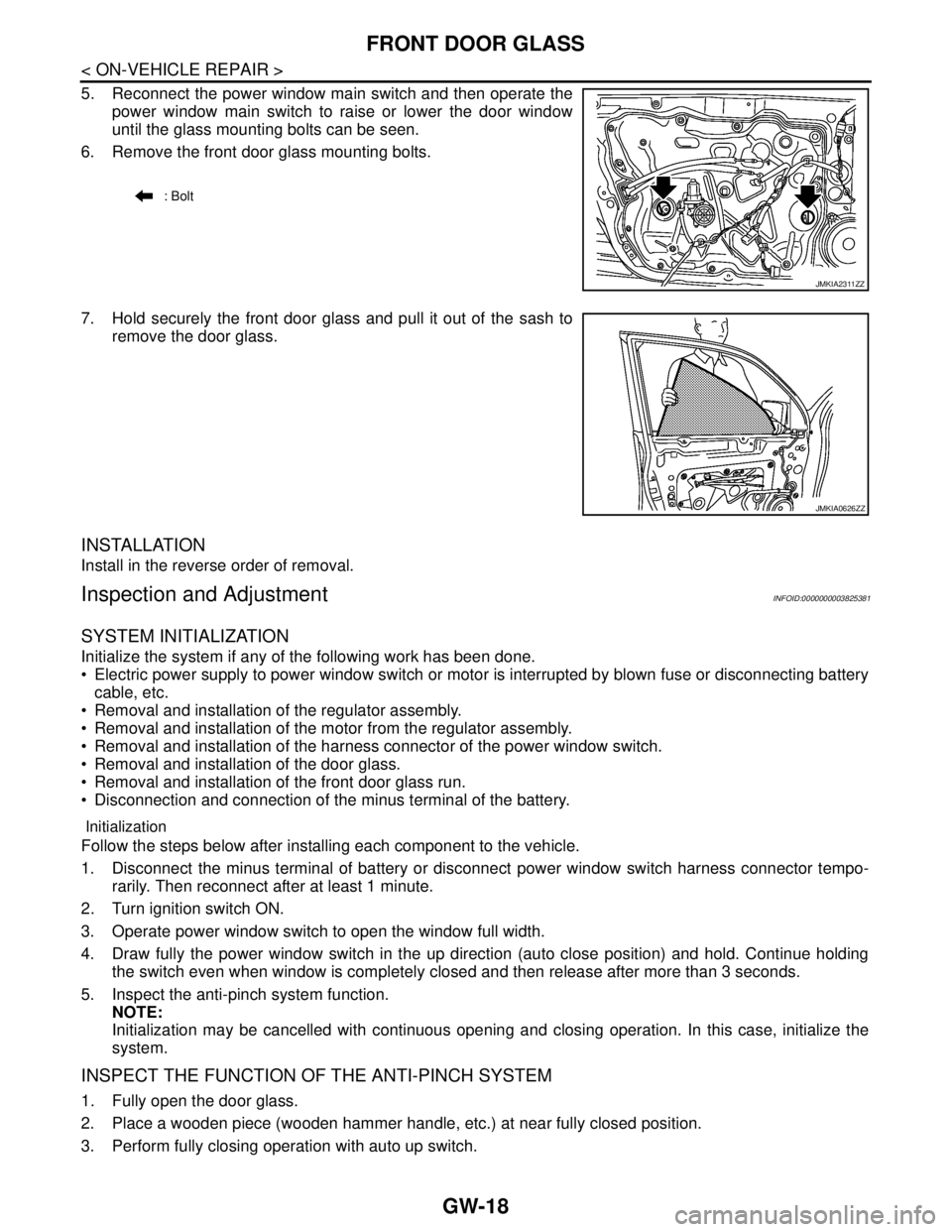
5. Reconnect the power window main switch and then operate the
power window main switch to raise or lower the door window
until the glass mounting bolts can be seen.
6. Remove the front door glass mounting bolts.
7. Hold securely the front door glass and pull it out of the sash to
remove the door glass.
INSTALLATION
Install in the reverse order of removal.
Inspection and AdjustmentINFOID:0000000003825381
SYSTEM INITIALIZATION
Initialize the system if any of the following work has been done.
Electric power supply to power window switch or motor is interrupted by blown fuse or disconnecting battery
cable, etc.
Removal and installation of the regulator assembly.
Removal and installation of the motor from the regulator assembly.
Removal and installation of the harness connector of the power window switch.
Removal and installation of the door glass.
Removal and installation of the front door glass run.
Disconnection and connection of the minus terminal of the battery.
Initialization
Follow the steps below after installing each component to the vehicle.
1. Disconnect the minus terminal of battery or disconnect power window switch harness connector tempo-
rarily. Then reconnect after at least 1 minute.
2. Turn ignition switch ON.
3. Operate power window switch to open the window full width.
4. Draw fully the power window switch in the up direction (auto close position) and hold. Continue holding
the switch even when window is completely closed and then release after more than 3 seconds.
5. Inspect the anti-pinch system function.
NOTE:
Initialization may be cancelled with continuous opening and closing operation. In this case, initialize the
system.
INSPECT THE FUNCTION OF THE ANTI-PINCH SYSTEM
1. Fully open the door glass.
2. Place a wooden piece (wooden hammer handle, etc.) at near fully closed position.
3. Perform fully closing operation with auto up switch.
: Bolt
JMKIA2311ZZ
JMKIA0626ZZ
Page 2564 of 5121
FRONT REGULATOR
GW-21
< ON-VEHICLE REPAIR >
C
D
E
F
G
H
I
J
L
MA
B
GW
N
O
P
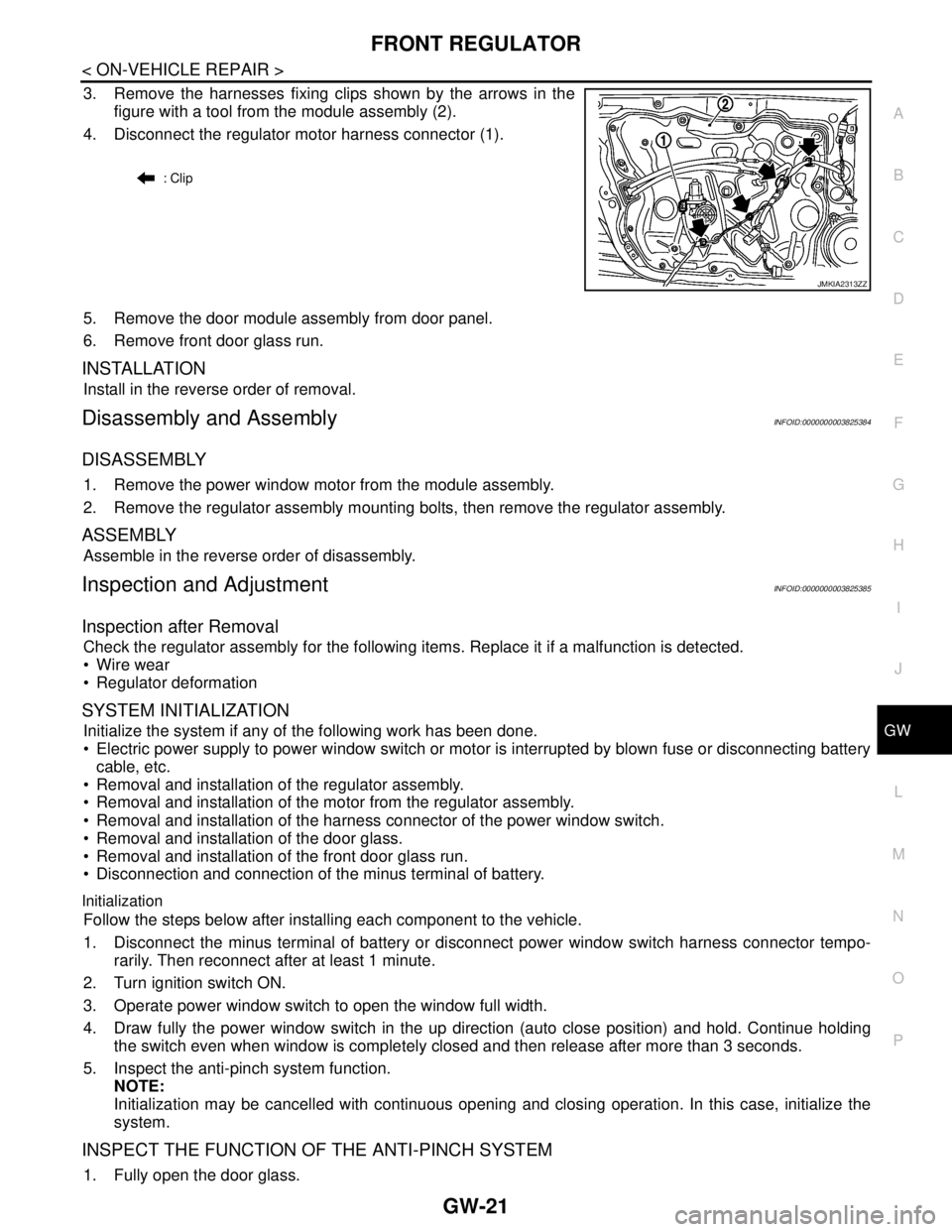
3. Remove the harnesses fixing clips shown by the arrows in the
figure with a tool from the module assembly (2).
4. Disconnect the regulator motor harness connector (1).
5. Remove the door module assembly from door panel.
6. Remove front door glass run.
INSTALLATION
Install in the reverse order of removal.
Disassembly and AssemblyINFOID:0000000003825384
DISASSEMBLY
1. Remove the power window motor from the module assembly.
2. Remove the regulator assembly mounting bolts, then remove the regulator assembly.
ASSEMBLY
Assemble in the reverse order of disassembly.
Inspection and AdjustmentINFOID:0000000003825385
Inspection after Removal
Check the regulator assembly for the following items. Replace it if a malfunction is detected.
Wire wear
Regulator deformation
SYSTEM INITIALIZATION
Initialize the system if any of the following work has been done.
Electric power supply to power window switch or motor is interrupted by blown fuse or disconnecting battery
cable, etc.
Removal and installation of the regulator assembly.
Removal and installation of the motor from the regulator assembly.
Removal and installation of the harness connector of the power window switch.
Removal and installation of the door glass.
Removal and installation of the front door glass run.
Disconnection and connection of the minus terminal of battery.
Initialization
Follow the steps below after installing each component to the vehicle.
1. Disconnect the minus terminal of battery or disconnect power window switch harness connector tempo-
rarily. Then reconnect after at least 1 minute.
2. Turn ignition switch ON.
3. Operate power window switch to open the window full width.
4. Draw fully the power window switch in the up direction (auto close position) and hold. Continue holding
the switch even when window is completely closed and then release after more than 3 seconds.
5. Inspect the anti-pinch system function.
NOTE:
Initialization may be cancelled with continuous opening and closing operation. In this case, initialize the
system.
INSPECT THE FUNCTION OF THE ANTI-PINCH SYSTEM
1. Fully open the door glass.
: Clip
JMKIA2313ZZ
Page 2581 of 5121

HA-12
< PRECAUTION >
PRECAUTIONS
PRECAUTION
PRECAUTIONS
Precaution for Supplemental Restraint System (SRS) "AIR BAG" and "SEAT BELT
PRE-TENSIONER"
INFOID:0000000003844112
The Supplemental Restraint System such as “AIR BAG” and “SEAT BELT PRE-TENSIONER”, used along
with a front seat belt, helps to reduce the risk or severity of injury to the driver and front passenger for certain
types of collision. Information necessary to service the system safely is included in the “SRS AIRBAG” and
“SEAT BELT” of this Service Manual.
WARNING:
• To avoid rendering the SRS inoperative, which could increase the risk of personal injury or death in
the event of a collision which would result in air bag inflation, all maintenance must be performed by
an authorized NISSAN/INFINITI dealer.
Improper maintenance, including incorrect removal and installation of the SRS, can lead to personal
injury caused by unintentional activation of the system. For removal of Spiral Cable and Air Bag
Module, see the “SRS AIRBAG”.
Never use electrical test equipment on any circuit related to the SRS unless instructed to in this Ser-
vice Manual. SRS wiring harnesses can be identified by yellow and/or orange harnesses or harness
connectors.
Precaution Necessary for Steering Wheel Rotation after Battery Disconnect
INFOID:0000000003844113
NOTE:
Before removing and installing any control units, first turn the push-button ignition switch to the LOCK posi-
tion, then disconnect both battery cables.
After finishing work, confirm that all control unit connectors are connected properly, then re-connect both
battery cables.
Always use CONSULT-III to perform self-diagnosis as a part of each function inspection after finishing work.
If a DTC is detected, perform trouble diagnosis according to self-diagnosis results.
This vehicle is equipped with a push-button ignition switch and a steering lock unit.
If the battery is disconnected or discharged, the steering wheel will lock and cannot be turned.
If turning the steering wheel is required with the battery disconnected or discharged, follow the procedure
below before starting the repair operation.
OPERATION PROCEDURE
1. Connect both battery cables.
NOTE:
Supply power using jumper cables if battery is discharged.
2. Turn the push-button ignition switch to ACC position.
(At this time, the steering lock will be released.)
3. Disconnect both battery cables. The steering lock will remain released with both battery cables discon-
nected and the steering wheel can be turned.
4. Perform the necessary repair operation.
5. When the repair work is completed, re-connect both battery cables. With the brake pedal released, turn
the push-button ignition switch from ACC position to ON position, then to LOCK position. (The steering
wheel will lock when the push-button ignition switch is turned to LOCK position.)
6. Perform self-diagnosis check of all control units using CONSULT-III.
Page 2636 of 5121
![NISSAN TEANA 2008 Service Manual HAC-8
< BASIC INSPECTION >[WITHOUT 7 INCH DISPLAY]
INSPECTION AND ADJUSTMENT
INSPECTION AND ADJUSTMENT
Description & InspectionINFOID:0000000003846291
DESCRIPTION
The purpose of the operational check](/img/5/57391/w960_57391-2635.png "NISSAN TEANA 2008 Service Manual HAC-8
< BASIC INSPECTION >[WITHOUT 7 INCH DISPLAY]
INSPECTION AND ADJUSTMENT
INSPECTION AND ADJUSTMENT
Description & InspectionINFOID:0000000003846291
DESCRIPTION
The purpose of the operational check")
HAC-8
< BASIC INSPECTION >[WITHOUT 7 INCH DISPLAY]
INSPECTION AND ADJUSTMENT
INSPECTION AND ADJUSTMENT
Description & InspectionINFOID:0000000003846291
DESCRIPTION
The purpose of the operational check is to check that the individual system operates normally.
INSPECTION PROCEDURE
1.CHECK MEMORY FUNCTION
1. Start the engine.
2. Operate the temperature control switch (driver side) and raise the temperature setting to 32°C (90°F).
3. Press the OFF switch.
4. Turn the ignition switch OFF.
5. Turn the ignition switch ON.
6. Press the AUTO switch.
7. Check that the temperature setting before turning the ignition switch OFF is stored.
Is the inspection result normal?
YES >> GO TO 2.
NO >> Memory function malfunction: HAC-96, "
Inspection procedure".
2.CHECK BLOWER MOTOR SPEED
1. Start the engine.
2. Operate the fan control dial. Check that the fan speed changes. Check the operation for all fan speeds.
3. Set the fan speed to speed 7.
Is the inspection result normal?
YES >> GO TO 3.
NO >> Blower motor system malfunction: HAC-68, "
Diagnosis Procedure".
3.CHECK DISCHARGE AIR
1. Press the MODE switch and the DEF switch.
2. Each position indicator should change shape.
3. Confirm that discharge air comes out according to the air distribution table. Refer to HAC-17, "
System
Description".
NOTE:
Confirm that the compressor clutch is engaged (sound or visual inspection) and the intake door position is at
the FRE when DEF is selected.
Is the inspection result normal?
YES >> GO TO 4.
NO >> Mode door system malfunction: HAC-61, "
Diagnosis Procedure". Conditions : Engine running at normal operating temperature
JPIIA0877GB
Page 2639 of 5121
![NISSAN TEANA 2008 Service Manual INSPECTION AND ADJUSTMENT
HAC-11
< BASIC INSPECTION >[WITHOUT 7 INCH DISPLAY]
C
D
E
F
G
H
J
K
L
MA
B
HAC
N
O
P
NOTE:
When the battery cable is disconnected from the negative terminal or when the batte](/img/5/57391/w960_57391-2638.png "NISSAN TEANA 2008 Service Manual INSPECTION AND ADJUSTMENT
HAC-11
< BASIC INSPECTION >[WITHOUT 7 INCH DISPLAY]
C
D
E
F
G
H
J
K
L
MA
B
HAC
N
O
P
NOTE:
When the battery cable is disconnected from the negative terminal or when the batte")
INSPECTION AND ADJUSTMENT
HAC-11
< BASIC INSPECTION >[WITHOUT 7 INCH DISPLAY]
C
D
E
F
G
H
J
K
L
MA
B
HAC
N
O
P
NOTE:
When the battery cable is disconnected from the negative terminal or when the battery voltage becomes 10 V
or less, trimmer operation is cancelled. Wind distribution rate set becomes that of initial condition.
Inlet Port Memory Function (FRE)INFOID:0000000003846294
DESCRIPTION
If the ignition switch is turned to the OFF position while the FRE switch is set to ON (fresh air intake), “Per-
form the memory” or “Do not perform the memory” of the FRE switch ON (fresh air intake) condition can be
selected.
If “Perform the memory” was set, the FRE switch will be ON (fresh air intake) when turning the ignition switch
to the ON position again.
If “Do not perform the memory” was set, the air inlets will be controlled automatically when turning the igni-
tion switch to the ON position again.
HOW TO SET
Using CONSULT-III, perform “FRE MEMORY SET” on “WORK SUPPORT” of HVAC.
NOTE:
When the battery cable is disconnected from the negative terminal or when the battery voltage becomes 10 V
or less, the setting of the FRE switch memory function may be cancelled.
Inlet Port Memory Function (REC)INFOID:0000000003846295
DESCRIPTION
If the ignition switch is turned to the OFF position while the REC switch is set to ON (recirculation), “Perform
the memory” or “Do not perform the memory” of the REC switch ON (recirculation) condition can be
selected.
If “Perform the memory” was set, the REC switch will be ON (recirculation) when turning the ignition switch
to the ON position again.
If “Do not perform the memory” was set, the air inlets will be controlled automatically when turning the igni-
tion switch to the ON position again.
HOW TO SET
Using CONSULT-III, perform “REC MEMORY SET” on “WORK SUPPORT” of HVAC.
NOTE:
When the battery cable is disconnected from the negative terminal or when the battery voltage becomes 10 V
or less, the setting of the REC switch memory function may be cancelled.
Work support items Display Setting
FRE MEMORY SETWITHOUT (initial status) Perform the memory of manual FRE
WITH Do not perform the memory of manual FRE (auto control)
Work support items Display Setting
REC MEMORY SETWITHOUT Perform the memory of manual REC
WITH (initial status) Do not perform the memory of manual REC (auto control)
Page 2659 of 5121
![NISSAN TEANA 2008 Service Manual AIR MIX DOOR CONTROL SYSTEM
HAC-31
< FUNCTION DIAGNOSIS >[WITHOUT 7 INCH DISPLAY]
C
D
E
F
G
H
J
K
L
MA
B
HAC
N
O
P
When ignition switch is ON, the A/C auto amp. continuously and
automatically controls](/img/5/57391/w960_57391-2658.png "NISSAN TEANA 2008 Service Manual AIR MIX DOOR CONTROL SYSTEM
HAC-31
< FUNCTION DIAGNOSIS >[WITHOUT 7 INCH DISPLAY]
C
D
E
F
G
H
J
K
L
MA
B
HAC
N
O
P
When ignition switch is ON, the A/C auto amp. continuously and
automatically controls")
AIR MIX DOOR CONTROL SYSTEM
HAC-31
< FUNCTION DIAGNOSIS >[WITHOUT 7 INCH DISPLAY]
C
D
E
F
G
H
J
K
L
MA
B
HAC
N
O
P
When ignition switch is ON, the A/C auto amp. continuously and
automatically controls temperatures regardless of air conditioner
operational condition. When setting a target temperature with the
temperature control switch, the A/C auto amp. corrects the set tem-
perature and decides a target air mix door opening angle. The A/C
auto amp. controls air mix door according to the target air mix door
opening angle and current air mix door opening angle, keeping an
optimum air mix door opening angle. When the temperature is set at
18°C (60°F), air mix door is set on full cold, and when the tempera-
ture is set at 32°C (90°F), it is set to full hot.
JPIIA0633GB
Page 2669 of 5121
![NISSAN TEANA 2008 Service Manual DIAGNOSIS SYSTEM (HVAC)
HAC-41
< FUNCTION DIAGNOSIS >[WITHOUT 7 INCH DISPLAY]
C
D
E
F
G
H
J
K
L
MA
B
HAC
N
O
P
NOTE:
When the battery cable is disconnected from the negative terminal or when the batte](/img/5/57391/w960_57391-2668.png "NISSAN TEANA 2008 Service Manual DIAGNOSIS SYSTEM (HVAC)
HAC-41
< FUNCTION DIAGNOSIS >[WITHOUT 7 INCH DISPLAY]
C
D
E
F
G
H
J
K
L
MA
B
HAC
N
O
P
NOTE:
When the battery cable is disconnected from the negative terminal or when the batte")
DIAGNOSIS SYSTEM (HVAC)
HAC-41
< FUNCTION DIAGNOSIS >[WITHOUT 7 INCH DISPLAY]
C
D
E
F
G
H
J
K
L
MA
B
HAC
N
O
P
NOTE:
When the battery cable is disconnected from the negative terminal or when the battery voltage becomes 10 V
or less, the setting of WORK SUPPORT may be cancelled.
FRE MEMORY SET If the ignition switch is turned to the OFF position while the FRE
switch is set to ON (fresh air intake), “Perform the memory” or
“Do not perform the memory” of the FRE switch ON (fresh air in-
take) condition can be selected.
If “Perform the memory” was set, the FRE switch will be ON
(fresh air intake) when turning the ignition switch to the ON posi-
tion again.
If “Do not perform the memory” was set, the air inlets will be con-
trolled automatically when turning the ignition switch to the ON
position again. HAC-11, "Inlet Port Mem-
ory Function (FRE)"
REC MEMORY SET If the ignition switch is turned to the OFF position while the REC
switch is set to ON (recirculation), “Perform the memory” or “Do
not perform the memory” of the REC switch ON (recirculation)
condition can be selected.
If “Perform the memory” was set, the REC switch will be ON (re-
circulation) when turning the ignition switch to the ON position
again.
If “Do not perform the memory” was set, the air inlets will be con-
trolled automatically when turning the ignition switch to the ON
position again. HAC-11, "Inlet Port Mem-
ory Function (REC)"
Work item Description Reference
Page 2670 of 5121
![NISSAN TEANA 2008 Service Manual HAC-42
< COMPONENT DIAGNOSIS >[WITHOUT 7 INCH DISPLAY]
U1000 CAN COMM CIRCUIT
COMPONENT DIAGNOSIS
U1000 CAN COMM CIRCUIT
DescriptionINFOID:0000000003846322
CAN (Controller Area Network) is a serial co](/img/5/57391/w960_57391-2669.png "NISSAN TEANA 2008 Service Manual HAC-42
< COMPONENT DIAGNOSIS >[WITHOUT 7 INCH DISPLAY]
U1000 CAN COMM CIRCUIT
COMPONENT DIAGNOSIS
U1000 CAN COMM CIRCUIT
DescriptionINFOID:0000000003846322
CAN (Controller Area Network) is a serial co")
HAC-42
< COMPONENT DIAGNOSIS >[WITHOUT 7 INCH DISPLAY]
U1000 CAN COMM CIRCUIT
COMPONENT DIAGNOSIS
U1000 CAN COMM CIRCUIT
DescriptionINFOID:0000000003846322
CAN (Controller Area Network) is a serial communication line for real time application. It is an on-vehicle mul-
tiplex communication line with high data communication speed and excellent error detection ability. Many elec-
tronic control units are equipped onto a vehicle, and each control unit shares information and links with other
control units during operation (not independent). In CAN communication, control units are connected with two
communication lines (CAN-H line, CAN-L line) allowing a high rate of information transmission with less wiring.
Each control unit transmits/receives data but selectively reads required data only.
CAN Communication Signal Chart. Refer to LAN-13, "
How to Use CAN Communication Signal Chart".
DTC LogicINFOID:0000000003846323
DTC DETECTION LOGIC
Diagnosis ProcedureINFOID:0000000003846324
1.CHECK WITH SELF-DIAGNOSIS FUNCTION OF CONSULT-III
1. Turn ignition switch ON and wait for 2 or more seconds.
2. Using CONSULT-III, perform “SELF-DIAGNOSIS RESULTS” of HVAC.
Is
“CAN COMM CIRCUIT” displayed?
YES >> Perform trouble diagnosis for the CAN communication system. Refer to LAN-14, "Trouble Diagno-
sis Flow Chart".
NO >> Perform the intermittent malfunction diagnosis. Refer to GI-35, "
Intermittent Incident".
DTCItems
(CONSULT-III screen terms)Diagnostic item is detected when... Possible cause
U1000 CAN COMM CIRCUITWhen A/C auto amp. is not transmitting
or receiving CAN communication signal
for 2 or more seconds.CAN communication system
Page 2673 of 5121
![NISSAN TEANA 2008 Service Manual B257B, B257C AMBIENT SENSOR
HAC-45
< COMPONENT DIAGNOSIS >[WITHOUT 7 INCH DISPLAY]
C
D
E
F
G
H
J
K
L
MA
B
HAC
N
O
P
1. Using CONSULT-III, perform “SELF-DIAGNOSIS RESULTS” of HVAC.
2. Check if any](/img/5/57391/w960_57391-2672.png "NISSAN TEANA 2008 Service Manual B257B, B257C AMBIENT SENSOR
HAC-45
< COMPONENT DIAGNOSIS >[WITHOUT 7 INCH DISPLAY]
C
D
E
F
G
H
J
K
L
MA
B
HAC
N
O
P
1. Using CONSULT-III, perform “SELF-DIAGNOSIS RESULTS” of HVAC.
2. Check if any")
B257B, B257C AMBIENT SENSOR
HAC-45
< COMPONENT DIAGNOSIS >[WITHOUT 7 INCH DISPLAY]
C
D
E
F
G
H
J
K
L
MA
B
HAC
N
O
P
1. Using CONSULT-III, perform “SELF-DIAGNOSIS RESULTS” of HVAC.
2. Check if any DTC is displayed in the self-diagnosis results.
NOTE:
If DTC is displayed along with DTC U1000 or U1010, first diagnose the DTC U1000 or U1010. Refer to HAC-
42, "DTC Logic" or HAC-43, "DTC Logic".
If there is an open circuit in the ambient sensor, A/C auto amp. registers extreme cold [−44°C (−47°F)] and
adjusts the temperature control warmer.
Is DTC
“B257B” or “B257C” displayed?
YES >> Perform trouble diagnosis for the ambient sensor. Refer to HAC-45, "Diagnosis Procedure".
NO >> INSPECTION END
Diagnosis ProcedureINFOID:0000000003846330
1.CHECK VOLTAGE BETWEEN AMBIENT SENSOR AND GROUND
1. Disconnect ambient sensor connector.
2. Turn ignition switch ON.
3. Check voltage between ambient sensor harness connector and ground.
Is the inspection result normal?
YES >> GO TO 2.
NO >> GO TO 4.
2.CHECK CIRCUIT CONTINUITY BETWEEN AMBIENT SENSOR AND A/C AUTO AMP.
1. Turn ignition switch OFF.
2. Disconnect A/C auto amp. connector.
3. Check continuity between ambient sensor harness connector and A/C auto amp. harness connector.
Is the inspection result normal?
YES >> GO TO 3.
NO >> Repair harness or connector.
3.CHECK AMBIENT SENSOR
Check ambient sensor. Refer to HAC-46, "
Component Inspection".
Is the inspection result normal?
YES >> Replace A/C auto amp.
NO >> Replace ambient sensor.
4.CHECK CIRCUIT CONTINUITY BETWEEN AMBIENT SENSOR AND A/C AUTO AMP.
1. Turn ignition switch OFF.
2. Disconnect A/C auto amp. connector.
3. Check continuity between ambient sensor harness connector and A/C auto amp. harness connector.
4. Check continuity between ambient sensor harness connector and ground.
(+) (−)
Vo l ta g e Ambient sensor
—
Connector Terminal
E337 1 Ground Approx. 5 V
Ambient sensor A/C auto amp.
Continuity
Connector Terminal Connector Terminal
E337 2 M50 37 Existed
Ambient sensor A/C auto amp.
Continuity
Connector Terminal Connector Terminal
E337 1 M50 35 Existed
Page 2674 of 5121
![NISSAN TEANA 2008 Service Manual HAC-46
< COMPONENT DIAGNOSIS >[WITHOUT 7 INCH DISPLAY]
B257B, B257C AMBIENT SENSOR
Is the inspection result normal?
YES >> Replace A/C auto amp.
NO >> Repair harness or connector.
Component Inspection](/img/5/57391/w960_57391-2673.png "NISSAN TEANA 2008 Service Manual HAC-46
< COMPONENT DIAGNOSIS >[WITHOUT 7 INCH DISPLAY]
B257B, B257C AMBIENT SENSOR
Is the inspection result normal?
YES >> Replace A/C auto amp.
NO >> Repair harness or connector.
Component Inspection")
HAC-46
< COMPONENT DIAGNOSIS >[WITHOUT 7 INCH DISPLAY]
B257B, B257C AMBIENT SENSOR
Is the inspection result normal?
YES >> Replace A/C auto amp.
NO >> Repair harness or connector.
Component InspectionINFOID:0000000003846331
1.CHECK AMBIENT SENSOR
1. Turn ignition switch OFF.
2. Disconnect ambient sensor connector. Refer to VTL-24, "
Exploded View".
3. Check resistance between ambient sensor terminals.
Is the inspection result normal?
YES >> END.
NO >> Replace ambient sensor.
Ambient sensor
—Continuity
Connector Terminal
E337 1 Ground Not existed
Te r m i n a lCondition
Resistance kΩ
Temperature °C (°F)
12−15 (5) 12.73
−10 (14) 9.92
−5 (23) 7.80
0 (32) 6.19
5 (41) 4.95
10 (50) 3.99
15 (59) 3.24
20 (68) 2.65
25 (77) 2.19
30 (86) 1.81
35 (95) 1.51
40 (104) 1.27
45 (113) 1.07