st-12 NISSAN TEANA 2008 Service Manual
[x] Cancel search | Manufacturer: NISSAN, Model Year: 2008, Model line: TEANA, Model: NISSAN TEANA 2008Pages: 5121, PDF Size: 69.03 MB
Page 186 of 5121
![NISSAN TEANA 2008 Service Manual AV-42
< ON-VEHICLE REPAIR >[AUDIO SYSTEM]
STEERING SWITCH
STEERING SWITCH
Exploded ViewINFOID:0000000003765621
Refer to ST-12, "Exploded View".
Removal and InstallationINFOID:0000000003765622
REMOVAL](/img/5/57391/w960_57391-185.png "NISSAN TEANA 2008 Service Manual AV-42
< ON-VEHICLE REPAIR >[AUDIO SYSTEM]
STEERING SWITCH
STEERING SWITCH
Exploded ViewINFOID:0000000003765621
Refer to ST-12, \"Exploded View\".
Removal and InstallationINFOID:0000000003765622
REMOVAL")
AV-42
< ON-VEHICLE REPAIR >[AUDIO SYSTEM]
STEERING SWITCH
STEERING SWITCH
Exploded ViewINFOID:0000000003765621
Refer to ST-12, "Exploded View".
Removal and InstallationINFOID:0000000003765622
REMOVAL
Refer to ST-12, "Removal and Installation".
INSTALLATION
Install in the reverse order of removal.
Page 309 of 5121
![NISSAN TEANA 2008 Service Manual AV
MULTI AV SYSTEM SYMPTOMS
AV-165
< SYMPTOM DIAGNOSIS >[BASE AUDIO AND DISPLAY SYSTEM]
C
D
E
F
G
H
I
J
K
L
MB A
O
P
RELATED TO AUDIO
RELATED TO STEERING SWITCH
Trouble diagnosis chart by symptom
RELA](/img/5/57391/w960_57391-308.png "NISSAN TEANA 2008 Service Manual AV
MULTI AV SYSTEM SYMPTOMS
AV-165
< SYMPTOM DIAGNOSIS >[BASE AUDIO AND DISPLAY SYSTEM]
C
D
E
F
G
H
I
J
K
L
MB A
O
P
RELATED TO AUDIO
RELATED TO STEERING SWITCH
Trouble diagnosis chart by symptom
RELA")
AV
MULTI AV SYSTEM SYMPTOMS
AV-165
< SYMPTOM DIAGNOSIS >[BASE AUDIO AND DISPLAY SYSTEM]
C
D
E
F
G
H
I
J
K
L
MB A
O
P
RELATED TO AUDIO
RELATED TO STEERING SWITCH
Trouble diagnosis chart by symptom
RELATED TO AUXILIARY INPUT
NOTE:
Symptoms Check items Possible malfunction location / Action to take
RGB image is not shown. All RGB images are not shown.
Composite images are not dis-
played.(camera and AUX image) Display unit power supply and ground circuit malfunc-
tion.
Refer to AV- 8 2 , "
DISPLAY UNIT : Diagnosis Proce-
dure".
Communication Circuit malfunction between AV control
unit and display unit.
Perform CONSULT-III self-diagnosis.
Refer to AV- 6 8 , "
CONSULT-III Function (MULTI AV)".
All RGB images are not shown.
Camera image is normal.
AUX images are not displayed. Perform CONSULT-III self-diagnosis.
Refer to AV- 6 8 , "
CONSULT-III Function (MULTI AV)".
All RGB images are not shown.
“Multi AV” is not displayed on system
selection screen when the CONSULT-
III is initialized.AV control unit power supply and ground circuit malfunc-
tion.
Refer to AV- 8 2 , "
AV CONTROL UNIT : Diagnosis Proce-
dure".
All RGB images are not shown.
Composite images are normal. (cam-
era and AUX image) RGB area (YS) signal circuit malfunction.
Refer to AV- 9 0 , "
Diagnosis Procedure".
Color of RGB image is not
proper. (All RGB image)Light blue (Cyan) tint.RGB signal (R: red) circuit malfunction between AV con-
trol unit and display unit.
Refer to AV- 8 6 , "
Diagnosis Procedure".
Purple (Magenta) tint.RGB signal (G: green) circuit malfunction between AV
control unit and display unit.
Refer to AV- 8 7 , "
Diagnosis Procedure".
Screen looks yellowish.RGB signal (B: blue) circuit malfunction between AV con-
trol unit and display unit.
Refer to AV- 8 8 , "
Diagnosis Procedure".
RGB screen is rolling. All RGB screen is rolling.RGB synchronizing signal circuit malfunction between AV
control unit and display unit.
Refer to AV- 8 9 , "
Diagnosis Procedure".
Symptoms Check items Possible malfunction location / Action to take
The CD cannot be removed. —Disk eject signal circuit.
Refer to AV- 9 4 , "
Diagnosis Procedure".
Audio sound is not heard.No sound from all speakers.Perform CONSULT-III self-diagnosis.
Refer to AV- 6 8 , "
CONSULT-III Function (MULTI AV)"
Sound is not heard only from the specific
places (RH front, RH rear, LH front and
LH rear).Sound signal circuit of suspect system
AM/FM radio is not received. Other audio sounds are normal. Antenna amp. ON signal circuit.
Symptoms Probable malfunction location
None of the steering switch operations work.Steering switch signal GND circuit. Refer toAV- 1 0 5 , "
Component In-
spection".
Only specified switch cannot be operated Replace steering switch. Refer to ST-12, "
Exploded View".
Steering switch's “SOURCE”, “MENU UP”, “MENU DOWN”
switches do not work.Steering switch signal A circuit. Refer to AV- 1 0 0 , "
Diagnosis Procedure".
Steering switch's “VOL UP”, “VOL DOWN” switches do not
work.Steering switch signal B circuit. Refer to AV- 1 0 2 , "
Diagnosis Procedure".
Page 3058 of 5121
IP-18
< ON-VEHICLE REPAIR >
INSTRUMENT PANEL ASSEMBLY
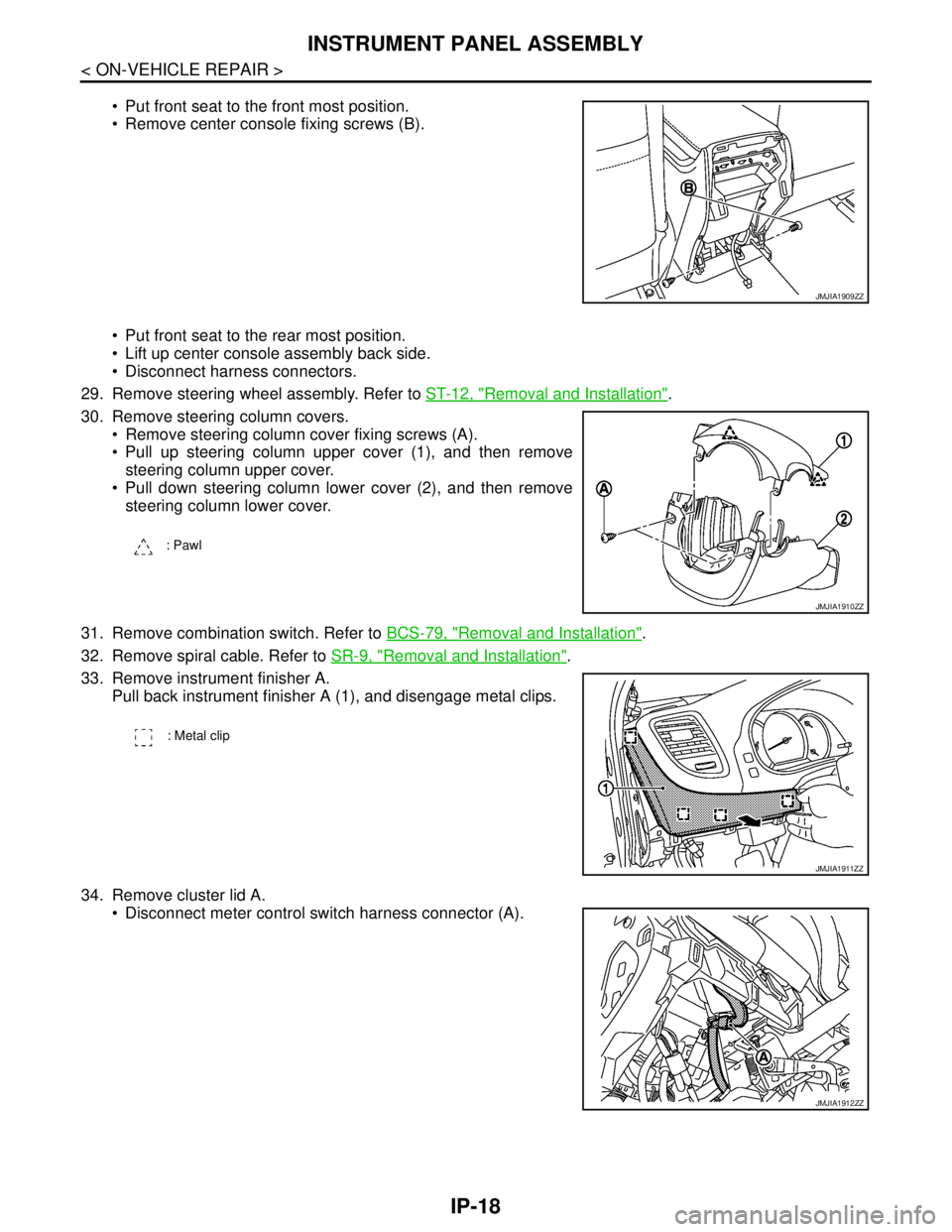
Put front seat to the front most position.
Remove center console fixing screws (B).
Put front seat to the rear most position.
Lift up center console assembly back side.
Disconnect harness connectors.
29. Remove steering wheel assembly. Refer to ST-12, "
Removal and Installation".
30. Remove steering column covers.
Remove steering column cover fixing screws (A).
Pull up steering column upper cover (1), and then remove
steering column upper cover.
Pull down steering column lower cover (2), and then remove
steering column lower cover.
31. Remove combination switch. Refer to BCS-79, "
Removal and Installation".
32. Remove spiral cable. Refer to SR-9, "
Removal and Installation".
33. Remove instrument finisher A.
Pull back instrument finisher A (1), and disengage metal clips.
34. Remove cluster lid A.
Disconnect meter control switch harness connector (A).
JMJIA1909ZZ
: Pawl
JMJIA1910ZZ
: Metal clip
JMJIA1911ZZ
JMJIA1912ZZ
Page 4223 of 5121
SPIRAL CABLE
SR-9
< ON-VEHICLE REPAIR >
C
D
E
F
G
I
J
K
L
MA
B
SR
N
O
P
SPIRAL CABLE
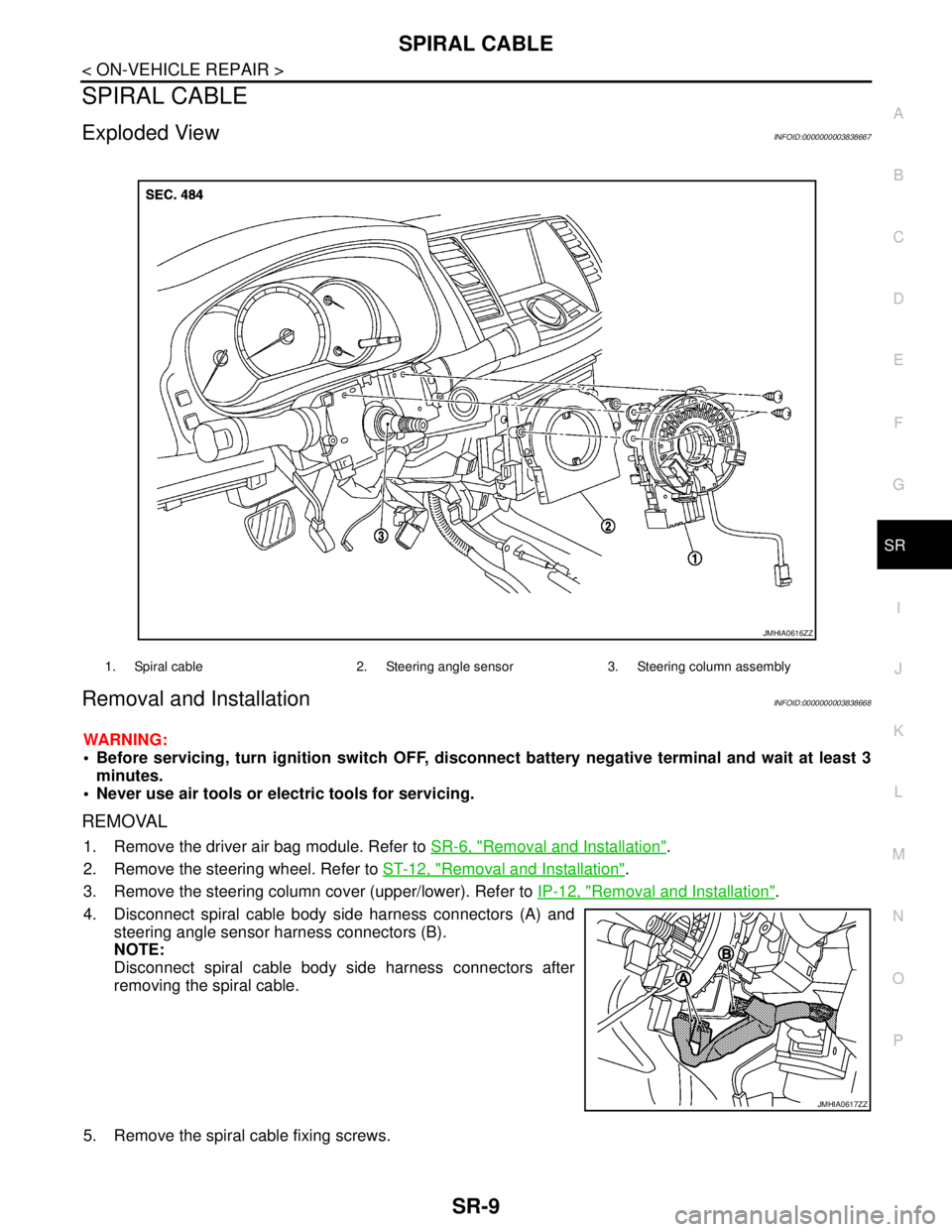
Exploded ViewINFOID:0000000003838667
Removal and InstallationINFOID:0000000003838668
WARNING:
Before servicing, turn ignition switch OFF, disconnect battery negative terminal and wait at least 3
minutes.
Never use air tools or electric tools for servicing.
REMOVAL
1. Remove the driver air bag module. Refer to SR-6, "Removal and Installation".
2. Remove the steering wheel. Refer to ST-12, "
Removal and Installation".
3. Remove the steering column cover (upper/lower). Refer to IP-12, "
Removal and Installation".
4. Disconnect spiral cable body side harness connectors (A) and
steering angle sensor harness connectors (B).
NOTE:
Disconnect spiral cable body side harness connectors after
removing the spiral cable.
5. Remove the spiral cable fixing screws.
1. Spiral cable 2. Steering angle sensor 3. Steering column assembly
JMHIA0616ZZ
JMHIA0617ZZ
Page 4366 of 5121

B1209 FRONTAL COLLISION DETECTION
SRC-123
< COMPONENT DIAGNOSIS >
C
D
E
F
G
I
J
K
L
MA
B
SRC
N
O
P
YES >> Replace front seat belt pre-tensioner. Refer to SB-5, "SEAT BELT RETRACTOR : Exploded
View".
NO >> GO TO 3.
3.CHECK AIR BAG DIAGNOSIS SENSOR UNIT
Check air bag diagnosis sensor unit.
Is the front air bag module and/or front seat belt pre-tensioner activated?
YES >> Replace air bag diagnosis sensor unit. Refer to SR-22, "Exploded View".
NO >> GO TO 4.
4.CHECK STEERING WHEEL
Check steering wheel.
Is the steering wheel normal?
YES >> GO TO 5.
NO >> Replace steering wheel. Refer to ST-12, "
Exploded View".
5.CHECK SPIRAL CABLE
1. Check the continuity of spiral cable.Refer to SRC-32, "
Diagnosis Procedure".
2. Operate the steering wheel to check excessive heavy operation force, abnormal noise or damage.
Is the inspection result normal?
YES >> GO TO 6.
NO >> Replace spiral cable. Refer to SR-9, "
Exploded View".
6.CHECK WIRING HARNESS/HARNESS CONNECTOR
Check wiring harness/harness connector.
Is the wiring harness/harness connector normal?
YES >> GO TO 7.
NO >> Replace wiring harness/harness connector.
7.FINAL CHECK
Perform “AIR BAG” Self Diagnostic Result with CONSULT-III and/or Air bag warning lamp status.
Is the inspection result normal?
YES >> INSPECTION END
NO >> Check the intermittent incident. Refer to GI-35, "
Intermittent Incident".
Page 4402 of 5121
ST-12
< ON-VEHICLE REPAIR >
STEERING WHEEL
ON-VEHICLE REPAIR
STEERING WHEEL
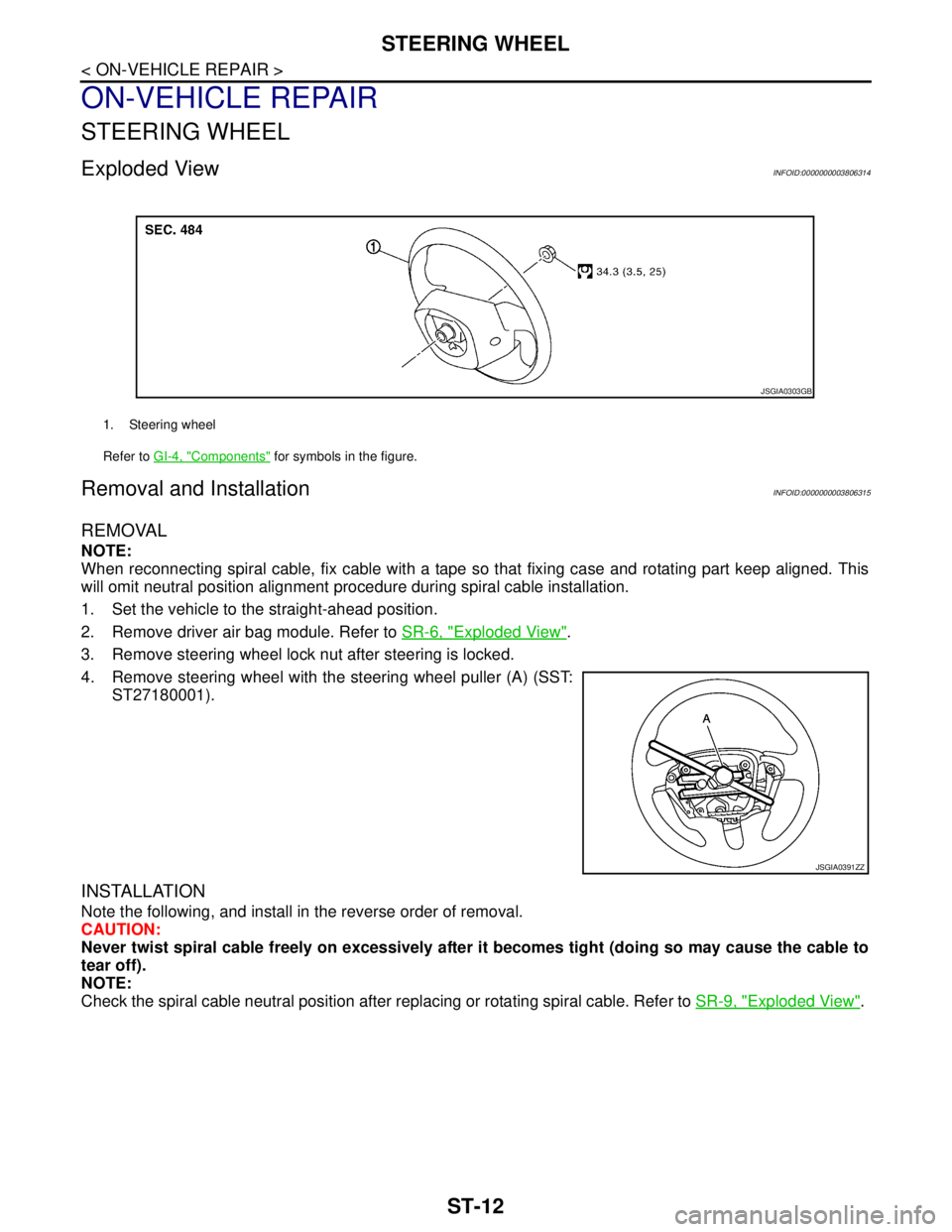
Exploded ViewINFOID:0000000003806314
Removal and InstallationINFOID:0000000003806315
REMOVAL
NOTE:
When reconnecting spiral cable, fix cable with a tape so that fixing case and rotating part keep aligned. This
will omit neutral position alignment procedure during spiral cable installation.
1. Set the vehicle to the straight-ahead position.
2. Remove driver air bag module. Refer to SR-6, "
Exploded View".
3. Remove steering wheel lock nut after steering is locked.
4. Remove steering wheel with the steering wheel puller (A) (SST:
ST27180001).
INSTALLATION
Note the following, and install in the reverse order of removal.
CAUTION:
Never twist spiral cable freely on excessively after it becomes tight (doing so may cause the cable to
tear off).
NOTE:
Check the spiral cable neutral position after replacing or rotating spiral cable. Refer to SR-9, "
Exploded View".
1. Steering wheel
Refer to GI-4, "
Components" for symbols in the figure.
JSGIA0303GB
JSGIA0391ZZ
Page 4403 of 5121
STEERING COLUMN
ST-13
< ON-VEHICLE REPAIR >
C
D
E
F
H
I
J
K
L
MA
B
ST
N
O
P
STEERING COLUMN
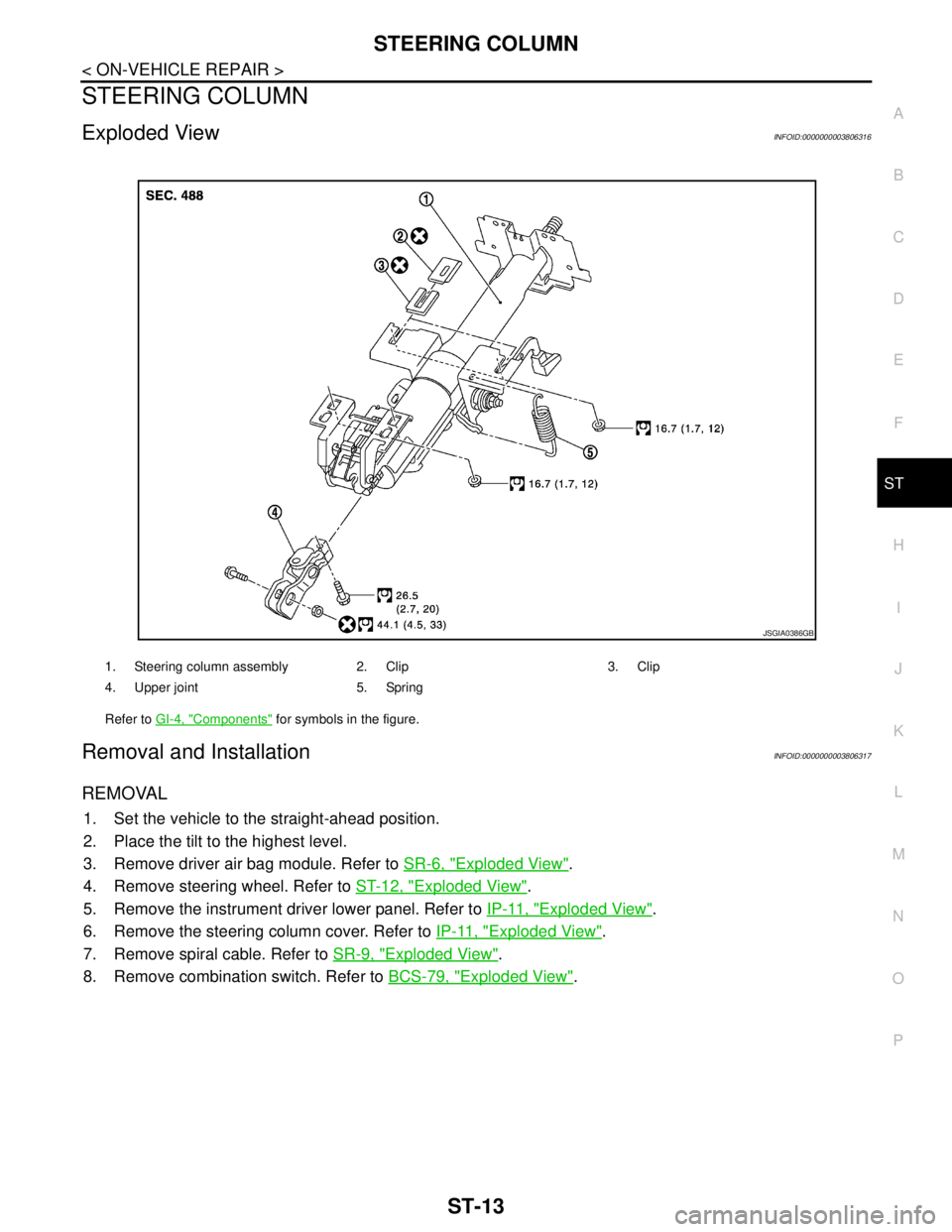
Exploded ViewINFOID:0000000003806316
Removal and InstallationINFOID:0000000003806317
REMOVAL
1. Set the vehicle to the straight-ahead position.
2. Place the tilt to the highest level.
3. Remove driver air bag module. Refer to SR-6, "
Exploded View".
4. Remove steering wheel. Refer to ST-12, "
Exploded View".
5. Remove the instrument driver lower panel. Refer to IP-11, "
Exploded View".
6. Remove the steering column cover. Refer to IP-11, "
Exploded View".
7. Remove spiral cable. Refer to SR-9, "
Exploded View".
8. Remove combination switch. Refer to BCS-79, "
Exploded View".
1. Steering column assembly 2. Clip 3. Clip
4. Upper joint 5. Spring
Refer to GI-4, "
Components" for symbols in the figure.
JSGIA0386GB