ignition NISSAN TEANA 2014 Service Manual
[x] Cancel search | Manufacturer: NISSAN, Model Year: 2014, Model line: TEANA, Model: NISSAN TEANA 2014Pages: 4801, PDF Size: 51.2 MB
Page 3325 of 4801
MWI-70
< DTC/CIRCUIT DIAGNOSIS >
STEERING SWITCH
STEERING SWITCH
DescriptionINFOID:0000000009461735
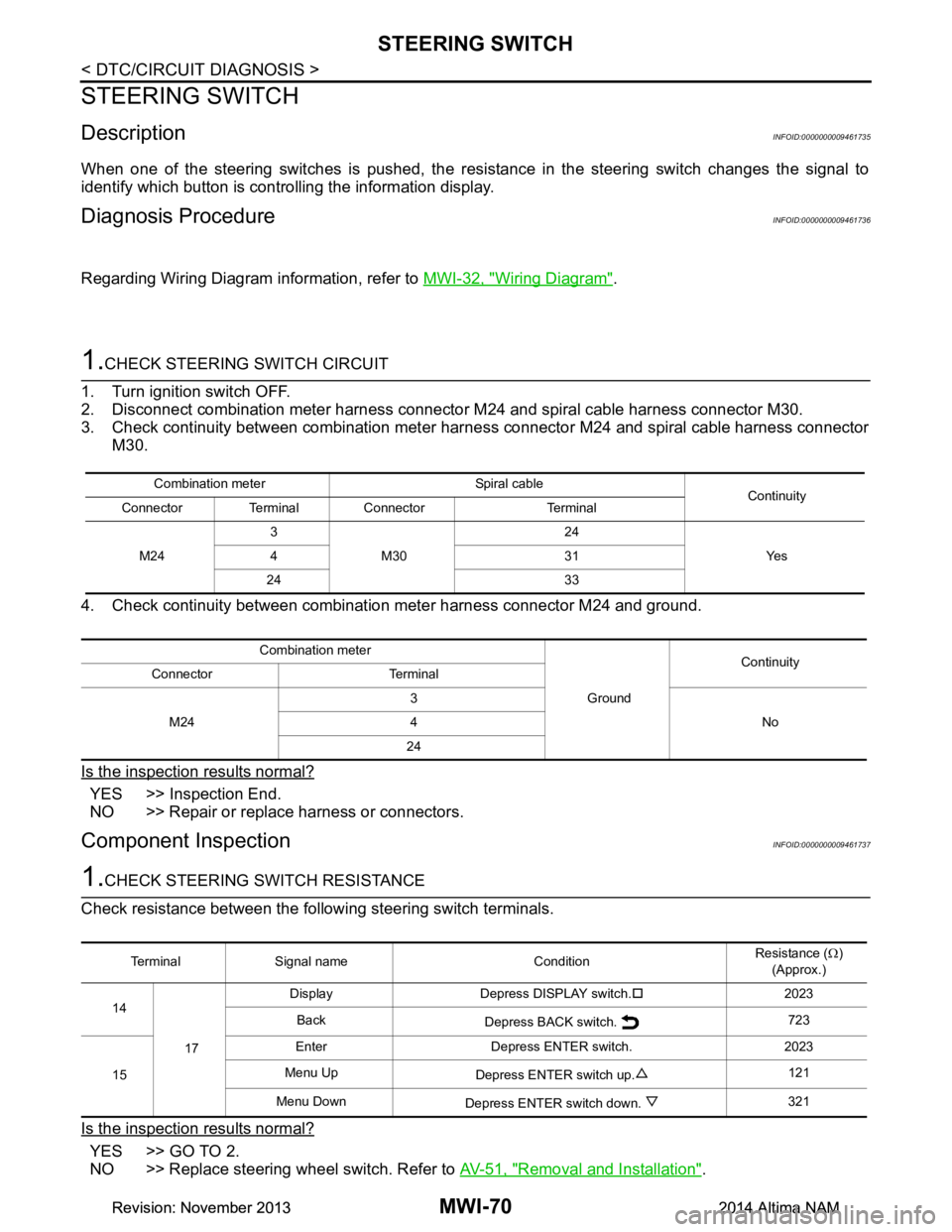
When one of the steering switches is pushed, the resistance in the steering switch changes the signal to
identify which button is controlling the information display.
Diagnosis ProcedureINFOID:0000000009461736
Regarding Wiring Diagram information, refer to MWI-32, "Wiring Diagram".
1.CHECK STEERING SWITCH CIRCUIT
1. Turn ignition switch OFF.
2. Disconnect combination meter harness connector M24 and spiral cable harness connector M30.
3. Check continuity between combination meter har ness connector M24 and spiral cable harness connector
M30.
4. Check continuity between combination meter harness connector M24 and ground.
Is the inspection results normal?
YES >> Inspection End.
NO >> Repair or replace harness or connectors.
Component InspectionINFOID:0000000009461737
1.CHECK STEERING SWITCH RESISTANCE
Check resistance between the following steering switch terminals.
Is the inspection results normal?
YES >> GO TO 2.
NO >> Replace steering wheel switch. Refer to AV-51, "Removal and Installation"
.
Combination meter Spiral cable
Continuity
Connector Terminal Connector Terminal
M24 3
M30 24
Ye s
431
24 33
Combination meter GroundContinuity
Connector Terminal
M24 3
No
4
24
Terminal Signal name Condition Resistance (
Ω)
(Approx.)
14
17 Display Depress DISPLAY switch.
†2023
Back Depress BACK switch. 723
15 Enter Depress ENTER switch. 2023
Menu Up Depress ENTER switch up. 121
Menu Down Depress ENTER switch down. 321
Revision: November 20132014 Altima NAMRevision: November 20132014 Altima NAM
Page 3330 of 4801
MWI
THE PARKING BRAKE RELEASE WARNING CONTINUES DISPLAYING, OR
DOES NOT DISPLAY
MWI-75
< SYMPTOM DIAGNOSIS >
C
D E
F
G H
I
J
K L
M B
A
O P
THE PARKING BRAKE RELEASE WA RNING CONTINUES DISPLAYING,
OR DOES NOT DISPLAY
DescriptionINFOID:0000000009461744
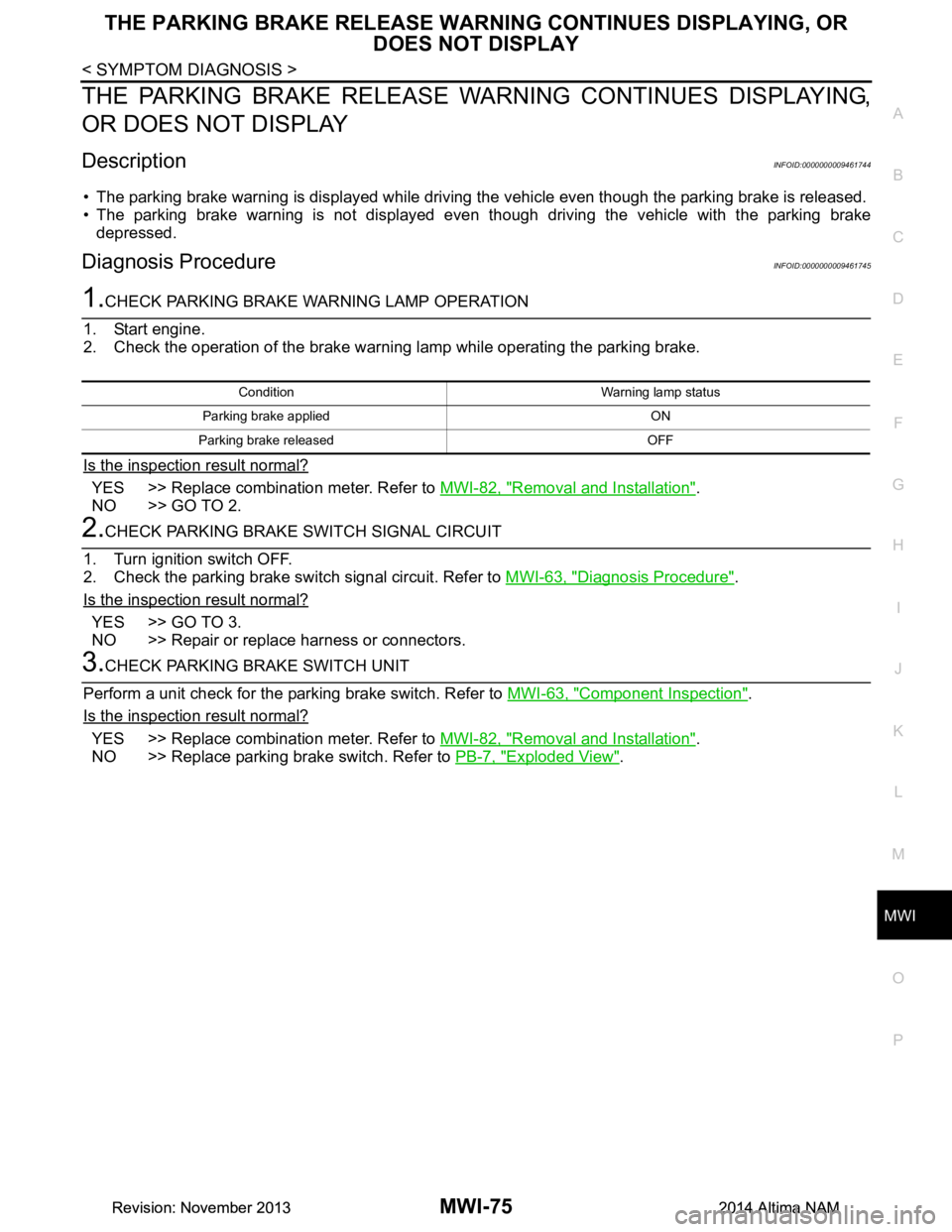
• The parking brake warning is displayed while driving the vehicle even though the parking brake is released.
• The parking brake warning is not displayed even though driving the vehicle with the parking brake
depressed.
Diagnosis ProcedureINFOID:0000000009461745
1.CHECK PARKING BRAKE WARNING LAMP OPERATION
1. Start engine.
2. Check the operation of the brake warni ng lamp while operating the parking brake.
Is the inspection result normal?
YES >> Replace combination meter. Refer to MWI-82, "Removal and Installation".
NO >> GO TO 2.
2.CHECK PARKING BRAKE SWITCH SIGNAL CIRCUIT
1. Turn ignition switch OFF.
2. Check the parking brake switch signal circuit. Refer to MWI-63, "Diagnosis Procedure"
.
Is the inspection result normal?
YES >> GO TO 3.
NO >> Repair or replace harness or connectors.
3.CHECK PARKING BRAKE SWITCH UNIT
Perform a unit check for the parking brake switch. Refer to MWI-63, "Component Inspection"
.
Is the inspection result normal?
YES >> Replace combination meter. Refer to MWI-82, "Removal and Installation".
NO >> Replace parking brake switch. Refer to PB-7, "Exploded View"
.
Condition Warning lamp status
Parking brake applied ON
Parking brake released OFF
Revision: November 20132014 Altima NAMRevision: November 20132014 Altima NAM
Page 3340 of 4801

PB-2
< PRECAUTION >
PRECAUTIONS
PRECAUTION
PRECAUTIONS
Precaution for Supplemental Restraint System (SRS) "AIR BAG" and "SEAT BELT
PRE-TENSIONER"
INFOID:0000000009951710
The Supplemental Restraint System such as “A IR BAG” and “SEAT BELT PRE-TENSIONER”, used along
with a front seat belt, helps to reduce the risk or severi ty of injury to the driver and front passenger for certain
types of collision. Information necessary to service the system safely is included in the SR and SB section of
this Service Manual.
WARNING:
• To avoid rendering the SRS inopera tive, which could increase the risk of personal injury or death in
the event of a collision which would result in air bag inflation, all maintenance must be performed by
an authorized NISS AN/INFINITI dealer.
• Improper maintenance, including in correct removal and installation of the SRS, can lead to personal
injury caused by unintent ional activation of the system. For re moval of Spiral Cable and Air Bag
Module, see the SR section.
• Do not use electrical test equipmen t on any circuit related to the SRS unless instructed to in this
Service Manual. SRS wiring harn esses can be identified by yellow and/or orange harnesses or har-
ness connectors.
PRECAUTIONS WHEN USING POWER TOOLS (AIR OR ELECTRIC) AND HAMMERS
WARNING:
• When working near the Airbag Diagnosis Sensor Unit or other Airbag System sensors with the Igni-
tion ON or engine running, DO NOT use air or electri c power tools or strike near the sensor(s) with a
hammer. Heavy vibration could activate the sensor( s) and deploy the air bag(s), possibly causing
serious injury.
• When using air or electric power tools or hammers , always switch the Ignition OFF, disconnect the
battery and wait at least three minutes before performing any service.
Revision: November 20132014 Altima NAM
Page 3350 of 4801

PCS
PCS-1
ELECTRICAL & POWER CONTROL
C
D E
F
G H
I
J
K L
B
SECTION PCS
A
O P
N
CONTENTS
POWER CONTROL SYSTEM
IPDM E/R
PRECAUTION ................ ...............................
3
PRECAUTIONS .............................................. .....3
Precaution for Supplemental Restraint System
(SRS) "AIR BAG" and "SEAT BELT PRE-TEN-
SIONER" ............................................................. ......
3
Precaution for Procedure without Cowl Top Cover ......3
SYSTEM DESCRIPTION ..............................4
COMPONENT PARTS ................................... .....4
Component Parts Location .................................. ......4
SYSTEM ..............................................................5
RELAY CONTROL SYSTEM ................................ ......5
RELAY CONTROL SYSTEM : System Diagram ......5
RELAY CONTROL SYSTEM : System Descrip-
tion ...................................................................... ......
6
POWER CONSUMPTION CONTROL SYSTEM ... ......6
POWER CONSUMPTION CONTROL SYSTEM :
System Diagram .................................................. ......
7
POWER CONSUMPTION CONTROL SYSTEM :
System Description ............................................. ......
7
DIAGNOSIS SYSTEM (IPDM E/R) ......................8
Diagnosis Description ......................................... ......8
CONSULT Function (IPDM E/R) ...............................9
ECU DIAGNOSIS INFORMATION ..............12
IPDM E/R (INTELLIGENT POWER DISTRI-
BUTION MODULE ENGINE ROOM) ............. ....
12
Reference Value ................................................. ....12
Fail Safe .................................................................19
DTC Index ..............................................................20
WIRING DIAGRAM ......................................21
IPDM E/R (INTELLIGENT POWER DISTRI-
BUTION MODULE ENGINE ROOM) ................
21
Wiring Diagram .................................................... ....21
DTC/CIRCUIT DIAGNOSIS .........................27
U1000 CAN COMM CIRCUIT ...........................27
Description ........................................................... ....27
DTC Logic ................................................................27
Diagnosis Procedure ...............................................27
U1010 CONTROL UNIT (CAN) .........................28
DTC Logic ................................................................28
Diagnosis Procedure ...............................................28
B2098 IGNITION RELAY ON STUCK ..............29
DTC Logic ................................................................29
Diagnosis Procedure ...............................................29
B2099 IGNITION RELAY OFF STUCK ............30
DTC Logic ................................................................30
Diagnosis Procedure ...............................................30
POWER SUPPLY AND GROUND CIRCUIT ....31
Diagnosis Procedure ...............................................31
REMOVAL AND INSTALLATION ...............32
IPDM E/R (INTELLIGENT POWER DISTRI-
BUTION MODULE ENGINE ROOM) ................
32
Removal and Installation ..................................... ....32
POWER DISTRIBUTION SYSTEM
PRECAUTION ...... ........................................
33
PRECAUTIONS .................................................33
Precaution for Supplemental Restraint System
(SRS) "AIR BAG" and "SEAT BELT PRE-TEN-
SIONER" ............................................................. ....
33
Precaution for Work .................................................33
PREPARATION ...........................................34
Revision: November 20132014 Altima NAMRevision: November 20132014 Altima NAM
Page 3351 of 4801

PCS-2
PREPARATION .............................................. ...34
Special Service Tool ............................................ ...34
SYSTEM DESCRIPTION ............................35
COMPONENT PARTS .................................... ...35
Component Parts Location .................................. ...35
SYSTEM .......................................................... ...36
POWER DISTRIBUTION SYST EM ........................ ...36
POWER DISTRIBUTION SYSTEM : System Dia-
gram .................................................................... ...
36
POWER DISTRIBUTION SYSTEM : System De-
scription ............................................................... ...
36
DIAGNOSIS SYSTEM (BCM) ............................38
COMMON ITEM ..................................................... ...38
COMMON ITEM : CONSULT Function (BCM -
COMMON ITEM) ................................................. ...
38
INTELLIGENT KEY ................................................ ...39
INTELLIGENT KEY : CONSULT Function (BCM -
INTELLIGENT KEY) ........ .......................................
39
ECU DIAGNOSIS INFORMATION ........... ...43
BCM, IPDM E/R .............................................. ...43
List of ECU Reference ......................................... ...43
WIRING DIAGRAM .....................................44
POWER DISTRIBUTION SYSTEM ................ ...44
Wiring Diagram .................................................... ...44
BASIC INSPECTION ...................................53
DIAGNOSIS AND REPAIR WORKFLOW ...... ...53
Work Flow ............................................................ ...53
DTC/CIRCUIT DIAGNOSIS ...................... ...56
U1000 CAN COMM CIRCUIT ......................... ...56
Description ........................................................... ...56
DTC Logic ...............................................................56
Diagnosis Procedure ..............................................56
U1010 CONTROL UNIT (CAN) .........................57
DTC Logic ............................................................ ...57
Diagnosis Procedure ..............................................57
B260A IGNITION RELAY ..................................58
DTC Logic ............................................................ ...58
Diagnosis Procedure ..............................................58
B2614 ACC RELAY CIRCUIT ...........................60
DTC Logic ............................................................ ...60
Diagnosis Procedure ..............................................60
Component Inspection (Relay) ...............................61
B2615 BLOWER RELAY CIRCUIT ...................62
DTC Logic ............................................................ ...62
Diagnosis Procedure ...............................................62
Component Inspection (Relay) ...............................63
B2616 IGNITION RELAY CIRCUIT ...................64
DTC Logic ............................................................ ...64
Diagnosis Procedure ...............................................64
Component Inspection (Relay) ...............................65
B2618 BCM .......................................................66
DTC Logic ............................................................ ...66
Diagnosis Procedure ...............................................66
B261A PUSH-BUTTON IGNITION SWITCH .....68
DTC Logic ............................................................ ...68
Diagnosis Procedure ...............................................68
B26F1 IGNITION RELAY ..................................70
DTC Logic ............................................................ ...70
Diagnosis Procedure ...............................................70
B26F2 IGNITION RELAY ..................................72
DTC Logic ............................................................ ...72
Diagnosis Procedure ...............................................72
B26F6 BCM .......................................................74
DTC Logic ............................................................ ...74
Diagnosis Procedure ...............................................74
PUSH-BUTTON IGNITION SWITCH .................76
Component Function Check ............................... ...76
Diagnosis Procedure ...............................................76
Component Inspection ............................................77
POWER SUPPLY AND GROUND CIRCUIT .....79
BCM ........................................................................ ...79
BCM : Diagnosis Procedure ....................................79
IPDM E/R (INTELLIGENT POWER DISTRIBU-
TION MODULE ENGINE ROOM) ........................... ...
79
IPDM E/R (INTELLIGENT POWER DISTRIBU-
TION MODULE ENGINE ROOM) : Diagnosis Pro-
cedure .................................................................. ...
79
SYMPTOM DIAGNOSIS ............................81
PUSH-BUTTON IGNITION SWITCH DOES
NOT OPERATE .............................................. ...
81
Description ........................................................... ...81
Diagnosis Procedure ...............................................81
REMOVAL AND INSTALLATION ..............82
BCM (BODY CONTROL MODULE) ............... ...82
Removal and Installation .........................................82
PUSH BUTTON IGNITION SWITCH .............. ...83
Exploded View ..................................................... ...83
Removal and Installation .........................................83
Revision: November 20132014 Altima NAMRevision: November 20132014 Altima NAM
Page 3352 of 4801
![NISSAN TEANA 2014 Service Manual
PCS
PRECAUTIONSPCS-3
< PRECAUTION > [IPDM E/R]
C
D E
F
G H
I
J
K L
B
A
O P
N
PRECAUTION
PRECAUTIONS
Precaution for Supplemental
Restraint System (SRS) "AIR BAG" and "SEAT BELT
PRE-TENSIONER"
INFO](/img/5/57390/w960_57390-3351.png "NISSAN TEANA 2014 Service Manual
PCS
PRECAUTIONSPCS-3
< PRECAUTION > [IPDM E/R]
C
D E
F
G H
I
J
K L
B
A
O P
N
PRECAUTION
PRECAUTIONS
Precaution for Supplemental
Restraint System (SRS) \"AIR BAG\" and \"SEAT BELT
PRE-TENSIONER\"
INFO")
PCS
PRECAUTIONSPCS-3
< PRECAUTION > [IPDM E/R]
C
D E
F
G H
I
J
K L
B
A
O P
N
PRECAUTION
PRECAUTIONS
Precaution for Supplemental
Restraint System (SRS) "AIR BAG" and "SEAT BELT
PRE-TENSIONER"
INFOID:0000000009951596
The Supplemental Restraint System such as “A IR BAG” and “SEAT BELT PRE-TENSIONER”, used along
with a front seat belt, helps to reduce the risk or severi ty of injury to the driver and front passenger for certain
types of collision. Information necessary to service t he system safely is included in the SR and SB section of
this Service Manual.
WARNING:
• To avoid rendering the SRS inoper ative, which could increase the risk of personal injury or death in
the event of a collision which would result in air bag inflation, all maintenance must be performed by
an authorized NISSAN/INFINITI dealer.
• Improper maintenance, including in correct removal and installation of the SRS, can lead to personal
injury caused by unintentional act ivation of the system. For removal of Spiral Cable and Air Bag
Module, see the SR section.
• Do not use electrical test equipm ent on any circuit related to the SRS unless instructed to in this
Service Manual. SRS wiring harnesses can be identi fied by yellow and/or orange harnesses or har-
ness connectors.
PRECAUTIONS WHEN USING POWER TOOLS (AIR OR ELECTRIC) AND HAMMERS
WARNING:
• When working near the Airbag Diagnosis Sensor Un it or other Airbag System sensors with the Igni-
tion ON or engine running, DO NOT use air or el ectric power tools or strike near the sensor(s) with a
hammer. Heavy vibration could activate the sensor( s) and deploy the air bag(s), possibly causing
serious injury.
• When using air or electric power tools or hammers , always switch the Ignition OFF, disconnect the
battery and wait at least three mi nutes before performing any service.
Precaution for Procedure without Cowl Top CoverINFOID:0000000009461595
When performing the procedure after removing cowl top cover, cover
the lower end of windshield with urethane, etc.
PIIB3706J
Revision: November 20132014 Altima NAMRevision: November 20132014 Altima NAM
Page 3355 of 4801
![NISSAN TEANA 2014 Service Manual
PC S-6
< SYSTEM DESCRIPTION >[IPDM E/R]
SYSTEM
RELAY CONTROL SYSTEM : System Description
INFOID:0000000009461598
IPDM E/R activates the internal cont rol circuit to perform the relay ON-OFF control a](/img/5/57390/w960_57390-3354.png "NISSAN TEANA 2014 Service Manual
PC S-6
< SYSTEM DESCRIPTION >[IPDM E/R]
SYSTEM
RELAY CONTROL SYSTEM : System Description
INFOID:0000000009461598
IPDM E/R activates the internal cont rol circuit to perform the relay ON-OFF control a")
PC S-6
< SYSTEM DESCRIPTION >[IPDM E/R]
SYSTEM
RELAY CONTROL SYSTEM : System Description
INFOID:0000000009461598
IPDM E/R activates the internal cont rol circuit to perform the relay ON-OFF control according to the input sig-
nals from various sensors and the request signals received from control units via CAN communication.
CAUTION:
IPDM E/R integrated relays cannot be removed.
POWER CONSUMPTION CONTROL SYSTEM
Control relay Input/output T ransmit unitControl partReference
page
Front fog lamp relay Front fog lamp request signal BCM (CAN) Front fog lamp EXL-101
Headlamp high relay High beam request signal BCM (CAN) Headlamp highEXL-91
Headlamp low relay Low beam request signal BCM (CAN) Headlamp lowEXL-93
(halogen)
EXL-94
(xe-
non)
Tail lamp relay Position light request signal BCM (CAN) •Parking lamp
• Side marker lamp
• License plate lamp
•Tail lamp EXL-103
• Front wiper relay
• Front wiper high relay Front wiper request signal BCM (CAN)
Front wiperWW-48
Front wiper auto stop signal Front wiper motor
Cooling fan relay-1 Cooling fan request signal ECM Cooling fan EC-499
(QR25DE)
EC-953
(VQ35DE)
A/C relay A/C compressor request signal ECM (CAN) A/C compressor HAC-87
(automatic
air condi-
tioner)
HAC-151
(manual air
conditioner)
Ignition relay-1 Ignition switch ON signal BCM (CAN)
Ignition relay-1PCS-58
Vehicle speed signal Combination meter (CAN)
Push-button ignition switch Push-button ignition switch
Fuel pump relay Fuel pump request signal ECM Fuel pump EC-508
(QR25DE)
EC-965
(VQ35DE)
ECM relay ECM relay cont rol signal ECM ECM relay EC-203
(QR25DE)
EC-709
(VQ35DE)
Throttle contro l motor relay Throttle control
motor relay sig-
nal ECMThrottle control motor re-
lay EC-475
(QR25DE)
EC-933
(VQ35DE)
Starter relay Starter relay control signal BCM Starter motor PCS-12
Starter control relay
Revision: November 20132014 Altima NAMRevision: November 20132014 Altima NAM
Page 3356 of 4801
![NISSAN TEANA 2014 Service Manual
PCS
SYSTEMPCS-7
< SYSTEM DESCRIPTION > [IPDM E/R]
C
D E
F
G H
I
J
K L
B
A
O P
N
POWER CONSUMPTION CONTRO
L SYSTEM : System DiagramINFOID:0000000009461599
POWER CONSUMPTION CONTROL SYSTEM : System](/img/5/57390/w960_57390-3355.png "NISSAN TEANA 2014 Service Manual
PCS
SYSTEMPCS-7
< SYSTEM DESCRIPTION > [IPDM E/R]
C
D E
F
G H
I
J
K L
B
A
O P
N
POWER CONSUMPTION CONTRO
L SYSTEM : System DiagramINFOID:0000000009461599
POWER CONSUMPTION CONTROL SYSTEM : System")
PCS
SYSTEMPCS-7
< SYSTEM DESCRIPTION > [IPDM E/R]
C
D E
F
G H
I
J
K L
B
A
O P
N
POWER CONSUMPTION CONTRO
L SYSTEM : System DiagramINFOID:0000000009461599
POWER CONSUMPTION CONTROL SYSTEM : System DescriptionINFOID:0000000009461600
OUTLINE
• IPDM E/R incorporates a power consumption control function that reduces the power consumption accord-
ing to the vehicle status.
• IPDM E/R changes its status (control mode) with the sleep wake up signal received from BCM via CAN com-
munication.
Normal mode (wake-up)- CAN communication is normally performed with other control units.
- Individual unit control by IPDM E/R is normally performed.
Low power consumption mode (sleep)- Low power consumption control is active.
- CAN transmission is stopped.
SLEEP MODE ACTIVATION
• IPDM E/R judges that the sleep-ready conditions are fu lfilled when the ignition switch is OFF and none of the
conditions below are present. Then it transmits a sleep-ready signal (ready) to BCM via CAN communica-
tion.
- Front wiper fail-safe operation
- Outputting signals to actuators
- Switches or relays operating
- Auto active test is starting
- Emergency OFF
- Output requests are being received from control units via CAN communication.
• IPDM E/R stops CAN communication and enters the low power consumption mode when it receives a sleep
wake up signal (sleep) from BCM and the sleep-ready conditions are fulfilled.
WAKE-UP OPERATION
• IPDM E/R changes from the low power consumption mode to the normal mode when it receives a sleep
wake-up signal (wake up) from BCM or any of the followi ng conditions is fulfilled. In addition, it transmits a
sleep-ready signal (not-ready) to BCM via CAN communication to report the CAN communication start.
- Ignition switch ON
- An output request is received from a control unit via CAN communication.
IGNITION BATTERY SAVER LOGIC
If the ignition is ON for 30 minutes with the engine OFF, the IPDM E/R and BCM turn OFF to save the battery.
ALCIA0030GB
Revision: November 20132014 Altima NAMRevision: November 20132014 Altima NAM
Page 3357 of 4801
![NISSAN TEANA 2014 Service Manual
PCS-8
< SYSTEM DESCRIPTION >[IPDM E/R]
DIAGNOSIS SYSTEM (IPDM E/R)
DIAGNOSIS SYSTEM (IPDM E/R)
Diagnosis DescriptionINFOID:0000000009461601
AUTO ACTIVE TEST
Description
In auto active test mode, the](/img/5/57390/w960_57390-3356.png "NISSAN TEANA 2014 Service Manual
PCS-8
< SYSTEM DESCRIPTION >[IPDM E/R]
DIAGNOSIS SYSTEM (IPDM E/R)
DIAGNOSIS SYSTEM (IPDM E/R)
Diagnosis DescriptionINFOID:0000000009461601
AUTO ACTIVE TEST
Description
In auto active test mode, the")
PCS-8
< SYSTEM DESCRIPTION >[IPDM E/R]
DIAGNOSIS SYSTEM (IPDM E/R)
DIAGNOSIS SYSTEM (IPDM E/R)
Diagnosis DescriptionINFOID:0000000009461601
AUTO ACTIVE TEST
Description
In auto active test mode, the IPDM
E/R sends a drive signal to the follo wing systems to check their operation.
• Front wiper (LO, HI)
• Front fog lamps
• Parking lamps
• Side marker lamps
• Tail lamps
• License plate lamps
• Daytime running lamps
• Headlamps (LO, HI)
• A/C compressor
• Cooling fans (LO, HI)
Operation Procedure
CAUTION:
Do not start the engine.
NOTE:
When auto active test is performed with hood opened, sprinkle water on windshield before hand.
NOTE:
• If auto active test mode cannot be actuat ed, check door switch system. Refer to DLK-100,
"Component Function Check".
• When auto active test mode has to be cancelled halfway through test, turn ignition switch OFF.
1. Close the hood and lift the wiper arms from the windshield. (Prevent windshield damage due to wiper
operation)
2. Turn ignition switch OFF.
3. Turn the ignition switch ON, and within 20 seconds, press the front door switch LH 10 times. Then turn the ignition switch OFF.
4. Turn the ignition switch ON within 10 seconds. Af ter that the horn sounds once, and the auto active test
starts.
5. After a series of the following operations is repeated 3 times, auto active test is completed.
Inspection in Auto Active Test Mode
When auto active test mode is actuated, the following operation sequence is repeated 3 times.
*: Outputs duty ratio of 50% for 5 seconds → duty ratio of 100% for 5 seconds on the cooling fan control module.
Operation se-
quence Inspection Location Operation
1 Front wiper LO for 3 seconds → HI for 3 seconds
2 •Front fog lamps
• Parking lamps
• Side marker lamps
•Tail lamps
• License plate lamps 10 seconds
3 Daytime running lamps 10 seconds
4 Headlamps LO ⇔ HI 5 times
5 A/C compressor ON ⇔ OFF 5 times
6
*Cooling fans LO for 5 seconds → HI for 5 seconds
Revision: November 20132014 Altima NAMRevision: November 20132014 Altima NAM
Page 3358 of 4801
![NISSAN TEANA 2014 Service Manual
PCS
DIAGNOSIS SYSTEM (IPDM E/R)PCS-9
< SYSTEM DESCRIPTION > [IPDM E/R]
C
D E
F
G H
I
J
K L
B
A
O P
N
Concept of auto active test
• IPDM E/R starts the auto active test with the door
switch signa](/img/5/57390/w960_57390-3357.png "NISSAN TEANA 2014 Service Manual
PCS
DIAGNOSIS SYSTEM (IPDM E/R)PCS-9
< SYSTEM DESCRIPTION > [IPDM E/R]
C
D E
F
G H
I
J
K L
B
A
O P
N
Concept of auto active test
• IPDM E/R starts the auto active test with the door
switch signa")
PCS
DIAGNOSIS SYSTEM (IPDM E/R)PCS-9
< SYSTEM DESCRIPTION > [IPDM E/R]
C
D E
F
G H
I
J
K L
B
A
O P
N
Concept of auto active test
• IPDM E/R starts the auto active test with the door
switch signals transmitted by BCM via CAN communica-
tion. Therefore, the CAN communication line between IPDM E/R and BCM is considered normal if the auto
active test starts successfully.
• The auto active test facilitates troubleshooting if any systems controlled by IPDM E/R cannot be operated.
Diagnosis chart in auto active test mode
CONSULT Function (IPDM E/R)INFOID:0000000009461602
CAUTION:
After disconnecting the CONSULT vehicle interface (VI) from the data link connector, the ignition must
be cycled OFF → ON (for at least 5 seconds) → OFF. If this step is not performed, the BCM may not go
to ”sleep mode”, potentiall y causing a discharged battery and a no-start condition.
AWMIA1280GB
Symptom Inspection contents Possible cause
Any of the following components do not operate
• Front fog lamps
•Parking lamps
• Side marker lamps
• License plate lamps
•Tail lamps
• Daytime running lamps
• Headlamp (HI, LO)
• Front wiper Perform auto active test.
Does the applicable system
operate? YES BCM signal input circuit
NO • Lamp or motor
• Lamp or motor ground cir-
cuit
• Harness or connector be- tween IPDM E/R and appli-
cable system
• IPDM E/R
Cooling fans do not operate Perform auto active test.
Do the cooling fans operate? YES
• ECM signal input circuit
• CAN communication signal between ECM and IPDM E/
R
NO • Cooling fans
• Harness or connectors be-
tween cooling fans and
cooling fan control module
• Cooling fan control module
• Harness or connectors be- tween cooling fan relay and
cooling fan control module
• Cooling fan relay
• Harness or connectors be- tween IPDM E/R and cool-
ing fan relay
• IPDM E/R
Revision: November 20132014 Altima NAMRevision: November 20132014 Altima NAM