ignition NISSAN TEANA 2014 Service Manual
[x] Cancel search | Manufacturer: NISSAN, Model Year: 2014, Model line: TEANA, Model: NISSAN TEANA 2014Pages: 4801, PDF Size: 51.2 MB
Page 4777 of 4801

WW-42
< DTC/CIRCUIT DIAGNOSIS >
WASHER MOTOR CIRCUIT
NO >> GO TO 5.
5. CHECK WASHER MOTOR POWER SUPPLY CONTINUITY
1. Turn ignition OFF.
2. Disconnect the washer motor connector harness.
3. Check continuity between the washer motor harnes s connector E226 and the rear view camera washer
control unit harness connector B16.
Is the inspection result normal?
YES >> GO TO 6.
NO >> Repair or replace the harness or connectors.
6.CHECK REAR VIEW CAMERA WASH ER CONTROL UNIT POWER SUPPLY
1. Disconnect the rear view camera washer control unit.
2. Turn ignition switch ON.
3. Check voltage between the rear view camera washer control unit harness connector B16 and ground.
Is the inspection result normal?
YES >> GO TO 10.
NO >> GO TO 7.
7.CHECK REAR VIEW CAMERA WASHER CO NTROL UNIT POWER SUPPLY CONTINUITY
1. Turn ignition OFF.
2. Check continuity between rear view camera wa sher control unit harness connector B16 and IPDM E/R
harness connector E200.
Is the inspection result normal?
Yes >> Refer to PCS-31, "Diagnosis Procedure".
NO >> Repair or replace the harness or connectors.
8. CHECK WASHER MOTOR GROUND CIRCUIT
Check continuity between combination switch harness connector E226 and ground.
Is the inspection result normal?
YES >> Replace the washer pump. Refer to WW-52, "Removal and Installation".
NO >> GO TO 9.
9. CHECK WASHER MOTOR GROUND CIRCUIT CONTINUITY
1. Turn the ignition switch OFF.
2. Check continuity between rear view camera was her control unit harness connector B16 and front washer
motor E226.
Rear view camera washer control unit Washer motor Continuity
Connector Terminal Connector Terminal
B16 4 E226 1 Yes
Rear view camera washer control unit GroundVo l ta g e
(Approx.)
Connector Terminal
B16 12 Battery voltage
Rear view camera washer control unit IPDM E/R Continuity
Connector Terminal Connector Terminal
B16 12 E200 74 Yes
Washer motor GroundContinuity
Connector Terminal
E226 2 Yes
Revision: November 20132014 Altima NAMRevision: November 20132014 Altima NAM
Page 4779 of 4801
WW-44
< DTC/CIRCUIT DIAGNOSIS >
WASHER SWITCH
WASHER SWITCH
DescriptionINFOID:0000000009464622
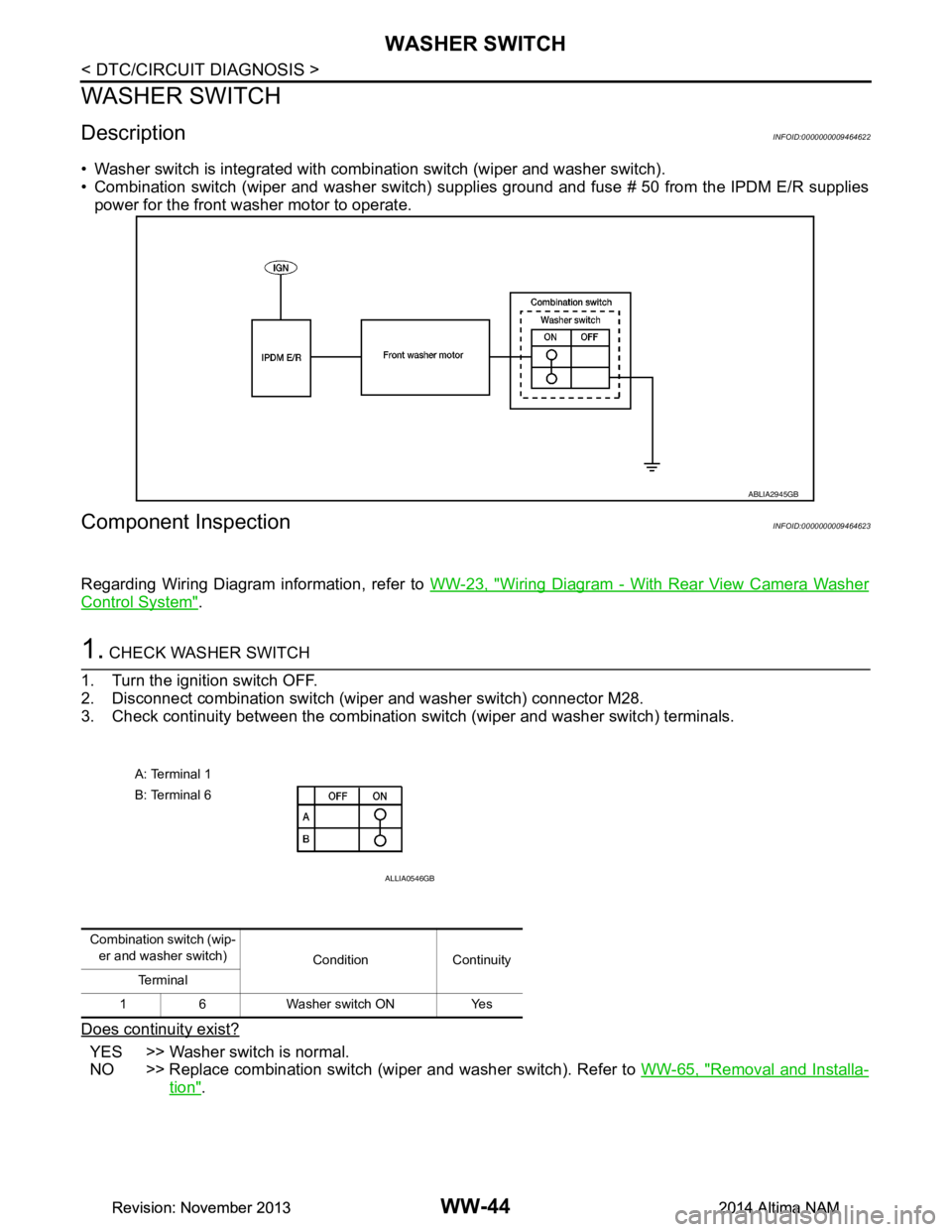
• Washer switch is integrated with combination switch (wiper and washer switch).
• Combination switch (wiper and washer switch) supp lies ground and fuse # 50 from the IPDM E/R supplies
power for the front washer motor to operate.
Component InspectionINFOID:0000000009464623
Regarding Wiring Diagram information, refer to WW-23, "Wiring Diagram - With Rear View Camera Washer
Control System".
1. CHECK WASHER SWITCH
1. Turn the ignition switch OFF.
2. Disconnect combination switch (wiper and washer switch) connector M28.
3. Check continuity between the combination switch (wiper and washer switch) terminals.
Does continuity exist?
YES >> Washer switch is normal.
NO >> Replace combination switch (wiper and washer switch). Refer to WW-65, "Removal and Installa-
tion".
ABLIA2945GB
A: Terminal 1
B: Terminal 6
ALLIA0546GB
Combination switch (wip- er and washer switch) Condition Continuity
Te r m i n a l
1 6 Washer switch ON Yes
Revision: November 20132014 Altima NAMRevision: November 20132014 Altima NAM
Page 4783 of 4801
WW-48
< SYMPTOM DIAGNOSIS >
FRONT WIPER DOES NOT OPERATE
FRONT WIPER DOES NOT OPERATE
DescriptionINFOID:0000000009464625
The front wiper does not operate under any operation conditions
Diagnosis ProcedureINFOID:0000000009464626
Regarding Wiring Diagram information, refer to WW-23, "Wiring Diagram - With Rear View Camera Washer
Control System".
1. CHECK WIPER RELAY OPERATION
IPDM E/R AUTO ACTIVE TEST
1. Start IPDM E/R auto active test. Refer to PCS-8, "Diagnosis Description"
.
2. Check that the front wiper operates at the LO/HI operation.
CONSULT ACTIVE TEST
1. Select FRONT WIPER of IPDM E/R active test item.
2. While operating the test item, check that front wiper LO/HI operation and OFF.
is the inspection result normal?
YES >> GO TO 5.
NO >> GO TO 2.
2. CHECK FRONT WIPER MOTOR FUSE
1. Turn the ignition switch OFF.
2. Check that the front wiper motor fuse 30A (No. 41, located in the IPDM E/R) is not blown.
Is the fuse blown?
YES >> Replace the fuse after repairing the affected circuit.
NO >> GO TO 3.
3. CHECK FRONT WIPER MOTOR (GND) OPEN CIRCUIT
1. Disconnect front wiper motor.
2. Check continuity between front wiper motor harness connector E25 and ground.
Is the inspection result normal?
YES >> GO TO 4.
NO >> Repair or replace the harness or connectors.
4. CHECK FRONT WIPER MOTOR OUTPUT VOLTAGE
CONSULT ACTIVE TEST
1. Turn the ignition switch ON.
2. Select FRONT WIPER of IPDM E/R active test item.
3. With operating the test item, check volt age between IPDM E/R harness connector E18 and ground.
Lo : Front wiper LO operation
Hi : Front wiper HI operation
Off : Stop the front wiper.
Front wiper motor
GroundContinuity
Connector Terminal
E25 2 Yes
Revision: November 20132014 Altima NAMRevision: November 20132014 Altima NAM