ignition NISSAN TEANA 2014 Service Manual
[x] Cancel search | Manufacturer: NISSAN, Model Year: 2014, Model line: TEANA, Model: NISSAN TEANA 2014Pages: 4801, PDF Size: 51.2 MB
Page 3847 of 4801
![NISSAN TEANA 2014 Service Manual
SEC-22
< SYSTEM DESCRIPTION >
DIAGNOSIS SYSTEM (BCM)
ACTIVE TEST
VEH SPEED 2 [mph/km/h]×Indicates condition of vehicle speed signal received from combination
meter on CAN communication line.
DOOR](/img/5/57390/w960_57390-3846.png "NISSAN TEANA 2014 Service Manual
SEC-22
< SYSTEM DESCRIPTION >
DIAGNOSIS SYSTEM (BCM)
ACTIVE TEST
VEH SPEED 2 [mph/km/h]×Indicates condition of vehicle speed signal received from combination
meter on CAN communication line.
DOOR")
SEC-22
< SYSTEM DESCRIPTION >
DIAGNOSIS SYSTEM (BCM)
ACTIVE TEST
VEH SPEED 2 [mph/km/h]×Indicates condition of vehicle speed signal received from combination
meter on CAN communication line.
DOOR STAT -DR [LOCK/READY/UNLK] ×Indicates condition of driver side door status.
DOOR STAT -AS [LOCK/READY/UNLK] ×Indicates condition of passenger side door status.
DOOR STAT -RR [LOCK/READY/UNLK] ×Indicates condition of rear right side door status.
DOOR STAT -RL [LOCK/READY/UNLK] ×Indicates condition of rear left side door status.
ID OK FLAG [Set/Reset] Indicates condition of Intelligent Key ID.
PRMT ENG STRT [Set/Reset] Indicates condition of engine start possibility.
PRMT RKE STRT [Set/Reset] Indicates condition of engine start possibility from Intelligent Key.
I-KEY OK FLAG [Key ON/Key OFF] ×Indicates condition of Intelligent Key OK flag.
PRBT ENG STRT [Set/Reset] Indicates condition of engine start prohibit.
ID AUTHENT CANCEL TIMER [STOP] Indicates condition of Intelligent Key ID authentication.
ACC BATTERY SAVER [STOP] Indicate s condition of battery saver.
CRNK PRBT TMR [On/Off] Indicates co ndition of crank prohibit timer.
AUT CRNK TMR [On/Off] Indicates co ndition of automatic engine crank timer fr om Intelligent Key.
CRNK PRBT TME [sec] Indicat es condition of engine crank prohibit time.
AUTO CRNK TME [sec] Indicates co ndition of automatic engine crank time from Intelligent Key.
CRANKING TME [sec] Indicates condition of engine cranking time from Intelligent Key.
DETE SW PWR [On/Off] Indicates condition of detent switch voltage.
ACC RLY -REQ [On/Off] Indicates condition of accessory relay control request.
RKE OPE COUN1 [0-19] ×When remote keyless entry receiver receives the signal transmitted while
operating on Intelligent Key, the numerical value start changing.
RKE OPE COUN2 [0-19] ×When remote keyless entry receiver receives the signal transmitted while
operating on Intelligent Key, the numerical value start changing.
TRNK/HAT MNTR [On/Off] Indicates condition of trunk room lamp switch.
RKE-LOCK [On/Off] Indicates condition of lock signal from Intelligent Key.
RKE-UNLOCK [On/Off] Indicates condition of unlock signal from Intelligent Key.
RKE-TR/BD [On/Off] Indicates condition of trunk open signal from Intelligent Key.
RKE-PANIC [On/Off] Indicates condition of panic signal from Intelligent Key.
RKE-MODE CHG [On/Off] Indicates condition of mode change signal from Intelligent Key. Monitor Item [Unit] Main Description
Test Item Description
INTELLIGENT KEY LINK (CAN) This test is able to check Intelligent Key identification number [Off/ID No1/ID N02/ID No3/ID
No4/ID No5].
INT LAMP This test is able to check interior room lamp operation [On/Off].
FLASHER This test is able to check hazard lamp operation [LH/RH/Off].
HORN This test is able to check horn operation [On].
BATTERY SAVER This test is able to check battery saver operation [On/Off].
TRUNK/BACK DOOR This test is able to check trunk actuator operation [Open].
OUTSIDE BUZZER This test is able to check Intelligent Key warning buzzer operation [On/Off].
INSIDE BUZZER This test is able to check combination meter warning chime operation [Take Out/Knob/Key/
Off].
INDICATOR This test is able to check combination meter warning lamp operation [KEY ON/KEY IND/Off].
IGN CONT2 This test is able to check ignition relay-2 control operation [On/Off].
ENGINE SW ILLUMI This test is able to check push-button ignition switch START indicator operation [On/Off].
Revision: November 20132014 Altima NAMRevision: November 20132014 Altima NAM
Page 3848 of 4801

DIAGNOSIS SYSTEM (BCM)SEC-23
< SYSTEM DESCRIPTION >
C
D E
F
G H
I
J
L
M A
B
SEC
N
O P
WORK SUPPORT
PUSH SWITCH INDICATOR This test is able to check push-button ignition switch indicator operation [On/Off].
ACC CONT This test is able to check ac cessory relay control operation [On/Off].
IGN CONT1 This test is able to check ignition relay-1 control operation [On/Off].
ST CONT LOW This test is able to check starter control relay operation [On/Off].
IGNITION RELAY This test is able to ignition relay operation [On/Off].
REVERSE LAMP TEST This test is able to check reverse lamp illuminatio n operation [On/Off].
TRUNK/LUGGAGE LAMP TEST This test is able to check cargo lamp illumination operation [On/Off].
KEYFOB PW TEST This test is able to check power window operation using the Inte lligent Key [Off/DOWN/UP].
SHIFTLOCK SOLENOID TEST This te st is able to check shift lock solenoid operation [On/Off].
Test Item Description
Support Item Setting Description
IGN/ACC BATTERY SAVER On* Battery saver function ON.
Off Battery saver function OFF.
REMOTE ENGINE STARTER On* Remote engine start function ON.
Off Remote engine start function OFF.
ANSWERBACK I-KEY LOCK UNLOCK BUZZER Buzzer reminder function by door lock/unlock request switch ON.
HORN Horn chirp reminder function by door lock request switch ON.
Off* No reminder function by door lock/unlock request switch.
INVALID This mode is not used.
ANSWERBACK KEYLESS LOCK UN-
LOCK On
Buzzer or horn chirp reminder when doors are locked/unlocked with
Intelligent Key.
Off* No buzzer or horn chirp reminder when doors are locked/unlocked
with Intelligent Key.
ANSWER BACK On* Horn chirp reminder when doors are locked with Intelligent Key.
Off No horn chirp reminder when doors are locked with Intelligent Key.
RETRACTABLE MIRROR SET On Retractable mirror set ON.
Off* Retractable mirror set OFF.
CONFIRM KEY FOB ID — Intellige nt Key ID code can check.
LOCK/UNLOCK BY I-KEY On* Door lock/unlock function from Intelligent Key ON.
Off Door lock/unlock function from Intelligent Key OFF.
ENGINE START BY I-KEY On* Engine start function from Intelligent Key ON.
Off Engine start function from Intelligent Key OFF.
TRUNK/GLASS HATCH OPEN On* Buzzer reminder function by trunk opener request switch ON.
Off Buzzer reminder function by trunk opener request switch OFF.
INTELLIGENT KEY LINK SET On Intelligent Key link set ON.
Off* Intelligent Key link set OFF.
SHORT CRANKING OUTPUT Start70 msec
Starter motor operation duration times.
100 msec
200 msec
End —
INSIDE ANT DIAGNOSIS — This function allo ws inside key antenna self-diagnosis.
Revision: November 20132014 Altima NAMRevision: November 20132014 Altima NAM
Page 3849 of 4801

SEC-24
< SYSTEM DESCRIPTION >
DIAGNOSIS SYSTEM (BCM)
*: Initial Setting
THEFT ALM
THEFT ALM : CONSULT Function (BCM - THEFT ALM)INFOID:0000000009955727
CAUTION:
After disconnecting the CONSULT vehicle interface (VI) from the data link connector, the ignition must
be cycled OFF → ON (for at least 5 seconds) → OFF. If this step is not performed, the BCM may not go
to ”sleep mode”, potentially causing a di scharged battery and a no-start condition.
DATA MONITOR
ACTIVE TEST
WORK SUPPORT
AUTO LOCK SET MODE7 5 min
Auto door lock time can be set in this mode.
MODE6 4 min
MODE5 3 min
MODE4 2 min
MODE3* 1 min
MODE2 30 sec
MODE1 Off
Support Item Setting Description
Monitored Item Description
REQ SW -DR [On/Off] Indicates condition of door request switch LH.
REQ SW -AS [On/Off] Indicates condition of door request switch RH.
REQ SW -BD/TR [ON/OFF] Indicates condition of trunk opener request switch.
PUSH SW [On/Off] Indicates condition of push-button ignition switch.
UNLK SEN -DR [On/Off] Indicates condition of door unlock sensor.
DOOR SW-DR [On/Off] Indicates condition of front door switch LH.
DOOR SW-AS [On/Off] Indicates condition of front door switch RH.
DOOR SW-RR [On/Off] Indicates condition of rear door switch RH.
DOOR SW-RL [On/Off] Indicates condition of rear door switch LH.
DOOR SW-BK [On/Off] Indicates condition of trunk switch.
CDL LOCK SW [On/Off] Indicates condition of lock signal from door lock and unlock switch.
CDL UNLOCK SW [On/Off] Indicates condition of unlock signal from door lock and unlock switch.
KEY CYL LK-SW [On/Off] Indicates condition of lock signal from door key cylinder switch.
KEY CYL UN-SW [On/Off] Indicates condition of unlock signal from door key cylinder switch.
TR/BD OPEN SW [On/Off] Indicates condition of trunk opener switch.
TRNK/HAT MNTR [On/Off] Indicates condition of trunk room lamp switch.
RKE-LOCK [On/Off] Indicates condition of lock signal from Intelligent Key.
RKE-UNLOCK [On/Off] Indicates condition of unlock signal from Intelligent Key.
RKE-TR/BD [On/Off] Indicates condition of trunk open signal from Intelligent Key.
Test Item Description
FLASHER This test is able to check turn signal lamp operation [LH/RH/Off].
THEFT IND This test is able to check se curity indicator lamp operation [On/Off].
VEHICLE SECURITY HORN This test is able to check vehicle security horn operation [On].
HEADLAMP(HI) This test is able to check vehicle security lamp operation [On].
Revision: November 20132014 Altima NAMRevision: November 20132014 Altima NAM
Page 3850 of 4801
DIAGNOSIS SYSTEM (BCM)SEC-25
< SYSTEM DESCRIPTION >
C
D E
F
G H
I
J
L
M A
B
SEC
N
O P
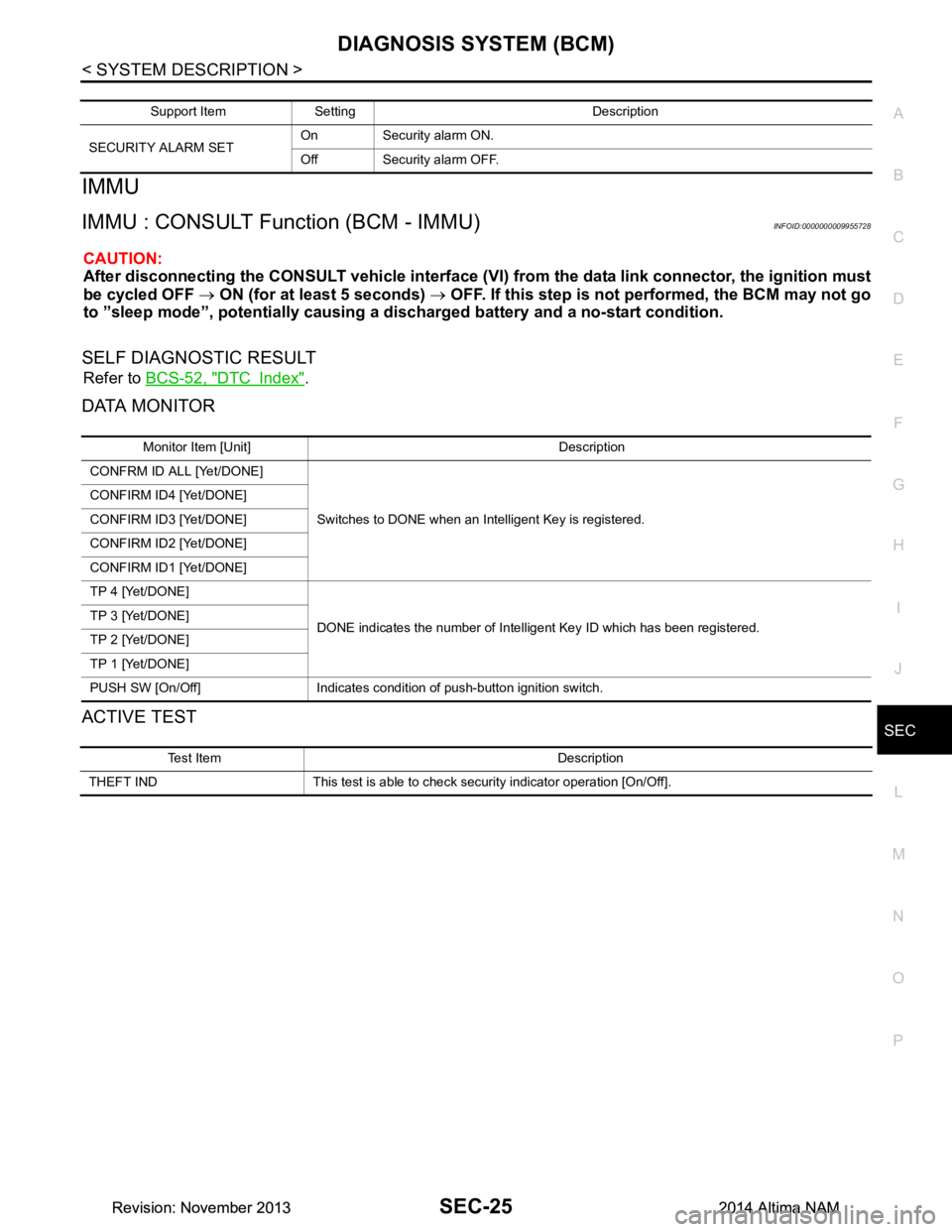
IMMU
IMMU : CONSULT Function (BCM - IMMU)INFOID:0000000009955728
CAUTION:
After disconnecting the CONSULT vehicle interface (VI) from the data link connector, the ignition must
be cycled OFF → ON (for at least 5 seconds) → OFF. If this step is not performed, the BCM may not go
to ”sleep mode”, potentiall y causing a discharged battery and a no-start condition.
SELF DIAGNOSTIC RESULT
Refer to BCS-52, "DTC Index".
DATA MONITOR
ACTIVE TEST
Support Item Setting Description
SECURITY ALARM SET On Security alarm ON.
Off Security alarm OFF.
Monitor Item [Unit] Description
CONFRM ID ALL [Yet/DONE]
Switches to DONE when an Intelligent Key is registered.
CONFIRM ID4 [Yet/DONE]
CONFIRM ID3 [Yet/DONE]
CONFIRM ID2 [Yet/DONE]
CONFIRM ID1 [Yet/DONE]
TP 4 [Yet/DONE]
DONE indicates the number of Intelligent Key ID which has been registered.
TP 3 [Yet/DONE]
TP 2 [Yet/DONE]
TP 1 [Yet/DONE]
PUSH SW [On/Off] Indicates condition of push-button ignition switch.
Test Item Description
THEFT IND This test is able to check security indicator operation [On/Off].
Revision: November 20132014 Altima NAMRevision: November 20132014 Altima NAM
Page 3851 of 4801

SEC-26
< SYSTEM DESCRIPTION >
DIAGNOSIS SYSTEM (IPDM E/R)
DIAGNOSIS SYSTEM (IPDM E/R)
CONSULT Function (IPDM E/R)INFOID:0000000009955729
CAUTION:
After disconnecting the CONSULT vehicle interface (VI) from the data link connector, the ignition must
be cycled OFF → ON (for at least 5 seconds) → OFF. If this step is not performed, the BCM may not go
to ”sleep mode”, potentially causing a di scharged battery and a no-start condition.
APPLICATION ITEM
CONSULT performs the following functions via CAN communication with IPDM E/R.
ECU IDENTIFICATION
The IPDM E/R part number is displayed.
SELF DIAGNOSTIC RESULT
Refer to PCS-20, "DTC Index".
DATA MONITOR
Direct Diagnostic Mode Description
Ecu Identification The IPDM E/R part number is displayed.
Self Diagnostic Result The IPDM E/R self diagnostic results are displayed.
Data Monitor The IPDM E/R input/output data is displayed in real time.
Active Test The IPDM E/R activates outputs to test components.
CAN Diag Support Mntr The result of transmit/receive diagnosis of CAN communication is displayed.
Monitor Item [Unit] Main
Signals Description
MOTOR FAN REQ [%] ×Indicates cooling fan speed signal received from ECM on CAN communication
line
AC COMP REQ [On/Off] ×Indicates A/C compressor request signal received from ECM on CAN commu-
nication line
TAIL&CLR REQ [On/Off] ×Indicates position light request signal received from BCM on CAN communica-
tion line
HL LO REQ [On/Off] ×Indicates low beam request signal received from BCM on CAN communication
line
HL HI REQ [On/Off] ×Indicates high beam request signal received from BCM on CAN communication
line
FR FOG REQ [On/Off] ×Indicates front fog light request signal received from BCM on CAN communica-
tion line
FR WIP REQ [Stop/1LOW/Low/Hi] ×Indicates front wiper request signal received from BCM on CAN communication
line
WIP AUTO STOP [STOP P/ACT P] ×Indicates condition of front wiper auto stop signal
WIP PROT [Off/BLOCK] ×Indicates condition of front wiper fail-safe operation
IGN RLY1 -REQ [On/Off] Indicates ignition switch ON signal received from BCM on CAN communication
line
IGN RLY [On/Off] ×Indicates condition of ignition relay
PUSH SW [On/Off] Indicates condition of push-button ignition switch
INTER/NP SW [On/Off] Indicates condition of CVT shift position
ST RLY CONT [On/Off] Indicates starter relay status signal received from BCM on CAN communication
line
IHBT RLY -REQ [On/Off] Indicates starter control relay signal received from BCM on CAN communication
line
Revision: November 20132014 Altima NAMRevision: November 20132014 Altima NAM
Page 3891 of 4801

SEC-66
< BASIC INSPECTION >
ADDITIONAL SERVICE WHEN REPLACING CONTROL UNIT
ADDITIONAL SERVICE WHEN REPLACING CONTROL UNIT
ECM
ECM : DescriptionINFOID:0000000009461102
Performing the following procedure can automatically activate recommunication of ECM and BCM, but only
when the ECM is replaced with a new one*.
*: New one means an ECM that has never been energized on-board.
(In this step, initialization procedure by CONSULT is not necessary)
NOTE:
• If multiple keys are attached to the key hold er, separate them before beginning work.
• Distinguish keys with unregistered key ID s from those with registered IDs.
ECM : Work ProcedureINFOID:0000000009461103
1.PERFORM ECM RECOMMUNICATING FUNCTION
1. Install ECM.
2. Contact backside of registered Intelligent Key* to pus h-button ignition switch, then turn ignition switch to
ON.
*: To perform this step, use the key that is used before performing ECM replacement.
3. Maintain ignition switch in the ON position for at least 5 seconds.
4. Turn ignition switch to OFF.
5. Check that the engine starts.
>> GO TO 2.
2.PERFORM ADDITIONAL SERVICE WHEN REPLACING ECM
Perform EC-174, "Work Procedure"
.
>> Inspection End.
BCM
BCM : DescriptionINFOID:0000000009461104
BEFORE REPLACEMENT
When replacing BCM, save or print current vehicle s pecification with CONSULT configuration before replace-
ment.
NOTE:
If “Before Replace ECU” cannot be used, use the “After Replace ECU” or “Manual Configuration” after replac-
ing BCM.
AFTER REPLACEMENT
CAUTION:
• When replacing BCM, you must perfo rm “After Replace ECU” with CONSULT.
- Complete the procedure of “After Replace ECU” in order.
- If you set incorrect “After Replace ECU”, incidents might occur.
- Configuration is different for each vehicle mode l. Confirm configuration of each vehicle model.
• When replacing BCM, perform the system initialization (NATS).
BCM : Work ProcedureINFOID:0000000009461105
1.SAVING VEHICLE SPECIFICATION
CONSULT
Enter "Re/Programming, Configuration" and perform “Before Replace ECU” to save or print current vehicle
specification.
NOTE:
If “Before Replace ECU” cannot be used, use the "After Replace ECU" or "Manual Configuration" after replac-
ing BCM.
Revision: November 20132014 Altima NAMRevision: November 20132014 Altima NAM
Page 3893 of 4801
SEC-68
< DTC/CIRCUIT DIAGNOSIS >
P1610 LOCK MODE
DTC/CIRCUIT DIAGNOSIS
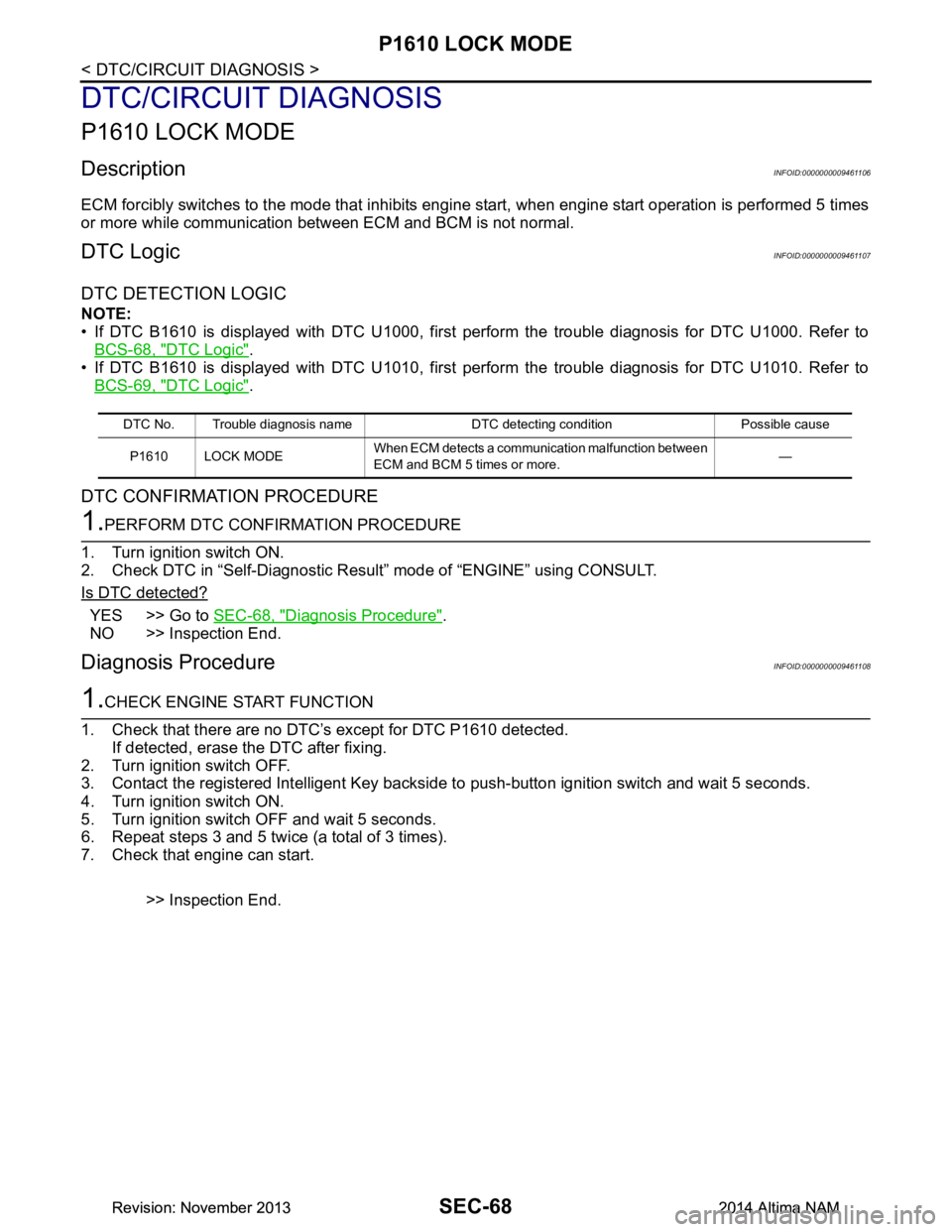
P1610 LOCK MODE
DescriptionINFOID:0000000009461106
ECM forcibly switches to the mode that inhibits engine start, when engine start operation is performed 5 times
or more while communication between ECM and BCM is not normal.
DTC LogicINFOID:0000000009461107
DTC DETECTION LOGIC
NOTE:
• If DTC B1610 is displayed with DTC U1000, first perform the trouble diagnosis for DTC U1000. Refer to BCS-68, "DTC Logic"
.
• If DTC B1610 is displayed with DTC U1010, first perform the trouble diagnosis for DTC U1010. Refer to BCS-69, "DTC Logic"
.
DTC CONFIRMATION PROCEDURE
1.PERFORM DTC CONFIRMATION PROCEDURE
1. Turn ignition switch ON.
2. Check DTC in “Self-Diagnostic Result” mode of “ENGINE” using CONSULT.
Is DTC detected?
YES >> Go to SEC-68, "Diagnosis Procedure".
NO >> Inspection End.
Diagnosis ProcedureINFOID:0000000009461108
1.CHECK ENGINE START FUNCTION
1. Check that there are no DTC’s except for DTC P1610 detected. If detected, erase the DTC after fixing.
2. Turn ignition switch OFF.
3. Contact the registered Intelligent Key backside to push-button ignition switch and wait 5 seconds.
4. Turn ignition switch ON.
5. Turn ignition switch OFF and wait 5 seconds.
6. Repeat steps 3 and 5 twice (a total of 3 times).
7. Check that engine can start.
>> Inspection End.
DTC No. Trouble diagnosis name DTC detecting condition Possible causeP1610 LOCK MODE When ECM detects a communication malfunction between
ECM and BCM 5 times or more. —
Revision: November 20132014 Altima NAMRevision: November 20132014 Altima NAM
Page 3894 of 4801
P1611 ID DISCORD, IMMU-ECMSEC-69
< DTC/CIRCUIT DIAGNOSIS >
C
D E
F
G H
I
J
L
M A
B
SEC
N
O P
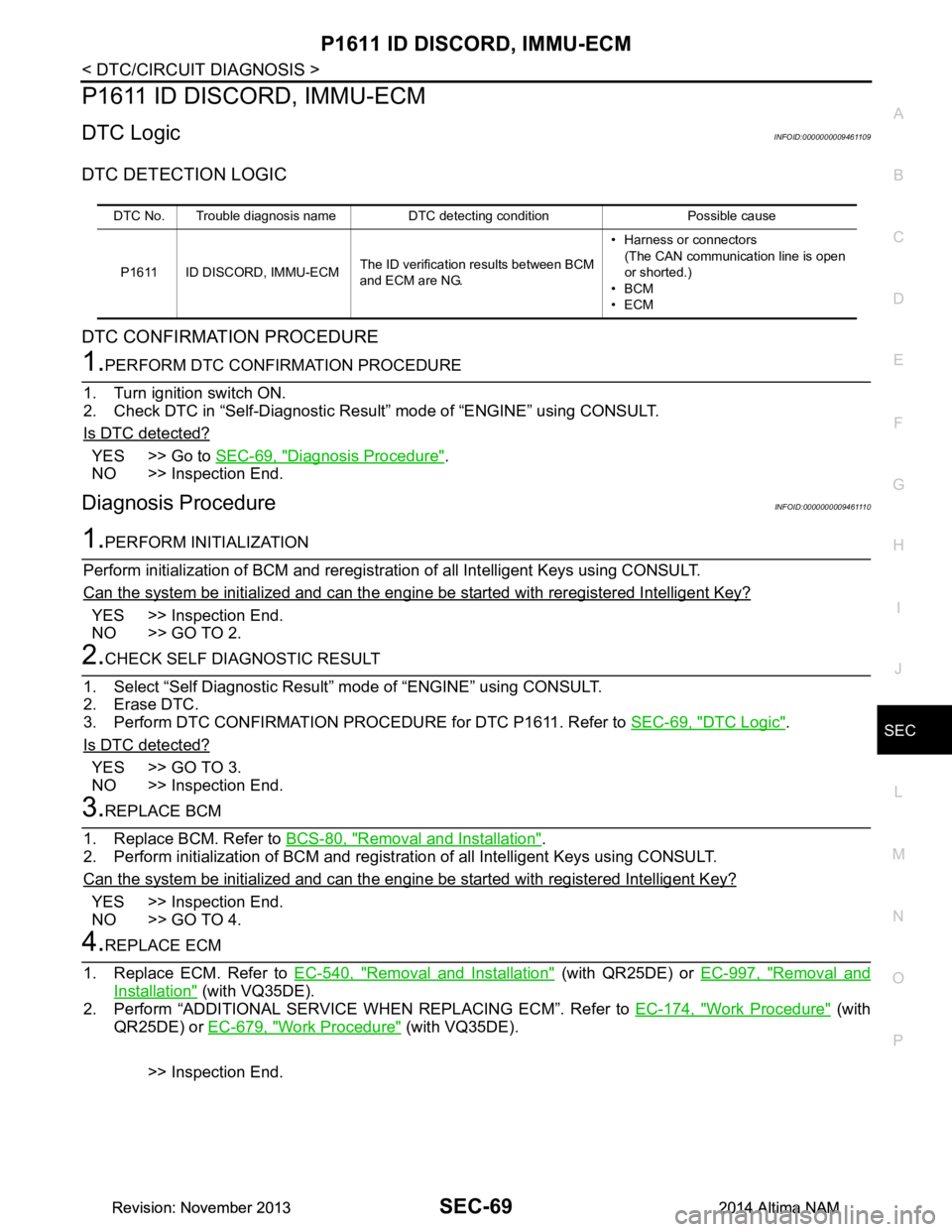
P1611 ID DISCORD, IMMU-ECM
DTC LogicINFOID:0000000009461109
DTC DETECTION LOGIC
DTC CONFIRMATION PROCEDURE
1.PERFORM DTC CONFIRMATION PROCEDURE
1. Turn ignition switch ON.
2. Check DTC in “Self-Diagnostic Result ” mode of “ENGINE” using CONSULT.
Is DTC detected?
YES >> Go to SEC-69, "Diagnosis Procedure".
NO >> Inspection End.
Diagnosis ProcedureINFOID:0000000009461110
1.PERFORM INITIALIZATION
Perform initialization of BCM and reregistrati on of all Intelligent Keys using CONSULT.
Can the system be initialized and can the engine be started with reregistered Intelligent Key?
YES >> Inspection End.
NO >> GO TO 2.
2.CHECK SELF DIAGNOSTIC RESULT
1. Select “Self Diagnostic Result” mode of “ENGINE” using CONSULT.
2. Erase DTC.
3. Perform DTC CONFIRMATION PROCEDURE for DTC P1611. Refer to SEC-69, "DTC Logic"
.
Is DTC detected?
YES >> GO TO 3.
NO >> Inspection End.
3.REPLACE BCM
1. Replace BCM. Refer to BCS-80, "Removal and Installation"
.
2. Perform initialization of BCM and registration of all Intelligent Keys using CONSULT.
Can the system be initialized and can the engine be started with registered Intelligent Key?
YES >> Inspection End.
NO >> GO TO 4.
4.REPLACE ECM
1. Replace ECM. Refer to EC-540, "Removal and Installation"
(with QR25DE) or EC-997, "Removal and
Installation" (with VQ35DE).
2. Perform “ADDITIONAL SERVICE WHEN REPLACING ECM”. Refer to EC-174, "Work Procedure"
(with
QR25DE) or EC-679, "Work Procedure"
(with VQ35DE).
>> Inspection End.
DTC No. Trouble diagnosis name DTC detecting condition Possible cause
P1611 ID DISCORD, IMMU-ECM The ID verification results between BCM
and ECM are NG. • Harness or connectors
(The CAN communication line is open
or shorted.)
•BCM
•ECM
Revision: November 20132014 Altima NAMRevision: November 20132014 Altima NAM
Page 3895 of 4801
SEC-70
< DTC/CIRCUIT DIAGNOSIS >
P1612 CHAIN OF ECM-IMMU
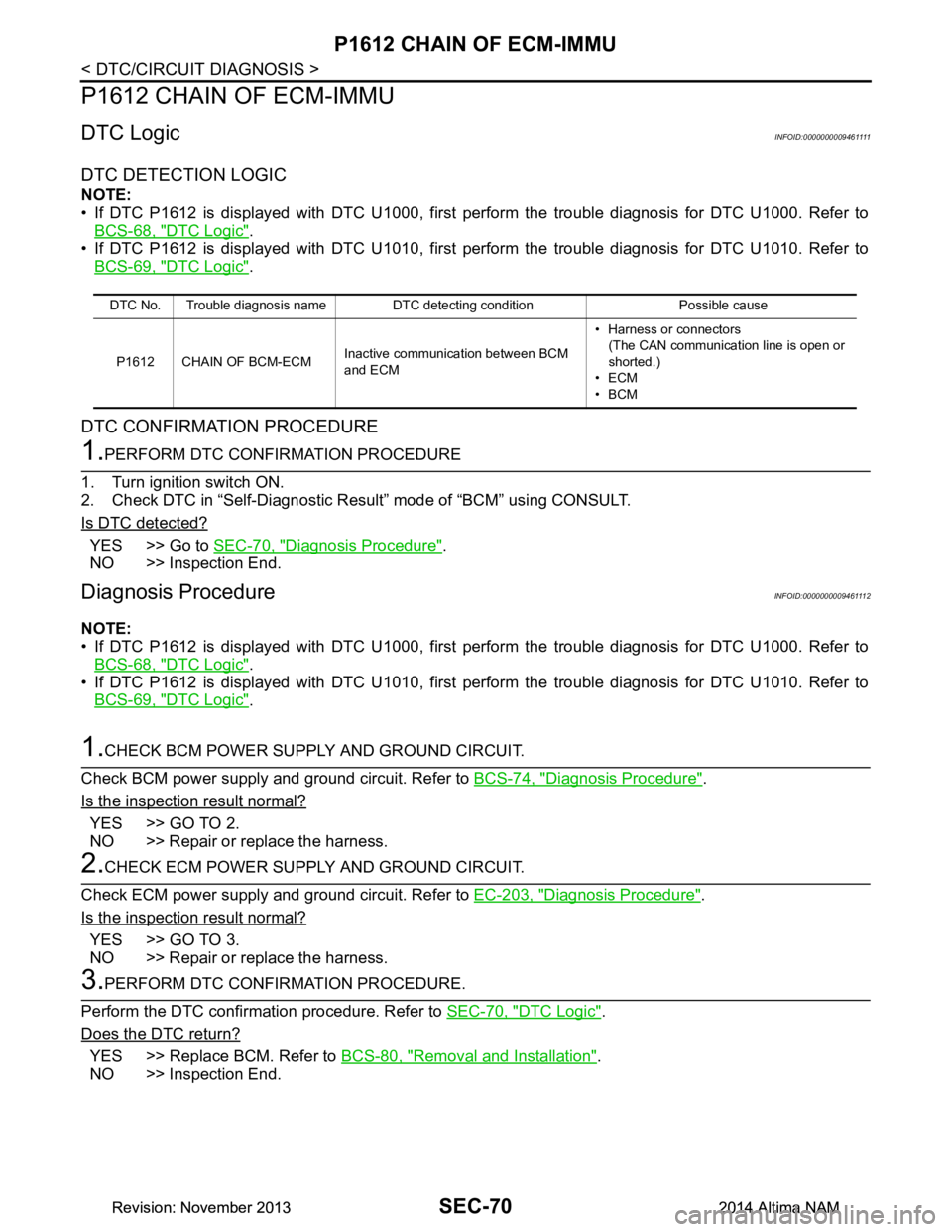
P1612 CHAIN OF ECM-IMMU
DTC LogicINFOID:0000000009461111
DTC DETECTION LOGIC
NOTE:
• If DTC P1612 is displayed with DTC U1000, first perform the trouble diagnosis for DTC U1000. Refer to
BCS-68, "DTC Logic"
.
• If DTC P1612 is displayed with DTC U1010, first perform the trouble diagnosis for DTC U1010. Refer to BCS-69, "DTC Logic"
.
DTC CONFIRMATION PROCEDURE
1.PERFORM DTC CONFIRMATION PROCEDURE
1. Turn ignition switch ON.
2. Check DTC in “Self-Diagnostic Result” mode of “BCM” using CONSULT.
Is DTC detected?
YES >> Go to SEC-70, "Diagnosis Procedure".
NO >> Inspection End.
Diagnosis ProcedureINFOID:0000000009461112
NOTE:
• If DTC P1612 is displayed with DTC U1000, first perform the trouble diagnosis for DTC U1000. Refer to BCS-68, "DTC Logic"
.
• If DTC P1612 is displayed with DTC U1010, first perform the trouble diagnosis for DTC U1010. Refer to
BCS-69, "DTC Logic"
.
1.CHECK BCM POWER SUPPLY AND GROUND CIRCUIT.
Check BCM power supply and ground circuit. Refer to BCS-74, "Diagnosis Procedure"
.
Is the inspection result normal?
YES >> GO TO 2.
NO >> Repair or replace the harness.
2.CHECK ECM POWER SUPPLY AND GROUND CIRCUIT.
Check ECM power supply and ground circuit. Refer to EC-203, "Diagnosis Procedure"
.
Is the inspection result normal?
YES >> GO TO 3.
NO >> Repair or replace the harness.
3.PERFORM DTC CONFIRMATION PROCEDURE.
Perform the DTC confirmation procedure. Refer to SEC-70, "DTC Logic"
.
Does the DTC return?
YES >> Replace BCM. Refer to BCS-80, "Removal and Installation".
NO >> Inspection End.
DTC No. Trouble diagnosis name DTC detecting condition Possible cause
P1612 CHAIN OF BCM-ECM Inactive communication between BCM
and ECM • Harness or connectors
(The CAN communication line is open or
shorted.)
•ECM
•BCM
Revision: November 20132014 Altima NAMRevision: November 20132014 Altima NAM
Page 3896 of 4801
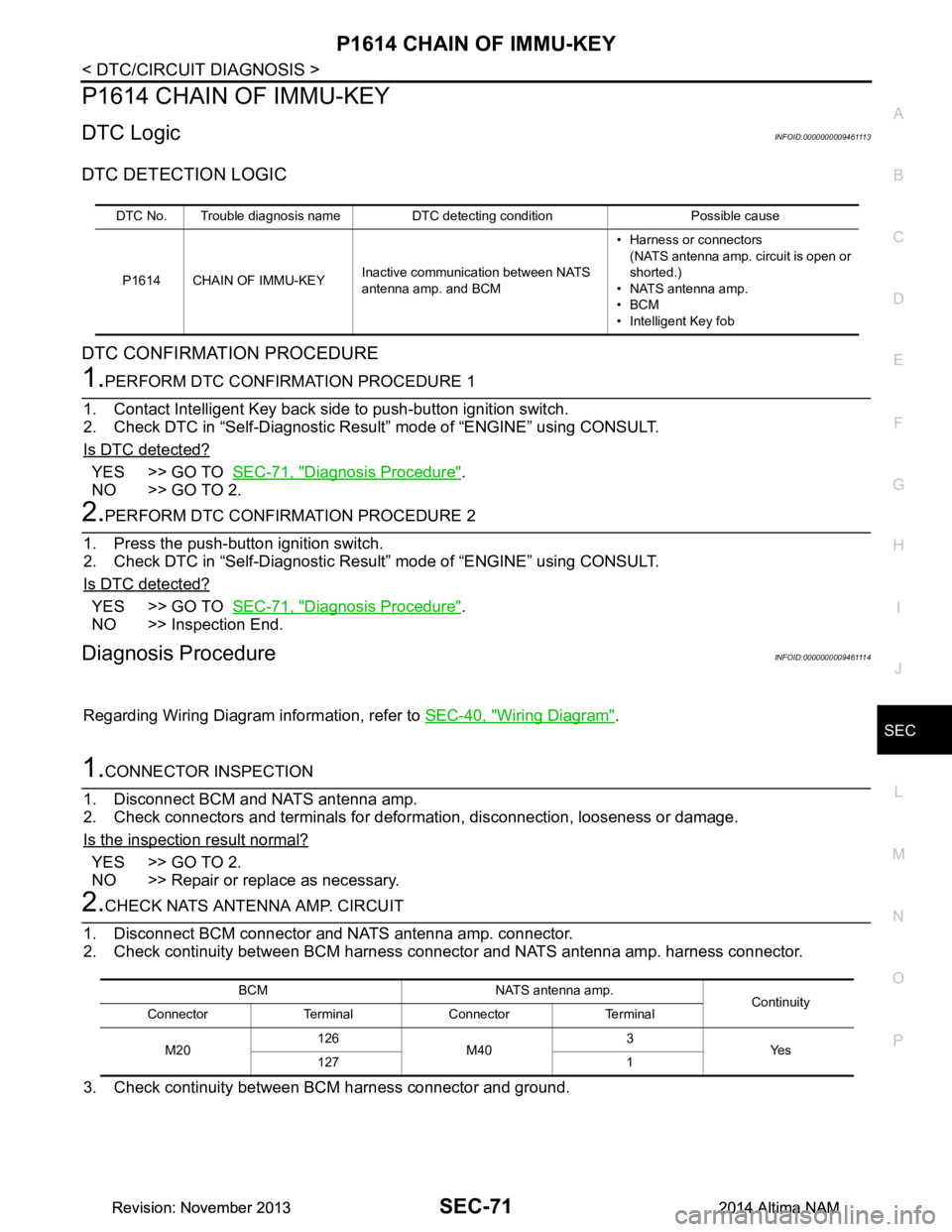
P1614 CHAIN OF IMMU-KEYSEC-71
< DTC/CIRCUIT DIAGNOSIS >
C
D E
F
G H
I
J
L
M A
B
SEC
N
O P
P1614 CHAIN OF IMMU-KEY
DTC LogicINFOID:0000000009461113
DTC DETECTION LOGIC
DTC CONFIRMATION PROCEDURE
1.PERFORM DTC CONFIRMATION PROCEDURE 1
1. Contact Intelligent Key back side to push-button ignition switch.
2. Check DTC in “Self-Diagnostic Result ” mode of “ENGINE” using CONSULT.
Is DTC detected?
YES >> GO TO SEC-71, "Diagnosis Procedure".
NO >> GO TO 2.
2.PERFORM DTC CONFIRMATION PROCEDURE 2
1. Press the push-button ignition switch.
2. Check DTC in “Self-Diagnostic Result ” mode of “ENGINE” using CONSULT.
Is DTC detected?
YES >> GO TO SEC-71, "Diagnosis Procedure".
NO >> Inspection End.
Diagnosis ProcedureINFOID:0000000009461114
Regarding Wiring Diagram information, refer to SEC-40, "Wiring Diagram".
1.CONNECTOR INSPECTION
1. Disconnect BCM and NATS antenna amp.
2. Check connectors and terminals for deformation, disconnection, looseness or damage.
Is the inspection result normal?
YES >> GO TO 2.
NO >> Repair or replace as necessary.
2.CHECK NATS ANTENNA AMP. CIRCUIT
1. Disconnect BCM connector and NATS antenna amp. connector.
2. Check continuity between BCM harness c onnector and NATS antenna amp. harness connector.
3. Check continuity between BCM harness connector and ground.
DTC No. Trouble diagnosis name DTC detecting condition Possible cause P1614 CHAIN OF IMMU-KEY Inactive communication between NATS
antenna amp. and BCM • Harness or connectors
(NATS antenna amp. circuit is open or
shorted.)
• NATS antenna amp.
•BCM
• Intelligent Key fob
BCM NATS antenna amp. Continuity
Connector Terminal Connector Terminal
M20 126
M40 3
Ye s
127 1
Revision: November 20132014 Altima NAMRevision: November 20132014 Altima NAM