battery NISSAN TEANA 2014 Service Manual
[x] Cancel search | Manufacturer: NISSAN, Model Year: 2014, Model line: TEANA, Model: NISSAN TEANA 2014Pages: 4801, PDF Size: 51.2 MB
Page 904 of 4801
DLK-136
< DTC/CIRCUIT DIAGNOSIS >
DOOR LOCK ACTUATOR
3.CHECK INTERMITTENT INCIDENT
Refer to GI-43, "Intermittent Incident"
.
>> Inspection End.
PASSENGER SIDE
PASSENGER SIDE : DescriptionINFOID:0000000009461876
Locks/unlocks the door with the signal from BCM.
PASSENGER SIDE : Component Function CheckINFOID:0000000009461877
1.CHECK FUNCTION
1. Use CONSULT to perform Active Test (“DOOR LOCK”).
2. Touch “ALL LOCK” or “ALL UNLOCK” to check that it works normally.
Is the inspection result normal?
YES >> Door lock actuator is OK.
NO >> Refer to DLK-136, "PASSENGER SIDE : Diagnosis Procedure"
.
PASSENGER SIDE : Diagnosis ProcedureINFOID:0000000009461878
Regarding Wiring Diagram information, refer to DLK-51, "Wiring Diagram".
1.CHECK DOOR LOCK ACTUATOR SIGNAL
Check voltage between BCM connector and ground.
Is the inspection result normal?
YES >> GO TO 3
NO >> GO TO 2
2.CHECK DOOR LOCK ACTUATOR CIRCUIT
1. Disconnect BCM and front door lock actuator RH connector.
2. Check continuity between BCM connecto r and front door lock actuator RH.
3. Check continuity between BCM connector and ground.
Te r m i n a l s Condition of
door lock and unlock switch Voltage (V)
(Approx.)
(+)
(–)
BCM
connector Te r m i n a l
M21 135
Ground Lock 0
→ Battery voltage → 0
130 Unlock 0 → Battery voltage → 0
BCM connec-
tor Te r m i n a lFront door lock
actuator RH connector Terminal Continuity
M21 135
D108 2
Ye s
130 1
BCM connector Terminal Continuity M21 135
Ground No
130
Revision: November 20132014 Altima NAMRevision: November 20132014 Altima NAM
Page 905 of 4801
DOOR LOCK ACTUATORDLK-137
< DTC/CIRCUIT DIAGNOSIS >
C
D E
F
G H
I
J
L
M A
B
DLK
N
O P
Is the inspection result normal?
YES >> Replace front door lock actuator RH.
NO >> Repair or replace harness.
3.CHECK INTERMITTENT INCIDENT
Refer to GI-43, "Intermittent Incident"
.
>> Inspection End.
REAR LH
REAR LH : DescriptionINFOID:0000000009461879
Locks/unlocks the door with the signal from BCM.
REAR LH : Component Function CheckINFOID:0000000009461880
1.CHECK FUNCTION
1. Use CONSULT to perform Active Test (“DOOR LOCK”).
2. Touch “ALL LOCK” or “ALL UNLOCK” to check that it works normally.
Is the inspection result normal?
YES >> Door lock actuator is OK.
NO >> Refer to DLK-137, "REAR LH : Diagnosis Procedure"
.
REAR LH : Diagnosis ProcedureINFOID:0000000009461881
Regarding Wiring Diagram information, refer to DLK-51, "Wiring Diagram".
1.CHECK DOOR LOCK ACTUATOR SIGNAL
Check voltage between BCM connector and ground.
Is the inspection result normal?
YES >> GO TO 3
NO >> GO TO 2
2.CHECK DOOR LOCK ACTUATOR CIRCUIT
1. Disconnect BCM and rear door lock actuator LH connectors.
2. Check continuity between BCM connector and rear door lock actuator LH connector.
3. Check continuity between BCM connector and ground.
Te r m i n a l s
Condition of
door lock and unlock switch Voltage (V)
(Approx.)
(+)
(–)
BCM
connector Te r m i n a l
M21 132
Ground Lock 0
→ Battery voltage → 0
133 Unlock 0 → Battery voltage → 0
BCM connector Terminal Rear door lock ac-
tuator LH connec- tor Terminal Continuity
M21 132
D205 1
Ye s
133 2
Revision: November 20132014 Altima NAMRevision: November 20132014 Altima NAM
Page 906 of 4801
DLK-138
< DTC/CIRCUIT DIAGNOSIS >
DOOR LOCK ACTUATOR
Is the inspection result normal?
YES >> Replace rear door lock actuator LH.
NO >> Repair or replace harness.
3.CHECK INTERMITTENT INCIDENT
Refer to GI-43, "Intermittent Incident"
.
>> Inspection End.
REAR RH
REAR RH : DescriptionINFOID:0000000009461882
Locks/unlocks the door with the signal from BCM.
REAR RH : Component Function CheckINFOID:0000000009461883
1.CHECK FUNCTION
1. Use CONSULT to perform Active Test (“DOOR LOCK”).
2. Touch “ALL LOCK” or “ALL UNLOCK” to check that it works normally.
Is the inspection result normal?
YES >> Door lock actuator is OK.
NO >> Refer to DLK-138, "REAR RH : Diagnosis Procedure"
.
REAR RH : Diagnosis ProcedureINFOID:0000000009461884
Regarding Wiring Diagram information, refer to DLK-51, "Wiring Diagram".
1.CHECK DOOR LOCK ACTUATOR SIGNAL
Check voltage between BCM connector and ground.
Is the inspection result normal?
YES >> GO TO 3
NO >> GO TO 2
2.CHECK DOOR LOCK ACTUATOR CIRCUIT
1. Disconnect BCM and rear door lock actuator RH connectors.
2. Check continuity between BCM connector and rear door lock actuator RH connector.
BCM connector Terminal Continuity
M21 132
Ground No
133
Te r m i n a l s
Condition of
door lock and unlock switch Voltage (V)
(Approx.)
(+)
(–)
BCM
connector Te r m i n a l
M21 132
Ground Lock 0
→ Battery voltage → 0
133 Unlock 0 → Battery voltage → 0
Revision: November 20132014 Altima NAMRevision: November 20132014 Altima NAM
Page 908 of 4801
DLK-140
< DTC/CIRCUIT DIAGNOSIS >
TRUNK LID OPENER ACTUATOR
TRUNK LID OPENER ACTUATOR
DescriptionINFOID:0000000009461885
Performs trunk lid open with signal from BCM.
Component Function CheckINFOID:0000000009461886
1.CHECK FUNCTION
1. Perform Active Test TRUNK/GLASS HATCH with CONSULT.
2. Touch “OPEN” and check that trunk lid opens.
Is the inspection result normal?
YES >> Trunk lid opener actuator is OK.
NO >> Refer to DLK-140, "Diagnosis Procedure"
.
Diagnosis ProcedureINFOID:0000000009461887
Regarding Wiring Diagram information, refer to DLK-77, "Wiring Diagram".
1.CHECK OUTPUT CIRCUIT
1. Turn ignition switch OFF.
2. Disconnect trunk lamp switch and trunk release solenoid connector.
3. Check voltage between trunk lamp switch and trunk release solenoid connector and ground.
Is the inspection result normal?
YES >> GO TO 4
NO >> GO TO 2
2.CHECK OUTPUT SIGNAL
Check voltage between BCM connector and ground.
Is the inspection result normal?
YES >> Repair or replace harness.
NO >> GO TO 3
3.CHECK TRUNK LID OPENER ACTUATOR CIRCUIT
1. Disconnect BCM.
2. Check continuity between BCM connector and trunk la mp switch and trunk release solenoid connector.
Te r m i n a l s
Condition of
trunk lid opener switch Voltage (V)
(Approx.)
(+)
(–)
Trunk lamp
switch and trunk
release solenoid connector Te r m i n a l
B28 3 Ground OFF → ON 0 → Battery voltage → 0
Te r m i n a l s
Condition of
trunk lid opener switch Voltage (V)
(Approx.)
(+)
(–)
BCM connector Terminal
M19 91 Ground OFF → ON 0 → Battery voltage → 0
Revision: November 20132014 Altima NAMRevision: November 20132014 Altima NAM
Page 910 of 4801

DLK-142
< DTC/CIRCUIT DIAGNOSIS >
INTELLIGENT KEY WARNING BUZZER
INTELLIGENT KEY WARNING BUZZER
DescriptionINFOID:0000000009461888
Answers back and warns for an inappropriate operation.
Component Function CheckINFOID:0000000009461889
1.CHECK FUNCTION
With CONSULT
Check Intelligent Key warning buzzer OUTSIDE BUZZER in Active Test mode.
Is the inspection result normal?
YES >> Intelligent Key warning buzzer (engine room) is OK.
NO >> Refer to DLK-142, "Diagnosis Procedure"
.
Diagnosis ProcedureINFOID:0000000009461890
Regarding Wiring Diagram information, refer to DLK-61, "Wiring Diagram".
1.CHECK INTELLIGENT KEY WARNING BUZZER
Check voltage between BCM connector and ground.
Is the inspection result normal?
YES >> GO TO 5
NO >> GO TO 2
2.CHECK INTELLIGENT KEY WARNING BUZZER POWER SUPPLY CIRCUIT
1. Turn ignition switch OFF.
2. Disconnect Intelligent Key warning buzzer connector.
3. Check voltage between Intelligent Key warning buzzer connector and ground.
Is the inspection result normal?
YES >> GO TO 3
NO >> Repair or replace Intelligent Key warning buzzer power supply circuit.
3.CHECK INTELLIGENT KEY WARNING BUZZER CIRCUIT
1. Disconnect BCM connector.
2. Check continuity between BCM connector and Intelligent Key warning buzzer connector.
Te r m i n a l s
Warning buzzer op-
eration condition Voltage (V)
(Approx.)
(+)
(–)
BCM connector Terminal
M18 64 Ground ON 0
OFF Battery voltage
Te r m i n a l s
Voltage (V)(Approx.)
(+)
(–)
Intelligent Key
warning buzzer connector Te r m i n a l
E74 1 Ground Battery voltage
Revision: November 20132014 Altima NAMRevision: November 20132014 Altima NAM
Page 911 of 4801
INTELLIGENT KEY WARNING BUZZERDLK-143
< DTC/CIRCUIT DIAGNOSIS >
C
D E
F
G H
I
J
L
M A
B
DLK
N
O P
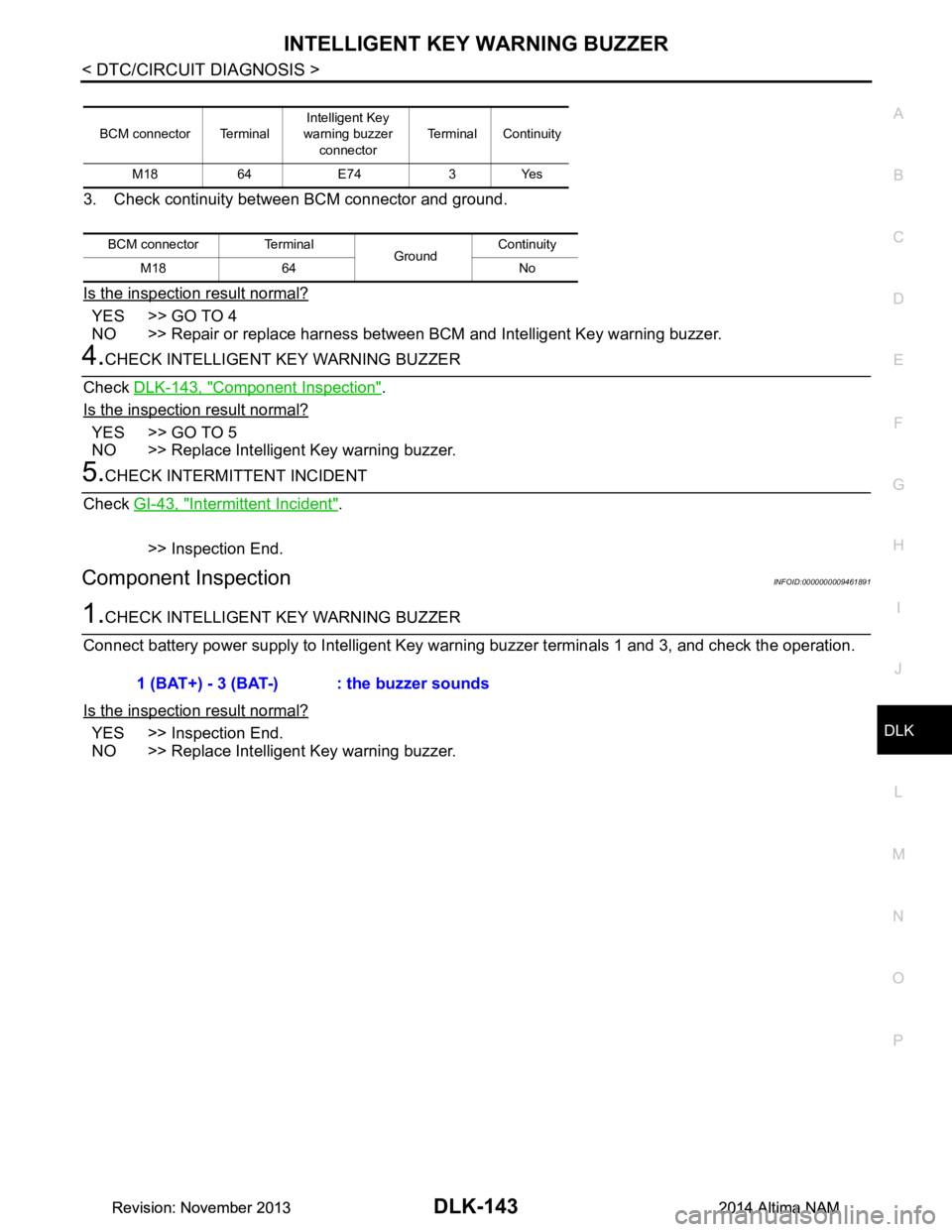
3. Check continuity between BCM connector and ground.
Is the inspection result normal?
YES >> GO TO 4
NO >> Repair or replace harness between BCM and Intelligent Key warning buzzer.
4.CHECK INTELLIGENT KEY WARNING BUZZER
Check DLK-143, "Component Inspection"
.
Is the inspection result normal?
YES >> GO TO 5
NO >> Replace Intelligent Key warning buzzer.
5.CHECK INTERMITTENT INCIDENT
Check GI-43, "Intermittent Incident"
.
>> Inspection End.
Component InspectionINFOID:0000000009461891
1.CHECK INTELLIGENT KEY WARNING BUZZER
Connect battery power supply to Intelligent Key wa rning buzzer terminals 1 and 3, and check the operation.
Is the inspection result normal?
YES >> Inspection End.
NO >> Replace Intelligent Key warning buzzer.
BCM connector Terminal Intelligent Key
warning buzzer
connector Terminal Continuity
M18 64 E74 3 Yes
BCM connector Terminal GroundContinuity
M18 64 No
1 (BAT+) - 3 (BAT-) : the buzzer sounds
Revision: November 20132014 Altima NAMRevision: November 20132014 Altima NAM
Page 913 of 4801
REMOTE KEYLESS ENTRY RECEIVERDLK-145
< DTC/CIRCUIT DIAGNOSIS >
C
D E
F
G H
I
J
L
M A
B
DLK
N
O P
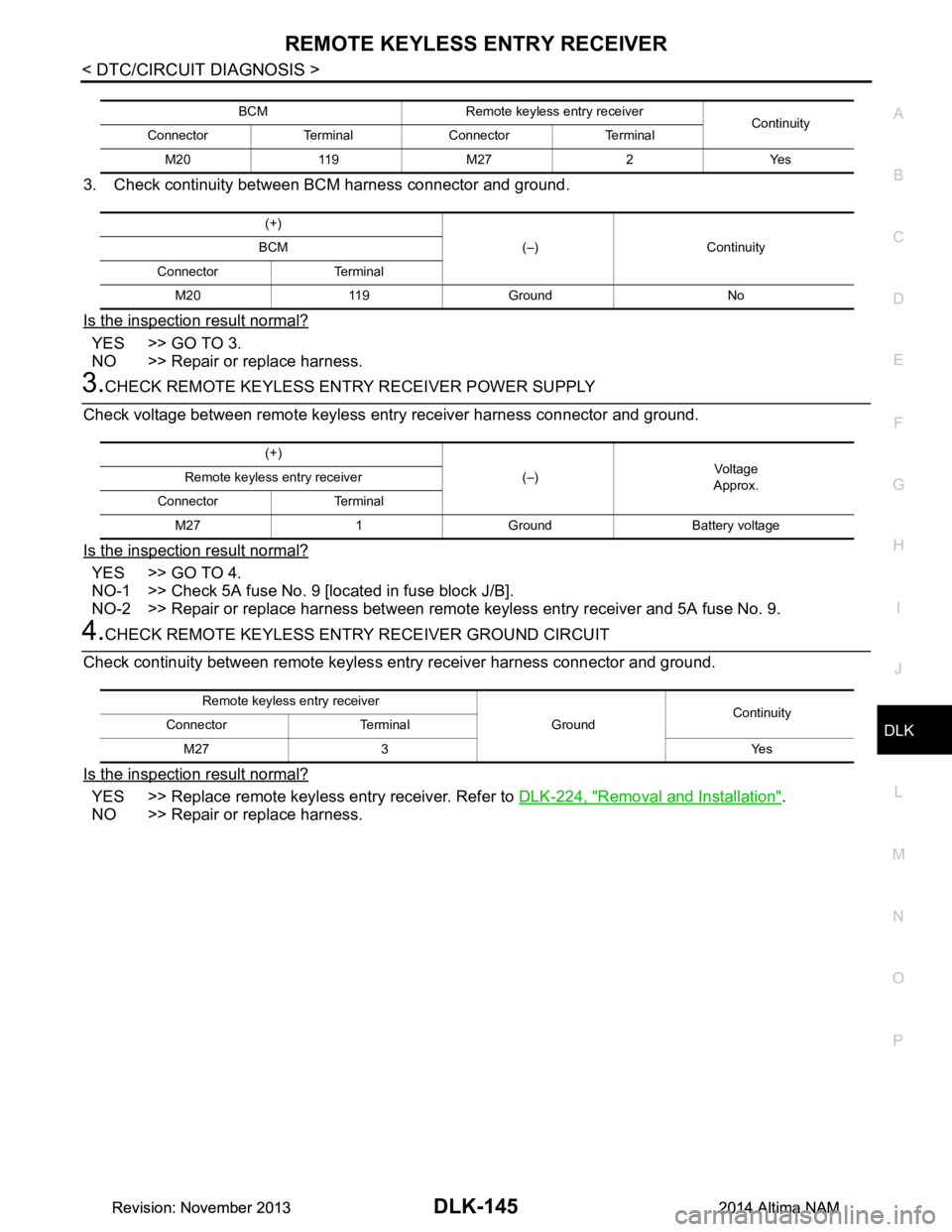
3. Check continuity between BCM harness connector and ground.
Is the inspection result normal?
YES >> GO TO 3.
NO >> Repair or replace harness.
3.CHECK REMOTE KEYLESS ENTRY RECEIVER POWER SUPPLY
Check voltage between remote keyless entry receiver harness connector and ground.
Is the inspection result normal?
YES >> GO TO 4.
NO-1 >> Check 5A fuse No. 9 [located in fuse block J/B].
NO-2 >> Repair or replace harness between remote keyless entry receiver and 5A fuse No. 9.
4.CHECK REMOTE KEYLESS ENTR Y RECEIVER GROUND CIRCUIT
Check continuity between remote keyles s entry receiver harness connector and ground.
Is the inspection result normal?
YES >> Replace remote keyless entry receiver. Refer to DLK-224, "Removal and Installation".
NO >> Repair or replace harness.
BCM Remote keyless entry receiver Continuity
Connector Terminal Connector Terminal
M20 119 M27 2 Yes
(+) (–) Continuity
BCM
Connector Terminal M20 119 Ground No
(+) (–)Vo l ta g e
Approx.
Remote keyless entry receiver
Connector Terminal M27 1 Ground Battery voltage
Remote keyless entry receiver GroundContinuity
Connector Terminal
M27 3 Yes
Revision: November 20132014 Altima NAMRevision: November 20132014 Altima NAM
Page 914 of 4801
DLK-146
< DTC/CIRCUIT DIAGNOSIS >
INTELLIGENT KEY BATTERY AND FUNCTION
INTELLIGENT KEY BATTERY AND FUNCTION
DescriptionINFOID:0000000009461895
The following functions are available when having and carrying the Intelligent Key.
• Door lock/unlock
• Trunk open
Remote control entry function and panic alarm functi on are available when operating the remote buttons.
Component Function CheckINFOID:0000000009461896
NOTE:
The Signal Tech II Tool (J-50190) can be used to perform the following functions. Refer to the Signal Tech II
User Guide for additional information.
• Check Intelligent Key relative signal strength
• Confirm vehicle Intelligent Key antenna signal strength
1.CHECK FUNCTION
With CONSULT
Check remote keyless entry receiver RKE OP E COUN1 in Data Monitor mode with CONSULT.
Is the inspection result normal?
YES >> Intelligent Key is OK.
NO >> Refer to DLK-146, "Diagnosis Procedure"
.
Diagnosis ProcedureINFOID:0000000009461897
NOTE:
The Signal Tech II Tool (J-50190) can be used to perform the following functions. Refer to the Signal Tech II
User Guide for additional information.
• Check Intelligent Key relative signal strength
• Confirm vehicle Intelligent Key antenna signal strength
1.CHECK INTELLIGENT KEY FUNCTION
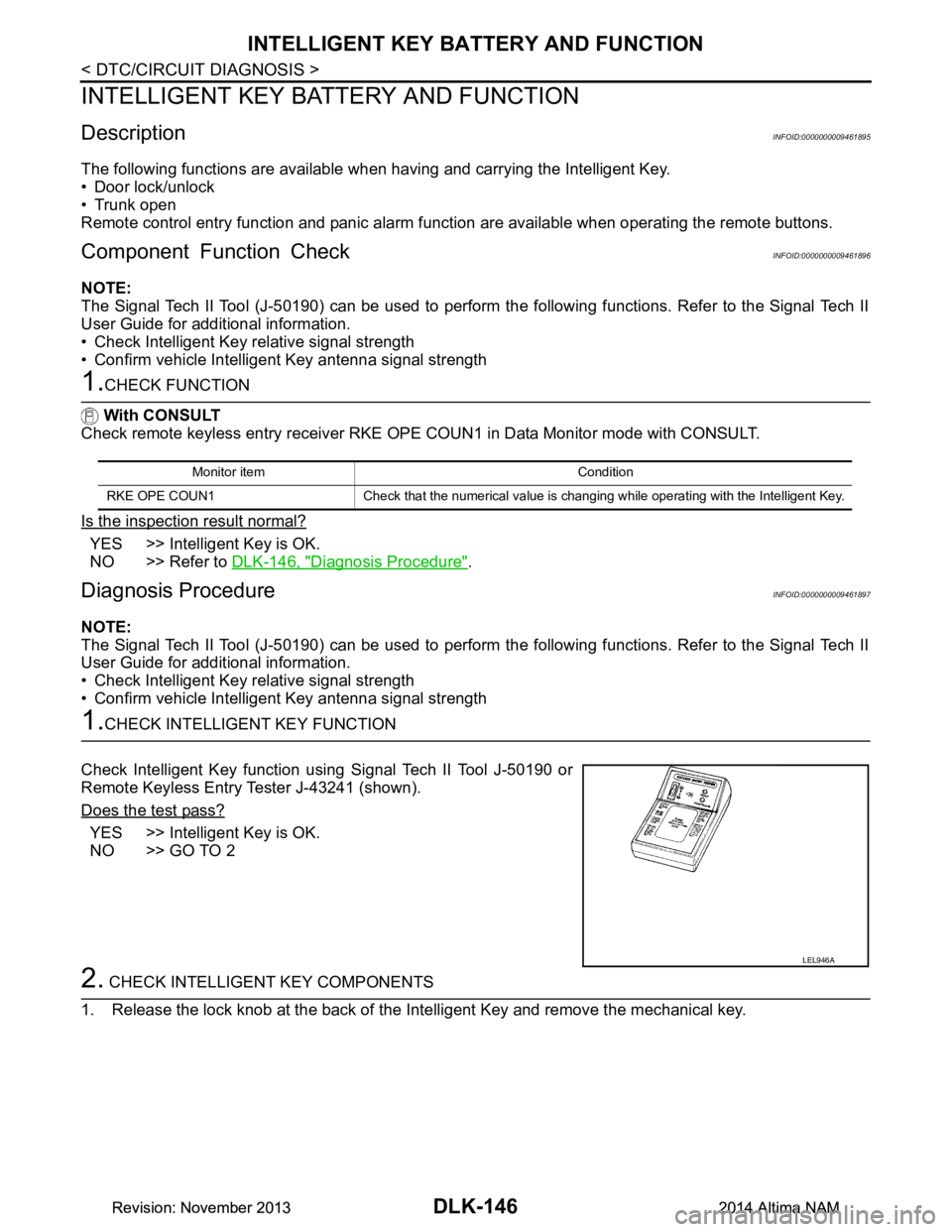
Check Intelligent Key function using Signal Tech II Tool J-50190 or
Remote Keyless Entry Tester J-43241 (shown).
Does the test pass?
YES >> Intelligent Key is OK.
NO >> GO TO 2
2. CHECK INTELLIGENT KEY COMPONENTS
1. Release the lock knob at the back of the In telligent Key and remove the mechanical key.
Monitor item Condition
RKE OPE COUN1 Check that the numerical value is changing while operating with the Intelligent Key.
LEL946A
Revision: November 20132014 Altima NAMRevision: November 20132014 Altima NAM
Page 915 of 4801
INTELLIGENT KEY BATTERY AND FUNCTIONDLK-147
< DTC/CIRCUIT DIAGNOSIS >
C
D E
F
G H
I
J
L
M A
B
DLK
N
O P
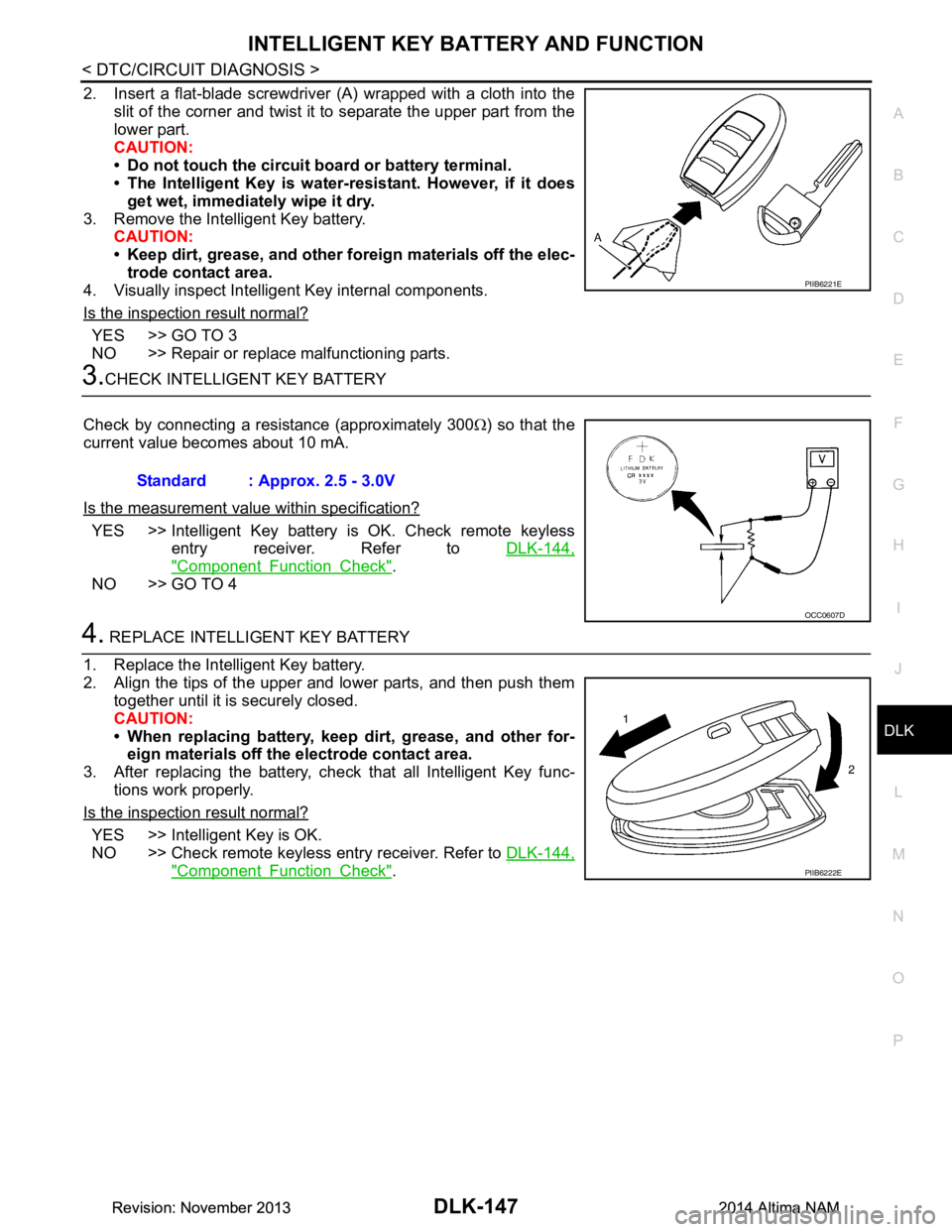
2. Insert a flat-blade screwdriver (A) wrapped with a cloth into the slit of the corner and twist it to separate the upper part from the
lower part.
CAUTION:
• Do not touch the circuit board or battery terminal.
• The Intelligent Key is water- resistant. However, if it does
get wet, immediately wipe it dry.
3. Remove the Intelligent Key battery. CAUTION:
• Keep dirt, grease, and other fo reign materials off the elec-
trode contact area.
4. Visually inspect Intelligent Key internal components.
Is the inspection result normal?
YES >> GO TO 3
NO >> Repair or replace malfunctioning parts.
3.CHECK INTELLIGENT KEY BATTERY
Check by connecting a resistance (approximately 300 Ω) so that the
current value becomes about 10 mA.
Is the measurement val ue within specification?
YES >> Intelligent Key battery is OK. Check remote keyless
entry receiver. Refer to DLK-144,
"Component Function Check".
NO >> GO TO 4
4. REPLACE INTELLIGENT KEY BATTERY
1. Replace the Intelligent Key battery.
2. Align the tips of the upper and lower parts, and then push them together until it is securely closed.
CAUTION:
• When replacing battery, keep dirt, grease, and other for- eign materials off the electrode contact area.
3. After replacing the battery, check that all Intelligent Key func-
tions work properly.
Is the inspection result normal?
YES >> Intelligent Key is OK.
NO >> Check remote keyless entry receiver. Refer to DLK-144,
"Component Function Check".
PIIB6221E
Standard : Approx. 2.5 - 3.0V
OCC0607D
PIIB6222E
Revision: November 20132014 Altima NAMRevision: November 20132014 Altima NAM
Page 918 of 4801
DLK-150
< DTC/CIRCUIT DIAGNOSIS >
HOMELINK UNIVERSAL TRANSCEIVER
HOMELINK UNIVERSAL TRANSCEIVER
DescriptionINFOID:0000000009461904
Homelink universal transceiver can store and transmit a maximum of 3 radio signals.
Allows operation of garage doors, gates, home and office lighting, entry door locks and security system, etc.
Homelink universal transceiver power supply uses vehicl e battery, which enables it to maintain every program
in case battery is discharged or removed.
Component Function CheckINFOID:0000000009461905
1.CHECK FUNCTION
Check that system receiver (garage door opener, et c.) operates with original hand-held transmitter.
Is the inspection result normal?
YES >> GO TO 2
NO >> Receiver or hand-held transmitter is malfunctioning.
2.CHECK ILLUMINATE
1. Turn ignition switch “OFF”.
2. Press each of the transmitter buttons and watch for the red light to illuminate with each button.
Is the inspection result normal?
YES >> GO TO 3
NO >> Refer to DLK-150, "Diagnosis Procedure"
.
3.CHECK TRANSMITTER
Check transmitter with Tool*.
*:For details, refer to Technical Service Bulletin.
Is the inspection result normal?
YES >> Receiver or hand-held transmitter malfunction, not vehicle related.
NO >> Replace auto anti-dazzling inside mirror (homelink universal transceiver). Refer to MIR-19,
"Removal and Installation".
Diagnosis ProcedureINFOID:0000000009461906
Regarding Wiring Diagram information, refer to DLK-49, "Wiring Diagram".
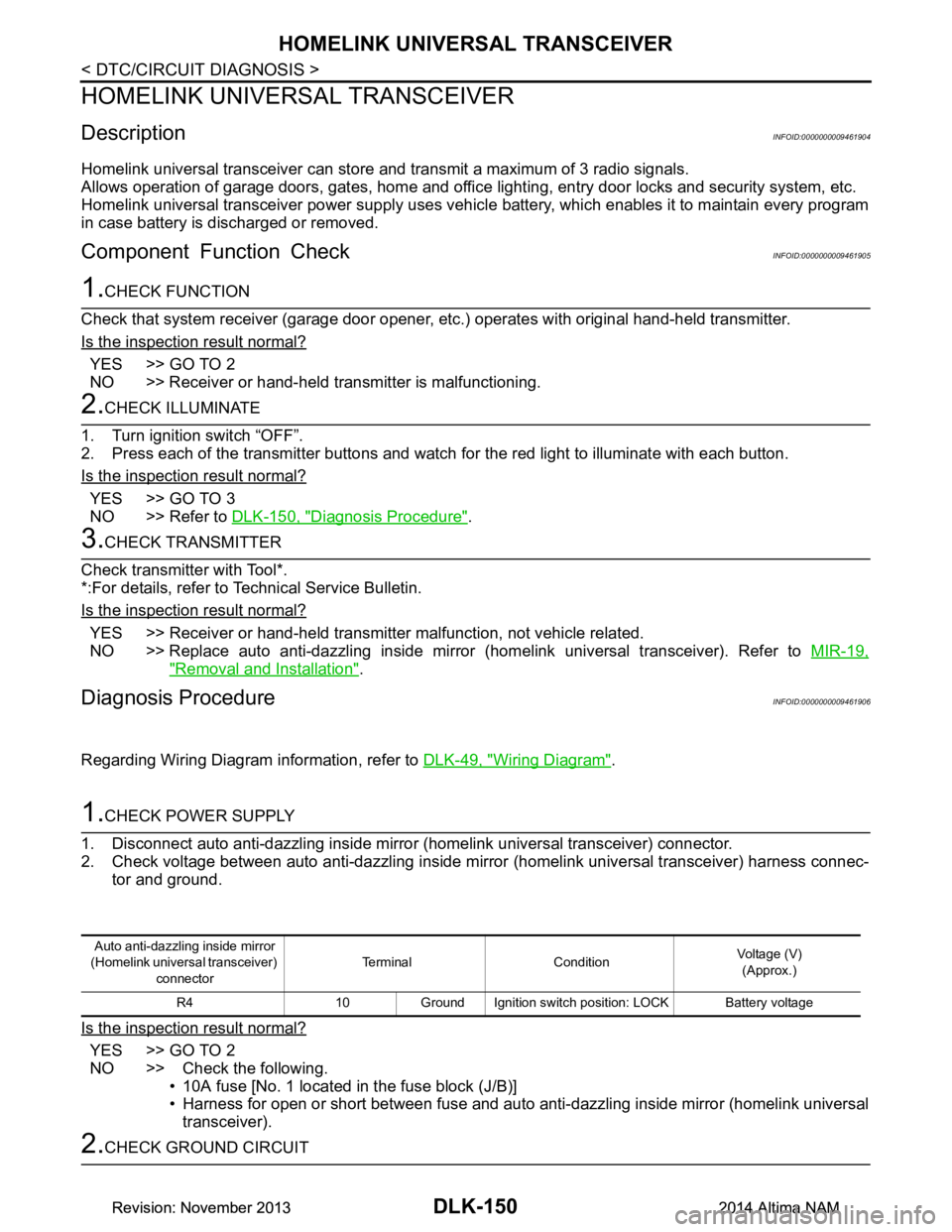
1.CHECK POWER SUPPLY
1. Disconnect auto anti-dazzling inside mirror (homelink universal transceiver) connector.
2. Check voltage between auto anti-dazzling inside mirror (homelink universal transceiver) harness connec-
tor and ground.
Is the inspection result normal?
YES >> GO TO 2
NO >> Check the following. • 10A fuse [No. 1 located in the fuse block (J/B)]
• Harness for open or short between fuse and auto anti-dazzling inside mirror (homelink universal
transceiver).
2.CHECK GROUND CIRCUIT
Auto anti-dazzling inside mirror
(Homelink universal transceiver) connector Terminal Condition
Voltage (V)
(Approx.)
R4 10 Ground Ignition switch position: LOCK Battery voltage
Revision: November 20132014 Altima NAMRevision: November 20132014 Altima NAM