height NISSAN TEANA 2014 User Guide
[x] Cancel search | Manufacturer: NISSAN, Model Year: 2014, Model line: TEANA, Model: NISSAN TEANA 2014Pages: 4801, PDF Size: 51.2 MB
Page 536 of 4801
![NISSAN TEANA 2014 User Guide
DAS
PRE-INSPECTION FOR DIAGNOSISDAS-103
< BASIC INSPECTION > [LDW]
C
D E
F
G H
I
J
K L
M B
N P
A
PRE-INSPECTION FOR DIAGNOSIS
Inspection ProcedureINFOID:0000000009464736
1.CHECK CAMERA LENS
Is came](/img/5/57390/w960_57390-535.png "NISSAN TEANA 2014 User Guide
DAS
PRE-INSPECTION FOR DIAGNOSISDAS-103
< BASIC INSPECTION > [LDW]
C
D E
F
G H
I
J
K L
M B
N P
A
PRE-INSPECTION FOR DIAGNOSIS
Inspection ProcedureINFOID:0000000009464736
1.CHECK CAMERA LENS
Is came")
DAS
PRE-INSPECTION FOR DIAGNOSISDAS-103
< BASIC INSPECTION > [LDW]
C
D E
F
G H
I
J
K L
M B
N P
A
PRE-INSPECTION FOR DIAGNOSIS
Inspection ProcedureINFOID:0000000009464736
1.CHECK CAMERA LENS
Is camera lens contaminated with foreign materials?
YES >> Clean camera lens.
NO >> GO TO 2.
2.CHECK REAR VIEW CAMERA UNIT INSTALLATION CONDITION
Check rear view camera unit installation condi tion (installation position, properly fitted).
Is it properly installed?
YES >> GO TO 3.
NO >> Install rear view camera unit properly, and perform rear view camera calibration. Refer to DAS-
107, "Description".
3.CHECK VEHICLE HEIGHT
Check vehicle height. Refer to FSU-26, "Wheelarch Height (Unladen*
1)".
Is vehicle height appropriate?
YES >> Inspection End.
NO >> Repair vehicle to appropriate height.
Revision: November 20132014 Altima NAMRevision: November 20132014 Altima NAM
Page 542 of 4801
![NISSAN TEANA 2014 User Guide
DAS
REAR VIEW CAMERA CALIBRATIONDAS-109
< BASIC INSPECTION > [LDW]
C
D E
F
G H
I
J
K L
M B
N P
A
CAUTION:
Make sure that the black/white pattern of the center target is rotated as compared with t](/img/5/57390/w960_57390-541.png "NISSAN TEANA 2014 User Guide
DAS
REAR VIEW CAMERA CALIBRATIONDAS-109
< BASIC INSPECTION > [LDW]
C
D E
F
G H
I
J
K L
M B
N P
A
CAUTION:
Make sure that the black/white pattern of the center target is rotated as compared with t")
DAS
REAR VIEW CAMERA CALIBRATIONDAS-109
< BASIC INSPECTION > [LDW]
C
D E
F
G H
I
J
K L
M B
N P
A
CAUTION:
Make sure that the black/white pattern of the center target is rotated as compared with the left and
right targets.
>> Go to DAS-109, "Work Procedure (Rear View Camera Calibration)"
.
Work Procedure (Rear Vi ew Camera Calibration)INFOID:0000000009464744
CAUTION:
Perform the calibration under the sp ecified vehicle condition (fuel full, no-load, specified tire pressure,
etc.). Refer to DAS-107, "Work Procedure (Preparation)"
.
1.CHECK REAR VIEW CAMERA HEIGHT
Measure the rear view camera height “H”.
>> GO TO 2.
2.REAR VIEW CAMERA CALIBRATION
1. Select “Work Support” on “AVM” with CONSULT.
2. Select “REAR CAMERA ITS”.
3. Select "OK". CAUTION:
• Perform the calibration after the ignition or en gine has been kept on for at least 10 minutes to
stabilize camera.
• Operate CONSULT outside the vehicle, and close al l doors to retain appropriate vehicle altitude.
4. Input the rear view camera height "H", and then touch "APPLY".
5. Confirm that the same value is displayed on the center display.
6. Confirm the following items:
- The target should be accurately placed.
- The vehicle should be stopped.
- The vehicle should be under the specified vehicle condition.
7. Select “Start” to perform calibration.
8. Confirm the displayed item.
- “Completed”: Select “Completion”.
- Otherwise, perform the following services:
ALOIA0192GB
ALOIA0188ZZ
Revision: November 20132014 Altima NAMRevision: November 20132014 Altima NAM
Page 611 of 4801
![NISSAN TEANA 2014 User Guide
DAS-178
< BASIC INSPECTION >[BSW]
PRE-INSPECTION FOR DIAGNOSIS
PRE-INSPECTION
FOR DIAGNOSIS
Inspection ProcedureINFOID:0000000009464820
1.CHECK CAMERA LENS
Is camera lens contaminated with foreign m](/img/5/57390/w960_57390-610.png "NISSAN TEANA 2014 User Guide
DAS-178
< BASIC INSPECTION >[BSW]
PRE-INSPECTION FOR DIAGNOSIS
PRE-INSPECTION
FOR DIAGNOSIS
Inspection ProcedureINFOID:0000000009464820
1.CHECK CAMERA LENS
Is camera lens contaminated with foreign m")
DAS-178
< BASIC INSPECTION >[BSW]
PRE-INSPECTION FOR DIAGNOSIS
PRE-INSPECTION
FOR DIAGNOSIS
Inspection ProcedureINFOID:0000000009464820
1.CHECK CAMERA LENS
Is camera lens contaminated with foreign materials?
YES >> Clean camera lens.
NO >> GO TO 2.
2.CHECK REAR VIEW CAMERA UNIT INSTALLATION CONDITION
Check rear view camera unit installation condition (installation position, properly fitted).
Is it properly installed?
YES >> GO TO 3.
NO >> Install rear view camera unit properly, and perform rear view camera calibration. Refer to DAS-
182, "Description".
3.CHECK VEHICLE HEIGHT
Check vehicle height. Refer to FSU-26, "Wheelarch Height (Unladen*
1)".
Is vehicle height appropriate?
YES >> Inspection End.
NO >> Repair vehicle to appropriate height.
Revision: November 20132014 Altima NAMRevision: November 20132014 Altima NAM
Page 617 of 4801
![NISSAN TEANA 2014 User Guide
DAS-184
< BASIC INSPECTION >[BSW]
REAR VIEW CAMERA CALIBRATION
CAUTION:
Make sure that the black/white pattern of the center target is rotated as compared with the left and
right targets.
>> Go to](/img/5/57390/w960_57390-616.png "NISSAN TEANA 2014 User Guide
DAS-184
< BASIC INSPECTION >[BSW]
REAR VIEW CAMERA CALIBRATION
CAUTION:
Make sure that the black/white pattern of the center target is rotated as compared with the left and
right targets.
>> Go to")
DAS-184
< BASIC INSPECTION >[BSW]
REAR VIEW CAMERA CALIBRATION
CAUTION:
Make sure that the black/white pattern of the center target is rotated as compared with the left and
right targets.
>> Go to DAS-184, "Work Procedure (Rear View Camera Calibration)"
.
Work Procedure (Rear View Camera Calibration)INFOID:0000000009464828
CAUTION:
Perform the calibration under the sp ecified vehicle condition (fuel full, no-load, specified tire pressure,
etc.). Refer to DAS-182, "Work Procedure (Preparation)"
.
1.CHECK REAR VIEW CAMERA HEIGHT
Measure the rear view camera height “H”.
>> GO TO 2.
2.REAR VIEW CAMERA CALIBRATION
1. Select “Work Support” on “AVM” with CONSULT.
2. Select “REAR CAMERA ITS”.
3. Select "OK". CAUTION:
• Perform the calibration after the ignition or engine has been kept on for at least 10 minutes to
stabilize camera.
• Operate CONSULT outside the vehicle, and close al l doors to retain appropriate vehicle altitude.
4. Input the rear view camera height "H", and then touch "APPLY".
5. Confirm that the same value is displayed on the center display.
6. Confirm the following items:
- The target should be accurately placed.
- The vehicle should be stopped.
- The vehicle should be under the specified vehicle condition.
7. Select “Start” to perform calibration.
8. Confirm the displayed item.
- “Completed”: Select “Completion”.
- Otherwise, perform the following services:
ALOIA0192GB
ALOIA0188ZZ
Revision: November 20132014 Altima NAMRevision: November 20132014 Altima NAM
Page 686 of 4801
![NISSAN TEANA 2014 User Guide
DAS
PRE-INSPECTION FOR DIAGNOSISDAS-253
< BASIC INSPECTION > [MOD]
C
D E
F
G H
I
J
K L
M B
N P
A
PRE-INSPECTION FOR DIAGNOSIS
Inspection ProcedureINFOID:0000000009464901
1.CHECK CAMERA LENS
Is came](/img/5/57390/w960_57390-685.png "NISSAN TEANA 2014 User Guide
DAS
PRE-INSPECTION FOR DIAGNOSISDAS-253
< BASIC INSPECTION > [MOD]
C
D E
F
G H
I
J
K L
M B
N P
A
PRE-INSPECTION FOR DIAGNOSIS
Inspection ProcedureINFOID:0000000009464901
1.CHECK CAMERA LENS
Is came")
DAS
PRE-INSPECTION FOR DIAGNOSISDAS-253
< BASIC INSPECTION > [MOD]
C
D E
F
G H
I
J
K L
M B
N P
A
PRE-INSPECTION FOR DIAGNOSIS
Inspection ProcedureINFOID:0000000009464901
1.CHECK CAMERA LENS
Is camera lens contaminated with foreign materials?
YES >> Clean camera lens.
NO >> GO TO 2.
2.CHECK REAR VIEW CAMERA UNIT INSTALLATION CONDITION
Check rear view camera unit installation condi tion (installation position, properly fitted).
Is it properly installed?
YES >> GO TO 3.
NO >> Install rear view camera unit properly, and perform rear view camera calibration. Refer to DAS-
256, "Description".
3.CHECK VEHICLE HEIGHT
Check vehicle height. Refer to FSU-26, "Wheelarch Height (Unladen*
1)".
Is vehicle height appropriate?
YES >> Inspection End.
NO >> Repair vehicle to appropriate height.
Revision: November 20132014 Altima NAMRevision: November 20132014 Altima NAM
Page 691 of 4801
![NISSAN TEANA 2014 User Guide
DAS-258
< BASIC INSPECTION >[MOD]
REAR VIEW CAMERA CALIBRATION
CAUTION:
Make sure that the black/white pattern of the center target is rotated as compared with the left and
right targets.
>> Go to](/img/5/57390/w960_57390-690.png "NISSAN TEANA 2014 User Guide
DAS-258
< BASIC INSPECTION >[MOD]
REAR VIEW CAMERA CALIBRATION
CAUTION:
Make sure that the black/white pattern of the center target is rotated as compared with the left and
right targets.
>> Go to")
DAS-258
< BASIC INSPECTION >[MOD]
REAR VIEW CAMERA CALIBRATION
CAUTION:
Make sure that the black/white pattern of the center target is rotated as compared with the left and
right targets.
>> Go to DAS-258, "Work Procedure (Rear View Camera Calibration)"
.
Work Procedure (Rear View Camera Calibration)INFOID:0000000009464909
CAUTION:
Perform the calibration under the sp ecified vehicle condition (fuel full, no-load, specified tire pressure,
etc.). Refer to DAS-256, "Work Procedure (Preparation)"
.
1.CHECK REAR VIEW CAMERA HEIGHT
Measure the rear view camera height “H”.
>> GO TO 2.
2.REAR VIEW CAMERA CALIBRATION
1. Select “Work Support” on “AVM” with CONSULT.
2. Select “REAR CAMERA ITS”.
3. Select "OK". CAUTION:
• Perform the calibration after the ignition or engine has been kept on for at least 10 minutes to
stabilize camera.
• Operate CONSULT outside the vehicle, and close al l doors to retain appropriate vehicle altitude.
4. Input the rear view camera height "H", and then touch "APPLY".
5. Confirm that the same value is displayed on the center display.
6. Confirm the following items:
- The target should be accurately placed.
- The vehicle should be stopped.
- The vehicle should be under the specified vehicle condition.
7. Select “Start” to perform calibration.
8. Confirm the displayed item.
- “Completed”: Select “Completion”.
- Otherwise, perform the following services:
ALOIA0192GB
ALOIA0188ZZ
Revision: November 20132014 Altima NAMRevision: November 20132014 Altima NAM
Page 940 of 4801
DLK-172
< REMOVAL AND INSTALLATION >
HOOD
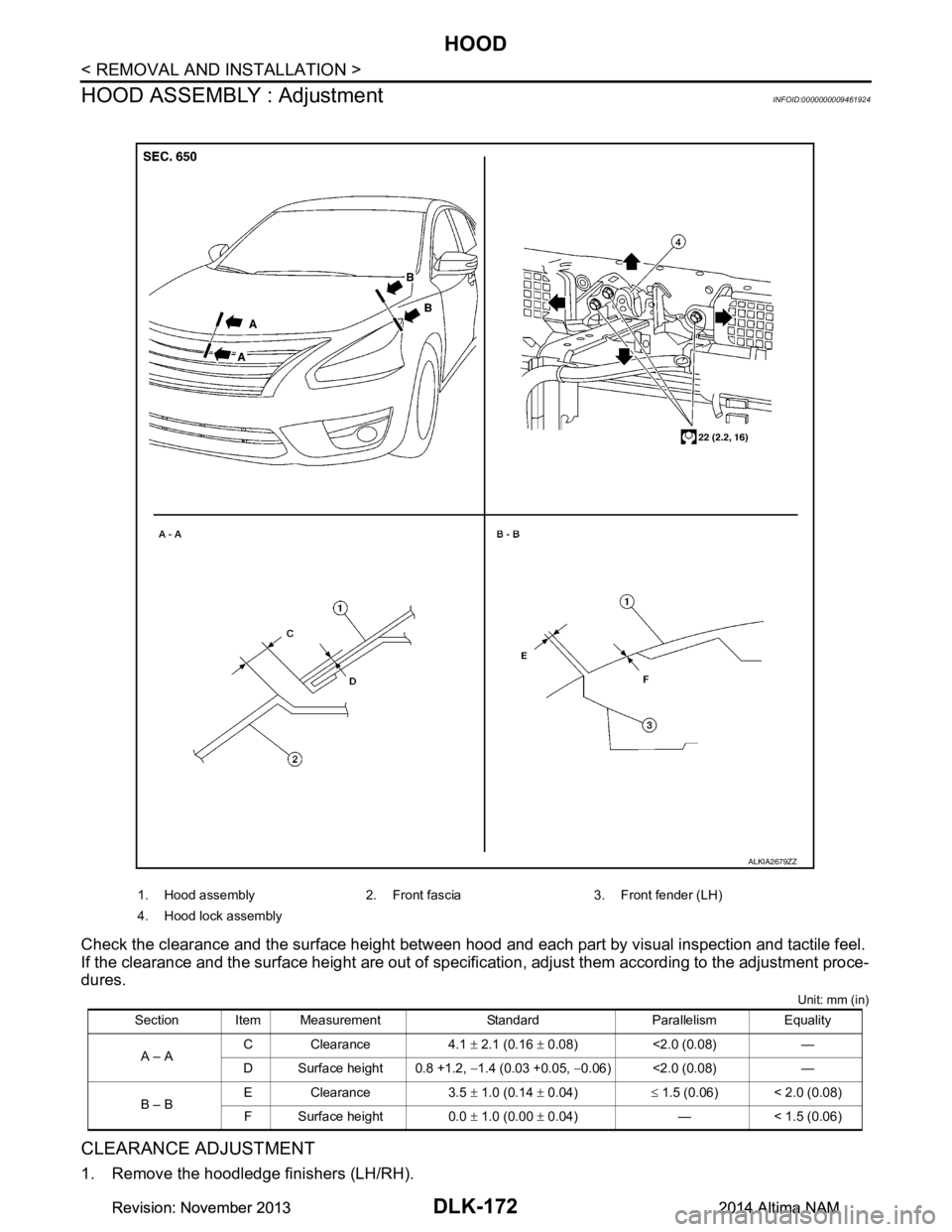
HOOD ASSEMBLY : Adjustment
INFOID:0000000009461924
Check the clearance and the surface height between hood and each part by visual inspection and tactile feel.
If the clearance and the surface height are out of specific ation, adjust them according to the adjustment proce-
dures.
Unit: mm (in)
CLEARANCE ADJUSTMENT
1. Remove the hoodledge finishers (LH/RH).
1. Hood assembly 2. Front fascia 3. Front fender (LH)
4. Hood lock assembly
Section Item Measurement Standard Parallelism Equality A – A C Clearance 4.1
± 2.1 (0.16 ± 0.08) <2.0 (0.08) —
D Surface height 0.8 +1.2, −1.4 (0.03 +0.05, −0.06) <2.0 (0.08) —
B – B E Clearance 3.5
± 1.0 (0.14 ± 0.04) ≤ 1.5 (0.06) < 2.0 (0.08)
F Surface height 0.0 ± 1.0 (0.00 ± 0.04) — < 1.5 (0.06)
ALKIA2679ZZ
Revision: November 20132014 Altima NAMRevision: November 20132014 Altima NAM
Page 941 of 4801
HOOD
DLK-173
< REMOVAL AND INSTALLATION >
C
D E
F
G H
I
J
L
M A
B
DLK
N
O P
2. Remove cowl top side trim covers (LH/RH). Refer to EXT-24, "Removal and Installation".
3. Loosen hood hinge (LH/RH) nuts and bolts. NOTE:
The anticorrosive agent applied between the hoodledge and the hood hinges also acts as an adhesive.
This seal must be broken before the hinges will move.
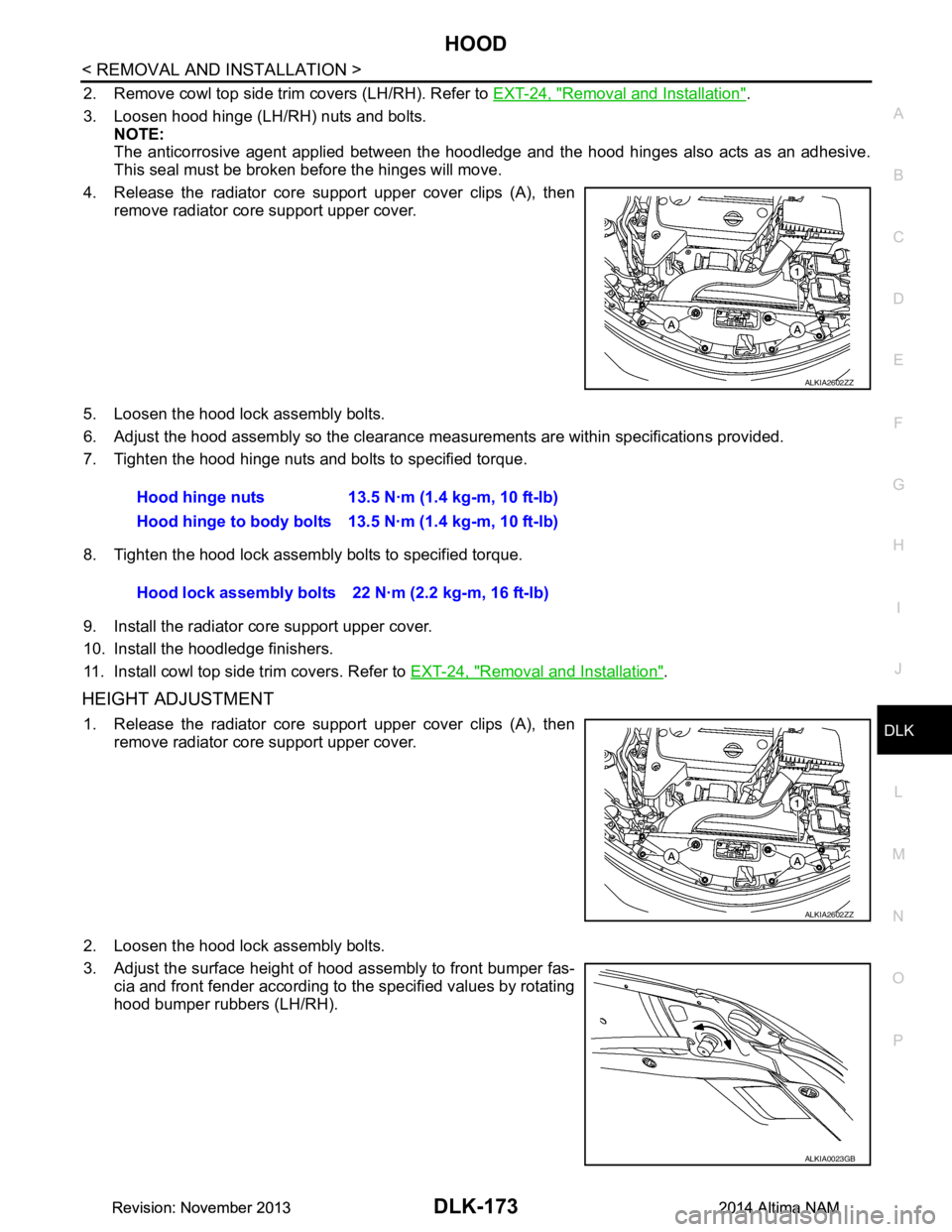
4. Release the radiator core support upper cover clips (A), then remove radiator core support upper cover.
5. Loosen the hood lock assembly bolts.
6. Adjust the hood assembly so the clearance m easurements are within specifications provided.
7. Tighten the hood hinge nuts and bolts to specified torque.
8. Tighten the hood lock assembly bolts to specified torque.
9. Install the radiator core support upper cover.
10. Install the hoodledge finishers.
11. Install cowl top side trim covers. Refer to EXT-24, "Removal and Installation"
.
HEIGHT ADJUSTMENT
1. Release the radiator core support upper cover clips (A), then
remove radiator core support upper cover.
2. Loosen the hood lock assembly bolts.
3. Adjust the surface height of hood assembly to front bumper fas- cia and front fender according to the specified values by rotating
hood bumper rubbers (LH/RH).
ALKIA2602ZZ
Hood hinge nuts 13.5 N·m (1.4 kg-m, 10 ft-lb)
Hood hinge to body bolts 13.5 N·m (1.4 kg-m, 10 ft-lb)
Hood lock assembly bolts 22 N·m (2.2 kg-m, 16 ft-lb)
ALKIA2602ZZ
ALKIA0023GB
Revision: November 20132014 Altima NAMRevision: November 20132014 Altima NAM
Page 942 of 4801
DLK-174
< REMOVAL AND INSTALLATION >
HOOD
4. Temporarily tighten hood lock assembly bolts.
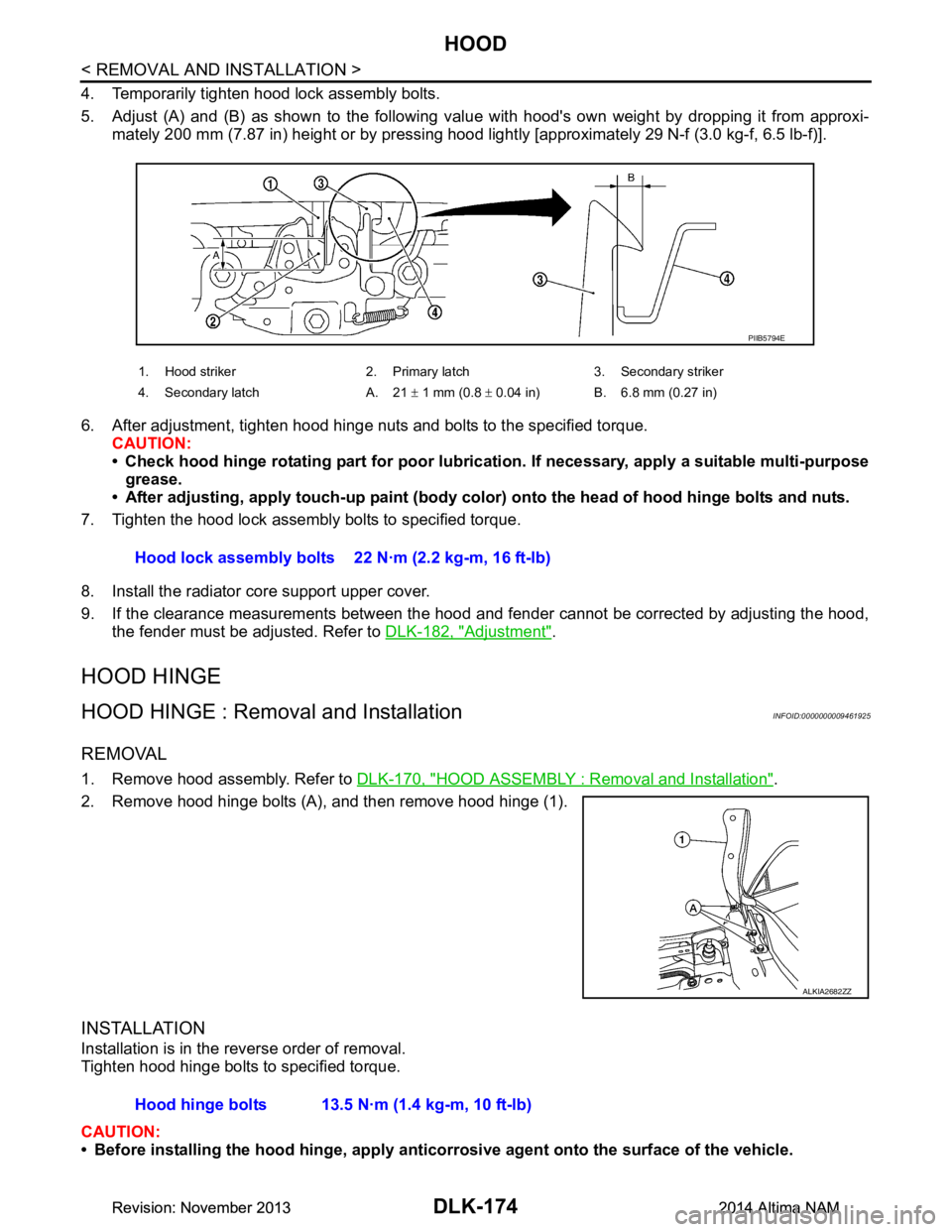
5. Adjust (A) and (B) as shown to the following val ue with hood's own weight by dropping it from approxi-
mately 200 mm (7.87 in) height or by pressing hood light ly [approximately 29 N-f (3.0 kg-f, 6.5 lb-f)].
6. After adjustment, tighten hood hinge nuts and bolts to the specified torque. CAUTION:
• Check hood hinge rotating part for poor lubrication. If necessary, apply a suitable multi-purpose
grease.
• After adjusting, apply touch-up paint (body color) onto the head of hood hinge bolts and nuts.
7. Tighten the hood lock assembly bolts to specified torque.
8. Install the radiator core support upper cover.
9. If the clearance measurements between the hood and fender cannot be corrected by adjusting the hood,
the fender must be adjusted. Refer to DLK-182, "Adjustment"
.
HOOD HINGE
HOOD HINGE : Removal and InstallationINFOID:0000000009461925
REMOVAL
1. Remove hood assembly. Refer to DLK-170, "HOOD ASSEMBLY : Removal and Installation".
2. Remove hood hinge bolts (A), and then remove hood hinge (1).
INSTALLATION
Installation is in the reverse order of removal.
Tighten hood hinge bolts to specified torque.
CAUTION:
• Before installing the hood hinge, apply anticorrosive agent onto the surface of the vehicle.
1. Hood striker 2. Primary latch 3. Secondary striker
4. Secondary latch A. 21 ± 1 mm (0.8 ± 0.04 in) B. 6.8 mm (0.27 in)
PIIB5794E
Hood lock assembly bolts 22 N·m (2.2 kg-m, 16 ft-lb)
ALKIA2682ZZ
Hood hinge bolts 13.5 N·m (1.4 kg-m, 10 ft-lb)
Revision: November 20132014 Altima NAMRevision: November 20132014 Altima NAM
Page 950 of 4801
DLK-182
< REMOVAL AND INSTALLATION >
FRONT FENDER
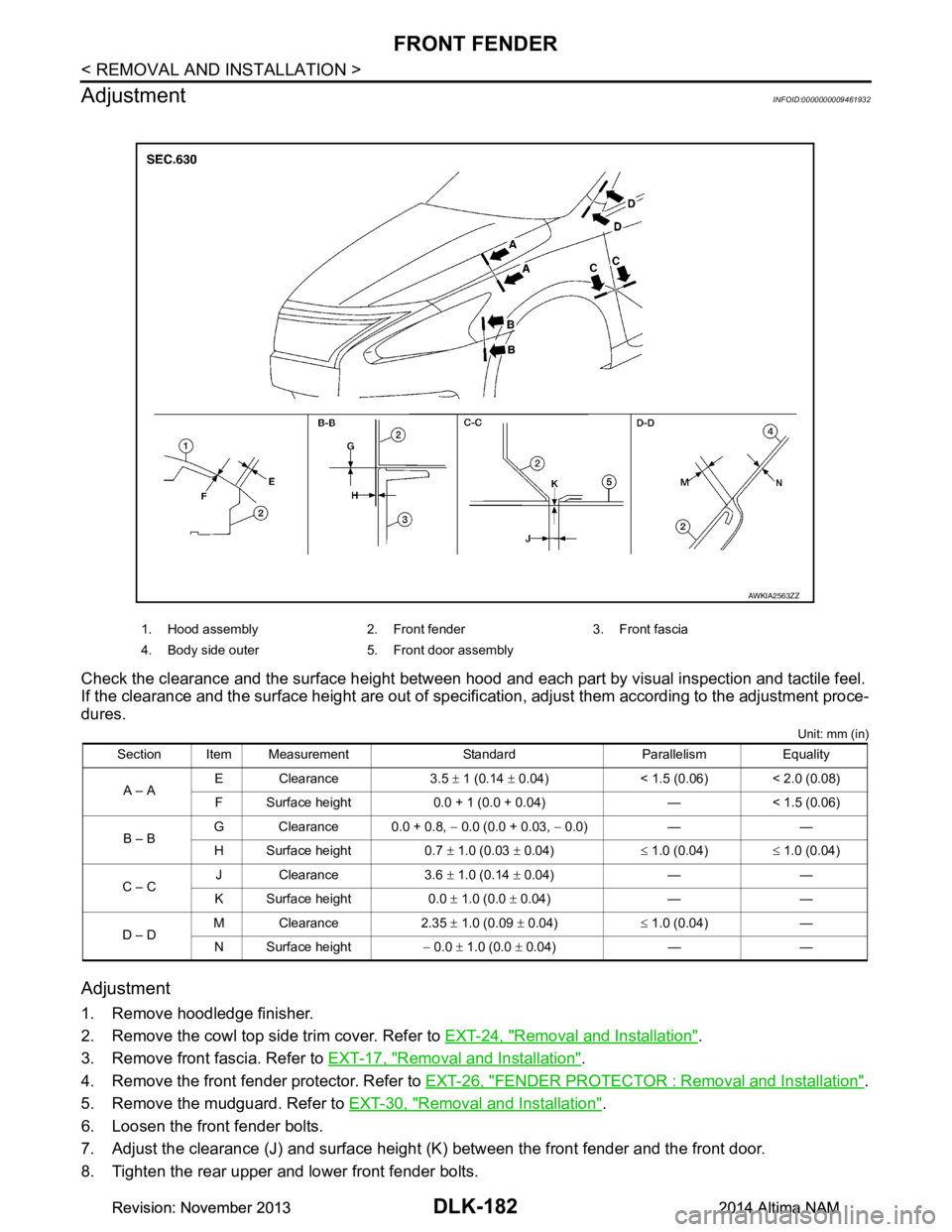
Adjustment
INFOID:0000000009461932
Check the clearance and the surface height between hood and each part by visual inspection and tactile feel.
If the clearance and the surface height are out of specific ation, adjust them according to the adjustment proce-
dures.
Unit: mm (in)
Adjustment
1. Remove hoodledge finisher.
2. Remove the cowl top side trim cover. Refer to EXT-24, "Removal and Installation"
.
3. Remove front fascia. Refer to EXT-17, "Removal and Installation"
.
4. Remove the front fender protector. Refer to EXT-26, "FENDER PROTECTOR : Removal and Installation"
.
5. Remove the mudguard. Refer to EXT-30, "Removal and Installation"
.
6. Loosen the front fender bolts.
7. Adjust the clearance (J) and surface height (K ) between the front fender and the front door.
8. Tighten the rear upper and lower front fender bolts.
1. Hood assembly 2. Front fender 3. Front fascia
4. Body side outer 5. Front door assembly
Section Item Measurement Standard Parallelism Equality A – A E Clearance 3.5
± 1 (0.14 ± 0.04) < 1.5 (0.06) < 2.0 (0.08)
F Surface height 0.0 + 1 (0.0 + 0.04) — < 1.5 (0.06)
B – B G Clearance 0.0 + 0.8,
− 0.0 (0.0 + 0.03, − 0.0) — —
H Surface height 0.7 ± 1.0 (0.03 ± 0.04) ≤ 1.0 (0.04) ≤ 1.0 (0.04)
C – C J Clearance 3.6
± 1.0 (0.14 ± 0.04) — —
K Surface height 0.0 ± 1.0 (0.0 ± 0.04) — —
D – D M Clearance 2.35
± 1.0 (0.09 ± 0.04) ≤ 1.0 (0.04) —
N Surface height − 0.0 ± 1.0 (0.0 ± 0.04) — —
AWKIA2563ZZ
Revision: November 20132014 Altima NAMRevision: November 20132014 Altima NAM