ECO mode NISSAN TEANA 2014 Service Manual
[x] Cancel search | Manufacturer: NISSAN, Model Year: 2014, Model line: TEANA, Model: NISSAN TEANA 2014Pages: 4801, PDF Size: 51.2 MB
Page 3589 of 4801
![NISSAN TEANA 2014 Service Manual
PWC-82
< ECU DIAGNOSIS INFORMATION >[LH & RH FRONT ANTI-PINCH]
FRONT POWER WINDOW SWITCH
Fail SafeINFOID:0000000009460905
FAIL-SAFE CONTROL
Switches to fail-safe control when malfunction is
detect](/img/5/57390/w960_57390-3588.png "NISSAN TEANA 2014 Service Manual
PWC-82
< ECU DIAGNOSIS INFORMATION >[LH & RH FRONT ANTI-PINCH]
FRONT POWER WINDOW SWITCH
Fail SafeINFOID:0000000009460905
FAIL-SAFE CONTROL
Switches to fail-safe control when malfunction is
detect")
PWC-82
< ECU DIAGNOSIS INFORMATION >[LH & RH FRONT ANTI-PINCH]
FRONT POWER WINDOW SWITCH
Fail SafeINFOID:0000000009460905
FAIL-SAFE CONTROL
Switches to fail-safe control when malfunction is
detected in encoder signal that detects up/down speed and
direction of door glass. Switches to fail-safe cont rol when error beyond regulation value is detected between
the fully closed position and the actual position of the glass.
It changes to condition before initialization and the fo llowing functions do not operate when switched to fail-
safe control.
• Auto-up operation
• Anti-pinch function
• Retained power function
Perform initial operation to recover when switched to fa il-safe mode. However, it switches back to fail-safe
control when malfunction is found in power window switch or in motor.
11
(R) 12Power window motor
UP signal OutputWhen power window motor is
UP at operated. Battery voltage
12
(P) 11
Power window motor
DOWN signal Output
When power window motor is
DOWN at operated. Battery voltage
Terminal No. Description
ConditionVoltag e
(Approx.)
+ - Signal name Input/
Output
Error Error condition
Pulse sensor malfunction When only one side of pulse signal is being detected for more than the specified value.
Both pulse sensors mal-
function When both pulse signals have not been detected for more than the specified value during glass open/
close operation.
Pulse direction malfunction When the pulse signal that is detected during glass open/close operation detects the opposite condition
of power window motor operating direction.
Glass recognition position
malfunction 1 When it detects the error between glass fully closed position in power window switch memory and actual
fully closed position during glass open/close operation is more than the specified value.
Glass recognition position
malfunction 2 When it detects pulse count more than the value of glass full stroke during glass open/close operation.
Malfunction of not yet up-
dated closed position of
glass When glass open/close operation is continuously performed without fully closing more than the specified
value (approximately 10 strokes).
Revision: November 20132014 Altima NAMRevision: November 20132014 Altima NAM
Page 3600 of 4801
![NISSAN TEANA 2014 Service Manual
INSPECTION AND ADJUSTMENTPWC-93
< BASIC INSPECTION > [LH & RH FRONT ANTI-PINCH]
C
D E
F
G H
I
J
L
M A
B
PWC
N
O P
INSPECTION AND ADJUSTMENT
ADDITIONAL SERVICE WHEN REMOVI NG BATTERY NEGATIVE TERMIN](/img/5/57390/w960_57390-3599.png "NISSAN TEANA 2014 Service Manual
INSPECTION AND ADJUSTMENTPWC-93
< BASIC INSPECTION > [LH & RH FRONT ANTI-PINCH]
C
D E
F
G H
I
J
L
M A
B
PWC
N
O P
INSPECTION AND ADJUSTMENT
ADDITIONAL SERVICE WHEN REMOVI NG BATTERY NEGATIVE TERMIN")
INSPECTION AND ADJUSTMENTPWC-93
< BASIC INSPECTION > [LH & RH FRONT ANTI-PINCH]
C
D E
F
G H
I
J
L
M A
B
PWC
N
O P
INSPECTION AND ADJUSTMENT
ADDITIONAL SERVICE WHEN REMOVI NG BATTERY NEGATIVE TERMINAL
ADDITIONAL SERVICE WHEN REMOVING BATTERY NEGATIVE TERMINAL : De-
scription
INFOID:0000000009460908
Initial setting is necessary when battery terminal is disconnected.
CAUTION:
The following specified operations are not pe rformed under the non-initialized condition.
• Auto-up operation
• Anti-pinch function
• Retained power operation
ADDITIONAL SERVICE WHEN REMOVING BATTERY NEGATIVE TERMINAL : Spe-
cial Repair Requirement
INFOID:0000000009460909
INITIALIZATION PROCEDURE
1. Disconnect battery minus terminal or power window ma in switch connector. Reconnect it after a minute or
more.
2. Turn ignition switch ON.
3. Operate power window switch to fully open the wi ndow. (This operation is unnecessary if the window is
already fully open)
4. Continue pulling the power window switch UP (AUTO-UP operation). Even after glass stops at fully closed
position, keep pulling the switch for 4 seconds or more.
5. Inspect anti-pinch function.
CHECK ANTI-PINCH FUNCTION
1. Fully open the door window.
2. Place a piece of wood near fully closed position.
3. Close door glass completely with AUTO-UP.
• Check that glass lowers for approximately 150 mm (5 .91 in.)or 2 seconds without pinching piece of wood
and stops.
• Check that glass does not rise when operating the power window main switch while lowering.
CAUTION:
• Do not check with hands and other part of body because they may be pinched. Do not get pinched.
• Check that AUTO-UP operates before inspectio n when system initialization is performed.
• It may switch to fail-safe mode if open/close oper ation is performed continuously. Perform initial set-
ting in that situ ation. Refer to PWC-79, "Fail Safe"
.
• Perform initial setting when auto-up operation or anti-pinch function does not operate normally.
• Finish initial setting. Otherwise, next operation cannot be done.
1. Auto-up operation
2. Anti-pinch function
3. Retained power operation wh en ignition switch is OFF.
ADDITIONAL SERVICE WHEN REPLACING CONTROL UNIT
ADDITIONAL SERVICE WHEN REPL ACING CONTROL UNIT : Description
INFOID:0000000009460910
Initial setting is necessary when replacing power window main switch.
CAUTION:
The following specified operations are not pe rformed under the non-initialized condition.
• Auto-up operation
• Anti-pinch function
• Retained power operation
ADDITIONAL SERVICE WHEN REPLACING CONTROL UNIT : Special Repair Re-
quirement
INFOID:0000000009460911
INITIALIZATION PROCEDURE
Revision: November 20132014 Altima NAMRevision: November 20132014 Altima NAM
Page 3601 of 4801
![NISSAN TEANA 2014 Service Manual
PWC-94
< BASIC INSPECTION >[LH & RH FRONT ANTI-PINCH]
INSPECTION AND ADJUSTMENT
1. Disconnect battery minus terminal or power window ma
in switch connector. Reconnect it after a minute or
more.
2. T](/img/5/57390/w960_57390-3600.png "NISSAN TEANA 2014 Service Manual
PWC-94
< BASIC INSPECTION >[LH & RH FRONT ANTI-PINCH]
INSPECTION AND ADJUSTMENT
1. Disconnect battery minus terminal or power window ma
in switch connector. Reconnect it after a minute or
more.
2. T")
PWC-94
< BASIC INSPECTION >[LH & RH FRONT ANTI-PINCH]
INSPECTION AND ADJUSTMENT
1. Disconnect battery minus terminal or power window ma
in switch connector. Reconnect it after a minute or
more.
2. Turn ignition switch ON.
3. Operate power window switch to fully open the window. (This operation is unnecessary if the window is
already fully open)
4. Continue pulling the power window switch UP (AUTO-UP operation). Even after glass stops at fully closed
position, keep pulling the switch for 4 seconds or more.
5. Inspect anti-pinch function.
CHECK ANTI-PINCH FUNCTION
1. Fully open the door window.
2. Place a piece of wood near fully closed position.
3. Close door glass completely with AUTO-UP.
• Check that glass lowers for approximately 150 mm (5.91 in.) or 2 seconds without pinching piece of wood
and stops.
• Check that glass does not rise when operating the power window main switch while lowering.
CAUTION:
• Do not check with hands and other part of body because they may be pinched. Do not get pinched.
• Check that AUTO-UP operates before inspectio n when system initialization is performed.
• It may switch to fail-safe mode if open/close oper ation is performed continuously. Perform initial set-
ting in that situation. Refer to PWC-79, "Fail Safe"
.
• Perform initial setting when auto-up operation or anti-pinch function does not operate normally.
• Finish initial setting. Otherwise, next operation cannot be done.
1. Auto-up operation
2. Anti-pinch function
3. Retained power operation when ignition switch is OFF.
Revision: November 20132014 Altima NAMRevision: November 20132014 Altima NAM
Page 3630 of 4801
![NISSAN TEANA 2014 Service Manual
POWER WINDOW SERIAL LINKPWC-123
< DTC/CIRCUIT DIAGNOSIS > [LH & RH FRONT ANTI-PINCH]
C
D E
F
G H
I
J
L
M A
B
PWC
N
O P
POWER WINDOW SERIAL LINK
POWER WINDOW MAIN SWITCH
POWER WINDOW MAIN SWITCH : D](/img/5/57390/w960_57390-3629.png "NISSAN TEANA 2014 Service Manual
POWER WINDOW SERIAL LINKPWC-123
< DTC/CIRCUIT DIAGNOSIS > [LH & RH FRONT ANTI-PINCH]
C
D E
F
G H
I
J
L
M A
B
PWC
N
O P
POWER WINDOW SERIAL LINK
POWER WINDOW MAIN SWITCH
POWER WINDOW MAIN SWITCH : D")
POWER WINDOW SERIAL LINKPWC-123
< DTC/CIRCUIT DIAGNOSIS > [LH & RH FRONT ANTI-PINCH]
C
D E
F
G H
I
J
L
M A
B
PWC
N
O P
POWER WINDOW SERIAL LINK
POWER WINDOW MAIN SWITCH
POWER WINDOW MAIN SWITCH : DescriptionINFOID:0000000009460959
Main power window and door lock/unlock switch, pow er window and door lock/unlock switch RH and BCM
transmit and receive the signal by power window serial link.
The signal mentioned below is transmitted from BCM to main power window and door lock/unlock switch and
power window and door lock/unlock switch RH
• Keyless power window down signal
The signal mentioned below is transmitted from main pow er window and door lock/unlock switch to power win-
dow and door lock/unlock switch RH
• Front door window RH operation signal
• Power window control by key cylinder switch signal
• Power window lock switch signal
• Retained power operation signal
POWER WINDOW MAIN SWITCH : Component Function CheckINFOID:0000000009460960
1. CHECK POWER WINDOW SWITCH OUTPUT SIGNAL
Check (“CDL LOCK SW ”, “CDL UNLOCK SW”) in “D ATA MONITOR” mode for “POWER DOOR LOCK SYS-
TEM” with CONSULT. Refer to BCS-15, "DOOR LOCK : CONSULT Function (BCM - DOOR LOCK)"
.
Is the inspection result normal?
YES >> Power window serial link is OK.
NO >> Refer to PWC-123, "POWER WINDOW MAIN SWITCH : Diagnosis Procedure"
.
POWER WINDOW MAIN SWITCH : Diagnosis ProcedureINFOID:0000000009460961
Regarding Wiring Diagram information, refer to PWC-83, "Wiring Diagram - With Left And Right Front Power
Window Anti-Pinch".
Power Window Serial Link Check
1. CHECK POWER WINDOW SWITCH OUTPUT SIGNAL
1. Remove Intelligent Key, and close front door LH and RH.
2. Check signal between BCM connector and ground wit h oscilloscope when door lock and unlock switch
(LH and RH) is turned to “LOCK” or “UNLOCK”.
3. Check that signals which are shown in the figure below can be detected during 10 second just after door
lock and unlock switch (LH and RH) is turned to “LOCK” or “UNLOCK”.
Monitor item Condition
CDL LOCK SW LOCK : ON
UNLOCK : OFF
CDL UNLOCK SW LOCK : OFF
UNLOCK : ON
Revision: November 20132014 Altima NAMRevision: November 20132014 Altima NAM
Page 3845 of 4801

SEC-20
< SYSTEM DESCRIPTION >
DIAGNOSIS SYSTEM (BCM)
DIAGNOSIS SYSTEM (BCM)
COMMON ITEM
COMMON ITEM : CONSULT Function (BCM - COMMON ITEM)INFOID:0000000009955724
CAUTION:
After disconnecting the CONSULT vehicle interface (VI) from the data link connector, the ignition must
be cycled OFF → ON (for at least 5 seconds) → OFF. If this step is not performed, the BCM may not go
to ”sleep mode”, potentially causing a di scharged battery and a no-start condition.
APPLICATION ITEM
CONSULT performs the following functions via CAN communication with BCM.
SYSTEM APPLICATION
BCM can perform the following functions.
Direct Diagnostic Mode Description
Ecu Identification The BCM part number is displayed.
Self Diagnostic Result The BCM self diagnostic results are displayed.
Data Monitor The BCM input/output data is displayed in real time.
Active Test The BCM activates outputs to test components.
Work support The settings for BCM functions can be changed.
Configuration • The vehicle specification can be read and saved.
• The vehicle specification can be written when replacing BCM.
CAN Diag Support Mntr The result of transmit/receive diagnosis of CAN communication is displayed.
System Sub System Direct Diagnostic Mode
Ecu Identification
Self Diagnostic Result
Data Monitor
Active Test
Work support
Configuration
CAN Diag Su pport Mntr
Door lock DOOR LOCK ××××
Rear window defogger REAR DEFOGGER ×××
Warning chime BUZZER ××
Interior room lamp timer INT LAMP ×××
Remote keyless entry system MULTI REMOTE ENT ×××
Exterior lamp HEADLAMP ×××
Wiper and washer WIPER ×××
Turn signal and hazard warning lamps FLASHER ××
Air conditioner AIR CONDITIONER ×
Intelligent Key system INTELLIGENT KEY ××××
Combination switch COMB SW ×
BCM BCM × × ×××
Immobilizer IMMU ×××
Interior room lamp battery saver BATTERY SAVER ××
Trunk open TRUNK ×
Vehicle security system THEFT ALM ×××
Revision: November 20132014 Altima NAMRevision: November 20132014 Altima NAM
Page 3846 of 4801
DIAGNOSIS SYSTEM (BCM)SEC-21
< SYSTEM DESCRIPTION >
C
D E
F
G H
I
J
L
M A
B
SEC
N
O P
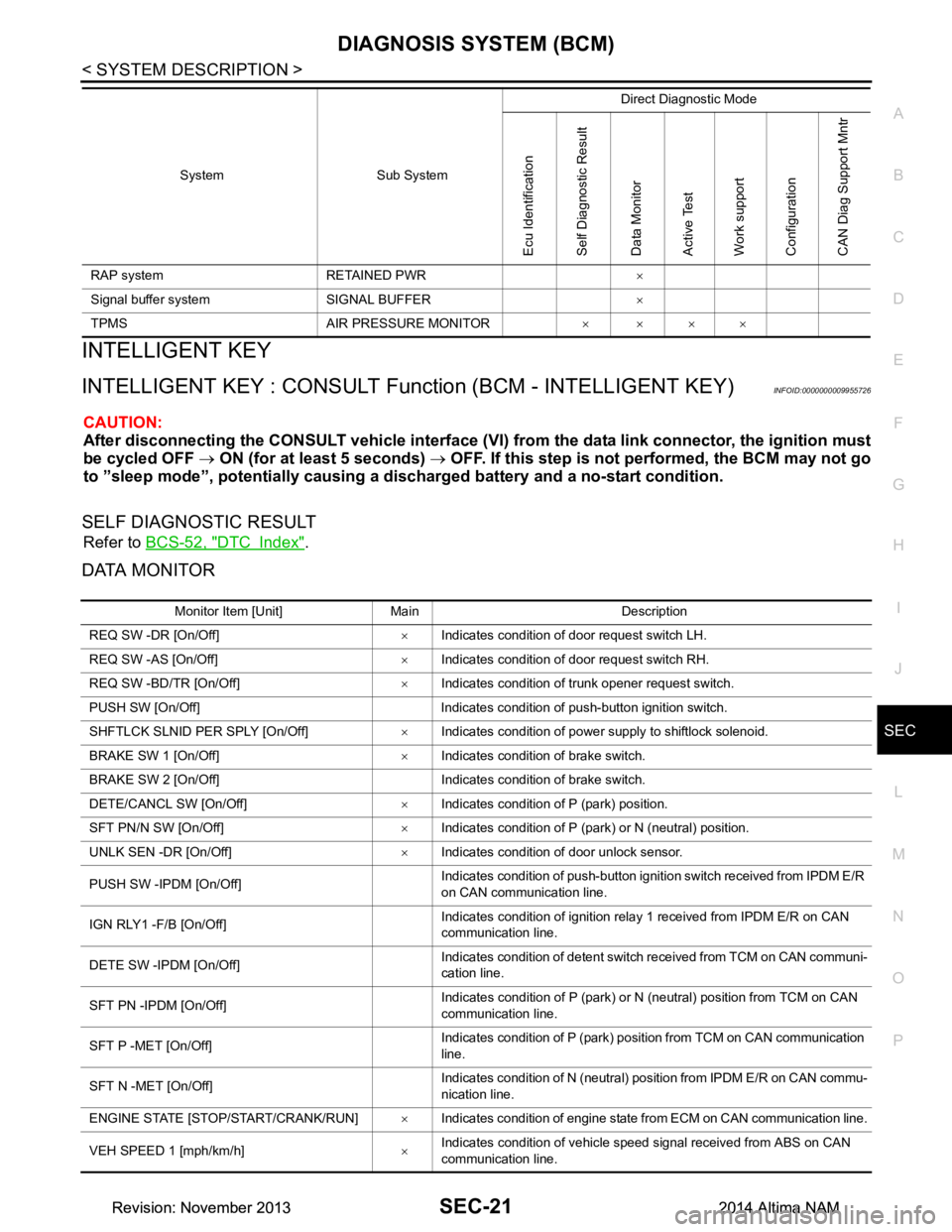
INTELLIGENT KEY
INTELLIGENT KEY : CONSULT Func tion (BCM - INTELLIGENT KEY)INFOID:0000000009955726
CAUTION:
After disconnecting the CONSULT vehicle interface (VI) from the data link connector, the ignition must
be cycled OFF → ON (for at least 5 seconds) → OFF. If this step is not performed, the BCM may not go
to ”sleep mode”, potentiall y causing a discharged battery and a no-start condition.
SELF DIAGNOSTIC RESULT
Refer to BCS-52, "DTC Index".
DATA MONITOR
RAP system RETAINED PWR ×
Signal buffer system SIGNAL BUFFER ×
TPMS AIR PRESSURE MONITOR ××××
System Sub System
Direct Diagnostic Mode
Ecu Identification
Self Diagnostic Result
Data Monitor
Active Test
Work support
Configuration
CAN Diag Support Mntr
Monitor Item [Unit] Main Description
REQ SW -DR [On/Off] ×Indicates condition of door request switch LH.
REQ SW -AS [On/Off] ×Indicates condition of door request switch RH.
REQ SW -BD/TR [On/Off] ×Indicates condition of trunk opener request switch.
PUSH SW [On/Off] Indicates condition of push-button ignition switch.
SHFTLCK SLNID PER SPLY [On/Off] ×Indicates condition of power supply to shiftlock solenoid.
BRAKE SW 1 [On/Off] ×Indicates condition of brake switch.
BRAKE SW 2 [On/Off] Indicates condition of brake switch.
DETE/CANCL SW [On/Off] ×Indicates condition of P (park) position.
SFT PN/N SW [On/Off] ×Indicates condition of P (park) or N (neutral) position.
UNLK SEN -DR [On/Off] ×Indicates condition of door unlock sensor.
PUSH SW -IPDM [On/Off] Indicates condition of push-button ignition switch received from IPDM E/R
on CAN communication line.
IGN RLY1 -F/B [On/Off] Indicates condition of ignition relay 1 received from IPDM E/R on CAN
communication line.
DETE SW -IPDM [On/Off] Indicates condition of detent switch received from TCM on CAN communi-
cation line.
SFT PN -IPDM [On/Off] Indicates condition of P (park) or N (neutral) position from TCM on CAN
communication line.
SFT P -MET [On/Off] Indicates condition of P (park) position from TCM on CAN communication
line.
SFT N -MET [On/Off] Indicates condition of N (neutral) position from IPDM E/R on CAN commu-
nication line.
ENGINE STATE [STOP/START/CRANK/RUN] ×Indicates condition of engine state from ECM on CAN communication line.
VEH SPEED 1 [mph/km/h] ×Indicates condition of vehicle speed signal received from ABS on CAN
communication line.
Revision: November 20132014 Altima NAMRevision: November 20132014 Altima NAM
Page 3849 of 4801

SEC-24
< SYSTEM DESCRIPTION >
DIAGNOSIS SYSTEM (BCM)
*: Initial Setting
THEFT ALM
THEFT ALM : CONSULT Function (BCM - THEFT ALM)INFOID:0000000009955727
CAUTION:
After disconnecting the CONSULT vehicle interface (VI) from the data link connector, the ignition must
be cycled OFF → ON (for at least 5 seconds) → OFF. If this step is not performed, the BCM may not go
to ”sleep mode”, potentially causing a di scharged battery and a no-start condition.
DATA MONITOR
ACTIVE TEST
WORK SUPPORT
AUTO LOCK SET MODE7 5 min
Auto door lock time can be set in this mode.
MODE6 4 min
MODE5 3 min
MODE4 2 min
MODE3* 1 min
MODE2 30 sec
MODE1 Off
Support Item Setting Description
Monitored Item Description
REQ SW -DR [On/Off] Indicates condition of door request switch LH.
REQ SW -AS [On/Off] Indicates condition of door request switch RH.
REQ SW -BD/TR [ON/OFF] Indicates condition of trunk opener request switch.
PUSH SW [On/Off] Indicates condition of push-button ignition switch.
UNLK SEN -DR [On/Off] Indicates condition of door unlock sensor.
DOOR SW-DR [On/Off] Indicates condition of front door switch LH.
DOOR SW-AS [On/Off] Indicates condition of front door switch RH.
DOOR SW-RR [On/Off] Indicates condition of rear door switch RH.
DOOR SW-RL [On/Off] Indicates condition of rear door switch LH.
DOOR SW-BK [On/Off] Indicates condition of trunk switch.
CDL LOCK SW [On/Off] Indicates condition of lock signal from door lock and unlock switch.
CDL UNLOCK SW [On/Off] Indicates condition of unlock signal from door lock and unlock switch.
KEY CYL LK-SW [On/Off] Indicates condition of lock signal from door key cylinder switch.
KEY CYL UN-SW [On/Off] Indicates condition of unlock signal from door key cylinder switch.
TR/BD OPEN SW [On/Off] Indicates condition of trunk opener switch.
TRNK/HAT MNTR [On/Off] Indicates condition of trunk room lamp switch.
RKE-LOCK [On/Off] Indicates condition of lock signal from Intelligent Key.
RKE-UNLOCK [On/Off] Indicates condition of unlock signal from Intelligent Key.
RKE-TR/BD [On/Off] Indicates condition of trunk open signal from Intelligent Key.
Test Item Description
FLASHER This test is able to check turn signal lamp operation [LH/RH/Off].
THEFT IND This test is able to check se curity indicator lamp operation [On/Off].
VEHICLE SECURITY HORN This test is able to check vehicle security horn operation [On].
HEADLAMP(HI) This test is able to check vehicle security lamp operation [On].
Revision: November 20132014 Altima NAMRevision: November 20132014 Altima NAM
Page 3850 of 4801
DIAGNOSIS SYSTEM (BCM)SEC-25
< SYSTEM DESCRIPTION >
C
D E
F
G H
I
J
L
M A
B
SEC
N
O P
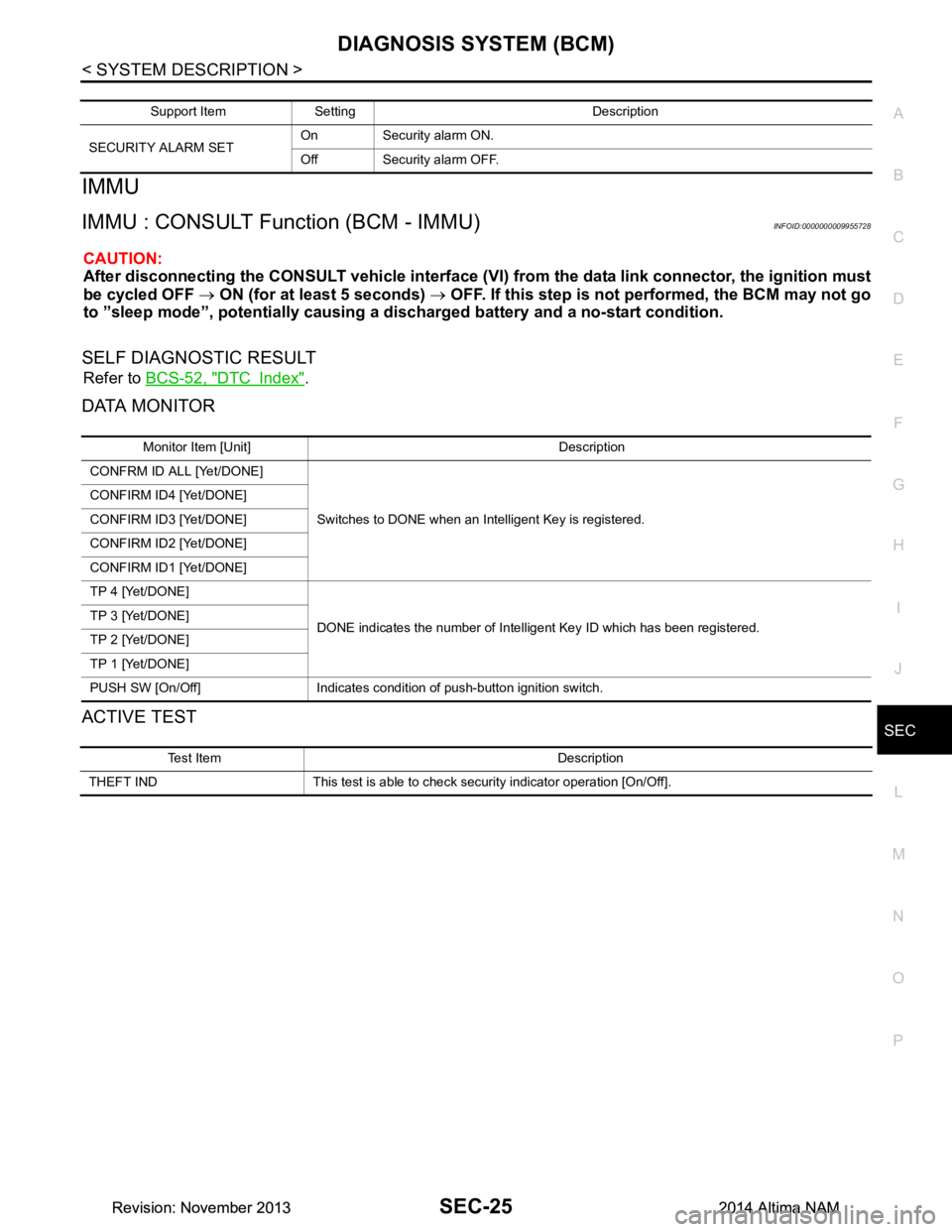
IMMU
IMMU : CONSULT Function (BCM - IMMU)INFOID:0000000009955728
CAUTION:
After disconnecting the CONSULT vehicle interface (VI) from the data link connector, the ignition must
be cycled OFF → ON (for at least 5 seconds) → OFF. If this step is not performed, the BCM may not go
to ”sleep mode”, potentiall y causing a discharged battery and a no-start condition.
SELF DIAGNOSTIC RESULT
Refer to BCS-52, "DTC Index".
DATA MONITOR
ACTIVE TEST
Support Item Setting Description
SECURITY ALARM SET On Security alarm ON.
Off Security alarm OFF.
Monitor Item [Unit] Description
CONFRM ID ALL [Yet/DONE]
Switches to DONE when an Intelligent Key is registered.
CONFIRM ID4 [Yet/DONE]
CONFIRM ID3 [Yet/DONE]
CONFIRM ID2 [Yet/DONE]
CONFIRM ID1 [Yet/DONE]
TP 4 [Yet/DONE]
DONE indicates the number of Intelligent Key ID which has been registered.
TP 3 [Yet/DONE]
TP 2 [Yet/DONE]
TP 1 [Yet/DONE]
PUSH SW [On/Off] Indicates condition of push-button ignition switch.
Test Item Description
THEFT IND This test is able to check security indicator operation [On/Off].
Revision: November 20132014 Altima NAMRevision: November 20132014 Altima NAM
Page 3851 of 4801

SEC-26
< SYSTEM DESCRIPTION >
DIAGNOSIS SYSTEM (IPDM E/R)
DIAGNOSIS SYSTEM (IPDM E/R)
CONSULT Function (IPDM E/R)INFOID:0000000009955729
CAUTION:
After disconnecting the CONSULT vehicle interface (VI) from the data link connector, the ignition must
be cycled OFF → ON (for at least 5 seconds) → OFF. If this step is not performed, the BCM may not go
to ”sleep mode”, potentially causing a di scharged battery and a no-start condition.
APPLICATION ITEM
CONSULT performs the following functions via CAN communication with IPDM E/R.
ECU IDENTIFICATION
The IPDM E/R part number is displayed.
SELF DIAGNOSTIC RESULT
Refer to PCS-20, "DTC Index".
DATA MONITOR
Direct Diagnostic Mode Description
Ecu Identification The IPDM E/R part number is displayed.
Self Diagnostic Result The IPDM E/R self diagnostic results are displayed.
Data Monitor The IPDM E/R input/output data is displayed in real time.
Active Test The IPDM E/R activates outputs to test components.
CAN Diag Support Mntr The result of transmit/receive diagnosis of CAN communication is displayed.
Monitor Item [Unit] Main
Signals Description
MOTOR FAN REQ [%] ×Indicates cooling fan speed signal received from ECM on CAN communication
line
AC COMP REQ [On/Off] ×Indicates A/C compressor request signal received from ECM on CAN commu-
nication line
TAIL&CLR REQ [On/Off] ×Indicates position light request signal received from BCM on CAN communica-
tion line
HL LO REQ [On/Off] ×Indicates low beam request signal received from BCM on CAN communication
line
HL HI REQ [On/Off] ×Indicates high beam request signal received from BCM on CAN communication
line
FR FOG REQ [On/Off] ×Indicates front fog light request signal received from BCM on CAN communica-
tion line
FR WIP REQ [Stop/1LOW/Low/Hi] ×Indicates front wiper request signal received from BCM on CAN communication
line
WIP AUTO STOP [STOP P/ACT P] ×Indicates condition of front wiper auto stop signal
WIP PROT [Off/BLOCK] ×Indicates condition of front wiper fail-safe operation
IGN RLY1 -REQ [On/Off] Indicates ignition switch ON signal received from BCM on CAN communication
line
IGN RLY [On/Off] ×Indicates condition of ignition relay
PUSH SW [On/Off] Indicates condition of push-button ignition switch
INTER/NP SW [On/Off] Indicates condition of CVT shift position
ST RLY CONT [On/Off] Indicates starter relay status signal received from BCM on CAN communication
line
IHBT RLY -REQ [On/Off] Indicates starter control relay signal received from BCM on CAN communication
line
Revision: November 20132014 Altima NAMRevision: November 20132014 Altima NAM
Page 3891 of 4801
SEC-66
< BASIC INSPECTION >
ADDITIONAL SERVICE WHEN REPLACING CONTROL UNIT
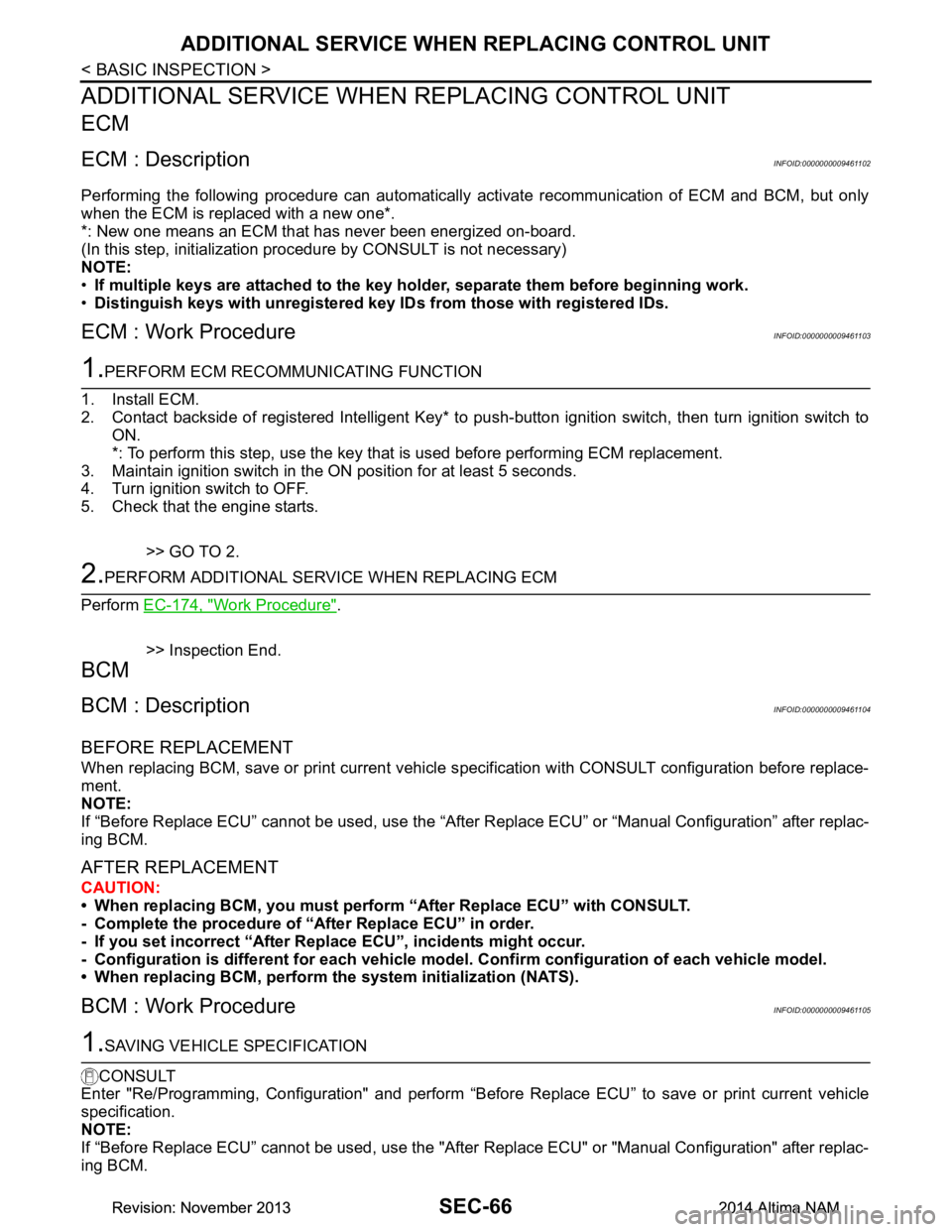
ADDITIONAL SERVICE WHEN REPLACING CONTROL UNIT
ECM
ECM : DescriptionINFOID:0000000009461102
Performing the following procedure can automatically activate recommunication of ECM and BCM, but only
when the ECM is replaced with a new one*.
*: New one means an ECM that has never been energized on-board.
(In this step, initialization procedure by CONSULT is not necessary)
NOTE:
• If multiple keys are attached to the key hold er, separate them before beginning work.
• Distinguish keys with unregistered key ID s from those with registered IDs.
ECM : Work ProcedureINFOID:0000000009461103
1.PERFORM ECM RECOMMUNICATING FUNCTION
1. Install ECM.
2. Contact backside of registered Intelligent Key* to pus h-button ignition switch, then turn ignition switch to
ON.
*: To perform this step, use the key that is used before performing ECM replacement.
3. Maintain ignition switch in the ON position for at least 5 seconds.
4. Turn ignition switch to OFF.
5. Check that the engine starts.
>> GO TO 2.
2.PERFORM ADDITIONAL SERVICE WHEN REPLACING ECM
Perform EC-174, "Work Procedure"
.
>> Inspection End.
BCM
BCM : DescriptionINFOID:0000000009461104
BEFORE REPLACEMENT
When replacing BCM, save or print current vehicle s pecification with CONSULT configuration before replace-
ment.
NOTE:
If “Before Replace ECU” cannot be used, use the “After Replace ECU” or “Manual Configuration” after replac-
ing BCM.
AFTER REPLACEMENT
CAUTION:
• When replacing BCM, you must perfo rm “After Replace ECU” with CONSULT.
- Complete the procedure of “After Replace ECU” in order.
- If you set incorrect “After Replace ECU”, incidents might occur.
- Configuration is different for each vehicle mode l. Confirm configuration of each vehicle model.
• When replacing BCM, perform the system initialization (NATS).
BCM : Work ProcedureINFOID:0000000009461105
1.SAVING VEHICLE SPECIFICATION
CONSULT
Enter "Re/Programming, Configuration" and perform “Before Replace ECU” to save or print current vehicle
specification.
NOTE:
If “Before Replace ECU” cannot be used, use the "After Replace ECU" or "Manual Configuration" after replac-
ing BCM.
Revision: November 20132014 Altima NAMRevision: November 20132014 Altima NAM