ECO mode NISSAN TEANA 2014 Service Manual
[x] Cancel search | Manufacturer: NISSAN, Model Year: 2014, Model line: TEANA, Model: NISSAN TEANA 2014Pages: 4801, PDF Size: 51.2 MB
Page 2774 of 4801
![NISSAN TEANA 2014 Service Manual
DIAGNOSIS SYSTEM (BCM)HAC-125
< SYSTEM DESCRIPTION > [MANUAL AIR CONDITIONER]
C
D E
F
G H
J
K L
M A
B
HAC
N
O P
CONSULT Function (BCM - AIR CONDITIONER)INFOID:0000000009958323
CAUTION:
After disco](/img/5/57390/w960_57390-2773.png "NISSAN TEANA 2014 Service Manual
DIAGNOSIS SYSTEM (BCM)HAC-125
< SYSTEM DESCRIPTION > [MANUAL AIR CONDITIONER]
C
D E
F
G H
J
K L
M A
B
HAC
N
O P
CONSULT Function (BCM - AIR CONDITIONER)INFOID:0000000009958323
CAUTION:
After disco")
DIAGNOSIS SYSTEM (BCM)HAC-125
< SYSTEM DESCRIPTION > [MANUAL AIR CONDITIONER]
C
D E
F
G H
J
K L
M A
B
HAC
N
O P
CONSULT Function (BCM - AIR CONDITIONER)INFOID:0000000009958323
CAUTION:
After disconnecting the CONSULT vehicle interface (VI) from the data link connector, the ignition must
be cycled OFF → ON (for at least 5 seconds) → OFF. If this step is not performed, the BCM may not go
to ”sleep mode”, potentiall y causing a discharged battery and a no-start condition.
DATA MONITOR
Signal buffer system SIGNAL BUFFER ×
TPMS AIR PRESSURE MONITOR ××××
System Sub System
Direct Diagnostic Mode
Ecu Identification
Self Diagnostic Result
Data Monitor
Active Test
Work support
Configuration
CAN Diag Support Mntr
Monitor Item [Unit] Description
FAN ON SIG [On/Off] Indicates condition of fan switch.
AIR COND SW [On/Off] Indicates condition of A/C switch.
Revision: November 20132014 Altima NAMRevision: November 20132014 Altima NAM
Page 2775 of 4801
![NISSAN TEANA 2014 Service Manual
HAC-126
< SYSTEM DESCRIPTION >[MANUAL AIR CONDITIONER]
DIAGNOSIS SYSTEM (IPDM E/R)
DIAGNOSIS SYSTEM (IPDM E/R)
CONSULT Function (IPDM E/R)INFOID:0000000009958324
CAUTION:
After disconnecting the CON](/img/5/57390/w960_57390-2774.png "NISSAN TEANA 2014 Service Manual
HAC-126
< SYSTEM DESCRIPTION >[MANUAL AIR CONDITIONER]
DIAGNOSIS SYSTEM (IPDM E/R)
DIAGNOSIS SYSTEM (IPDM E/R)
CONSULT Function (IPDM E/R)INFOID:0000000009958324
CAUTION:
After disconnecting the CON")
HAC-126
< SYSTEM DESCRIPTION >[MANUAL AIR CONDITIONER]
DIAGNOSIS SYSTEM (IPDM E/R)
DIAGNOSIS SYSTEM (IPDM E/R)
CONSULT Function (IPDM E/R)INFOID:0000000009958324
CAUTION:
After disconnecting the CONSULT vehicle interface (VI) from the data link connector, the ignition must
be cycled OFF → ON (for at least 5 seconds) → OFF. If this step is not performed, the BCM may not go
to ”sleep mode”, potentially causing a di scharged battery and a no-start condition.
APPLICATION ITEM
CONSULT performs the following functions via CAN communication with IPDM E/R.
ECU IDENTIFICATION
The IPDM E/R part number is displayed.
SELF DIAGNOSTIC RESULT
Refer to PCS-20, "DTC Index".
DATA MONITOR
Direct Diagnostic Mode Description
Ecu Identification The IPDM E/R part number is displayed.
Self Diagnostic Result The IPDM E/R self diagnostic results are displayed.
Data Monitor The IPDM E/R input/output data is displayed in real time.
Active Test The IPDM E/R activates outputs to test components.
CAN Diag Support Mntr The result of transmit/receive diagnosis of CAN communication is displayed.
Monitor Item [Unit] Main
Signals Description
MOTOR FAN REQ [%] ×Indicates cooling fan speed signal received from ECM on CAN communication
line
AC COMP REQ [On/Off] ×Indicates A/C compressor request signal received from ECM on CAN commu-
nication line
TAIL&CLR REQ [On/Off] ×Indicates position light request signal received from BCM on CAN communica-
tion line
HL LO REQ [On/Off] ×Indicates low beam request signal received from BCM on CAN communication
line
HL HI REQ [On/Off] ×Indicates high beam request signal received from BCM on CAN communication
line
FR FOG REQ [On/Off] ×Indicates front fog light request signal received from BCM on CAN communica-
tion line
FR WIP REQ [Stop/1LOW/Low/Hi] ×Indicates front wiper request signal received from BCM on CAN communication
line
WIP AUTO STOP [STOP P/ACT P] ×Indicates condition of front wiper auto stop signal
WIP PROT [Off/BLOCK] ×Indicates condition of front wiper fail-safe operation
IGN RLY1 -REQ [On/Off] Indicates ignition switch ON signal received from BCM on CAN communication
line
IGN RLY [On/Off] ×Indicates condition of ignition relay
PUSH SW [On/Off] Indicates condition of push-button ignition switch
INTER/NP SW [On/Off] Indicates condition of CVT shift position
ST RLY CONT [On/Off] Indicates starter relay status signal received from BCM on CAN communication
line
IHBT RLY -REQ [On/Off] Indicates starter control relay signal received from BCM on CAN communication
line
Revision: November 20132014 Altima NAMRevision: November 20132014 Altima NAM
Page 2798 of 4801
![NISSAN TEANA 2014 Service Manual
BLOWER MOTORHAC-149
< DTC/CIRCUIT DIAGNOSIS > [MANUAL AIR CONDITIONER]
C
D E
F
G H
J
K L
M A
B
HAC
N
O P
1. Reconnect blower motor connector and front air control connector.
2. Turn ignition swit](/img/5/57390/w960_57390-2797.png "NISSAN TEANA 2014 Service Manual
BLOWER MOTORHAC-149
< DTC/CIRCUIT DIAGNOSIS > [MANUAL AIR CONDITIONER]
C
D E
F
G H
J
K L
M A
B
HAC
N
O P
1. Reconnect blower motor connector and front air control connector.
2. Turn ignition swit")
BLOWER MOTORHAC-149
< DTC/CIRCUIT DIAGNOSIS > [MANUAL AIR CONDITIONER]
C
D E
F
G H
J
K L
M A
B
HAC
N
O P
1. Reconnect blower motor connector and front air control connector.
2. Turn ignition switch ON.
3. Operate MODE switch to set air outlet to VENT.
4. Change fan speed from Lo to Hi, and check duty ratios between blower motor harness connector and
ground by using an oscilloscope.
NOTE:
Calculate drive signal duty ratio as shown in the figure.
T2 = Approx. 1.6 ms
Is the inspection result normal?
YES >> Replace blower motor. Refer to VTL-13, "BLOWER MOTOR : Removal and Installation".
NO >> Replace front air control. Refer to HAC-102, "Removal and Installation"
.
6.CHECK BLOWER MOTOR RELAY GROUND CIRCUIT
1. Turn ignition switch OFF.
2. Check continuity between fuse bl ock (J/B) harness connector and ground.
Is the inspection result normal?
YES >> GO TO 7.
NO >> Repair harness or connector.
7.CHECK FRONT BLOWER MOTOR RELAY
Check front blower motor relay. Refer to HAC-149, "Component Inspection (Front Blower Motor Relay)"
.
Is the inspection result normal?
YES >> Repair harness or connector between blower motor and fuse block (J/B).
NO >> Replace front blower motor relay.
Component Inspection (Blower Motor)INFOID:0000000009463215
1.CHECK BLOWER MOTOR
1. Connect battery voltage to terminal 1 of blower motor.
2. Connect ground to terminal 2 of blower motor.
Does the blower fan operate?
YES >> Intermittent incident. Refer to GI-43, "Intermittent Incident".
NO >> Replace blower motor. Refer to VTL-13, "BLOWER MOTOR : Removal and Installation"
.
Component Inspection (Front Blower Motor Relay)INFOID:0000000009463216
1.CHECK BLOWER RELAY
1. Turn ignition switch OFF.
2. Remove front blower motor relay.
Blower motor Condition Duty ratio
(Approx.)
Connector Terminal Fan speed (manual)
VENT mode
M31 17 1st 25 %
2nd 33 % 3rd 41 %4th 51 %
5th 61 %
6th 69 %
7th 81 %
JPLIA1210GB
Fuse block (J/B) —Continuity
Connector Terminal
M4 13R Ground Yes
Revision: November 20132014 Altima NAMRevision: November 20132014 Altima NAM
Page 2832 of 4801

DIAGNOSIS SYSTEM (BCM)INL-11
< SYSTEM DESCRIPTION >
C
D E
F
G H
I
J
K
M A
B
INL
N
O P
DIAGNOSIS SYSTEM (BCM)
COMMON ITEM
COMMON ITEM : CONSULT Function (BCM - COMMON ITEM)INFOID:0000000009956797
CAUTION:
After disconnecting the CONSULT vehicle interface (VI) from the data link connector, the ignition must
be cycled OFF → ON (for at least 5 seconds) → OFF. If this step is not performed, the BCM may not go
to ”sleep mode”, potentiall y causing a discharged battery and a no-start condition.
APPLICATION ITEM
CONSULT performs the following functions via CAN communication with BCM.
SYSTEM APPLICATION
BCM can perform the following functions.
Direct Diagnostic Mode Description
Ecu Identification The BCM part number is displayed.
Self Diagnostic Result The BCM self diagnostic results are displayed.
Data Monitor The BCM input/output data is displayed in real time.
Active Test The BCM activates outputs to test components.
Work support The settings for BCM functions can be changed.
Configuration • The vehicle specification can be read and saved.
• The vehicle specification can be written when replacing BCM.
CAN Diag Support Mntr The result of transmit/receive diagnosis of CAN communication is displayed.
System Sub System Direct Diagnostic Mode
Ecu Identification
Self Diagnostic Result
Data Monitor
Active Test
Work support
Configuration
CAN Diag Su pport Mntr
Door lock DOOR LOCK ××××
Rear window defogger REAR DEFOGGER ×××
Warning chime BUZZER ××
Interior room lamp timer INT LAMP ×××
Remote keyless entry system MULTI REMOTE ENT ×××
Exterior lamp HEADLAMP ×××
Wiper and washer WIPER ×××
Turn signal and hazard warning lamps FLASHER ××
Air conditioner AIR CONDITIONER ×
Intelligent Key system INTELLIGENT KEY ××××
Combination switch COMB SW ×
BCM BCM × × ×××
Immobilizer IMMU ×××
Interior room lamp battery saver BATTERY SAVER ××
Trunk open TRUNK ×
Vehicle security system THEFT ALM ×××
Revision: November 20132014 Altima NAMRevision: November 20132014 Altima NAM
Page 2833 of 4801

INL-12
< SYSTEM DESCRIPTION >
DIAGNOSIS SYSTEM (BCM)
INT LAMP
INT LAMP : CONSULT Function (BCM - INT LAMP)INFOID:0000000009956798
CAUTION:
After disconnecting the CONSULT vehicle interface (VI) from the data link connector, the ignition must
be cycled OFF → ON (for at least 5 seconds) → OFF. If this step is not performed, the BCM may not go
to ”sleep mode”, potentially causing a di scharged battery and a no-start condition.
DATA MONITOR
ACTIVE TEST
WORK SUPPORT
NOTE:
The items listed below are the only applicable Work Support it ems for this vehicle. If other items are displayed
on CONSULT, do not use or change t he setting for these other items.
RAP system RETAINED PWR ×
Signal buffer system SIGNAL BUFFER ×
TPMS AIR PRESSURE MONITOR ××××
System Sub System
Direct Diagnostic Mode
Ecu Identification
Self Diagnostic Result
Data Monitor
Active Test
Work support
Configuration
CAN Diag Support Mntr
Monitor Item [Unit] Description
REQ SW -DR [On/Off] Indicates condition of door request switch LH.
REQ SW -AS [On/Off] Indicates condition of door request switch RH.
PUSH -SW [On/Off] Indicates condition of push-button ignition switch.
UNLK SEN -DR [On/Off] Indicates condition of door unlock sensor.
DOOR SW-DR [On/Off] Indicates condition of front door switch LH.
DOOR SW-AS [On/Off] Indicates condition of front door switch RH.
DOOR SW-RR [On/Off] Indicates condition of rear door switch RH.
DOOR SW-RL [On/Off] Indicates condition of rear door switch LH.
DOOR SW-BK [On/Off] Indicates condition of trunk switch.
CDL LOCK SW [On/Off] Indicates condition of lock signal from door lock and unlock switch.
CDL UNLOCK SW [On/Off] Indicates condition of unlock signal from door lock and unlock switch.
KEY CYL LK-SW [On/Off] Indicates condition of lock signal from door key cylinder switch.
KEY CYL UN-SW [On/Off] Indicates condition of unlock signal from door key cylinder switch.
TRNK/HAT MNTR [On/Off] Indicates condition of trunk room lamp switch.
RKE-LOCK [On/Off] Indicates condition of lock signal from Intelligent Key.
RKE-UNLOCK [On/Off] Indicates condition of unlock signal from Intelligent Key.
Te s t I t e m D e s c r i p t i o n
INT LAMP This test is able to check interior room lamp operation [On/Off].
STEP LAMP TEST This test is able to check step lamp operation [On/Off].
Revision: November 20132014 Altima NAMRevision: November 20132014 Altima NAM
Page 2834 of 4801

DIAGNOSIS SYSTEM (BCM)INL-13
< SYSTEM DESCRIPTION >
C
D E
F
G H
I
J
K
M A
B
INL
N
O P
* : Initial setting
BATTERY SAVER
BATTERY SAVER : CONSULT Function (BCM - BATTERY SAVER)INFOID:0000000009956799
CAUTION:
After disconnecting the CONSULT vehicle interface (VI) from the data link connector, the ignition must
be cycled OFF → ON (for at least 5 seconds) → OFF. If this step is not performed, the BCM may not go
to ”sleep mode”, potentiall y causing a discharged battery and a no-start condition.
DATA MONITOR
ACTIVE TEST
INTELLIGENT KEY
INTELLIGENT KEY : CONSULT Func tion (BCM - INTELLIGENT KEY)INFOID:0000000009956802
CAUTION:
After disconnecting the CONSULT vehicle interface (VI) from the data link connector, the ignition must
be cycled OFF → ON (for at least 5 seconds) → OFF. If this step is not performed, the BCM may not go
to ”sleep mode”, potentiall y causing a discharged battery and a no-start condition.
Support Item Setting Description
SCENARIO LIGHTING SETTING On
NOTE:
Do not use this function since interior room lamp control is changed.
Off*
SET I/L D-UNLCK INTCON On Interior room lamp timer function ON.
Off* Interior room lamp timer function OFF.
FOG LAMP OVERRIDE On* Fog lamp override function ON.
Off Fog lamp override function OFF.
Monitor Item [Unit] Description
REQ SW -DR [On/Off] Indicates condition of door request switch LH.
REQ SW -AS [On/Off] Indicates condition of door request switch RH.
PUSH SW [On/Off] Indicates condition push-button ignition switch.
UNLK SEN -DR [On/Off] Indicates condition of door unlock sensor.
DOOR SW-DR [On/Off] Indicates condition of front door switch LH.
DOOR SW-AS [On/Off] Indicates condition of front door switch RH.
DOOR SW-RR [On/Off] Indicates condition of rear door switch RH.
DOOR SW-RL [On/Off] Indicates condition of rear door switch LH.
DOOR SW-BK [On/Off] Indicates condition of trunk switch.
CDL LOCK SW [On/Off] Indicates condition of lock signal from door lock and unlock switch.
CDL UNLOCK SW [On/Off] Indicates condition of unlock signal from door lock and unlock switch.
KEY CYL LK-SW [On/Off] Indicates condition of lo ck signal from door key cylinder switch.
KEY CYL UN-SW [On/Off] Indicates condition of unl ock signal from door key cylinder switch.
TRNK/HAT MNTR [On/Off] Indicates condition of trunk room lamp switch.
RKE-LOCK [On/Off] Indicates condition of lock signal from Intelligent Key.
RKE-UNLOCK [On/Off] Indicates condition of unlock signal from Intelligent Key.
Test item Description
BATTERY SAVER This test is able to check battery saver operation [On/Off].
Revision: November 20132014 Altima NAMRevision: November 20132014 Altima NAM
Page 2838 of 4801
DIAGNOSIS SYSTEM (IPDM E/R)INL-17
< SYSTEM DESCRIPTION >
C
D E
F
G H
I
J
K
M A
B
INL
N
O P
DIAGNOSIS SYSTEM (IPDM E/R)
Diagnosis DescriptionINFOID:0000000009956803
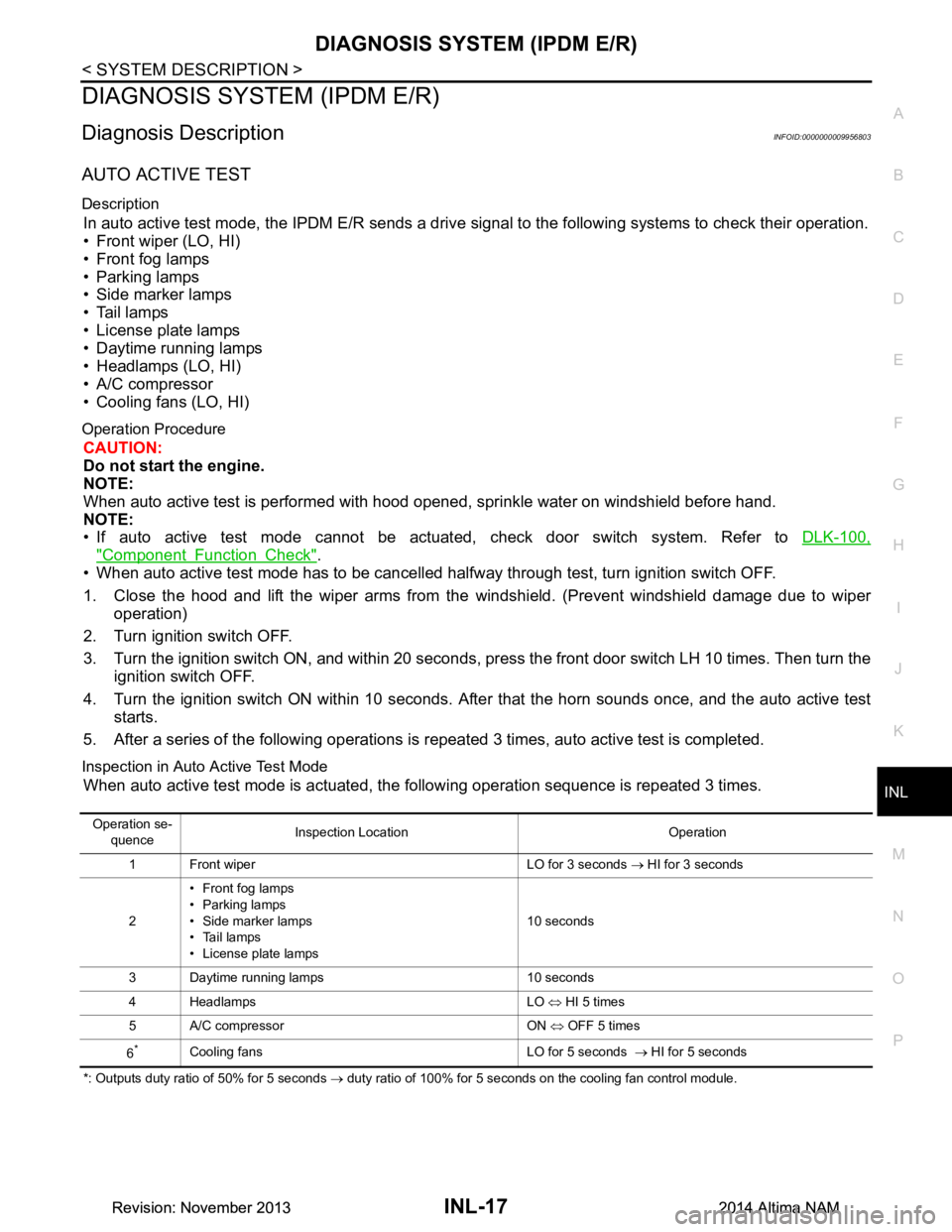
AUTO ACTIVE TEST
Description
In auto active test mode, the IPDM E/R sends a drive signal to the following systems to check their operation.
• Front wiper (LO, HI)
• Front fog lamps
• Parking lamps
• Side marker lamps
• Tail lamps
• License plate lamps
• Daytime running lamps
• Headlamps (LO, HI)
• A/C compressor
• Cooling fans (LO, HI)
Operation Procedure
CAUTION:
Do not start the engine.
NOTE:
When auto active test is performed with hood opened, sprinkle water on windshield before hand.
NOTE:
• If auto active test mode cannot be actuated, check door switch system. Refer to DLK-100,
"Component Function Check".
• When auto active test mode has to be cancelled halfway through test, turn ignition switch OFF.
1. Close the hood and lift the wiper arms from the windshield. (Prevent windshield damage due to wiper
operation)
2. Turn ignition switch OFF.
3. Turn the ignition switch ON, and within 20 seconds, press the front door switch LH 10 times. Then turn the ignition switch OFF.
4. Turn the ignition switch ON within 10 seconds. Afte r that the horn sounds once, and the auto active test
starts.
5. After a series of the following operations is repeated 3 times, auto active test is completed.
Inspection in Auto Active Test Mode
When auto active test mode is actuated, the following operation sequence is repeated 3 times.
*: Outputs duty ratio of 50% for 5 seconds → duty ratio of 100% for 5 seconds on the cooling fan control module.
Operation se-
quence Inspection Location Operation
1 Front wiper LO for 3 seconds → HI for 3 seconds
2 • Front fog lamps
•Parking lamps
• Side marker lamps
• Tail lamps
• License plate lamps 10 seconds
3 Daytime running lamps 10 seconds
4 Headlamps LO ⇔ HI 5 times
5 A/C compressor ON ⇔ OFF 5 times
6
*Cooling fans LO for 5 seconds → HI for 5 seconds
Revision: November 20132014 Altima NAMRevision: November 20132014 Altima NAM
Page 2839 of 4801
INL-18
< SYSTEM DESCRIPTION >
DIAGNOSIS SYSTEM (IPDM E/R)
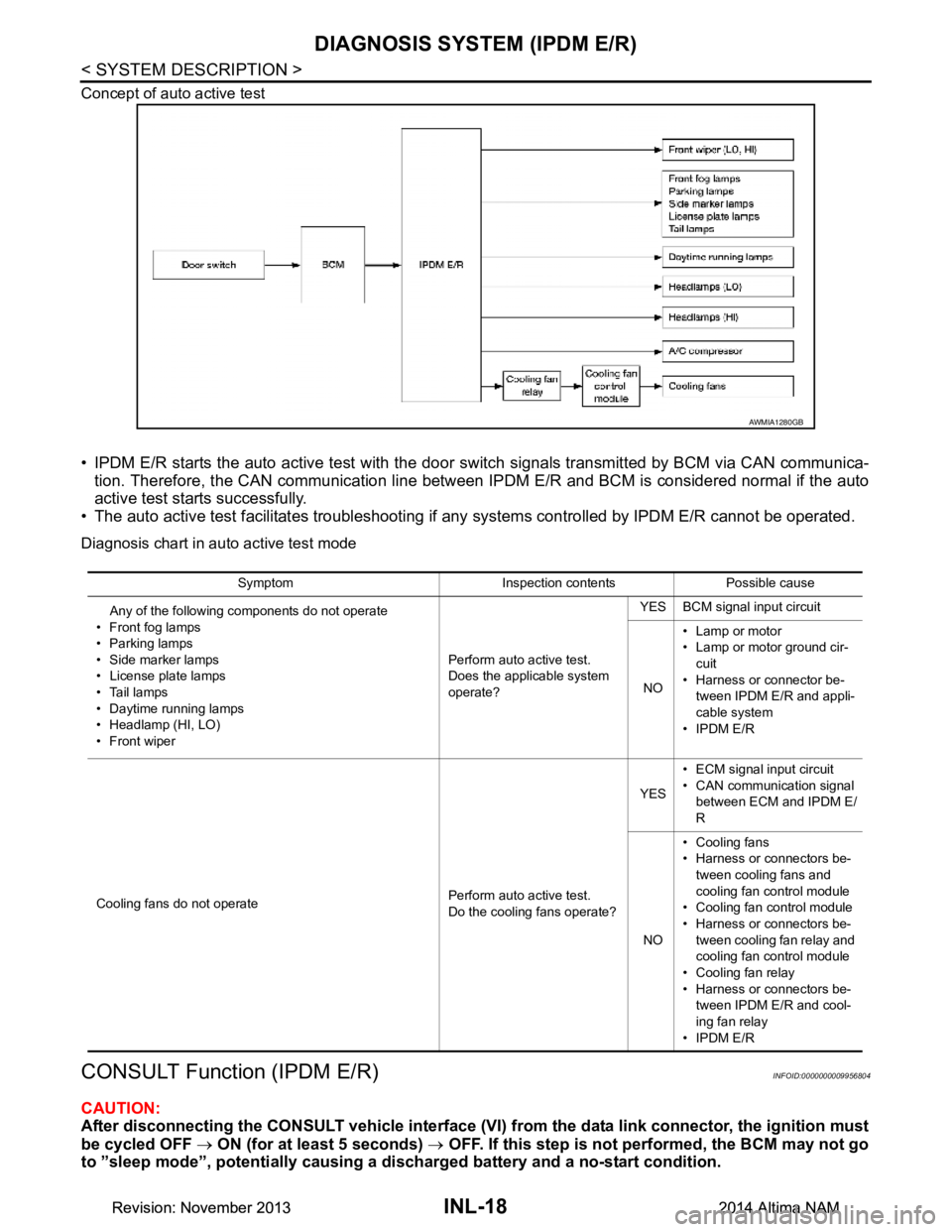
Concept of auto active test
• IPDM E/R starts the auto active test with the door switch signals transmitted by BCM via CAN communica-
tion. Therefore, the CAN communication line between IPDM E/R and BCM is considered normal if the auto
active test starts successfully.
• The auto active test facilitates troubleshooting if any systems controlled by IPDM E/R cannot be operated.
Diagnosis chart in auto active test mode
CONSULT Function (IPDM E/R)INFOID:0000000009956804
CAUTION:
After disconnecting the CONSULT vehicle interface (VI) from the data link connector, the ignition must
be cycled OFF → ON (for at least 5 seconds) → OFF. If this step is not performed, the BCM may not go
to ”sleep mode”, potentially causing a di scharged battery and a no-start condition.
AWMIA1280GB
Symptom Inspection contents Possible cause
Any of the following components do not operate
•Front fog lamps
• Parking lamps
• Side marker lamps
• License plate lamps
•Tail lamps
• Daytime running lamps
• Headlamp (HI, LO)
• Front wiper Perform auto active test.
Does the applicable system
operate? YES BCM signal input circuit
NO • Lamp or motor
• Lamp or motor ground cir-
cuit
• Harness or connector be- tween IPDM E/R and appli-
cable system
•IPDM E/R
Cooling fans do not operate Perform auto active test.
Do the cooling fans operate? YES
• ECM signal input circuit
• CAN communication signal between ECM and IPDM E/
R
NO • Cooling fans
• Harness or connectors be-
tween cooling fans and
cooling fan control module
• Cooling fan control module
• Harness or connectors be- tween cooling fan relay and
cooling fan control module
• Cooling fan relay
• Harness or connectors be- tween IPDM E/R and cool-
ing fan relay
•IPDM E/R
Revision: November 20132014 Altima NAMRevision: November 20132014 Altima NAM
Page 3198 of 4801
MA-14
< PERIODIC MAINTENANCE >
ENGINE MAINTENANCE (QR25DE)
• Loose connections
• Chafing
• Deterioration
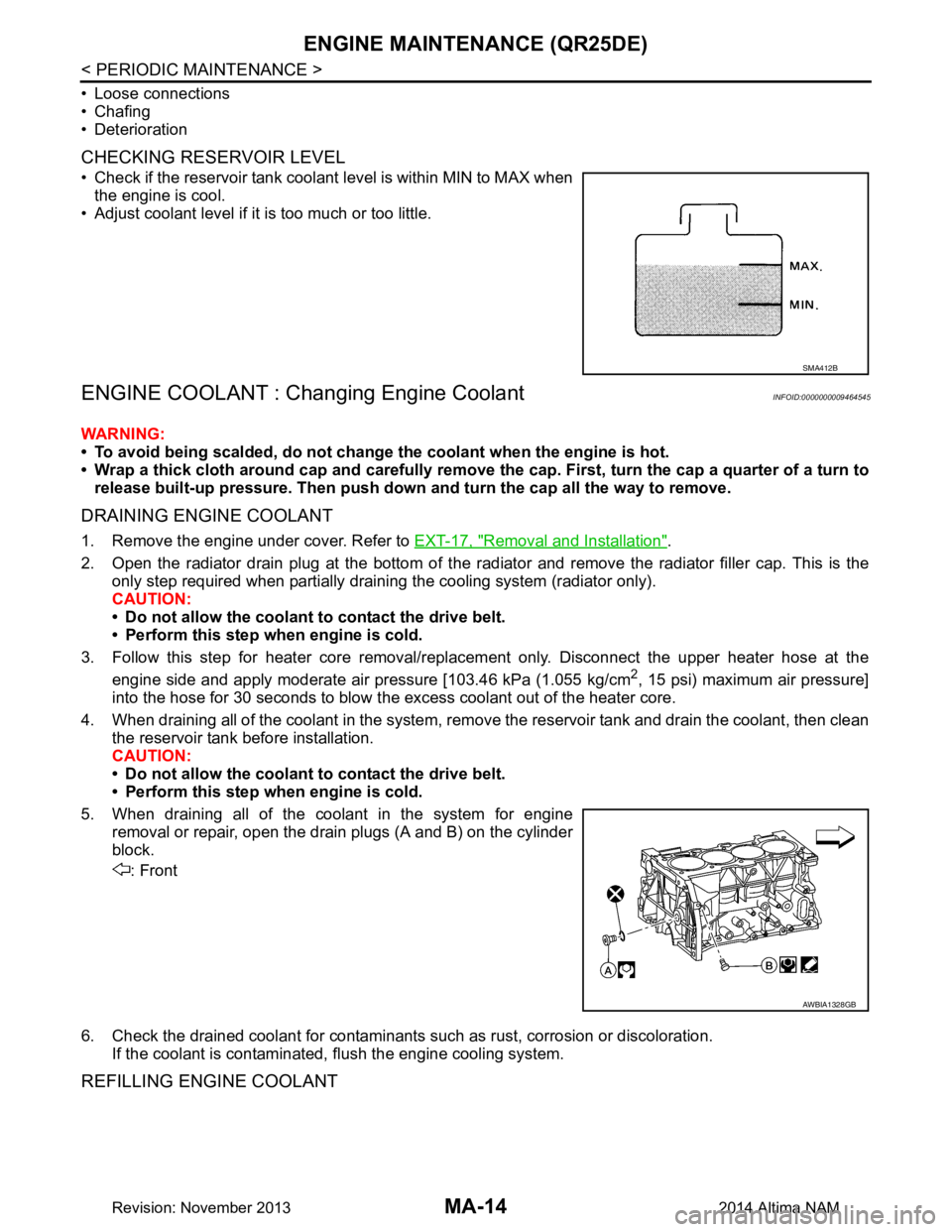
CHECKING RESERVOIR LEVEL
• Check if the reservoir tank coolant level is within MIN to MAX when the engine is cool.
• Adjust coolant level if it is too much or too little.
ENGINE COOLANT : Changing Engine CoolantINFOID:0000000009464545
WARNING:
• To avoid being scalded, do not change the coolant when the engine is hot.
• Wrap a thick cloth around cap and carefully remove the cap. First, turn the cap a quarter of a turn to
release built-up pressure. Then push down and turn the cap all the way to remove.
DRAINING ENGINE COOLANT
1. Remove the engine under cover. Refer to EXT-17, "Removal and Installation".
2. Open the radiator drain plug at the bottom of the radi ator and remove the radiator filler cap. This is the
only step required when partially draining the cooling system (radiator only).
CAUTION:
• Do not allow the coolant to contact the drive belt.
• Perform this step when engine is cold.
3. Follow this step for heater core removal/replac ement only. Disconnect the upper heater hose at the
engine side and apply moderate air pressure [103.46 kPa (1.055 kg/cm
2, 15 psi) maximum air pressure]
into the hose for 30 seconds to blow t he excess coolant out of the heater core.
4. When draining all of the coolant in the system, re move the reservoir tank and drain the coolant, then clean
the reservoir tank before installation.
CAUTION:
• Do not allow the coolant to contact the drive belt.
• Perform this step when engine is cold.
5. When draining all of the coolant in the system for engine removal or repair, open the drain plugs (A and B) on the cylinder
block.
: Front
6. Check the drained coolant for contaminants such as rust, corrosion or discoloration.
If the coolant is contaminated, flush the engine cooling system.
REFILLING ENGINE COOLANT
SMA412B
AWBIA1328GB
Revision: November 20132014 Altima NAM
Page 3199 of 4801
ENGINE MAINTENANCE (QR25DE)MA-15
< PERIODIC MAINTENANCE >
C
D E
F
G H
I
J
K L
M B
MA
N
O A
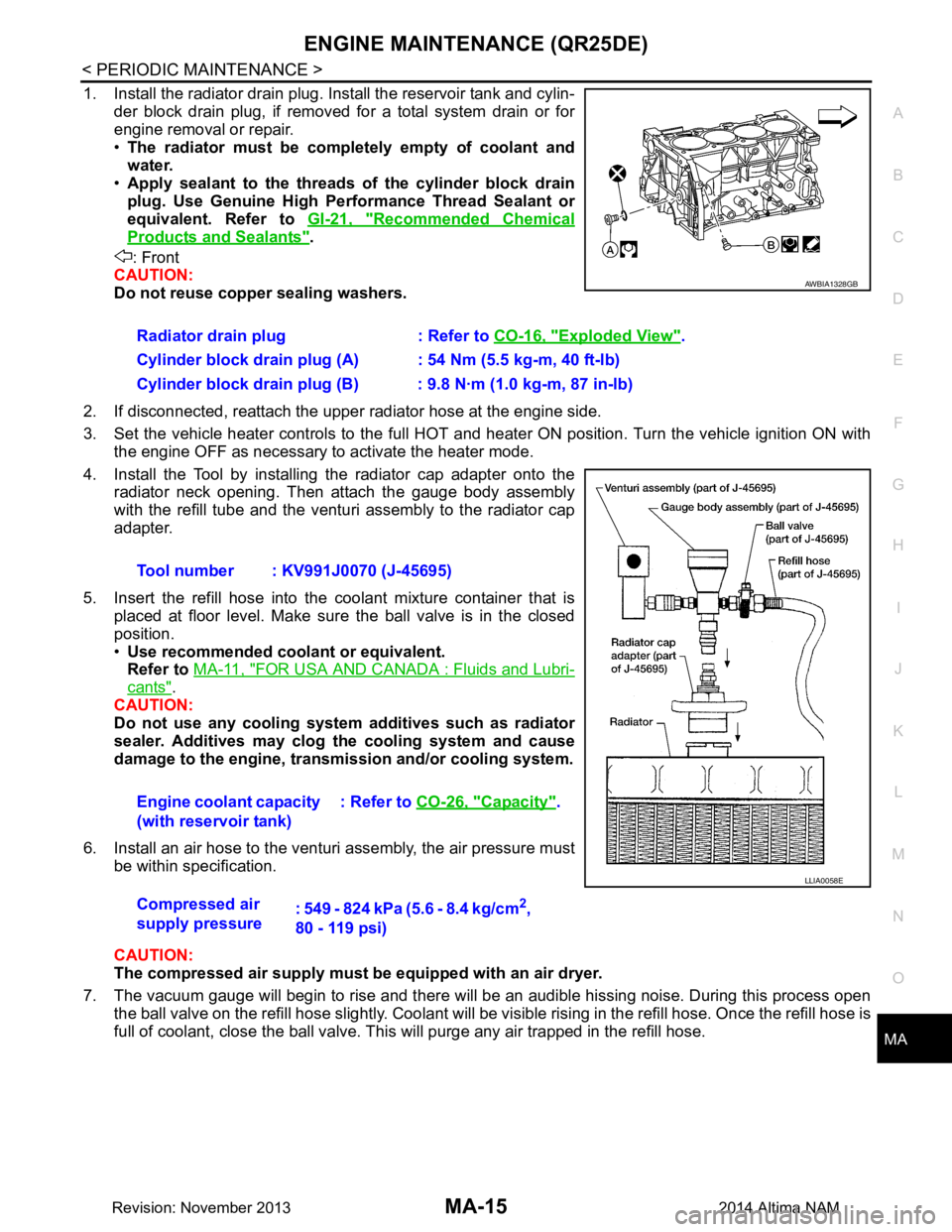
1. Install the radiator drain plug. Install the reservoir tank and cylin-
der block drain plug, if removed for a total system drain or for
engine removal or repair.
• The radiator must be completely empty of coolant and
water.
• Apply sealant to the threads of the cylinder block drain
plug. Use Genuine High Pe rformance Thread Sealant or
equivalent. Refer to GI-21, "Recommended Chemical
Products and Sealants".
: Front
CAUTION:
Do not reuse copper sealing washers.
2. If disconnected, reattach the upper radiator hose at the engine side.
3. Set the vehicle heater controls to the full HOT and heat er ON position. Turn the vehicle ignition ON with
the engine OFF as necessary to activate the heater mode.
4. Install the Tool by installing the radiator cap adapter onto the radiator neck opening. Then attach the gauge body assembly
with the refill tube and the venturi assembly to the radiator cap
adapter.
5. Insert the refill hose into the coolant mixture container that is
placed at floor level. Make sure the ball valve is in the closed
position.
• Use recommended coolant or equivalent.
Refer to MA-11, "FOR USA AND CANADA : Fluids and Lubri-
cants".
CAUTION:
Do not use any cooling system additives such as radiator
sealer. Additives may clog th e cooling system and cause
damage to the engine, transmission and/or cooling system.
6. Install an air hose to the venturi assembly, the air pressure must be within specification.
CAUTION:
The compressed air supply must be equipped with an air dryer.
7. The vacuum gauge will begin to rise and there will be an audible hissing noise. During this process open the ball valve on the refill hose slightly. Coolant will be vi sible rising in the refill hose. Once the refill hose is
full of coolant, close the ball valve. Th is will purge any air trapped in the refill hose.
Radiator drain plug : Refer to
CO-16, "Exploded View"
.
Cylinder block drain plug (A) : 54 Nm (5.5 kg-m, 40 ft-lb)
Cylinder block drain plug (B) : 9.8 N·m (1.0 kg-m, 87 in-lb)
Tool number : KV991J0070 (J-45695)
Engine coolant capacity
(with reservoir tank) : Refer to
CO-26, "Capacity"
.
Compressed air
supply pressure : 549 - 824 kPa (5.6 - 8.4 kg/cm
2,
80 - 119 psi)
AWBIA1328GB
LLIA0058E
Revision: November 20132014 Altima NAM