light NISSAN TEANA 2014 Service Manual
[x] Cancel search | Manufacturer: NISSAN, Model Year: 2014, Model line: TEANA, Model: NISSAN TEANA 2014Pages: 4801, PDF Size: 51.2 MB
Page 3359 of 4801
![NISSAN TEANA 2014 Service Manual
PCS-10
< SYSTEM DESCRIPTION >[IPDM E/R]
DIAGNOSIS SYSTEM (IPDM E/R)
APPLICATION ITEM
CONSULT performs the following functions
via CAN communication with IPDM E/R.
ECU IDENTIFICATION
The IPDM E/R par](/img/5/57390/w960_57390-3358.png "NISSAN TEANA 2014 Service Manual
PCS-10
< SYSTEM DESCRIPTION >[IPDM E/R]
DIAGNOSIS SYSTEM (IPDM E/R)
APPLICATION ITEM
CONSULT performs the following functions
via CAN communication with IPDM E/R.
ECU IDENTIFICATION
The IPDM E/R par")
PCS-10
< SYSTEM DESCRIPTION >[IPDM E/R]
DIAGNOSIS SYSTEM (IPDM E/R)
APPLICATION ITEM
CONSULT performs the following functions
via CAN communication with IPDM E/R.
ECU IDENTIFICATION
The IPDM E/R part number is displayed.
SELF DIAGNOSTIC RESULT
Refer to PCS-20, "DTC Index".
DATA MONITOR
Direct Diagnostic Mode Description
Ecu Identification The IPDM E/R part number is displayed.
Self Diagnostic Result The IPDM E/R self diagnostic results are displayed.
Data Monitor The IPDM E/R input/output data is displayed in real time.
Active Test The IPDM E/R activates outputs to test components.
CAN Diag Support Mntr The result of transmit/receive diagnosis of CAN communication is displayed.
Monitor Item [Unit] Main
Signals Description
MOTOR FAN REQ [%] ×Indicates cooling fan speed signal received from ECM on CAN communication
line
AC COMP REQ [On/Off] ×Indicates A/C compressor request signal received from ECM on CAN commu-
nication line
TAIL&CLR REQ [On/Off] ×Indicates position light request signal received from BCM on CAN communica-
tion line
HL LO REQ [On/Off] ×Indicates low beam request signal received from BCM on CAN communication
line
HL HI REQ [On/Off] ×Indicates high beam request signal received from BCM on CAN communication
line
FR FOG REQ [On/Off] ×Indicates front fog light request signal received from BCM on CAN communica-
tion line
FR WIP REQ [Stop/1LOW/Low/Hi] ×Indicates front wiper request signal received from BCM on CAN communication
line
WIP AUTO STOP [STOP P/ACT P] ×Indicates condition of front wiper auto stop signal
WIP PROT [Off/BLOCK] ×Indicates condition of front wiper fail-safe operation
IGN RLY1 -REQ [On/Off] Indicates ignition switch ON signal received from BCM on CAN communication
line
IGN RLY [On/Off] ×Indicates condition of ignition relay
PUSH SW [On/Off] Indicates condition of push-button ignition switch
INTER/NP SW [On/Off] Indicates condition of CVT shift position
ST RLY CONT [On/Off] Indicates starter relay status signal received from BCM on CAN communication
line
IHBT RLY -REQ [On/Off] Indicates starter control relay signal received from BCM on CAN communication
line
ST/INHI RLY [Off/ ST /INHI] Indicates condition of starter relay and starter control relay
DETENT SW [On/Off] Indicates condition of CVT shift selector (park position switch)
DTRL REQ [Off] Indicates daytime light request signal received from BCM on CAN communica-
tion line
HOOD SW [On/Off] Indicates condition of hood switch
THFT HRN REQ [On/Off] Indicates theft warning horn request signal received from BCM on CAN commu-
nication line
Revision: November 20132014 Altima NAMRevision: November 20132014 Altima NAM
Page 3361 of 4801
![NISSAN TEANA 2014 Service Manual
PCS-12
< ECU DIAGNOSIS INFORMATION >[IPDM E/R]
IPDM E/R (INTELLIGENT POWER DI
STRIBUTION MODULE ENGINE ROOM)
ECU DIAGNOSIS INFORMATION
IPDM E/R (INTELLIGENT POWER DISTRIBUTION MODULE ENGINE
ROOM)
Re](/img/5/57390/w960_57390-3360.png "NISSAN TEANA 2014 Service Manual
PCS-12
< ECU DIAGNOSIS INFORMATION >[IPDM E/R]
IPDM E/R (INTELLIGENT POWER DI
STRIBUTION MODULE ENGINE ROOM)
ECU DIAGNOSIS INFORMATION
IPDM E/R (INTELLIGENT POWER DISTRIBUTION MODULE ENGINE
ROOM)
Re")
PCS-12
< ECU DIAGNOSIS INFORMATION >[IPDM E/R]
IPDM E/R (INTELLIGENT POWER DI
STRIBUTION MODULE ENGINE ROOM)
ECU DIAGNOSIS INFORMATION
IPDM E/R (INTELLIGENT POWER DISTRIBUTION MODULE ENGINE
ROOM)
Reference ValueINFOID:0000000009461603
VALUES ON THE DIAGNOSIS TOOL
Monitor Item Condition Value/Status
RAD FAN REQ Engine idle speed Changes depending on engine cool-
ant temperature, air conditioner op-
eration status, vehicle speed, etc. 1, 2, 3, 4
AC COMP REQ Engine running A/C switch OFF Off
A/C switch ON
(Compressor is operating) On
TAIL&CLR REQ Lighting switch OFF Off
Lighting switch 1ST, 2ND, HI or AUTO (Light is illuminated) On
HL LO REQ Lighting switch OFF Off
Lighting switch 2ND HI or AUTO (Light is illuminated) On
HL HI REQ Lighting switch OFF Off
Lighting switch HI On
FR FOG REQ Lighting switch 2ND or
AUTO (Light is illuminated) Front fog lamp switch OFF Off
• Front fog lamp switch ON
• Daytime running light activated (Only for Canada models) On
FR WIP REQ Ignition switch ON Front wiper switch OFF STOP
Front wiper switch INT 1LOW
Front wiper switch LO Low
Front wiper switch HI Hi
WIP AUTO STOP Ignition switch ON Front wiper stop position STOP P
Any position other than front wiper
stop position ACT P
WIP PROT Ignition switch ON Front wiper operates normally Off
Front wiper stops at fail-safe opera-
tion BLOCK
IGN RLY1 -REQ Ignition switch OFF or ACC Off
Ignition switch ON On
IGN RLY Ignition switch OFF or ACC Off
Ignition switch ON On
PUSH SW Release the push-button ignition switch Off
Press the push-button ignition switch On
INTER/NP SW Ignition switch ON CVT selector lever in any position
other than P or N Off
CVT selector lever in P or N position On
ST RLY CONT Ignition switch ON Off
At engine cranking On
IHBT RLY -REQ Ignition switch ON Off
At engine cranking On
Revision: November 20132014 Altima NAMRevision: November 20132014 Altima NAM
Page 3364 of 4801
![NISSAN TEANA 2014 Service Manual
PCS
IPDM E/R (INTELLIGENT POWER DISTRIBUTION MODULE ENGINE ROOM)
PCS-15
< ECU DIAGNOSIS INFORMATION > [IPDM E/R]
C
D E
F
G H
I
J
K L
B
A
O P
N
7
(B) Ground Ground (Power) — Ignition switch ON 0V](/img/5/57390/w960_57390-3363.png "NISSAN TEANA 2014 Service Manual
PCS
IPDM E/R (INTELLIGENT POWER DISTRIBUTION MODULE ENGINE ROOM)
PCS-15
< ECU DIAGNOSIS INFORMATION > [IPDM E/R]
C
D E
F
G H
I
J
K L
B
A
O P
N
7
(B) Ground Ground (Power) — Ignition switch ON 0V")
PCS
IPDM E/R (INTELLIGENT POWER DISTRIBUTION MODULE ENGINE ROOM)
PCS-15
< ECU DIAGNOSIS INFORMATION > [IPDM E/R]
C
D E
F
G H
I
J
K L
B
A
O P
N
7
(B) Ground Ground (Power) — Ignition switch ON 0V
9
(SB) Ground Tail RH Output Ignition
switch ON Lighting switch OFF 0V
Lighting switch 1ST Battery voltage
10
(V) Ground Tail LH Output Ignition
switch ON Lighting switch OFF 0V
Lighting switch 1ST Battery voltage
11
(Y) Ground Front wiper LO Output Ignition
switch ON Front wiper switch OFF 0V
Front wiper switch LO Battery voltage
13
(LG) Ground ECM battery Output Ignition switch OFF 0V
Ignition switch ON Battery voltage
14
(Y) Ground Daytime running lamps Output Ignition switch OFF Battery voltage
15
(R) Ground Fuel pump Output Approximately 1 second or more after
turning the ignition switch ON 0V
• Approximately 1 second after turning the ignition switch ON
• Engine running Battery voltage
18
(L) Ground Front wiper HI Output Ignition
switch ON Front wiper switch OFF 0V
Front wiper switch HI Battery voltage
19
(BR) Ground Power steering control unit Output Ignition switch OFF 0V
Ignition switch ON Battery voltage
21
(L) Ground ECM ignition switch Output Ignition switch OFF 0V
Ignition switch ON Battery voltage
22
(W) Ground Horn relay Input The horn is deactivated Battery voltage
The horn is activated 0V
23
(V) Ground Horn switch Input The horn is deactivated Battery voltage
The horn is activated 0V
27
(BG) Ground Fan motor relay mid Input Ignition switch OFF 0V
Ignition switch ON 0.7V
28
(P) —CAN-L
Input/
Output ——
29
(L) —CAN-H Input/
Output ——
31
(Y) Ground Detent switch Input Ignition
switch ON Press the CVT selector
button (CVT selector lever
P) Battery voltage
• CVT selector lever in any position other than
P
• Release the CVT selec- tor button (CVT selector
lever P) 0V
33
(R) Ground Starter control Input
Ignition
switch ON CVT selector lever in any
position other than P or N 0V
CVT selector lever P or N Battery voltage
34
(SB) Ground Wiper autostop Input Ignition
switch ON Front wiper stop position 0V
Any position other than
front wiper stop position Battery voltage
Te r m i n a l N o .
(Wire color) Description
ConditionVa l u e
(Approx.)
Signal name Input/
Output
+ −
Revision: November 20132014 Altima NAMRevision: November 20132014 Altima NAM
Page 3367 of 4801
![NISSAN TEANA 2014 Service Manual
PCS-18
< ECU DIAGNOSIS INFORMATION >[IPDM E/R]
IPDM E/R (INTELLIGENT POWER DI
STRIBUTION MODULE ENGINE ROOM)
71
(SB) Ground Alternator C Output Ignition switch ON
6.3V
40% is set on “Active test”](/img/5/57390/w960_57390-3366.png "NISSAN TEANA 2014 Service Manual
PCS-18
< ECU DIAGNOSIS INFORMATION >[IPDM E/R]
IPDM E/R (INTELLIGENT POWER DI
STRIBUTION MODULE ENGINE ROOM)
71
(SB) Ground Alternator C Output Ignition switch ON
6.3V
40% is set on “Active test”")
PCS-18
< ECU DIAGNOSIS INFORMATION >[IPDM E/R]
IPDM E/R (INTELLIGENT POWER DI
STRIBUTION MODULE ENGINE ROOM)
71
(SB) Ground Alternator C Output Ignition switch ON
6.3V
40% is set on “Active test”, “ALTERNA-
TOR DUTY” of “ENGINE”
3.8V
80% is set on “Active test”, “ALTERNA-
TOR DUTY” of “ENGINE”
1.4V
72
2
(V) Ground ECM relay
(Self shut-off) OutputIgnition switch OFF
(For a few seconds after turning ignition
switch OFF) Battery voltage
72
3
(Y) • Ignition switch ON
• Ignition switch OFF (More than a few seconds after turn-
ing ignition switch OFF) 0 - 1.5V
74
4
(BG) Ground Washer motor Output Ignition switch ON Battery voltage
74
5
(V)
75
(R) Ground Headlamp LO RH Output Ignition
switch ON Lighting switch OFF 0V
Lighting switch 2ND Battery voltage
76
(P) Ground Headlamp LO LH Output Ignition
switch ON Lighting switch OFF 0V
Lighting switch 2ND Battery voltage
78
(W) Ground Front fog lamp RH Output Ignition
switch ON Fog lamp switch OFF 0V
Fog lamp switch ON Battery voltage
79
(G) Ground Front fog lamp LH Output Ignition
switch ON Fog lamp switch OFF 0V
Fog lamp switch ON Battery voltage
80
(L) Ground Headlamp HI RH Output
Ignition
switch ON • Lighting switch HI
• Lighting switch PASS Battery voltage
Lighting switch OFF 0V
81
(Y) Ground Headlamp HI LH Output Ignition
switch ON • Lighting switch HI
• Lighting switch PASS Battery voltage
Lighting switch OFF 0V
Te r m i n a l N o .
(Wire color) Description
ConditionVa l u e
(Approx.)
Signal name Input/
Output
+ −
JPMIA0001GB
JPMIA0002GB
JPMIA0003GB
Revision: November 20132014 Altima NAMRevision: November 20132014 Altima NAM
Page 3368 of 4801
![NISSAN TEANA 2014 Service Manual
PCS
IPDM E/R (INTELLIGENT POWER DISTRIBUTION MODULE ENGINE ROOM)
PCS-19
< ECU DIAGNOSIS INFORMATION > [IPDM E/R]
C
D E
F
G H
I
J
K L
B
A
O P
N
1: Ignition battery saver logic turns OFF the IPDM E/R](/img/5/57390/w960_57390-3367.png "NISSAN TEANA 2014 Service Manual
PCS
IPDM E/R (INTELLIGENT POWER DISTRIBUTION MODULE ENGINE ROOM)
PCS-19
< ECU DIAGNOSIS INFORMATION > [IPDM E/R]
C
D E
F
G H
I
J
K L
B
A
O P
N
1: Ignition battery saver logic turns OFF the IPDM E/R")
PCS
IPDM E/R (INTELLIGENT POWER DISTRIBUTION MODULE ENGINE ROOM)
PCS-19
< ECU DIAGNOSIS INFORMATION > [IPDM E/R]
C
D E
F
G H
I
J
K L
B
A
O P
N
1: Ignition battery saver logic turns OFF the IPDM E/R and BCM if the ignition is ON for 30 minutes with the engine OFF.
2: With QR25DE.
3: With VQ35DE.
4: With rear view camera.
5: Without rear view camera.
Fail SafeINFOID:0000000009461604
CAN COMMUNICATION CONTROL
When CAN communication with ECM and BCM is impossible,
IPDM E/R performs fail-safe control. After CAN
communication recovers normally, it also returns to normal control.
If No CAN Communication Is Available With BCM
82
(W) Ground
Power distribution sensor
signal-fem —• Ignition switch ON (READY)
• Both A/C switch and blower motor switch ON (electric compressor oper-
ates) 1.0 - 4.0V
83
(G) Ground Power distribution sensor
power-fem — Ignition switch ON 5V
85
(V) Ground Daytime running lamps re-
lay OutputIgnition
switch ON Daytime light system ac-
tive Battery voltage
Ignition
switch ON Daytime light system inac-
tive 0V
86
(R) Ground Power distribution sensor
ground-fem — Ignition switch ON 0V
87
(P) Ground Ambient sensor signal-fem — Ignition switch ON 5V
90
(LG) Ground Clearance lamps Output Ignition
switch ON Lighting switch 1ST Battery voltage
Lighting switch OFF 0V
94
(SB) Ground Hood switch 2 Input Ignition
switch ON Hood closed 0V
Hood open Battery voltage
95
(BG) Ground Ambient sensor ground-
fem — Ignition switch ON 0V
96
(Y) Ground Hood switch Input
Ignition
switch ON Hood closed 0V
Hood open Battery voltage
Te r m i n a l N o .
(Wire color) Description
ConditionVa l u e
(Approx.)
Signal name Input/
Output
+ −
Control part Fail-safe in operation
Headlamp • Turns ON the headlamp low relay when the ignition switch is turned ON
• Turns OFF the headlamp low relay when the ignition switch is turned OFF
• Headlamp high relay OFF
•Parking lamps
• Side marker lamps
• License plate lamps
• Tail lamps • Turns ON the tail lamp relay when the ignition switch is turned ON
• Turns OFF the tail lamp relay when the ignition switch is turned OFF
Front wiper • The status just before activation of fail-safe control is maintained until the ignition
switch is turned OFF while the front wiper is operating at LO or HI speed.
• The wiper is operated at LO speed until the ignition switch is turned OFF if the fail- safe control is activated while the front wipe r is set in the INT mode and the front wiper
motor is operating.
Horn Horn OFF
Ignition relay The status just before activation of fail-safe is maintained.
Revision: November 20132014 Altima NAMRevision: November 20132014 Altima NAM
Page 3385 of 4801
![NISSAN TEANA 2014 Service Manual
PCS-36
< SYSTEM DESCRIPTION >[POWER DISTRIBUTION SYSTEM]
SYSTEM
SYSTEM
POWER DISTRIBUTION SYSTEM
POWER DISTRIBUTION SYSTEM : System DiagramINFOID:0000000009461624
POWER DISTRIBUTION SYSTEM
: System](/img/5/57390/w960_57390-3384.png "NISSAN TEANA 2014 Service Manual
PCS-36
< SYSTEM DESCRIPTION >[POWER DISTRIBUTION SYSTEM]
SYSTEM
SYSTEM
POWER DISTRIBUTION SYSTEM
POWER DISTRIBUTION SYSTEM : System DiagramINFOID:0000000009461624
POWER DISTRIBUTION SYSTEM
: System")
PCS-36
< SYSTEM DESCRIPTION >[POWER DISTRIBUTION SYSTEM]
SYSTEM
SYSTEM
POWER DISTRIBUTION SYSTEM
POWER DISTRIBUTION SYSTEM : System DiagramINFOID:0000000009461624
POWER DISTRIBUTION SYSTEM
: System DescriptionINFOID:0000000009461625
SYSTEM DESCRIPTION
• PDS (POWER DISTRIBUTION SYSTEM ) is the system that BCM controls with the operation of the push-
button ignition switch and performs the power distribution to each power circuit. This system is used instead
of the mechanical power supply changing mechanism wi th the operation of the conventional key cylinder.
• The push-button ignition switch can be operated when Intelligent Key is in the following condition.
- Intelligent Key is in the detection area of the inside key antenna.
- Intelligent Key backside is contacted to push-button ignition switch.
• The push-button ignition switch operation is input to BCM as a signal. BCM changes the power supply posi-
tion according to the status and operates the following relays to supply power to each power circuit.
- Ignition relay-1
- Ignition relay-2
- Accessory relay-1
- Accessory relay-2
- Front blower motor relay
NOTE:
The engine switch operation changes due to the conditions of brake pedal, selector lever and vehicle speed.
• The power supply position can be confirmed with the light ing of the indicators in the push-button ignition
switch.
BATTERY SAVER SYSTEM
When all the following conditions are met for 30 minutes, t he battery saver system will cut off the power supply
to prevent battery discharge.
• The ignition switch is in the ACC or ON position
• All doors are closed
• Selector lever is in the P (park) position
Reset Condition of Battery Saver System
In order to prevent the battery from discharging, the battery saver system will cut off the power supply when all
doors are closed, the selector lever is in P (park) positi on and the ignition switch is left in the ACC or ON posi-
tion for 30 minutes. If any of the following conditions are met the battery saver system is released and the
steering will change automatically to lock position from OFF position.
• Opening any door
• Operating door request switch on door handle
• Operating Intelligent Key
AWMIA1282GB
Revision: November 20132014 Altima NAMRevision: November 20132014 Altima NAM
Page 3478 of 4801
PG-46
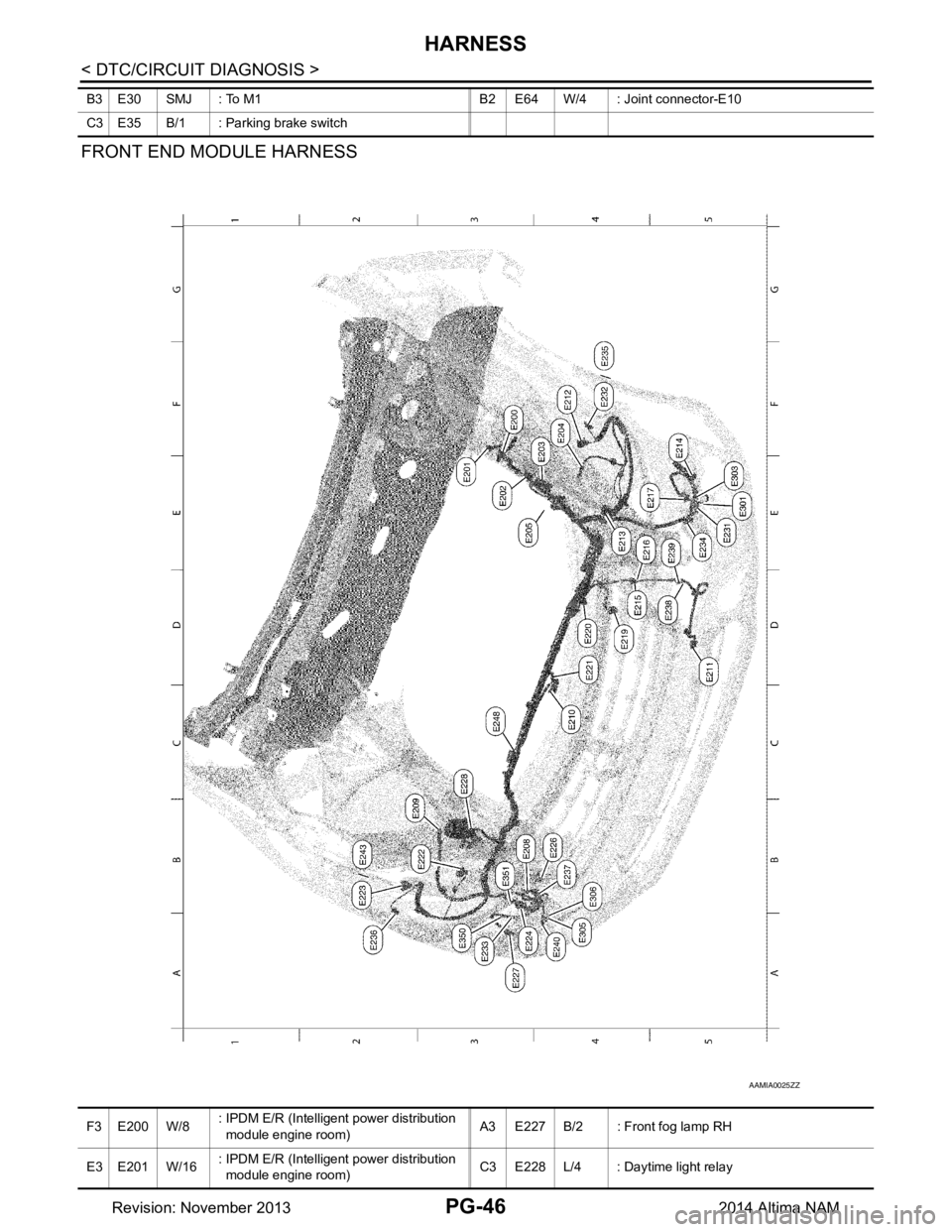
< DTC/CIRCUIT DIAGNOSIS >
HARNESS
FRONT END MODULE HARNESS
B3 E30 SMJ : To M1 B2 E64 W/4 : Joint connector-E10
C3 E35 B/1 : Parking brake switch
AAMIA0025ZZ
F 3 E 2 0 0 W / 8 : IPDM E/R (Intelligent power distribution
module engine room) A3 E227 B/2 : Front fog lamp RH
E3 E201 W/16 : IPDM E/R (Intelligent power distribution
module engine room) C3 E228 L/4 : Daytime light relay
Revision: November 20132014 Altima NAM
Page 3700 of 4801
SQUEAK AND RATTLE TROUBLE DIAGNOSESRF-35
< SYMPTOM DIAGNOSIS >
C
D E
F
G H
I
J
L
M A
B
RF
N
O P
SQUEAK AND RATTLE TROUBLE DIAGNOSES
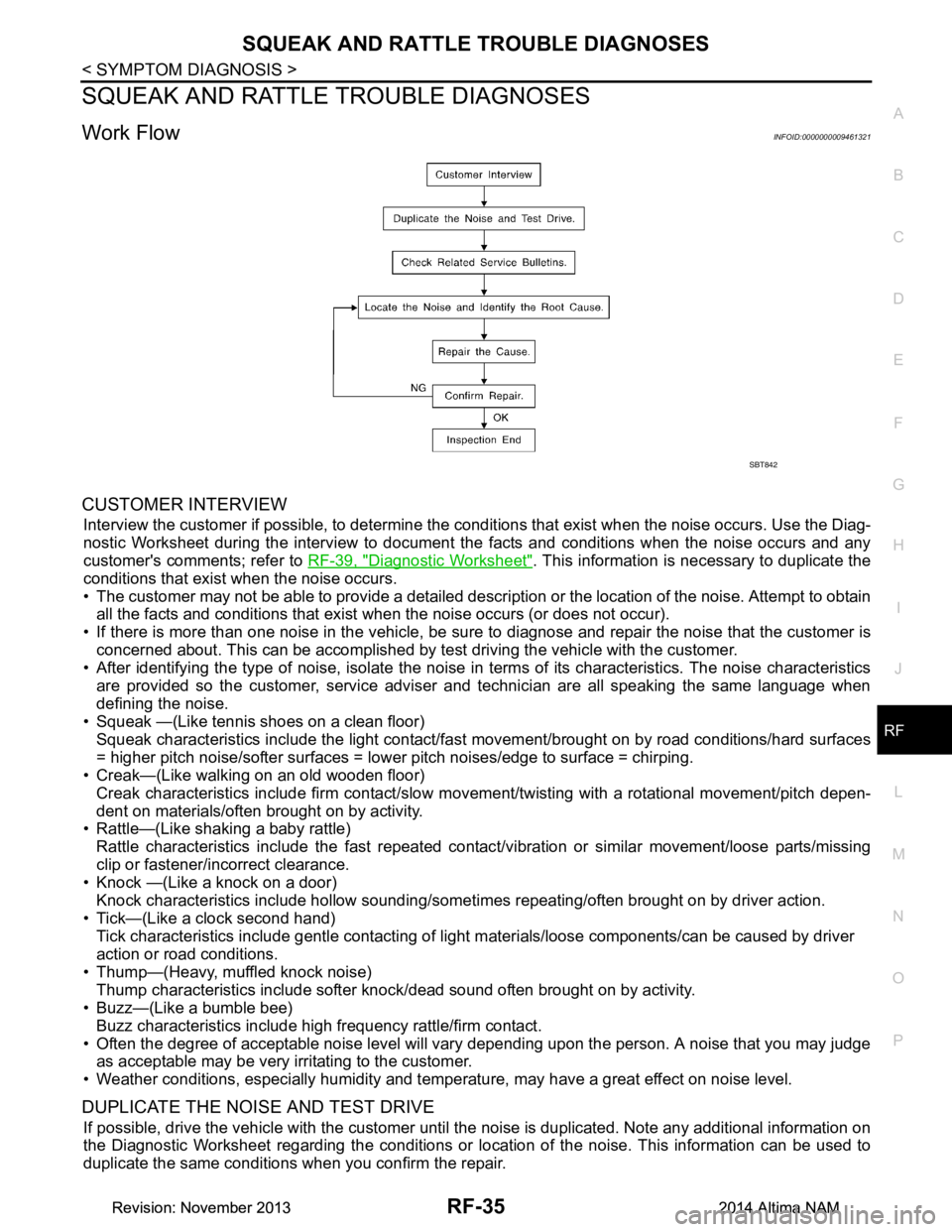
Work FlowINFOID:0000000009461321
CUSTOMER INTERVIEW
Interview the customer if possible, to determine the c onditions that exist when the noise occurs. Use the Diag-
nostic Worksheet during the interv iew to document the facts and conditions when the noise occurs and any
customer's comments; refer to RF-39, "Diagnostic Worksheet"
. This information is necessary to duplicate the
conditions that exist when the noise occurs.
• The customer may not be able to provide a detailed descr iption or the location of the noise. Attempt to obtain
all the facts and conditions that exist when the noise occurs (or does not occur).
• If there is more than one noise in the vehicle, be sure to diagnose and repair the noise that the customer is
concerned about. This can be accomplished by test driving the vehicle with the customer.
• After identifying the type of noise, isolate the noise in terms of its characteristics. The noise characteristics
are provided so the customer, service adviser and technician are all speaking the same language when
defining the noise.
• Squeak —(Like tennis shoes on a clean floor)
Squeak characteristics include the light contact/fast movement/brought on by road conditions/hard surfaces
= higher pitch noise/softer surfaces = lower pitch noises/edge to surface = chirping.
• Creak—(Like walking on an old wooden floor)
Creak characteristics include firm contact/slow mo vement/twisting with a rotational movement/pitch depen-
dent on materials/often brought on by activity.
• Rattle—(Like shaking a baby rattle)
Rattle characteristics include the fast repeated contac t/vibration or similar movement/loose parts/missing
clip or fastener/incorrect clearance.
• Knock —(Like a knock on a door)
Knock characteristics include hollow sounding/someti mes repeating/often brought on by driver action.
• Tick—(Like a clock second hand) Tick characteristics include gentle contacting of li ght materials/loose components/can be caused by driver
action or road conditions.
• Thump—(Heavy, muffled knock noise) Thump characteristics include softer k nock/dead sound often brought on by activity.
• Buzz—(Like a bumble bee)
Buzz characteristics include high frequency rattle/firm contact.
• Often the degree of acceptable noise level will vary depending upon the person. A noise that you may judge as acceptable may be very irritating to the customer.
• Weather conditions, especially humidity and temperature, may have a great effect on noise level.
DUPLICATE THE NOISE AND TEST DRIVE
If possible, drive the vehicle with the customer until the noise is duplicated. Note any additional information on
the Diagnostic Worksheet regarding the conditions or lo cation of the noise. This information can be used to
duplicate the same conditions when you confirm the repair.
SBT842
Revision: November 20132014 Altima NAMRevision: November 20132014 Altima NAM
Page 3701 of 4801

RF-36
< SYMPTOM DIAGNOSIS >
SQUEAK AND RATTLE TROUBLE DIAGNOSES
If the noise can be duplicated easily during the test drive, to help identify the source of the noise, try to dupli-
cate the noise with the vehicle stopped by doing one or all of the following:
1) Close a door.
2) Tap or push/pull around the area where the noise appears to be coming from.
3) Rev the engine.
4) Use a floor jack to recreate vehicle “twist”.
5) At idle, apply engine load (electrical load, half-clutch on M/T model, drive position on CVT and A/T models).
6) Raise the vehicle on a hoist and hit a tire with a rubber hammer.
• Drive the vehicle and attempt to duplicate the conditions the customer states exist when the noise occurs.
• If it is difficult to duplicate the noise, drive the v ehicle slowly on an undulating or rough road to stress the
vehicle body.
CHECK RELATED SERVICE BULLETINS
After verifying the customer concern or symptom, chec k ASIST for Technical Service Bulletins (TSBs) related
to that concern or symptom.
If a TSB relates to the symptom, follo w the procedure to repair the noise.
LOCATE THE NOISE AND IDENTIFY THE ROOT CAUSE
1. Narrow down the noise to a general area. To help pi npoint the source of the noise, use a listening tool
(Chassis Ear: J-39570, Engine Ear: J-39565 and mechanic's stethoscope).
2. Narrow down the noise to a more specific area and identify the cause of the noise by:
• removing the components in the area that you suspect the noise is coming from.
Do not use too much force when removing clips and fasteners, otherwise clips and fasteners can be
broken or lost during the repair, resulting in the creation of new noise.
• tapping or pushing/pulling the component that you suspect is causing the noise. Do not tap or push/pull the component with excessive force, otherwise the noise will be eliminated only
temporarily.
• feeling for a vibration with your hand by touching the component(s) that you suspect is (are) causing the
noise.
• placing a piece of paper between components that you suspect are causing the noise.
• looking for loose components and contact marks. Refer to RF-37, "Generic Squeak and Rattle Troubleshooting"
.
REPAIR THE CAUSE
• If the cause is a loose component, tighten the component securely.
• If the cause is insufficient clearance between components:
- separate components by repositioning or loos ening and retightening the component, if possible.
- insulate components with a suitable insulator such as urethane pads, foam blocks, felt cloth tape or urethane
tape. A NISSAN Squeak and Rattle Kit (J-43980) is av ailable through your authorized NISSAN Parts Depart-
ment.
CAUTION:
Do not use excessive force as many components are constructed of plastic and may be damaged.
Always check with the Parts Department for the latest parts information.
The following materials are contained in the NISS AN Squeak and Rattle Kit (J-43980). Each item can be
ordered separately as needed.
URETHANE PADS [1.5 mm (0.059 in) thick]
Insulates connectors, harness, etc.
76268-9E005: 100 ×135 mm (3.94 ×5.31 in)/76884-71L01: 60 ×85 mm (2.36 ×3.35 in)/76884-71L02: 15 ×25
mm (0.59 ×0.98 in)
INSULATOR (Foam blocks)
Insulates components from contact. Can be used to fill space behind a panel.
73982-9E000: 45 mm (1.77 in) thick, 50 ×50 mm (1.97 ×1.97 in)/73982-50Y00: 10 mm (0.39 in) thick,
50 ×50 mm (1.97 ×1.97 in)
INSULATOR (Light foam block)
80845-71L00: 30 mm (1.18 in) thick, 30 ×50 mm (1.18 ×1.97 in)
FELT CLOTH TAPE
Used to insulate where movemen t does not occur. Ideal for instrument panel applications.
68370-4B000: 15 ×25 mm (0.59 ×0.98 in) pad/68239-13E00: 5 mm (0.20 in ) wide tape roll. The following
materials not found in the kit can also be used to repair squeaks and rattles.
UHMW (TEFLON) TAPE
Insulates where slight movemen t is present. Ideal for instrument panel applications.
SILICONE GREASE
Revision: November 20132014 Altima NAMRevision: November 20132014 Altima NAM
Page 3703 of 4801

RF-38
< SYMPTOM DIAGNOSIS >
SQUEAK AND RATTLE TROUBLE DIAGNOSES
Most of these incidents can be repaired by adjusting, securing or insulating the item(s) or component(s) caus-
ing the noise.
SUNROOF/HEADLINING
Noises in the sunroof/headlining area c an often be traced to one of the following:
1. Sunroof lid, rail, linkage or seals making a rattle or light knocking noise
2. Sun visor shaft shaking in the holder
3. Front or rear windshield touching headlining and squeaking
Again, pressing on the components to stop the noise while duplicating the conditions can isolate most of these
incidents. Repairs usually consist of insulating with felt cloth tape.
OVERHEAD CONSOLE (FRONT AND REAR)
Overhead console noises are often caused by the c onsole panel clips not being engaged correctly. Most of
these incidents are repaired by pushing up on the c onsole at the clip locations until the clips engage.
In addition look for:
1. Loose harness or harness connectors.
2. Front console map/reading lamp lens loose.
3. Loose screws at console attachment points.
SEATS
When isolating seat noise it's important to note the pos ition the seat is in and the load placed on the seat when
the noise is present. These conditions should be dupl icated when verifying and isolating the cause of the
noise.
Cause of seat noise include:
1. Headrest rods and holder
2. A squeak between the seat pad cushion and frame
3. The rear seatback lock and bracket
These noises can be isolated by moving or pressing on the suspected components while duplicating the con-
ditions under which the noise occurs. Most of thes e incidents can be repaired by repositioning the component
or applying urethane tape to the contact area.
UNDERHOOD
Some interior noise may be caused by components under the hood or on the engine wall. The noise is then
transmitted into the passenger compartment.
Causes of transmitted underhood noise include:
1. Any component installed to the engine wall
2. Components that pass through the engine wall
3. Engine wall mounts and connectors
4. Loose radiator installation pins
5. Hood bumpers out of adjustment
6. Hood striker out of adjustment
These noises can be difficult to isolate since they cannot be reached from the interior of the vehicle. The best
method is to secure, move or insulate one component at a time and test drive the vehicle. Also, engine rpm or
load can be changed to isolate the noise. Repairs can usually be made by moving, adjusting, securing, or
insulating the component causing the noise.
Revision: November 20132014 Altima NAMRevision: November 20132014 Altima NAM