light NISSAN TEANA 2014 Service Manual
[x] Cancel search | Manufacturer: NISSAN, Model Year: 2014, Model line: TEANA, Model: NISSAN TEANA 2014Pages: 4801, PDF Size: 51.2 MB
Page 2587 of 4801

SQUEAK AND RATTLE TROUBLE DIAGNOSESGW-7
< SYMPTOM DIAGNOSIS >
C
D E
F
G H
I
J
L
M A
B
GW
N
O P
INSTRUMENT PANEL
Most incidents are caused by contact and movement between:
1. Cluster lid A and the instrument panel
2. Acrylic lens and combination meter housing
3. Instrument panel to front pillar finisher
4. Instrument panel to windshield
5. Instrument panel pins
6. Wiring harnesses behind the combination meter
7. A/C defroster duct and duct joint
These incidents can usually be located by tapping or moving the components to duplicate the noise or by
pressing on the components while driving to stop the noi se. Most of these incidents can be repaired by apply-
ing felt cloth tape or silicone spray (in hard to reach areas). Urethane pads can be used to insulate wiring har-
ness.
CAUTION:
Do not use silicone spray to isolate a squeak or ra ttle. If you saturate the area with silicone, you will
not be able to recheck the repair.
CENTER CONSOLE
Components to pay attention to include:
1. Shift selector assembly cover to finisher
2. A/C control unit and cluster lid C
3. Wiring harnesses behind audio and A/C control unit
The instrument panel repair and isolation pr ocedures also apply to the center console.
DOORS
Pay attention to the:
1. Finisher and inner panel making a slapping noise
2. Inside handle escutcheon to door finisher
3. Wiring harnesses tapping
4. Door striker out of alignment causing a popping noise on starts and stops
Tapping or moving the components or pressing on them wh ile driving to duplicate the conditions can isolate
many of these incidents. You can usually insulate the ar eas with felt cloth tape or insulator foam blocks from
the NISSAN Squeak and Rattle Kit (J-50397) to repair the noise.
TRUNK
Trunk noises are often caused by a loose jack or loose items put into the trunk by the owner.
In addition look for:
1. Trunk lid bumpers out of adjustment
2. Trunk lid striker out of adjustment
3. The trunk lid torsion bars knocking together
4. A loose license plate or bracket
Most of these incidents can be repaired by adjusting, se curing or insulating the item(s) or component(s) caus-
ing the noise.
SUNROOF/HEADLINING
Noises in the sunroof/headlining area can often be traced to one of the following:
1. Sunroof lid, rail, linkage or seals making a rattle or light knocking noise
2. Sun visor shaft shaking in the holder
3. Front or rear windshield touching headlining and squeaking
Again, pressing on the components to stop the noise while duplicating the conditions can isolate most of these
incidents. Repairs usually consist of insulating with felt cloth tape.
OVERHEAD CONSOLE (FRONT AND REAR)
Overhead console noises are often caused by the cons ole panel clips not being engaged correctly. Most of
these incidents are repaired by pushing up on the c onsole at the clip locations until the clips engage.
In addition look for:
Revision: November 20132014 Altima NAM
Page 2595 of 4801
FRONT DOOR GLASSGW-15
< REMOVAL AND INSTALLATION >
C
D E
F
G H
I
J
L
M A
B
GW
N
O P
Installation is in the reverse order of removal.
• Tighten the front door regulator to glass bolts to specification.
FRONT DOOR GLASS INSPECTION AFTER INSTALLATION
• Check that the door glass is securely set into the glass run groove.
• Lower the door glass slightly [approximately 10 to 20 mm (0.4 to 0.8 in)] and check that the clearance to the
sash is parallel. If the clearance between the door gla ss and sash is not parallel, loosen the regulator bolts,
guide rail bolts, and door glass and guide rail bolts to correct the glass position.
Inspection and AdjustmentINFOID:0000000009463663
SYSTEM INITIALIZATION (IF NECESSARY)
• If any of the following occur, syst em initialization must be performed.
- Electric power supply to power window switch or motor is interrupted by blown fuse or disconnecting battery cable, etc.
- Removal and installation of the regulator assembly.
- Removal and installation of the motor from the regulator assembly.
- Removal and installation of the harness connector of the power window switch.
- Operation of the regulator assembly as a unit.
- Removal and installation of the door glass.
- Removal and installation of the door glass run.
- Window is partly opened and or closed multiple times with out being fully closed.
• To perform system initialization, refer to the following:
- For LH ONLY ANTI-PINCH, refer to PWC-27, "ADDITIONAL SERVICE WHEN REMOVING BATTERY
NEGATIVE TERMINAL : Special Repair Requirement".
- For LH&RH FRONT ANTI-PINCH, refer to PWC-93, "ADDITIONAL SERVICE WHEN REMOVING BAT-
TERY NEGATIVE TERMINAL : Special Repair Requirement".
INSPECT THE FUNCTION OF THE ANTI-PINCH SYSTEM.
To inspect the anti-pinch system, refer to the following:
• For LH ONLY ANTI-PINCH, refer to PWC-27, "ADDITIONAL SERVICE WHEN REMOVING BATTERY
NEGATIVE TERMINAL : Special Repair Requirement".
• For LH&RH FRONT ANTI-PINCH, refer to PWC-93, "ADDITIONAL SERVICE WHEN REMOVING BAT-
TERY NEGATIVE TERMINAL : Special Repair Requirement".
Front door regulator to glass bol
ts : 6.1 N·m (0.62 kg-m, 54 in-lb)
Revision: November 20132014 Altima NAM
Page 2599 of 4801
REAR DOOR GLASSGW-19
< REMOVAL AND INSTALLATION >
C
D E
F
G H
I
J
L
M A
B
GW
N
O P
REAR DOOR GLASS
Removal and InstallationINFOID:0000000009463668
REMOVAL
1. Remove the rear door finisher. Refer to INT-18, "Removal and Installation".
2. Remove the vapor barrier. CAUTION:
Use care to not damage or tear vapor barrier during removal.
3. Remove the rear door window inside seal.
4. Remove the rear door window run rubber.
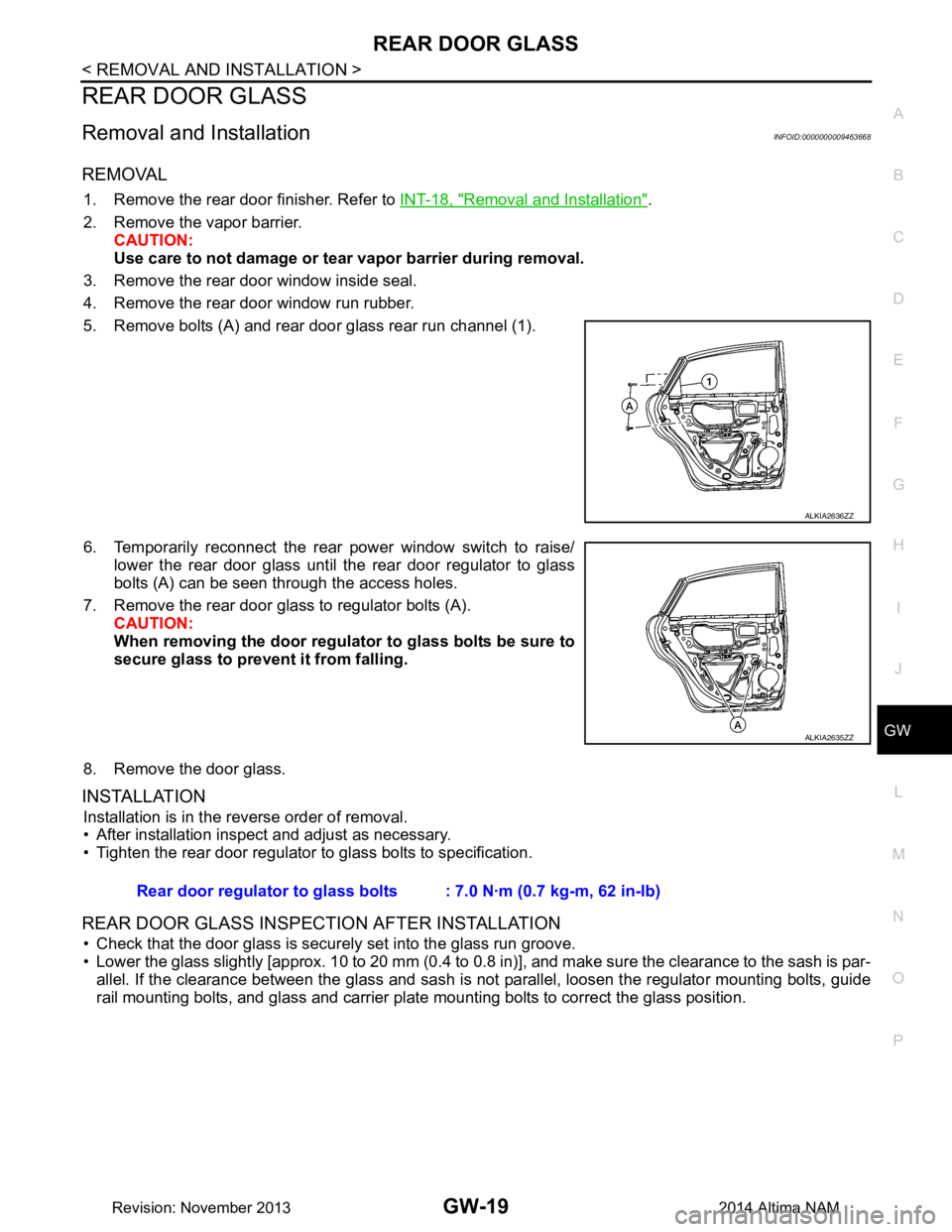
5. Remove bolts (A) and rear door glass rear run channel (1).
6. Temporarily reconnect the rear power window switch to raise/ lower the rear door glass until the rear door regulator to glass
bolts (A) can be seen through the access holes.
7. Remove the rear door glass to regulator bolts (A). CAUTION:
When removing the door regula tor to glass bolts be sure to
secure glass to prevent it from falling.
8. Remove the door glass.
INSTALLATION
Installation is in the reverse order of removal.
• After installation inspect and adjust as necessary.
• Tighten the rear door regulator to glass bolts to specification.
REAR DOOR GLASS INSPECTION AFTER INSTALLATION
• Check that the door glass is securely set into the glass run groove.
• Lower the glass slightly [approx. 10 to 20 mm (0.4 to 0.8 in)], and make sure the clearance to the sash is par-
allel. If the clearance between the glass and sash is not parallel, loosen the regulator mounting bolts, guide
rail mounting bolts, and glass and carrier plate mounting bolts to correct the glass position.
ALKIA2636ZZ
ALKIA2635ZZ
Rear door regulator to glass bolts : 7.0 N·m (0.7 kg-m, 62 in-lb)
Revision: November 20132014 Altima NAM
Page 2616 of 4801
HA-10
< PREPARATION >
PREPARATION
Tool number
(TechMate No.)
Tool name Description
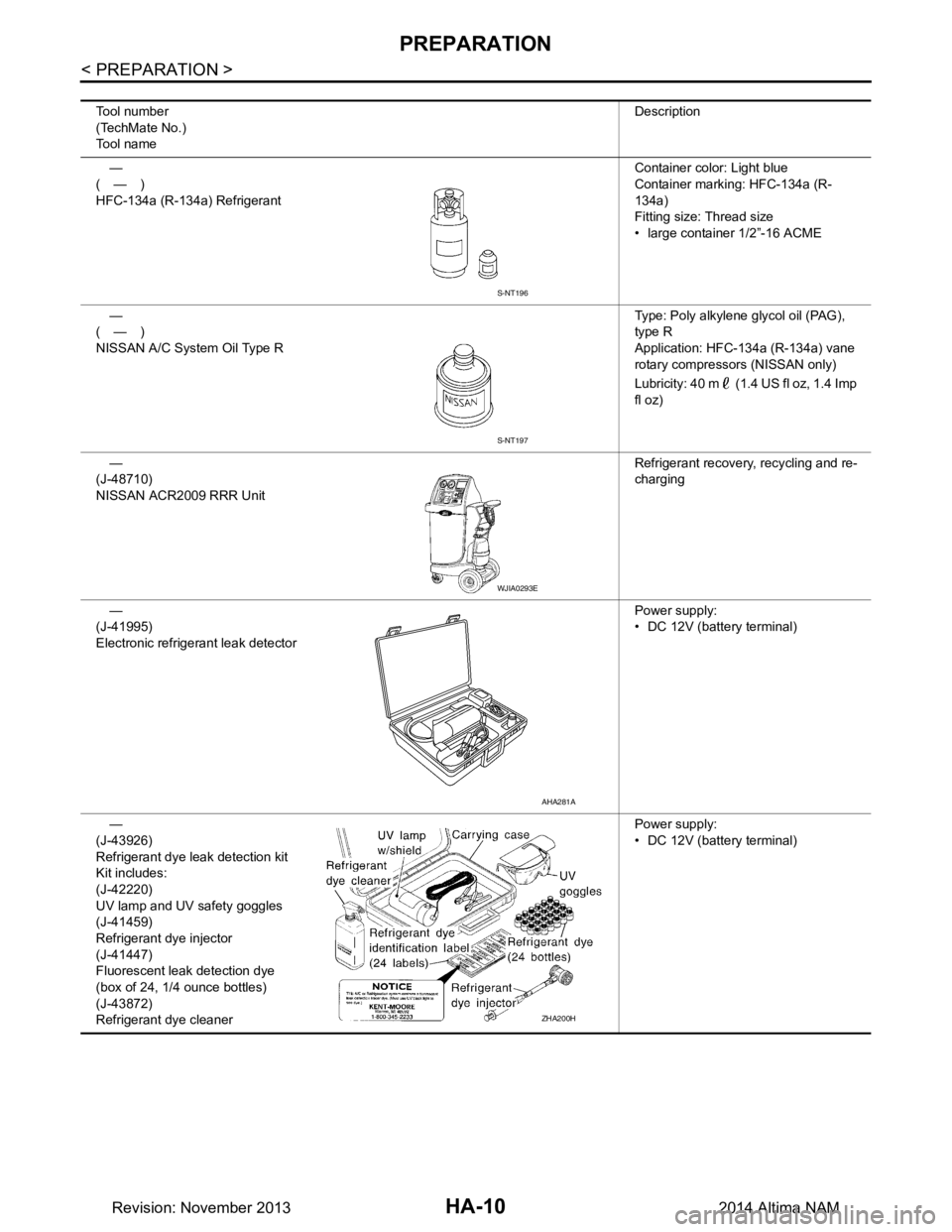
—
(—)
HFC-134a (R-134a) Refrigerant Container color: Light blue
Container marking: HFC-134a (R-
134a)
Fitting size: Thread size
• large container 1/2”-16 ACME
—
(—)
NISSAN A/C System Oil Type R Type: Poly alkylene glycol oil (PAG),
type R
Application: HFC-134a (R-134a) vane
rotary compressors (NISSAN only)
Lubricity: 40 m (1.4 US fl oz, 1.4 Imp
fl oz)
—
(J-48710)
NISSAN ACR2009 RRR Unit Refrigerant recovery, recycling and re-
charging
—
(J-41995)
Electronic refrigerant leak detector Power supply:
• DC 12V (batte ry terminal)
—
(J-43926)
Refrigerant dye leak detection kit
Kit includes:
(J-42220)
UV lamp and UV safety goggles
(J-41459)
Refrigerant dye injector
(J-41447)
Fluorescent leak detection dye
(box of 24, 1/4 ounce bottles)
(J-43872)
Refrigerant dye cleaner Power supply:
• DC 12V (batte ry terminal)
S-NT196
S-NT197
WJIA0293E
AHA281A
ZHA200H
Revision: November 20132014 Altima NAM
Page 2628 of 4801

HA-22
< PERIODIC MAINTENANCE >
REFRIGERANT
4. Press UV lamp switch (5) and check A/C system for refrigerant leakage. (Where refrigerant leakage
occurs, fluorescent leak detec tion dye appears in green color.)
WARNING:
Do not look directly into UV lamp light source.
NOTE:
• For continuous operating time of UV lamp, follow the manufacturer operating instructions.
• Illuminate piping joints from different angles using UV lamp and check that there is no leakage.
• Use a mirror in area that is difficult to see to check refrigerant leakage.
• Refrigerant leakage from evaporator can be detected by soaking cotton swab or a similar material with
drain hose water and illuminating it using UV lamp.
• Dust, dirt and packing materials adhesive used for condenser, evaporator, and other locations may fluo- resce. Be careful not to misidentify leakage.
5. Repair or replace parts where refrigerant leakage occurs and wipe off fluorescent leak detection dye. NOTE:
Completely wipe off fluorescent leak detection dy e from gaps between parts, screw threads, and others
using a cotton swab or similar materials.
6. Use a UV lamp to check that no fluorescent leak detection dye remains after finishing work.
WARNING:
Do not look directly into UV lamp light source.
NOTE:
• For continuous operating time of UV lamp, follow the manufacturer operating instructions.
• Dust, dirt, and packing materials adhesive used for condenser, evaporator, and other locations may flu-
oresce. Be careful not to misidentify leakage.
CHECK REFRIGERANT LEAKAGE USING ELECTRICAL LEAK DETECTOR
WARNING:
Do not check refrigerant leakage while the engine is running.
CAUTION:
Be careful of the following it ems so that inaccurate checks or misidentifications are avoided.
• Do not allow refrigerant vapor, shop chemical vapor s, cigarette smoke or others around the vehicle.
• Always check refrigerant leakage in a low air flow en vironment so that refrigerant may not disperse
when leakage occurs.
1. Stop the engine.
2. Connect recovery/recycling/recharging equipment or manifold gauge set (J-39183-C) to A/C service
valve.
3. Check that A/C refrigerant pressure is 345 kPa (3.52 kg/cm
2, 50 psi) or more when temperature is 16 °C
(61 °F) or more. When pressure is lower than the specif ied value, recycle refrigerant completely and fill
refrigerant to the specified level.
NOTE:
Leakages may not be detected if A/C refrigerant pressure is 345 kPa (3.52 kg/cm
2, 50 psi) or less when
temperature is less than 16 °C (61 °F).
4. Clean area where refrigerant leakage check is performed and check refrigerant leakage along all surfaces of pipe connections and A/C system components us ing electrical leak detector (J-41995) probe.
CAUTION:
• Continue checking when a leakag e is found. Always continue and complete checking along all
pipe connections and A/C system components for additional leakage.
• When a leakage is detected, clean leakage area using compressed air and check again.
• When checking leakage of cooling unit inside, always clean inside of drain hose so that the
probe surface may not be exposed to water or dirt.
NOTE:
• Always check leakage starting from high-pressure side and continue to low-pressure side.
• When checking leakage of cooling unit inside, operate bl ower fan motor for 15 minutes or more at the
maximum fan speed while the engine is stopped, and then in sert electrical leak detector probe into drain
hose and hold for 10 minutes or more.
• When disconnecting shut-off valve that is connected to A/C service valve, always evacuate remaining
refrigerant so that misidentification can be avoided.
5. Repair or replace parts where refrigerant leak age is detected. (Leakage is detected but leakage area is
unknown.)
Revision: November 20132014 Altima NAM
Page 2674 of 4801
![NISSAN TEANA 2014 Service Manual
DIAGNOSIS SYSTEM (A/C AUTO AMP.)HAC-25
< SYSTEM DESCRIPTION > [AUTOMATIC AIR CONDITIONER]
C
D E
F
G H
J
K L
M A
B
HAC
N
O P
*: Perform self-diagnosis under sunshine. When performing indoors, aim a](/img/5/57390/w960_57390-2673.png "NISSAN TEANA 2014 Service Manual
DIAGNOSIS SYSTEM (A/C AUTO AMP.)HAC-25
< SYSTEM DESCRIPTION > [AUTOMATIC AIR CONDITIONER]
C
D E
F
G H
J
K L
M A
B
HAC
N
O P
*: Perform self-diagnosis under sunshine. When performing indoors, aim a")
DIAGNOSIS SYSTEM (A/C AUTO AMP.)HAC-25
< SYSTEM DESCRIPTION > [AUTOMATIC AIR CONDITIONER]
C
D E
F
G H
J
K L
M A
B
HAC
N
O P
*: Perform self-diagnosis under sunshine. When performing indoors, aim a light (more than 60 W) at sunload sensor, otherwise se lf-diag-
nosis reports an error even though the sunload sensor is functioning normally.
DATA MONITOR
Display item list
B2632 DR AIRMIX ACTR (SHORT) Air mix door PBR LH position 5% or
less • Air mix door motor LH
• A/C auto amp.
• Harness and connector (CAN communication line is open
or shorted)
(Air mix door motor is open or
shorted)
B2633 DR AIRMIX ACTR (OPEN)
Air mix door PBR LH position 95% or
more
B2634 PASS AIRMIX ACTR (SHORT) Air mix door PBR RH position 5% or
less • Air mix door motor RH
• A/C auto amp.
• Harness and connector (CAN communication line is open
or shorted)
(Air mix door motor is open or
shorted)
B2635 PASS AIRMIX ACTR (OPEN)
Air mix door PBR RH position 95% or
more
B2636 DR VENT DOOR FAIL When the malfunctioning door position
is detected at VENT position • Mode door motor
• A/C auto amp.
• Harness and connector (CAN communication line is open
or shorted)
(Mode door motor is open or
shorted)
B2637 DR B/L DOOR FAIL
When the malfunctioning door position
is detected at B/L position
B2638 DR D/F1 DOOR FAIL When the malfunctioning door position
is detected at FOOT position
B2639 DR DEF DOOR FAIL When the malfunctioning door position
is detected at DEF position
B263D FRE DOOR FAIL When the malfunctioning intake door
position is detected at FRE position • Intake door motor
• A/C auto amp.
• Harness and connector (CAN communication line is open
or shorted)
(Intake door motor is open or
shorted)
B263E 20P FRE DOOR FAIL
When the malfunctioning intake door
position is detected at 20%FRE posi-
tion
B263F REC DOOR FAIL When the malfunctioning intake door
position is detected at REC position
B2654 D/F2 DOOR FAIL When the malfunctioning door position
is detected at D/F position • Mode door motor
• A/C auto amp.
• Harness and connector (CAN communication line is open
or shorted)
(Mode door motor is open or
shorted)
B2655 B/L2 DOOR FAIL
When the malfunctioning door position
is detected at B/L2 position
DTC
Items
(CONSULT screen terms) Diagnostic item is detected when... Possible cause
Monitor item [Unit] Description
AMB TEMP SEN [ °C] Ambient sensor value converted from ambient sensor signal received from ambient
sensor
IN-VEH TEMP [ °C] In-vehicle sensor value converted from in-vehicle sensor signal received from in-vehi-
cle sensor
INT TEMP SEN [ °C] Intake sensor value converted from intake sensor signal received from intake sensor
SUNLOAD SEN [w/m
2]Sunload sensor value converted from sunload sensor signal received from sunload
sensor
AMB SEN CAL [ °C] Ambient sensor value calculated by A/C auto amp.
IN-VEH CAL [ °C] In-vehicle sensor value calculated by A/C auto amp.
INT TEMP CAL [ °C] Intake sensor value calculated by A/C auto amp.
SUNL SEN CAL [w/m
2]Sunload sensor value calculated by A/C auto amp.
COMP REQ SIG [On/Off] Displays A/C switch ON/OFF status transmitted to other units via CAN communication
Revision: November 20132014 Altima NAMRevision: November 20132014 Altima NAM
Page 2681 of 4801
![NISSAN TEANA 2014 Service Manual
HAC-32
< ECU DIAGNOSIS INFORMATION >[AUTOMATIC AIR CONDITIONER]
A/C AUTO AMP.
*: Perform self-diagnosis under direct sunlight. When performing indoors, aim a light (more than 60 W) at sunload sensor,](/img/5/57390/w960_57390-2680.png "NISSAN TEANA 2014 Service Manual
HAC-32
< ECU DIAGNOSIS INFORMATION >[AUTOMATIC AIR CONDITIONER]
A/C AUTO AMP.
*: Perform self-diagnosis under direct sunlight. When performing indoors, aim a light (more than 60 W) at sunload sensor,")
HAC-32
< ECU DIAGNOSIS INFORMATION >[AUTOMATIC AIR CONDITIONER]
A/C AUTO AMP.
*: Perform self-diagnosis under direct sunlight. When performing indoors, aim a light (more than 60 W) at sunload sensor, other
wise self-
diagnosis reports an error even though the sunload sensor is functioning normally. B2655 B/L2 DOOR FAIL
HAC-73, "DTC Logic"
B27B0 A/C AUTO AMP. HAC-77, "DTC Logic"
DTCItems
(CONSULT screen terms) Reference
Revision: November 20132014 Altima NAMRevision: November 20132014 Altima NAM
Page 2697 of 4801
![NISSAN TEANA 2014 Service Manual
HAC-48
< BASIC INSPECTION >[AUTOMATIC AIR CONDITIONER]
OPERATION INSPECTION
OPERATION INSPECTION
Work ProcedureINFOID:0000000009463110
DESCRIPTION
The purpose of the operational check is to che
ck th](/img/5/57390/w960_57390-2696.png "NISSAN TEANA 2014 Service Manual
HAC-48
< BASIC INSPECTION >[AUTOMATIC AIR CONDITIONER]
OPERATION INSPECTION
OPERATION INSPECTION
Work ProcedureINFOID:0000000009463110
DESCRIPTION
The purpose of the operational check is to che
ck th")
HAC-48
< BASIC INSPECTION >[AUTOMATIC AIR CONDITIONER]
OPERATION INSPECTION
OPERATION INSPECTION
Work ProcedureINFOID:0000000009463110
DESCRIPTION
The purpose of the operational check is to che
ck that the individual system operates normally.
INSPECTION PROCEDURE
1.CHECK MEMORY FUNCTION
1. Start the engine.
2. Operate the temperature control switch (drive r side) and raise the temperature setting to 32°C (90 °F).
3. Press the OFF switch.
4. Turn the ignition switch OFF.
5. Turn the ignition switch ON.
6. Press the AUTO switch.
7. Check that the temperature setting, before turning the ignition switch OFF, is stored.
Is the inspection result normal?
YES >> GO TO 2.
NO >> Check power and ground circuits for A/C auto amp. Refer to HAC-78, "A/C AUTO AMP. : Diagno-
sis Procedure".
2.CHECK BLOWER MOTOR SPEED
1. Operate the fan control dial. Check that the fan speed changes.
2. Check the operation for all fan speeds.
Is the inspection result normal?
YES >> GO TO 3.
NO >> Check blower motor system. Refer to HAC-84, "Diagnosis Procedure"
.
3.CHECK DISCHARGE AIR (MODE SWITCH AND DEF SWITCH)
1. Press the MODE switch and the DEF switch.
2. Check that the air outlets change according to each i ndicated air outlet by placing a hand in front of the
outlets. Refer to HAC-13, "System Description"
.
NOTE:
Confirm that the A/C compressor clutch is engaged (sound or visual inspection) and intake door position is at
FRE ( ) when the D/F ( ) or DEF ( ) is selected.
Is the inspection result normal?
YES >> GO TO 4.
NO >> Check mode door system. Refer to HAC-80, "MODE DOOR MOTOR : Diagnosis Procedure"
.
4.CHECK INTAKE AIR
1. Press the REC ( ) switch. Indicator is turned ON.
2. Press the FRE ( ) switch. Indicator is turned ON.
3. Listen for the intake door position change. (Slight change of blower sound can be heard.)
NOTE:
Confirm that the A/C compressor clutch is engaged (sound or visual inspection) and the FRE ( ) switch is
pressed when the D/F ( ) or DEF ( ) is selected.
Is the inspection result normal?
YES >> GO TO 5.
NO >> Check intake door system. Refer to HAC-81, "INTAKE DOOR MOTOR : Diagnosis Procedure"
.
5.CHECK A/C SWITCH
1. Press the A/C switch.
2. The A/C switch indicator is turned ON.
Confirm that the A/C compressor clutch engages (sound or visual inspection).
Is the inspection result normal?
Conditions : Engine running at normal operating temperature
Revision: November 20132014 Altima NAMRevision: November 20132014 Altima NAM
Page 2715 of 4801
![NISSAN TEANA 2014 Service Manual
HAC-66
< DTC/CIRCUIT DIAGNOSIS >[AUTOMATIC AIR CONDITIONER]
B2630, B2631 SUNLOAD SENSOR
B2630, B2631 SUNLOAD SENSOR
DTC LogicINFOID:0000000009463136
DTC DETECTION LOGIC
NOTE:
• If DTC is displayed](/img/5/57390/w960_57390-2714.png "NISSAN TEANA 2014 Service Manual
HAC-66
< DTC/CIRCUIT DIAGNOSIS >[AUTOMATIC AIR CONDITIONER]
B2630, B2631 SUNLOAD SENSOR
B2630, B2631 SUNLOAD SENSOR
DTC LogicINFOID:0000000009463136
DTC DETECTION LOGIC
NOTE:
• If DTC is displayed")
HAC-66
< DTC/CIRCUIT DIAGNOSIS >[AUTOMATIC AIR CONDITIONER]
B2630, B2631 SUNLOAD SENSOR
B2630, B2631 SUNLOAD SENSOR
DTC LogicINFOID:0000000009463136
DTC DETECTION LOGIC
NOTE:
• If DTC is displayed along with DTC U1000 or U1010, first diagnose the DTC U1000 or U1010. Refer to HAC-
55, "DTC Logic" or HAC-56, "DTC Logic".
• Sunload sensor may register a malfunction when indoors, at dusk, or at other times when light is insufficient.
When performing the diagnosis indoors, light the sunload sensor with a lamp (60W or more).
DTC CONFIRMATION PROCEDURE
1.CHECK WITH SELF-DIAGNOSIS FUNCTION OF CONSULT
1. Using CONSULT, perform “SELF- DIAGNOSIS RESULTS” of HVAC.
2. Check if any DTC No. is displayed in the self-diagnosis results.
NOTE:
• If DTC is displayed along with DTC U1000 or U1010, first diagnose the DTC U1000 or U1010. Refer to HAC-
55, "DTC Logic" or HAC-56, "DTC Logic".
• Sunload sensor may register a malfunction when indoors, at dusk, or at other times when light is insufficient.
When performing the diagnosis indoors, light the sunload sensor with a lamp (60W or more).
Is DTC No.
“B2630” or “B2631” displayed?
YES >> Perform trouble diagnosis for the sunload sensor. Refer to HAC-66, "Diagnosis Procedure".
NO >> Inspection End.
Diagnosis ProcedureINFOID:0000000009463137
Regarding Wiring Diagram information, refer to HAC-34, "Wiring Diagram".
1.CHECK SUNLOAD SENSOR POWER SUPPLY
1. Disconnect sunload sensor connector.
2. Turn ignition switch ON.
3. Check voltage between sunload sensor harness connector M56 terminal 1 and ground.
Is the inspection result normal?
YES >> GO TO 2.
NO >> GO TO 4.
2.CHECK CONTINUITY BETWEEN SUNL OAD SENSOR AND A/C AUTO AMP.
1. Turn ignition switch OFF.
2. Disconnect A/C auto amp. connector.
DTC Items
(CONSULT screen terms) Diagnostic item is detected when... Possible cause
B2630 SUNLOAD SEN (SHORT) Detected calorie at sunload sensor 1395 w/m
2
(1200 kcal/m2·h) or more • Sunload sensor
• A/C auto amp.
• Harness and connector
(Sunload sensor circuit is open, or
there is a short in the circuit)
B2631 SUNLOAD SEN (OPEN)
Detected calorie at sunload sensor 0 w/m
2
(0 kcal/m2·h)
+
−Voltage
(Approx.)
Sunload sensor
Connector Terminal M56 1 Ground 5 V
Revision: November 20132014 Altima NAMRevision: November 20132014 Altima NAM
Page 2747 of 4801
![NISSAN TEANA 2014 Service Manual
HAC-98
< SYMPTOM DIAGNOSIS >[AUTOMATIC AIR CONDITIONER]
INSUFFICIENT HEATING
INSUFFICIENT HEATING
DescriptionINFOID:0000000009463169
Symptom
• Insufficient heating
• No warm air comes out. (Air](/img/5/57390/w960_57390-2746.png "NISSAN TEANA 2014 Service Manual
HAC-98
< SYMPTOM DIAGNOSIS >[AUTOMATIC AIR CONDITIONER]
INSUFFICIENT HEATING
INSUFFICIENT HEATING
DescriptionINFOID:0000000009463169
Symptom
• Insufficient heating
• No warm air comes out. (Air")
HAC-98
< SYMPTOM DIAGNOSIS >[AUTOMATIC AIR CONDITIONER]
INSUFFICIENT HEATING
INSUFFICIENT HEATING
DescriptionINFOID:0000000009463169
Symptom
• Insufficient heating
• No warm air comes out. (Air flow volume is normal.)
Diagnosis ProcedureINFOID:0000000009463170
NOTE:
Perform self-diagnosis with CONSULT before performing symptom diagnosis. If DTC is detected, perform the
corresponding diagnosis.
1.CHECK COOLING SYSTEM
1. Check engine coolant level and check leakage. Refer to CO-11, "System Inspection"
(QR25DE) or CO-
35, "System Inspection" (VQ35DE).
2. Check reservoir tank cap. Refer to CO-11, "System Inspection"
(QR25DE) or CO-35, "System Inspection"
(VQ35DE).
3. Check water flow sounds of the engine coolant. Refer to CO-11, "System Inspection"
(QR25DE) or CO-
35, "System Inspection" (VQ35DE).
Is the inspection result normal?
YES >> GO TO 2.
NO >> Refill engine coolant and repair or repl ace parts depending on the inspection results.
2.CHECK HEATER HOSE
Check installation of heater hose visually or by touching.
Is the inspection result normal?
YES >> GO TO 3.
NO >> Repair or replace parts depending on the inspection results.
3.CHECK HEATER CORE
1. Check temperature of inlet hose and outlet hose of front heater core.
2. Check that inlet side of heater core is hot and the outle t side is slightly lower than/almost equal to the inlet
side.
CAUTION:
Always perform the temperature in spection in a short period of time because the engine coolant
temperature is very hot.
Is the inspection result normal?
YES >> GO TO 4.
NO >> Replace heater core. Refer to HA-42, "HEATER CORE : Removal and Installation"
.
4.CHECK AIR LEAKAGE FROM EACH DUCT
Check duct and nozzle, etc. of front air conditioning system for air leakage.
Is the inspection result normal?
YES >> GO TO 5.
NO >> Repair or replace parts depending on the inspection results.
5.CHECK SETTING OF TEMPERATURE SETTING TRIMMER (FRONT)
1. Check setting value of temperature setting trimmer (front). Refer to HAC-50, "Temperature Setting Trim-
mer".
2. Check that temperature setting trimmer (front) is set to “ − direction”.
NOTE:
The control temperature can be set by t he temperature setting trimmer (front).
3. Set difference between the set temperature and control temperature to “0”.
Are the symptoms solved?
YES >> Inspection End.
NO >> Replace A/C auto amp. Refer to HAC-102, "Removal and Installation"
.
Revision: November 20132014 Altima NAMRevision: November 20132014 Altima NAM