Key NISSAN TEANA 2014 Service Manual
[x] Cancel search | Manufacturer: NISSAN, Model Year: 2014, Model line: TEANA, Model: NISSAN TEANA 2014Pages: 4801, PDF Size: 51.2 MB
Page 3923 of 4801

SEC-98
< DTC/CIRCUIT DIAGNOSIS >
B2556 PUSH-BUTTON IGNITION SWITCH
Is the inspection result normal?
YES >> GO TO 3.
NO >> Repair or replace harness.
3.REPLACE BCM
1. Replace BCM. Refer to BCS-80, "Removal and Installation"
.
2. Perform initialization of BCM and registration of all Intelligent Keys using CONSULT.
>> Inspection End.
4.CHECK PUSH-BUTTON IGNITION SWITCH
Refer to SEC-98, "Component Inspection"
.
Is the inspection result normal?
YES >> GO TO 5.
NO >> Replace push-button ignition switch. Refer to SEC-136, "Removal and Installation"
.
5.CHECK INTERMITTENT INCIDENT
Refer to GI-43, "Intermittent Incident"
.
>> Inspection End.
Component InspectionINFOID:0000000009461155
1.CHECK PUSH-BUTTON IGNITION SWITCH
1. Turn ignition switch OFF.
2. Disconnect push-button ignition switch connector.
3. Check continuity between push- button ignition switch terminals.
Is the inspection result normal?
YES >> Inspection End.
NO >> Replace push-button ignition switch. Refer to SEC-136, "Removal and Installation"
.
Push-button ignition switch
Condition Continuity
Te r m i n a l
48 Push-button ignition
switch Pressed Yes
Not pressed No
Revision: November 20132014 Altima NAMRevision: November 20132014 Altima NAM
Page 3927 of 4801

SEC-102
< DTC/CIRCUIT DIAGNOSIS >
B2601 SHIFT POSITION
2.CHECK CVT SHIFT SELECTOR CIRCUIT (BCM)
1. Disconnect BCM connector and IPDM E/R connector.
2. Check continuity between CVT shift selector (p ark position switch) harness connector and BCM harness
connector.
3. Check continuity between CVT shift selector (park position switch) harness connector and ground.
Is the inspection result normal?
YES >> GO TO 3.
NO >> Repair or replace harness.
3.CONNECTOR INSPECTION
1. Disconnect BCM.
2. Check connectors and terminals for deformation, disconnection, looseness or damage.
Is the inspection result normal?
YES >> GO TO 4.
NO >> Repair or replace as necessary.
4.REPLACE BCM
1. Replace BCM. Refer to BCS-80, "Removal and Installation"
.
2. Perform initialization of BCM and registration of all Intelligent Keys using CONSULT.
>> Inspection End.
5.CHECK CVT SHIFT SELECTOR CIRCUIT (IPDM E/R)
Check continuity between CVT shift selector (park position switch) harness connector and IPDM E/R harness
connector.
Is the inspection result normal?
YES >> GO TO 6.
NO >> Repair or replace harness.
6.CONNECTOR INSPECTION
1. Disconnect IPDM E/R.
2. Check connectors and terminals for deformation, disconnection, looseness or damage.
Is the inspection result normal?
YES >> GO TO 7.
NO >> Repair or replace as necessary.
7.REPLACE IPDM E/R
1. Replace IPDM E/R. Refer to PCS-32, "Removal and Installation"
.
>> Inspection End.
CVT shift selector (park position switch) BCM Continuity
Connector Terminal Connector Terminal
M23 6 M17 20 Yes
CVT shift selector (park position switch) GroundContinuity
Connector Terminal
M23 6 No
CVT shift selector (park position switch) IPDM E/R Continuity
Connector Terminal Connector Terminal
M23 6 E63 31 Yes
Revision: November 20132014 Altima NAMRevision: November 20132014 Altima NAM
Page 3932 of 4801
B2603 SHIFT POSITIONSEC-107
< DTC/CIRCUIT DIAGNOSIS >
C
D E
F
G H
I
J
L
M A
B
SEC
N
O P
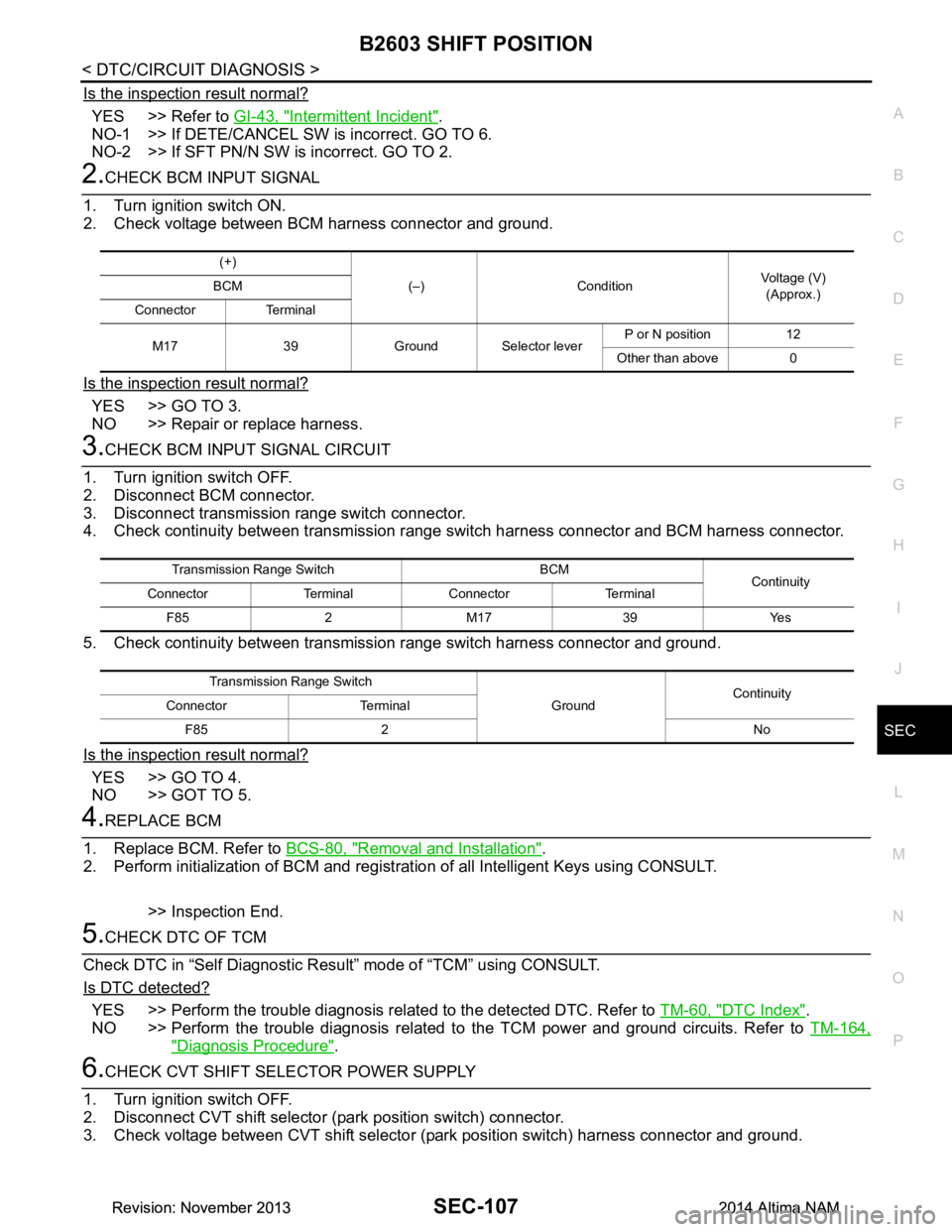
Is the inspection result normal?
YES >> Refer to GI-43, "Intermittent Incident".
NO-1 >> If DETE/CANCEL SW is incorrect. GO TO 6.
NO-2 >> If SFT PN/N SW is incorrect. GO TO 2.
2.CHECK BCM INPUT SIGNAL
1. Turn ignition switch ON.
2. Check voltage between BCM harness connector and ground.
Is the inspection result normal?
YES >> GO TO 3.
NO >> Repair or replace harness.
3.CHECK BCM INPUT SIGNAL CIRCUIT
1. Turn ignition switch OFF.
2. Disconnect BCM connector.
3. Disconnect transmission range switch connector.
4. Check continuity between transmission range switch harness connector and BCM harness connector.
5. Check continuity between transmissi on range switch harness connector and ground.
Is the inspection result normal?
YES >> GO TO 4.
NO >> GOT TO 5.
4.REPLACE BCM
1. Replace BCM. Refer to BCS-80, "Removal and Installation"
.
2. Perform initialization of BCM and registration of all Intelligent Keys using CONSULT.
>> Inspection End.
5.CHECK DTC OF TCM
Check DTC in “Self Diagnostic Resu lt” mode of “TCM” using CONSULT.
Is DTC detected?
YES >> Perform the trouble diagnosis rela ted to the detected DTC. Refer to TM-60, "DTC Index".
NO >> Perform the trouble diagnosis related to the TCM power and ground circuits. Refer to TM-164,
"Diagnosis Procedure".
6.CHECK CVT SHIFT SELECTOR POWER SUPPLY
1. Turn ignition switch OFF.
2. Disconnect CVT shift selector (park position switch) connector.
3. Check voltage between CVT shift selector (p ark position switch) harness connector and ground.
(+)
(–) Condition Voltage (V)
(Approx.)
BCM
Connector Terminal
M17 39 Ground Selector lever P or N position 12
Other than above 0
Transmission Range Switch BCM Continuity
Connector Terminal Connector Terminal
F85 2 M17 39 Yes
Transmission Range Switch GroundContinuity
Connector Terminal
F85 2 No
Revision: November 20132014 Altima NAMRevision: November 20132014 Altima NAM
Page 3933 of 4801

SEC-108
< DTC/CIRCUIT DIAGNOSIS >
B2603 SHIFT POSITION
Is the inspection result normal?
YES >> GO TO 7.
NO >> Repair or replace harness.
7.CHECK CVT SHIFT SELECTOR POWER SUPPLY CIRCUIT
1. Disconnect BCM connector.
2. Check continuity between CVT shift selector (p ark position switch) harness connector and BCM harness
connector.
3. Check continuity between CVT shift selector (park position switch) harness connector and ground.
Is the inspection result normal?
YES >> GO TO 8.
NO >> Repair or replace harness.
8.CHECK CVT SHIFT SELECTOR CIRCUIT
1. Disconnect BCM connector and IPDM E/R connector.
2. Check continuity between CVT shift selector (p ark position switch) harness connector and BCM harness
connector.
3. Check continuity between CVT shift selector (park position switch) harness connector and ground.
Is the inspection result normal?
YES >> GO TO 9.
NO >> Repair or replace harness.
9.CHECK CVT SHIFT SELECTOR (PARK POSITION SWITCH)
Refer to SEC-109, "Component Inspection"
.
Is the inspection result normal?
YES >> GO TO 10.
NO >> Replace CVT shift selector. Refer to TM-179, "Removal and Installation"
.
10.REPLACE BCM
1. Replace BCM. Refer to BCS-80, "Removal and Installation"
.
2. Perform initialization of BCM and registration of all Intelligent Keys using CONSULT.
(+)
(–)Voltage (V)
(Approx.)
CVT shift selector (park position switch)
Connector Terminal M23 5 Ground 12
CVT shift selector (park position switch) BCM Continuity
Connector Terminal Connector Terminal
M23 5 M18 69 Yes
CVT shift selector (park position switch) GroundContinuity
Connector Terminal
M23 5 No
CVT shift selector (park position switch) BCM Continuity
Connector Terminal Connector Terminal
M23 6 M17 20 Yes
CVT shift selector (park position switch) GroundContinuity
Connector Terminal
M23 6 No
Revision: November 20132014 Altima NAMRevision: November 20132014 Altima NAM
Page 3936 of 4801
B2604 SHIFT POSITIONSEC-111
< DTC/CIRCUIT DIAGNOSIS >
C
D E
F
G H
I
J
L
M A
B
SEC
N
O P
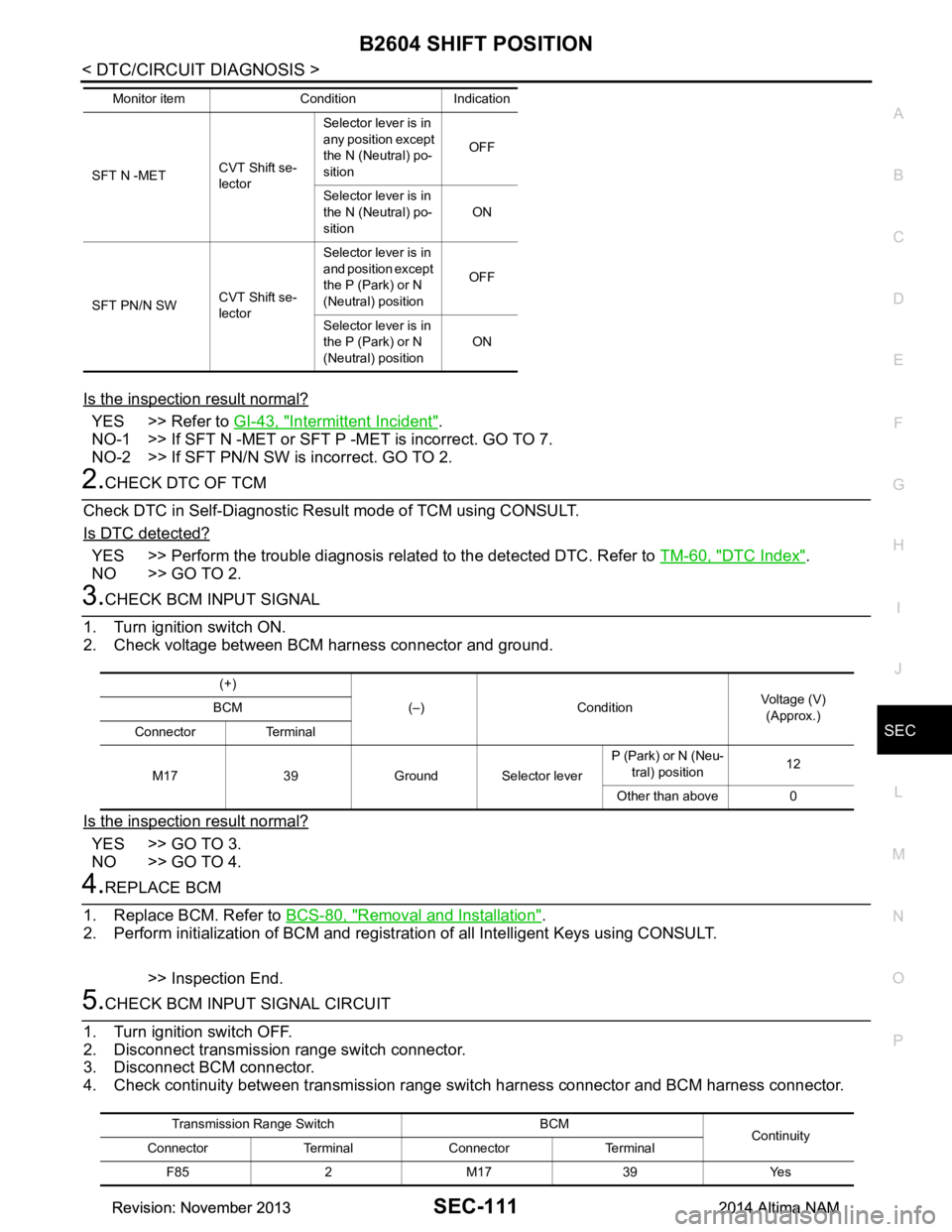
Is the inspection result normal?
YES >> Refer to GI-43, "Intermittent Incident".
NO-1 >> If SFT N -MET or SFT P -MET is incorrect. GO TO 7.
NO-2 >> If SFT PN/N SW is incorrect. GO TO 2.
2.CHECK DTC OF TCM
Check DTC in Self-Diagnostic Resu lt mode of TCM using CONSULT.
Is DTC detected?
YES >> Perform the trouble diagnosis rela ted to the detected DTC. Refer to TM-60, "DTC Index".
NO >> GO TO 2.
3.CHECK BCM INPUT SIGNAL
1. Turn ignition switch ON.
2. Check voltage between BCM harness connector and ground.
Is the inspection result normal?
YES >> GO TO 3.
NO >> GO TO 4.
4.REPLACE BCM
1. Replace BCM. Refer to BCS-80, "Removal and Installation"
.
2. Perform initialization of BCM and registration of all Intelligent Keys using CONSULT.
>> Inspection End.
5.CHECK BCM INPUT SIGNAL CIRCUIT
1. Turn ignition switch OFF.
2. Disconnect transmission range switch connector.
3. Disconnect BCM connector.
4. Check continuity between transmission range switch harness connector and BCM harness connector.
SFT N -METCVT Shift se-
lector Selector lever is in
any position except
the N (Neutral) po-
sition OFF
Selector lever is in
the N (Neutral) po-
sition ON
SFT PN/N SW CVT Shift se-
lector Selector lever is in
and position except
the P (Park) or N
(Neutral) position OFF
Selector lever is in
the P (Park) or N
(Neutral) position ON
Monitor item Condition Indication
(+)
(–) Condition Voltage (V)
(Approx.)
BCM
Connector Terminal
M17 39 Ground Selector lever P (Park) or N (Neu-
tral) position 12
Other than above 0
Transmission Range Switch BCM Continuity
Connector Terminal Connector Terminal
F85 2 M17 39 Yes
Revision: November 20132014 Altima NAMRevision: November 20132014 Altima NAM
Page 3940 of 4801
B2605 SHIFT POSITIONSEC-115
< DTC/CIRCUIT DIAGNOSIS >
C
D E
F
G H
I
J
L
M A
B
SEC
N
O P
6.REPLACE BCM
1. Replace BCM. Refer to BCS-80, "Removal and Installation"
.
2. Perform initialization of BCM and registration of all Intelligent Keys using CONSULT.
>> Inspection End.
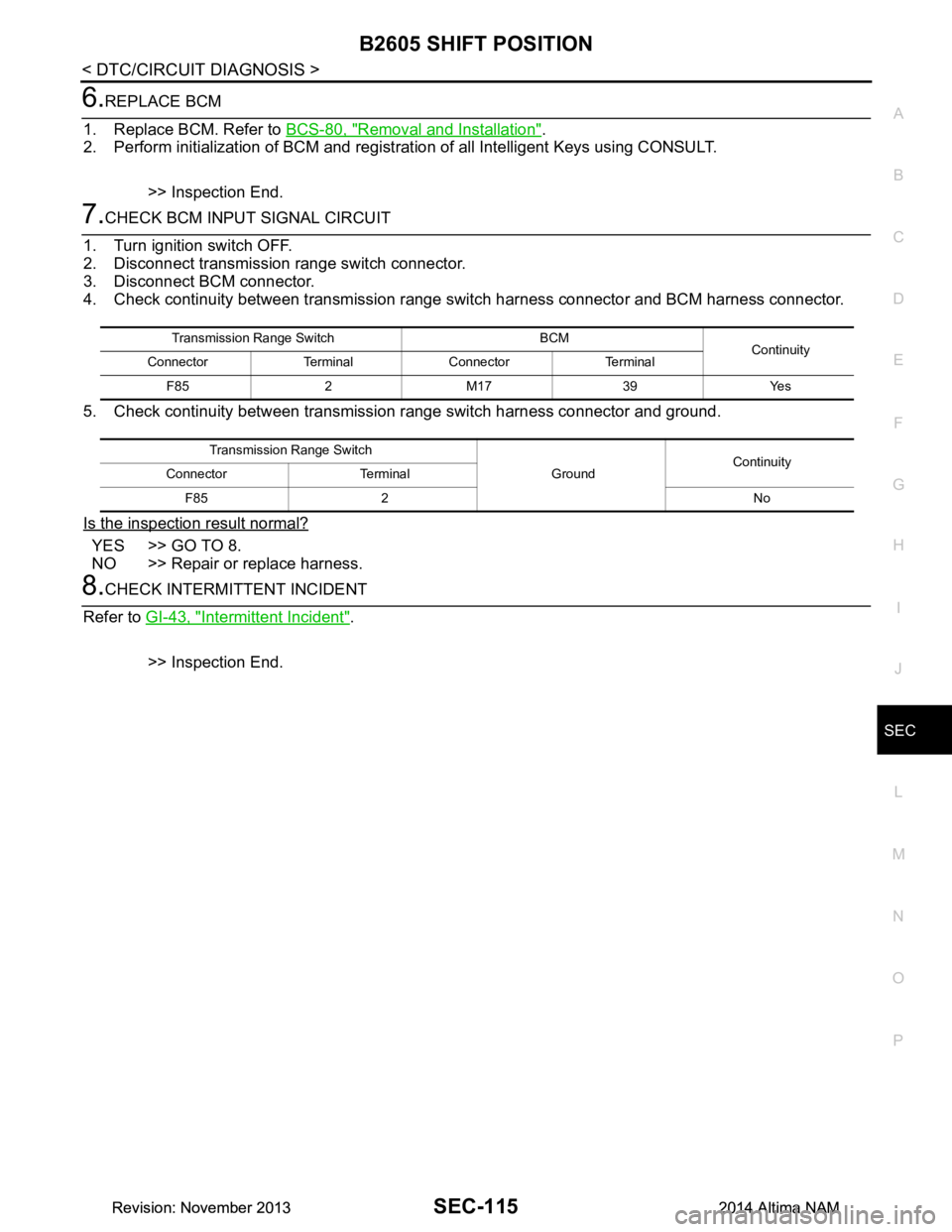
7.CHECK BCM INPUT SIGNAL CIRCUIT
1. Turn ignition switch OFF.
2. Disconnect transmission range switch connector.
3. Disconnect BCM connector.
4. Check continuity between transmission range switch harness connector and BCM harness connector.
5. Check continuity between transmissi on range switch harness connector and ground.
Is the inspection result normal?
YES >> GO TO 8.
NO >> Repair or replace harness.
8.CHECK INTERMITTENT INCIDENT
Refer to GI-43, "Intermittent Incident"
.
>> Inspection End.
Transmission Range Switch BCM Continuity
Connector Terminal Connector Terminal
F85 2 M17 39 Yes
Transmission Range Switch GroundContinuity
Connector Terminal
F85 2 No
Revision: November 20132014 Altima NAMRevision: November 20132014 Altima NAM
Page 3952 of 4801
SECURITY INDICATOR LAMPSEC-127
< DTC/CIRCUIT DIAGNOSIS >
C
D E
F
G H
I
J
L
M A
B
SEC
N
O P
SECURITY INDICATOR LAMP
Component Function CheckINFOID:0000000009461192
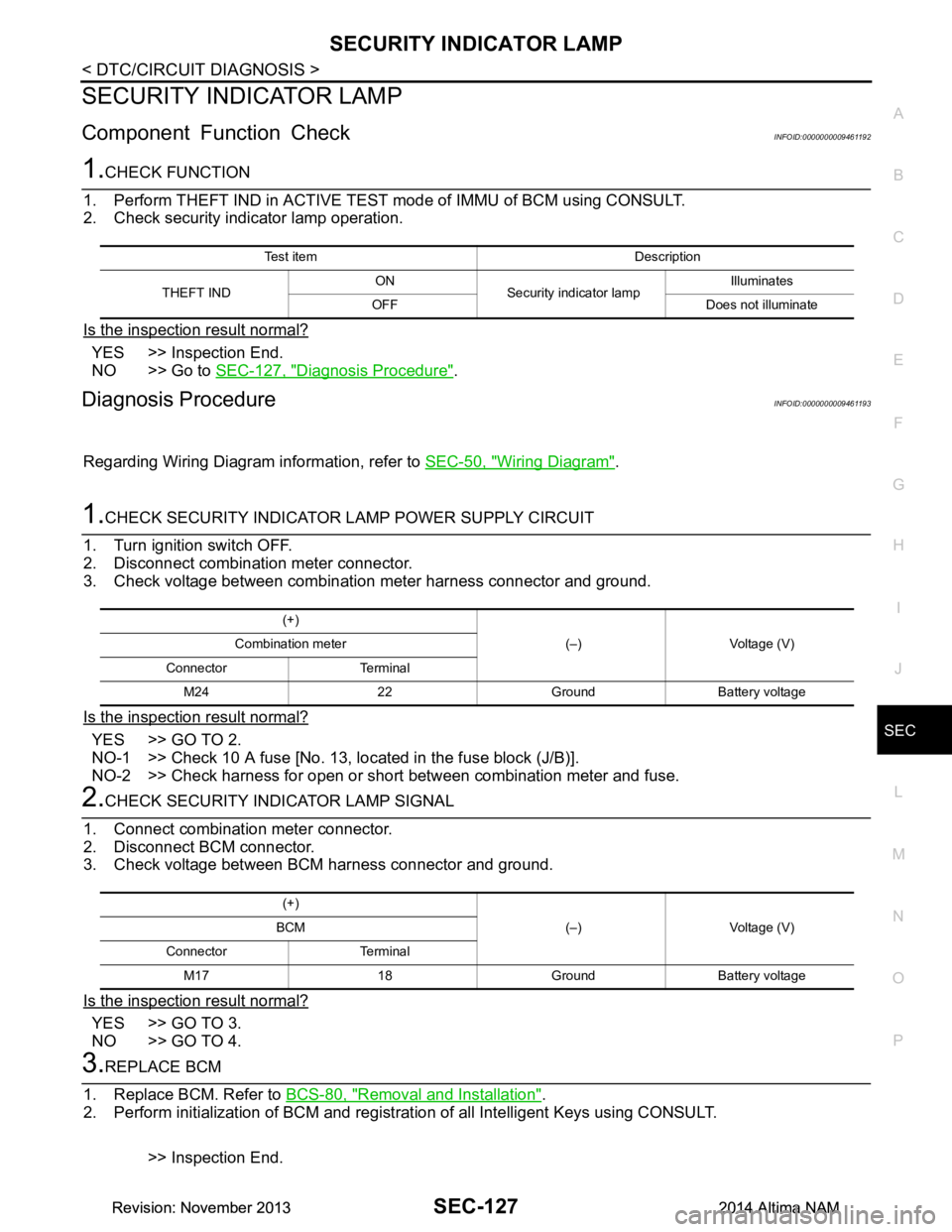
1.CHECK FUNCTION
1. Perform THEFT IND in ACTIVE TEST mode of IMMU of BCM using CONSULT.
2. Check security indicator lamp operation.
Is the inspection result normal?
YES >> Inspection End.
NO >> Go to SEC-127, "Diagnosis Procedure"
.
Diagnosis ProcedureINFOID:0000000009461193
Regarding Wiring Diagram information, refer to SEC-50, "Wiring Diagram".
1.CHECK SECURITY INDICATOR LAMP POWER SUPPLY CIRCUIT
1. Turn ignition switch OFF.
2. Disconnect combination meter connector.
3. Check voltage between combination meter harness connector and ground.
Is the inspection result normal?
YES >> GO TO 2.
NO-1 >> Check 10 A fuse [No. 13, lo cated in the fuse block (J/B)].
NO-2 >> Check harness for open or short between combination meter and fuse.
2.CHECK SECURITY INDICATOR LAMP SIGNAL
1. Connect combination meter connector.
2. Disconnect BCM connector.
3. Check voltage between BCM harness connector and ground.
Is the inspection result normal?
YES >> GO TO 3.
NO >> GO TO 4.
3.REPLACE BCM
1. Replace BCM. Refer to BCS-80, "Removal and Installation"
.
2. Perform initialization of BCM and registration of all Intelligent Keys using CONSULT.
>> Inspection End.
Test item Description
THEFT IND ON
Security indicator lamp Illuminates
OFF Does not illuminate
(+) (–) Voltage (V)
Combination meter
Connector Terminal M24 22 Ground Battery voltage
(+) (–) Voltage (V)
BCM
Connector Terminal M17 18 Ground Battery voltage
Revision: November 20132014 Altima NAMRevision: November 20132014 Altima NAM
Page 3954 of 4801
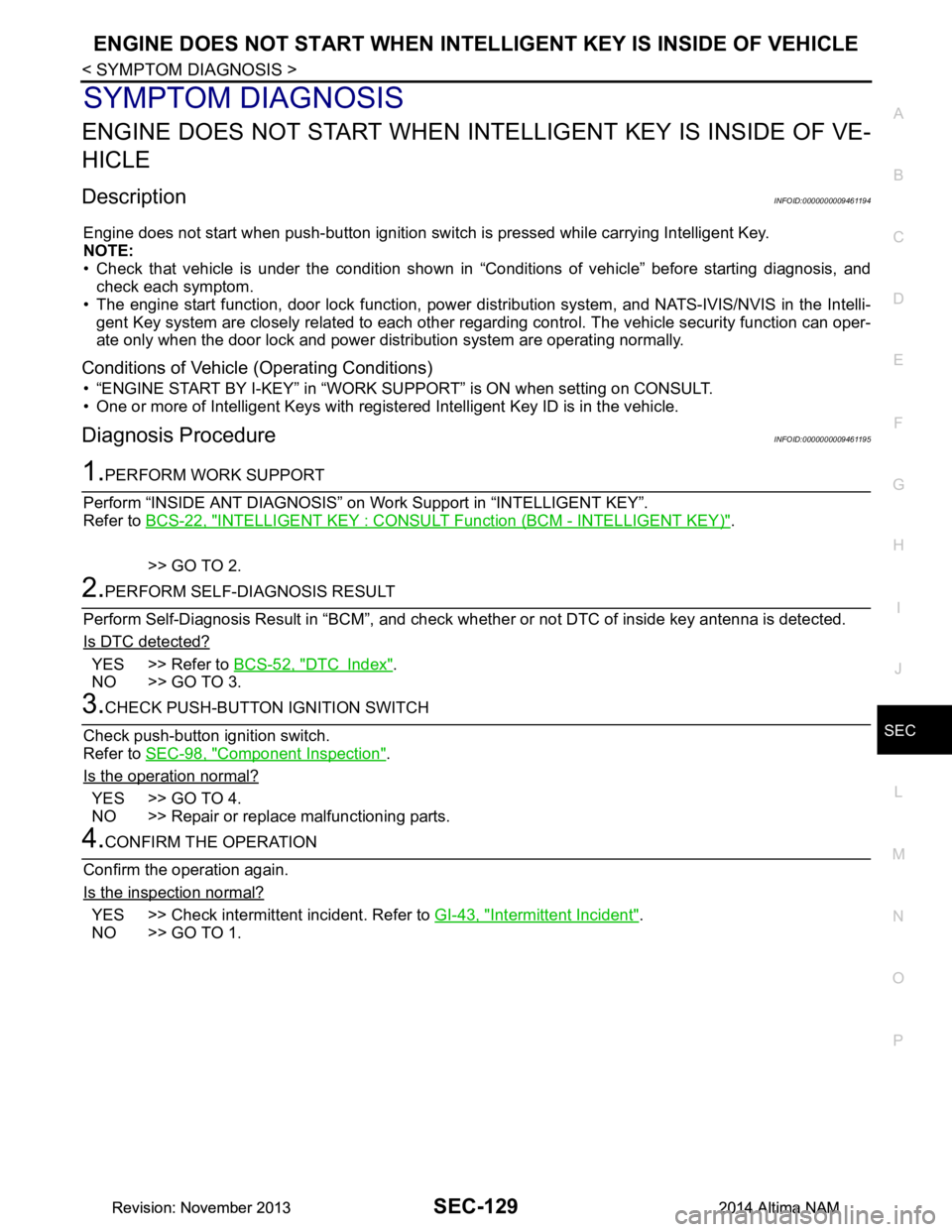
ENGINE DOES NOT START WHEN INTELLIGENT KEY IS INSIDE OF VEHICLE
SEC-129
< SYMPTOM DIAGNOSIS >
C
D E
F
G H
I
J
L
M A
B
SEC
N
O P
SYMPTOM DIAGNOSIS
ENGINE DOES NOT START WHEN IN TELLIGENT KEY IS INSIDE OF VE-
HICLE
DescriptionINFOID:0000000009461194
Engine does not start when push-button ignition swit ch is pressed while carrying Intelligent Key.
NOTE:
• Check that vehicle is under the condition shown in “Conditions of vehicle” before starting diagnosis, and
check each symptom.
• The engine start function, door lock function, power dist ribution system, and NATS-IVIS/NVIS in the Intelli-
gent Key system are closely related to each other regar ding control. The vehicle security function can oper-
ate only when the door lock and power distribution system are operating normally.
Conditions of Vehicle (Operating Conditions)
• “ENGINE START BY I-KEY” in “WORK SUPPORT” is ON when setting on CONSULT.
• One or more of Intelligent Keys with registered Intelligent Key ID is in the vehicle.
Diagnosis ProcedureINFOID:0000000009461195
1.PERFORM WORK SUPPORT
Perform “INSIDE ANT DIAGNOSIS” on Wo rk Support in “INTELLIGENT KEY”.
Refer to BCS-22, "INTELLIGENT KEY : CONSUL T Function (BCM - INTELLIGENT KEY)"
.
>> GO TO 2.
2.PERFORM SELF-DIAGNOSIS RESULT
Perform Self-Diagnosis Result in “BCM”, and check whether or not DTC of inside key antenna is detected.
Is DTC detected?
YES >> Refer to BCS-52, "DTC Index".
NO >> GO TO 3.
3.CHECK PUSH-BUTTON IGNITION SWITCH
Check push-button ignition switch.
Refer to SEC-98, "Component Inspection"
.
Is the operation normal?
YES >> GO TO 4.
NO >> Repair or replace malfunctioning parts.
4.CONFIRM THE OPERATION
Confirm the operation again.
Is the inspection normal?
YES >> Check intermittent incident. Refer to GI-43, "Intermittent Incident".
NO >> GO TO 1.
Revision: November 20132014 Altima NAMRevision: November 20132014 Altima NAM
Page 3956 of 4801
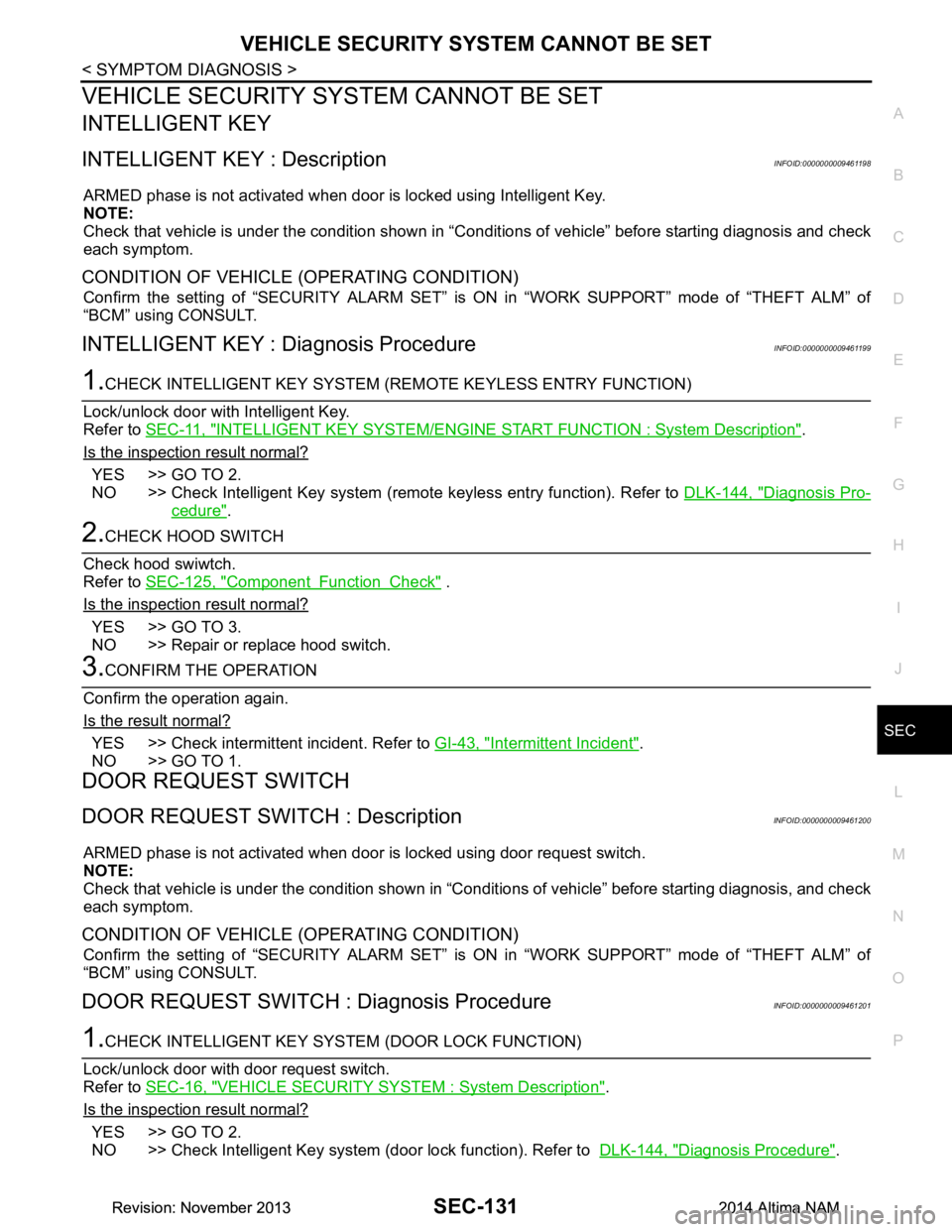
VEHICLE SECURITY SYSTEM CANNOT BE SETSEC-131
< SYMPTOM DIAGNOSIS >
C
D E
F
G H
I
J
L
M A
B
SEC
N
O P
VEHICLE SECURITY S YSTEM CANNOT BE SET
INTELLIGENT KEY
INTELLIGENT KEY : DescriptionINFOID:0000000009461198
ARMED phase is not activated when door is locked using Intelligent Key.
NOTE:
Check that vehicle is under the condition shown in “C onditions of vehicle” before starting diagnosis and check
each symptom.
CONDITION OF VEHICLE (OPERATING CONDITION)
Confirm the setting of “SECURITY ALARM SET” is ON in “WORK SUPPORT” mode of “THEFT ALM” of
“BCM” using CONSULT.
INTELLIGENT KEY : Diagnosis ProcedureINFOID:0000000009461199
1.CHECK INTELLIGENT KEY SYSTEM (REMOTE KEYLESS ENTRY FUNCTION)
Lock/unlock door with Intelligent Key.
Refer to SEC-11, "INTELLIGENT KEY SYSTEM/ENGIN E START FUNCTION : System Description"
.
Is the inspection result normal?
YES >> GO TO 2.
NO >> Check Intelligent Key system (remote keyless entry function). Refer to DLK-144, "Diagnosis Pro-
cedure".
2.CHECK HOOD SWITCH
Check hood swiwtch.
Refer to SEC-125, "Component Function Check"
.
Is the inspection result normal?
YES >> GO TO 3.
NO >> Repair or replace hood switch.
3.CONFIRM THE OPERATION
Confirm the operation again.
Is the result normal?
YES >> Check intermittent incident. Refer to GI-43, "Intermittent Incident".
NO >> GO TO 1.
DOOR REQUEST SWITCH
DOOR REQUEST SWITCH : DescriptionINFOID:0000000009461200
ARMED phase is not activated when door is locked using door request switch.
NOTE:
Check that vehicle is under the condition shown in “C onditions of vehicle” before starting diagnosis, and check
each symptom.
CONDITION OF VEHICLE (OPERATING CONDITION)
Confirm the setting of “SECURITY ALARM SET” is ON in “WORK SUPPORT” mode of “THEFT ALM” of
“BCM” using CONSULT.
DOOR REQUEST SWITCH : Diagnosis ProcedureINFOID:0000000009461201
1.CHECK INTELLIGENT KEY SYS TEM (DOOR LOCK FUNCTION)
Lock/unlock door with door request switch.
Refer to SEC-16, "VEHICLE SECURITY SY STEM : System Description"
.
Is the inspection result normal?
YES >> GO TO 2.
NO >> Check Intelligent Key system (door lock function). Refer to DLK-144, "Diagnosis Procedure"
.
Revision: November 20132014 Altima NAMRevision: November 20132014 Altima NAM
Page 3957 of 4801
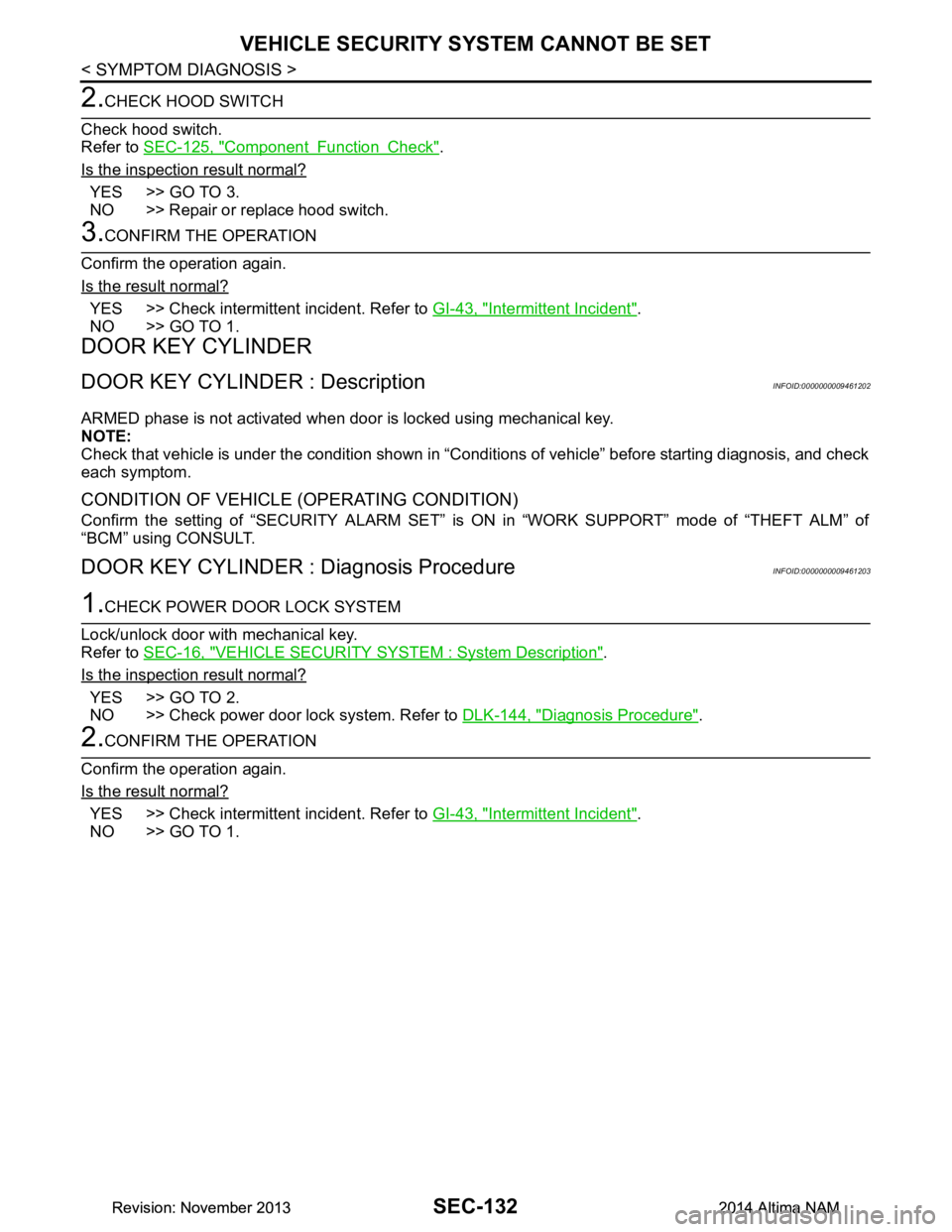
SEC-132
< SYMPTOM DIAGNOSIS >
VEHICLE SECURITY SYSTEM CANNOT BE SET
2.CHECK HOOD SWITCH
Check hood switch.
Refer to SEC-125, "Component Function Check"
.
Is the inspection result normal?
YES >> GO TO 3.
NO >> Repair or replace hood switch.
3.CONFIRM THE OPERATION
Confirm the operation again.
Is the result normal?
YES >> Check intermittent incident. Refer to GI-43, "Intermittent Incident".
NO >> GO TO 1.
DOOR KEY CYLINDER
DOOR KEY CYLINDER : DescriptionINFOID:0000000009461202
ARMED phase is not activated when door is locked using mechanical key.
NOTE:
Check that vehicle is under the condition shown in “C onditions of vehicle” before starting diagnosis, and check
each symptom.
CONDITION OF VEHICLE (OPERATING CONDITION)
Confirm the setting of “SECURITY ALARM SET” is ON in “WORK SUPPORT” mode of “THEFT ALM” of
“BCM” using CONSULT.
DOOR KEY CYLINDER : Diagnosis ProcedureINFOID:0000000009461203
1.CHECK POWER DOOR LOCK SYSTEM
Lock/unlock door with mechanical key.
Refer to SEC-16, "VEHICLE SECURITY SYSTEM : System Description"
.
Is the inspection result normal?
YES >> GO TO 2.
NO >> Check power door lock system. Refer to DLK-144, "Diagnosis Procedure"
.
2.CONFIRM THE OPERATION
Confirm the operation again.
Is the result normal?
YES >> Check intermittent incident. Refer to GI-43, "Intermittent Incident".
NO >> GO TO 1.
Revision: November 20132014 Altima NAMRevision: November 20132014 Altima NAM