center console NISSAN TEANA 2014 Owner's Manual
[x] Cancel search | Manufacturer: NISSAN, Model Year: 2014, Model line: TEANA, Model: NISSAN TEANA 2014Pages: 4801, PDF Size: 51.2 MB
Page 3768 of 4801

SQUEAK AND RATTLE TROUBLE DIAGNOSESSE-19
< SYMPTOM DIAGNOSIS >
C
D E
F
G H
I
K L
M A
B
SE
N
O P
INSTRUMENT PANEL
Most incidents are caused by contact and movement between:
1. Cluster lid A and the instrument panel
2. Acrylic lens and combination meter housing
3. Instrument panel to front pillar finisher
4. Instrument panel to windshield
5. Instrument panel pins
6. Wiring harnesses behind the combination meter
7. A/C defroster duct and duct joint
These incidents can usually be located by tapping or moving the components to duplicate the noise or by
pressing on the components while driving to stop the noi se. Most of these incidents can be repaired by apply-
ing felt cloth tape or silicone spray (in hard to reach areas). Urethane pads can be used to insulate wiring har-
ness.
CAUTION:
Do not use silicone spray to isolate a squeak or ra ttle. If you saturate the area with silicone, you will
not be able to recheck the repair.
CENTER CONSOLE
Components to pay attention to include:
1. Shift selector assembly cover to finisher
2. A/C control unit and cluster lid C
3. Wiring harnesses behind audio and A/C control unit
The instrument panel repair and isolation pr ocedures also apply to the center console.
DOORS
Pay attention to the:
1. Finisher and inner panel making a slapping noise
2. Inside handle escutcheon to door finisher
3. Wiring harnesses tapping
4. Door striker out of alignment causing a popping noise on starts and stops
Tapping or moving the components or pressing on them wh ile driving to duplicate the conditions can isolate
many of these incidents. You can usually insulate the ar eas with felt cloth tape or insulator foam blocks from
the NISSAN Squeak and Rattle Kit (J-50397) to repair the noise.
TRUNK
Trunk noises are often caused by a loose jack or loose items put into the trunk by the owner.
In addition look for:
1. Trunk lid bumpers out of adjustment
2. Trunk lid striker out of adjustment
3. The trunk lid torsion bars knocking together
4. A loose license plate or bracket
Most of these incidents can be repaired by adjusting, se curing or insulating the item(s) or component(s) caus-
ing the noise.
SUNROOF/HEADLINING
Noises in the sunroof/headlining area can often be traced to one of the following:
1. Sunroof lid, rail, linkage or seals making a rattle or light knocking noise
2. Sun visor shaft shaking in the holder
3. Front or rear windshield touching headlining and squeaking
Again, pressing on the components to stop the noise while duplicating the conditions can isolate most of these
incidents. Repairs usually consist of insulating with felt cloth tape.
OVERHEAD CONSOLE (FRONT AND REAR)
Overhead console noises are often caused by the cons ole panel clips not being engaged correctly. Most of
these incidents are repaired by pushing up on the c onsole at the clip locations until the clips engage.
In addition look for:
Revision: November 20132014 Altima NAMRevision: November 20132014 Altima NAM
Page 3781 of 4801
SE-32
< REMOVAL AND INSTALLATION >
FRONT SEAT
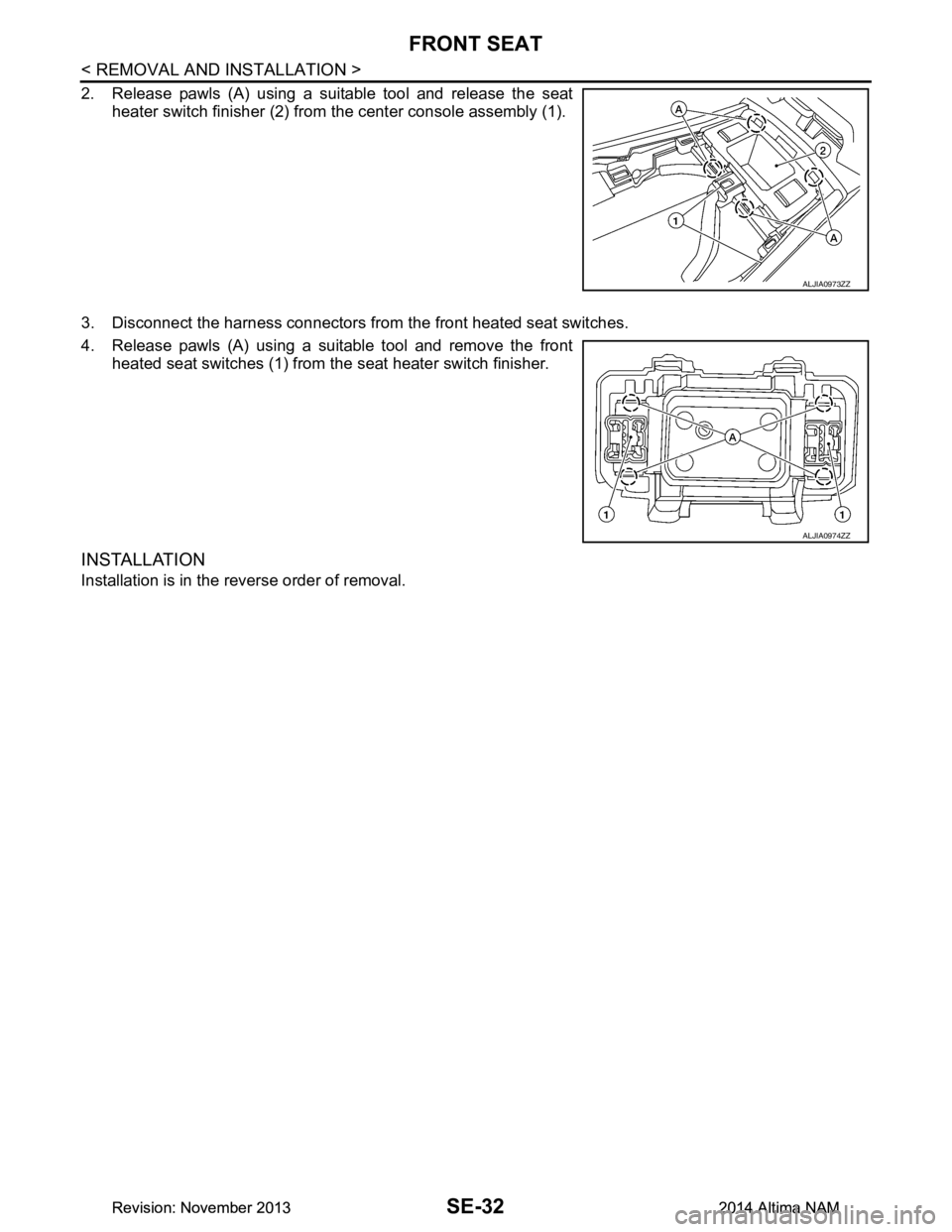
2. Release pawls (A) using a suitable tool and release the seatheater switch finisher (2) from the center console assembly (1).
3. Disconnect the harness connectors from the front heated seat switches.
4. Release pawls (A) using a suitable tool and remove the front heated seat switches (1) from t he seat heater switch finisher.
INSTALLATION
Installation is in the reverse order of removal.
ALJIA0973ZZ
ALJIA0974ZZ
Revision: November 20132014 Altima NAMRevision: November 20132014 Altima NAM
Page 3988 of 4801
SR-26
< REMOVAL AND INSTALLATION >
DIAGNOSIS SENSOR UNIT
DIAGNOSIS SENSOR UNIT
Removal and InstallationINFOID:0000000009463080
REMOVAL
WARNING:
• Before servicing the SRS, turn ig nition switch OFF, disconnect both battery terminals and wait at
least three minutes.
• Before disconnecting the air bag diagnosis sensor unit harness conn ectors, be sure to disconnect
each harness connector of the front shoulder belt pre-tensioners to prevent accidental air bag
deployment by static electricity and seat belt pre-tensioner operation.
• Do not use the air tools or electric tools for servicing.
• When replacing the air bag diagno sis sensor unit, always check with th e parts department for the lat-
est parts information. Installing an incorrect air bag diagnosis sen sor unit may or may not cause the
air bag warning lamp to illuminate and may cause in correct deployment of the supplemental air bags
and seat belt pre-tensioners in a collision r esulting in serious personal injury or death.
1. Always check the air bag diagnosis sensor unit ECU discriminated number (identification number) or part
number using CONSULT.
2. Disconnect both the negative and positive battery terminal s, then wait at least three minutes. Refer to PG-
73, "Removal and Installation (Battery)".
3. Disconnect the harness connector fo r the following SRS components: SB-8, "Removal and Installation"
(Front shoulder belt pre-tensioner LH/RH).
4. Remove the center console. Refer to IP-18, "Removal and Installation"
.
5. Disconnect the harness connector from air bag diagnosis sensor unit.
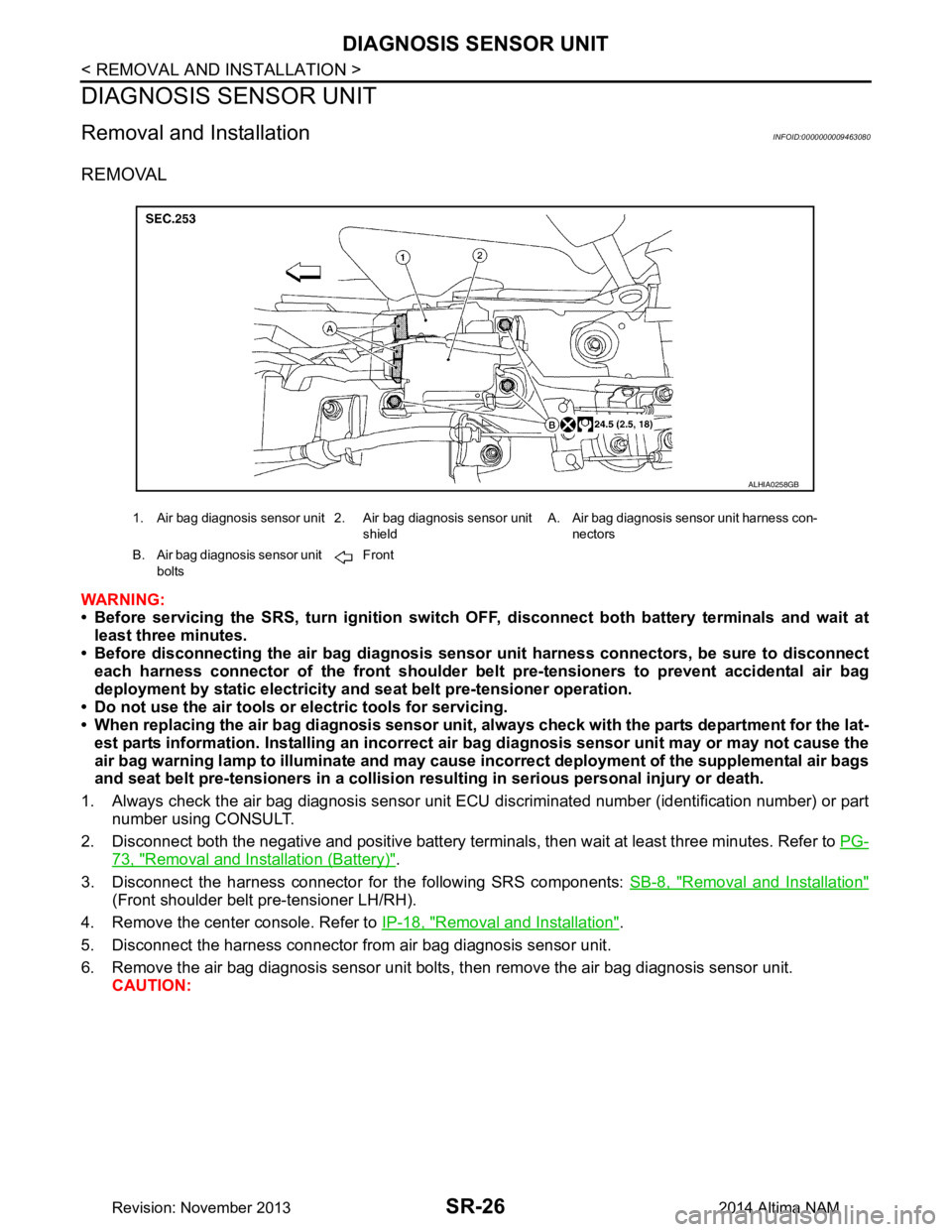
6. Remove the air bag diagnosis sensor unit bolts , then remove the air bag diagnosis sensor unit.
CAUTION:
1. Air bag diagnosis sensor unit 2. Air bag diagnosis sensor unit
shieldA. Air bag diagnosis sensor unit harness con-
nectors
B. Air bag diagnosis sensor unit bolts Front
ALHIA0258GB
Revision: November 20132014 Altima NAM
Page 3999 of 4801

SRC-6
< SYSTEM DESCRIPTION >
COMPONENT PARTS
Component Description
INFOID:0000000009460705
1. Driver air bag module 2. Front passenger air bag off indicator 3. Front passenger air bag module
4. Front LH side air bag module (RH similar) 5. LH side curtain air bag module
(view with headliner removed)
(RH similar) 6. Front LH seatbelt pre-tensioner
(view with lower cent er pillar cover LH
removed)
(RH similar)
7. Occupant classification system control unit (A)
Occupant classification system sen-
sors (B)
(view with front passenger seat re-
moved) 8. Crash zone sensor
(view with air intake removed) 9. Front door satellite sensor LH
(view with front door finisher LH re-
moved)
(RH similar)
10. Front side air bag satellite sensor LH (view with lower cent er pillar cover LH
removed)
(RH similar) 11. Rear side air bag satellite sensor LH
(view with dash side lower finisher LH
removed)
(RH similar) 12. Seat belt buckle switch (driver seat)
(passenger seat similar)
13. Spiral cable (view with steeri ng wheel removed) 14. Air bag diagnosis sensor unit
(view with center console assembly
removed)
Component Function
Air bag diagnosis sensor unit Refer to SRC-8, "Air Bag Diagnosis Sensor Unit"
.
Driver air bag module Refer to SRC-7, "Driver Air Bag Module"
.
Front passenger air bag module Refer to SRC-7, "Front Passenger Air Bag Module"
.
Front side air bag module Refer to SRC-7, "Front Side Air Bag Module"
.
Side curtain air bag module Refer to SRC-7, "Side Curtain Air Bag Module"
.
Front seat belt pre-tensioner Refer to SRC-8, "Front Seat Belt Pre-tensioner"
.
Occupant classification system Refer to
SRC-12, "OCCUPANT CLASSIFICATION SYSTEM : System Descrip-
tion".
Crash zone sensor Refer to SRC-8, "Crash Zone Sensor"
.
Front side air bag (satellite) sensor Refer to SRC-8, "Front Side Air Bag Satellite Sensor"
.
Rear side air bag (satellite) sensor Refer to SRC-9, "Rear Side Air Bag Satellite Sensor"
.
Front door (satellite) sensor Refer to SRC-9, "Front Door Satellite Sensor"
.
Seat belt buckle switch The driver seat belt buckle switch and passenger seat belt buckle switch provide
the seat belt buckle signals to the air bag diagnosis sensor unit and the combina-
tion meter.
Sp iral c ab le The spiral cable provides a rotating physical connection to the driver air bag mod-
ule.
Combination meter The combination meter displays the air bag warning lamp and the seat belt warn-
ing lamp. The air bag warning lamp is used for diagnosis in User Mode and may
be used to display diagnostic trouble codes without the use of the CONSULT.
Revision: November 20132014 Altima NAMRevision: November 20132014 Altima NAM
Page 4395 of 4801
![NISSAN TEANA 2014 Owners Manual
TM-180
< REMOVAL AND INSTALLATION >[CVT: RE0F10D]
CVT SHIFT SELECTOR
4. Remove the shift selector handle (1).
a. Release the shift selector handle cover (2) using a suitable tool from the base of t](/img/5/57390/w960_57390-4394.png "NISSAN TEANA 2014 Owners Manual
TM-180
< REMOVAL AND INSTALLATION >[CVT: RE0F10D]
CVT SHIFT SELECTOR
4. Remove the shift selector handle (1).
a. Release the shift selector handle cover (2) using a suitable tool from the base of t")
TM-180
< REMOVAL AND INSTALLATION >[CVT: RE0F10D]
CVT SHIFT SELECTOR
4. Remove the shift selector handle (1).
a. Release the shift selector handle cover (2) using a suitable tool from the base of the shift selector handle (1).
b. Remove the shift selector handle clip (A).
c. Pull upward and remove the shift selector handle (1).
5. Remove the center console. Refer to IP-18, "Removal and Installation"
.
6. Release the harness clip, then disconnect the harness connector from CVT shift selector.
7. Depress shift lock override button and move CVT shift selector to "P" position“”.
8. Remove the control cable from the CV T shift selector assembly. Refer to TM-181, "Exploded View"
.
9. Remove the four CVT shift selector assembly nuts and the CVT shift selector assembly from the vehicle.
INSTALLATION
Installation is in the reverse order of removal.
• When installing control cable (1) to the CVT shift selector assembly (2), check that control cable is fully pressed in until it stops with the
ribbed surface (A) facing upward.
NOTE:
Apply multi-purpose grease to control cable eye before installation.
• Adjust control cable as necessary. Refer to TM-182, "Inspection
and Adjustment".
InspectionINFOID:0000000009464122
INSPECTION AFTER INSTALLATION
Check the CVT shift selector position. Refer to TM-87, "Inspection".
If a malfunction is found, adjust the CVT position. Refer to TM-87, "Adjustment"
.
ALDIA0319ZZ
JSDIA1624ZZ
Revision: November 20132014 Altima NAMRevision: November 20132014 Altima NAM
Page 4396 of 4801
![NISSAN TEANA 2014 Owners Manual
CONTROL CABLETM-181
< REMOVAL AND INSTALLATION > [CVT: RE0F10D]
C
EF
G H
I
J
K L
M A
B
TM
N
O P
CONTROL CABLE
Exploded ViewINFOID:0000000009464123
Removal and InstallationINFOID:0000000009464124
CAU](/img/5/57390/w960_57390-4395.png "NISSAN TEANA 2014 Owners Manual
CONTROL CABLETM-181
< REMOVAL AND INSTALLATION > [CVT: RE0F10D]
C
EF
G H
I
J
K L
M A
B
TM
N
O P
CONTROL CABLE
Exploded ViewINFOID:0000000009464123
Removal and InstallationINFOID:0000000009464124
CAU")
CONTROL CABLETM-181
< REMOVAL AND INSTALLATION > [CVT: RE0F10D]
C
EF
G H
I
J
K L
M A
B
TM
N
O P
CONTROL CABLE
Exploded ViewINFOID:0000000009464123
Removal and InstallationINFOID:0000000009464124
CAUTION:
Always apply the parking brake before pe rforming removal and installation.
REMOVAL
1. Apply the parking brake.
CAUTION:
Make sure the vehicle cannot move with the parking brake applied.
2. Remove the front air duct and air cleaner case assembly. Refer to EM-29, "Removal and Installation"
.
3. Remove the control cable nut ( ), using suitable tool.
4. Remove control cable (2) from manual lever (A).
5. Remove the lock plate (3) from control cable (2).
6. Remove control cable (2) from bracket (1).
7. Remove center console. Refer to IP-18, "Removal and Installation"
.
8. Disconnect the ITS control unit harness connectors and remove the ITS control unit (if equipped). Refer to
AV-436, "Removal and Installation"
.
1. Lock plate 2. Transaxle assembly 3. Bracket
4. Control cable 5. CVT shift selector assembly A. Manual lever
B. Retainer grommet
ALDIA0351GB
ALDIA0357ZZ
Revision: November 20132014 Altima NAMRevision: November 20132014 Altima NAM
Page 4594 of 4801
![NISSAN TEANA 2014 Owners Manual
CVT SHIFT SELECTORTM-379
< REMOVAL AND INSTALLATION > [CVT: RE0F10E]
C
EF
G H
I
J
K L
M A
B
TM
N
O P
4. Remove the shift selector handle (1).
a. Release the shift selector handle cover (2) using a](/img/5/57390/w960_57390-4593.png "NISSAN TEANA 2014 Owners Manual
CVT SHIFT SELECTORTM-379
< REMOVAL AND INSTALLATION > [CVT: RE0F10E]
C
EF
G H
I
J
K L
M A
B
TM
N
O P
4. Remove the shift selector handle (1).
a. Release the shift selector handle cover (2) using a")
CVT SHIFT SELECTORTM-379
< REMOVAL AND INSTALLATION > [CVT: RE0F10E]
C
EF
G H
I
J
K L
M A
B
TM
N
O P
4. Remove the shift selector handle (1).
a. Release the shift selector handle cover (2) using a suitable tool from the base of the shift selector handle (1).
b. Remove the shift selector handle clip (A).
c. Pull upward and remove the shift selector handle (1).
5. Remove the center console. Refer to IP-18, "Removal and Installation"
.
6. Release the harness clip, then disconnect the harness connector from CVT shift selector.
7. Depress shift lock override button and move CVT shift selector to "P" position“”.
8. Remove the control cable from the CV T shift selector assembly. Refer to TM-181, "Exploded View"
.
9. Remove the four CVT shift selector assembly nuts and the CVT shift selector assembly from the vehicle.
INSTALLATION
Installation is in the reverse order of removal.
• When installing control cable (1) to the CVT shift selector assembly (2), check that control cable is full y pressed in until it stops with the
ribbed surface (A) facing upward.
NOTE:
Apply multi-purpose grease to cont rol cable eye before installation.
• Adjust control cable as necessary. Refer to TM-381, "Inspection
and Adjustment".
InspectionINFOID:0000000009464334
INSPECTION AFTER INSTALLATION
Check the CVT shift selector position. Refer to TM-289, "Inspection".
If a malfunction is found, adjust the CVT position. Refer to TM-289, "Adjustment"
.
ALDIA0353ZZ
JSDIA1624ZZ
Revision: November 20132014 Altima NAMRevision: November 20132014 Altima NAM
Page 4595 of 4801
![NISSAN TEANA 2014 Owners Manual
TM-380
< REMOVAL AND INSTALLATION >[CVT: RE0F10E]
CONTROL CABLE
CONTROL CABLE
Exploded ViewINFOID:0000000009464335
Removal and InstallationINFOID:0000000009464336
CAUTION:
Always apply the parking b](/img/5/57390/w960_57390-4594.png "NISSAN TEANA 2014 Owners Manual
TM-380
< REMOVAL AND INSTALLATION >[CVT: RE0F10E]
CONTROL CABLE
CONTROL CABLE
Exploded ViewINFOID:0000000009464335
Removal and InstallationINFOID:0000000009464336
CAUTION:
Always apply the parking b")
TM-380
< REMOVAL AND INSTALLATION >[CVT: RE0F10E]
CONTROL CABLE
CONTROL CABLE
Exploded ViewINFOID:0000000009464335
Removal and InstallationINFOID:0000000009464336
CAUTION:
Always apply the parking brake before pe rforming removal and installation.
INSTALLATION
1. Apply the parking brake.
CAUTION:
Make sure the vehicle cannot move with the parking brake applied.
2. Remove the front air duct and air cleaner case assembly. Refer to EM-29, "Removal and Installation"
.
3. Remove the control cable nut ( ), using suitable tool.
4. Remove control cable (2) from manual lever (A).
5. Remove the lock plate (3) from control cable (2).
6. Remove control cable (2) from bracket (1).
7. Remove center console. Refer to IP-18, "Removal and Installation"
.
8. Disconnect the ITS control unit harness connectors and remove the ITS control unit (if equipped). Refer to
AV-436, "Removal and Installation"
.
1. Lock plate 2. Transaxle assembly 3. Bracket
4. Control cable 5. CVT shift selector assembly A. Manual lever
B. Retainer grommet
ALDIA0352GB
ALDIA0360ZZ
Revision: November 20132014 Altima NAMRevision: November 20132014 Altima NAM
Page 4636 of 4801
VTL-8
< REMOVAL AND INSTALLATION >
DUCTS AND GRILLES
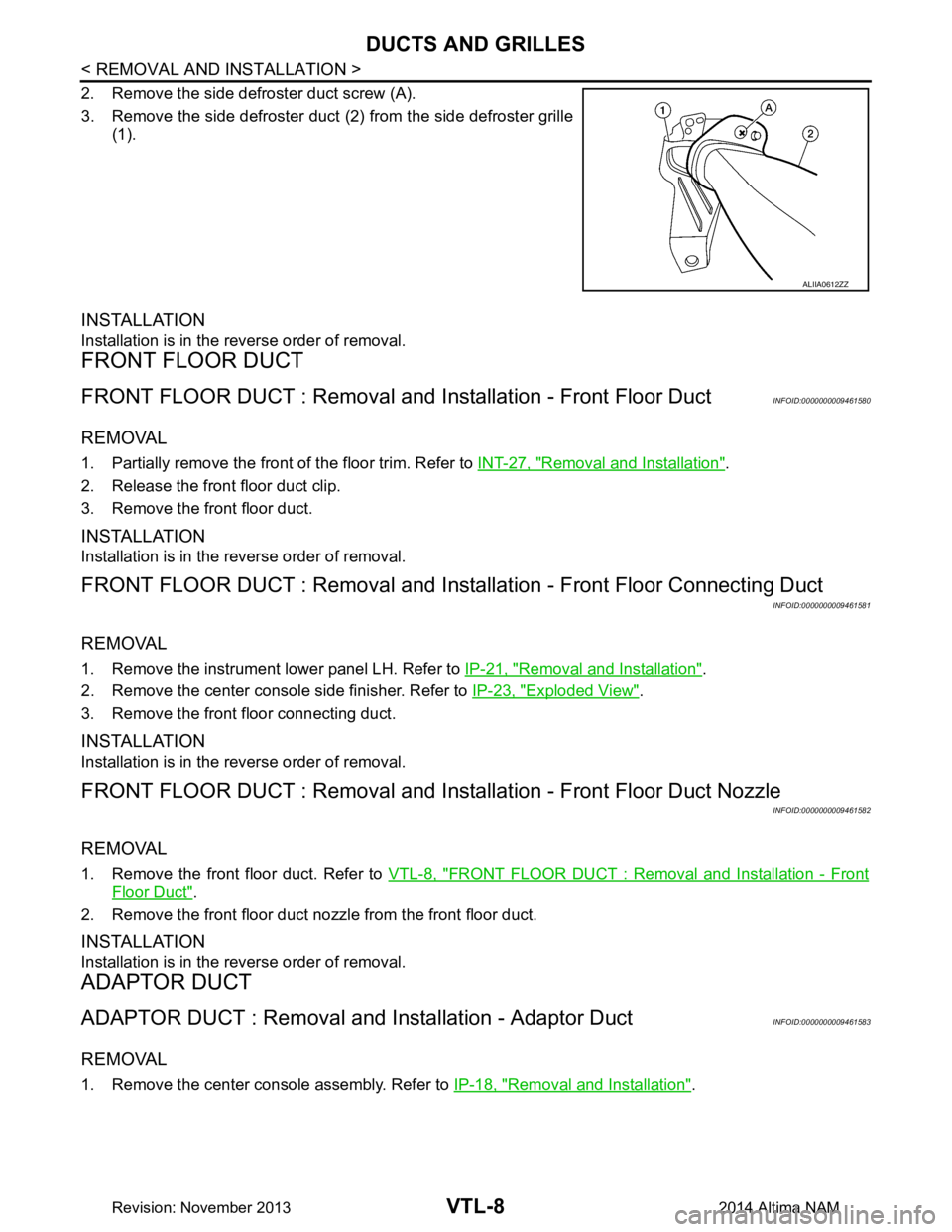
2. Remove the side defroster duct screw (A).
3. Remove the side defroster duct (2) from the side defroster grille
(1).
INSTALLATION
Installation is in the reverse order of removal.
FRONT FLOOR DUCT
FRONT FLOOR DUCT : Removal and In stallation - Front Floor DuctINFOID:0000000009461580
REMOVAL
1. Partially remove the front of the floor trim. Refer to INT-27, "Removal and Installation".
2. Release the front floor duct clip.
3. Remove the front floor duct.
INSTALLATION
Installation is in the reverse order of removal.
FRONT FLOOR DUCT : Removal and Installa tion - Front Floor Connecting Duct
INFOID:0000000009461581
REMOVAL
1. Remove the instrument lower panel LH. Refer to IP-21, "Removal and Installation".
2. Remove the center console side finisher. Refer to IP-23, "Exploded View"
.
3. Remove the front floor connecting duct.
INSTALLATION
Installation is in the reverse order of removal.
FRONT FLOOR DUCT : Removal and Insta llation - Front Floor Duct Nozzle
INFOID:0000000009461582
REMOVAL
1. Remove the front floor duct. Refer to VTL-8, "FRONT FLOOR DUCT : Removal and Installation - Front
Floor Duct".
2. Remove the front floor duct nozzle from the front floor duct.
INSTALLATION
Installation is in the reverse order of removal.
ADAPTOR DUCT
ADAPTOR DUCT : Removal and Installation - Adaptor DuctINFOID:0000000009461583
REMOVAL
1. Remove the center console assembly. Refer to IP-18, "Removal and Installation".
ALIIA0612ZZ
Revision: November 20132014 Altima NAM
Page 4637 of 4801
DUCTS AND GRILLESVTL-9
< REMOVAL AND INSTALLATION >
C
D E
F
G H
J
K L
M A
B
VTL
N
O P
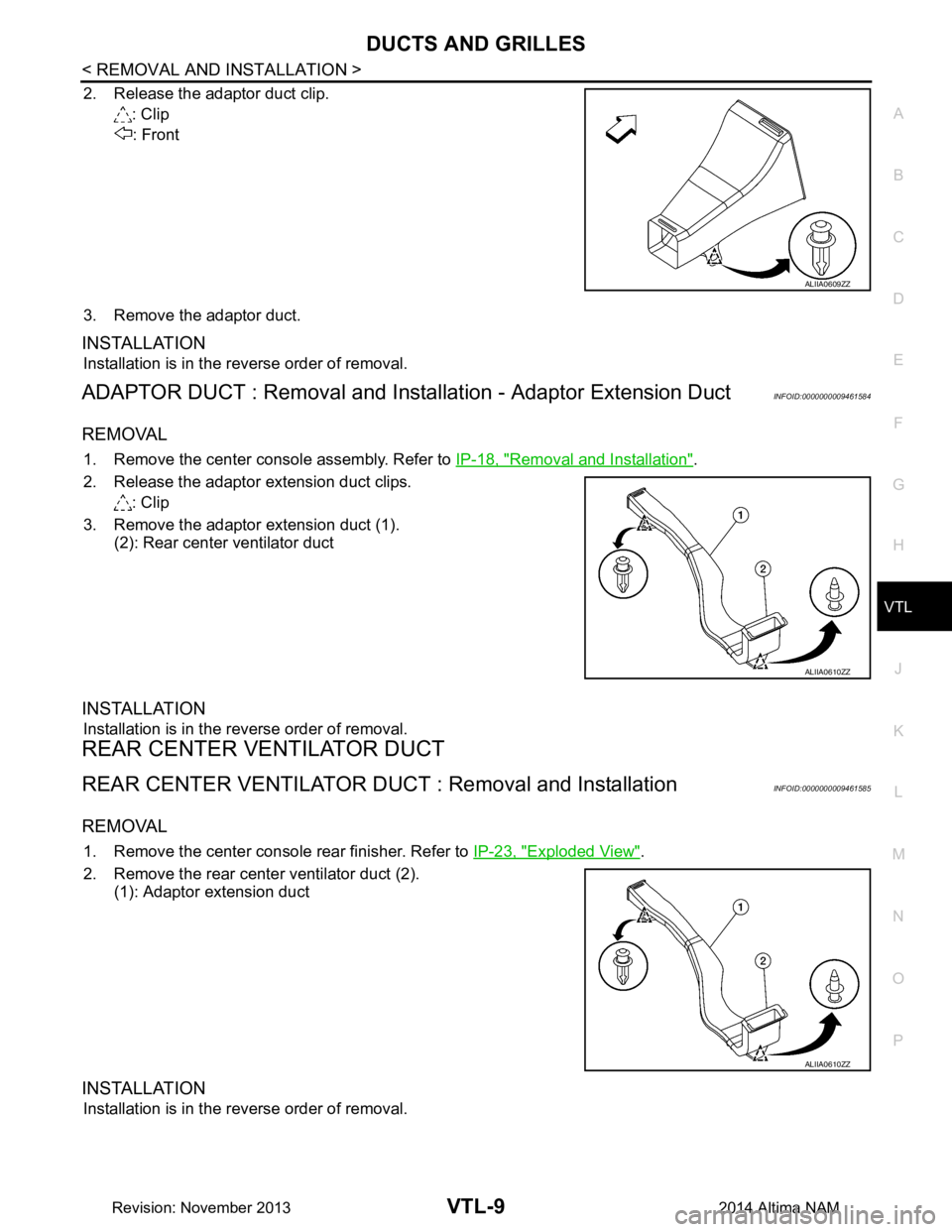
2. Release the adaptor duct clip. : Clip
: Front
3. Remove the adaptor duct.
INSTALLATION
Installation is in the reverse order of removal.
ADAPTOR DUCT : Removal and Insta llation - Adaptor Extension DuctINFOID:0000000009461584
REMOVAL
1. Remove the center console assembly. Refer to IP-18, "Removal and Installation".
2. Release the adaptor extension duct clips. : Clip
3. Remove the adaptor extension duct (1). (2): Rear center ventilator duct
INSTALLATION
Installation is in the reverse order of removal.
REAR CENTER VENTILATOR DUCT
REAR CENTER VENTILATOR DUCT : Removal and InstallationINFOID:0000000009461585
REMOVAL
1. Remove the center console rear finisher. Refer to IP-23, "Exploded View".
2. Remove the rear center ventilator duct (2). (1): Adaptor extension duct
INSTALLATION
Installation is in the reverse order of removal.
ALIIA0609ZZ
ALIIA0610ZZ
ALIIA0610ZZ
Revision: November 20132014 Altima NAM