display NISSAN TEANA 2014 Service Manual
[x] Cancel search | Manufacturer: NISSAN, Model Year: 2014, Model line: TEANA, Model: NISSAN TEANA 2014Pages: 4801, PDF Size: 51.2 MB
Page 2579 of 4801
CONSULT CHECKING SYSTEMGI-51
< BASIC INSPECTION >
C
D E
F
G H
I
J
K L
M B
GI
N
O PCONSULT CHECKING SYSTEM
DescriptionINFOID:0000000009463016
CAUTION:
After disconnecting the CONSULT vehicle interface (VI) from the data link connector, the ignition must
be cycled OFF → ON (for at least 5 seconds) → OFF. If this step is not performed, the BCM may not go
to “sleep mode”, potentiall y causing a discharged battery and a no-start condition.
NOTE:
This vehicle is diagnosed using the CONSULT-III plus.
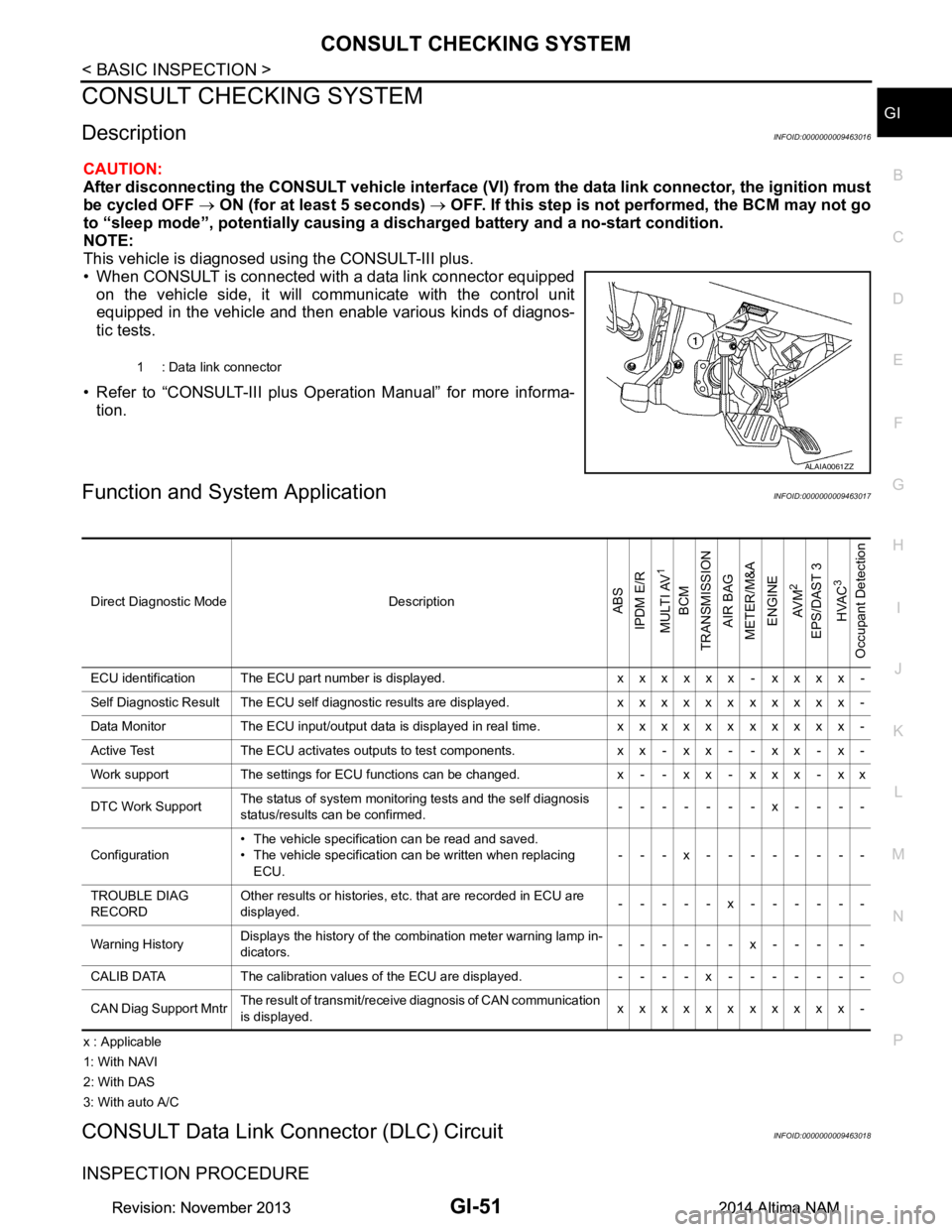
• When CONSULT is connected with a data link connector equipped on the vehicle side, it will communicate with the control unit
equipped in the vehicle and then enable various kinds of diagnos-
tic tests.
• Refer to “CONSULT-III plus Operation Manual” for more informa- tion.
Function and System ApplicationINFOID:0000000009463017
x : Applicable
1: With NAVI
2: With DAS
3: With auto A/C
CONSULT Data Link Connector (DLC) CircuitINFOID:0000000009463018
INSPECTION PROCEDURE
1 : Data link connector
ALAIA0061ZZ
Direct Diagnostic Mode DescriptionABS
IPDM E/R
MULTI AV
1
BCM
TRANSMISSION
AIR BAG
METER/M&A
ENGINE
AV M
2
EPS/DAST 3 HVAC
3
Occupant Detection
ECU identification The ECU part number is displayed. x x x x x x - x x x x -
Self Diagnostic Result The ECU self diagnostic results are displayed. x x x x x x x x x x x -
Data Monitor The ECU input/output data is displayed in real time. x x x x x x x x x x x -
Active Test The ECU activates outputs to test components. x x - x x - - x x - x -
Work support The settings for ECU functions can be changed. x - - x x - x x x - x x
DTC Work Support The status of system monitoring tests and the self diagnosis
status/results can be confirmed. -------x----
Configuration • The vehicle specification can be read and saved.
• The vehicle specification can be written when replacing ECU. ---x--------
TROUBLE DIAG
RECORD Other results or histories, etc. that are recorded in ECU are
displayed. -----x------
Warning History Displays the history of the combination meter warning lamp in-
dicators. ------x-----
CALIB DATA The calibration values of the ECU are displayed. - - - - x - - - - - - -
CAN Diag Support Mntr The result of transmit/receive diagnosis of CAN communication
is displayed. xxxxxxxxxxx-
Revision: November 20132014 Altima NAMRevision: November 20132014 Altima NAM
Page 2614 of 4801
HA-8
< PRECAUTION >
PRECAUTIONS
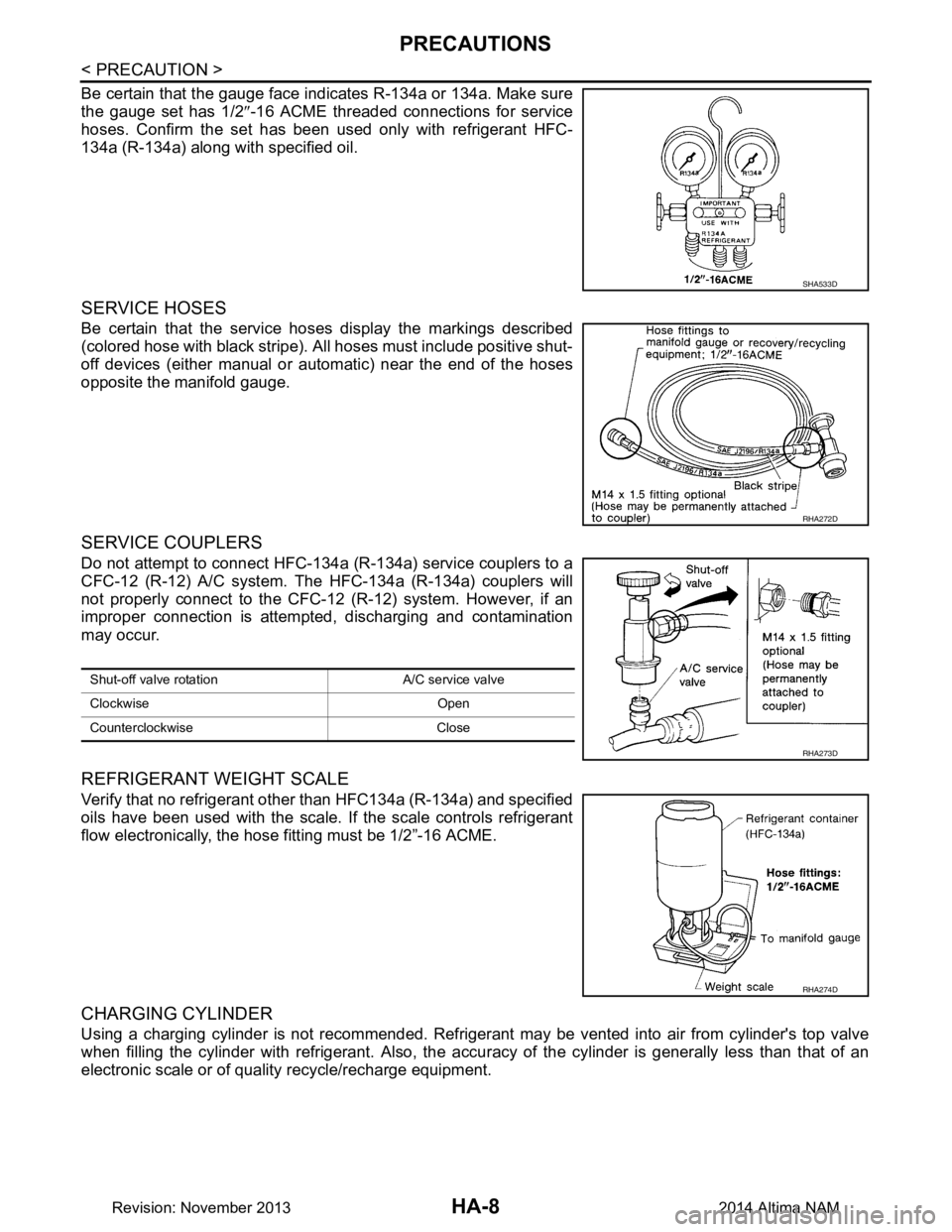
Be certain that the gauge face indicates R-134a or 134a. Make sure
the gauge set has 1/2 ″-16 ACME threaded connections for service
hoses. Confirm the set has been used only with refrigerant HFC-
134a (R-134a) along with specified oil.
SERVICE HOSES
Be certain that the service hoses display the markings described
(colored hose with black stripe). All hoses must include positive shut-
off devices (either manual or aut omatic) near the end of the hoses
opposite the manifold gauge.
SERVICE COUPLERS
Do not attempt to connect HFC-134a (R-134a) service couplers to a
CFC-12 (R-12) A/C system. The HFC-134a (R-134a) couplers will
not properly connect to the CFC-12 (R-12) system. However, if an
improper connection is attempted, discharging and contamination
may occur.
REFRIGERANT WEIGHT SCALE
Verify that no refrigerant other than HFC134a (R-134a) and specified
oils have been used with the scale. If the scale controls refrigerant
flow electronically, the hose fitting must be 1/2”-16 ACME.
CHARGING CYLINDER
Using a charging cylinder is not recommended. Refrigerant may be vented into air from cylinder's top valve
when filling the cylinder with refrigerant. Also, the accu racy of the cylinder is generally less than that of an
electronic scale or of quality recycle/recharge equipment.
SHA533D
RHA272D
Shut-off valve rotati on A/C service valve
Clockwise Open
Counterclockwise Close
RHA273D
RHA274D
Revision: November 20132014 Altima NAM
Page 2632 of 4801
HA-26
< PERIODIC MAINTENANCE >
OIL
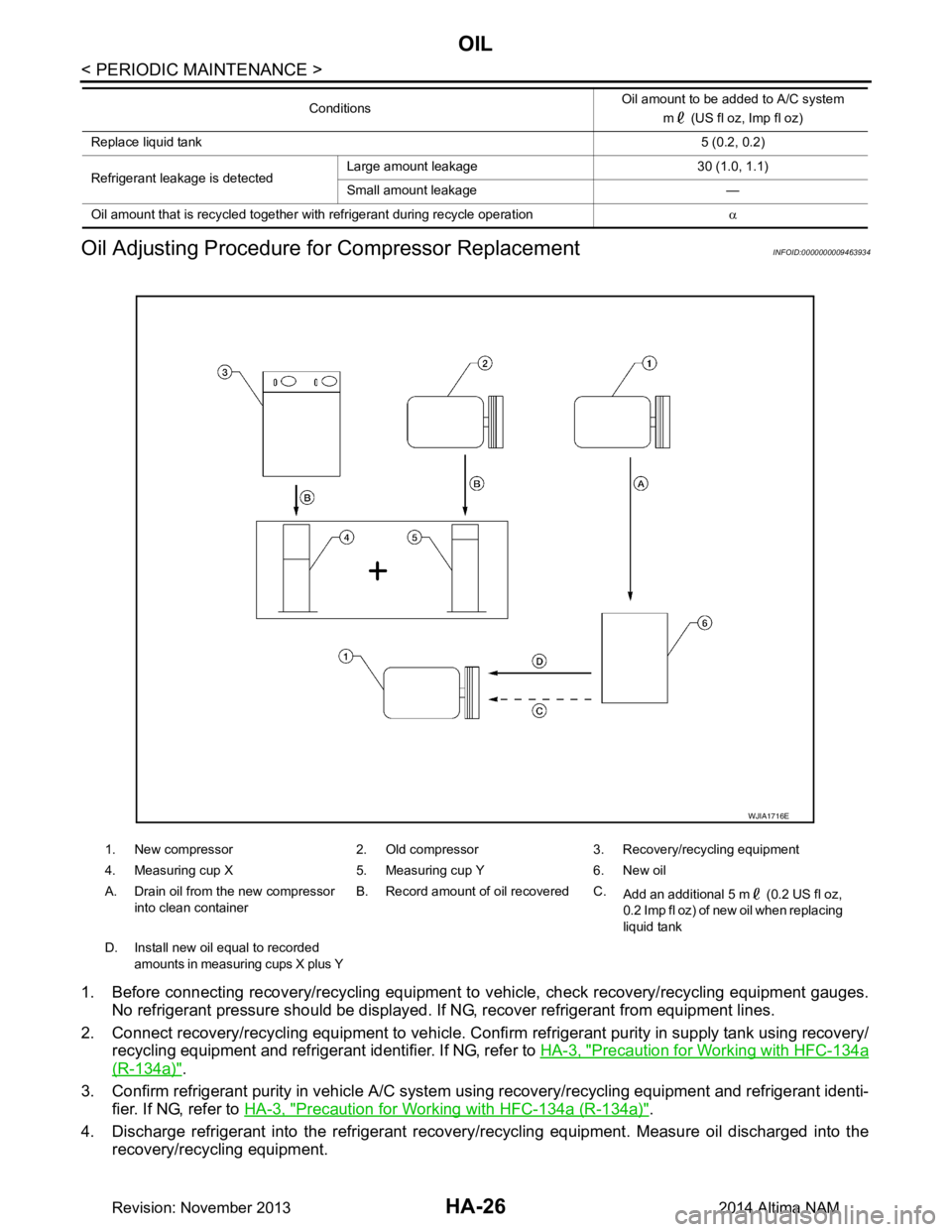
Oil Adjusting Procedure fo r Compressor Replacement
INFOID:0000000009463934
1. Before connecting recovery/recycling equipment to vehicle, check recovery/recycling equipment gauges.
No refrigerant pressure should be displayed. If NG, recover refrigerant from equipment lines.
2. Connect recovery/recycling equipment to vehicle. Confi rm refrigerant purity in supply tank using recovery/
recycling equipment and refrigerant identifier. If NG, refer to HA-3, "Precaution for Working with HFC-134a
(R-134a)".
3. Confirm refrigerant purity in vehi cle A/C system using recovery/recycling equipment and refrigerant identi-
fier. If NG, refer to HA-3, "Precaution for Working with HFC-134a (R-134a)"
.
4. Discharge refrigerant into the refrigerant recove ry/recycling equipment. Measure oil discharged into the
recovery/recycling equipment.
Replace liquid tank 5 (0.2, 0.2)
Refrigerant leakage is detected Large amount leakage 30 (1.0, 1.1)
Small amount leakage —
Oil amount that is recycled together with refrigerant during recycle operation α
Conditions
Oil amount to be added to A/C system
m (US fl oz, Imp fl oz)
1. New compressor 2. Old compressor 3. Recovery/recycling equipment
4. Measuring cup X 5. Measuring cup Y 6. New oil
A. Drain oil from the new compressor into clean container B. Record amount of oil recovered C.
Add an additional 5 m (0.2 US fl oz,
0.2 Imp fl oz) of new oil when replacing
liquid tank
D. Install new oil equal to recorded amounts in measuring cups X plus Y
WJIA1716E
Revision: November 20132014 Altima NAM
Page 2656 of 4801
![NISSAN TEANA 2014 Service Manual
PRECAUTIONSHAC-7
< PRECAUTION > [AUTOMATIC AIR CONDITIONER]
C
D E
F
G H
J
K L
M A
B
HAC
N
O P
Be certain that the service hoses display the markings described
(colored hose with black stripe). All](/img/5/57390/w960_57390-2655.png "NISSAN TEANA 2014 Service Manual
PRECAUTIONSHAC-7
< PRECAUTION > [AUTOMATIC AIR CONDITIONER]
C
D E
F
G H
J
K L
M A
B
HAC
N
O P
Be certain that the service hoses display the markings described
(colored hose with black stripe). All")
PRECAUTIONSHAC-7
< PRECAUTION > [AUTOMATIC AIR CONDITIONER]
C
D E
F
G H
J
K L
M A
B
HAC
N
O P
Be certain that the service hoses display the markings described
(colored hose with black stripe). All hoses must include positive shut-
off devices (either manual or aut omatic) near the end of the hoses
opposite the manifold gauge.
SERVICE COUPLERS
Do not attempt to connect HFC-134a (R-134a) service couplers to a
CFC-12 (R-12) A/C system. T he HFC-134a (R-134a) couplers will
not properly connect to the CFC-12 (R-12) system. However, if an
improper connection is attempted, discharging and contamination
may occur.
RHA272D
Shut-off valve rotati on A/C service valve
Clockwise Open
Counterclockwise Close
RHA273D
Revision: November 20132014 Altima NAMRevision: November 20132014 Altima NAM
Page 2667 of 4801
![NISSAN TEANA 2014 Service Manual
HAC-18
< SYSTEM DESCRIPTION >[AUTOMATIC AIR CONDITIONER]
SYSTEM
*: Inlet status is displayed by indicator during activating automatic control
AIR DISTRIBUTION
1. Intake door 2. Blower motor 3. In-cab](/img/5/57390/w960_57390-2666.png "NISSAN TEANA 2014 Service Manual
HAC-18
< SYSTEM DESCRIPTION >[AUTOMATIC AIR CONDITIONER]
SYSTEM
*: Inlet status is displayed by indicator during activating automatic control
AIR DISTRIBUTION
1. Intake door 2. Blower motor 3. In-cab")
HAC-18
< SYSTEM DESCRIPTION >[AUTOMATIC AIR CONDITIONER]
SYSTEM
*: Inlet status is displayed by indicator during activating automatic control
AIR DISTRIBUTION
1. Intake door 2. Blower motor 3. In-cabin microfilter
4. Front evaporator 5. Air mix door 6. Front heater core
7. Foot door 8. Ventilator door 9. Defroster door
10. Max. cool door
Fresh air Recirculation air Discharge air
Defroster Center ventilator Side ventilator
Front foot Rear foot
Switch position Door position
Mode door
Intake door
Air mix door
Ventilator door
Max. cool door Defroster door Foot door
(Driver side)
(Passenger side)
AUTO switch AUTO
MODE switch AAAA
———
BBAB
CCB B
CBBB
DEF switch C A C C
Intake switch
*
———— A
B
Temperature control
switch (Driver side) DUAL
switch:
OFF Full cold
[18 °C (60 °F)]
—A
18.5 °C – 31.5 °C
(61 °F – 89 °F) AUTO
Full hot
[32 °C (90 °F)] B
Temperature control
switch (Driver side)
DUAL
switch:
ON Full cold
[18 °C (60 °F)] A
—
18.5
°C – 31.5 °C
(61 °F – 89 °F) AUTO
Full hot
[32 °C (90 °F)] B
Temperature control
switch (Passenger
side) Full cold
[18 °C (60 °F)]
—A
18.5 °C – 31.5 °C
(61 °F – 89 °F) AUTO
Full hot
[32 °C (90 °F)] B
ON·OFF switch OFF C C B B B —
Revision: November 20132014 Altima NAMRevision: November 20132014 Altima NAM
Page 2670 of 4801
![NISSAN TEANA 2014 Service Manual
OPERATIONHAC-21
< SYSTEM DESCRIPTION > [AUTOMATIC AIR CONDITIONER]
C
D E
F
G H
J
K L
M A
B
HAC
N
O P
OPERATION
Switch Name and FunctionINFOID:0000000009463102
CONTROL OPERATION
A/C Switch Assembly](/img/5/57390/w960_57390-2669.png "NISSAN TEANA 2014 Service Manual
OPERATIONHAC-21
< SYSTEM DESCRIPTION > [AUTOMATIC AIR CONDITIONER]
C
D E
F
G H
J
K L
M A
B
HAC
N
O P
OPERATION
Switch Name and FunctionINFOID:0000000009463102
CONTROL OPERATION
A/C Switch Assembly")
OPERATIONHAC-21
< SYSTEM DESCRIPTION > [AUTOMATIC AIR CONDITIONER]
C
D E
F
G H
J
K L
M A
B
HAC
N
O P
OPERATION
Switch Name and FunctionINFOID:0000000009463102
CONTROL OPERATION
A/C Switch Assembly
Switch Operation
1. Defroster switch 2. Rear window defogger switch 3. Temperature control dial (driver side)
4. ON/OFF switch 5. Fan control switch 6. Mode switch
7. A/C switch 8. Temperature control dial (passen- ger side)9. Recirculation switch
10. Fresh air switch 11. DUAL switch 12. Display
13. AUTO switch
ALIIA0603ZZ
Revision: November 20132014 Altima NAMRevision: November 20132014 Altima NAM
Page 2671 of 4801
![NISSAN TEANA 2014 Service Manual
HAC-22
< SYSTEM DESCRIPTION >[AUTOMATIC AIR CONDITIONER]
OPERATION
AUTO switchTurns the switch indicator lamp and "AUTO" indicator on the display ON, and then front air condition-
ing system becomes](/img/5/57390/w960_57390-2670.png "NISSAN TEANA 2014 Service Manual
HAC-22
< SYSTEM DESCRIPTION >[AUTOMATIC AIR CONDITIONER]
OPERATION
AUTO switchTurns the switch indicator lamp and \"AUTO\" indicator on the display ON, and then front air condition-
ing system becomes")
HAC-22
< SYSTEM DESCRIPTION >[AUTOMATIC AIR CONDITIONER]
OPERATION
AUTO switchTurns the switch indicator lamp and "AUTO" indicator on the display ON, and then front air condition-
ing system becomes the following state.
• Air inlet: Automatic control
• Air outlet: Automatic control
• Blower fan: Automatic control
• Compressor: ON
Defroster switch Turns defroster mode (swi
tch indicator) between ON ⇔ OFF each time.
When defroster switch is pressed while front air conditioning system is in the ON position.
• When defroster mode is turned ON, front air conditioning system becomes the following state.
- Air inlet: Fresh air intake
- Air outlet: DEF
- Blower fan: Automatic control (If fan speed other than AUTO is selected before pressing defroster
switch, fan speed is manual control.)
- Compressor: ON
• When defroster mode is turned OFF, front air conditioning system state returns to the previous state
before defroster mode is selected. But, the following state is continued.
- Air inlet: Fresh air intake
- Compressor: ON
When defroster switch is pressed while front air conditioning system is in the OFF position.
• When defroster mode is turned ON, front air conditioning system becomes the following state.
- Air inlet: Fresh air intake
- Air outlet: Defroster
- Blower fan: Automatic control
- Compressor: ON
• When defroster mode is turned OFF, entire front air conditioning system is set to auto mode.
NOTE:
When defroster mode turns ON while front air conditioning system is in automatic control (“AUTO” is
indicated), automatic control is released (“AUTO” turns OFF).
DUAL switch • Turns left and right ventilation temperature control (switch indicator) between ON
⇔ OFF each
time.
• When DUAL switch indicator is ON, the driver side and passenger side temperatures can each be
set independently.
• When DUAL switch indicator is OFF, the driver side outlet and setting temperature is applied to both sides.
• Left and right ventilation temperature control is cancelled by turning the DEF mode ON.
NOTE:
When front air conditioning system is in the OFF position, left and right ventilation temperature control
can be selected only while front air conditioning system state (when MODE switch is pressed) is in-
dicated on the display.
Fan switch (UP/DOWN) Blower fan speed is manually controlled with these switches. Seven speeds are available for manual
control (as shown on the display screen).
NOTE:
• When fan switch is pressed while front air conditioning system is in OFF, front air conditioning sys- tem is activated. (Compressor control state returns to the previous state before front air condition-
ing system OFF.)
• When fan switch is pressed while front air conditioning system is in automatic control (“AUTO” is indicated), automatic control is released (“AUTO” turns OFF).
A/C switch Compressor control (switch in
dicator) changes between ON ⇔ OFF each time this switch is pressed
while front blower motor is operated.
NOTE:
• A/C switch cannot be turned ON when front blower motor is OFF.
• A/C switch cannot be turned OFF when air outlet is D/F or DEF.
• Air inlet changes to fresh air intake when A/C switch is turned OFF while air inlet is set to recircu- lation.
MODE switch Selects air outlet sequentially from VENT
⇒ B/L ⇒ FOOT ⇒ D/F ⇒ VENT each time.
NOTE:
• When front air conditioning system is in the OFF position, air outlet can be selected.
• When MODE switch is pressed while front air conditioning system is in automatic control (“AUTO” is indicated), automatic control is released (“AUTO” turns OFF).
ON/OFF switch • Turns front air conditioning system ON/OFF.
• When front air conditioning system turns OFF, air inlet and air outlet become the automatic control.
Revision: November 20132014 Altima NAMRevision: November 20132014 Altima NAM
Page 2672 of 4801
![NISSAN TEANA 2014 Service Manual
OPERATIONHAC-23
< SYSTEM DESCRIPTION > [AUTOMATIC AIR CONDITIONER]
C
D E
F
G H
J
K L
M A
B
HAC
N
O P
Fresh air switch Air inlet changes to fresh air (FRE) when this switch is pressed.
• Fresh ai](/img/5/57390/w960_57390-2671.png "NISSAN TEANA 2014 Service Manual
OPERATIONHAC-23
< SYSTEM DESCRIPTION > [AUTOMATIC AIR CONDITIONER]
C
D E
F
G H
J
K L
M A
B
HAC
N
O P
Fresh air switch Air inlet changes to fresh air (FRE) when this switch is pressed.
• Fresh ai")
OPERATIONHAC-23
< SYSTEM DESCRIPTION > [AUTOMATIC AIR CONDITIONER]
C
D E
F
G H
J
K L
M A
B
HAC
N
O P
Fresh air switch Air inlet changes to fresh air (FRE) when this switch is pressed.
• Fresh air switch indica tor ON: Fresh air intake
• Fresh air switch indicator OFF: Recirculation
NOTE:
When front air conditioning system is in the OFF position, air inlet can be selected.
Recirculation switch Air inlet changes to reci
rculation (REC) when this switch is pressed.
• Recirculation switch indicator ON: Recirculation
• Recirculation switch indicator OFF: Fresh air intake
NOTE:
• When front air conditioning system is in the OFF position, air inlet can be selected.
• When MODE switch and DEF switch is in the D/F or DEF position, air inlet cannot be selected to recirculation (REC).
Temperature control dial
(Driver side) Setting temperature is selected using this dial within a range between 18
°C (60 °F) and 32 °C (90 °F)
at a rate of 0.5 °C (1.0 °F) per adjustment.
NOTE:
When air conditioning system is OFF, setting temperature can be selected only while air conditioning
system status screen [only when MODE switch (driver side) is pressed] is indicated on display.
Temperature control dial
(Passenger side) • Outlet air flow temperature of passenger side can be changed without changing outlet air flow tem-
perature of driver side.
• Setting temperature is selected using this dial within a range between 18 °C (60 °F) and 32 °C (90 °F)
at a rate of 0.5 °C (1.0 °F) per adjustment.
NOTE:
• When air conditioning system is OFF, setting temperature can be selected only while air condition-
ing system status screen [only when MODE switch (passenger side) is pressed] is indicated on dis-
play.
• When DEF mode is ON, temperature control dial (passenger side) is inoperative.
Revision: November 20132014 Altima NAMRevision: November 20132014 Altima NAM
Page 2673 of 4801
![NISSAN TEANA 2014 Service Manual
HAC-24
< SYSTEM DESCRIPTION >[AUTOMATIC AIR CONDITIONER]
DIAGNOSIS SYSTEM
(A/C AUTO AMP.)
DIAGNOSIS SYSTEM (A/C AUTO AMP.)
CONSULT Function (HVAC)INFOID:0000000009463103
CAUTION:
After disconnectin](/img/5/57390/w960_57390-2672.png "NISSAN TEANA 2014 Service Manual
HAC-24
< SYSTEM DESCRIPTION >[AUTOMATIC AIR CONDITIONER]
DIAGNOSIS SYSTEM
(A/C AUTO AMP.)
DIAGNOSIS SYSTEM (A/C AUTO AMP.)
CONSULT Function (HVAC)INFOID:0000000009463103
CAUTION:
After disconnectin")
HAC-24
< SYSTEM DESCRIPTION >[AUTOMATIC AIR CONDITIONER]
DIAGNOSIS SYSTEM
(A/C AUTO AMP.)
DIAGNOSIS SYSTEM (A/C AUTO AMP.)
CONSULT Function (HVAC)INFOID:0000000009463103
CAUTION:
After disconnecting the CONSULT vehicle interface (VI) from the data link connector, the ignition must
be cycled OFF → ON (for at least 5 seconds) → OFF. If this step is not performed, the BCM may not go
to ”sleep mode”, potentially causing a di scharged battery and no-start condition.
CONSULT can display each diagnosis item us ing the diagnosis test modes as shown.
CONSULT application items
SELF-DIAGNOSTIC RESULT
Refer to HAC-31, "DTC Index".
Display Item List
Diagnosis mode Description
Self-Diagnostic Result Displays the diagnosis results judged by A/C auto amp.
Data Monitor Displays A/C auto amp. input/output data in real time.
Work support Changes the setting for each system function.
Active Test The signals used to activate each device are forcibly supplied from A/C auto amp.
ECU Identification Displays the A/C auto amp. number.
Configuration • The vehicle specification can be read and saved.
• The vehicle specification can be written when replacing A/C auto amp.
DTC Items
(CONSULT screen terms) Diagnostic item is detected when... Possible cause
U1000 CAN COMM CIRCUIT When A/C auto amp. is not transmitting
or receiving CAN communication signal
for 2 or more seconds. CAN communication system
U1010 CONTROL UNIT (CAN) When detecting error during the initial
diagnosis of CAN controller of A/C auto
amp. A/C auto amp.
B257B AMB TEMP SEN (SHORT) Detected temperature at ambient sen-
sor 55 °C (131 °F) or more • Ambient sensor
• A/C auto amp.
• Harness and connector (Ambient sensor circuit is open,
or there is a short in the circuit)
B257C AMB TEMP SEN (OPEN)
Detected temperature at ambient sen-
sor −30 °C ( −22 °F) or less
B2578 IN-CAR SENSOR (OUT OF RANGE
[LOW]) Detected temperature at in-vehicle sen-
sor 55 °C (131 °F) or more • In-vehicle sensor
• A/C auto amp.
• Harness and connector (In-vehicle sensor circuit is open,
or there is a short in the circuit)
B2579
IN-CAR SENSOR (OUT OF RANGE
[HI]) Detected temperature at in-vehicle sen-
sor −30 °C ( −22 °F) or less
B2581 EVAP TEMP SEN (SHORT) Detected temperature at intake sensor
55 °C (131 °F) or more • Intake sensor
• A/C auto amp.
• Harness and connector
(Intake sensor circuit is open, or
there is a short in the circuit)
B2582 EVAP TEMP SEN (OPEN)
Detected temperature at intake sensor
− 30 °C ( −22 °F) or less
B2630
*SUNLOAD SEN (SHORT) Detected calorie at sunload sensor
1395 w/m2 (1200 kcal/m2·h) • Sunload sensor
• A/C auto amp.
• Harness and connector (Sunload sensor circuit is open,
or there is a short in the circuit)
B2631
*SUNLOAD SEN (OPEN) Detected calorie at sunload sensor 0 w/
m2 (0 kcal/m2·h)
Revision: November 20132014 Altima NAMRevision: November 20132014 Altima NAM
Page 2674 of 4801
![NISSAN TEANA 2014 Service Manual
DIAGNOSIS SYSTEM (A/C AUTO AMP.)HAC-25
< SYSTEM DESCRIPTION > [AUTOMATIC AIR CONDITIONER]
C
D E
F
G H
J
K L
M A
B
HAC
N
O P
*: Perform self-diagnosis under sunshine. When performing indoors, aim a](/img/5/57390/w960_57390-2673.png "NISSAN TEANA 2014 Service Manual
DIAGNOSIS SYSTEM (A/C AUTO AMP.)HAC-25
< SYSTEM DESCRIPTION > [AUTOMATIC AIR CONDITIONER]
C
D E
F
G H
J
K L
M A
B
HAC
N
O P
*: Perform self-diagnosis under sunshine. When performing indoors, aim a")
DIAGNOSIS SYSTEM (A/C AUTO AMP.)HAC-25
< SYSTEM DESCRIPTION > [AUTOMATIC AIR CONDITIONER]
C
D E
F
G H
J
K L
M A
B
HAC
N
O P
*: Perform self-diagnosis under sunshine. When performing indoors, aim a light (more than 60 W) at sunload sensor, otherwise se lf-diag-
nosis reports an error even though the sunload sensor is functioning normally.
DATA MONITOR
Display item list
B2632 DR AIRMIX ACTR (SHORT) Air mix door PBR LH position 5% or
less • Air mix door motor LH
• A/C auto amp.
• Harness and connector (CAN communication line is open
or shorted)
(Air mix door motor is open or
shorted)
B2633 DR AIRMIX ACTR (OPEN)
Air mix door PBR LH position 95% or
more
B2634 PASS AIRMIX ACTR (SHORT) Air mix door PBR RH position 5% or
less • Air mix door motor RH
• A/C auto amp.
• Harness and connector (CAN communication line is open
or shorted)
(Air mix door motor is open or
shorted)
B2635 PASS AIRMIX ACTR (OPEN)
Air mix door PBR RH position 95% or
more
B2636 DR VENT DOOR FAIL When the malfunctioning door position
is detected at VENT position • Mode door motor
• A/C auto amp.
• Harness and connector (CAN communication line is open
or shorted)
(Mode door motor is open or
shorted)
B2637 DR B/L DOOR FAIL
When the malfunctioning door position
is detected at B/L position
B2638 DR D/F1 DOOR FAIL When the malfunctioning door position
is detected at FOOT position
B2639 DR DEF DOOR FAIL When the malfunctioning door position
is detected at DEF position
B263D FRE DOOR FAIL When the malfunctioning intake door
position is detected at FRE position • Intake door motor
• A/C auto amp.
• Harness and connector (CAN communication line is open
or shorted)
(Intake door motor is open or
shorted)
B263E 20P FRE DOOR FAIL
When the malfunctioning intake door
position is detected at 20%FRE posi-
tion
B263F REC DOOR FAIL When the malfunctioning intake door
position is detected at REC position
B2654 D/F2 DOOR FAIL When the malfunctioning door position
is detected at D/F position • Mode door motor
• A/C auto amp.
• Harness and connector (CAN communication line is open
or shorted)
(Mode door motor is open or
shorted)
B2655 B/L2 DOOR FAIL
When the malfunctioning door position
is detected at B/L2 position
DTC
Items
(CONSULT screen terms) Diagnostic item is detected when... Possible cause
Monitor item [Unit] Description
AMB TEMP SEN [ °C] Ambient sensor value converted from ambient sensor signal received from ambient
sensor
IN-VEH TEMP [ °C] In-vehicle sensor value converted from in-vehicle sensor signal received from in-vehi-
cle sensor
INT TEMP SEN [ °C] Intake sensor value converted from intake sensor signal received from intake sensor
SUNLOAD SEN [w/m
2]Sunload sensor value converted from sunload sensor signal received from sunload
sensor
AMB SEN CAL [ °C] Ambient sensor value calculated by A/C auto amp.
IN-VEH CAL [ °C] In-vehicle sensor value calculated by A/C auto amp.
INT TEMP CAL [ °C] Intake sensor value calculated by A/C auto amp.
SUNL SEN CAL [w/m
2]Sunload sensor value calculated by A/C auto amp.
COMP REQ SIG [On/Off] Displays A/C switch ON/OFF status transmitted to other units via CAN communication
Revision: November 20132014 Altima NAMRevision: November 20132014 Altima NAM