display NISSAN TEANA 2014 Service Manual
[x] Cancel search | Manufacturer: NISSAN, Model Year: 2014, Model line: TEANA, Model: NISSAN TEANA 2014Pages: 4801, PDF Size: 51.2 MB
Page 2745 of 4801
![NISSAN TEANA 2014 Service Manual
HAC-96
< SYMPTOM DIAGNOSIS >[AUTOMATIC AIR CONDITIONER]
INSUFFICIENT COOLING
INSUFFICIENT COOLING
DescriptionINFOID:0000000009463167
Symptom
• Insufficient cooling
• No cool air comes out. (Air](/img/5/57390/w960_57390-2744.png "NISSAN TEANA 2014 Service Manual
HAC-96
< SYMPTOM DIAGNOSIS >[AUTOMATIC AIR CONDITIONER]
INSUFFICIENT COOLING
INSUFFICIENT COOLING
DescriptionINFOID:0000000009463167
Symptom
• Insufficient cooling
• No cool air comes out. (Air")
HAC-96
< SYMPTOM DIAGNOSIS >[AUTOMATIC AIR CONDITIONER]
INSUFFICIENT COOLING
INSUFFICIENT COOLING
DescriptionINFOID:0000000009463167
Symptom
• Insufficient cooling
• No cool air comes out. (Air flow volume is normal.)
Diagnosis ProcedureINFOID:0000000009463168
NOTE:
Perform self-diagnoses with CONSULT before performi ng symptom diagnosis. If any DTC is detected, per-
form the corresponding diagnosis.
1.CHECK MAGNET CLUTCH OPERATION
1. Turn ignition switch ON.
2. Operate fan switch.
3. Press A/C switch.
4. Check that A/C indicator turns ON. Check visually and by sound that compressor operates.
5. Press A/C switch again.
6. Check that A/C indicator turns OFF. Check that compressor stops.
Is the inspection result normal?
YES >> GO TO 2.
NO >> Perform diagnosis of “COMPRESSOR DOES NOT OPERATE” in “SYMPTOM DIAGNOSIS”.
Refer to HAC-99, "Diagnosis Procedure"
.
2.CHECK DRIVE BELT
Check tension of drive belt. Refer to EM-19, "Checking Drive Belts"
(QR25DE) or EM-134, "Checking Drive
Belts" (VQ35DE).
Is the inspection result normal?
YES >> GO TO 3.
NO >> Adjust or replace drive belt depending on the inspection results.
3.CHECK REFRIGERANT CYCLE
Connect recovery/recycling recharging equipment to the vehicle and perform pressure inspection with gauge.
Refer to HA-18, "Symptom Table"
.
Is the inspection result normal?
YES >> GO TO 4.
NO >> Repair or replace parts depending on the inspection results.
4.CHECK AIR LEAKAGE FROM EACH DUCT
Check duct and nozzle, etc. of the fr ont air conditioning system for leakage.
Is the inspection result normal?
YES >> GO TO 5.
NO >> Repair or replace parts depending on the inspection results.
5.CHECK AMBIENT TEMPERATURE DISPLAY
Check that there is not much difference between act ual ambient temperature and indicated temperature on
information display in combination meter.
Is the inspection result normal?
YES >> GO TO 6.
NO >> Perform diagnosis for the A/C auto amp. connection recognition signal circuit. Refer to HAC-60,
"Diagnosis Procedure".
6.CHECK SETTING OF TEMPERATURE SETTING TRIMMER (FRONT)
1. Check setting value of temperature setting trimmer (front). Refer to HAC-50, "Temperature Setting Trim-
mer".
2. Check that temperature setting trimme r (front) is set to “+ direction”.
Revision: November 20132014 Altima NAMRevision: November 20132014 Altima NAM
Page 2751 of 4801
![NISSAN TEANA 2014 Service Manual
HAC-102
< REMOVAL AND INSTALLATION >[AUTOMATIC AIR CONDITIONER]
A/C AUTO AMP.
A/C AUTO AMP.
Exploded ViewINFOID:0000000009463174
Removal and InstallationINFOID:0000000009463175
REMOVAL
1. Remove the](/img/5/57390/w960_57390-2750.png "NISSAN TEANA 2014 Service Manual
HAC-102
< REMOVAL AND INSTALLATION >[AUTOMATIC AIR CONDITIONER]
A/C AUTO AMP.
A/C AUTO AMP.
Exploded ViewINFOID:0000000009463174
Removal and InstallationINFOID:0000000009463175
REMOVAL
1. Remove the")
HAC-102
< REMOVAL AND INSTALLATION >[AUTOMATIC AIR CONDITIONER]
A/C AUTO AMP.
A/C AUTO AMP.
Exploded ViewINFOID:0000000009463174
Removal and InstallationINFOID:0000000009463175
REMOVAL
1. Remove the audio unit. Refer to
AV-47, "Removal and Installation" (BASE AUDIO), AV-108, "Removal and
Installation" (DISPLAY AUDIO WITHOUT BOSE) or AV-198, "Removal and Installation" (DISPLAY AUDIO
WITH BOSE).
2. Remove the AV control unit. Refer to AV-298, "Removal and Installation"
( N AV I G AT I O N W I T H O U T
BOSE) or AV-418, "Removal and Installation"
( N AV I G AT I O N W I T H B O S E ) .
3. Remove the audio unit bracket screws and audio unit brackets (LH/RH).
4. Remove the A/C auto amp.
INSTALLATION
Installation is in the reverse order of removal.
1. Audio unit 2. Audio unit bracket (LH) 3. A/C auto amp.
4. Audio unit bracket (RH)
AWNIA2551ZZ
Revision: November 20132014 Altima NAMRevision: November 20132014 Altima NAM
Page 2761 of 4801
![NISSAN TEANA 2014 Service Manual
HAC-112
< PRECAUTION >[MANUAL AIR CONDITIONER]
PRECAUTIONS
Be certain that the service hoses display the markings described
(colored hose with black stripe). All hoses must include positive shut-
o](/img/5/57390/w960_57390-2760.png "NISSAN TEANA 2014 Service Manual
HAC-112
< PRECAUTION >[MANUAL AIR CONDITIONER]
PRECAUTIONS
Be certain that the service hoses display the markings described
(colored hose with black stripe). All hoses must include positive shut-
o")
HAC-112
< PRECAUTION >[MANUAL AIR CONDITIONER]
PRECAUTIONS
Be certain that the service hoses display the markings described
(colored hose with black stripe). All hoses must include positive shut-
off devices (either manual or aut omatic) near the end of the hoses
opposite the manifold gauge.
SERVICE COUPLERS
Do not attempt to connect HFC-134a (R-134a) service couplers to a
CFC-12 (R-12) A/C system. The HFC-134a (R-134a) couplers will
not properly connect to the CFC-12 (R-12) system. However, if an
improper connection is attempted, discharging and contamination
may occur.
RHA272D
Shut-off valve rotati on A/C service valve
Clockwise Open
Counterclockwise Close
RHA273D
Revision: November 20132014 Altima NAMRevision: November 20132014 Altima NAM
Page 2769 of 4801
![NISSAN TEANA 2014 Service Manual
HAC-120
< SYSTEM DESCRIPTION >[MANUAL AIR CONDITIONER]
SYSTEM
*1: Inlet status is displayed by indicator when activating Max A/C or D/F modes.
AIR DISTRIBUTION
1. Intake door 2. Blower motor 3. Evapo](/img/5/57390/w960_57390-2768.png "NISSAN TEANA 2014 Service Manual
HAC-120
< SYSTEM DESCRIPTION >[MANUAL AIR CONDITIONER]
SYSTEM
*1: Inlet status is displayed by indicator when activating Max A/C or D/F modes.
AIR DISTRIBUTION
1. Intake door 2. Blower motor 3. Evapo")
HAC-120
< SYSTEM DESCRIPTION >[MANUAL AIR CONDITIONER]
SYSTEM
*1: Inlet status is displayed by indicator when activating Max A/C or D/F modes.
AIR DISTRIBUTION
1. Intake door 2. Blower motor 3. Evaporator
4. Air mix door 5. Heater core 6. Foot door
7. Ventilator door 8. Defroster door Fresh air intake Recirculation air
Ventilator Side defroster Defroster
Foot
ALIIA0433ZZ
Switch/Dial position Door position
Ventilator door Foot
door Defroster
door Intake
door Air mix
door
MODE switch VENT H E K —
B/L I F K —
FOOT J G L — D/F J G L B —
DEF switch J E M B —
REC
switch
*1ON — B —
OFF — — A —
Temperature control dial Full Cold — C
Full Cold ⇔ Full Hot — AUTO
Full Hot — D
Revision: November 20132014 Altima NAMRevision: November 20132014 Altima NAM
Page 2773 of 4801
![NISSAN TEANA 2014 Service Manual
HAC-124
< SYSTEM DESCRIPTION >[MANUAL AIR CONDITIONER]
DIAGNOSIS SYSTEM (BCM)
DIAGNOSIS SYSTEM (BCM)
CONSULT Function (BCM - COMMON ITEM)INFOID:0000000009958322
CAUTION:
After disconnecting the CONS](/img/5/57390/w960_57390-2772.png "NISSAN TEANA 2014 Service Manual
HAC-124
< SYSTEM DESCRIPTION >[MANUAL AIR CONDITIONER]
DIAGNOSIS SYSTEM (BCM)
DIAGNOSIS SYSTEM (BCM)
CONSULT Function (BCM - COMMON ITEM)INFOID:0000000009958322
CAUTION:
After disconnecting the CONS")
HAC-124
< SYSTEM DESCRIPTION >[MANUAL AIR CONDITIONER]
DIAGNOSIS SYSTEM (BCM)
DIAGNOSIS SYSTEM (BCM)
CONSULT Function (BCM - COMMON ITEM)INFOID:0000000009958322
CAUTION:
After disconnecting the CONSULT vehicle interface (VI) from the data link connector, the ignition must
be cycled OFF → ON (for at least 5 seconds) → OFF. If this step is not performed, the BCM may not go
to ”sleep mode”, potentially causing a di scharged battery and a no-start condition.
APPLICATION ITEM
CONSULT performs the following functions via CAN communication with BCM.
SYSTEM APPLICATION
BCM can perform the following functions.
Direct Diagnostic Mode Description
Ecu Identification The BCM part number is displayed.
Self Diagnostic Result The BCM self diagnostic results are displayed.
Data Monitor The BCM input/output data is displayed in real time.
Active Test The BCM activates outputs to test components.
Work support The settings for BCM functions can be changed.
Configuration • The vehicle specification can be read and saved.
• The vehicle specification can be written when replacing BCM.
CAN Diag Support Mntr The result of transmit/receive diagnosis of CAN communication is displayed.
System Sub System Direct Diagnostic Mode
Ecu Identification
Self Diagnostic Result
Data Monitor
Active Test
Work support
Configuration
CAN Diag Support Mntr
Door lock DOOR LOCK ××××
Rear window defogger REAR DEFOGGER ×××
Warning chime BUZZER ××
Interior room lamp timer INT LAMP ×××
Remote keyless entry system MULTI REMOTE ENT ×××
Exterior lamp HEADLAMP ×××
Wiper and washer WIPER ×××
Turn signal and hazard warning lamps FLASHER ××
Air conditioner AIR CONDITIONER ×
Intelligent Key system INTELLIGENT KEY ××××
Combination switch COMB SW ×
BCM BCM × × ×××
Immobilizer IMMU ×××
Interior room lamp battery saver BATTERY SAVER ××
Trunk open TRUNK ×
Vehicle security system THEFT ALM ×××
RAP system RETAINED PWR ×
Revision: November 20132014 Altima NAMRevision: November 20132014 Altima NAM
Page 2775 of 4801
![NISSAN TEANA 2014 Service Manual
HAC-126
< SYSTEM DESCRIPTION >[MANUAL AIR CONDITIONER]
DIAGNOSIS SYSTEM (IPDM E/R)
DIAGNOSIS SYSTEM (IPDM E/R)
CONSULT Function (IPDM E/R)INFOID:0000000009958324
CAUTION:
After disconnecting the CON](/img/5/57390/w960_57390-2774.png "NISSAN TEANA 2014 Service Manual
HAC-126
< SYSTEM DESCRIPTION >[MANUAL AIR CONDITIONER]
DIAGNOSIS SYSTEM (IPDM E/R)
DIAGNOSIS SYSTEM (IPDM E/R)
CONSULT Function (IPDM E/R)INFOID:0000000009958324
CAUTION:
After disconnecting the CON")
HAC-126
< SYSTEM DESCRIPTION >[MANUAL AIR CONDITIONER]
DIAGNOSIS SYSTEM (IPDM E/R)
DIAGNOSIS SYSTEM (IPDM E/R)
CONSULT Function (IPDM E/R)INFOID:0000000009958324
CAUTION:
After disconnecting the CONSULT vehicle interface (VI) from the data link connector, the ignition must
be cycled OFF → ON (for at least 5 seconds) → OFF. If this step is not performed, the BCM may not go
to ”sleep mode”, potentially causing a di scharged battery and a no-start condition.
APPLICATION ITEM
CONSULT performs the following functions via CAN communication with IPDM E/R.
ECU IDENTIFICATION
The IPDM E/R part number is displayed.
SELF DIAGNOSTIC RESULT
Refer to PCS-20, "DTC Index".
DATA MONITOR
Direct Diagnostic Mode Description
Ecu Identification The IPDM E/R part number is displayed.
Self Diagnostic Result The IPDM E/R self diagnostic results are displayed.
Data Monitor The IPDM E/R input/output data is displayed in real time.
Active Test The IPDM E/R activates outputs to test components.
CAN Diag Support Mntr The result of transmit/receive diagnosis of CAN communication is displayed.
Monitor Item [Unit] Main
Signals Description
MOTOR FAN REQ [%] ×Indicates cooling fan speed signal received from ECM on CAN communication
line
AC COMP REQ [On/Off] ×Indicates A/C compressor request signal received from ECM on CAN commu-
nication line
TAIL&CLR REQ [On/Off] ×Indicates position light request signal received from BCM on CAN communica-
tion line
HL LO REQ [On/Off] ×Indicates low beam request signal received from BCM on CAN communication
line
HL HI REQ [On/Off] ×Indicates high beam request signal received from BCM on CAN communication
line
FR FOG REQ [On/Off] ×Indicates front fog light request signal received from BCM on CAN communica-
tion line
FR WIP REQ [Stop/1LOW/Low/Hi] ×Indicates front wiper request signal received from BCM on CAN communication
line
WIP AUTO STOP [STOP P/ACT P] ×Indicates condition of front wiper auto stop signal
WIP PROT [Off/BLOCK] ×Indicates condition of front wiper fail-safe operation
IGN RLY1 -REQ [On/Off] Indicates ignition switch ON signal received from BCM on CAN communication
line
IGN RLY [On/Off] ×Indicates condition of ignition relay
PUSH SW [On/Off] Indicates condition of push-button ignition switch
INTER/NP SW [On/Off] Indicates condition of CVT shift position
ST RLY CONT [On/Off] Indicates starter relay status signal received from BCM on CAN communication
line
IHBT RLY -REQ [On/Off] Indicates starter control relay signal received from BCM on CAN communication
line
Revision: November 20132014 Altima NAMRevision: November 20132014 Altima NAM
Page 2777 of 4801
![NISSAN TEANA 2014 Service Manual
HAC-128
< ECU DIAGNOSIS INFORMATION >[MANUAL AIR CONDITIONER]
FRONT AIR CONTROL
ECU DIAGNOSIS INFORMATION
FRONT AIR CONTROL
Reference ValueINFOID:0000000009463206
VALUES ON THE DIAGNOSIS TOOL
Display](/img/5/57390/w960_57390-2776.png "NISSAN TEANA 2014 Service Manual
HAC-128
< ECU DIAGNOSIS INFORMATION >[MANUAL AIR CONDITIONER]
FRONT AIR CONTROL
ECU DIAGNOSIS INFORMATION
FRONT AIR CONTROL
Reference ValueINFOID:0000000009463206
VALUES ON THE DIAGNOSIS TOOL
Display")
HAC-128
< ECU DIAGNOSIS INFORMATION >[MANUAL AIR CONDITIONER]
FRONT AIR CONTROL
ECU DIAGNOSIS INFORMATION
FRONT AIR CONTROL
Reference ValueINFOID:0000000009463206
VALUES ON THE DIAGNOSIS TOOL
Display Item List
TERMINAL LAYOUT
PHYSICAL VALUES
Monitor item name “operation or unit” Contents
HEATER FAN SW “ON/OFF” Displays “O N/OFF” status as judged from blower fan motor switch signal.
AIR COND SW “ON/OFF” Displays “ON/OFF” status as judged from air conditioner switch signal.
ABIIA0520ZZ
Te r m i n a l No. Wire
color ItemIgnition
switch Condition Voltage (V)
(Approx.)
1 SB Power supply for battery — — 12
2 G Power supply for IGN ON — 12
4 P Rear defrost feedback ON Defroster
switch ON 12
OFF 0
5 R Illumination (+) ON Lighting
switch OFF 0
1st position 12
6 GR Illumination (-) — — 0
7 L Compressor ON signal ON Compressor ON 0
OFF 9 - 12
8 Y Blower ON signal ON Fan ON 0
OFF 5
9 B Ground — — 0
10 Y Rear defrost ON signal ON Defroster
switch ON 0
OFF 5
11 P Blower motor feedback ON Fan speed Low 7.0.- 10.0
12 G LIN signal ON — 5.5
13 W VACTR ON — 12
14 B ACTR Ground — — 0
16 BR PD cut ON Compressor ON 4.6
Revision: November 20132014 Altima NAMRevision: November 20132014 Altima NAM
Page 2832 of 4801

DIAGNOSIS SYSTEM (BCM)INL-11
< SYSTEM DESCRIPTION >
C
D E
F
G H
I
J
K
M A
B
INL
N
O P
DIAGNOSIS SYSTEM (BCM)
COMMON ITEM
COMMON ITEM : CONSULT Function (BCM - COMMON ITEM)INFOID:0000000009956797
CAUTION:
After disconnecting the CONSULT vehicle interface (VI) from the data link connector, the ignition must
be cycled OFF → ON (for at least 5 seconds) → OFF. If this step is not performed, the BCM may not go
to ”sleep mode”, potentiall y causing a discharged battery and a no-start condition.
APPLICATION ITEM
CONSULT performs the following functions via CAN communication with BCM.
SYSTEM APPLICATION
BCM can perform the following functions.
Direct Diagnostic Mode Description
Ecu Identification The BCM part number is displayed.
Self Diagnostic Result The BCM self diagnostic results are displayed.
Data Monitor The BCM input/output data is displayed in real time.
Active Test The BCM activates outputs to test components.
Work support The settings for BCM functions can be changed.
Configuration • The vehicle specification can be read and saved.
• The vehicle specification can be written when replacing BCM.
CAN Diag Support Mntr The result of transmit/receive diagnosis of CAN communication is displayed.
System Sub System Direct Diagnostic Mode
Ecu Identification
Self Diagnostic Result
Data Monitor
Active Test
Work support
Configuration
CAN Diag Su pport Mntr
Door lock DOOR LOCK ××××
Rear window defogger REAR DEFOGGER ×××
Warning chime BUZZER ××
Interior room lamp timer INT LAMP ×××
Remote keyless entry system MULTI REMOTE ENT ×××
Exterior lamp HEADLAMP ×××
Wiper and washer WIPER ×××
Turn signal and hazard warning lamps FLASHER ××
Air conditioner AIR CONDITIONER ×
Intelligent Key system INTELLIGENT KEY ××××
Combination switch COMB SW ×
BCM BCM × × ×××
Immobilizer IMMU ×××
Interior room lamp battery saver BATTERY SAVER ××
Trunk open TRUNK ×
Vehicle security system THEFT ALM ×××
Revision: November 20132014 Altima NAMRevision: November 20132014 Altima NAM
Page 2833 of 4801

INL-12
< SYSTEM DESCRIPTION >
DIAGNOSIS SYSTEM (BCM)
INT LAMP
INT LAMP : CONSULT Function (BCM - INT LAMP)INFOID:0000000009956798
CAUTION:
After disconnecting the CONSULT vehicle interface (VI) from the data link connector, the ignition must
be cycled OFF → ON (for at least 5 seconds) → OFF. If this step is not performed, the BCM may not go
to ”sleep mode”, potentially causing a di scharged battery and a no-start condition.
DATA MONITOR
ACTIVE TEST
WORK SUPPORT
NOTE:
The items listed below are the only applicable Work Support it ems for this vehicle. If other items are displayed
on CONSULT, do not use or change t he setting for these other items.
RAP system RETAINED PWR ×
Signal buffer system SIGNAL BUFFER ×
TPMS AIR PRESSURE MONITOR ××××
System Sub System
Direct Diagnostic Mode
Ecu Identification
Self Diagnostic Result
Data Monitor
Active Test
Work support
Configuration
CAN Diag Support Mntr
Monitor Item [Unit] Description
REQ SW -DR [On/Off] Indicates condition of door request switch LH.
REQ SW -AS [On/Off] Indicates condition of door request switch RH.
PUSH -SW [On/Off] Indicates condition of push-button ignition switch.
UNLK SEN -DR [On/Off] Indicates condition of door unlock sensor.
DOOR SW-DR [On/Off] Indicates condition of front door switch LH.
DOOR SW-AS [On/Off] Indicates condition of front door switch RH.
DOOR SW-RR [On/Off] Indicates condition of rear door switch RH.
DOOR SW-RL [On/Off] Indicates condition of rear door switch LH.
DOOR SW-BK [On/Off] Indicates condition of trunk switch.
CDL LOCK SW [On/Off] Indicates condition of lock signal from door lock and unlock switch.
CDL UNLOCK SW [On/Off] Indicates condition of unlock signal from door lock and unlock switch.
KEY CYL LK-SW [On/Off] Indicates condition of lock signal from door key cylinder switch.
KEY CYL UN-SW [On/Off] Indicates condition of unlock signal from door key cylinder switch.
TRNK/HAT MNTR [On/Off] Indicates condition of trunk room lamp switch.
RKE-LOCK [On/Off] Indicates condition of lock signal from Intelligent Key.
RKE-UNLOCK [On/Off] Indicates condition of unlock signal from Intelligent Key.
Te s t I t e m D e s c r i p t i o n
INT LAMP This test is able to check interior room lamp operation [On/Off].
STEP LAMP TEST This test is able to check step lamp operation [On/Off].
Revision: November 20132014 Altima NAMRevision: November 20132014 Altima NAM
Page 2840 of 4801
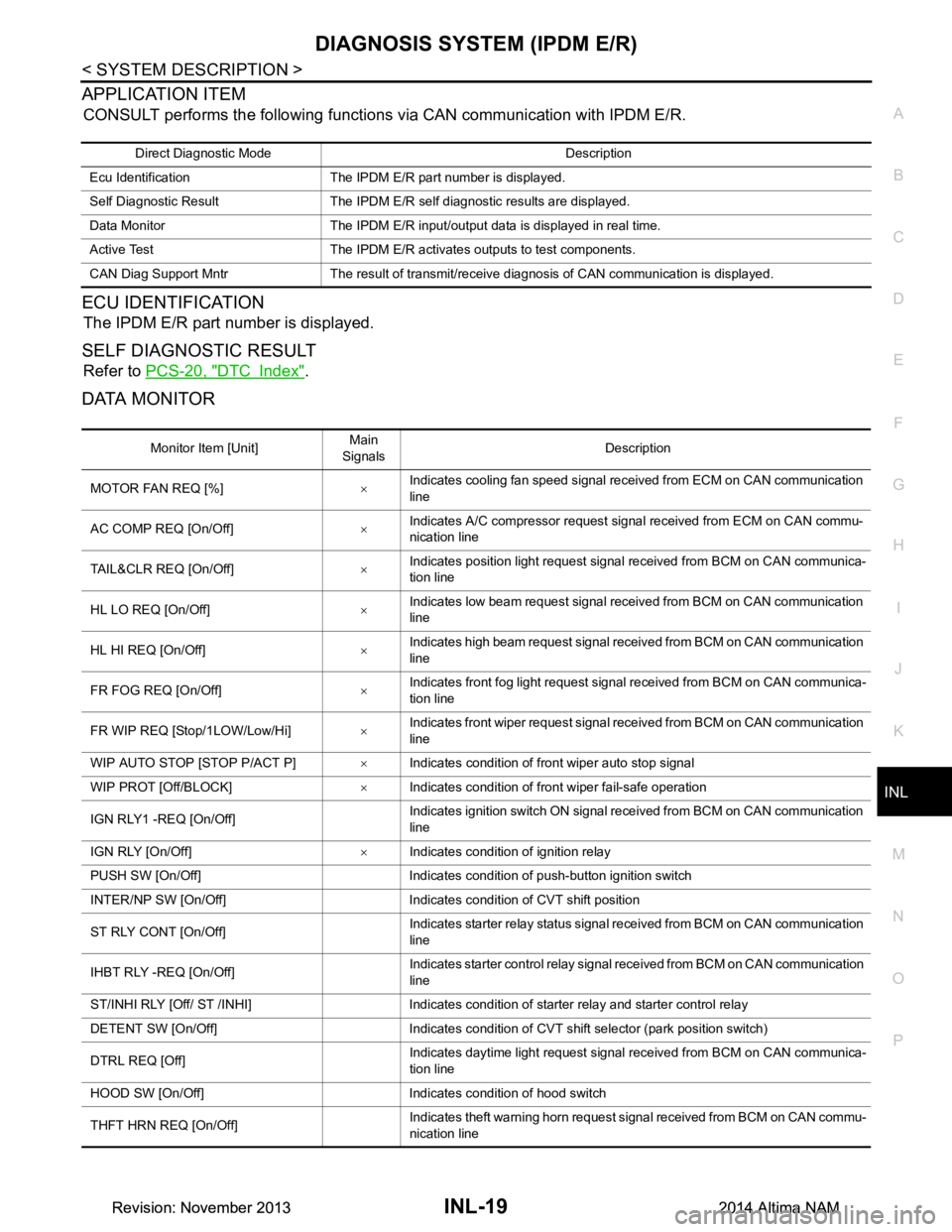
DIAGNOSIS SYSTEM (IPDM E/R)INL-19
< SYSTEM DESCRIPTION >
C
D E
F
G H
I
J
K
M A
B
INL
N
O P
APPLICATION ITEM
CONSULT performs the following functions via CAN communication with IPDM E/R.
ECU IDENTIFICATION
The IPDM E/R part number is displayed.
SELF DIAGNOSTIC RESULT
Refer to PCS-20, "DTC Index".
DATA MONITOR
Direct Diagnostic Mode Description
Ecu Identification The IPDM E/R part number is displayed.
Self Diagnostic Result The IPDM E/R self diagnostic results are displayed.
Data Monitor The IPDM E/R input/output data is displayed in real time.
Active Test The IPDM E/R activates outputs to test components.
CAN Diag Support Mntr The result of transmit/receive diagnosis of CAN communication is displayed.
Monitor Item [Unit] Main
Signals Description
MOTOR FAN REQ [%] ×Indicates cooling fan speed signal received from ECM on CAN communication
line
AC COMP REQ [On/Off] ×Indicates A/C compressor request signal received from ECM on CAN commu-
nication line
TAIL&CLR REQ [On/Off] ×Indicates position light request signal
received from BCM on CAN communica-
tion line
HL LO REQ [On/Off] ×Indicates low beam request signal received from BCM on CAN communication
line
HL HI REQ [On/Off] ×Indicates high beam request signal received from BCM on CAN communication
line
FR FOG REQ [On/Off] ×Indicates front fog light request signal received from BCM on CAN communica-
tion line
FR WIP REQ [Stop/1LOW/Low/Hi] ×Indicates front wiper request signal received from BCM on CAN communication
line
WIP AUTO STOP [STOP P/ACT P] ×Indicates condition of front wiper auto stop signal
WIP PROT [Off/BLOCK] ×Indicates condition of front wiper fail-safe operation
IGN RLY1 -REQ [On/Off] Indicates ignition switch ON signal received from BCM on CAN communication
line
IGN RLY [On/Off] ×Indicates condition of ignition relay
PUSH SW [On/Off] Indicates condition of push-button ignition switch
INTER/NP SW [On/Off] Indicates condition of CVT shift position
ST RLY CONT [On/Off] Indicates starter relay status signal received from BCM on CAN communication
line
IHBT RLY -REQ [On/Off] Indicates starter control relay signal received from BCM on CAN communication
line
ST/INHI RLY [Off/ ST /INHI] Indicates condition of starter relay and starter control relay
DETENT SW [On/Off] Indicates condition of CVT shift selector (park position switch)
DTRL REQ [Off] Indicates daytime light request signal received from BCM on CAN communica-
tion line
HOOD SW [On/Off] Indicates condition of hood switch
THFT HRN REQ [On/Off] Indicates theft warning horn request signal received from BCM on CAN commu-
nication line
Revision: November 20132014 Altima NAMRevision: November 20132014 Altima NAM