lock NISSAN TEANA 2014 Service Manual
[x] Cancel search | Manufacturer: NISSAN, Model Year: 2014, Model line: TEANA, Model: NISSAN TEANA 2014Pages: 4801, PDF Size: 51.2 MB
Page 2801 of 4801
![NISSAN TEANA 2014 Service Manual
HAC-152
< DTC/CIRCUIT DIAGNOSIS >[MANUAL AIR CONDITIONER]
POWER SUPPLY AND GROUND CIRCUIT FOR FRONT AIR CONTROL
POWER SUPPLY AND GROUND CIRC
UIT FOR FRONT AIR CONTROL
DescriptionINFOID:00000000094632](/img/5/57390/w960_57390-2800.png "NISSAN TEANA 2014 Service Manual
HAC-152
< DTC/CIRCUIT DIAGNOSIS >[MANUAL AIR CONDITIONER]
POWER SUPPLY AND GROUND CIRCUIT FOR FRONT AIR CONTROL
POWER SUPPLY AND GROUND CIRC
UIT FOR FRONT AIR CONTROL
DescriptionINFOID:00000000094632")
HAC-152
< DTC/CIRCUIT DIAGNOSIS >[MANUAL AIR CONDITIONER]
POWER SUPPLY AND GROUND CIRCUIT FOR FRONT AIR CONTROL
POWER SUPPLY AND GROUND CIRC
UIT FOR FRONT AIR CONTROL
DescriptionINFOID:0000000009463219
COMPONENT DESCRIPTION
Front air control.
The front air control has a built-in microcomputer that processes inform ation sent from various sensors
needed for air conditioner operation. The air mix door motor, the mode door motor, the intake door motor, the
blower motor and the A/C compressor are then controlled.
Component Function CheckINFOID:0000000009463220
1.CHECK OPERATION
1. Turn the blower motor dial clockwise and verify t he blower speed increases and that one of the LEDs illu-
minates on the mode switch.
2. Press the mode switches and verify that the modes change, the LEDs illuminate, and that air flows from
the various vents.
3. Turn the temperature control dial and verify the temperature changes at the selected vents.
4. Press the DEF and REC buttons and verify air flow changes.
Does it operate normally?
YES >> Inspection End.
NO >> Perform trouble diagnosis for the front air control system. Refer to HAC-152, "Diagnosis Proce-
dure".
Diagnosis ProcedureINFOID:0000000009463221
Regarding Wiring Diagram information, refer to HAC-130, "Wiring Diagram".
1.CHECK FRONT AIR CONTROL POWER SUPPLY
1. Turn ignition switch OFF.
2. Disconnect the front air control connector.
3. Turn ignition switch ON.
4. Check voltage between front air control har ness connector M37 terminals 1, 2 and ground.
Is the inspection result normal?
YES >> GO TO 3.
NO >> GO TO 2.
2.CHECK FUSE
Check fuses [Nos. 14 and 30, located in the fuse block (J/B)].
NOTE:
Refer to PG-70, "Terminal Arrangement"
.
Is the inspection result normal?
YES >> Check harness for open circuit. Repair or replace if necessary.
NO >> Check harness for short circuit. Repair or replace if necessary.
3.CHECK FRONT AIR CONTROL GROUND CIRCUIT
(+) (−)Voltage
Front air control —Ignition switch position
Connector Terminal OFF ACC ON
M37 1
Ground Battery
voltage Battery
voltage Battery
voltage
2 Approx. 0V Approx. 0V Battery
voltage
Revision: November 20132014 Altima NAMRevision: November 20132014 Altima NAM
Page 2804 of 4801
![NISSAN TEANA 2014 Service Manual
INSUFFICIENT COOLINGHAC-155
< SYMPTOM DIAGNOSIS > [MANUAL AIR CONDITIONER]
C
D E
F
G H
J
K L
M A
B
HAC
N
O P
INSUFFICIENT COOLING
Component Function CheckINFOID:0000000009463223
SYMPTOM: Insufficie](/img/5/57390/w960_57390-2803.png "NISSAN TEANA 2014 Service Manual
INSUFFICIENT COOLINGHAC-155
< SYMPTOM DIAGNOSIS > [MANUAL AIR CONDITIONER]
C
D E
F
G H
J
K L
M A
B
HAC
N
O P
INSUFFICIENT COOLING
Component Function CheckINFOID:0000000009463223
SYMPTOM: Insufficie")
INSUFFICIENT COOLINGHAC-155
< SYMPTOM DIAGNOSIS > [MANUAL AIR CONDITIONER]
C
D E
F
G H
J
K L
M A
B
HAC
N
O P
INSUFFICIENT COOLING
Component Function CheckINFOID:0000000009463223
SYMPTOM: Insufficient cooling
INSPECTION FLOW
1. CONFIRM SYMPTOM BY PERFORMING OP ERATION CHECK - TEMPERATURE DECREASE
1. Press the A/C switch.
2. Turn temperature control dial counterclockwise to maximum cold.
3. Check for cold air at discharge air outlets.
Can a symptom be duplicated?
YES >> GO TO 3
NO >> GO TO 2
2. CHECK FOR ANY SYMPTOMS
Perform a complete operational check and check for any symptoms. Refer to HAC-140, "Work Procedure"
.
Does another symptom exist?
YES >> Refer to HAC-154, "Symptom Table".
NO >> System OK.
3. CHECK FOR SERVICE BULLETINS
Check for any service bulletins.
>> GO TO 4
4. CHECK DRIVE BELTS
Check A/C compressor belt tension. Refer to EM-19, "Checking Drive Belts"
(QR25DE) or EM-134, "Checking
Drive Belts" (VQ35DE).
Is the inspection result normal?
YES >> GO TO 5
NO >> Adjust or replace compressor belt. Refer to EM-19, "Tension Adjustment"
(QR25DE) or EM-134,
"Tension Adjustment" (VQ35DE).
5. CHECK AIR MIX DOOR MOTOR OPERATION
Check and verify air mix door mechanism for smooth operation.
Does air mix door operate correctly?
YES >> GO TO 6
NO >> Check air mix door motor circuit. Refer to HAC-144, "Diagnosis Procedure"
.
6. CHECK COOLING FAN MOTOR OPERATION
Check and verify cooling f an motor for smooth operation.
Does cooling fan motor operation correctly?
YES >> GO TO 7
NO >> Check cooling fan motor. Refer to EC-499, "Component Function Check"
(QR25DE) or EC-953,
"Component Function Check" (VQ35DE).
7. CHECK RECOVERY/RECYCLING EQUIPMENT BEFORE USAGE
Check recovery/recycling equipment befor e connecting to vehicle. Verify there is no pressure in the recovery/
recycling equipment by checking the gauges. If pressure exists, recover refrigerant from equipment lines.
>> GO TO 8
8. CHECK REFRIGERANT PURITY
1. Connect recovery/recycling equipment to vehicle.
2. Confirm refrigerant purity in supply tank us ing recovery/recycling and refrigerant identifier.
Is the inspection result normal?
Revision: November 20132014 Altima NAMRevision: November 20132014 Altima NAM
Page 2806 of 4801
![NISSAN TEANA 2014 Service Manual
INSUFFICIENT HEATINGHAC-157
< SYMPTOM DIAGNOSIS > [MANUAL AIR CONDITIONER]
C
D E
F
G H
J
K L
M A
B
HAC
N
O P
INSUFFICIENT HEATING
Component Function CheckINFOID:0000000009463224
SYMPTOM: Insufficie](/img/5/57390/w960_57390-2805.png "NISSAN TEANA 2014 Service Manual
INSUFFICIENT HEATINGHAC-157
< SYMPTOM DIAGNOSIS > [MANUAL AIR CONDITIONER]
C
D E
F
G H
J
K L
M A
B
HAC
N
O P
INSUFFICIENT HEATING
Component Function CheckINFOID:0000000009463224
SYMPTOM: Insufficie")
INSUFFICIENT HEATINGHAC-157
< SYMPTOM DIAGNOSIS > [MANUAL AIR CONDITIONER]
C
D E
F
G H
J
K L
M A
B
HAC
N
O P
INSUFFICIENT HEATING
Component Function CheckINFOID:0000000009463224
SYMPTOM: Insufficient heating
INSPECTION FLOW
1. CONFIRM SYMPTOM BY PERFORMING OP ERATION CHECK - TEMPERATURE INCREASE
1. Turn temperature control dial clockwise to maximum heat.
2. Check for hot air at discharge air outlets.
Can a symptom be duplicated?
YES >> GO TO 3
NO >> GO TO 2
2. CHECK FOR ANY SYMPTOMS
Perform a complete operational check and check for any symptoms. Refer to HAC-140, "Work Procedure"
.
Does another symptom exist?
YES >> Refer to HAC-154, "Symptom Table".
NO >> System OK.
3. CHECK FOR SERVICE BULLETINS
Check for any service bulletins.
>> GO TO 4
4. CHECK ENGINE COOLING SYSTEM
1. Check for proper engine coolant level. Refer to CO-11, "System Inspection"
(QR25DE) or CO-35, "System
Inspection" (VQ35DE).
2. Check hoses for leaks or kinks.
3. Check radiator cap. Refer to CO-11, "System Inspection"
(QR25DE) or CO-35, "System Inspection"
(VQ35DE).
4. Check for air in cooling system.
>> GO TO 5
5. CHECK AIR MIX DOOR MOTOR OPERATION
Check and verify air mix door mechanism for smooth operation.
Does air mix door operate correctly?
YES >> GO TO 6
NO >> Check the air mix door motor circuit. Refer to HAC-144, "Diagnosis Procedure"
.
6. CHECK AIR DUCTS
Check for disconnected or leaking air ducts.
Is the inspection result normal?
YES >> GO TO 7
NO >> Repair all disconnected or leaking air ducts.
7. CHECK HEATER HOSE TEMPERATURES
1. Start engine and warm it up to normal operating temperature.
2. Touch both the inlet and outlet heater hoses. The inlet hose should be hot and the outlet hose should be
warm.
Is the inspection result normal?
YES >> GO TO 8
NO >> Both hoses warm: GO TO 9
8. CHECK ENGINE COOLANT SYSTEM
Revision: November 20132014 Altima NAMRevision: November 20132014 Altima NAM
Page 2826 of 4801
COMPONENT PARTSINL-5
< SYSTEM DESCRIPTION >
C
D E
F
G H
I
J
K
M A
B
INL
N
O P
SYSTEM DESCRIPTION
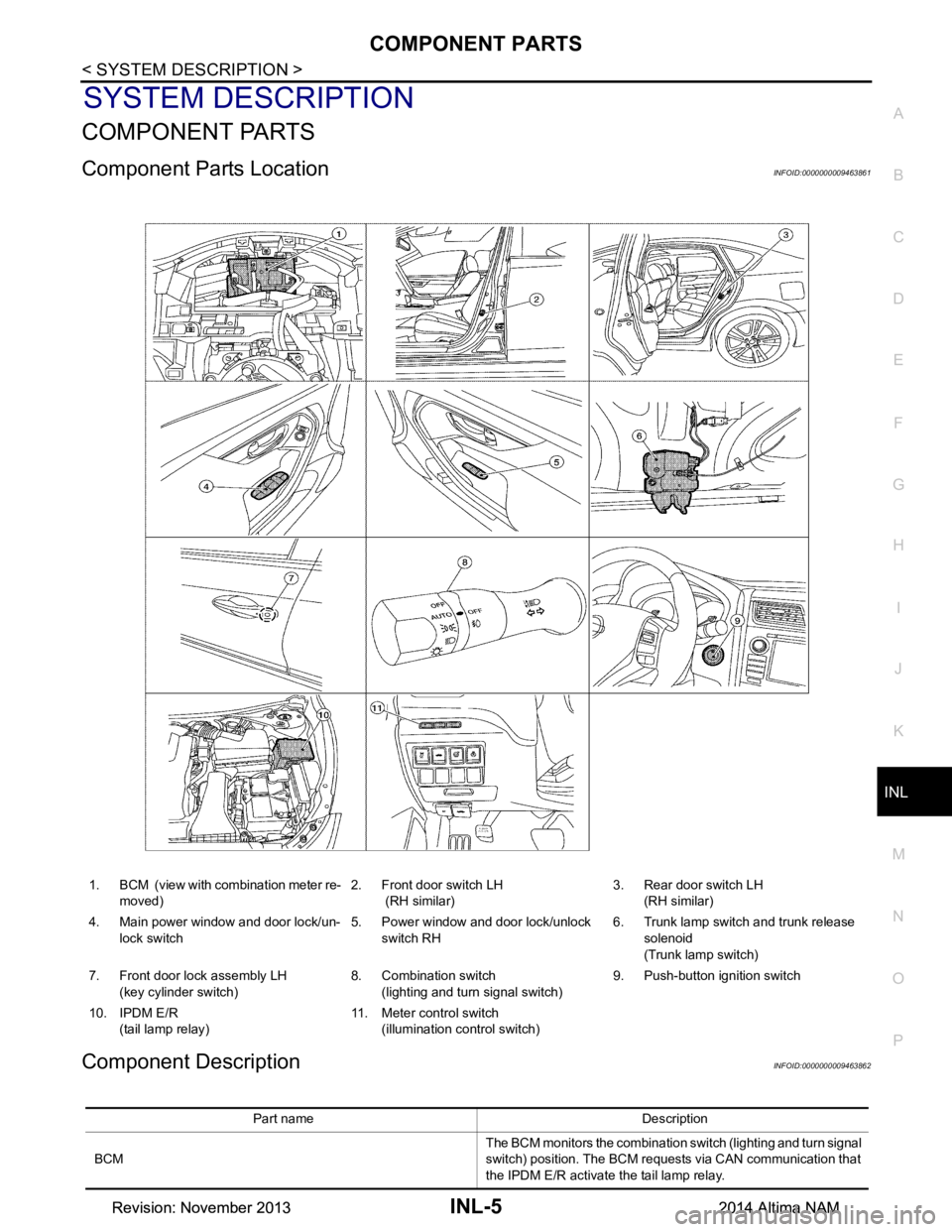
COMPONENT PARTS
Component Parts LocationINFOID:0000000009463861
Component DescriptionINFOID:0000000009463862
1. BCM (view with combination meter re- moved) 2. Front door switch LH
(RH similar) 3. Rear door switch LH
(RH similar)
4. Main power window and door lock/un- lock switch 5. Power window and door lock/unlock
switch RH 6. Trunk lamp switch and trunk release
solenoid
(Trunk lamp switch)
7. Front door lock assembly LH (key cylinder switch) 8. Combination switch
(lighting and turn signal switch) 9. Push-button ignition switch
10. IPDM E/R (tail lamp relay) 11. Meter control switch
(illumination control switch)
Part name Description
BCM The BCM monitors the combination switch (lighting and turn signal
switch) position. The BCM requests via CAN communication that
the IPDM E/R activate the tail lamp relay.
Revision: November 20132014 Altima NAMRevision: November 20132014 Altima NAM
Page 2827 of 4801

INL-6
< SYSTEM DESCRIPTION >
COMPONENT PARTS
IPDM E/RThe IPDM E/R activates the tail lamp relay based on inputs re-
ceived from the BCM via the CAN communication.
Push button ignition switch Provides ignition switch status to the BCM.
Door switches Provides door OPEN/CLOSED status to the BCM.
Combination switch
(lighting and turn signal switch) The combination switch (lighting and turn signal switch) provides
input to the BCM. The BCM then sends a tail lamp relay request
signal to the IPDM E/R via CAN communication to operate the il-
lumination system.
Trunk lamp switch and release solenoid
(trunk lamp switch) Provides trunk lamp switch OP
EN/CLOSED status to the BCM.
Power window and door lock/unlock switch RH Provides door lock/unlock position switch RH status to the BCM.
Main power window and door lock/unlock switch Provides door lock/unlock position switch LH status to the BCM.
Meter control switch
(illumination control switch) • Adjusts the illumination system and combination meter illumina-
tion brightness (with multiple illumination control).
• Only adjusts the combination meter illumination brightness
(with meter illumination control only).
Front door lock assembly LH (key cylinder switch) Provides front door lock assembly LH (key cylinder switch) door
lock/unlock switch position status to the BCM.
Revision: November 20132014 Altima NAMRevision: November 20132014 Altima NAM
Page 2828 of 4801
INTERIOR ROOM LAMP CONTROL SYSTEMINL-7
< SYSTEM DESCRIPTION >
C
D E
F
G H
I
J
K
M A
B
INL
N
O P
INTERIOR ROOM LAMP CONTROL SYSTEM
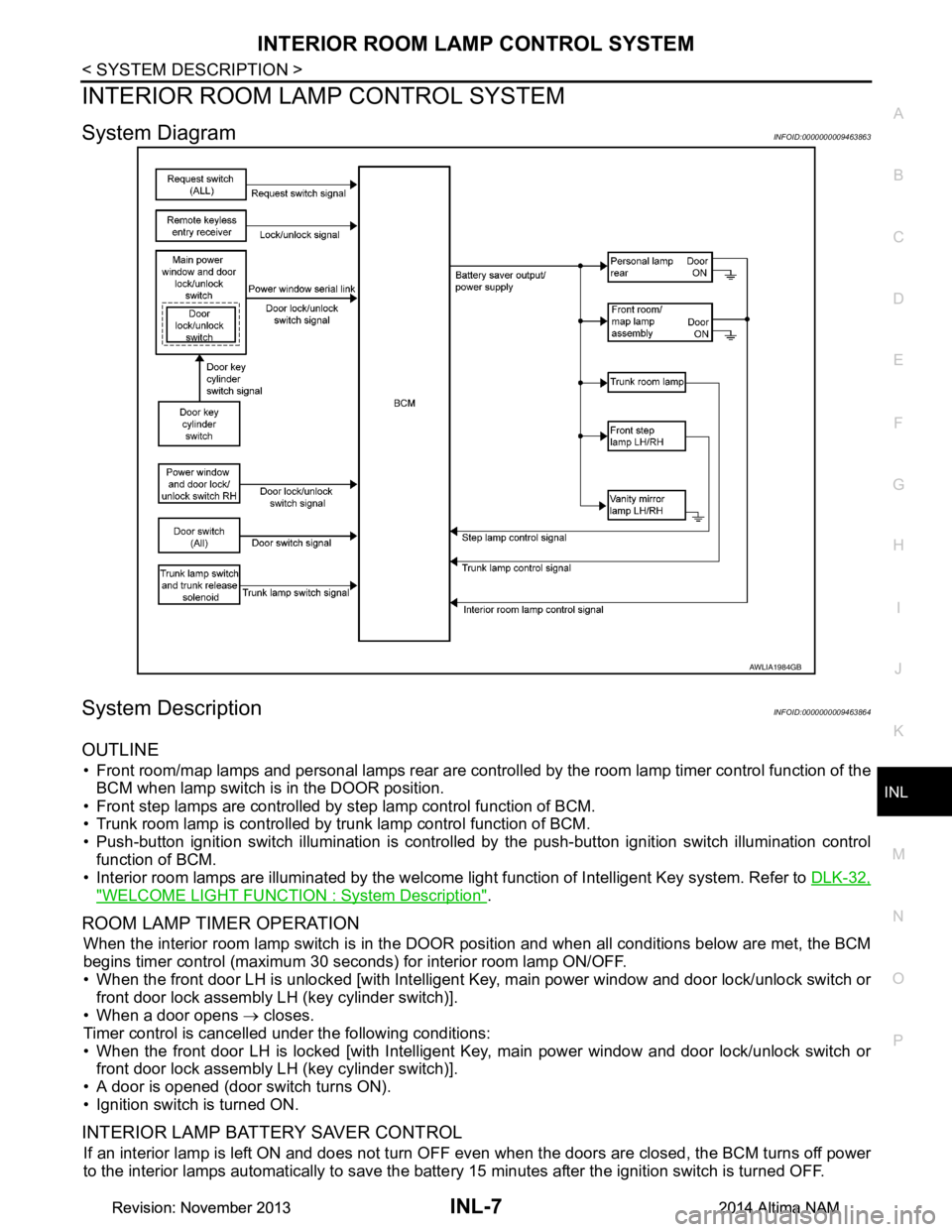
System DiagramINFOID:0000000009463863
System DescriptionINFOID:0000000009463864
OUTLINE
• Front room/map lamps and personal lamps rear are controll ed by the room lamp timer control function of the
BCM when lamp switch is in the DOOR position.
• Front step lamps are controlled by step lamp control function of BCM.
• Trunk room lamp is controlled by trunk lamp control function of BCM.
• Push-button ignition switch illumination is controlled by the push-button ignition switch illumination control
function of BCM.
• Interior room lamps are illuminated by the welcome light function of Intelligent Key system. Refer to DLK-32,
"WELCOME LIGHT FUNCTION : System Description".
ROOM LAMP TIMER OPERATION
When the interior room lamp switch is in the DOOR position and when all conditions below are met, the BCM
begins timer control (maximum 30 seconds ) for interior room lamp ON/OFF.
• When the front door LH is unlocked [with Intelligent Key, main power window and door lock/unlock switch or
front door lock assembly LH (key cylinder switch)].
• When a door opens → closes.
Timer control is cancelled under the following conditions:
• When the front door LH is locked [with Intelligent Key, main power window and door lock/unlock switch or front door lock assembly LH (key cylinder switch)].
• A door is opened (door switch turns ON).
• Ignition switch is turned ON.
INTERIOR LAMP BATTERY SAVER CONTROL
If an interior lamp is left ON and does not turn OF F even when the doors are closed, the BCM turns off power
to the interior lamps automatically to save the batte ry 15 minutes after the ignition switch is turned OFF.
AWLIA1984GB
Revision: November 20132014 Altima NAMRevision: November 20132014 Altima NAM
Page 2829 of 4801

INL-8
< SYSTEM DESCRIPTION >
INTERIOR ROOM LAMP CONTROL SYSTEM
The BCM controls the following interior lamps:
• Front step lamp LH/RH
• Front room/map lamp LH/RH
• Personal lamp rear LH/RH
• Vanity mirror lamp LH/RH (if equipped)
• Trunk room lamp
After the battery saver system turns the la mps OFF, the lamps will illuminate again when:
• A signal is received from an Intelligent Key or main power window and door lock/unlock switch or when the front door lock assembly LH (key cylinder switch) is locked or unlocked.
• A door is opened or closed.
Revision: November 20132014 Altima NAMRevision: November 20132014 Altima NAM
Page 2832 of 4801

DIAGNOSIS SYSTEM (BCM)INL-11
< SYSTEM DESCRIPTION >
C
D E
F
G H
I
J
K
M A
B
INL
N
O P
DIAGNOSIS SYSTEM (BCM)
COMMON ITEM
COMMON ITEM : CONSULT Function (BCM - COMMON ITEM)INFOID:0000000009956797
CAUTION:
After disconnecting the CONSULT vehicle interface (VI) from the data link connector, the ignition must
be cycled OFF → ON (for at least 5 seconds) → OFF. If this step is not performed, the BCM may not go
to ”sleep mode”, potentiall y causing a discharged battery and a no-start condition.
APPLICATION ITEM
CONSULT performs the following functions via CAN communication with BCM.
SYSTEM APPLICATION
BCM can perform the following functions.
Direct Diagnostic Mode Description
Ecu Identification The BCM part number is displayed.
Self Diagnostic Result The BCM self diagnostic results are displayed.
Data Monitor The BCM input/output data is displayed in real time.
Active Test The BCM activates outputs to test components.
Work support The settings for BCM functions can be changed.
Configuration • The vehicle specification can be read and saved.
• The vehicle specification can be written when replacing BCM.
CAN Diag Support Mntr The result of transmit/receive diagnosis of CAN communication is displayed.
System Sub System Direct Diagnostic Mode
Ecu Identification
Self Diagnostic Result
Data Monitor
Active Test
Work support
Configuration
CAN Diag Su pport Mntr
Door lock DOOR LOCK ××××
Rear window defogger REAR DEFOGGER ×××
Warning chime BUZZER ××
Interior room lamp timer INT LAMP ×××
Remote keyless entry system MULTI REMOTE ENT ×××
Exterior lamp HEADLAMP ×××
Wiper and washer WIPER ×××
Turn signal and hazard warning lamps FLASHER ××
Air conditioner AIR CONDITIONER ×
Intelligent Key system INTELLIGENT KEY ××××
Combination switch COMB SW ×
BCM BCM × × ×××
Immobilizer IMMU ×××
Interior room lamp battery saver BATTERY SAVER ××
Trunk open TRUNK ×
Vehicle security system THEFT ALM ×××
Revision: November 20132014 Altima NAMRevision: November 20132014 Altima NAM
Page 2833 of 4801

INL-12
< SYSTEM DESCRIPTION >
DIAGNOSIS SYSTEM (BCM)
INT LAMP
INT LAMP : CONSULT Function (BCM - INT LAMP)INFOID:0000000009956798
CAUTION:
After disconnecting the CONSULT vehicle interface (VI) from the data link connector, the ignition must
be cycled OFF → ON (for at least 5 seconds) → OFF. If this step is not performed, the BCM may not go
to ”sleep mode”, potentially causing a di scharged battery and a no-start condition.
DATA MONITOR
ACTIVE TEST
WORK SUPPORT
NOTE:
The items listed below are the only applicable Work Support it ems for this vehicle. If other items are displayed
on CONSULT, do not use or change t he setting for these other items.
RAP system RETAINED PWR ×
Signal buffer system SIGNAL BUFFER ×
TPMS AIR PRESSURE MONITOR ××××
System Sub System
Direct Diagnostic Mode
Ecu Identification
Self Diagnostic Result
Data Monitor
Active Test
Work support
Configuration
CAN Diag Support Mntr
Monitor Item [Unit] Description
REQ SW -DR [On/Off] Indicates condition of door request switch LH.
REQ SW -AS [On/Off] Indicates condition of door request switch RH.
PUSH -SW [On/Off] Indicates condition of push-button ignition switch.
UNLK SEN -DR [On/Off] Indicates condition of door unlock sensor.
DOOR SW-DR [On/Off] Indicates condition of front door switch LH.
DOOR SW-AS [On/Off] Indicates condition of front door switch RH.
DOOR SW-RR [On/Off] Indicates condition of rear door switch RH.
DOOR SW-RL [On/Off] Indicates condition of rear door switch LH.
DOOR SW-BK [On/Off] Indicates condition of trunk switch.
CDL LOCK SW [On/Off] Indicates condition of lock signal from door lock and unlock switch.
CDL UNLOCK SW [On/Off] Indicates condition of unlock signal from door lock and unlock switch.
KEY CYL LK-SW [On/Off] Indicates condition of lock signal from door key cylinder switch.
KEY CYL UN-SW [On/Off] Indicates condition of unlock signal from door key cylinder switch.
TRNK/HAT MNTR [On/Off] Indicates condition of trunk room lamp switch.
RKE-LOCK [On/Off] Indicates condition of lock signal from Intelligent Key.
RKE-UNLOCK [On/Off] Indicates condition of unlock signal from Intelligent Key.
Te s t I t e m D e s c r i p t i o n
INT LAMP This test is able to check interior room lamp operation [On/Off].
STEP LAMP TEST This test is able to check step lamp operation [On/Off].
Revision: November 20132014 Altima NAMRevision: November 20132014 Altima NAM
Page 2834 of 4801

DIAGNOSIS SYSTEM (BCM)INL-13
< SYSTEM DESCRIPTION >
C
D E
F
G H
I
J
K
M A
B
INL
N
O P
* : Initial setting
BATTERY SAVER
BATTERY SAVER : CONSULT Function (BCM - BATTERY SAVER)INFOID:0000000009956799
CAUTION:
After disconnecting the CONSULT vehicle interface (VI) from the data link connector, the ignition must
be cycled OFF → ON (for at least 5 seconds) → OFF. If this step is not performed, the BCM may not go
to ”sleep mode”, potentiall y causing a discharged battery and a no-start condition.
DATA MONITOR
ACTIVE TEST
INTELLIGENT KEY
INTELLIGENT KEY : CONSULT Func tion (BCM - INTELLIGENT KEY)INFOID:0000000009956802
CAUTION:
After disconnecting the CONSULT vehicle interface (VI) from the data link connector, the ignition must
be cycled OFF → ON (for at least 5 seconds) → OFF. If this step is not performed, the BCM may not go
to ”sleep mode”, potentiall y causing a discharged battery and a no-start condition.
Support Item Setting Description
SCENARIO LIGHTING SETTING On
NOTE:
Do not use this function since interior room lamp control is changed.
Off*
SET I/L D-UNLCK INTCON On Interior room lamp timer function ON.
Off* Interior room lamp timer function OFF.
FOG LAMP OVERRIDE On* Fog lamp override function ON.
Off Fog lamp override function OFF.
Monitor Item [Unit] Description
REQ SW -DR [On/Off] Indicates condition of door request switch LH.
REQ SW -AS [On/Off] Indicates condition of door request switch RH.
PUSH SW [On/Off] Indicates condition push-button ignition switch.
UNLK SEN -DR [On/Off] Indicates condition of door unlock sensor.
DOOR SW-DR [On/Off] Indicates condition of front door switch LH.
DOOR SW-AS [On/Off] Indicates condition of front door switch RH.
DOOR SW-RR [On/Off] Indicates condition of rear door switch RH.
DOOR SW-RL [On/Off] Indicates condition of rear door switch LH.
DOOR SW-BK [On/Off] Indicates condition of trunk switch.
CDL LOCK SW [On/Off] Indicates condition of lock signal from door lock and unlock switch.
CDL UNLOCK SW [On/Off] Indicates condition of unlock signal from door lock and unlock switch.
KEY CYL LK-SW [On/Off] Indicates condition of lo ck signal from door key cylinder switch.
KEY CYL UN-SW [On/Off] Indicates condition of unl ock signal from door key cylinder switch.
TRNK/HAT MNTR [On/Off] Indicates condition of trunk room lamp switch.
RKE-LOCK [On/Off] Indicates condition of lock signal from Intelligent Key.
RKE-UNLOCK [On/Off] Indicates condition of unlock signal from Intelligent Key.
Test item Description
BATTERY SAVER This test is able to check battery saver operation [On/Off].
Revision: November 20132014 Altima NAMRevision: November 20132014 Altima NAM