battery NISSAN TEANA 2014 Service Manual
[x] Cancel search | Manufacturer: NISSAN, Model Year: 2014, Model line: TEANA, Model: NISSAN TEANA 2014Pages: 4801, PDF Size: 51.2 MB
Page 2360 of 4801
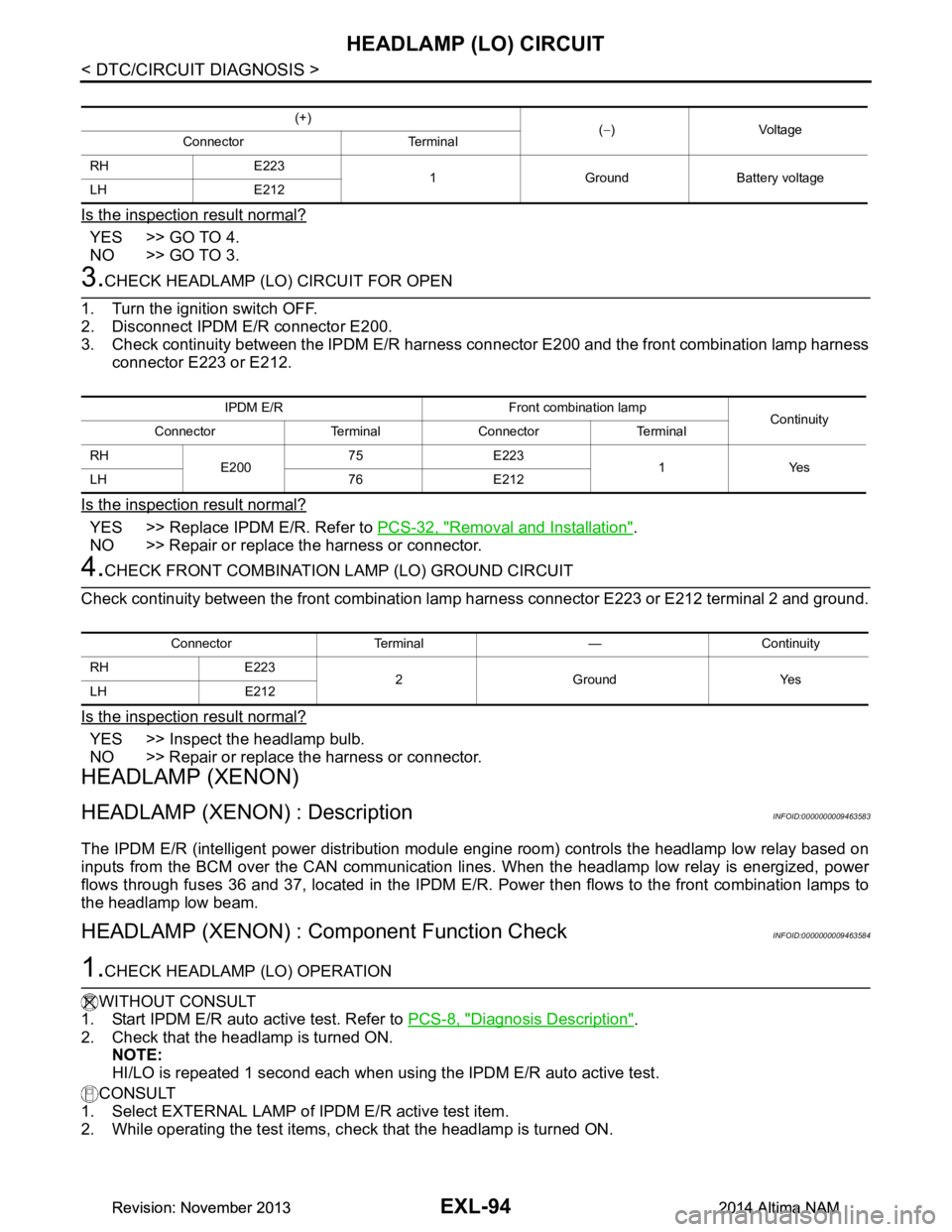
EXL-94
< DTC/CIRCUIT DIAGNOSIS >
HEADLAMP (LO) CIRCUIT
Is the inspection result normal?
YES >> GO TO 4.
NO >> GO TO 3.
3.CHECK HEADLAMP (LO) CIRCUIT FOR OPEN
1. Turn the ignition switch OFF.
2. Disconnect IPDM E/R connector E200.
3. Check continuity between the IPDM E/R harness c onnector E200 and the front combination lamp harness
connector E223 or E212.
Is the inspection result normal?
YES >> Replace IPDM E/R. Refer to PCS-32, "Removal and Installation".
NO >> Repair or replace the harness or connector.
4.CHECK FRONT COMBINATION LAMP (LO) GROUND CIRCUIT
Check continuity between the front combination la mp harness connector E223 or E212 terminal 2 and ground.
Is the inspection result normal?
YES >> Inspect the headlamp bulb.
NO >> Repair or replace the harness or connector.
HEADLAMP (XENON)
HEADLAMP (XENON) : DescriptionINFOID:0000000009463583
The IPDM E/R (intelligent power distribution modul e engine room) controls the headlamp low relay based on
inputs from the BCM over the CAN communication li nes. When the headlamp low relay is energized, power
flows through fuses 36 and 37, located in the IPDM E/R. Power then flows to the front combination lamps to
the headlamp low beam.
HEADLAMP (XENON) : Component Function CheckINFOID:0000000009463584
1.CHECK HEADLAMP (LO) OPERATION
WITHOUT CONSULT
1. Start IPDM E/R auto active test. Refer to PCS-8, "Diagnosis Description"
.
2. Check that the headlamp is turned ON. NOTE:
HI/LO is repeated 1 second each when usi ng the IPDM E/R auto active test.
CONSULT
1. Select EXTERNAL LAMP of IP DM E/R active test item.
2. While operating the test items, c heck that the headlamp is turned ON.
(+)
(− )Voltage
Connector Terminal
RH E223 1 Ground Battery voltage
LH E212
IPDM E/R Front combination lamp Continuity
Connector Terminal Connector Terminal
RH E20075 E223
1Yes
LH 76 E212
Connector Terminal — Continuity
RH E223 2GroundYes
LH E212
Revision: November 20132014 Altima NAMRevision: November 20132014 Altima NAM
Page 2361 of 4801
HEADLAMP (LO) CIRCUITEXL-95
< DTC/CIRCUIT DIAGNOSIS >
C
D E
F
G H
I
J
K
M A
B
EXL
N
O P
Is the inspection result normal?
YES >> Headlamp (LO) is normal.
NO >> Refer to EXL-95, "HEADLAMP (XEN ON) : Diagnosis Procedure"
.
HEADLAMP (XENON) : Diagnosis ProcedureINFOID:0000000009463585
Regarding Wiring Diagram information, refer to EXL-33, "Wiring Diagram - Xenon".
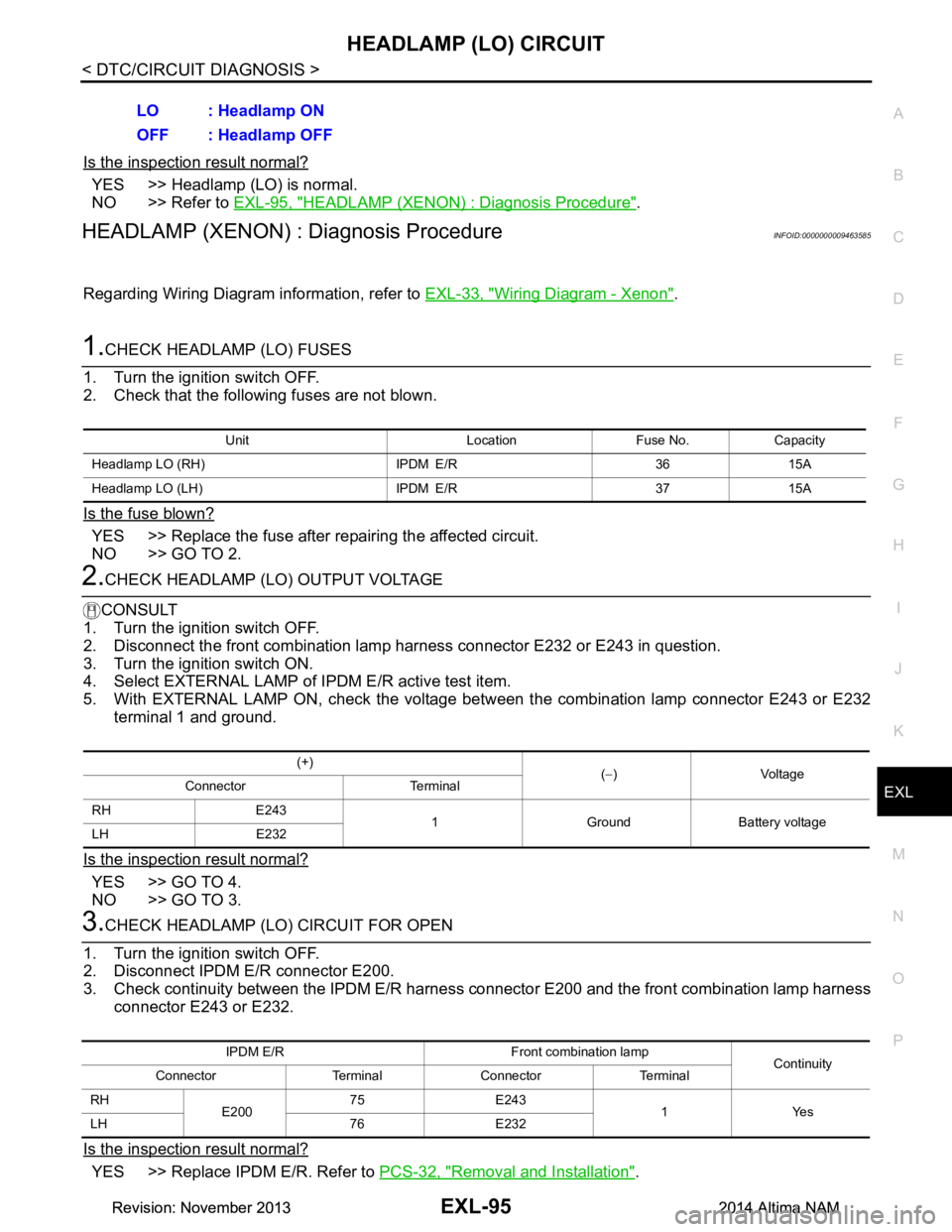
1.CHECK HEADLAMP (LO) FUSES
1. Turn the ignition switch OFF.
2. Check that the following fuses are not blown.
Is the fuse blown?
YES >> Replace the fuse after repairing the affected circuit.
NO >> GO TO 2.
2.CHECK HEADLAMP (LO) OUTPUT VOLTAGE
CONSULT
1. Turn the ignition switch OFF.
2. Disconnect the front combination lamp harness connector E232 or E243 in question.
3. Turn the ignition switch ON.
4. Select EXTERNAL LAMP of IP DM E/R active test item.
5. With EXTERNAL LAMP ON, check the voltage betw een the combination lamp connector E243 or E232
terminal 1 and ground.
Is the inspection result normal?
YES >> GO TO 4.
NO >> GO TO 3.
3.CHECK HEADLAMP (LO) CIRCUIT FOR OPEN
1. Turn the ignition switch OFF.
2. Disconnect IPDM E/R connector E200.
3. Check continuity between the IPDM E/R harness c onnector E200 and the front combination lamp harness
connector E243 or E232.
Is the inspection result normal?
YES >> Replace IPDM E/R. Refer to PCS-32, "Removal and Installation".
LO : Headlamp ON
OFF : Headlamp OFF
Unit Location Fuse No. Capacity
Headlamp LO (RH) IPDM E/R 36 15A
Headlamp LO (L H) IPDM E/R 37 15A
(+)
(− )Voltage
Connector Terminal
RH E243 1 Ground Battery voltage
LH E232
IPDM E/R Front combination lamp Continuity
Connector Terminal Connector Terminal
RH E20075 E243
1Yes
LH 76 E232
Revision: November 20132014 Altima NAMRevision: November 20132014 Altima NAM
Page 2364 of 4801
EXL-98
< DTC/CIRCUIT DIAGNOSIS >
DAYTIME LIGHT RELAY CIRCUIT
DAYTIME LIGHT RELAY CIRCUIT
DescriptionINFOID:0000000009463588
The BCM sends a daytime light request to the IPDM E/R via the CAN communication lines. The power flows
through fuse 43 located in IPDM E/R to the daytime li ght relay coil. When the IPDM E/R operates the daytime
light relay, power is sent to the daytime lamps.
Diagnosis ProcedureINFOID:0000000009463589
Regarding Wiring Diagram information, refer to EXL-39, "Wiring Diagram".
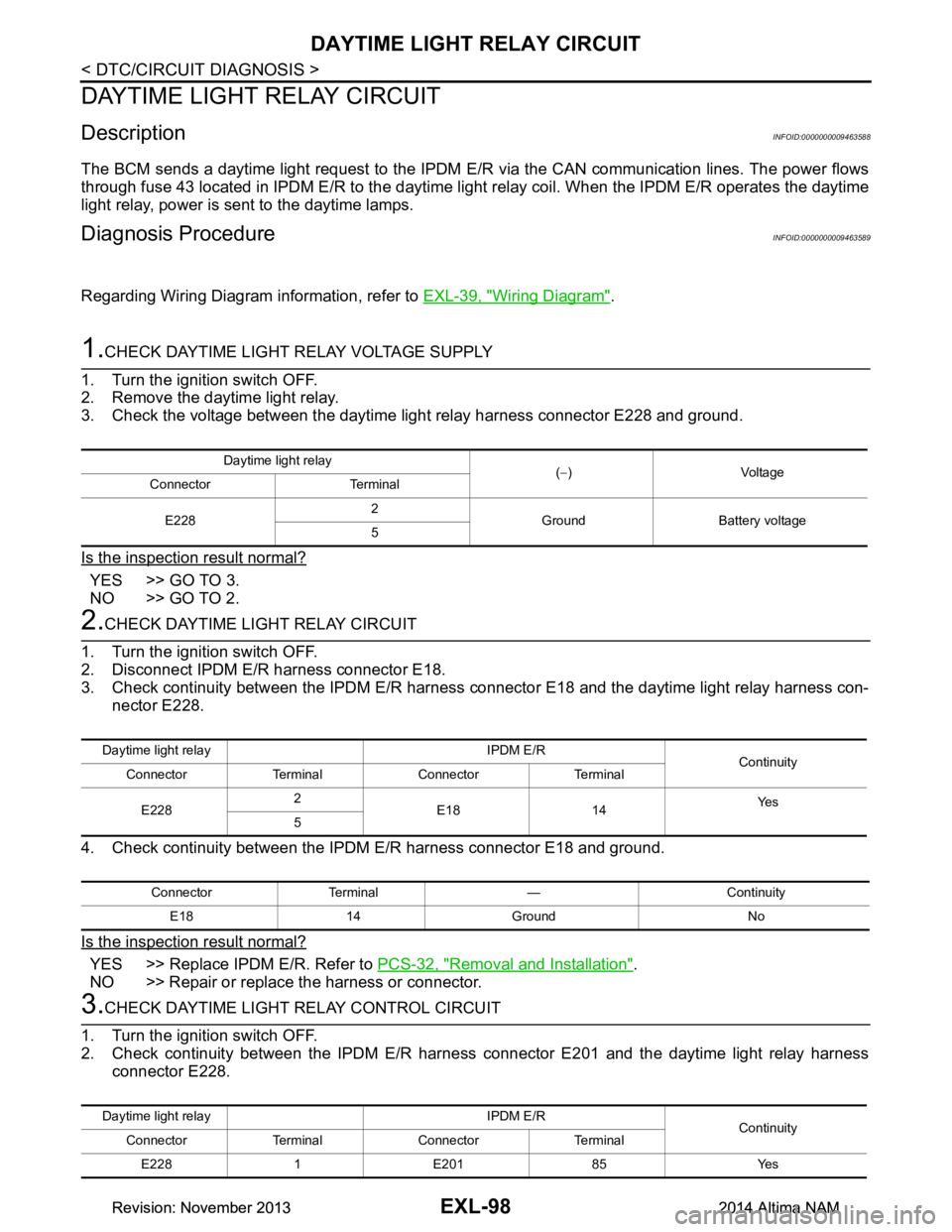
1.CHECK DAYTIME LIGHT RELAY VOLTAGE SUPPLY
1. Turn the ignition switch OFF.
2. Remove the daytime light relay.
3. Check the voltage between the daytime light relay harness connector E228 and ground.
Is the inspection result normal?
YES >> GO TO 3.
NO >> GO TO 2.
2.CHECK DAYTIME LIGHT RELAY CIRCUIT
1. Turn the ignition switch OFF.
2. Disconnect IPDM E/R harness connector E18.
3. Check continuity between the IPDM E/R harness c onnector E18 and the daytime light relay harness con-
nector E228.
4. Check continuity between the IP DM E/R harness connector E18 and ground.
Is the inspection result normal?
YES >> Replace IPDM E/R. Refer to PCS-32, "Removal and Installation".
NO >> Repair or replace the harness or connector.
3.CHECK DAYTIME LIGHT RELAY CONTROL CIRCUIT
1. Turn the ignition switch OFF.
2. Check continuity between the IPDM E/R harness connector E201 and the daytime light relay harness
connector E228.
Daytime light relay (− )Voltage
Connector Terminal
E228 2
Ground Battery voltage
5
Daytime light relay IPDM E/R Continuity
Connector Terminal Connector Terminal
E228 2
E18 14 Ye s
5
Connector Terminal — Continuity
E18 14 Ground No
Daytime light relay IPDM E/R Continuity
Connector Terminal Connector Terminal
E228 1 E201 85 Yes
Revision: November 20132014 Altima NAMRevision: November 20132014 Altima NAM
Page 2367 of 4801
FRONT FOG LAMP CIRCUITEXL-101
< DTC/CIRCUIT DIAGNOSIS >
C
D E
F
G H
I
J
K
M A
B
EXL
N
O P
FRONT FOG LAMP CIRCUIT
DescriptionINFOID:0000000009463591
The IPDM E/R (intelligent power di stribution module engine room) controls the front fog lamp relay based on
inputs from the BCM over the CAN communication lines . When the front fog lamp relay is energized, power
flows from the front fog lamp relay in the IPDM E/R to the front fog lamps.
Component Function CheckINFOID:0000000009463592
1.CHECK FRONT FOG LAMP OPERATION
WITHOUT CONSULT
1. Activate IPDM E/R auto active test. Refer to PCS-9, "CONSULT Function (IPDM E/R)"
.
2. Check that the front fog lamp is turned ON.
WITH CONSULT
1. Select EXTERNAL LAMP of IP DM E/R active test item.
2. While operating the test items, check that the front fog lamp is turned ON.
Is the inspection result normal?
YES >> Front fog lamp circuit is normal.
NO >> Refer to EXL-101, "Diagnosis Procedure"
.
Diagnosis ProcedureINFOID:0000000009463593
Regarding Wiring Diagram information, refer to EXL-54, "Wiring Diagram".
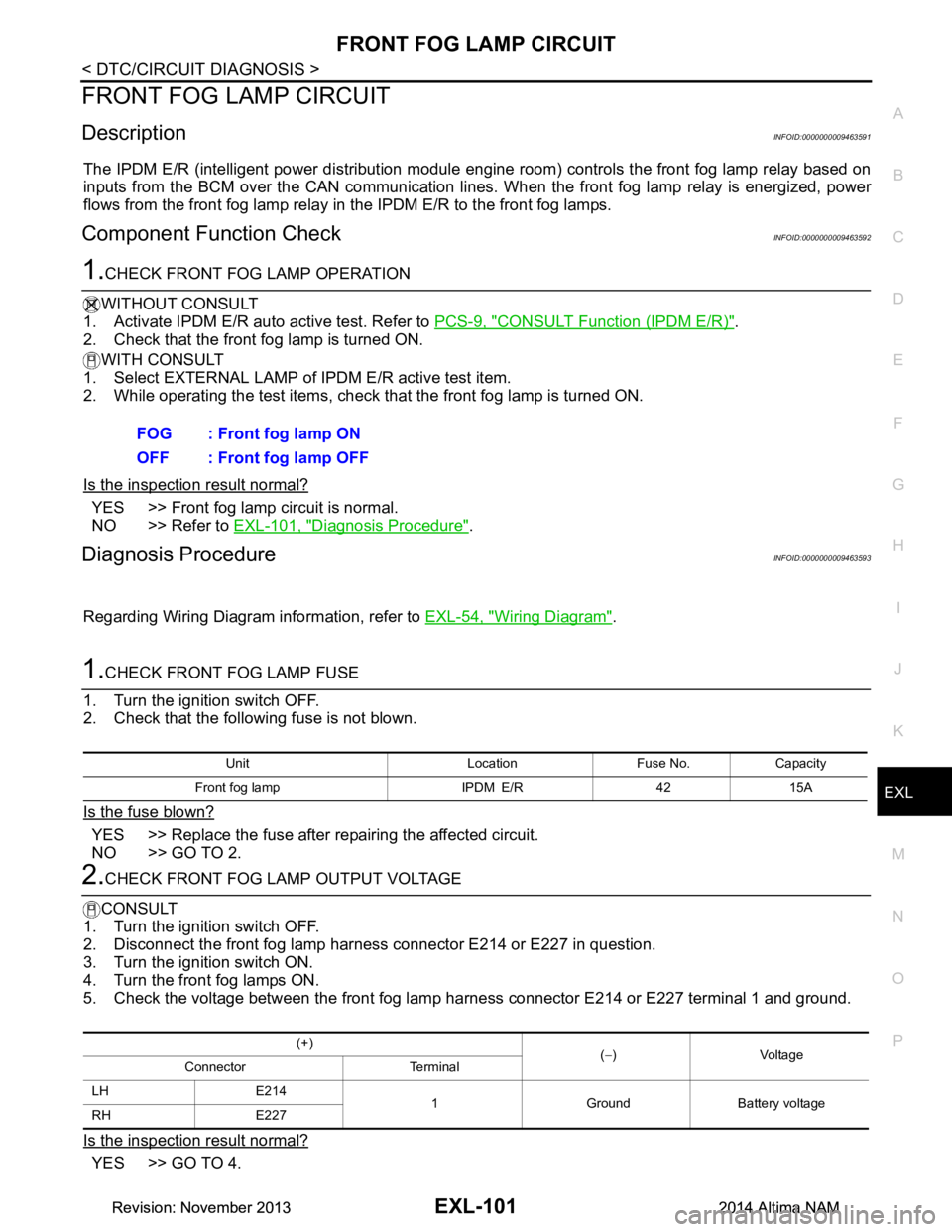
1.CHECK FRONT FOG LAMP FUSE
1. Turn the ignition switch OFF.
2. Check that the following fuse is not blown.
Is the fuse blown?
YES >> Replace the fuse after repairing the affected circuit.
NO >> GO TO 2.
2.CHECK FRONT FOG LAMP OUTPUT VOLTAGE
CONSULT
1. Turn the ignition switch OFF.
2. Disconnect the front fog lamp harness connector E214 or E227 in question.
3. Turn the ignition switch ON.
4. Turn the front fog lamps ON.
5. Check the voltage between the front fog lamp harness connector E214 or E227 terminal 1 and ground.
Is the inspection result normal?
YES >> GO TO 4. FOG : Front fog lamp ON
OFF : Front fog lamp OFF
Unit Location Fuse No. Capacity
Front fog lamp IPDM E/R 42 15A
(+) (− )Voltage
Connector Terminal
LH E214 1 Ground Battery voltage
RH E227
Revision: November 20132014 Altima NAMRevision: November 20132014 Altima NAM
Page 2369 of 4801
PARKING LAMP CIRCUITEXL-103
< DTC/CIRCUIT DIAGNOSIS >
C
D E
F
G H
I
J
K
M A
B
EXL
N
O P
PARKING LAMP CIRCUIT
DescriptionINFOID:0000000009463594
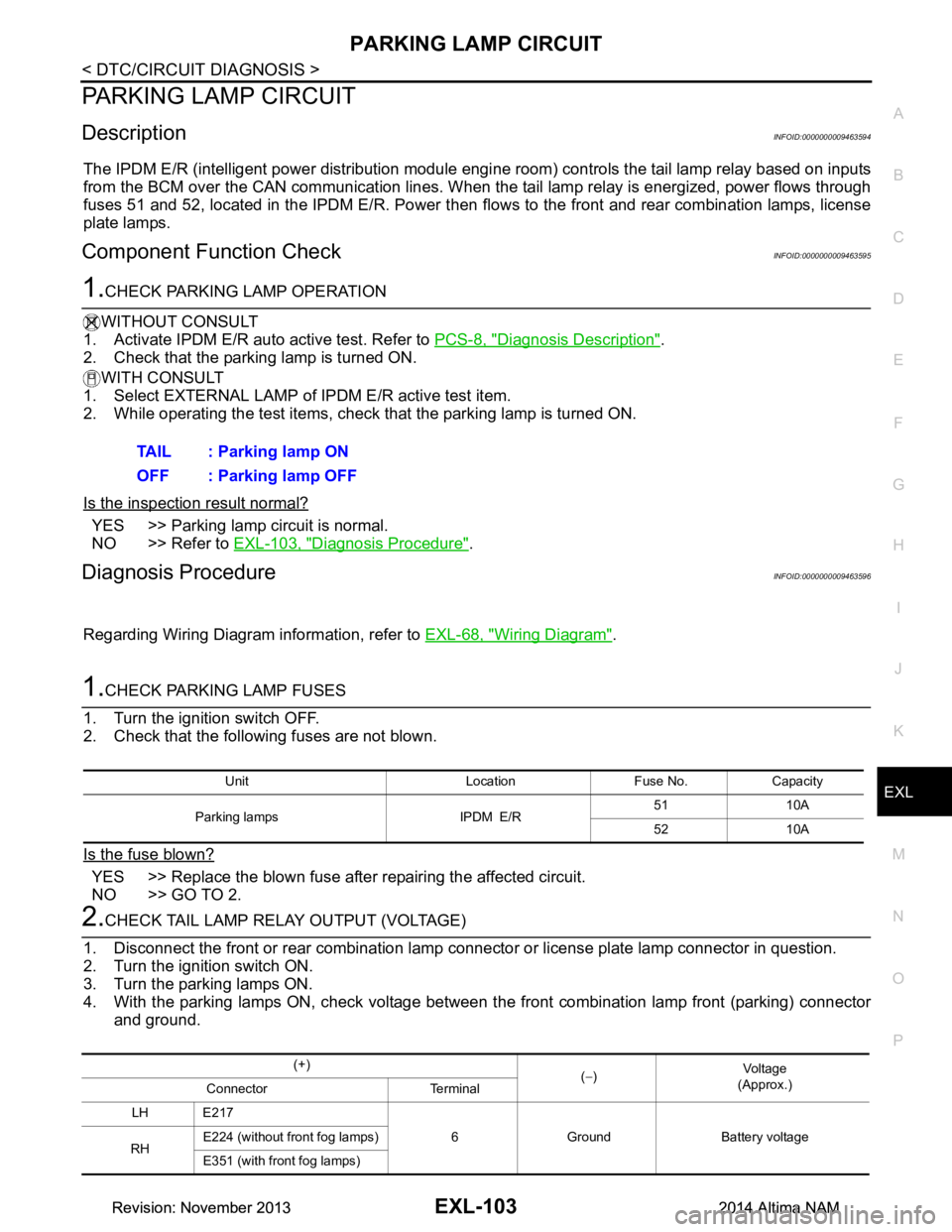
The IPDM E/R (intelligent power distribution module engi ne room) controls the tail lamp relay based on inputs
from the BCM over the CAN communication lines. When t he tail lamp relay is energized, power flows through
fuses 51 and 52, located in the IPDM E/R. Power then fl ows to the front and rear combination lamps, license
plate lamps.
Component Function CheckINFOID:0000000009463595
1.CHECK PARKING LAMP OPERATION
WITHOUT CONSULT
1. Activate IPDM E/R auto active test. Refer to PCS-8, "Diagnosis Description"
.
2. Check that the parking lamp is turned ON.
WITH CONSULT
1. Select EXTERNAL LAMP of IP DM E/R active test item.
2. While operating the test items, check that the parking lamp is turned ON.
Is the inspection result normal?
YES >> Parking lamp circuit is normal.
NO >> Refer to EXL-103, "Diagnosis Procedure"
.
Diagnosis ProcedureINFOID:0000000009463596
Regarding Wiring Diagram information, refer to EXL-68, "Wiring Diagram".
1.CHECK PARKING LAMP FUSES
1. Turn the ignition switch OFF.
2. Check that the following fuses are not blown.
Is the fuse blown?
YES >> Replace the blown fuse after repairing the affected circuit.
NO >> GO TO 2.
2.CHECK TAIL LAMP RELAY OUTPUT (VOLTAGE)
1. Disconnect the front or rear combination lamp connector or license plate lamp connector in question.
2. Turn the ignition switch ON.
3. Turn the parking lamps ON.
4. With the parking lamps ON, check voltage between t he front combination lamp front (parking) connector
and ground. TAIL : Parking lamp ON
OFF : Parking lamp OFF
Unit Location Fuse No. Capacity
Parking lamps IPDM E/R 51 10A
52 10A
(+) (− ) Vo l ta g e
(Approx.)
Connector Terminal
LH E217 6 Ground Battery voltage
RH E224 (without front fog lamps)
E351 (with front fog lamps)
Revision: November 20132014 Altima NAMRevision: November 20132014 Altima NAM
Page 2370 of 4801

EXL-104
< DTC/CIRCUIT DIAGNOSIS >
PARKING LAMP CIRCUIT
5. With the parking lamps ON, check voltage between the front combination lamp (side marker) connector
and ground.
6. With the parking lamps ON, check voltage betw een the rear combination lamp connector and ground.
7. With the parking lamps ON, check voltage between the license plate lamp connector and ground.
Are the inspection results normal?
YES >> GO TO 4.
NO >> GO TO 3.
3.CHECK PARKING LAMP CIRCUIT (OPEN)
1. Turn the ignition switch OFF.
2. Disconnect IPDM E/R connector.
3. Check continuity between the IPDM E/R harness connector and the front combination lamp (parking) har-
ness connector.
4. Check continuity between the IPDM E/R harness connec tor and the front combination lamp (side marker)
harness connector.
5. Check continuity between the IPDM E/R harness c onnector and the rear combination lamp harness con-
nector.
(+) (− ) Vol tag e
(Approx.)
Connector Terminal
LH E235 8 Ground Battery voltage
RH E236
(+) (− ) Vo l ta g e
(Approx.)
Connector Terminal
LH B30 2 Ground Battery voltage
RH B45
(+) (− ) Vo l ta g e
(Approx.)
Connector Terminal
LH B34 1 Ground Battery voltage
RH B32
IPDM E/R Front combination lamp (parking) Continuity
Connector Terminal Connector Terminal
LH E201 90 E217
6Yes
RH E224 (without front fog lamps)
E351 (with front fog lamps)
IPDM E/R Front combination lamp (side marker) Continuity
Connector Terminal Connector Terminal
LH E201 90 E235
8Yes
RH E236
IPDM E/R Rear combination lamp Continuity
Connector Terminal Connector Terminal
Revision: November 20132014 Altima NAMRevision: November 20132014 Altima NAM
Page 2380 of 4801
EXL-114
< SYMPTOM DIAGNOSIS >
EXTERIOR LIGHTING SYSTEM SYMPTOMS
SYMPTOM DIAGNOSIS
EXTERIOR LIGHTING SYSTEM SYMPTOMS
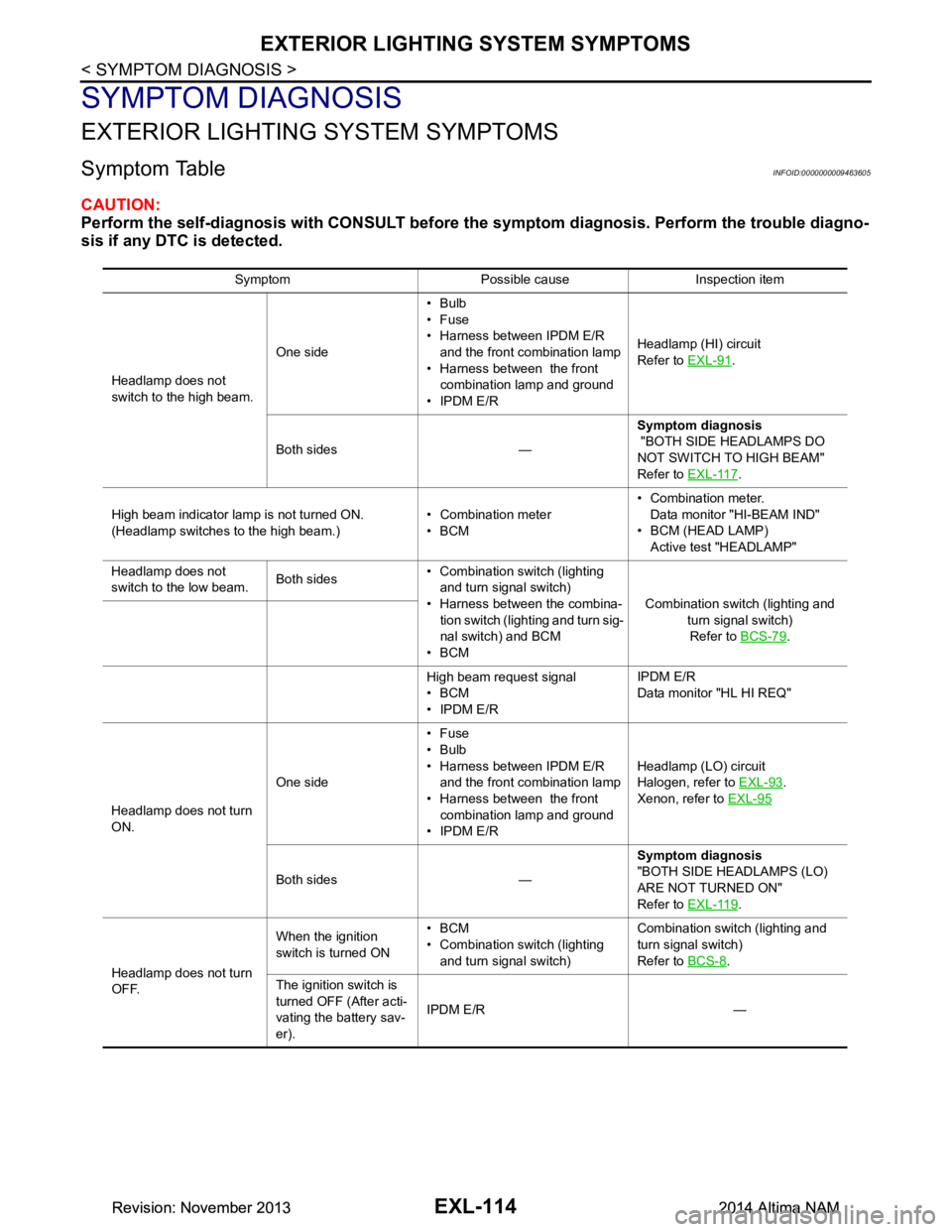
Symptom TableINFOID:0000000009463605
CAUTION:
Perform the self-diagnosis with CONSULT before th e symptom diagnosis. Perform the trouble diagno-
sis if any DTC is detected.
Symptom Possible cause Inspection item
Headlamp does not
switch to the high beam. One side•Bulb
•Fuse
• Harness between IPDM E/R and the front combination lamp
• Harness between the front combination lamp and ground
• IPDM E/R Headlamp (HI) circuit
Refer to EXL-91
.
Both sides — Symptom diagnosis
"BOTH SIDE HEADLAMPS DO
NOT SWITCH TO HIGH BEAM"
Refer to EXL-117
.
High beam indicator lamp is not turned ON.
(Headlamp switches to the high beam.) • Combination meter
•BCM • Combination meter.
Data monitor "HI-BEAM IND"
• BCM (HEAD LAMP) Active test "HEADLAMP"
Headlamp does not
switch to the low beam. Both sides• Combination switch (lighting
and turn signal switch)
• Harness between the combina- tion switch (lighting and turn sig-
nal switch) and BCM
•BCM Combination switch (lighting and
turn signal switch)Refer to BCS-79
.
High beam request signal
•BCM
• IPDM E/R IPDM E/R
Data monitor "HL HI REQ"
Headlamp does not turn
ON. One side•Fuse
•Bulb
• Harness between IPDM E/R and the front combination lamp
• Harness between the front combination lamp and ground
• IPDM E/R Headlamp (L
O) circuit
Halogen, refer to EXL-93
.
Xenon, refer to EXL-95
Both sides — Symptom diagnosis
"BOTH SIDE HEADLAMPS (LO)
ARE NOT TURNED ON"
Refer to EXL-119
.
Headlamp does not turn
OFF. When the ignition
switch is turned ON •BCM
• Combination switch (lighting and turn signal switch) Combination switch (lighting and
turn signal switch)
Refer to BCS-8
.
The ignition switch is
turned OFF (After acti-
vating the battery sav-
er). IPDM E/R —
Revision: November 20132014 Altima NAMRevision: November 20132014 Altima NAM
Page 2392 of 4801
EXL-126
< REMOVAL AND INSTALLATION >
FRONT COMBINATION LAMP
REMOVAL AND INSTALLATION
FRONT COMBINATION LAMP
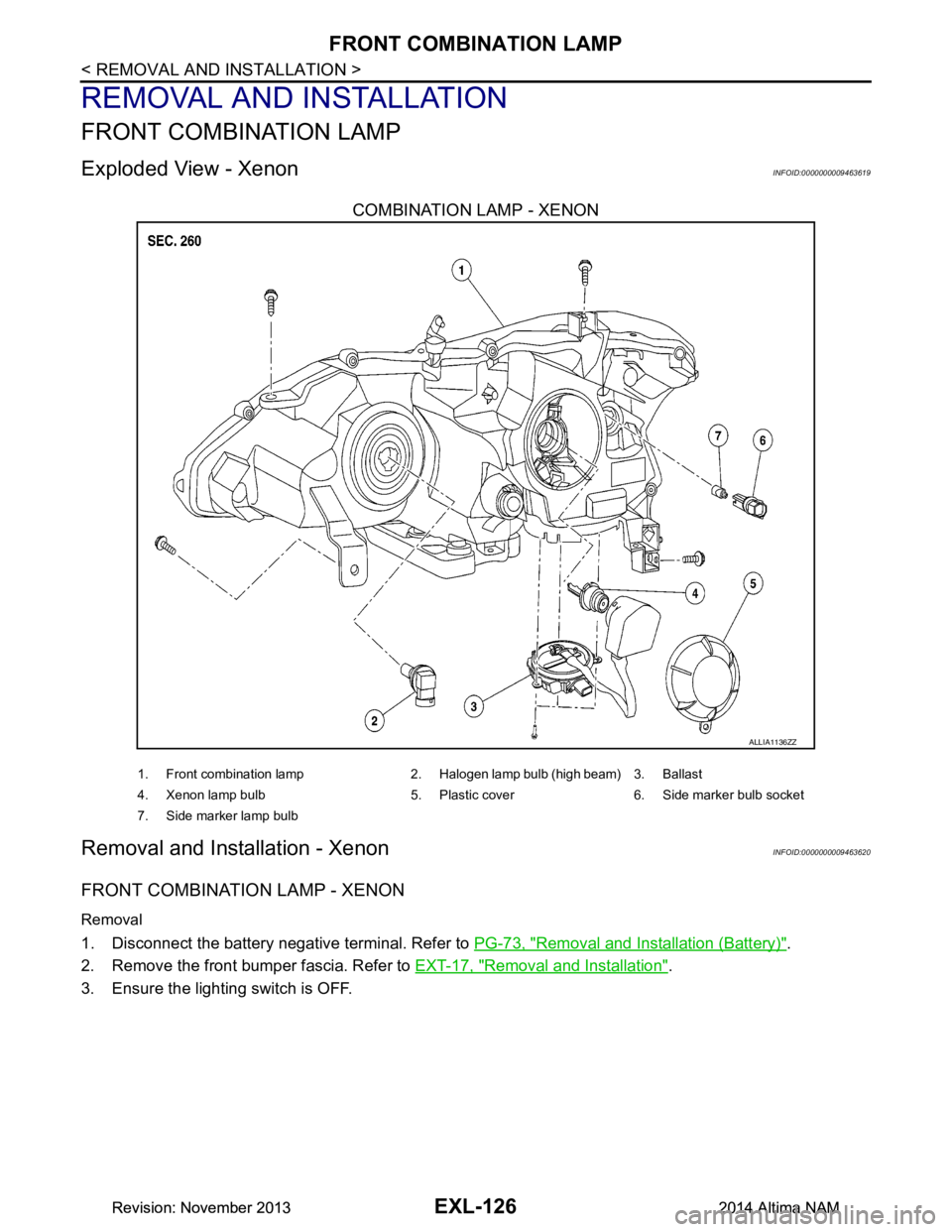
Exploded View - XenonINFOID:0000000009463619
COMBINATION LAMP - XENON
Removal and Installation - XenonINFOID:0000000009463620
FRONT COMBINATION LAMP - XENON
Removal
1. Disconnect the battery negative terminal. Refer to PG-73, "Removal and Installation (Battery)".
2. Remove the front bumper fascia. Refer to EXT-17, "Removal and Installation"
.
3. Ensure the lighting switch is OFF.
ALLIA1136ZZ
1. Front combination lamp 2. Halogen lamp bulb (high beam) 3. Ballast
4. Xenon lamp bulb 5. Plastic cover 6. Side marker bulb socket
7. Side marker lamp bulb
Revision: November 20132014 Altima NAMRevision: November 20132014 Altima NAM
Page 2393 of 4801
FRONT COMBINATION LAMPEXL-127
< REMOVAL AND INSTALLATION >
C
D E
F
G H
I
J
K
M A
B
EXL
N
O P
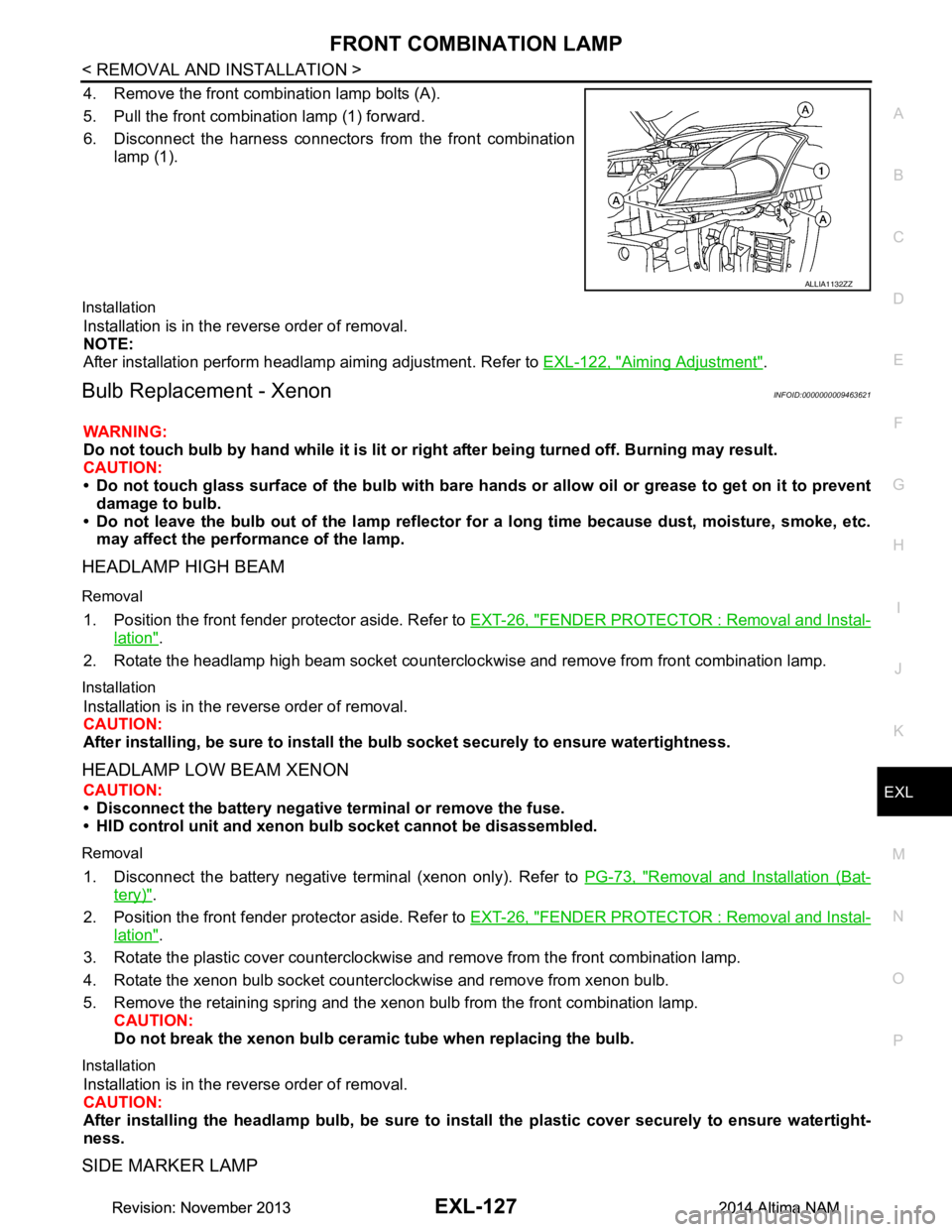
4. Remove the front combination lamp bolts (A).
5. Pull the front combination lamp (1) forward.
6. Disconnect the harness connectors from the front combination
lamp (1).
Installation
Installation is in the reverse order of removal.
NOTE:
After installation perform headlamp aiming adjustment. Refer to EXL-122, "Aiming Adjustment"
.
Bulb Replacement - XenonINFOID:0000000009463621
WARNING:
Do not touch bulb by hand while it is lit or right after being turned off. Burning may result.
CAUTION:
• Do not touch glass surface of the bulb with bare hand s or allow oil or grease to get on it to prevent
damage to bulb.
• Do not leave the bulb out of the lamp reflector fo r a long time because dust, moisture, smoke, etc.
may affect the performance of the lamp.
HEADLAMP HIGH BEAM
Removal
1. Position the front fender pr otector aside. Refer to EXT-26, "FENDER PROTECTOR : Removal and Instal-
lation".
2. Rotate the headlamp high beam socket countercloc kwise and remove from front combination lamp.
Installation
Installation is in the reverse order of removal.
CAUTION:
After installing, be sure to install the bulb socket securely to ensure watertightness.
HEADLAMP LOW BEAM XENON
CAUTION:
• Disconnect the battery negative terminal or remove the fuse.
• HID control unit and xenon bu lb socket cannot be disassembled.
Removal
1. Disconnect the battery negative te rminal (xenon only). Refer to PG-73, "Removal and Installation (Bat-
tery)".
2. Position the front fender pr otector aside. Refer to EXT-26, "FENDER PROTECTOR : Removal and Instal-
lation".
3. Rotate the plastic cover counterclockwise and remove from the front combination lamp.
4. Rotate the xenon bulb socket counterclockwise and remove from xenon bulb.
5. Remove the retaining spring and the xenon bulb from the front combination lamp. CAUTION:
Do not break the xenon bulb ceramic tube when replacing the bulb.
Installation
Installation is in the reverse order of removal.
CAUTION:
After installing the headlamp bulb, be sure to inst all the plastic cover securely to ensure watertight-
ness.
SIDE MARKER LAMP
ALLIA1132ZZ
Revision: November 20132014 Altima NAMRevision: November 20132014 Altima NAM
Page 2405 of 4801
COMBINATION SWITCHEXL-139
< REMOVAL AND INSTALLATION >
C
D E
F
G H
I
J
K
M A
B
EXL
N
O P
COMBINATION SWITCH
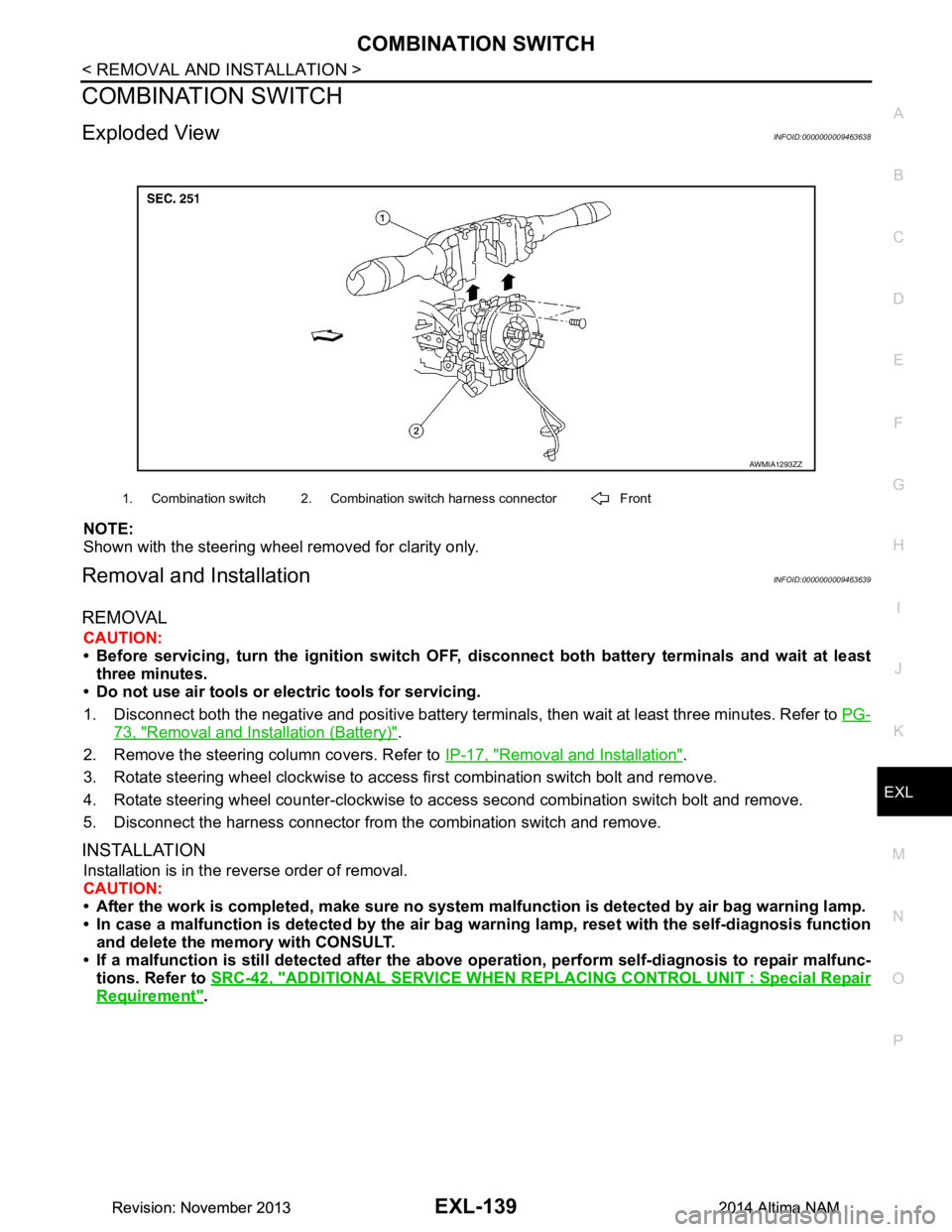
Exploded ViewINFOID:0000000009463638
NOTE:
Shown with the steering wheel removed for clarity only.
Removal and InstallationINFOID:0000000009463639
REMOVAL
CAUTION:
• Before servicing, turn the ignition switch OFF, disconnect both battery terminals and wait at least
three minutes.
• Do not use air tools or electric tools for servicing.
1. Disconnect both the negative and positive battery terminal s, then wait at least three minutes. Refer to PG-
73, "Removal and Installation (Battery)".
2. Remove the steering column covers. Refer to IP-17, "Removal and Installation"
.
3. Rotate steering wheel clockwise to access first combination switch bolt and remove.
4. Rotate steering wheel counter-clockwise to access second combination switch bolt and remove.
5. Disconnect the harness connector from the combination switch and remove.
INSTALLATION
Installation is in the reverse order of removal.
CAUTION:
• After the work is completed, make sure no system malfunction is detected by air bag warning lamp.
• In case a malfunction is detected by the air bag wa rning lamp, reset with the self-diagnosis function
and delete the memory with CONSULT.
• If a malfunction is still detected after the above operation, perform self-diagnosis to repair malfunc-
tions. Refer to SRC-42, "ADDITIONAL SERVICE WHEN RE PLACING CONTROL UNIT : Special Repair
Requirement".
AWMIA1293ZZ
1. Combination switch 2. Combination switch harness connector Front
Revision: November 20132014 Altima NAMRevision: November 20132014 Altima NAM