bulb NISSAN TEANA 2014 Workshop Manual
[x] Cancel search | Manufacturer: NISSAN, Model Year: 2014, Model line: TEANA, Model: NISSAN TEANA 2014Pages: 4801, PDF Size: 51.2 MB
Page 2879 of 4801
INL-58
< DTC/CIRCUIT DIAGNOSIS >
TRUNK ROOM LAMP CIRCUIT
TRUNK ROOM LAMP CIRCUIT
DescriptionINFOID:0000000009463888
Controls the trunk room lamp (ground side) to turn the trunk room lamp ON and OFF.
Component Function CheckINFOID:0000000009463889
CAUTION:
Before performing the diagnosis, check that the following is normal.
• Battery saver output/power supply
• Trunk room lamp bulb
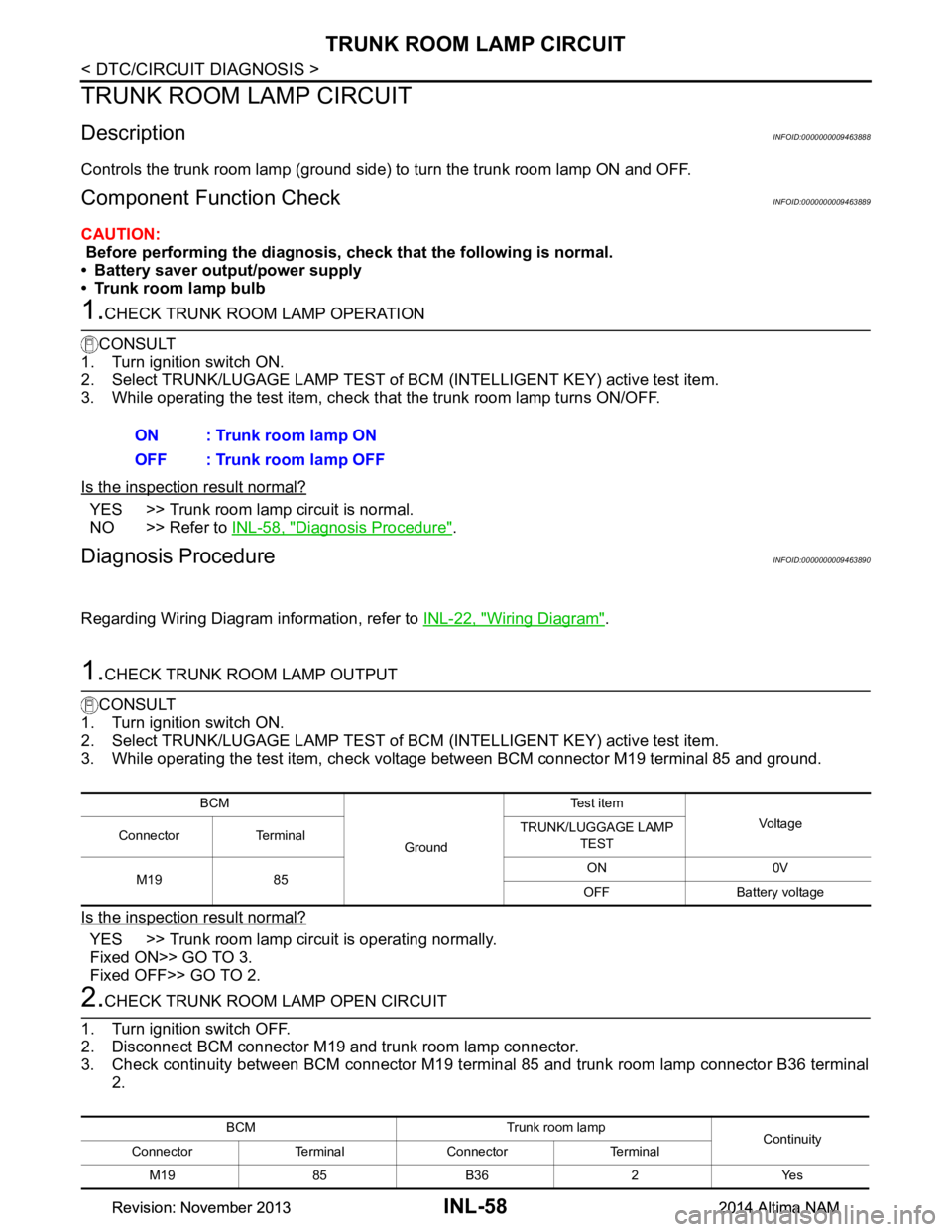
1.CHECK TRUNK ROOM LAMP OPERATION
CONSULT
1. Turn ignition switch ON.
2. Select TRUNK/LUGAGE LAMP TEST of BC M (INTELLIGENT KEY) active test item.
3. While operating the test item, check t hat the trunk room lamp turns ON/OFF.
Is the inspection result normal?
YES >> Trunk room lamp circuit is normal.
NO >> Refer to INL-58, "Diagnosis Procedure"
.
Diagnosis ProcedureINFOID:0000000009463890
Regarding Wiring Diagram information, refer to INL-22, "Wiring Diagram".
1.CHECK TRUNK ROOM LAMP OUTPUT
CONSULT
1. Turn ignition switch ON.
2. Select TRUNK/LUGAGE LAMP TEST of BC M (INTELLIGENT KEY) active test item.
3. While operating the test item, check voltage between BCM connector M19 terminal 85 and ground.
Is the inspection result normal?
YES >> Trunk room lamp circuit is operating normally.
Fixed ON>> GO TO 3.
Fixed OFF>> GO TO 2.
2.CHECK TRUNK ROOM LAMP OPEN CIRCUIT
1. Turn ignition switch OFF.
2. Disconnect BCM connector M19 and trunk room lamp connector.
3. Check continuity between BCM connector M19 terminal 85 and trunk room lamp connector B36 terminal 2.ON : Trunk room lamp ON
OFF : Trunk room lamp OFF
BCM
GroundTe s t i t e m
Vol tag e
Connector Terminal TRUNK/LUGGAGE LAMP
TEST
M19 85 ON 0V
OFF Battery voltage
BCM Trunk room lamp Continuity
Connector Terminal Connector Terminal
M19 85 B36 2 Yes
Revision: November 20132014 Altima NAMRevision: November 20132014 Altima NAM
Page 2883 of 4801
INL-62
< SYMPTOM DIAGNOSIS >
INTERIOR LIGHTING SYSTEM SYMPTOMS
SYMPTOM DIAGNOSIS
INTERIOR LIGHTING SYSTEM SYMPTOMS
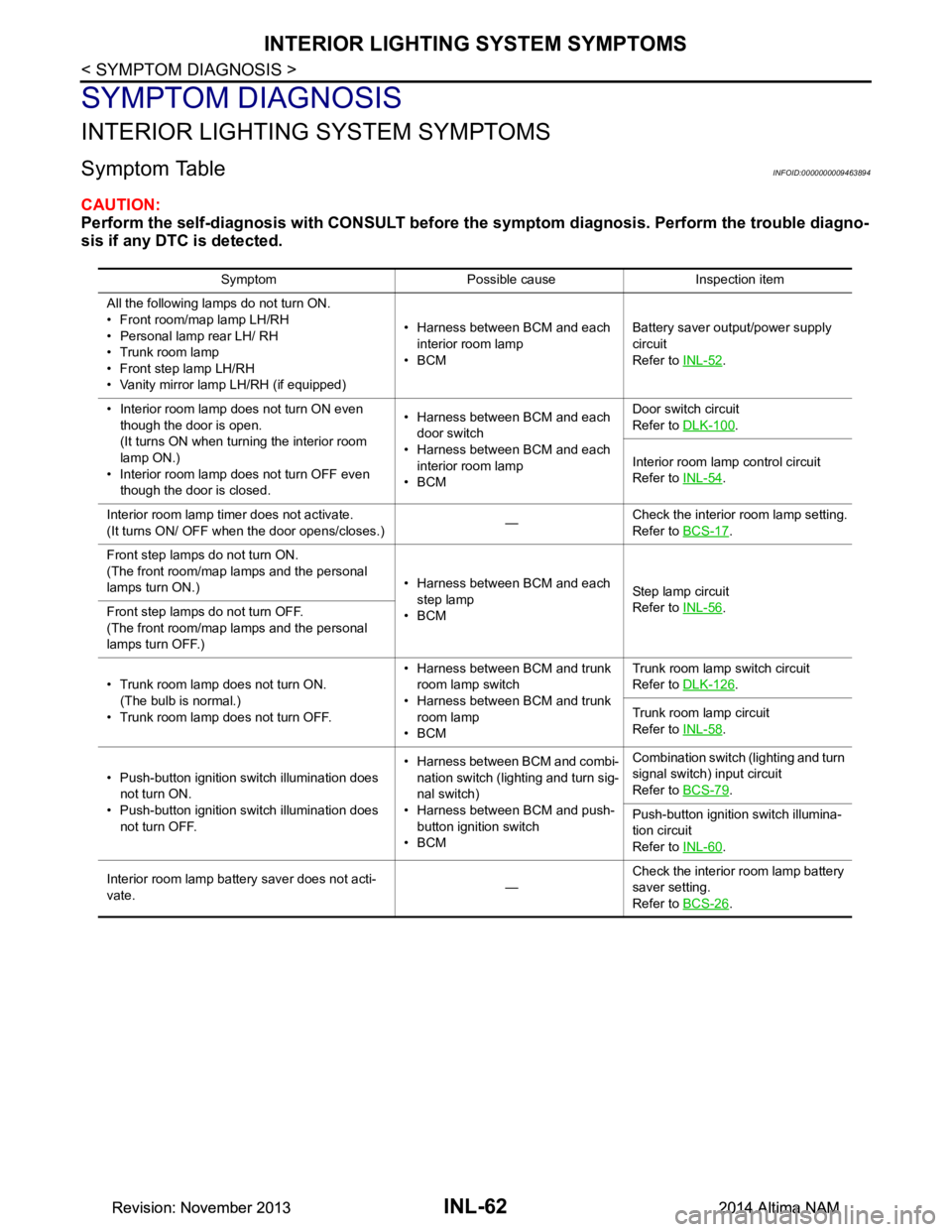
Symptom TableINFOID:0000000009463894
CAUTION:
Perform the self-diagnosis with CONSULT before th e symptom diagnosis. Perform the trouble diagno-
sis if any DTC is detected.
Symptom Possible cause Inspection item
All the following lamps do not turn ON.
• Front room/map lamp LH/RH
• Personal lamp rear LH/ RH
• Trunk room lamp
• Front step lamp LH/RH
• Vanity mirror lamp LH/RH (if equipped) • Harness between BCM and each
interior room lamp
•BCM Battery saver output/power supply
circuit
Refer to INL-52
.
• Interior room lamp does not turn ON even though the door is open.
(It turns ON when turn ing the interior room
lamp ON.)
• Interior room lamp does not turn OFF even though the door is closed. • Harness between BCM and each
door switch
• Harness between BCM and each interior room lamp
•BCM Door switch circuit
Refer to DLK-100
.
Interior room lamp control circuit
Refer to INL-54
.
Interior room lamp timer does not activate.
(It turns ON/ OFF when the door opens/closes.) —Check the interior room lamp setting.
Refer to BCS-17
.
Front step lamps do not turn ON.
(The front room/map lamps and the personal
lamps turn ON.) • Harness between BCM and each
step lamp
•BCM St ep la mp ci rcu it
Refer to INL-56
.
Front step lamps do not turn OFF.
(The front room/map lamps and the personal
lamps turn OFF.)
• Trunk room lamp does not turn ON. (The bulb is normal.)
• Trunk room lamp does not turn OFF. • Harness between BCM and trunk
room lamp switch
• Harness between BCM and trunk room lamp
•BCM Trunk room lamp switch circuit
Refer to DLK-126
.
Trunk room lamp circuit
Refer to INL-58
.
• Push-button ignition switch illumination does not turn ON.
• Push-button ignition switch illumination does not turn OFF. • Harness between BCM and combi-
nation switch (lighting and turn sig-
nal switch)
• Harness between BCM and push- button ignition switch
•BCM Combination switch (lighting and turn
signal switch) input circuit
Refer to BCS-79
.
Push-button ignition switch illumina-
tion circuit
Refer to INL-60
.
Interior room lamp battery saver does not acti-
vate. —Check the interior room lamp battery
saver setting.
Refer to BCS-26
.
Revision: November 20132014 Altima NAMRevision: November 20132014 Altima NAM
Page 2884 of 4801
FRONT ROOM/MAP LAMPINL-63
< REMOVAL AND INSTALLATION >
C
D E
F
G H
I
J
K
M A
B
INL
N
O P
REMOVAL AND INSTALLATION
FRONT ROOM/MAP LAMP
Removal and InstallationINFOID:0000000009463895
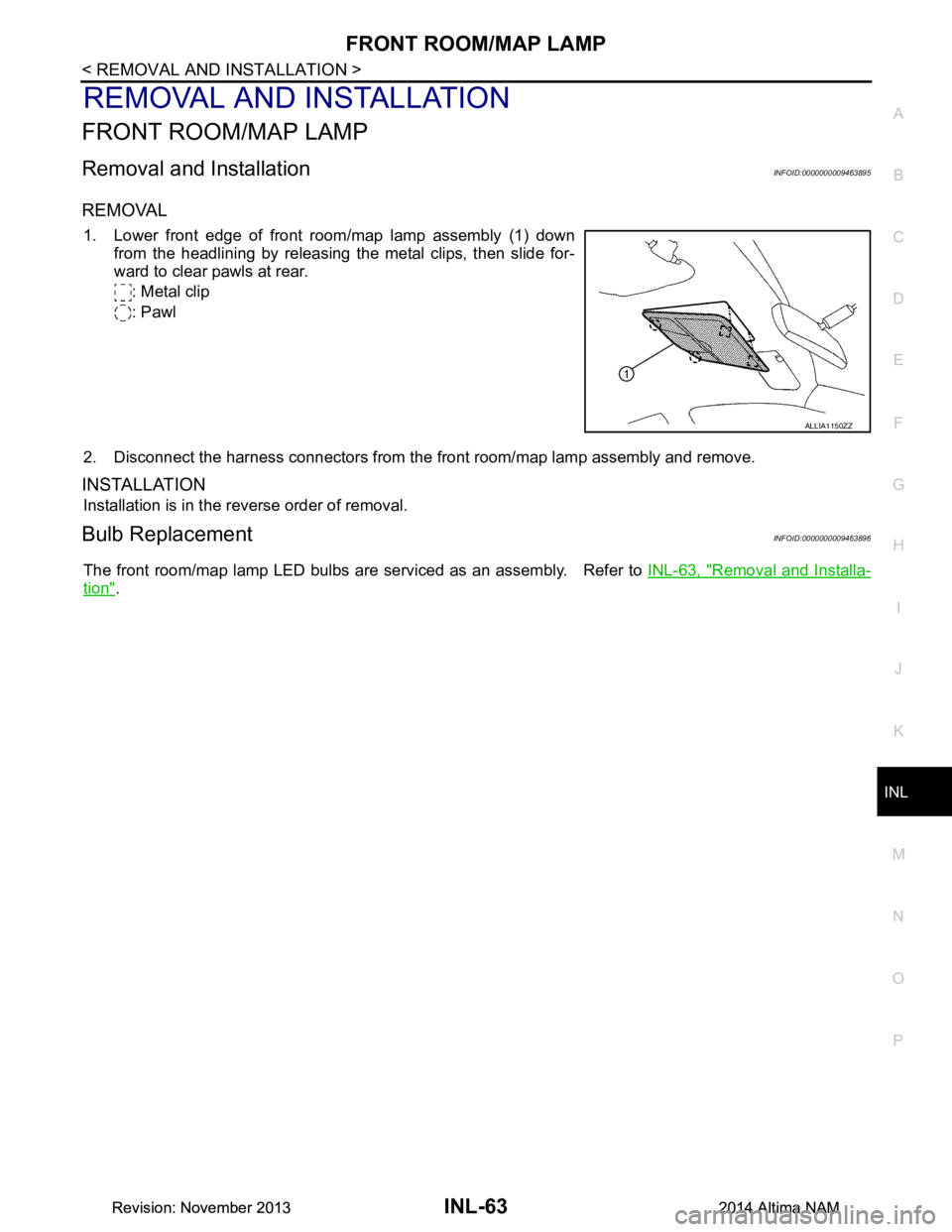
REMOVAL
1. Lower front edge of front room/map lamp assembly (1) down from the headlining by releasing the metal clips, then slide for-
ward to clear pawls at rear.
: Metal clip
: Pawl
2. Disconnect the harness connectors from the front room/map lamp assembly and remove.
INSTALLATION
Installation is in the reverse order of removal.
Bulb ReplacementINFOID:0000000009463896
The front room/map lamp LED bulbs are serviced as an assembly. Refer to INL-63, "Removal and Installa-
tion".
ALLIA1150ZZ
Revision: November 20132014 Altima NAMRevision: November 20132014 Altima NAM
Page 2885 of 4801
INL-64
< REMOVAL AND INSTALLATION >
VANITY MIRROR LAMP
VANITY MIRROR LAMP
Removal and InstallationINFOID:0000000009463897
CAUTION:
Do not attempt to separate the vanity mirror lamp from the sun visor or damage to the components
may occur.
The vanity mirror lamp is replaced as part of the sun visor. Refer to INT-30, "Removal and Installation"
.
Bulb or Lens ReplacementINFOID:0000000009463898
WARNING:
Do not touch bulb while it is lit or right after being turned OFF. Burning may result.
CAUTION:
• Do not attempt to separate the vanity mirror lamp from the sun visor or damage to the components
may occur.
• Do not touch glass surface of the bulb with bare hands or allow oil or grease to get on it to prevent
damage to bulb.
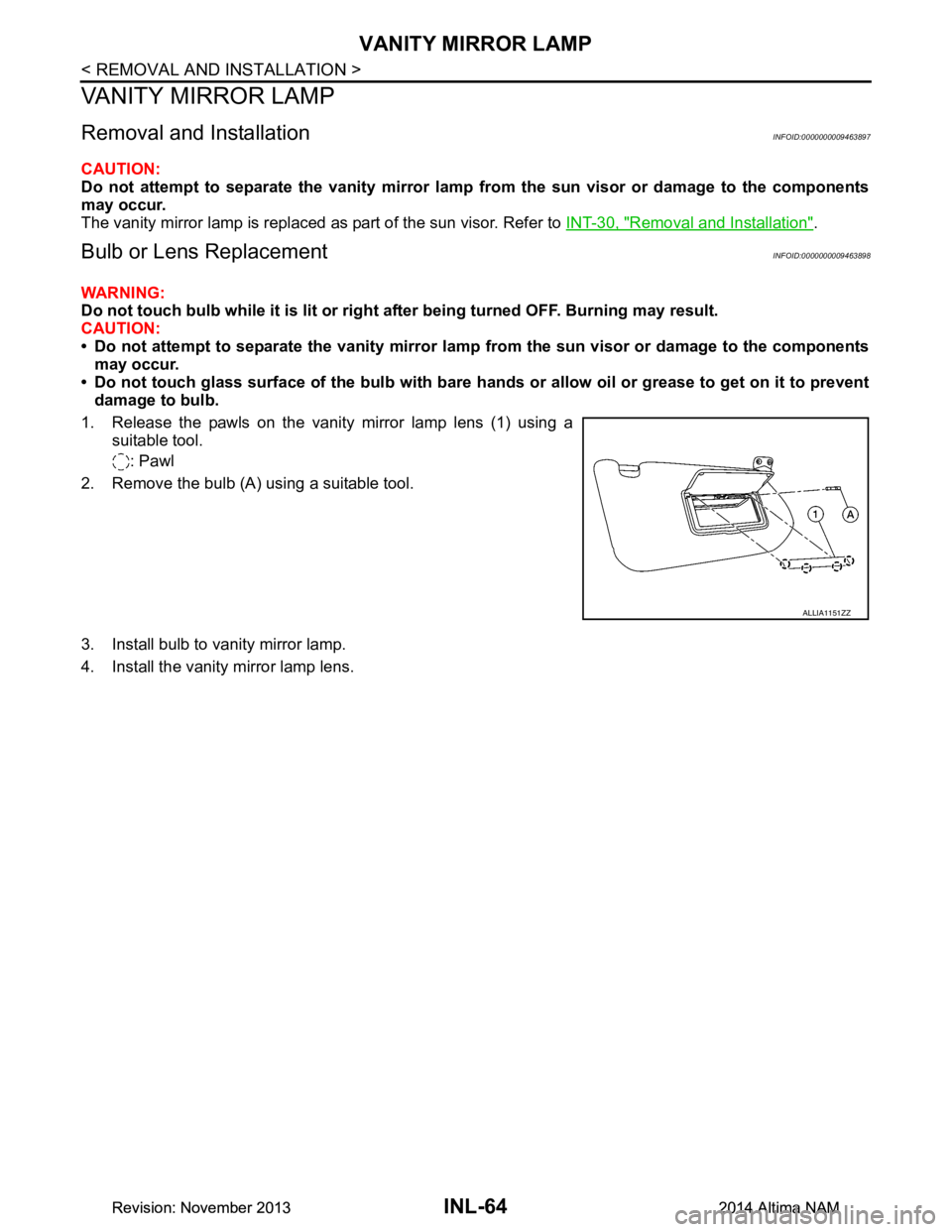
1. Release the pawls on the vanity mirror lamp lens (1) using a suitable tool.
: Pawl
2. Remove the bulb (A) using a suitable tool.
3. Install bulb to vanity mirror lamp.
4. Install the vanity mirror lamp lens.
ALLIA1151ZZ
Revision: November 20132014 Altima NAMRevision: November 20132014 Altima NAM
Page 2886 of 4801
GLOVE BOX LAMPINL-65
< REMOVAL AND INSTALLATION >
C
D E
F
G H
I
J
K
M A
B
INL
N
O P
GLOVE BOX LAMP
Removal and InstallationINFOID:0000000009463899
WARNING:
Do not touch bulb while it is lit or right after being turned OFF. Burning may result.
CAUTION:
Do not touch glass surface of the bulb with bare hands or allow oil or grease to get on it to prevent
damage to bulb.
REMOVAL
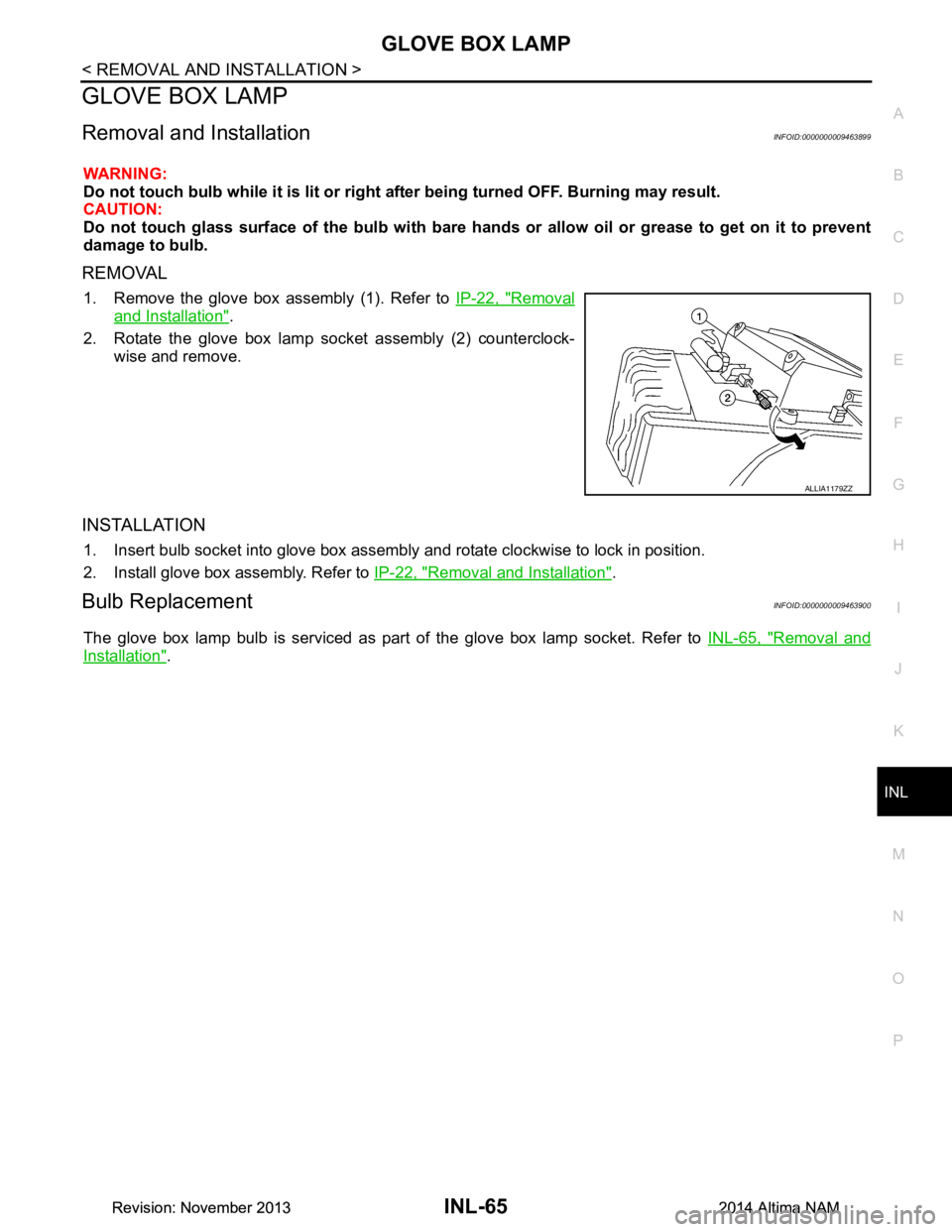
1. Remove the glove box assembly (1). Refer to IP-22, "Removal
and Installation".
2. Rotate the glove box lamp socket assembly (2) counterclock- wise and remove.
INSTALLATION
1. Insert bulb socket into glove box assembly and rotate clockwise to lock in position.
2. Install glove box assembly. Refer to IP-22, "Removal and Installation"
.
Bulb ReplacementINFOID:0000000009463900
The glove box lamp bulb is serviced as part of the glove box lamp socket. Refer to INL-65, "Removal and
Installation".
ALLIA1179ZZ
Revision: November 20132014 Altima NAMRevision: November 20132014 Altima NAM
Page 2887 of 4801
INL-66
< REMOVAL AND INSTALLATION >
STEP LAMP
STEP LAMP
Bulb or Lens ReplacementINFOID:0000000009463901
WARNING:
Do not touch bulb while it is lit or right after being turned OFF. Burning may result.
CAUTION:
Do not touch glass surface of the bulb with bare ha nds or allow oil or grease to get on it to prevent
damage to bulb.
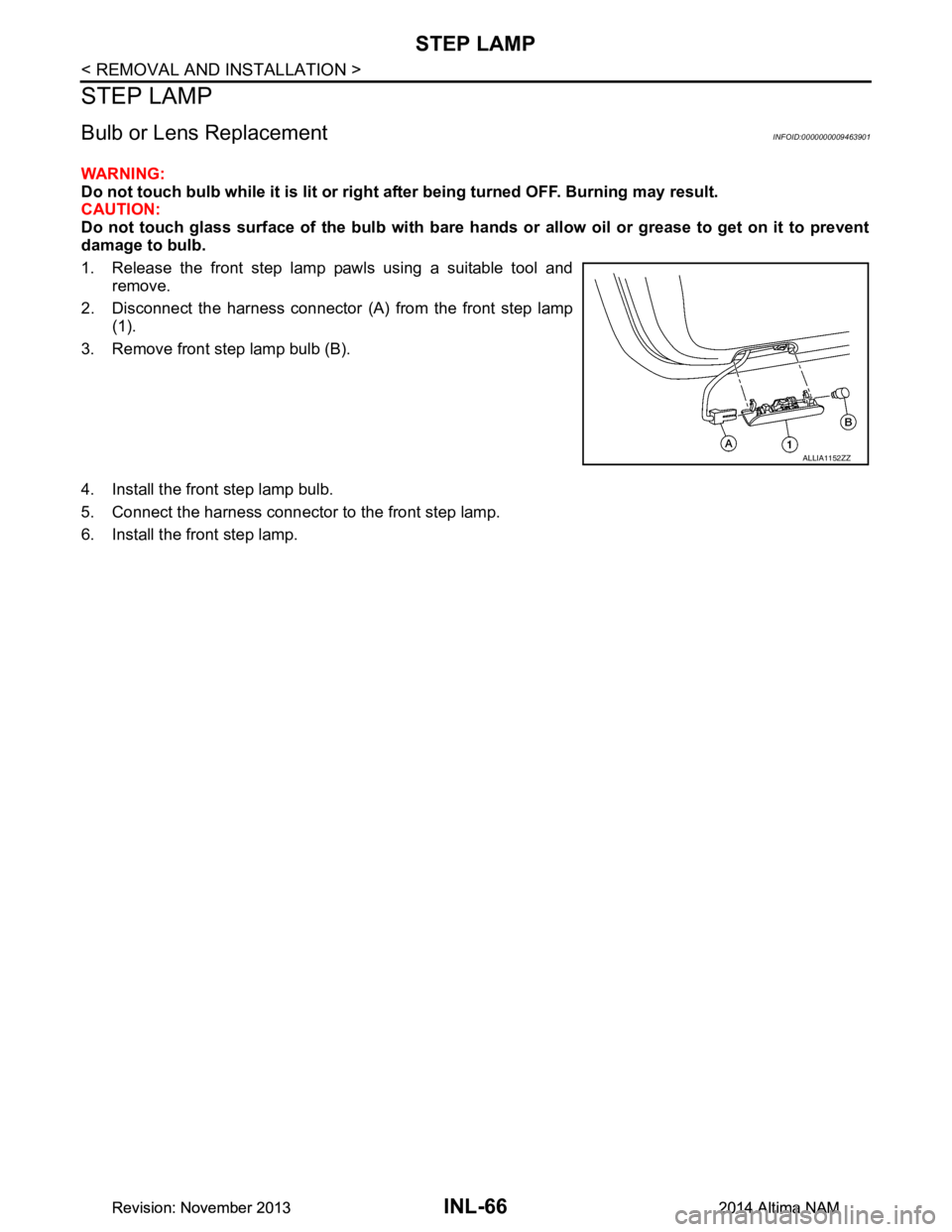
1. Release the front step lamp pawls using a suitable tool and remove.
2. Disconnect the harness connector (A) from the front step lamp (1).
3. Remove front step lamp bulb (B).
4. Install the front step lamp bulb.
5. Connect the harness connector to the front step lamp.
6. Install the front step lamp.
ALLIA1152ZZ
Revision: November 20132014 Altima NAMRevision: November 20132014 Altima NAM
Page 2888 of 4801
PERSONAL LAMPINL-67
< REMOVAL AND INSTALLATION >
C
D E
F
G H
I
J
K
M A
B
INL
N
O P
PERSONAL LAMP
Removal and InstallationINFOID:0000000009463902
CAUTION:
Do not attempt to separate the personal lamp rear from the headlining or damage to the components
may occur.
The personal lamp rear is replaced as part of the headlining. Refer to INT-30, "Removal and Installation"
.
Bulb or Lens ReplacementINFOID:0000000009463903
WARNING:
Do not touch bulb while it is lit or right after being turned OFF. Burning may result.
CAUTION:
Do not touch glass surface of the bulb with bare hands or allow oil or grease to get on it to prevent
damage to bulb.
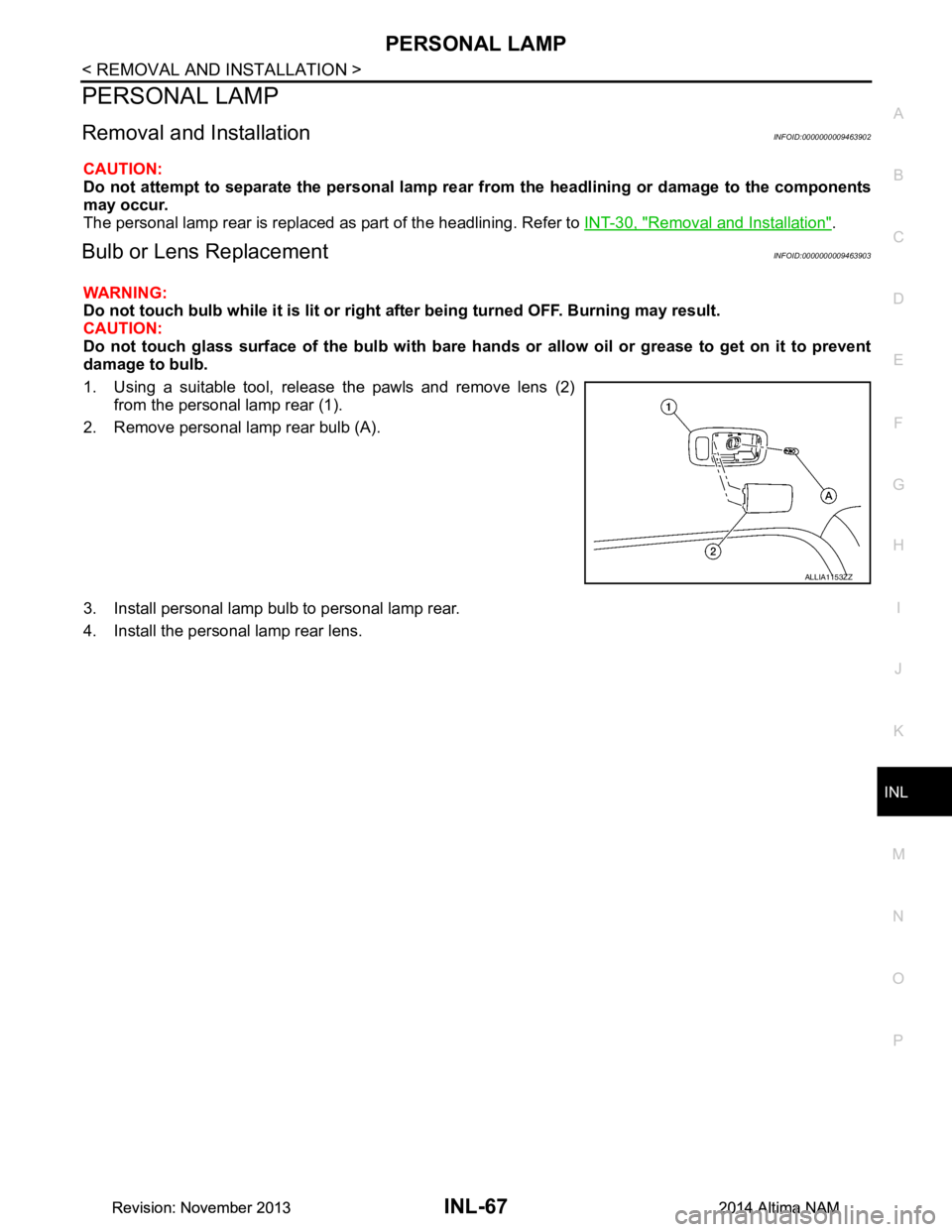
1. Using a suitable tool, release the pawls and remove lens (2) from the personal lamp rear (1).
2. Remove personal lamp rear bulb (A).
3. Install personal lamp bulb to personal lamp rear.
4. Install the personal lamp rear lens.
ALLIA1153ZZ
Revision: November 20132014 Altima NAMRevision: November 20132014 Altima NAM
Page 2889 of 4801
INL-68
< REMOVAL AND INSTALLATION >
TRUNK ROOM LAMP
TRUNK ROOM LAMP
Removal and InstallationINFOID:0000000009463904
WARNING:
Do not touch bulb while it is lit or right after being turned OFF. Burning may result.
CAUTION:
Do not touch glass surface of the bulb with bare ha nds or allow oil or grease to get on it to prevent
damage to bulb.
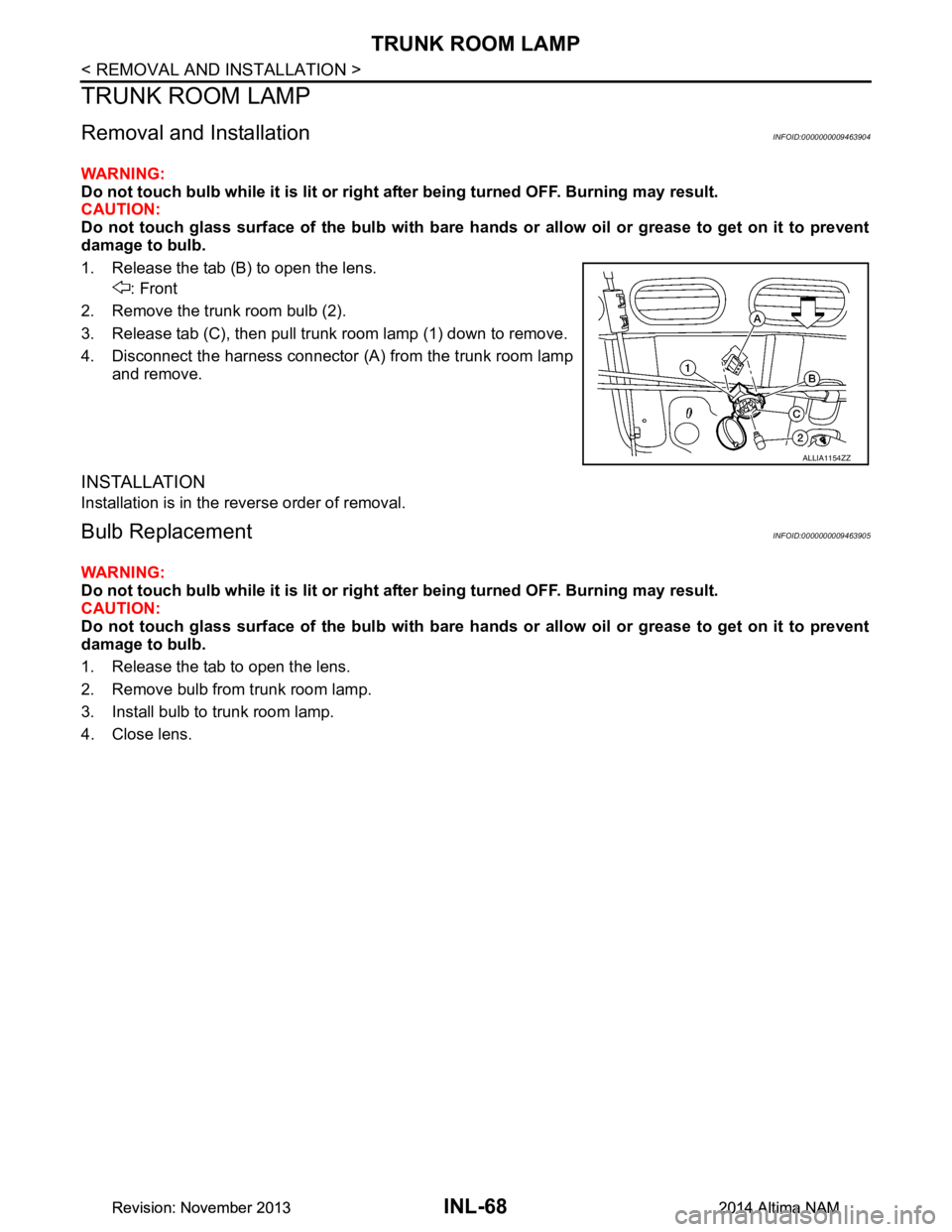
1. Release the tab (B) to open the lens. : Front
2. Remove the trunk room bulb (2).
3. Release tab (C), then pull trunk room lamp (1) down to remove.
4. Disconnect the harness connector (A ) from the trunk room lamp
and remove.
INSTALLATION
Installation is in the reverse order of removal.
Bulb ReplacementINFOID:0000000009463905
WARNING:
Do not touch bulb while it is lit or right after being turned OFF. Burning may result.
CAUTION:
Do not touch glass surface of the bulb with bare ha nds or allow oil or grease to get on it to prevent
damage to bulb.
1. Release the tab to open the lens.
2. Remove bulb from trunk room lamp.
3. Install bulb to trunk room lamp.
4. Close lens.
ALLIA1154ZZ
Revision: November 20132014 Altima NAMRevision: November 20132014 Altima NAM
Page 2891 of 4801

INL-70
< SERVICE DATA AND SPECIFICATIONS (SDS)
SERVICE DATA AND SPECIFICATIONS (SDS)
SERVICE DATA AND SPECIFICATIONS (SDS)
SERVICE DATA AND SPECIFICATIONS (SDS)
Bulb SpecificationsINFOID:0000000009463907
* Always check with the Parts Department for the latest parts information.Item Wattage (W)*
Front room/map lamp LED
Vanity mirror lamp -
Glove box lamp -
Front step lamp 3.8
Personal lamp rear 8
Trunk room lamp 3.4
Revision: November 20132014 Altima NAMRevision: November 20132014 Altima NAM
Page 4235 of 4801
![NISSAN TEANA 2014 Workshop Manual
TM-20
< SYSTEM DESCRIPTION >[CVT: RE0F10D]
COMPONENT PARTS
• The principle of the linear solenoid valve utilizes the fa
ct that the force pressing on the valve spool installed
inside the coil incre](/img/5/57390/w960_57390-4234.png "NISSAN TEANA 2014 Workshop Manual
TM-20
< SYSTEM DESCRIPTION >[CVT: RE0F10D]
COMPONENT PARTS
• The principle of the linear solenoid valve utilizes the fa
ct that the force pressing on the valve spool installed
inside the coil incre")
TM-20
< SYSTEM DESCRIPTION >[CVT: RE0F10D]
COMPONENT PARTS
• The principle of the linear solenoid valve utilizes the fa
ct that the force pressing on the valve spool installed
inside the coil increases nearly in proportion to the current . This allows it to produce a fluid pressure that is
proportional to this pressing force.
• The N/L (normal low) type does not produce hydr aulic control when the coil is not energized.
CVT CONTROL SYSTEM : Line Pressure Solenoid ValveINFOID:0000000009463975
• The line pressure solenoid valve is installed to control valve.
• The line pressure solenoid valve controls the pressure regulator valve. For information about the pressure
regulator valve, refer to TM-27, "TRANSAXLE : Component Description"
.
• The line pressure solenoid valve uses the linear solenoid valve [N/H (normal high) type]. NOTE:
• The principle of the linear solenoid valve utilizes the fa ct that the force pressing on the valve spool installed
inside the coil increases nearly in proportion to the current . This allows it to produce a fluid pressure that is
proportional to this pressing force.
• The N/H (normal high) produces hydraulic control when the coil is not energized.
CVT CONTROL SYSTEM : Overdrive Control SwitchINFOID:0000000009463976
• The overdrive control switch is inst alled to the selector lever knob.
• If the overdrive control switch is pressed when the O/D OFF indicator lamp on the combination meter is not
lit, the status changes to overdrive OFF and the O/D OFF indicator lamp illuminates.
• If the overdrive control switch is pressed when the O/ D OFF indicator lamp on the combination meter is lit,
the overdrive OFF status is canceled and the O/D OFF indicator lamp turns off.
CVT CONTROL SYSTEM : O/D OFF Indicator LampINFOID:0000000009463977
• O/D OFF indicator lamp is positioned on the combination meter.
• The O/D OFF indicator lamp illuminates when the overdrive function is deactivated (O/D OFF).
• For checking the bulb, this lamp turns on for a cert ain period of time when the ignition switch turns ON,
andthen turns off.
CVT CONTROL SYSTEM : Sh ift Position IndicatorINFOID:0000000009463978
TCM transmits shift position signal to combination meter via CAN communication. The actual shift position is
displayed on combination meter according to the signal.
SHIFT LOCK SYSTEM
Condition (status) O/D OFF indicator lamp
Ignition switch OFF. OFF
Ignition switch ON. ON (Approx. 2 seconds)
Overdrive control switch is pressed when the selector lever is in
the D position and the O/D OFF indicator lamp is OFF (when sys-
tem is normal). ON
Overdrive control switch is pressed when the selector lever is in
the D position and the O/D OFF indicator lamp is ON. OFF
Selector lever is shifted from the D position to another position-
when the O/D OFF indicator lamp is ON. OFF
Revision: November 20132014 Altima NAMRevision: November 20132014 Altima NAM