warning NISSAN TEANA 2014 Service Manual
[x] Cancel search | Manufacturer: NISSAN, Model Year: 2014, Model line: TEANA, Model: NISSAN TEANA 2014Pages: 4801, PDF Size: 51.2 MB
Page 4684 of 4801
SYSTEMWT-9
< SYSTEM DESCRIPTION >
C
D
F
G H
I
J
K L
M A
B
WT
N
O P
System DescriptionINFOID:0000000009464484
When the vehicle has reached a speed of 40 km/h (25 MPH) or greater, the BCM receives a signal transmitted
from the tire pressure sensors/transmitters installed in each wheel. If the BCM detects low inflation pressure or
a system malfunction, it sends a signal to the combi nation meter via CAN communication to illuminate the low
tire pressure warning lamp. In addition, a warning message will be displayed in the vehicle information display.
Refer to the Owner’s Manual for additional information.
The tire pressure monitoring system (TPMS) has Easy fill ti re alert function to aid in tire inflation. Refer to WT-
9, "Easy Fill Tire Alert Function".
Low Tire Pressure Warning Lamp and Display Indications
Easy Fill Tire Alert FunctionINFOID:0000000009464485
NOTE:
When beginning tire inflation, it takes a few seconds for t he Easy fill tire alert to function. If there is no
response for approximately 15 seconds or more, cancel t he Easy fill tire alert function and move the vehicle
approximately 1 m (3.2 ft) backward or forward to try again.
• The Easy fill tire alert function operates only when t he select lever position is in P-range with the ignition
switch ON.
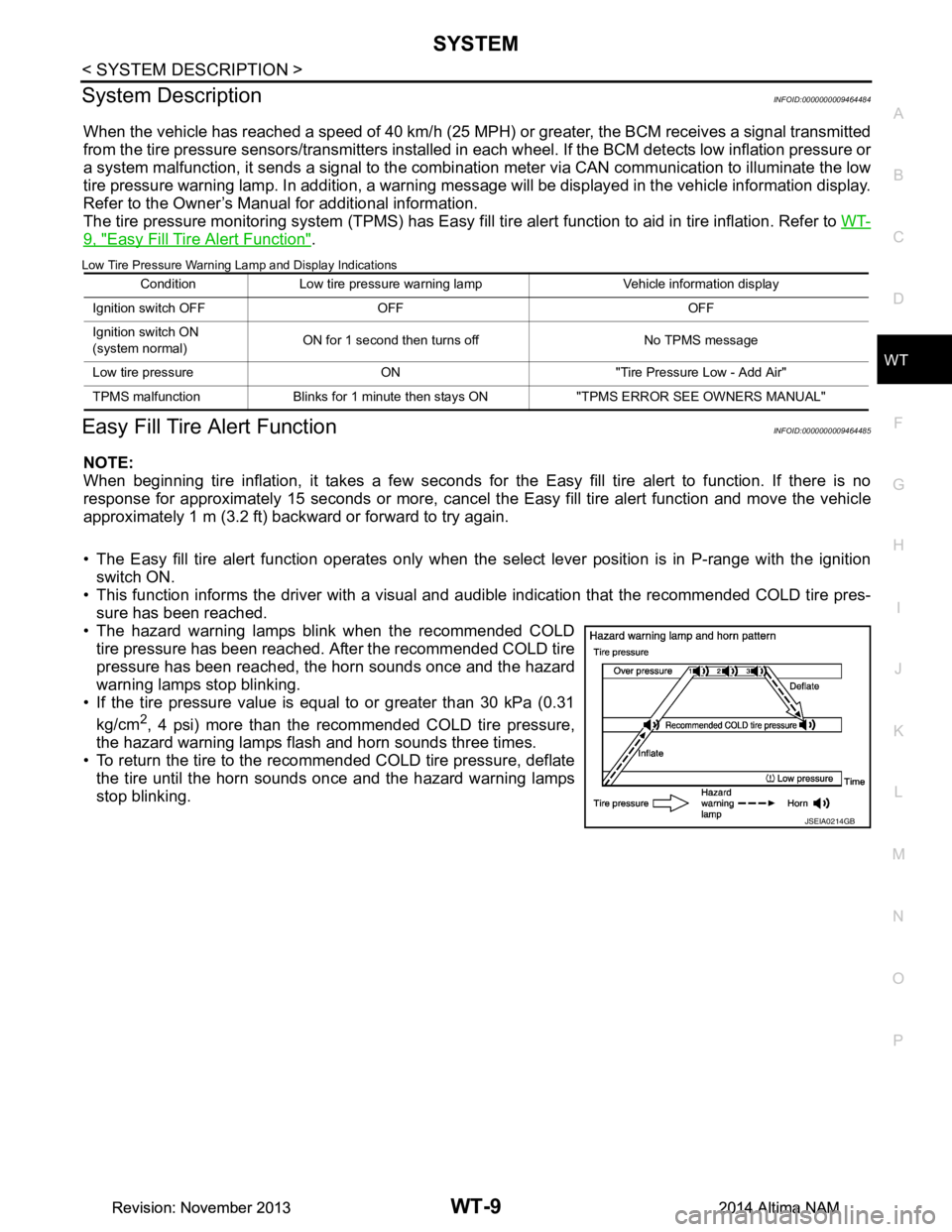
• This function informs the driver with a visual and audible indication that the recommended COLD tire pres-
sure has been reached.
• The hazard warning lamps blink when the recommended COLD tire pressure has been reached. After the recommended COLD tire
pressure has been reached, the horn sounds once and the hazard
warning lamps stop blinking.
• If the tire pressure value is equal to or greater than 30 kPa (0.31
kg/cm
2, 4 psi) more than the recommended COLD tire pressure,
the hazard warning lamps flash and horn sounds three times.
• To return the tire to the recommended COLD tire pressure, deflate
the tire until the horn sounds once and the hazard warning lamps
stop blinking.
Condition Low tire pressure warning lamp Vehicle information display
Ignition switch OFF OFF OFF
Ignition switch ON
(system normal) ON for 1 second then turns off No TPMS message
Low tire pressure ON "Tire Pressure Low - Add Air"
TPMS malfunction Blinks for 1 minute th en stays ON "TPMS ERROR SEE OWNERS MANUAL"
JSEIA0214GB
Revision: November 20132014 Altima NAMRevision: November 20132014 Altima NAM
Page 4685 of 4801

WT-10
< SYSTEM DESCRIPTION >
DIAGNOSIS SYSTEM (BCM)
DIAGNOSIS SYSTEM (BCM)
COMMON ITEM
COMMON ITEM : CONSULT Function (BCM - COMMON ITEM)INFOID:0000000009955585
CAUTION:
After disconnecting the CONSULT vehicle interface (VI) from the data link connector, the ignition must
be cycled OFF → ON (for at least 5 seconds) → OFF. If this step is not performed, the BCM may not go
to ”sleep mode”, potentially causing a di scharged battery and a no-start condition.
APPLICATION ITEM
CONSULT performs the following functions via CAN communication with BCM.
SYSTEM APPLICATION
BCM can perform the following functions.
Direct Diagnostic Mode Description
Ecu Identification The BCM part number is displayed.
Self Diagnostic Result The BCM self diagnostic results are displayed.
Data Monitor The BCM input/output data is displayed in real time.
Active Test The BCM activates outputs to test components.
Work support The settings for BCM functions can be changed.
Configuration • The vehicle specification can be read and saved.
• The vehicle specification can be written when replacing BCM.
CAN Diag Support Mntr The result of transmit/receive diagnosis of CAN communication is displayed.
System Sub System Direct Diagnostic Mode
Ecu Identification
Self Diagnostic Result
Data Monitor
Active Test
Work support
Configuration
CAN Diag Su pport Mntr
Door lock DOOR LOCK ××××
Rear window defogger REAR DEFOGGER ×××
Warning chime BUZZER ××
Interior room lamp timer INT LAMP ×××
Remote keyless entry system MULTI REMOTE ENT ×××
Exterior lamp HEADLAMP ×××
Wiper and washer WIPER ×××
Turn signal and hazard warning lamps FLASHER ××
Air conditioner AIR CONDITIONER ×
Intelligent Key system INTELLIGENT KEY ××××
Combination switch COMB SW ×
BCM BCM × × ×××
Immobilizer IMMU ×××
Interior room lamp battery saver BATTERY SAVER ××
Trunk open TRUNK ×
Vehicle security system THEFT ALM ×××
Revision: November 20132014 Altima NAMRevision: November 20132014 Altima NAM
Page 4686 of 4801

DIAGNOSIS SYSTEM (BCM)WT-11
< SYSTEM DESCRIPTION >
C
D
F
G H
I
J
K L
M A
B
WT
N
O PAIR PRESSURE MONITOR
AIR PRESSURE MONITOR : CONSULT Fu nction (BCM-AIR PRESSURE MONITOR)
INFOID:0000000009955586
CAUTION:
After disconnecting the CONSULT vehicle interface (VI) from the data link connector, the ignition must
be cycled OFF → ON (for at least 5 seconds) → OFF. If this step is not performed, the BCM may not go
to ”sleep mode”, potentiall y causing a discharged battery and a no-start condition.
NOTE:
The Signal Tech II Tool (J-50190) can be used to perform the following functions. Refer to the Signal Tech II
User Guide for additional information.
• Activate and display TPMS transmitter IDs
• Display tire pressure repor ted by the TPMS transmitter
• Read TPMS DTCs
• Register TPMS transmitter IDs
SELF DIAGNOSTIC RESULT
NOTE:
Before performing Self Diagnostic Result, be sure to regi ster the transmitter ID or the actual malfunction may
be different from that displayed on CONSULT.
Refer to BCS-52, "DTC Index"
.
DATA MONITOR
ACTIVE TEST
RAP system RETAINED PWR ×
Signal buffer system SIGNAL BUFFER ×
TPMS AIR PRESSURE MONITOR ××××
System Sub System
Direct Diagnostic Mode
Ecu Identification
Self Diagnostic Result
Data Monitor
Active Test
Work support
Configuration
CAN Diag Support Mntr
Monitor Item [Unit] Description
AIR PRESS FL [kPa, kg/cm
2 or Psi] Indicates air pressure of front LH tire.
AIR PRESS FR [kPa, kg/cm
2 or Psi] Indicates air pressure of front RH tire.
AIR PRESS RR [kPa, kg/cm
2 or Psi] Indicates air pressure of rear RH tire.
AIR PRESS RL [kPa, kg/cm
2 or Psi] Indicates air pressure of rear LH tire.
ID REGST FL1 [Done/Yet] Indicates ID registration status of front LH transmitter.
ID REGST FR1 [Done/Yet] Indicates ID registration status of front RH transmitter.
ID REGST RR1 [Done/Yet] Indicates ID registration status of rear RH transmitter.
ID REGST RL1 [Done/Yet] Indicates ID registration status of rear LH transmitter.
WARNING LAMP [Off/On] Indicates condition of low tire pressure warning lamp in combination meter.
BUZZER [Off/On] Indicates condition of buzzer in combination meter.
Test Item Description
FLASHER This test is able to check turn signal lamp operation [Off/LH/RH].
HORN This test is able to check horn operation [On].
Revision: November 20132014 Altima NAMRevision: November 20132014 Altima NAM
Page 4687 of 4801
![NISSAN TEANA 2014 Service Manual
WT-12
< SYSTEM DESCRIPTION >
DIAGNOSIS SYSTEM (BCM)
WORK SUPPORT
WARNING LAMP This test is able to check tire pressure warning lamp operation [On/Off].
ID REGIST WARNING This test is able to check I](/img/5/57390/w960_57390-4686.png "NISSAN TEANA 2014 Service Manual
WT-12
< SYSTEM DESCRIPTION >
DIAGNOSIS SYSTEM (BCM)
WORK SUPPORT
WARNING LAMP This test is able to check tire pressure warning lamp operation [On/Off].
ID REGIST WARNING This test is able to check I")
WT-12
< SYSTEM DESCRIPTION >
DIAGNOSIS SYSTEM (BCM)
WORK SUPPORT
WARNING LAMP This test is able to check tire pressure warning lamp operation [On/Off].
ID REGIST WARNING This test is able to check ID regist warning chime operation [On/Off]. Test Item Description
Support Item Description
ID READ The registered ID number is displayed.
ID REGIST Refer to WT-25, "Description"
.
Revision: November 20132014 Altima NAMRevision: November 20132014 Altima NAM
Page 4699 of 4801
WT-24
< BASIC INSPECTION >
DIAGNOSIS AND REPAIR WORK FLOW
BASIC INSPECTION
DIAGNOSIS AND REPAIR WORK FLOW
Work Flow INFOID:0000000009464491
NOTE:
The Signal Tech II Tool (J-50190) can be used to perform the following functions. Refer to the Signal Tech II
User Guide for additional information.
• Activate and display TPMS transmitter IDs
• Display tire pressure reported by the TPMS transmitter
• Read TPMS DTCs
• Register TPMS transmitter IDs
1.COLLECT INFORMATION FROM CUSTOMER
Get detailed information from the customer about the symptom (the condition and the environment when the
incident/malfunction occurred).
>> GO TO 2.
2.TIRE PRESSURE INSPECTION
Check the tire pressure for all wheels. Refer to WT-60, "Tire"
.
Is the inspection result normal?
YES >> GO TO 3.
NO >> Repair or replace tire(s) or wheel(s).
3.CHECK LOW TIRE PRESSURE WARNING LAMP
Check that the low tire pressure warning lamp illumi nates for approximately 1 second after the ignition switch
is turned ON, then turns OFF.
Does the low tire pressure warning lamp turn OFF?
YES >> Inspection End.
NO >> GO TO 4.
4.PERFORM SELF DIAGNOSTIC RESULT
Perform self diagnostic result. Refer to BCS-29, "AIR PRESSURE MONITOR : CONSULT Function (BCM-AIR
PRESSURE MONITOR)".
Are any DTCs displayed?
YES >> Refer to BCS-52, "DTC Index". If two or more DTCs are displayed, refer to BCS-50,
"DTC Inspection Priority Chart".
NO >> GO TO 5.
5.PERFORM DIAGNOSIS APPLICABLE TO THE SYMPTOM
Perform diagnosis applicable to the symptom. Refer to WT-48, "Symptom Table"
.
>> GO TO 6.
6.FINAL CHECK
Perform self diagnostic result again, and check that the malfunction is repaired. After checking, erase the self
diagnosis memory. Refer to BCS-29, "AIR PRESSURE MONITOR : CONSULT Function (BCM-AIR PRES-
SURE MONITOR)".
>> Inspection End.
Revision: November 20132014 Altima NAMRevision: November 20132014 Altima NAM
Page 4700 of 4801
ID REGISTRATION PROCEDUREWT-25
< BASIC INSPECTION >
C
D
F
G H
I
J
K L
M A
B
WT
N
O P
ID REGISTRATION PROCEDURE
DescriptionINFOID:0000000009464492
This procedure must be performed:
• after replacement of a transmitter or BCM (with individual tire pressure display).
• after replacement of a transmitter, BCM or rotation of the wheels (without individual tire pressure display).
Work ProcedureINFOID:0000000009464493
TPMS ID registration can be performed using one of the following procedures:
• Transmitter Activation tool (J-45295-A) with CONSULT (preferred method)
• Signal Tech II tool (J-50190) with CONSULT (preferred method)
• Signal Tech II tool (J-50190) without CONSULT
• CONSULT only
TPMS REGISTRATION WITH TRANSMI TTER ACTIVATION TOOL (J-45295-A)
With CONSULT
1. Turn the ignition switch ON.
2. Using CONSULT, select “WORK SUPPORT” in BC M (AIR PRESSURE MONITOR). Then, select “ID
REGIST.”
3. Select “Start” on “ID REGIST” screen.
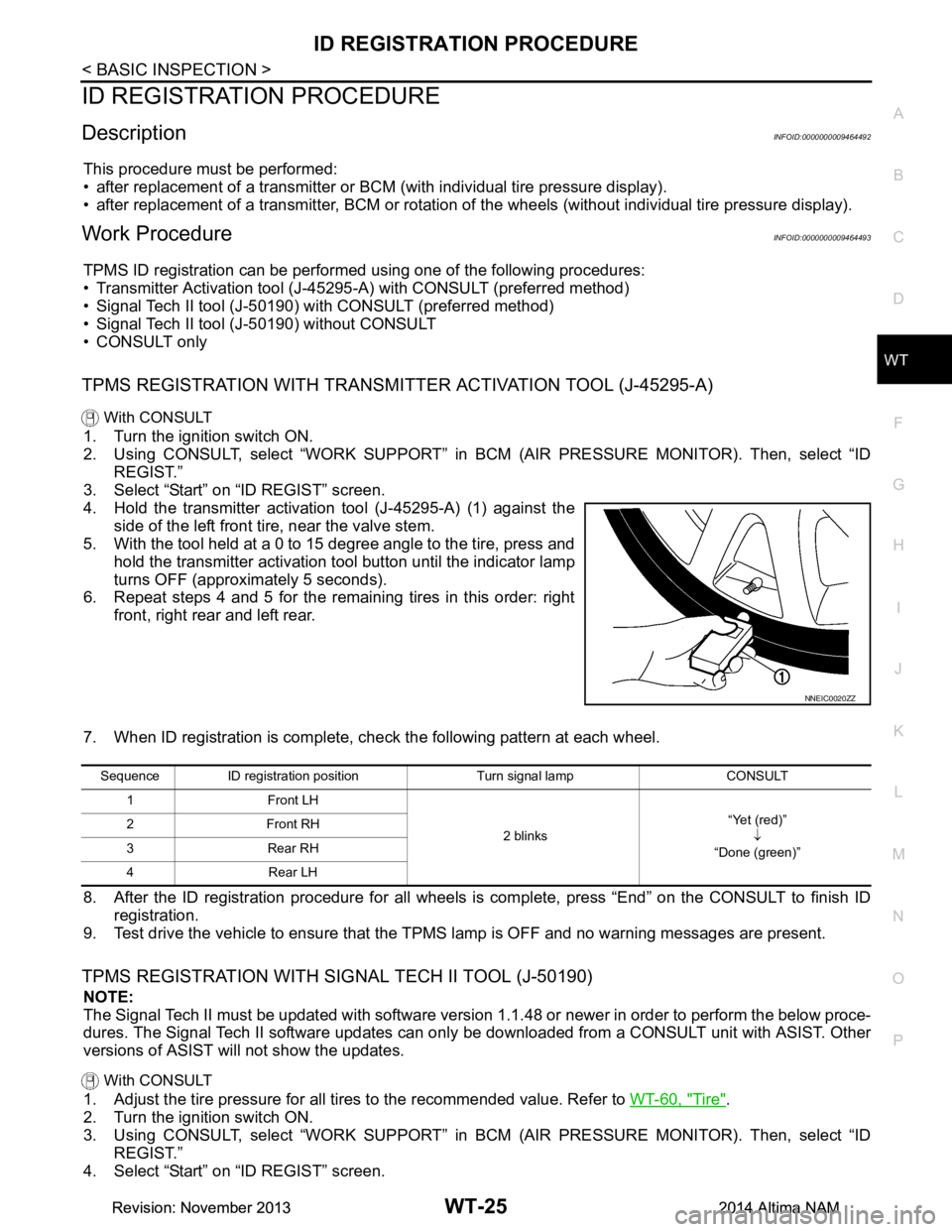
4. Hold the transmitter activation tool (J-45295-A) (1) against the side of the left front tire, near the valve stem.
5. With the tool held at a 0 to 15 degree angle to the tire, press and
hold the transmitter activation tool button until the indicator lamp
turns OFF (approximately 5 seconds).
6. Repeat steps 4 and 5 for the remaining tires in this order: right
front, right rear and left rear.
7. When ID registration is complete, check the following pattern at each wheel.
8. After the ID registration procedure for all wheels is complete, press “End” on the CONSULT to finish ID registration.
9. Test drive the vehicle to ensure that the TPMS lamp is OFF and no warning messages are present.
TPMS REGISTRATION WITH SIGNAL TECH II TOOL (J-50190)
NOTE:
The Signal Tech II must be updated with software version 1.1.48 or newer in order to perform the below proce-
dures. The Signal Tech II software updates can onl y be downloaded from a CONSULT unit with ASIST. Other
versions of ASIST will not show the updates.
With CONSULT
1. Adjust the tire pressure for all tires to the recommended value. Refer to WT-60, "Tire".
2. Turn the ignition switch ON.
3. Using CONSULT, select “WORK SUPPORT” in BC M (AIR PRESSURE MONITOR). Then, select “ID
REGIST.”
4. Select “Start” on “ID REGIST” screen.
NNEIC0020ZZ
Sequence ID registration position Turn signal lamp CONSULT
1 Front LH
2 blinks“Yet (red)”
↓
“Done (green)”
2Front RH
3 Rear RH
4 Rear LH
Revision: November 20132014 Altima NAMRevision: November 20132014 Altima NAM
Page 4701 of 4801
WT-26
< BASIC INSPECTION >
ID REGISTRATION PROCEDURE
5. Turn on the Signal Tech II tool (J-50190).
6. Hold the Signal Tech II against the side of the left front tire, near the valve stem.
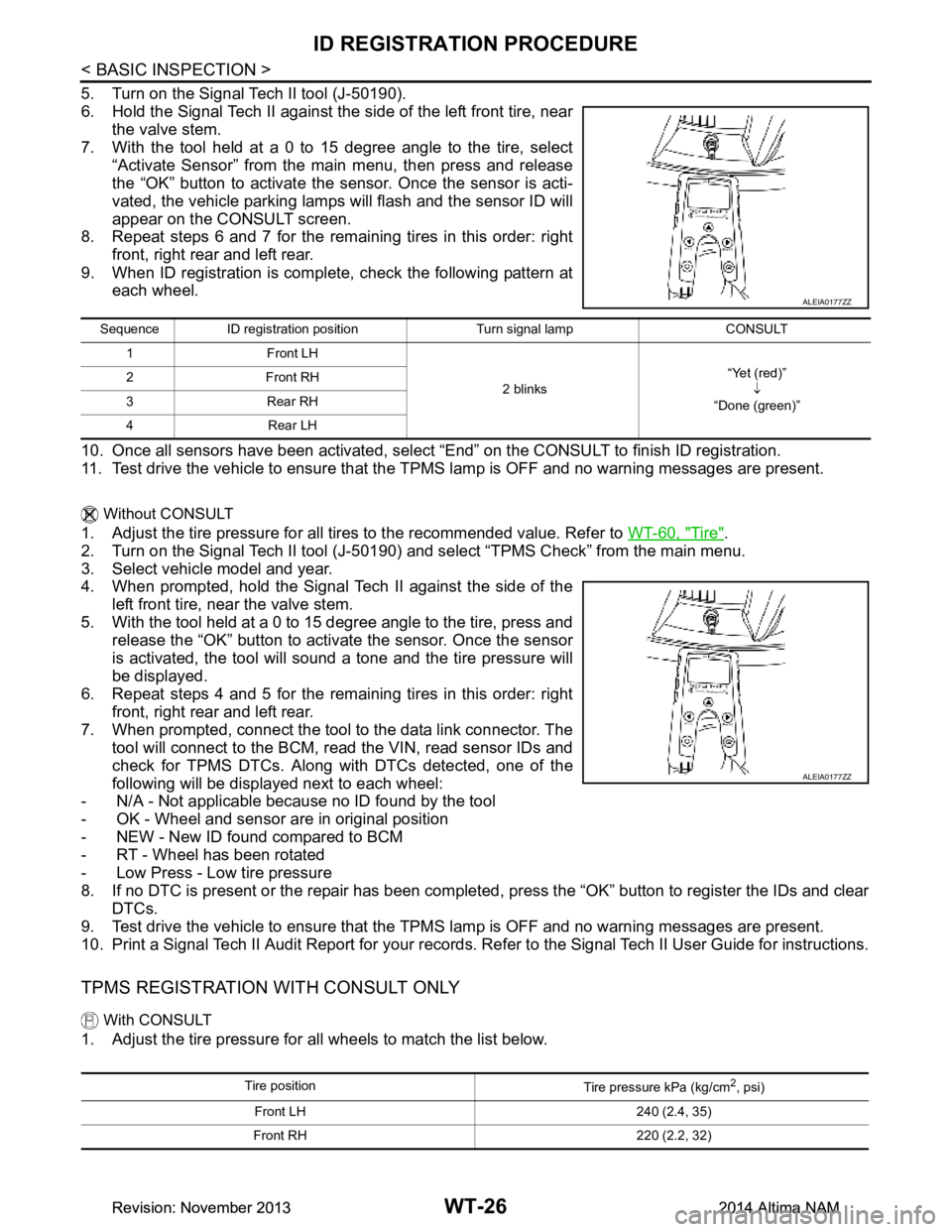
7. With the tool held at a 0 to 15 degree angle to the tire, select
“Activate Sensor” from the main menu, then press and release
the “OK” button to activate the s ensor. Once the sensor is acti-
vated, the vehicle parking lamps will flash and the sensor ID will
appear on the CONSULT screen.
8. Repeat steps 6 and 7 for the remaining tires in this order: right
front, right rear and left rear.
9. When ID registration is complete, check the following pattern at each wheel.
10. Once all sensors have been activated, select “End” on the CONSULT to finish ID registration.
11. Test drive the vehicle to ensure that the TPMS lamp is OFF and no warning messages are present.
Without CONSULT
1. Adjust the tire pressure for all tires to the recommended value. Refer to WT-60, "Tire".
2. Turn on the Signal Tech II tool (J-50190) and select “TPMS Check” from the main menu.
3. Select vehicle model and year.
4. When prompted, hold the Signal Tech II against the side of the
left front tire, near the valve stem.
5. With the tool held at a 0 to 15 degree angle to the tire, press and release the “OK” button to activate the sensor. Once the sensor
is activated, the tool will sound a tone and the tire pressure will
be displayed.
6. Repeat steps 4 and 5 for the remaining tires in this order: right
front, right rear and left rear.
7. When prompted, connect the tool to the data link connector. The tool will connect to the BCM, read the VIN, read sensor IDs and
check for TPMS DTCs. Along wit h DTCs detected, one of the
following will be displayed next to each wheel:
- N/A - Not applicable because no ID found by the tool
- OK - Wheel and sensor are in original position
- NEW - New ID found compared to BCM
- RT - Wheel has been rotated
- Low Press - Low tire pressure
8. If no DTC is present or the repair has been complet ed, press the “OK” button to register the IDs and clear
DTCs.
9. Test drive the vehicle to ensure that the TPMS lamp is OFF and no warning messages are present.
10. Print a Signal Tech II Audit Report for your records. Re fer to the Signal Tech II User Guide for instructions.
TPMS REGISTRATION WITH CONSULT ONLY
With CONSULT
1. Adjust the tire pressure for all wheels to match the list below.
ALEIA0177ZZ
Sequence ID registration position Turn signal lamp CONSULT
1Front LH
2 blinks“Yet (red)”
↓
“Done (green)”
2Front RH
3Rear RH
4Rear LH
ALEIA0177ZZ
Tire position Tire pressure kPa (kg/cm2, psi)
Front LH 240 (2.4, 35)
Front RH 220 (2.2, 32)
Revision: November 20132014 Altima NAMRevision: November 20132014 Altima NAM
Page 4702 of 4801

ID REGISTRATION PROCEDUREWT-27
< BASIC INSPECTION >
C
D
F
G H
I
J
K L
M A
B
WT
N
O P
2. Turn the ignition switch ON.
3. Using CONSULT, select “WORK SUPPORT” in BC M (AIR PRESSURE MONITOR). Then, select “ID
REGIST.”
4. Select “Start” on “ID REGIST” screen.
5. Drive the vehicle at a speed greater than 40 km/h (25 MPH) for 3 minutes or more.
6. After ID registration for all wheels is complete, pr ess “End” on the CONSULT to finish ID registration.
7. Adjust the tire pressures for all tires to the recommended value. Refer to WT-60, "Tire"
.
8. Test drive the vehicle to ensure that the TPMS lamp is OFF and no warning messages are present.
Rear RH 200 (2.0, 29)
Rear LH 180 (1.8, 26)
ID registration position CONSULT Front LH “Yet (red)”↓
“Done (green)”
Front RH
Rear RH Rear LH
Tire position
Tire pressure kPa (kg/cm
2, psi)
Revision: November 20132014 Altima NAMRevision: November 20132014 Altima NAM
Page 4707 of 4801
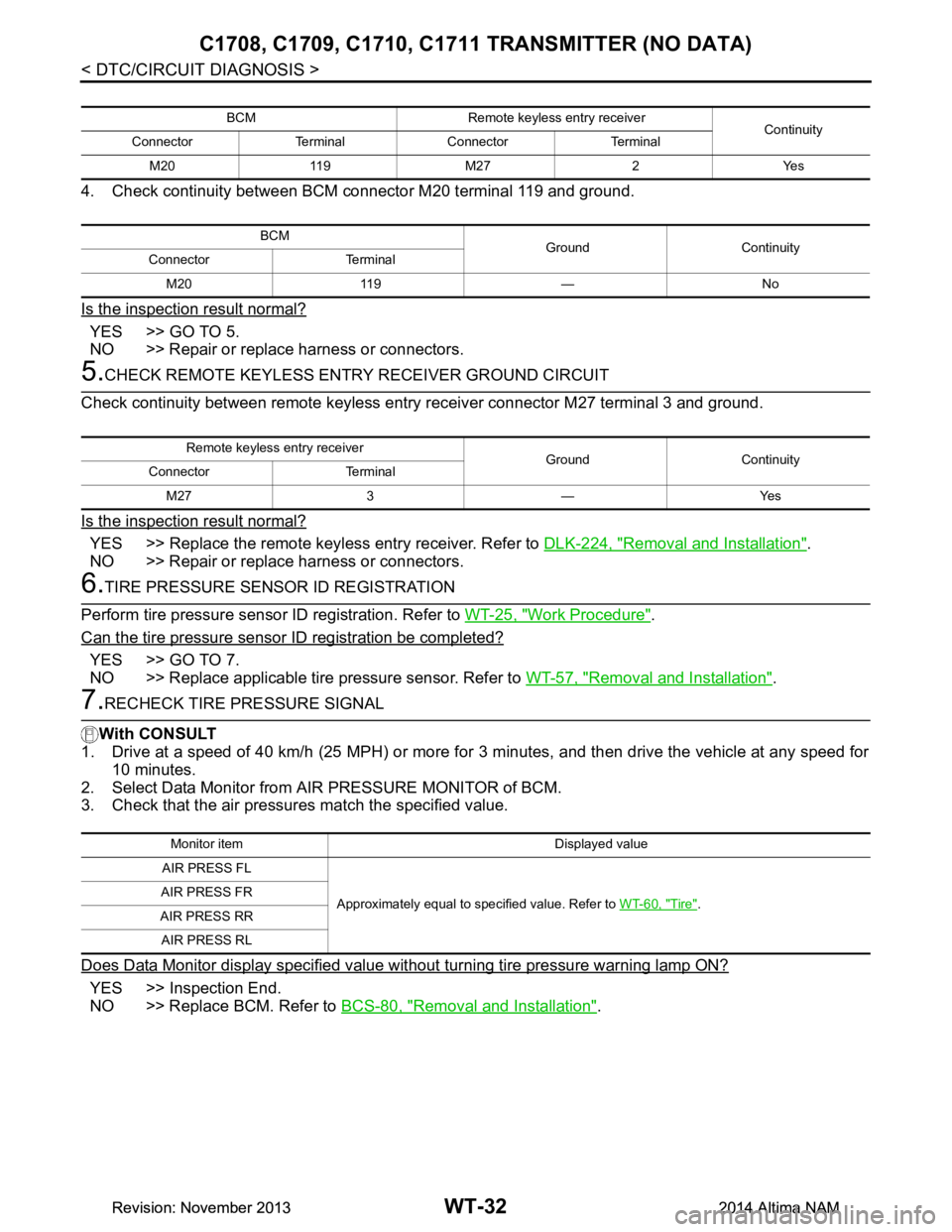
WT-32
< DTC/CIRCUIT DIAGNOSIS >
C1708, C1709, C1710, C1711 TRANSMITTER (NO DATA)
4. Check continuity between BCM connector M20 terminal 119 and ground.
Is the inspection result normal?
YES >> GO TO 5.
NO >> Repair or replace harness or connectors.
5.CHECK REMOTE KEYL ESS ENTRY RECEIVER GROUND CIRCUIT
Check continuity between remote keyless entry receiver connector M27 terminal 3 and ground.
Is the inspection result normal?
YES >> Replace the remote keyless entry receiver. Refer to DLK-224, "Removal and Installation".
NO >> Repair or replace harness or connectors.
6.TIRE PRESSURE SENSOR ID REGISTRATION
Perform tire pressure sensor ID registration. Refer to WT-25, "Work Procedure"
.
Can the tire pressure sensor ID registration be completed?
YES >> GO TO 7.
NO >> Replace applicable tire pressure sensor. Refer to WT-57, "Removal and Installation"
.
7.RECHECK TIRE PRESSURE SIGNAL
With CONSULT
1. Drive at a speed of 40 km/h (25 MPH) or more fo r 3 minutes, and then drive the vehicle at any speed for
10 minutes.
2. Select Data Monitor from AIR PRESSURE MONITOR of BCM.
3. Check that the air pressures match the specified value.
Does Data Monitor display specified value without turning tire pressure warning lamp ON?
YES >> Inspection End.
NO >> Replace BCM. Refer to BCS-80, "Removal and Installation"
.
BCM Remote keyless entry receiver
Continuity
Connector Terminal Connector Terminal
M20 119 M27 2 Yes
BCM Ground Continuity
Connector Terminal
M20 119 — No
Remote keyless entry receiver Ground Continuity
Connector Terminal
M27 3 — Yes
Monitor item Displayed value
AIR PRESS FL
Approximately equal to specified value. Refer to WT-60, "Tire"
.
AIR PRESS FR
AIR PRESS RR AIR PRESS RL
Revision: November 20132014 Altima NAMRevision: November 20132014 Altima NAM
Page 4721 of 4801

WT-46
< DTC/CIRCUIT DIAGNOSIS >
C1735 IGNITION SIGNAL
C1735 IGNITION SIGNAL
DTC LogicINFOID:0000000009464512
NOTE:
The Signal Tech II Tool (J-50190) can be used to perform the following functions. Refer to the Signal Tech II
User Guide for additional information.
• Activate and display TPMS transmitter IDs
• Display tire pressure reported by the TPMS transmitter
• Read TPMS DTCs
• Register TPMS transmitter IDs
DTC DETECTION LOGIC
DTC CONFIRMATION PROCEDURE
1.PERFORM SELF DIAGNOSTIC RESULT
With CONSULT
Perform Self Diagnostic Result.
Is DTC C1735 detected?
YES >> Proceed to WT-46, "Diagnosis Procedure".
NO >> Inspection End.
Diagnosis ProcedureINFOID:0000000009464513
NOTE:
The Signal Tech II Tool (J-50190) can be used to perform the following functions. Refer to the Signal Tech II
User Guide for additional information.
• Activate and display TPMS transmitter IDs
• Display tire pressure reported by the TPMS transmitter
• Read TPMS DTCs
• Register TPMS transmitter IDs
1.CHECK CAN IGNITION SIGNAL
With CONSULT
1. Select Data Monitor from INTELLIGENT KEY of BCM.
2. Check IGN RLY1-F/B value.
Is the inspection result normal?
YES >> GO TO 2.
NO >> Check CAN system. Refer to LAN-18, "Trouble Diagnosis Flow Chart"
.
2.CHECK BCM POWER SUPPLY AND GROUND
Check BCM power supply and ground. Refer to BCS-74, "Diagnosis Procedure"
.
Is the inspection result normal?
YES >> GO TO 3.
NO >> Repair or replace harness or connectors.
3.DRIVE VEHICLE
Clear DTC and test drive vehicle to check for low tire pressure warning lamp.
Does the vehicle operate without any low tire pressure warning lamp?
CONSULT Display DTC Detectio n Condition Possible Cause
IGNITION SIGNAL LINE - BCM/TPMS
[C1735] BCM has detected a mismatch between IGN
ON signals. BCM
Monitor item Displayed value
IGN RLY1 F/B On with ignition in ON position
Revision: November 20132014 Altima NAMRevision: November 20132014 Altima NAM