change time NISSAN TEANA 2014 Repair Manual
[x] Cancel search | Manufacturer: NISSAN, Model Year: 2014, Model line: TEANA, Model: NISSAN TEANA 2014Pages: 4801, PDF Size: 51.2 MB
Page 2673 of 4801
![NISSAN TEANA 2014 Repair Manual
HAC-24
< SYSTEM DESCRIPTION >[AUTOMATIC AIR CONDITIONER]
DIAGNOSIS SYSTEM
(A/C AUTO AMP.)
DIAGNOSIS SYSTEM (A/C AUTO AMP.)
CONSULT Function (HVAC)INFOID:0000000009463103
CAUTION:
After disconnectin](/img/5/57390/w960_57390-2672.png "NISSAN TEANA 2014 Repair Manual
HAC-24
< SYSTEM DESCRIPTION >[AUTOMATIC AIR CONDITIONER]
DIAGNOSIS SYSTEM
(A/C AUTO AMP.)
DIAGNOSIS SYSTEM (A/C AUTO AMP.)
CONSULT Function (HVAC)INFOID:0000000009463103
CAUTION:
After disconnectin")
HAC-24
< SYSTEM DESCRIPTION >[AUTOMATIC AIR CONDITIONER]
DIAGNOSIS SYSTEM
(A/C AUTO AMP.)
DIAGNOSIS SYSTEM (A/C AUTO AMP.)
CONSULT Function (HVAC)INFOID:0000000009463103
CAUTION:
After disconnecting the CONSULT vehicle interface (VI) from the data link connector, the ignition must
be cycled OFF → ON (for at least 5 seconds) → OFF. If this step is not performed, the BCM may not go
to ”sleep mode”, potentially causing a di scharged battery and no-start condition.
CONSULT can display each diagnosis item us ing the diagnosis test modes as shown.
CONSULT application items
SELF-DIAGNOSTIC RESULT
Refer to HAC-31, "DTC Index".
Display Item List
Diagnosis mode Description
Self-Diagnostic Result Displays the diagnosis results judged by A/C auto amp.
Data Monitor Displays A/C auto amp. input/output data in real time.
Work support Changes the setting for each system function.
Active Test The signals used to activate each device are forcibly supplied from A/C auto amp.
ECU Identification Displays the A/C auto amp. number.
Configuration • The vehicle specification can be read and saved.
• The vehicle specification can be written when replacing A/C auto amp.
DTC Items
(CONSULT screen terms) Diagnostic item is detected when... Possible cause
U1000 CAN COMM CIRCUIT When A/C auto amp. is not transmitting
or receiving CAN communication signal
for 2 or more seconds. CAN communication system
U1010 CONTROL UNIT (CAN) When detecting error during the initial
diagnosis of CAN controller of A/C auto
amp. A/C auto amp.
B257B AMB TEMP SEN (SHORT) Detected temperature at ambient sen-
sor 55 °C (131 °F) or more • Ambient sensor
• A/C auto amp.
• Harness and connector (Ambient sensor circuit is open,
or there is a short in the circuit)
B257C AMB TEMP SEN (OPEN)
Detected temperature at ambient sen-
sor −30 °C ( −22 °F) or less
B2578 IN-CAR SENSOR (OUT OF RANGE
[LOW]) Detected temperature at in-vehicle sen-
sor 55 °C (131 °F) or more • In-vehicle sensor
• A/C auto amp.
• Harness and connector (In-vehicle sensor circuit is open,
or there is a short in the circuit)
B2579
IN-CAR SENSOR (OUT OF RANGE
[HI]) Detected temperature at in-vehicle sen-
sor −30 °C ( −22 °F) or less
B2581 EVAP TEMP SEN (SHORT) Detected temperature at intake sensor
55 °C (131 °F) or more • Intake sensor
• A/C auto amp.
• Harness and connector
(Intake sensor circuit is open, or
there is a short in the circuit)
B2582 EVAP TEMP SEN (OPEN)
Detected temperature at intake sensor
− 30 °C ( −22 °F) or less
B2630
*SUNLOAD SEN (SHORT) Detected calorie at sunload sensor
1395 w/m2 (1200 kcal/m2·h) • Sunload sensor
• A/C auto amp.
• Harness and connector (Sunload sensor circuit is open,
or there is a short in the circuit)
B2631
*SUNLOAD SEN (OPEN) Detected calorie at sunload sensor 0 w/
m2 (0 kcal/m2·h)
Revision: November 20132014 Altima NAMRevision: November 20132014 Altima NAM
Page 2767 of 4801
![NISSAN TEANA 2014 Repair Manual
HAC-118
< SYSTEM DESCRIPTION >[MANUAL AIR CONDITIONER]
SYSTEM
Control by ECM- Cooling fan control
Refer to EC-60, "COOLING FAN CONTROL : System Description (with manual air conditioner)"
(QR25DE)](/img/5/57390/w960_57390-2766.png "NISSAN TEANA 2014 Repair Manual
HAC-118
< SYSTEM DESCRIPTION >[MANUAL AIR CONDITIONER]
SYSTEM
Control by ECM- Cooling fan control
Refer to EC-60, \"COOLING FAN CONTROL : System Description (with manual air conditioner)\"
(QR25DE)")
HAC-118
< SYSTEM DESCRIPTION >[MANUAL AIR CONDITIONER]
SYSTEM
Control by ECM- Cooling fan control
Refer to EC-60, "COOLING FAN CONTROL : System Description (with manual air conditioner)"
(QR25DE)
or EC-575, "COOLING FAN CONTROL : System Description"
(VQ35DE).
- Air conditioning cut control Refer to EC-57, "AIR CONDITIONING CUT CONTROL : Sy stem Description (with manual air conditioner)"
(QR25DE) or EC-573, "AIR CONDITIONING CUT CONTROL : System Description" (VQ35DE).
Control by IPDM E/R
- Relay control
Refer to PCS-6, "RELAY CONTROL SYSTEM : System Description"
.
- Cooling fan control
Refer to EC-60, "COOLING FAN CONTROL : System Description (with manual air conditioner)"
(QR25DE)
or EC-575, "COOLING FAN CONTROL : System Description"
(VQ35DE).
Air Flow ControlINFOID:0000000009463196
DESCRIPTION
• Front air control changes duty ratio of front blower mo tor control signal to control air flow continuously. When
air flow is increased, duty ratio of front blower mo tor control signal gradually increases to prevent a sudden
increase in air flow.
• In addition to manual control, air flow control is composed of fan speed control at door motor operation.
FAN SPEED CONTROL AT DOOR MOTOR OPERATION
When mode door motor is activated while air flow is more than the specified value, front air control temporarily
reduces fan speed so that mode door moves smoothly.
Air Inlet ControlINFOID:0000000009463197
The intake door position is automatically controlled in MAX A/C and DEF modes. The intake door is controlled
by customer input in the other modes.
Air Outlet ControlINFOID:0000000009463198
Air outlet control is controlled by customer input. When t he A/C is turned off by turning the blower control dial
fully counterclockwise, the front air control retains the current selections and returns to these selections the
next time the blower control dial is turned to any fan position.
NOTE:
If ambient temperature is excessively low, D/F is se lected to prevent windshield fogging when air outlet is set
to FOOT.
Compressor ControlINFOID:0000000009463199
DESCRIPTION
In order for the IPDM E/R to complete a compress or ON request, the following conditions must be met:
1. The BCM detects a Fan ON signal from the front air control. The front air control grounds the fan ON sig-
nal monitored by the BCM when the blower speed dial is in any of the fan speed positions.
2. The BCM detects an A/C ON signal from the front air control. The front air control grounds the A/C ON sig-
nal monitored by the BCM when:
- The A/C switch is pressed. The A/C switch LED ill uminates and the front air control grounds the A/C ON
signal monitored by the BCM. Any mode c ontrol button except D/F may be selected.
- The A/C switch is OFF, and the MAX A/C button is pr essed. The A/C switch LED will automatically illumi-
nate and the front air control grounds the A/C ON signal monitored by the BCM.
- The A/C switch is OFF, and the mode button for either D/F or DEF is selected. The front air control
grounds the A/C ON signal monitored by the BCM, but it does not illuminate the A/C switch LED
NOTE:
If the compressor was engaged by pressing the D/F or DE F mode buttons, and the time spent in either mode
exceeds 1 minute, then the compressor stays reques ted, even when modes other than D/F or DEF are
selected, until either:
1. The ignition switch is turned OFF.
Revision: November 20132014 Altima NAMRevision: November 20132014 Altima NAM
Page 2773 of 4801
![NISSAN TEANA 2014 Repair Manual
HAC-124
< SYSTEM DESCRIPTION >[MANUAL AIR CONDITIONER]
DIAGNOSIS SYSTEM (BCM)
DIAGNOSIS SYSTEM (BCM)
CONSULT Function (BCM - COMMON ITEM)INFOID:0000000009958322
CAUTION:
After disconnecting the CONS](/img/5/57390/w960_57390-2772.png "NISSAN TEANA 2014 Repair Manual
HAC-124
< SYSTEM DESCRIPTION >[MANUAL AIR CONDITIONER]
DIAGNOSIS SYSTEM (BCM)
DIAGNOSIS SYSTEM (BCM)
CONSULT Function (BCM - COMMON ITEM)INFOID:0000000009958322
CAUTION:
After disconnecting the CONS")
HAC-124
< SYSTEM DESCRIPTION >[MANUAL AIR CONDITIONER]
DIAGNOSIS SYSTEM (BCM)
DIAGNOSIS SYSTEM (BCM)
CONSULT Function (BCM - COMMON ITEM)INFOID:0000000009958322
CAUTION:
After disconnecting the CONSULT vehicle interface (VI) from the data link connector, the ignition must
be cycled OFF → ON (for at least 5 seconds) → OFF. If this step is not performed, the BCM may not go
to ”sleep mode”, potentially causing a di scharged battery and a no-start condition.
APPLICATION ITEM
CONSULT performs the following functions via CAN communication with BCM.
SYSTEM APPLICATION
BCM can perform the following functions.
Direct Diagnostic Mode Description
Ecu Identification The BCM part number is displayed.
Self Diagnostic Result The BCM self diagnostic results are displayed.
Data Monitor The BCM input/output data is displayed in real time.
Active Test The BCM activates outputs to test components.
Work support The settings for BCM functions can be changed.
Configuration • The vehicle specification can be read and saved.
• The vehicle specification can be written when replacing BCM.
CAN Diag Support Mntr The result of transmit/receive diagnosis of CAN communication is displayed.
System Sub System Direct Diagnostic Mode
Ecu Identification
Self Diagnostic Result
Data Monitor
Active Test
Work support
Configuration
CAN Diag Support Mntr
Door lock DOOR LOCK ××××
Rear window defogger REAR DEFOGGER ×××
Warning chime BUZZER ××
Interior room lamp timer INT LAMP ×××
Remote keyless entry system MULTI REMOTE ENT ×××
Exterior lamp HEADLAMP ×××
Wiper and washer WIPER ×××
Turn signal and hazard warning lamps FLASHER ××
Air conditioner AIR CONDITIONER ×
Intelligent Key system INTELLIGENT KEY ××××
Combination switch COMB SW ×
BCM BCM × × ×××
Immobilizer IMMU ×××
Interior room lamp battery saver BATTERY SAVER ××
Trunk open TRUNK ×
Vehicle security system THEFT ALM ×××
RAP system RETAINED PWR ×
Revision: November 20132014 Altima NAMRevision: November 20132014 Altima NAM
Page 2790 of 4801
![NISSAN TEANA 2014 Repair Manual
OPERATION INSPECTIONHAC-141
< BASIC INSPECTION > [MANUAL AIR CONDITIONER]
C
D E
F
G H
J
K L
M A
B
HAC
N
O P
4. Press REC ( ) switch one more time. REC indicator should go off.
Is the test result n](/img/5/57390/w960_57390-2789.png "NISSAN TEANA 2014 Repair Manual
OPERATION INSPECTIONHAC-141
< BASIC INSPECTION > [MANUAL AIR CONDITIONER]
C
D E
F
G H
J
K L
M A
B
HAC
N
O P
4. Press REC ( ) switch one more time. REC indicator should go off.
Is the test result n")
OPERATION INSPECTIONHAC-141
< BASIC INSPECTION > [MANUAL AIR CONDITIONER]
C
D E
F
G H
J
K L
M A
B
HAC
N
O P
4. Press REC ( ) switch one more time. REC indicator should go off.
Is the test result normal?
YES >> GO TO 7.
NO >> Refer to HAC-152, "Diagnosis Procedure"
.
7.CHECK INTAKE DOOR OPERATION
1. Press REC ( ) switch one time. REC indicator should illuminate.
2. Listen to the sound of the air coming out of the vent.
3. Press REC ( ) switch one more time. REC indicator should go off.
4. There should be an audible change to the sound of the air flowing out of the vent.
Is the test result normal?
YES >> GO TO 8.
NO >> Refer to HAC-146, "Diagnosis Procedure"
.
8.CHECK TEMPERATURE DECREASE
1. Press A/C switch.
2. Rotate temperature control dial counterclockwise until maximum cold.
3. Check for cold air at selected discharge air outlets.
Is the test result normal?
YES >> GO TO 9.
NO >> Refer to HAC-155, "Component Function Check"
.
9.CHECK TEMPERATURE INCREASE
1. Rotate temperature control dial clockwise until maximum hot.
2. Check for hot air at appropriate discharge air outlets.
Is the test result normal?
YES >> Inspection End.
NO >> Refer to HAC-157, "Component Function Check"
.
Revision: November 20132014 Altima NAMRevision: November 20132014 Altima NAM
Page 2832 of 4801

DIAGNOSIS SYSTEM (BCM)INL-11
< SYSTEM DESCRIPTION >
C
D E
F
G H
I
J
K
M A
B
INL
N
O P
DIAGNOSIS SYSTEM (BCM)
COMMON ITEM
COMMON ITEM : CONSULT Function (BCM - COMMON ITEM)INFOID:0000000009956797
CAUTION:
After disconnecting the CONSULT vehicle interface (VI) from the data link connector, the ignition must
be cycled OFF → ON (for at least 5 seconds) → OFF. If this step is not performed, the BCM may not go
to ”sleep mode”, potentiall y causing a discharged battery and a no-start condition.
APPLICATION ITEM
CONSULT performs the following functions via CAN communication with BCM.
SYSTEM APPLICATION
BCM can perform the following functions.
Direct Diagnostic Mode Description
Ecu Identification The BCM part number is displayed.
Self Diagnostic Result The BCM self diagnostic results are displayed.
Data Monitor The BCM input/output data is displayed in real time.
Active Test The BCM activates outputs to test components.
Work support The settings for BCM functions can be changed.
Configuration • The vehicle specification can be read and saved.
• The vehicle specification can be written when replacing BCM.
CAN Diag Support Mntr The result of transmit/receive diagnosis of CAN communication is displayed.
System Sub System Direct Diagnostic Mode
Ecu Identification
Self Diagnostic Result
Data Monitor
Active Test
Work support
Configuration
CAN Diag Su pport Mntr
Door lock DOOR LOCK ××××
Rear window defogger REAR DEFOGGER ×××
Warning chime BUZZER ××
Interior room lamp timer INT LAMP ×××
Remote keyless entry system MULTI REMOTE ENT ×××
Exterior lamp HEADLAMP ×××
Wiper and washer WIPER ×××
Turn signal and hazard warning lamps FLASHER ××
Air conditioner AIR CONDITIONER ×
Intelligent Key system INTELLIGENT KEY ××××
Combination switch COMB SW ×
BCM BCM × × ×××
Immobilizer IMMU ×××
Interior room lamp battery saver BATTERY SAVER ××
Trunk open TRUNK ×
Vehicle security system THEFT ALM ×××
Revision: November 20132014 Altima NAMRevision: November 20132014 Altima NAM
Page 2834 of 4801

DIAGNOSIS SYSTEM (BCM)INL-13
< SYSTEM DESCRIPTION >
C
D E
F
G H
I
J
K
M A
B
INL
N
O P
* : Initial setting
BATTERY SAVER
BATTERY SAVER : CONSULT Function (BCM - BATTERY SAVER)INFOID:0000000009956799
CAUTION:
After disconnecting the CONSULT vehicle interface (VI) from the data link connector, the ignition must
be cycled OFF → ON (for at least 5 seconds) → OFF. If this step is not performed, the BCM may not go
to ”sleep mode”, potentiall y causing a discharged battery and a no-start condition.
DATA MONITOR
ACTIVE TEST
INTELLIGENT KEY
INTELLIGENT KEY : CONSULT Func tion (BCM - INTELLIGENT KEY)INFOID:0000000009956802
CAUTION:
After disconnecting the CONSULT vehicle interface (VI) from the data link connector, the ignition must
be cycled OFF → ON (for at least 5 seconds) → OFF. If this step is not performed, the BCM may not go
to ”sleep mode”, potentiall y causing a discharged battery and a no-start condition.
Support Item Setting Description
SCENARIO LIGHTING SETTING On
NOTE:
Do not use this function since interior room lamp control is changed.
Off*
SET I/L D-UNLCK INTCON On Interior room lamp timer function ON.
Off* Interior room lamp timer function OFF.
FOG LAMP OVERRIDE On* Fog lamp override function ON.
Off Fog lamp override function OFF.
Monitor Item [Unit] Description
REQ SW -DR [On/Off] Indicates condition of door request switch LH.
REQ SW -AS [On/Off] Indicates condition of door request switch RH.
PUSH SW [On/Off] Indicates condition push-button ignition switch.
UNLK SEN -DR [On/Off] Indicates condition of door unlock sensor.
DOOR SW-DR [On/Off] Indicates condition of front door switch LH.
DOOR SW-AS [On/Off] Indicates condition of front door switch RH.
DOOR SW-RR [On/Off] Indicates condition of rear door switch RH.
DOOR SW-RL [On/Off] Indicates condition of rear door switch LH.
DOOR SW-BK [On/Off] Indicates condition of trunk switch.
CDL LOCK SW [On/Off] Indicates condition of lock signal from door lock and unlock switch.
CDL UNLOCK SW [On/Off] Indicates condition of unlock signal from door lock and unlock switch.
KEY CYL LK-SW [On/Off] Indicates condition of lo ck signal from door key cylinder switch.
KEY CYL UN-SW [On/Off] Indicates condition of unl ock signal from door key cylinder switch.
TRNK/HAT MNTR [On/Off] Indicates condition of trunk room lamp switch.
RKE-LOCK [On/Off] Indicates condition of lock signal from Intelligent Key.
RKE-UNLOCK [On/Off] Indicates condition of unlock signal from Intelligent Key.
Test item Description
BATTERY SAVER This test is able to check battery saver operation [On/Off].
Revision: November 20132014 Altima NAMRevision: November 20132014 Altima NAM
Page 2903 of 4801

INT-12
< SYMPTOM DIAGNOSIS >
SQUEAK AND RATTLE TROUBLE DIAGNOSES
1. Loose harness or harness connectors.
2. Front console map/reading lamp lens loose.
3. Loose screws at console attachment points.
SEATS
When isolating seat noise it's important to note the pos ition the seat is in and the load placed on the seat when
the noise is present. These conditions should be dupl icated when verifying and isolating the cause of the
noise.
Cause of seat noise include:
1. Headrest rods and holder
2. A squeak between the seat pad cushion and frame
3. The rear seatback lock and bracket
These noises can be isolated by moving or pressing on the suspected components while duplicating the con-
ditions under which the noise occurs. Most of thes e incidents can be repaired by repositioning the component
or applying urethane tape to the contact area.
UNDERHOOD
Some interior noise may be caused by components under the hood or on the engine wall. The noise is then
transmitted into the passenger compartment.
Causes of transmitted underhood noise include:
1. Any component installed to the engine wall
2. Components that pass through the engine wall
3. Engine wall mounts and connectors
4. Loose radiator installation pins
5. Hood bumpers out of adjustment
6. Hood striker out of adjustment
These noises can be difficult to isolate since they cannot be reached from the interior of the vehicle. The best
method is to secure, move or insulate one component at a time and test drive the vehicle. Also, engine rpm or
load can be changed to isolate the noise. Repairs can usually be made by moving, adjusting, securing, or
insulating the component causing the noise.
Revision: November 20132014 Altima NAM
Page 2937 of 4801

SQUEAK AND RATTLE TROUBLE DIAGNOSESIP-11
< SYMPTOM DIAGNOSIS >
C
D E
F
G H
I
K L
M A
B
IP
N
O P
1. Loose harness or harness connectors.
2. Front console map/reading lamp lens loose.
3. Loose screws at console attachment points.
SEATS
When isolating seat noise it's important to note the pos ition the seat is in and the load placed on the seat when
the noise is present. These conditions should be duplic ated when verifying and isolating the cause of the
noise.
Cause of seat noise include:
1. Headrest rods and holder
2. A squeak between the seat pad cushion and frame
3. The rear seatback lock and bracket
These noises can be isolated by moving or pressing on the suspected components while duplicating the con-
ditions under which the noise occurs. Most of thes e incidents can be repaired by repositioning the component
or applying urethane tape to the contact area.
UNDERHOOD
Some interior noise may be caused by components under the hood or on the engine wall. The noise is then
transmitted into the passenger compartment.
Causes of transmitted underhood noise include:
1. Any component installed to the engine wall
2. Components that pass through the engine wall
3. Engine wall mounts and connectors
4. Loose radiator installation pins
5. Hood bumpers out of adjustment
6. Hood striker out of adjustment
These noises can be difficult to isolate since they cannot be reached from the interior of the vehicle. The best
method is to secure, move or insulate one component at a time and test drive the vehicle. Also, engine rpm or
load can be changed to isolate the noise. Repairs can usually be made by moving, adjusting, securing, or
insulating the component causing the noise.
Revision: November 20132014 Altima NAM
Page 3189 of 4801
GENERAL MAINTENANCEMA-5
< PERIODIC MAINTENANCE >
C
D E
F
G H
I
J
K L
M B
MA
N
O A
PERIODIC MAINTENANCE
GENERAL MAINTENANCE
FOR USA AND CANADA
FOR USA AND CANADA : Explana
tion of General MaintenanceINFOID:0000000009464530
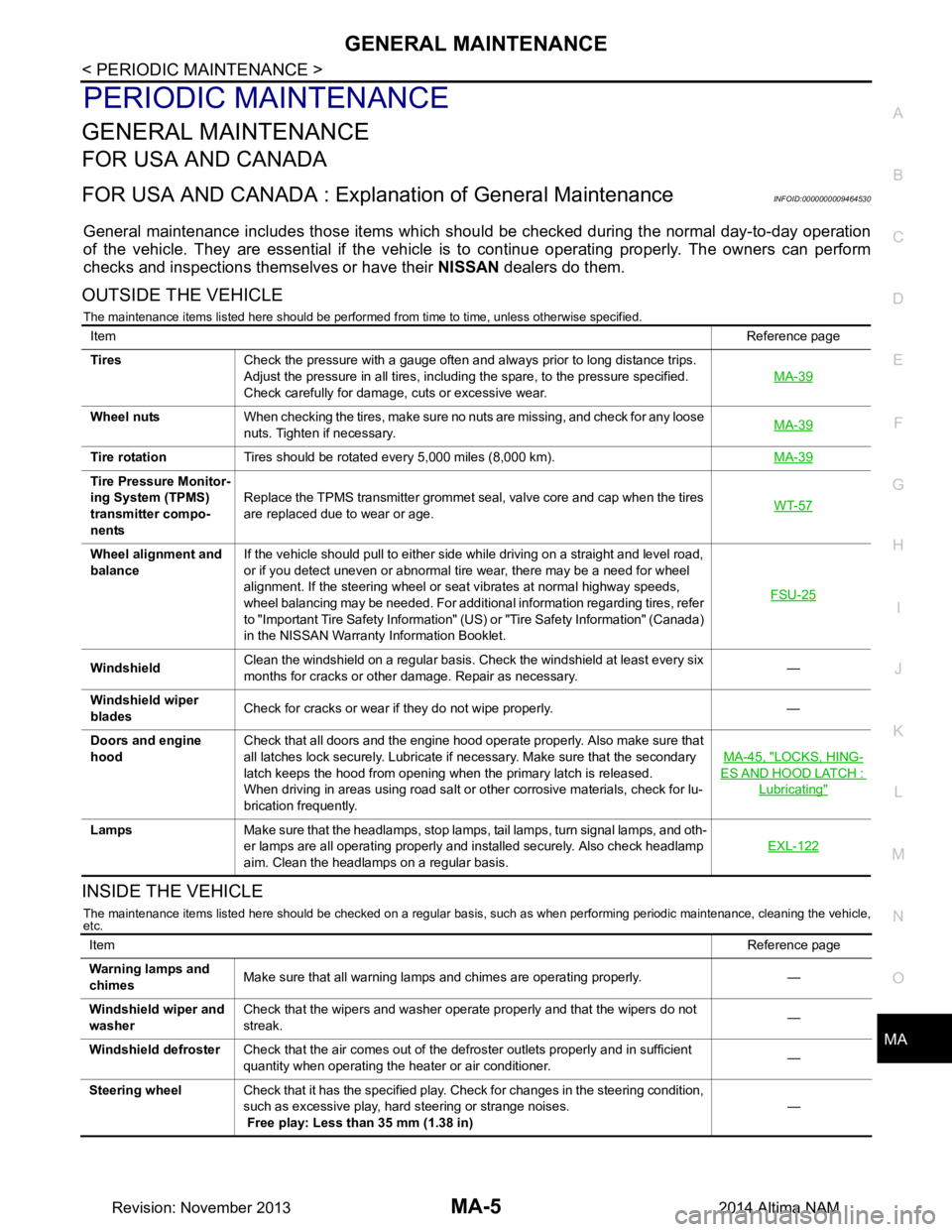
General maintenance includes those items which shoul d be checked during the normal day-to-day operation
of the vehicle. They are essential if the vehicle is to continue operating properly. The owners can perform
checks and inspections themselves or have their NISSAN dealers do them.
OUTSIDE THE VEHICLE
The maintenance items listed here should be performed from time to time, unless otherwise specified.
INSIDE THE VEHICLE
The maintenance items listed here should be checked on a regular basis, such as when performing periodic maintenance, cleaning the vehicle,
etc.
Item Reference page
Tires Check the pressure with a gauge often and always prior to long distance trips.
Adjust the pressure in all tires, including the spare, to the pressure specified.
Check carefully for damage, cuts or excessive wear. MA-39
Wheel nuts
When checking the tires, make sure no nuts are missing, and check for any loose
nuts. Tighten if necessary. MA-39
Tire rotation
Tires should be rotated every 5,000 miles (8,000 km). MA-39
Tire Pressure Monitor-
ing System (TPMS)
transmitter compo-
nents Replace the TPMS transmitter grommet seal, valve core and cap when the tires
are replaced due to wear or age. WT-57
Wheel alignment and
balance If the vehicle should pull to either side while driving on a straight and level road,
or if you detect uneven or abnormal tire wear, there may be a need for wheel
alignment. If the steering wheel or seat vibrates at normal highway speeds,
wheel balancing may be needed. For additional information regarding tires, refer
to "Important Tire Safety Information" (US) or "Tire Safety Information" (Canada)
in the NISSAN Warranty Information Booklet. FSU-25
Windshield
Clean the windshield on a regular basis. Check the windshield at least every six
months for cracks or other damage. Repair as necessary. —
Windshield wiper
blades Check for cracks or wear if they do not wipe properly. —
Doors and engine
hood Check that all doors and the engine hood operate properly. Also make sure that
all latches lock securely. Lubricate if necessary. Make sure that the secondary
latch keeps the hood from opening when the primary latch is released.
When driving in areas using road salt or other corrosive materials, check for lu-
brication frequently. MA-45, "LOCKS, HING-
ES AND HOOD LATCH :
Lubricating"
Lamps
Make sure that the headlamps, stop lamps, tail lamps, turn signal lamps, and oth-
er lamps are all operating properly and installed securely. Also check headlamp
aim. Clean the headlamps on a regular basis. EXL-122
Item
Reference page
Warning lamps and
chimes Make sure that all warning lamps and chimes are operating properly. —
Windshield wiper and
washer Check that the wipers and washer operate properly and that the wipers do not
streak. —
Windshield defroster Check that the air comes out of the defroster outlets properly and in sufficient
quantity when operating the heater or air conditioner. —
Steering wheel Check that it has the specified play. Check for changes in the steering condition,
such as excessive play, hard steering or strange noises.
Free play: Less than 35 mm (1.38 in) —
Revision: November 20132014 Altima NAM
Page 3205 of 4801
ENGINE MAINTENANCE (QR25DE)MA-21
< PERIODIC MAINTENANCE >
C
D E
F
G H
I
J
K L
M B
MA
N
O A
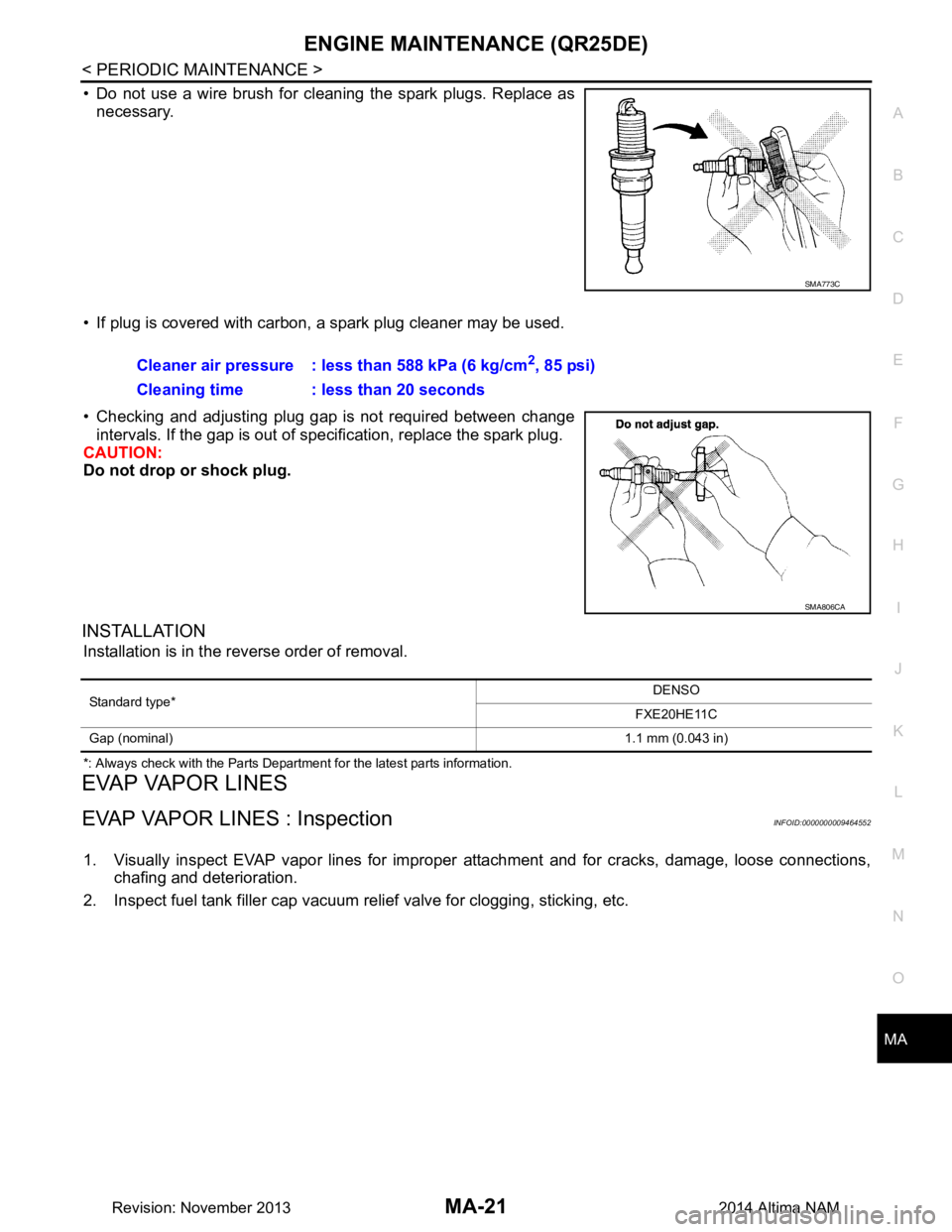
• Do not use a wire brush for cleaning the spark plugs. Replace as
necessary.
• If plug is covered with carbon, a spark plug cleaner may be used.
• Checking and adjusting plug gap is not required between change intervals. If the gap is out of s pecification, replace the spark plug.
CAUTION:
Do not drop or shock plug.
INSTALLATION
Installation is in the reverse order of removal.
*: Always check with the Parts Department for the latest parts information.
EVAP VAPOR LINES
EVAP VAPOR LINES : InspectionINFOID:0000000009464552
1. Visually inspect EVAP vapor lines for improper attachment and for cracks, damage, loose connections,
chafing and deterioration.
2. Inspect fuel tank filler cap vacuum relief valve for clogging, sticking, etc.
SMA773C
Cleaner air pressure : less than 588 kPa (6 kg/cm2, 85 psi)
Cleaning time : less than 20 seconds
SMA806CA
Standard type* DENSO
FXE20HE11C
Gap (nominal) 1.1 mm (0.043 in)
Revision: November 20132014 Altima NAM