change time NISSAN TEANA 2014 Workshop Manual
[x] Cancel search | Manufacturer: NISSAN, Model Year: 2014, Model line: TEANA, Model: NISSAN TEANA 2014Pages: 4801, PDF Size: 51.2 MB
Page 2278 of 4801
EXL-12
< SYSTEM DESCRIPTION >
SYSTEM
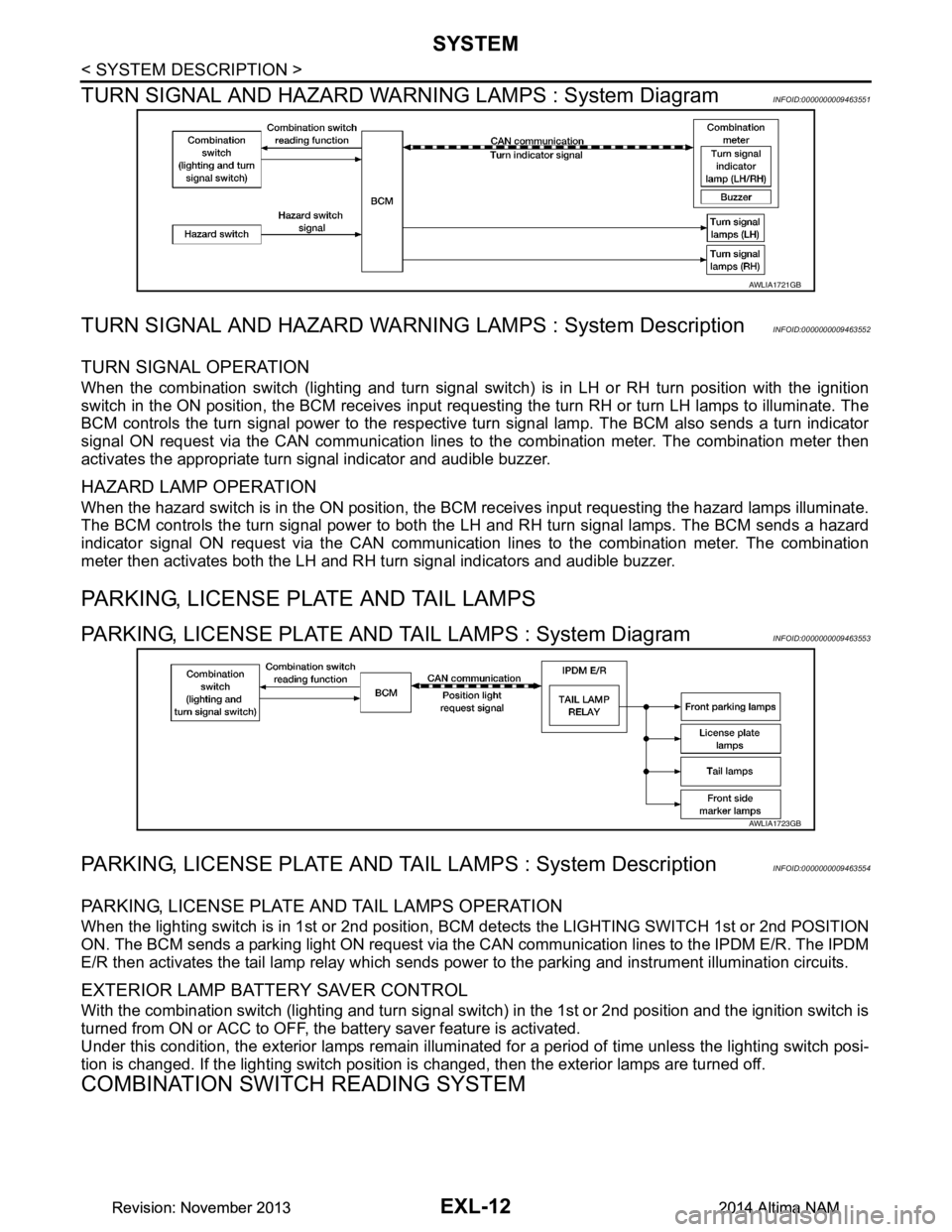
TURN SIGNAL AND HAZARD WARNI NG LAMPS : System Diagram
INFOID:0000000009463551
TURN SIGNAL AND HAZARD WARNING LAMPS : System DescriptionINFOID:0000000009463552
TURN SIGNAL OPERATION
When the combination switch (lighting and turn signal swit ch) is in LH or RH turn position with the ignition
switch in the ON position, the BCM receives input reques ting the turn RH or turn LH lamps to illuminate. The
BCM controls the turn signal power to the respective turn signal lamp. The BCM also sends a turn indicator
signal ON request via the CAN communication lines to the combination meter. The combination meter then
activates the appropriate turn signal indicator and audible buzzer.
HAZARD LAMP OPERATION
When the hazard switch is in the ON position, the BC M receives input requesting the hazard lamps illuminate.
The BCM controls the turn signal power to both the LH and RH turn signal lamps. The BCM sends a hazard
indicator signal ON request via the CAN communication lines to the combination meter. The combination
meter then activates both the LH and RH turn signal indicators and audible buzzer.
PARKING, LICENSE PLATE AND TAIL LAMPS
PARKING, LICENSE PLATE AND TAIL LAMPS : System DiagramINFOID:0000000009463553
PARKING, LICENSE PLATE AND TA IL LAMPS : System DescriptionINFOID:0000000009463554
PARKING, LICENSE PLATE AND TAIL LAMPS OPERATION
When the lighting switch is in 1st or 2nd position, BCM detects the LIGHTING SWITCH 1st or 2nd POSITION
ON. The BCM sends a parking light ON request via the CAN communication lines to the IPDM E/R. The IPDM
E/R then activates the tail lamp relay which sends power to the parking and instrument illumination circuits.
EXTERIOR LAMP BATTERY SAVER CONTROL
With the combination switch (lighting and turn signal switch) in the 1st or 2nd position and the ignition switch is
turned from ON or ACC to OFF, the battery saver feature is activated.
Under this condition, the exterior lamps remain illumi nated for a period of time unless the lighting switch posi-
tion is changed. If the lighting switch position is changed, then the exterior lamps are turned off.
COMBINATION SWITCH READING SYSTEM
AWLIA1721GB
AWLIA1723GB
Revision: November 20132014 Altima NAMRevision: November 20132014 Altima NAM
Page 2283 of 4801

DIAGNOSIS SYSTEM (BCM)EXL-17
< SYSTEM DESCRIPTION >
C
D E
F
G H
I
J
K
M A
B
EXL
N
O P
DIAGNOSIS SYSTEM (BCM)
COMMON ITEM
COMMON ITEM : CONSULT Function (BCM - COMMON ITEM)INFOID:0000000009956424
CAUTION:
After disconnecting the CONSULT vehicle interface (VI) from the data link connector, the ignition must
be cycled OFF → ON (for at least 5 seconds) → OFF. If this step is not performed, the BCM may not go
to ”sleep mode”, potentiall y causing a discharged battery and a no-start condition.
APPLICATION ITEM
CONSULT performs the following functions via CAN communication with BCM.
SYSTEM APPLICATION
BCM can perform the following functions.
Direct Diagnostic Mode Description
Ecu Identification The BCM part number is displayed.
Self Diagnostic Result The BCM self diagnostic results are displayed.
Data Monitor The BCM input/output data is displayed in real time.
Active Test The BCM activates outputs to test components.
Work support The settings for BCM functions can be changed.
Configuration • The vehicle specification can be read and saved.
• The vehicle specification can be written when replacing BCM.
CAN Diag Support Mntr The result of transmit/receive diagnosis of CAN communication is displayed.
System Sub System Direct Diagnostic Mode
Ecu Identification
Self Diagnostic Result
Data Monitor
Active Test
Work support
Configuration
CAN Diag Su pport Mntr
Door lock DOOR LOCK ××××
Rear window defogger REAR DEFOGGER ×××
Warning chime BUZZER ××
Interior room lamp timer INT LAMP ×××
Remote keyless entry system MULTI REMOTE ENT ×××
Exterior lamp HEADLAMP ×××
Wiper and washer WIPER ×××
Turn signal and hazard warning lamps FLASHER ××
Air conditioner AIR CONDITIONER ×
Intelligent Key system INTELLIGENT KEY ××××
Combination switch COMB SW ×
BCM BCM × × ×××
Immobilizer IMMU ×××
Interior room lamp battery saver BATTERY SAVER ××
Trunk open TRUNK ×
Vehicle security system THEFT ALM ×××
Revision: November 20132014 Altima NAMRevision: November 20132014 Altima NAM
Page 2427 of 4801

SQUEAK AND RATTLE TROUBLE DIAGNOSESEXT-13
< PERIODIC MAINTENANCE >
C
D E
F
G H
I
J
L
M A
B
EXT
N
O P
1. Loose harness or harness connectors.
2. Front console map/reading lamp lens loose.
3. Loose screws at console attachment points.
SEATS
When isolating seat noise it's important to note the pos ition the seat is in and the load placed on the seat when
the noise is present. These conditions should be duplic ated when verifying and isolating the cause of the
noise.
Cause of seat noise include:
1. Headrest rods and holder
2. A squeak between the seat pad cushion and frame
3. The rear seatback lock and bracket
These noises can be isolated by moving or pressing on the suspected components while duplicating the con-
ditions under which the noise occurs. Most of thes e incidents can be repaired by repositioning the component
or applying urethane tape to the contact area.
UNDERHOOD
Some interior noise may be caused by components under the hood or on the engine wall. The noise is then
transmitted into the passenger compartment.
Causes of transmitted underhood noise include:
1. Any component installed to the engine wall
2. Components that pass through the engine wall
3. Engine wall mounts and connectors
4. Loose radiator installation pins
5. Hood bumpers out of adjustment
6. Hood striker out of adjustment
These noises can be difficult to isolate since they cannot be reached from the interior of the vehicle. The best
method is to secure, move or insulate one component at a time and test drive the vehicle. Also, engine rpm or
load can be changed to isolate the noise. Repairs can usually be made by moving, adjusting, securing, or
insulating the component causing the noise.
Revision: November 20132014 Altima NAM
Page 2560 of 4801
GI-32
< PRECAUTION >
LIFTING POINT
LIFTING POINT
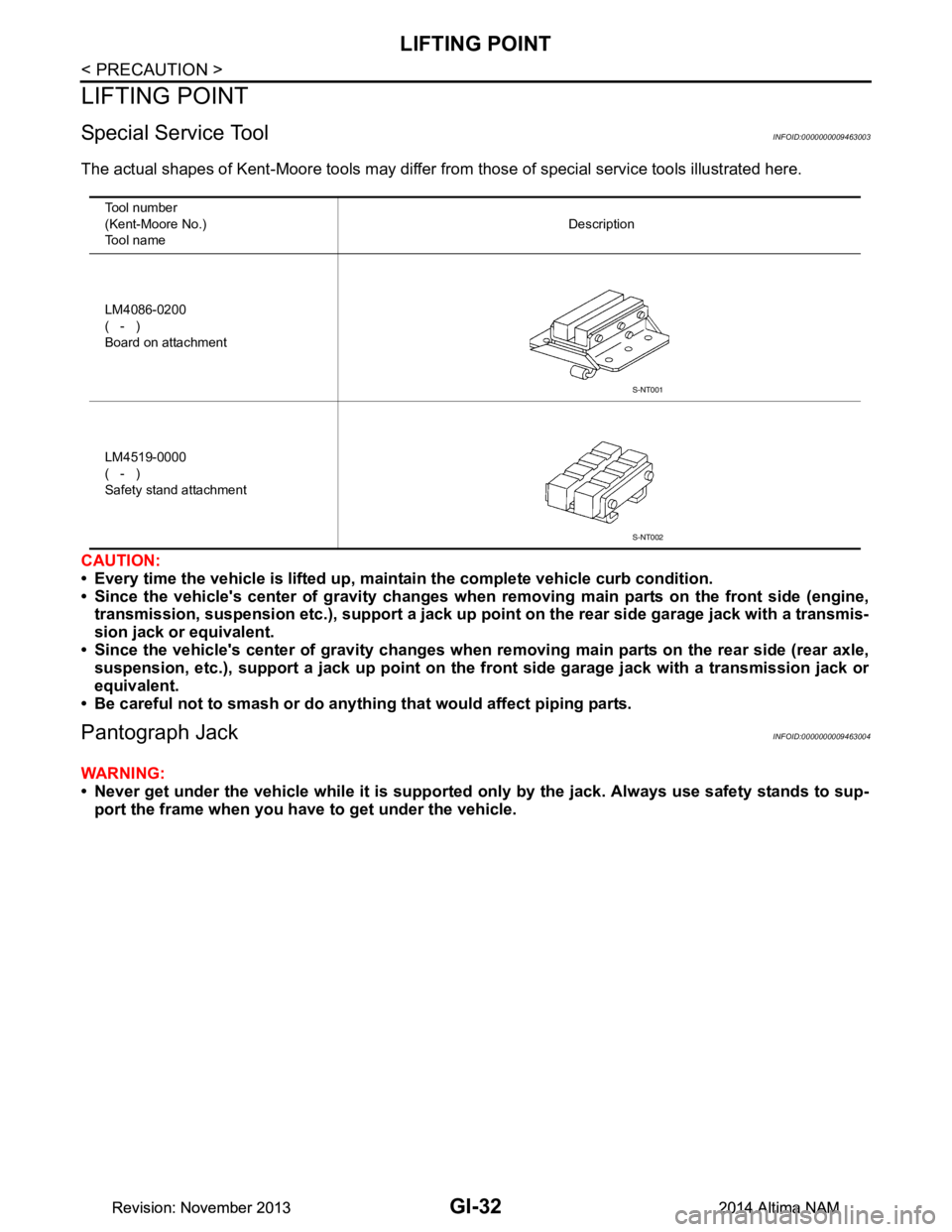
Special Service ToolINFOID:0000000009463003
The actual shapes of Kent-Moore tools may differ from those of special service tools illustrated here.
CAUTION:
• Every time the vehicle is lifted up, main tain the complete vehicle curb condition.
• Since the vehicle's center of gravity changes when removing main parts on the front side (engine,
transmission, suspension etc.), supp ort a jack up point on the rear side garage jack with a transmis-
sion jack or equivalent.
• Since the vehicle's center of gravity changes when removing main parts on the rear side (rear axle,
suspension, etc.), support a jack up point on the front side garage jack with a transmission jack or
equivalent.
• Be careful not to smash or do anythi ng that would affect piping parts.
Pantograph JackINFOID:0000000009463004
WARNING:
• Never get under the vehicle while it is supported only by the jack. Always use safety stands to sup-
port the frame when you have to get under the vehicle.
Tool number
(Kent-Moore No.)
Tool name Description
LM4086-0200
( - )
Board on attachment
LM4519-0000
( - )
Safety stand attachment
S-NT001
S-NT002
Revision: November 20132014 Altima NAMRevision: November 20132014 Altima NAM
Page 2574 of 4801
GI-46
< BASIC INSPECTION >
SERVICE INFORMATION FOR ELECTRICAL INCIDENT
Circuit Inspection
INFOID:0000000009463015
DESCRIPTION
• In general, testing electrical circuits is an easy ta sk if it is approached in a logical and organized method.
Before beginning it is important to have all available in formation on the system to be tested. Also, get a thor-
ough understanding of system operation. Then you will be able to use the appropriate equipment and follow
the correct test procedure.
• You may have to simulate vehicle vibrations while te sting electrical components. Gently shake the wiring
harness or electrical component to do this.
NOTE:
Refer to GI-40, "How to Check Terminal"
to probe or check terminal.
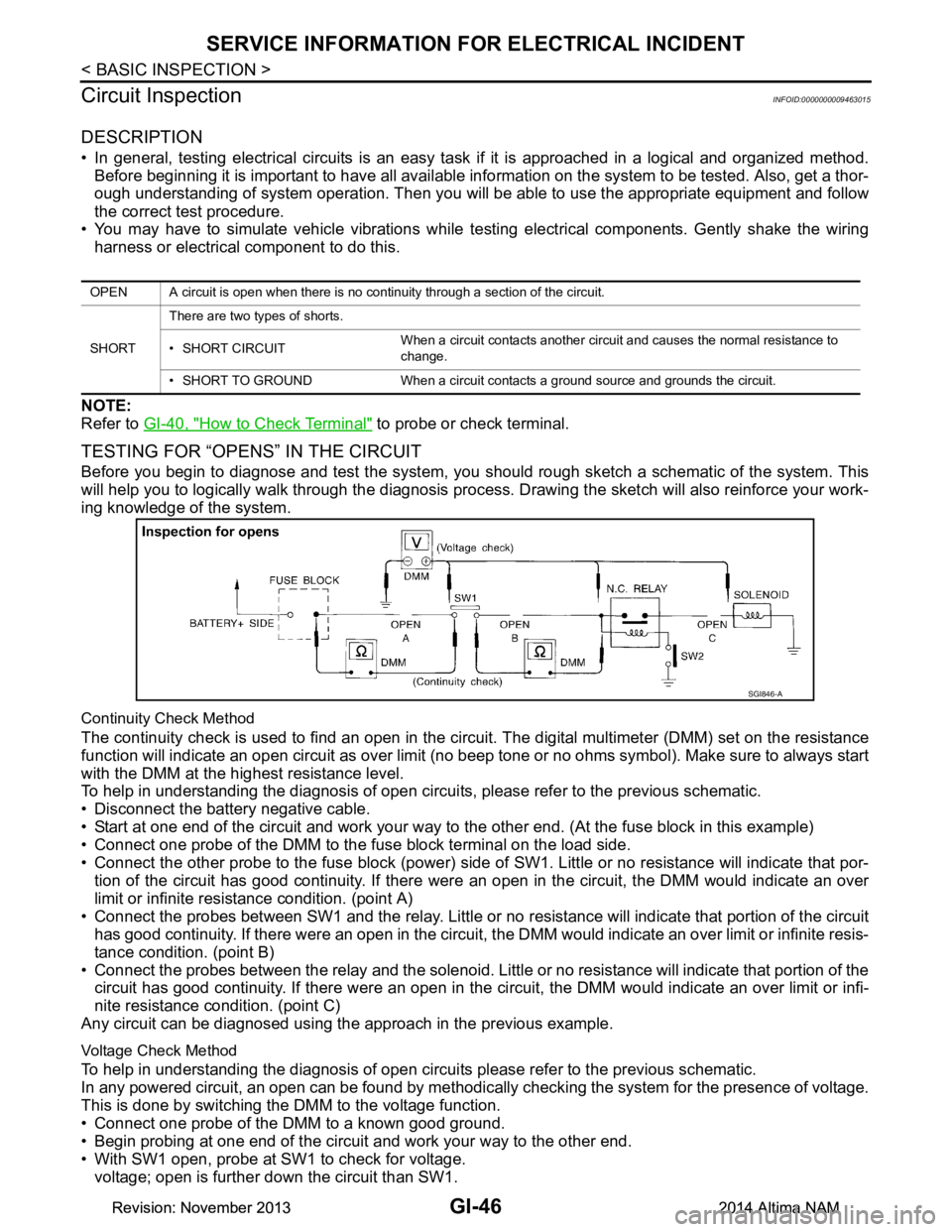
TESTING FOR “OPENS” IN THE CIRCUIT
Before you begin to diagnose and test the system, you should rough sketch a schematic of the system. This
will help you to logically walk through the diagnosis process. Drawing the sketch will also reinforce your work-
ing knowledge of the system.
Continuity Check Method
The continuity check is used to find an open in the circ uit. The digital multimeter (DMM) set on the resistance
function will indicate an open circuit as over limit (no beep tone or no ohms symbol). Make sure to always start
with the DMM at the highest resistance level.
To help in understanding the diagnosis of open circui ts, please refer to the previous schematic.
• Disconnect the battery negative cable.
• Start at one end of the circuit and work your way to the other end. (At the fuse block in this example)
• Connect one probe of the DMM to the fuse block terminal on the load side.
• Connect the other probe to the fuse block (power) side of SW1. Little or no resistance will indicate that por-
tion of the circuit has good continuity. If there were an open in the circuit, the DMM would indicate an over
limit or infinite resistance condition. (point A)
• Connect the probes between SW1 and the relay. Little or no resistance will indicate that portion of the circuit
has good continuity. If there were an open in the circuit, t he DMM would indicate an over limit or infinite resis-
tance condition. (point B)
• Connect the probes between the relay and the solenoid. Little or no resistance will indicate that portion of the
circuit has good continuity. If there were an open in the ci rcuit, the DMM would indicate an over limit or infi-
nite resistance condition. (point C)
Any circuit can be diagnosed using the approach in the previous example.
Voltage Check Method
To help in understanding the diagnosis of open circui ts please refer to the previous schematic.
In any powered circuit, an open can be found by methodica lly checking the system for the presence of voltage.
This is done by switching the DMM to the voltage function.
• Connect one probe of the DMM to a known good ground.
• Begin probing at one end of the circuit and work your way to the other end.
• With SW1 open, probe at SW1 to check for voltage. voltage; open is further down the circuit than SW1.
OPEN A circuit is open when there is no continuity through a section of the circuit.
SHORT There are two types of shorts.
• SHORT CIRCUIT When a circuit contacts another circuit and causes the normal resistance to
change.
• SHORT TO GROUND When a circuit contacts a ground source and grounds the circuit.
SGI846-A
Revision: November 20132014 Altima NAMRevision: November 20132014 Altima NAM
Page 2579 of 4801
CONSULT CHECKING SYSTEMGI-51
< BASIC INSPECTION >
C
D E
F
G H
I
J
K L
M B
GI
N
O PCONSULT CHECKING SYSTEM
DescriptionINFOID:0000000009463016
CAUTION:
After disconnecting the CONSULT vehicle interface (VI) from the data link connector, the ignition must
be cycled OFF → ON (for at least 5 seconds) → OFF. If this step is not performed, the BCM may not go
to “sleep mode”, potentiall y causing a discharged battery and a no-start condition.
NOTE:
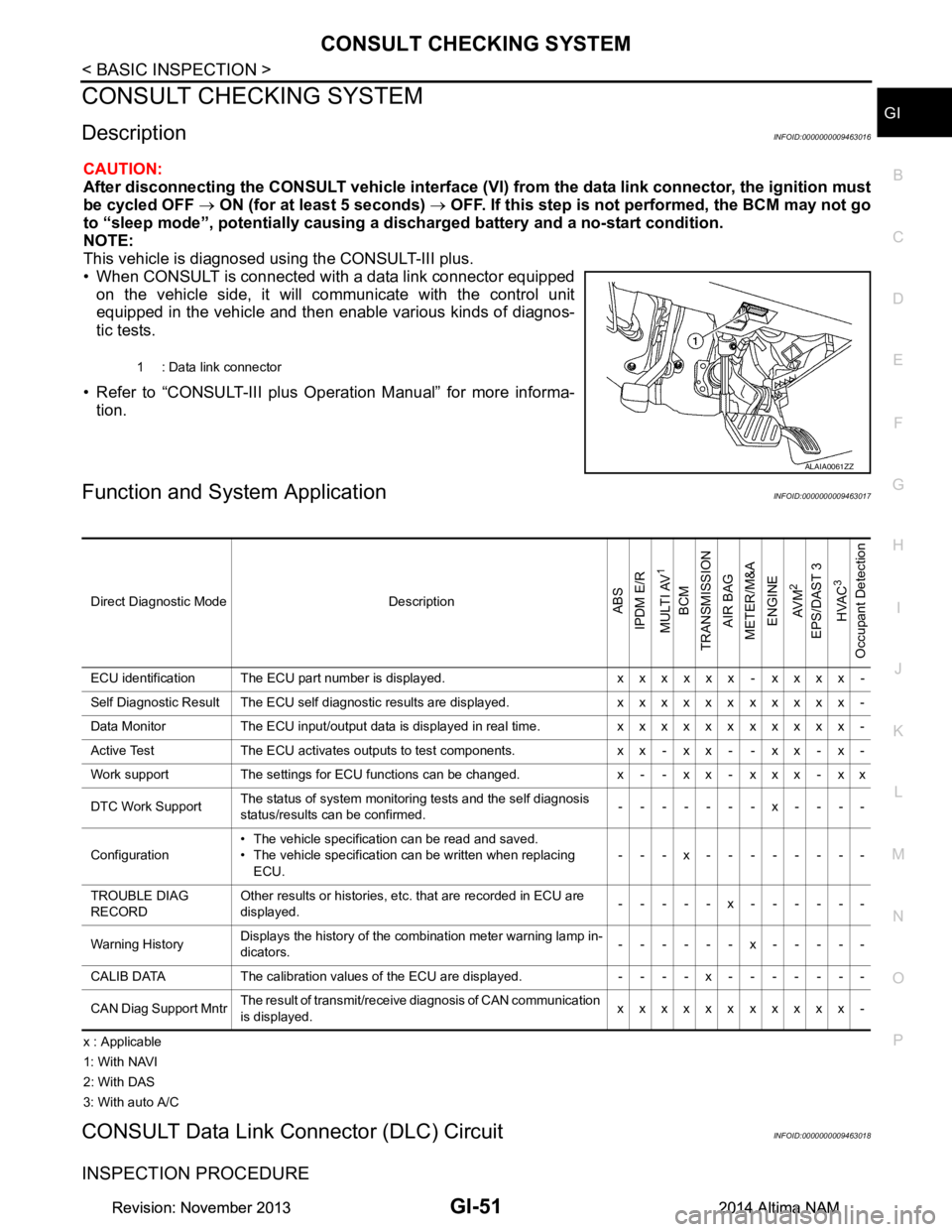
This vehicle is diagnosed using the CONSULT-III plus.
• When CONSULT is connected with a data link connector equipped on the vehicle side, it will communicate with the control unit
equipped in the vehicle and then enable various kinds of diagnos-
tic tests.
• Refer to “CONSULT-III plus Operation Manual” for more informa- tion.
Function and System ApplicationINFOID:0000000009463017
x : Applicable
1: With NAVI
2: With DAS
3: With auto A/C
CONSULT Data Link Connector (DLC) CircuitINFOID:0000000009463018
INSPECTION PROCEDURE
1 : Data link connector
ALAIA0061ZZ
Direct Diagnostic Mode DescriptionABS
IPDM E/R
MULTI AV
1
BCM
TRANSMISSION
AIR BAG
METER/M&A
ENGINE
AV M
2
EPS/DAST 3 HVAC
3
Occupant Detection
ECU identification The ECU part number is displayed. x x x x x x - x x x x -
Self Diagnostic Result The ECU self diagnostic results are displayed. x x x x x x x x x x x -
Data Monitor The ECU input/output data is displayed in real time. x x x x x x x x x x x -
Active Test The ECU activates outputs to test components. x x - x x - - x x - x -
Work support The settings for ECU functions can be changed. x - - x x - x x x - x x
DTC Work Support The status of system monitoring tests and the self diagnosis
status/results can be confirmed. -------x----
Configuration • The vehicle specification can be read and saved.
• The vehicle specification can be written when replacing ECU. ---x--------
TROUBLE DIAG
RECORD Other results or histories, etc. that are recorded in ECU are
displayed. -----x------
Warning History Displays the history of the combination meter warning lamp in-
dicators. ------x-----
CALIB DATA The calibration values of the ECU are displayed. - - - - x - - - - - - -
CAN Diag Support Mntr The result of transmit/receive diagnosis of CAN communication
is displayed. xxxxxxxxxxx-
Revision: November 20132014 Altima NAMRevision: November 20132014 Altima NAM
Page 2588 of 4801

GW-8
< SYMPTOM DIAGNOSIS >
SQUEAK AND RATTLE TROUBLE DIAGNOSES
1. Loose harness or harness connectors.
2. Front console map/reading lamp lens loose.
3. Loose screws at console attachment points.
SEATS
When isolating seat noise it's important to note the pos ition the seat is in and the load placed on the seat when
the noise is present. These conditions should be dupl icated when verifying and isolating the cause of the
noise.
Cause of seat noise include:
1. Headrest rods and holder
2. A squeak between the seat pad cushion and frame
3. The rear seatback lock and bracket
These noises can be isolated by moving or pressing on the suspected components while duplicating the con-
ditions under which the noise occurs. Most of thes e incidents can be repaired by repositioning the component
or applying urethane tape to the contact area.
UNDERHOOD
Some interior noise may be caused by components under the hood or on the engine wall. The noise is then
transmitted into the passenger compartment.
Causes of transmitted underhood noise include:
1. Any component installed to the engine wall
2. Components that pass through the engine wall
3. Engine wall mounts and connectors
4. Loose radiator installation pins
5. Hood bumpers out of adjustment
6. Hood striker out of adjustment
These noises can be difficult to isolate since they cannot be reached from the interior of the vehicle. The best
method is to secure, move or insulate one component at a time and test drive the vehicle. Also, engine rpm or
load can be changed to isolate the noise. Repairs can usually be made by moving, adjusting, securing, or
insulating the component causing the noise.
Revision: November 20132014 Altima NAM
Page 2623 of 4801
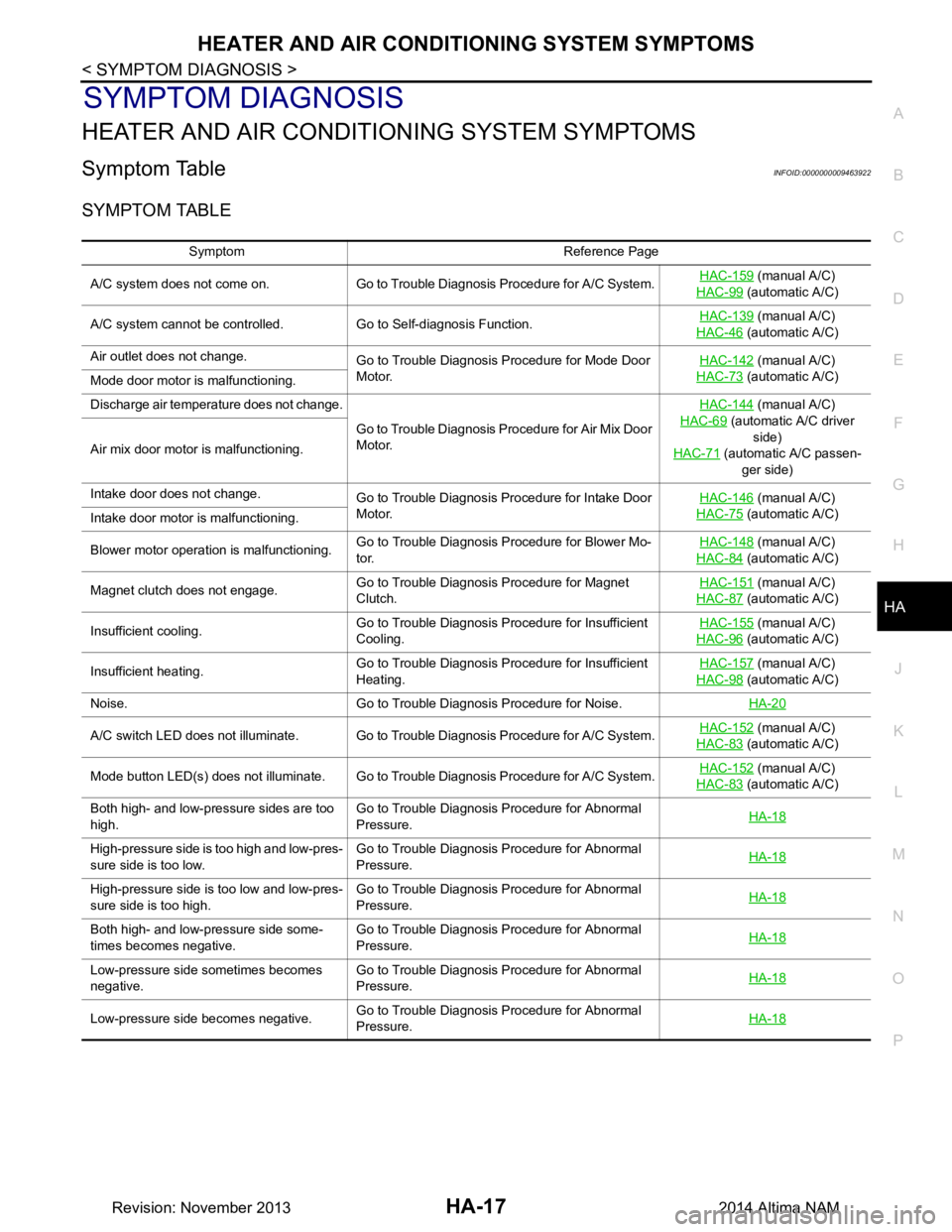
HEATER AND AIR CONDITIONING SYSTEM SYMPTOMS
HA-17
< SYMPTOM DIAGNOSIS >
C
D E
F
G H
J
K L
M A
B
HA
N
O P
SYMPTOM DIAGNOSIS
HEATER AND AIR CONDITIONING SYSTEM SYMPTOMS
Symptom TableINFOID:0000000009463922
SYMPTOM TABLE
Symptom Reference Page
A/C system does not come on. Go to Trouble Diagnosis Procedure for A/C System. HAC-159
(manual A/C)
HAC-99
(automatic A/C)
A/C system cannot be controlled. Go to Self-diagnosis Function. HAC-139
(manual A/C)
HAC-46
(automatic A/C)
Air outlet does not change. Go to Trouble Diagnosis Procedure for Mode Door
Motor. HAC-142
(manual A/C)
HAC-73
(automatic A/C)
Mode door motor is malfunctioning.
Discharge air temperature does not change.
Go to Trouble Diagnosis Procedure for Air Mix Door
Motor. HAC-144
(manual A/C)
HAC-69
(automatic A/C driver side)
HAC-71
(automatic A/C passen-
ger side)
Air mix door motor is malfunctioning.
Intake door does not change.
Go to Trouble Diagnosis Procedure for Intake Door
Motor. HAC-146
(manual A/C)
HAC-75
(automatic A/C)
Intake door motor is malfunctioning.
Blower motor operation is malfunctioning. Go to Trouble Diagnosis Procedure for Blower Mo-
tor. HAC-148
(manual A/C)
HAC-84
(automatic A/C)
Magnet clutch does not engage. Go to Trouble Diagnosis Procedure for Magnet
Clutch. HAC-151
(manual A/C)
HAC-87
(automatic A/C)
Insufficient cooling. Go to Trouble Diagnosis Procedure for Insufficient
Cooling. HAC-155
(manual A/C)
HAC-96
(automatic A/C)
Insufficient heating. Go to Trouble Diagnosis Procedure for Insufficient
Heating. HAC-157
(manual A/C)
HAC-98
(automatic A/C)
Noise. Go to Trouble Diagnosis Procedure for Noise. HA-20
A/C switch LED does not illuminate. Go to Trouble Diagnosis Procedure for A/C System.HAC-152 (manual A/C)
HAC-83
(automatic A/C)
Mode button LED(s) does not illuminate. Go to Trouble Diagnosis Procedure for A/C System. HAC-152
(manual A/C)
HAC-83
(automatic A/C)
Both high- and low-pressure sides are too
high. Go to Trouble Diagnosis Procedure for Abnormal
Pressure. HA-18
High-pressure side is too high and low-pres-
sure side is too low. Go to Trouble Diagnosis Procedure for Abnormal
Pressure. HA-18
High-pressure side is too low and low-pres-
sure side is too high. Go to Trouble Diagnosis Procedure for Abnormal
Pressure. HA-18
Both high- and low-pressure side some-
times becomes negative. Go to Trouble Diagnosis Procedure for Abnormal
Pressure. HA-18
Low-pressure side sometimes becomes
negative. Go to Trouble Diagnosis Procedure for Abnormal
Pressure. HA-18
Low-pressure side becomes negative.
Go to Trouble Diagnosis Procedure for Abnormal
Pressure. HA-18
Revision: November 20132014 Altima NAM
Page 2660 of 4801
![NISSAN TEANA 2014 Workshop Manual
COMPONENT PARTSHAC-11
< SYSTEM DESCRIPTION > [AUTOMATIC AIR CONDITIONER]
C
D E
F
G H
J
K L
M A
B
HAC
N
O P
Air mix door motor RH The air mix door controls the mix of hot or cold air that enters th](/img/5/57390/w960_57390-2659.png "NISSAN TEANA 2014 Workshop Manual
COMPONENT PARTSHAC-11
< SYSTEM DESCRIPTION > [AUTOMATIC AIR CONDITIONER]
C
D E
F
G H
J
K L
M A
B
HAC
N
O P
Air mix door motor RH The air mix door controls the mix of hot or cold air that enters th")
COMPONENT PARTSHAC-11
< SYSTEM DESCRIPTION > [AUTOMATIC AIR CONDITIONER]
C
D E
F
G H
J
K L
M A
B
HAC
N
O P
Air mix door motor RH The air mix door controls the mix of hot or cold air that enters the ventilation system. It is controlled
by the A/C auto amp. based on the position of the temperature dial. The air mix door motor RH re-
ceives position commands from the A/C auto amp. and reports actual door position back via an LCU
(Local Control Unit) installed inside the motor. Commands and responses are sent across the LIN (Lo-
cal Interconnect Network) to each motor simultaneously, with each motor having its own unique ad-
dress, thereby only responding to requests sent to its specific address. The LCU reads the door
position from a Position Balanced Resistor (PBR), also part of the motor, and returns that information
to the A/C auto amp. The LCU switches the polarity of the circuits connected to the DC motor to drive
the motor forward or backward as requested by the A/C auto amp. If the air mix door moves to a po-
sition less than 5% or more than 95% of its expected or allowed positions, the A/C auto amp. will set
a DTC.
Ambient sensor The ambient sensor measures the temperature of the air surrounding the vehicle. The sensor uses a
thermistor which is sensitive to the change in temperature. The electrical resistance of the thermistor
decreases as temperature increases.
BCM The BCM receives the fan ON and A/C ON signals from the A/C auto amp. and sends a compressor
ON request to the ECM.
Blower motor The blower motor varies the speed at which the air flows through the ventilation system.
ECM The ECM sends a compressor ON request to the IPDM E/R based on the status of engine operation
and load as well as refrigerant pressure information. If all the conditions are met for A/C operation,
the ECM transmits the compressor ON request to the IPDM E/R. The ECM shares the refrigerant
pressure sensor signal, engine RPM, and engine coolant temperature with the A/C auto amp. via
CAN communication line.
Front blower motor relay The front blower motor relay controls the flow of current to fuse 17 and 27 in the Fuse Block (J/B).
The relay is connected directly to ground, and is energized when the ignition switch is in the ON or
START position.
Fuse Block (J/B) Located in the passenger compartment, behind the left lower IP, the Fuse Block (J/B) contains the
front blower motor relay and several fuses required for the air conditioner control system.
Intake door motor The intake door motor controls the position of the intake door. Fresh air is allowed to enter the cabin
in one position, and recirculated inside air is allowed to enter in the other position. At times the A/C
auto amp. may command partial fresh or recirculation based on evaporator or coolant temperatures.
The intake door motor receives position commands from the A/C auto amp. and reports actual door
position back via an LCU (Local Control Unit) installed inside the motor. Commands and responses
are sent across the LIN (Local Interconnect Network) to each motor simultaneously, with each motor
having its own unique address, thereby only responding to requests sent to its specific address. The
LCU reads the door position from a Position Balanced Resistor (PBR), also part of the motor, and re-
turns that information to the A/C auto amp. The LCU switches the polarity of the circuits connected to
the DC motor to drive the motor forward or backward as requested by the A/C auto amp. If the recir-
culation door moves to a position less than 5% or more than 95% of its expected or allowed positions,
the A/C auto amp. will set a DTC.
Intake sensor The intake sensor measures the temperature of the front evaporator fins. The sensor uses a ther-
mistor which is sensitive to the change in temperature. The electrical resistance of the thermistor de-
creases as temperature increases.
In-vehicle sensor In-vehicle sensor measures temperature of intake air that flows through aspirator to passenger room.
The sensor uses a thermistor which is sensitive to the change in temperature. The electrical resis-
tance of the thermistor decreases as temperature increases.
IPDM E/R Refer to PCS-6, "RELAY CONTROL SYSTEM : System Description"
.
Mode door motor The mode door controls the direction the conditioned air passes through the ventilation system.
Through a series of levers and gears, the mode door controls the defrost door, the foot door, and the
vent door. There are 5 preset positions: VENT, B/L, FOOT, D/F, and DEF. The FOOT position can be
set to allow some airflow through to the defroster vent, or to completely block the defroster vent using
the CONSULT. The mode door motor receives position commands from the A/C auto amp. and re-
ports actual door position back via an LCU (Local Control Unit) installed inside the motor. Commands
and responses are sent across the LIN (Local Interconnect Network) to each motor simultaneously,
with each motor having its own unique address, thereby only responding to requests sent to its spe-
cific address. The LCU reads the door position from a Position Balanced Resistor (PBR), also part of
the motor, and returns that information to the A/C auto amp. The LCU switches the polarity of the cir-
cuits connected to the DC motor to drive the motor forward or backward as requested by the A/C auto
amp. The mode door has 5 expected positions and, therefore, can set up to 5 DTCs if the expected
position is not reported back to the A/C auto amp.
Component Description
Revision: November 20132014 Altima NAMRevision: November 20132014 Altima NAM
Page 2671 of 4801
![NISSAN TEANA 2014 Workshop Manual
HAC-22
< SYSTEM DESCRIPTION >[AUTOMATIC AIR CONDITIONER]
OPERATION
AUTO switchTurns the switch indicator lamp and "AUTO" indicator on the display ON, and then front air condition-
ing system becomes](/img/5/57390/w960_57390-2670.png "NISSAN TEANA 2014 Workshop Manual
HAC-22
< SYSTEM DESCRIPTION >[AUTOMATIC AIR CONDITIONER]
OPERATION
AUTO switchTurns the switch indicator lamp and \"AUTO\" indicator on the display ON, and then front air condition-
ing system becomes")
HAC-22
< SYSTEM DESCRIPTION >[AUTOMATIC AIR CONDITIONER]
OPERATION
AUTO switchTurns the switch indicator lamp and "AUTO" indicator on the display ON, and then front air condition-
ing system becomes the following state.
• Air inlet: Automatic control
• Air outlet: Automatic control
• Blower fan: Automatic control
• Compressor: ON
Defroster switch Turns defroster mode (swi
tch indicator) between ON ⇔ OFF each time.
When defroster switch is pressed while front air conditioning system is in the ON position.
• When defroster mode is turned ON, front air conditioning system becomes the following state.
- Air inlet: Fresh air intake
- Air outlet: DEF
- Blower fan: Automatic control (If fan speed other than AUTO is selected before pressing defroster
switch, fan speed is manual control.)
- Compressor: ON
• When defroster mode is turned OFF, front air conditioning system state returns to the previous state
before defroster mode is selected. But, the following state is continued.
- Air inlet: Fresh air intake
- Compressor: ON
When defroster switch is pressed while front air conditioning system is in the OFF position.
• When defroster mode is turned ON, front air conditioning system becomes the following state.
- Air inlet: Fresh air intake
- Air outlet: Defroster
- Blower fan: Automatic control
- Compressor: ON
• When defroster mode is turned OFF, entire front air conditioning system is set to auto mode.
NOTE:
When defroster mode turns ON while front air conditioning system is in automatic control (“AUTO” is
indicated), automatic control is released (“AUTO” turns OFF).
DUAL switch • Turns left and right ventilation temperature control (switch indicator) between ON
⇔ OFF each
time.
• When DUAL switch indicator is ON, the driver side and passenger side temperatures can each be
set independently.
• When DUAL switch indicator is OFF, the driver side outlet and setting temperature is applied to both sides.
• Left and right ventilation temperature control is cancelled by turning the DEF mode ON.
NOTE:
When front air conditioning system is in the OFF position, left and right ventilation temperature control
can be selected only while front air conditioning system state (when MODE switch is pressed) is in-
dicated on the display.
Fan switch (UP/DOWN) Blower fan speed is manually controlled with these switches. Seven speeds are available for manual
control (as shown on the display screen).
NOTE:
• When fan switch is pressed while front air conditioning system is in OFF, front air conditioning sys- tem is activated. (Compressor control state returns to the previous state before front air condition-
ing system OFF.)
• When fan switch is pressed while front air conditioning system is in automatic control (“AUTO” is indicated), automatic control is released (“AUTO” turns OFF).
A/C switch Compressor control (switch in
dicator) changes between ON ⇔ OFF each time this switch is pressed
while front blower motor is operated.
NOTE:
• A/C switch cannot be turned ON when front blower motor is OFF.
• A/C switch cannot be turned OFF when air outlet is D/F or DEF.
• Air inlet changes to fresh air intake when A/C switch is turned OFF while air inlet is set to recircu- lation.
MODE switch Selects air outlet sequentially from VENT
⇒ B/L ⇒ FOOT ⇒ D/F ⇒ VENT each time.
NOTE:
• When front air conditioning system is in the OFF position, air outlet can be selected.
• When MODE switch is pressed while front air conditioning system is in automatic control (“AUTO” is indicated), automatic control is released (“AUTO” turns OFF).
ON/OFF switch • Turns front air conditioning system ON/OFF.
• When front air conditioning system turns OFF, air inlet and air outlet become the automatic control.
Revision: November 20132014 Altima NAMRevision: November 20132014 Altima NAM