wheel NISSAN TEANA 2014 Repair Manual
[x] Cancel search | Manufacturer: NISSAN, Model Year: 2014, Model line: TEANA, Model: NISSAN TEANA 2014Pages: 4801, PDF Size: 51.2 MB
Page 378 of 4801
CHG
GENERATORCHG-33
< REMOVAL AND INSTALLATION >
C
D E
F
G H
I
J
K L
B
A
O P
N
• This model is equipped with a power generation voltage
variable control system. Therefore, perform an
inspection of the power generation voltage variable c ontrol system operation after replacing the generator.
Refer to CHG-10, "System Description"
.
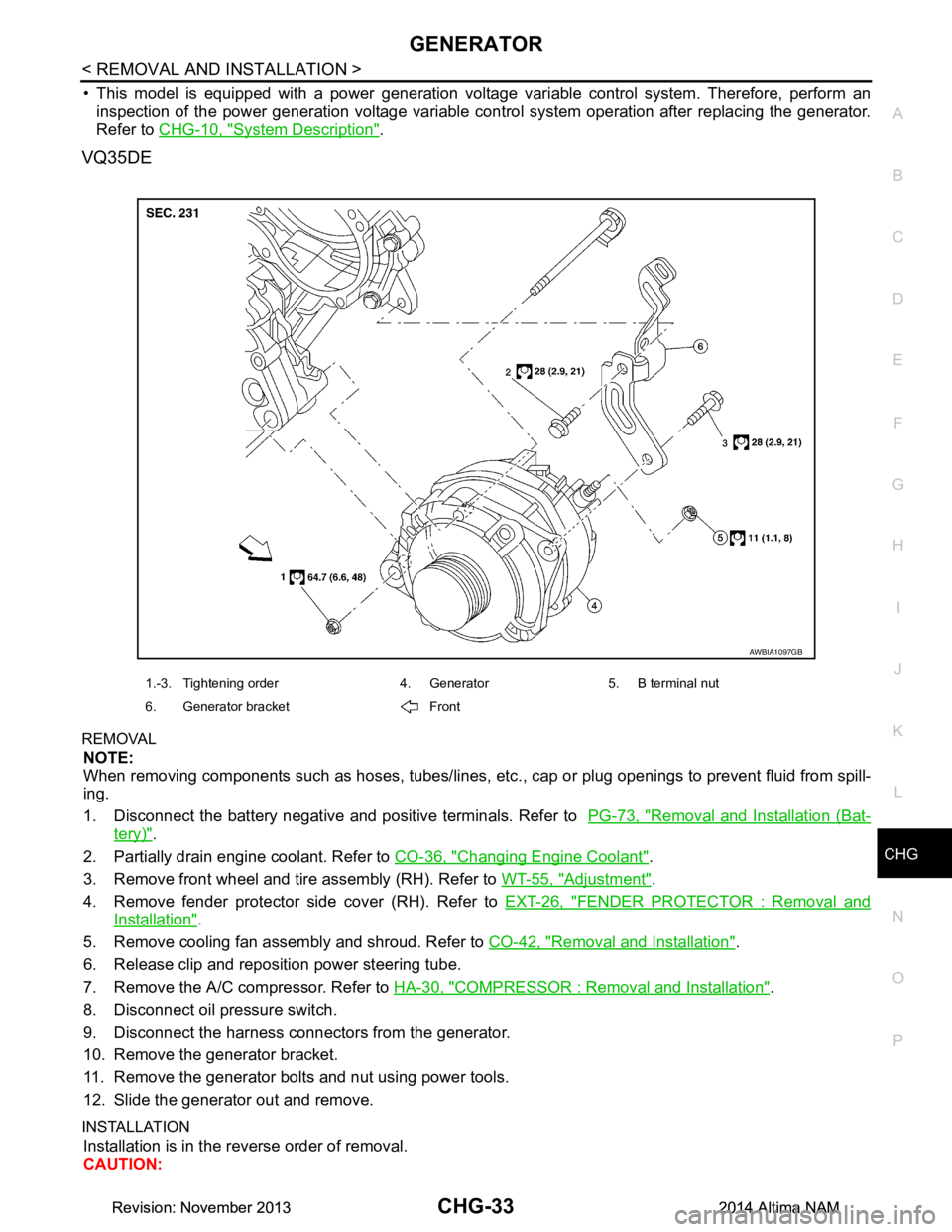
VQ35DE
REMOVAL
NOTE:
When removing components such as hoses, tubes/lines, etc. , cap or plug openings to prevent fluid from spill-
ing.
1. Disconnect the battery negative and positive terminals. Refer to PG-73, "Removal and Installation (Bat-
tery)".
2. Partially drain engine coolant. Refer to CO-36, "Changing Engine Coolant"
.
3. Remove front wheel and tire assembly (RH). Refer to WT-55, "Adjustment"
.
4. Remove fender protector side cover (RH). Refer to EXT-26, "FENDER PROTECTOR : Removal and
Installation".
5. Remove cooling fan assembly and shroud. Refer to CO-42, "Removal and Installation"
.
6. Release clip and reposition power steering tube.
7. Remove the A/C compressor. Refer to HA-30, "COMPRESSOR : Removal and Installation"
.
8. Disconnect oil pressure switch.
9. Disconnect the harness connectors from the generator.
10. Remove the generator bracket.
11. Remove the generator bolts and nut using power tools.
12. Slide the generator out and remove.
INSTALLATION
Installation is in the reverse order of removal.
CAUTION:
AWBIA1097GB
1.-3. Tightening order 4. Generator 5. B terminal nut
6. Generator bracket Front
Revision: November 20132014 Altima NAMRevision: November 20132014 Altima NAM
Page 390 of 4801
![NISSAN TEANA 2014 Repair Manual
CO-10
< SYSTEM DESCRIPTION >[QR25DE]
OVERHEATING CAUSE ANALYSIS
Except cool-
ing system
parts mal-
function — Overload on engine
Abusive driving
High engine rpm under no
load
Driving in low g](/img/5/57390/w960_57390-389.png "NISSAN TEANA 2014 Repair Manual
CO-10
< SYSTEM DESCRIPTION >[QR25DE]
OVERHEATING CAUSE ANALYSIS
Except cool-
ing system
parts mal-
function — Overload on engine
Abusive driving
High engine rpm under no
load
Driving in low g")
CO-10
< SYSTEM DESCRIPTION >[QR25DE]
OVERHEATING CAUSE ANALYSIS
Except cool-
ing system
parts mal-
function — Overload on engine
Abusive driving
High engine rpm under no
load
Driving in low gear for ex-
tended time
Driving at extremely high
speed
Powertrain sy stem malfunc-
tion
—
Installed improper size
wheels and tires
Dragging brakes
Improper ignition timing
Blocked or restricted air
flow Blocked radiator grille Installed car brassiere
—
Mud contamination or paper
clogging
Blocked bumper
Blocked radiator
Blocked condenser
Installed large fog lamp
Symptom Check items
Revision: November 20132014 Altima NAM
Page 414 of 4801
![NISSAN TEANA 2014 Repair Manual
CO-34
< SYSTEM DESCRIPTION >[VQ35DE]
OVERHEATING CAUSE ANALYSIS
Except cool-
ing system
parts mal-
function — Overload on engine
Abusive driving
High engine rpm under no
load
Driving in low g](/img/5/57390/w960_57390-413.png "NISSAN TEANA 2014 Repair Manual
CO-34
< SYSTEM DESCRIPTION >[VQ35DE]
OVERHEATING CAUSE ANALYSIS
Except cool-
ing system
parts mal-
function — Overload on engine
Abusive driving
High engine rpm under no
load
Driving in low g")
CO-34
< SYSTEM DESCRIPTION >[VQ35DE]
OVERHEATING CAUSE ANALYSIS
Except cool-
ing system
parts mal-
function — Overload on engine
Abusive driving
High engine rpm under no
load
Driving in low gear for ex-
tended time
Driving at extremely high
speed
Powertrain sy stem malfunc-
tion
—
Installed improper size
wheels and tires
Dragging brakes
Improper ignition timing
Blocked or restricted air
flow Blocked bumper Blocked air flow
—
Blocked radiator grille
Installed car brassiere
Mud contamination or paper
clogging
Blocked radiator Blocked air flow
Blocked condenser
Installed large fog lamp
Symptom Check items
Revision: November 20132014 Altima NAM
Page 425 of 4801
![NISSAN TEANA 2014 Repair Manual
WATER PUMPCO-45
< REMOVAL AND INSTALLATION > [VQ35DE]
C
D E
F
G H
I
J
K L
M A
CO
NP
O
4. Remove cowl top extension. Refer to
EXT-24, "Removal and Installation".
5. Remove the front road wheel and t](/img/5/57390/w960_57390-424.png "NISSAN TEANA 2014 Repair Manual
WATER PUMPCO-45
< REMOVAL AND INSTALLATION > [VQ35DE]
C
D E
F
G H
I
J
K L
M A
CO
NP
O
4. Remove cowl top extension. Refer to
EXT-24, \"Removal and Installation\".
5. Remove the front road wheel and t")
WATER PUMPCO-45
< REMOVAL AND INSTALLATION > [VQ35DE]
C
D E
F
G H
I
J
K L
M A
CO
NP
O
4. Remove cowl top extension. Refer to
EXT-24, "Removal and Installation".
5. Remove the front road wheel and tire (RH). Refer to WT-55, "Adjustment"
.
6. Remove the fender protector (RH). Refer to EXT-26, "FENDER PROTECTOR : Removal and Installation"
.
7. Drain coolant from the radiator. Refer to CO-36, "Changing Engine Coolant"
.
CAUTION:
Perform when the engine is cold.
8. Disconnect coolant reservoir hose and remove coolant reservoir tank. Refer to CO-40, "Exploded View"
.
9. Drain the power steering fluid reservoir. Refer to ST-30, "Draining and Refilling"
.
10. Remove the power steering oil pump. Refer to ST-38, "Removal and Installation"
.
11. Support engine and remove the RH engine insulator and bracket. Refer to EM-220, "Exploded View"
.
12. Set No. 1 cylinder at TDC on its compression stroke. • Align pointer with TDC mark on crankshaft pulley.
13. Remove drive belt. Refer to EM-134, "Removal and Installation"
.
14. Remove the drive belt auto-tensioner assembly. Refer to EM-135, "Removal and Installation of Drive Belt
Auto-tensioner".
15. Remove water drain plug (A) and copper sealing washer (B) to drain coolant from engine.
CAUTION:
Do not reuse copper sealing washers.
16. Disconnect RH valve timing control connectors and remo ve valve timing control cover (bank 1). Refer to
EM-182, "Exploded View"
.
17. Remove water pump cover. Refer to CO-44, "Exploded View"
.
18. Remove the timing chain tensioner (primary) as follows:
a. Pull the lever (C) down to release the plunger stopper tab (B).
b. Insert the stopper pin A into the tensioner body hole to hold the lever (C) and keep the plunger stopper tab (B) released.
NOTE:
An allen wrench [(1.2 mm (0.047 in)] is used for a stopper pin A
as an example.
c. Compress the plunger (D) into the tensioner body (1) by press- ing the slack guide (2).
d. Keep the slack guide (2) pressed and lock the plunger (D) in by pushing the stopper pin A through the lever (C) and into the
chain tensioner body hole.
e. Remove timing chain tensioner bolts and then remove the timing chain tensioner. CAUTION:
Be careful not to drop timing chain te nsioner bolts inside timing chain case.
19. Remove the three water pump bolts (A). Make a gap between water pump sprocket (1) and timing chain, by carefully turning
crankshaft pulley (2) counterclockwise until timing chain loosens
on water pump sprocket (1).
: Front
AWBIA1202GB
AWBIA0903ZZ
AWBIA0904ZZ
Revision: November 20132014 Altima NAM
Page 443 of 4801
![NISSAN TEANA 2014 Repair Manual
DAS-10
< SYSTEM DESCRIPTION >[ITS CONTROL UNIT]
COMPONENT PARTS
Component Description
INFOID:0000000009464649
1. Combination meter 2. Vehicle information display 3. BCM (view with combination meter r](/img/5/57390/w960_57390-442.png "NISSAN TEANA 2014 Repair Manual
DAS-10
< SYSTEM DESCRIPTION >[ITS CONTROL UNIT]
COMPONENT PARTS
Component Description
INFOID:0000000009464649
1. Combination meter 2. Vehicle information display 3. BCM (view with combination meter r")
DAS-10
< SYSTEM DESCRIPTION >[ITS CONTROL UNIT]
COMPONENT PARTS
Component Description
INFOID:0000000009464649
1. Combination meter 2. Vehicle information display 3. BCM (view with combination meter re- moved)
4. Blind spot warning indicator RH 5. Blind spot warning indicator LH 6. TCM
7. ECM 8. Warning systems switch 9. Warning systems ON indicator
10. Rear view camera washer control unit 11. Rear view camera air pump motor 12. Rear view camera
13. AV control unit (center display) (with navi- gation system and bose audio system)
Audio unit (center display) (with display
audio system and bose audio system) 14. ITS control unit
(view with center console removed) 15. Steering angle sensor
(view with steeri ng wheel removed)
16. Washer fluid level switch (view with front fascia removed)
Component Description
ITS control unit • Controls each system, based on signals received from the rear view camera and CAN communica-
tion signals received from each control unit
• Transmits signals necessary for control between CAN communication
Blind Spot Warning indicator
LH/ RH Receives Blind Spot Warning indicator operation signal from rear view camera and turns OFF, turns
ON or blinks
Warning systems switch Inputs the switch signal to ITS control unit
Warning systems ON indicator
(On the warning systems
switch) Indicates BSW/LDW system status
Rear view camera • Detects the lane marker by the built-in camera
• Transmits detected lane condition signal to ITS control unit
ABS actuator and electric unit
(control unit) • Transmits vehicle speed signal to ITS control unit via CAN communication
• Transmits yaw rate signal/side G sensor signal to ITS control unit via CAN communication
Buzzer (combination meter) Receives buzzer signal from ITS control unit and sounds buzzer.
Combination meter • Turns the Lane Departure Warning/Blind Spot Warning indicator ON/OFF according to the signals
from the ITS control unit via CAN communication
• Receives Lane Departure Warning/Blind Spot Warning ON indicator signal via CAN communication.
Steering angle sensor Transmits steering angle sensor signal to ITS control unit via CAN communication
BCM • Transmits turn signal indicator to ITS control unit via CAN communication
• Transmits dimmer signal to ITS control unit via CAN communication
ECM Transmits engine speed signal to ITS control unit via CAN communication
TCM Transmits the output shaft speed signal, input speed signal, current gear position signal and shift po-
sition signal to ITS control unit via CAN communication
AV c o n t r o l u n i t
(with navigation system and
bose audio system) Receives the various systems and camera signals via CAN communication and routes them to the
center display
Audio unit
(with display audio system
and bose audio system) Receives the various systems and camera signals and routes them to the center display
Center display Displays the various system screen signals according to the priority level received via CAN commu-
nication
Rear view camera washer
control unit Controls the air pump to drive air to the rear camera lens according to the signals received from the
ITS control unit
Rear view camera air pump
motor Drives air to the rear camera lens according to the signals received from the pump control unit
Revision: November 20132014 Altima NAMRevision: November 20132014 Altima NAM
Page 444 of 4801
![NISSAN TEANA 2014 Repair Manual
DAS
SYSTEMDAS-11
< SYSTEM DESCRIPTION > [ITS CONTROL UNIT]
C
D E
F
G H
I
J
K L
M B
N P
A
SYSTEM
System DescriptionINFOID:0000000009464650
SYSTEM DIAGRAM
ITS CONTROL UNIT INPUT/OUTPUT SIGNAL ITEM
I](/img/5/57390/w960_57390-443.png "NISSAN TEANA 2014 Repair Manual
DAS
SYSTEMDAS-11
< SYSTEM DESCRIPTION > [ITS CONTROL UNIT]
C
D E
F
G H
I
J
K L
M B
N P
A
SYSTEM
System DescriptionINFOID:0000000009464650
SYSTEM DIAGRAM
ITS CONTROL UNIT INPUT/OUTPUT SIGNAL ITEM
I")
DAS
SYSTEMDAS-11
< SYSTEM DESCRIPTION > [ITS CONTROL UNIT]
C
D E
F
G H
I
J
K L
M B
N P
A
SYSTEM
System DescriptionINFOID:0000000009464650
SYSTEM DIAGRAM
ITS CONTROL UNIT INPUT/OUTPUT SIGNAL ITEM
Input Signal Item
AWOIA0038GB
Transmit unit Signal name Description
ECM CAN com-
munica-
tion Engine speed signal Receives engine speed
TCM CAN com-
munica-
tion Input speed signal Receives the number of revolutions of input shaft
Current gear position signal Receives a current gear position
Shift position signal Receives a shift selector position
Output shaft revolution signal Receives the number of revolutions of output shaft
ABS actuator
and electric unit
(control unit) CAN com-
munica-
tion Vehicle speed signal (ABS) Receives
wheel speeds of four wheels
Yaw rate signal Receives yaw rate acting on the vehicle
Combination
meter CAN com-
munica-
tion Parking brake switch signal Receives an operational state of the parking brake
BCM CAN com-
munica-
tion Front wiper request signal Receives an operational state of front wiper(s)
Turn indicator signal Receives an operational state of the turn signal lamp
and the hazard lamp
Dimmer signal Receives ON/OFF state of dimmer signal
Revision: November 20132014 Altima NAMRevision: November 20132014 Altima NAM
Page 445 of 4801
![NISSAN TEANA 2014 Repair Manual
DAS-12
< SYSTEM DESCRIPTION >[ITS CONTROL UNIT]
SYSTEM
Output Signal Item
DESCRIPTION
•ITS* control unit controls the following systems, based on ITS communication signals from the rear view
camera](/img/5/57390/w960_57390-444.png "NISSAN TEANA 2014 Repair Manual
DAS-12
< SYSTEM DESCRIPTION >[ITS CONTROL UNIT]
SYSTEM
Output Signal Item
DESCRIPTION
•ITS* control unit controls the following systems, based on ITS communication signals from the rear view
camera")
DAS-12
< SYSTEM DESCRIPTION >[ITS CONTROL UNIT]
SYSTEM
Output Signal Item
DESCRIPTION
•ITS* control unit controls the following systems, based on ITS communication signals from the rear view
camera and a CAN communication signal from each control unit.
NOTE:
*: Intelligent Technology Suite
- Moving Object Detection (MOD)
- Blind Spot Warning (BSW)
- Lane Departure Warning (LDW)
Steering angle
sensor CAN com-
munica-
tion Steering angle sensor malfunction signal Receives a malfunction state of steering angle sensor
Steering angle sensor signal Receives the number of revolutions, turning direction of
the steering wheel
Steering angle speed signal Receives the turning angle speed of the steering wheel
AV control unit
(with navigation
system and
bose audio sys-
tem) CAN com-
munica-
tion System selection signal
Receives a selection state of each item in “Driver Assis-
tance” selected with the navigation system
Audio unit
(with display
audio system
and bose audio
system) System selection signal
Receives a selection state of each item in “Driver Assis-
tance” selected with the display audio system
Warning sys-
tems switch Warning systems switch signal Receives an ON/OFF state of the warning systems
switch
Transmit unit Signal name Description
Reception unit Signal name Description
Combination
meter CAN commu-
nication Meter display
signal Own vehicle indicator
signal Transmits a signal to display a state of the system on
the information display
Blind Spot Warning indicator Transmits a Blind Spot Warning signal to turn ON the
Blind Spot Warning indicator
Lane Departure Warning lamp signal Transmits a Lane Departure Warning signal to turn
ON the Lane Departure Warning indicator
Buzzer output signal Transmits a buzzer output signal to turn ON the buzz-
er of the following systems:
• Moving Object Detection (MOD)
• Blind Spot Warning (BSW)
• Lane Departure Warning (LDW)
Warning buzz-
er Warning buzzer signal Activates the warning buzzer of the following systems:
• Moving Object Detection (MOD)
• Blind Spot Warning (BSW)
• Lane Departure Warning (LDW)
Warning sys-
tems ON indi-
cator Warning systems ON indicator signal Turns ON the warning systems ON indicator
System Reference
Moving Object Detection (MOD) DAS-228, "System Description"
Blind Spot Warning (BSW)DAS-152, "System Description"
Lane Departure Warning (LDW)DAS-77, "System Description"
Revision: November 20132014 Altima NAMRevision: November 20132014 Altima NAM
Page 447 of 4801
![NISSAN TEANA 2014 Repair Manual
DAS-14
< SYSTEM DESCRIPTION >[ITS CONTROL UNIT]
DIAGNOSIS SYSTEM (ITS CONTROL UNIT)
DIAGNOSIS SYSTEM (ITS CONTROL UNIT)
CONSULT Function (AVM)INFOID:0000000009464652
CAUTION:
After disconnecting the](/img/5/57390/w960_57390-446.png "NISSAN TEANA 2014 Repair Manual
DAS-14
< SYSTEM DESCRIPTION >[ITS CONTROL UNIT]
DIAGNOSIS SYSTEM (ITS CONTROL UNIT)
DIAGNOSIS SYSTEM (ITS CONTROL UNIT)
CONSULT Function (AVM)INFOID:0000000009464652
CAUTION:
After disconnecting the")
DAS-14
< SYSTEM DESCRIPTION >[ITS CONTROL UNIT]
DIAGNOSIS SYSTEM (ITS CONTROL UNIT)
DIAGNOSIS SYSTEM (ITS CONTROL UNIT)
CONSULT Function (AVM)INFOID:0000000009464652
CAUTION:
After disconnecting the CONSULT vehicle interface (VI) from the data link connector, the ignition must
be cycled OFF → ON (for at least 5 seconds) → OFF. If this step is not performed, the BCM may not go
to ”sleep mode”, potentially causing a di scharged battery and no-start condition.
APPLICATION ITEMS
CONSULT performs the following functions via CAN communication using ITS control unit.
SELF DIAGNOSTIC RESULT
Refer to DAS-20, "DTC Index".
DATA MONITOR
Diagnosis mode Description
Self Diagnostic Result Displays the name of a malfunctioning system stored in the ITS control unit
Data Monitor Displays ITS control unit input/output data in real time
Work support Displays causes of automatic system cancellation occurred during system control
Active Test Enables an operational check of a load by transmitting a driving signal from the ITS control unit to
the load
ECU identification Displays ITS control unit part number
Configuration The vehicle specification can be written when replacing the ITS control unit
Monitored item [Unit] Description
ST ANGLE SENSOR SIGNAL
[On/Off] Indicates [On/Off] status as judged from ITS control unit (Angle sensor transmits angle signal
through CAN communication)
REVERSE SIGNAL
[On/Off] Indicates [On/Off] status as judged from ITS control unit (TCM transmits reverse signal
through CAN communication)
VEHICLE SPEED SIGNAL
[On/Off] Indicates vehicle speed
calculated from ITS control unit through CAN communication [ABS ac-
tuator and electric unit (control unit) transmits vehicle speed signal (wheel speed) through
CAN communication]
CAMERA SWITCH SIGNAL
[On/Off] Indicates [On/Off] status of camera switch signal as judged from ITS control unit
CAMERA OFF SIGNAL
[On/Off] Indicates [On/Off] status of camera OFF signal as judged from ITS control unit
ST ANGLE SENSOR TYPE
[Absolute/Not] Indicates whether steering angle sensor type is absolute or not (ON means “controlling”)
STEERING GEAR RATIO TYPE
[Type 0/1] Indicates the type of the steering gear ratio (type 1 or 2)
STEERING POSITION
[LHD/RHD] Indicates the steering position (LHD or RHD)
REAR CAMERA IMAGE SIGNAL
[OK/Not] Indicates the status of the rear camera image as read from ITS control unit through dedicated
ITS communication lines
WASH SW
[ON/OFF] Indicates the state of the wash switch indicator output
R-CAMERA COMM STATUS
[OK/Not] Indicates the status of the rear camera communication status as read from ITS control unit
through dedicated ITS communication lines
R-CAMERA COMM LINE
[OK/Not] Indicates the condition of the rear camera communication line whether transmitting properly
through dedicated ITS communication lines
PUMP COMM STATUS
[OK/NG] Indicates the state of the communication signal from pump control unit
Revision: November 20132014 Altima NAMRevision: November 20132014 Altima NAM
Page 467 of 4801
![NISSAN TEANA 2014 Repair Manual
DAS-34
< BASIC INSPECTION >[ITS CONTROL UNIT]
PRE-INSPECTION FOR DIAGNOSIS
PRE-INSPECTION
FOR DIAGNOSIS
Inspection ProcedureINFOID:0000000009464660
1.CHECK CAMERA LENS
Is camera lens contaminated wi](/img/5/57390/w960_57390-466.png "NISSAN TEANA 2014 Repair Manual
DAS-34
< BASIC INSPECTION >[ITS CONTROL UNIT]
PRE-INSPECTION FOR DIAGNOSIS
PRE-INSPECTION
FOR DIAGNOSIS
Inspection ProcedureINFOID:0000000009464660
1.CHECK CAMERA LENS
Is camera lens contaminated wi")
DAS-34
< BASIC INSPECTION >[ITS CONTROL UNIT]
PRE-INSPECTION FOR DIAGNOSIS
PRE-INSPECTION
FOR DIAGNOSIS
Inspection ProcedureINFOID:0000000009464660
1.CHECK CAMERA LENS
Is camera lens contaminated with foreign materials?
YES >> Clean camera lens.
NO >> GO TO 2.
2.CHECK REAR VIEW CAMERA UNIT INSTALLATION CONDITION
Check rear view camera unit installation condition (installation position, properly fitted).
Is it properly installed?
YES >> GO TO 3.
NO >> Install rear view camera unit properly, and perform rear view camera calibration. Refer to DAS-38,
"Description".
3.CHECK VEHICLE HEIGHT
Check vehicle height. Refer to FSU-26, "Wheelarch Height (Unladen*
1)".
Is vehicle height appropriate?
YES >> Inspection End.
NO >> Repair vehicle to appropriate height.
Revision: November 20132014 Altima NAMRevision: November 20132014 Altima NAM
Page 472 of 4801
![NISSAN TEANA 2014 Repair Manual
DAS
REAR VIEW CAMERA CALIBRATIONDAS-39
< BASIC INSPECTION > [ITS CONTROL UNIT]
C
D E
F
G H
I
J
K L
M B
N P
A
>> Refer to DAS-39, "Work Procedure (Target Setting)".
Work Procedure (Target Setting)I](/img/5/57390/w960_57390-471.png "NISSAN TEANA 2014 Repair Manual
DAS
REAR VIEW CAMERA CALIBRATIONDAS-39
< BASIC INSPECTION > [ITS CONTROL UNIT]
C
D E
F
G H
I
J
K L
M B
N P
A
>> Refer to DAS-39, \"Work Procedure (Target Setting)\".
Work Procedure (Target Setting)I")
DAS
REAR VIEW CAMERA CALIBRATIONDAS-39
< BASIC INSPECTION > [ITS CONTROL UNIT]
C
D E
F
G H
I
J
K L
M B
N P
A
>> Refer to DAS-39, "Work Procedure (Target Setting)".
Work Procedure (Target Setting)INFOID:0000000009464667
CAUTION:
• Perform this operation in a horizontal position wh ere there is a clear view for 3 m (9.84 ft) backward
and 4 m (13.12 ft) wide.
• Place the target in a well-lig hted location. (Poor lighting may make it hard to adjust.)
• The target may not be detected when it shines by the reflected light of the sun or lighting.
• The target may not be detected when there is the same pattern of black and white as the target when
the pattern is within 0.5 m (1.64 ft) from either si de and upward/downward position from the target. (It
is desirable that the vehicle is pos itioned on a single-color floor.)
1.TARGET SETTING
1. Mark points “A”, “B”, “C” and “D” at the center of the lateral sur- face of each wheel.
NOTE:
Hang a string with a cone from the fender so as to pass through
the center of wheel, and then mark a point at the center of the
lateral surface of the wheel.
2. Draw line “LH” passing through points “A” and “B” on the left side of vehicle.
NOTE:
Approximately 2.2 m (7.22 ft) or more at the rear from the rear
axle.
3. Mark point “E” on the line “LH” at the positions 2125 mm (83.66
in) from point “B”.
4. Draw line “RH” passing through points “C” and “D” on the right side of vehicle in the same way as step 2.
5. Mark point “F” on the line “RH” at the positions 2125 mm (83.66 in) from point “D”.
6. Draw line “RW” passing through the points “E” and “F” on the rear of the vehicle. NOTE:
Approximately 1.8 m (5.91 ft) or more at bot h left and right sides from vehicle center.
7. Mark point “C
t” at the center of point “E” and “F” on the line “RW”.
CAUTION:
Make sure that “E” to “C
t” is equal to “F” to “Ct”.
8. Mark point "Lt" and "Rt" on the line "RW" at t he positions 1500 mm (59.06 in) from point "Ct".
9. Position the center of the ta rget mark to point of “Ct”.
Side distance (S
d): “B” – “E” (“D” – “F”)
: 2125 mm (83.66 in)
Left distance (L
d): “Ct” – “Lt” : 1500 mm (59.06 in)
Right distance (R
d): “Ct” – “Rt” : 1500 mm (59.06 in)
ALOIA0187GB
PKIB7667E
Revision: November 20132014 Altima NAMRevision: November 20132014 Altima NAM