fog NISSAN TIIDA 2007 Service Manual Online
[x] Cancel search | Manufacturer: NISSAN, Model Year: 2007, Model line: TIIDA, Model: NISSAN TIIDA 2007Pages: 5883, PDF Size: 78.95 MB
Page 3027 of 5883

EXL-26
< FUNCTION DIAGNOSIS >
DIAGNOSIS SYSTEM (BCM)
DIAGNOSIS SYSTEM (BCM)
COMMON ITEM
COMMON ITEM : CONSULT-III Function (BCM - COMMON ITEM)INFOID:0000000001528970
APPLICATION ITEM
CONSULT-III performs the following functions via CAN communication with BCM.
BCM
BCM : CONSULT-III Function (BCM - BCM)INFOID:0000000001528971
WORK SUPPORT
HEADLAMP
HEADLAMP : CONSULT-III Function (BCM - HEAD LAMP)INFOID:0000000001528977
WORK SUPPORT
*: Initial setting
DATA MONITOR
Diagnosis mode Function Description
WORK SUPPORT Changes the setting for each system function.
SELF-DIAG RESULTS Displays the diagnosis results judged by BCM. Refer to BCS-54, "
DTCIndex".
CAN DIAG SUPPORT MNTR Monitors the reception status of CAN communication viewed from BCM.
DATA MONITOR The BCM input/output signals are displayed.
ACTIVE TEST The signals used to activate each device are forcibly supplied from BCM.
ECU IDENTIFICATION The BCM part number is displayed.
CONFIGURATION Enables to read and save the vehicle specification.
Enables to write the vehicle specification when replacing BCM.
Item Description
RESET SETTING VALUE Return a value set with WORK SUPPORT of each system to a default value in factory shipment.
Work item Setting Description
BATTERY SAVER SETON*
Battery saver mode can be changed.
OFF
Monitor item
[Unit]Description
IGN ON SW [ON/OFF] Ignition switch (ON) status judged from IGN signal (ignition power supply)
HI BEAM SW [ON/OFF]
Each switch status that BCM judges from the combination switch reading function H/L SW POS [ON/OFF]
LIGHT SW 1ST [ON/OFF]
PASSING SW [ON/OFF]
AUTO LIGHT SW [ON/OFF]
FR FOG SW [ON/OFF]
RR FOG SW [ON/OFF]
DOOR SW-DR [ON/OFF] The switch status input from front door switch (driver side)
ENGINE STATUS The engine status received from ECM with CAN communication
Page 3028 of 5883
DIAGNOSIS SYSTEM (BCM)
EXL-27
< FUNCTION DIAGNOSIS >
C
D
E
F
G
H
I
J
K
MA
B
EXL
N
O
P
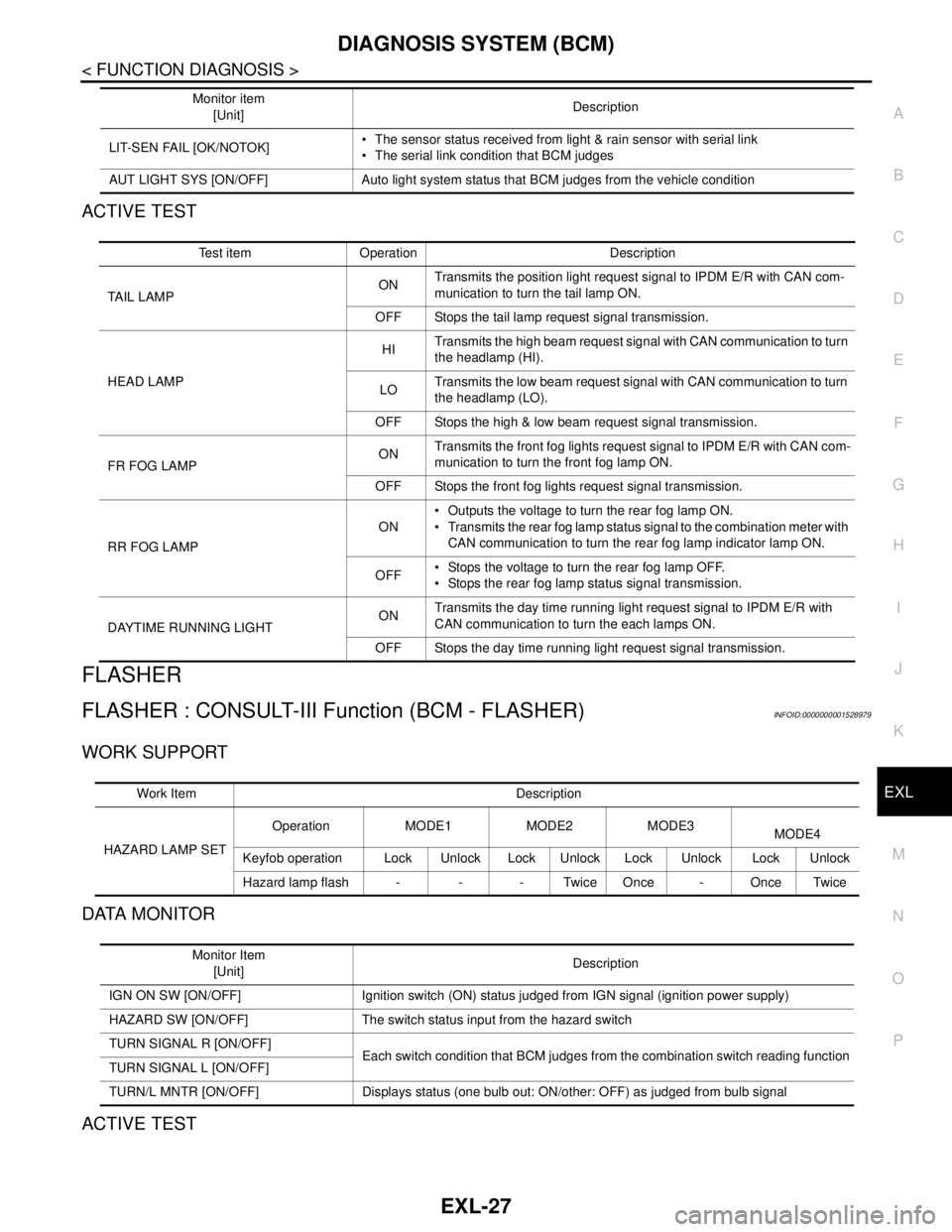
ACTIVE TEST
FLASHER
FLASHER : CONSULT-III Function (BCM - FLASHER)INFOID:0000000001528979
WORK SUPPORT
DATA MONITOR
ACTIVE TEST
LIT-SEN FAIL [OK/NOTOK] The sensor status received from light & rain sensor with serial link
The serial link condition that BCM judges
AUT LIGHT SYS [ON/OFF] Auto light system status that BCM judges from the vehicle conditionMonitor item
[Unit]Description
Test item Operation Description
TAIL LAMPONTransmits the position light request signal to IPDM E/R with CAN com-
munication to turn the tail lamp ON.
OFF Stops the tail lamp request signal transmission.
HEAD LAMPHITransmits the high beam request signal with CAN communication to turn
the headlamp (HI).
LOTransmits the low beam request signal with CAN communication to turn
the headlamp (LO).
OFF Stops the high & low beam request signal transmission.
FR FOG LAMPONTransmits the front fog lights request signal to IPDM E/R with CAN com-
munication to turn the front fog lamp ON.
OFF Stops the front fog lights request signal transmission.
RR FOG LAMPON Outputs the voltage to turn the rear fog lamp ON.
Transmits the rear fog lamp status signal to the combination meter with
CAN communication to turn the rear fog lamp indicator lamp ON.
OFF Stops the voltage to turn the rear fog lamp OFF.
Stops the rear fog lamp status signal transmission.
DAYTIME RUNNING LIGHTONTransmits the day time running light request signal to IPDM E/R with
CAN communication to turn the each lamps ON.
OFF Stops the day time running light request signal transmission.
Work Item Description
HAZARD LAMP SETOperation MODE1 MODE2 MODE3
MODE4
Keyfob operation Lock Unlock Lock Unlock Lock Unlock Lock Unlock
Hazard lamp flash - - - Twice Once - Once Twice
Monitor Item
[Unit]Description
IGN ON SW [ON/OFF] Ignition switch (ON) status judged from IGN signal (ignition power supply)
HAZARD SW [ON/OFF] The switch status input from the hazard switch
TURN SIGNAL R [ON/OFF]
Each switch condition that BCM judges from the combination switch reading function
TURN SIGNAL L [ON/OFF]
TURN/L MNTR [ON/OFF] Displays status (one bulb out: ON/other: OFF) as judged from bulb signal
Page 3029 of 5883

EXL-28
< FUNCTION DIAGNOSIS >
DIAGNOSIS SYSTEM (BCM)
COMB SW
COMB SW : CONSULT-III Function (BCM - COMB SW)INFOID:0000000001528982
DATA MONITOR
BATTERY SAVER
BATTERY SAVER : CONSULT-III Function (BCM - BATTERY SAVER)INFOID:0000000001528984
WORK SUPPORT
Test Item Operation Description
FLASHERRH Outputs the voltage to turn the right side turn signal lamps ON.
LH Outputs the voltage to turn the left side turn signal lamps ON.
OFF Stops the voltage to turn the turn signal lamps OFF.
Monitor Item
[Unit]Description
TURN SIGNAL R
[OFF/ON]Displays the status of the TURN RH switch in combination switch judged by BCM with the combination switch
reading function.
TURN SIGNAL L
[OFF/ON]Displays the status of the TURN LH switch in combination switch judged by BCM with the combination switch
reading function.
HI BEAM SW
[OFF/ON]Displays the status of the HI BEAM switch in combination switch judged by BCM with the combination switch
reading function.
H/L SW POS
[OFF/ON]Displays the status of the HEADLAMP switch in combination switch judged by BCM with the combination
switch reading function.
LIGHT SW 1ST
[OFF/ON]Displays the status of the HEADLAMP switch in combination switch judged by BCM with the combination
switch reading function.
PASSING SW
[OFF/ON]Displays the status of the PASSING switch in combination switch judged by BCM with the combination switch
reading function.
AUTO LIGHT SW
[OFF/ON]Displays the status of the AUTO LIGHT switch in combination switch judged by BCM with the combination
switch reading function.
FR FOG SW
[OFF/ON]Displays the status of the FR FOG switch in combination switch judged by BCM with the combination switch
reading function.
RR FOG SW
[OFF/ON]Displays the status of the RR FOG switch in combination switch judged by BCM with the combination switch
reading function.
FR WIPER HI
[OFF/ON]Displays the status of the FR WIPER HI switch in combination switch judged by BCM with the combination
switch reading function.
FR WIPER LOW
[OFF/ON]Displays the status of the FR WIPER LOW switch in combination switch judged by BCM with the combination
switch reading function.
FR WIPER INT
[OFF/ON]Displays the status of the FR WIPER INT switch in combination switch judged by BCM with the combination
switch reading function.
FR WASHER SW
[OFF/ON]Displays the status of the FR WASHER switch in combination switch judged by BCM with the combination
switch reading function.
INT VOLUME
[1 - 7]Displays the status of wiper intermittent dial position judged by BCM with the combination switch reading
function.
RR WIPER ON
[OFF/ON]Displays the status of the RR WIPER switch in combination switch judged by BCM with the combination
switch reading function.
RR WIPER INT
[OFF/ON]Displays the status of the RR WIPER INT switch in combination switch judged by BCM with the combination
switch reading function.
RR WASHER SW
[OFF/ON]Displays the status of the RR WASHER switch in combination switch judged by BCM with the combination
switch reading function.
Page 3031 of 5883

EXL-30
< FUNCTION DIAGNOSIS >
DIAGNOSIS SYSTEM (IPDM E/R)
DIAGNOSIS SYSTEM (IPDM E/R)
CONSULT - III Function (IPDM E/R)INFOID:0000000001523254
APPLICATION ITEM
CONSULT-III performs the following functions via CAN communication with IPDM E/R.
DATA MONITOR
Monitor item
ACTIVE TEST
Te s t i t e m
Diagnosis mode Description
SELF-DIAG RESULTS Displays the diagnosis results judged by IPDM E/R.
DATA MONITOR Displays the real-time input/output data from IPDM E/R input/output data.
ACTIVE TEST IPDM E/R can provide a drive signal to electronic components to check their operations.
CAN DIAG SUPPORT MONITOR The results of transmit/receive diagnosis of CAN communication can be read.
Monitor Item
[Unit]MAIN SIG-
NALSDescription
HL LO REQ
[Off/On]×Displays the status of the low beam request signal received from BCM via CAN
communication.
HL HI REQ
[Off/On]×Displays the status of the high beam request signal received from BCM via CAN
communication.
FR FOG REQ
[Off/On]×Displays the status of the front fog light request signal received from BCM via
CAN communication.
TAIL & CLR REQ
[Off/On]xDisplays the status of the tail and clearance lamp request signal received from
BCM via CAN communication.
DTRL REQ
[Off]NOTE:
The item is indicated, but not monitored.
Test item Operation Description
EXTERNAL LAMPSOff OFF
TAIL Operates the tail lamp relay.
Lo Operates the headlamp low relay.
HiOperates the headlamp low relay and ON/OFF the headlamp high relay at 1 sec-
ond intervals.
Fog Operates the front fog lamp relay.
Page 3042 of 5883
FRONT FOG LAMP CIRCUIT
EXL-41
< COMPONENT DIAGNOSIS >
C
D
E
F
G
H
I
J
K
MA
B
EXL
N
O
P
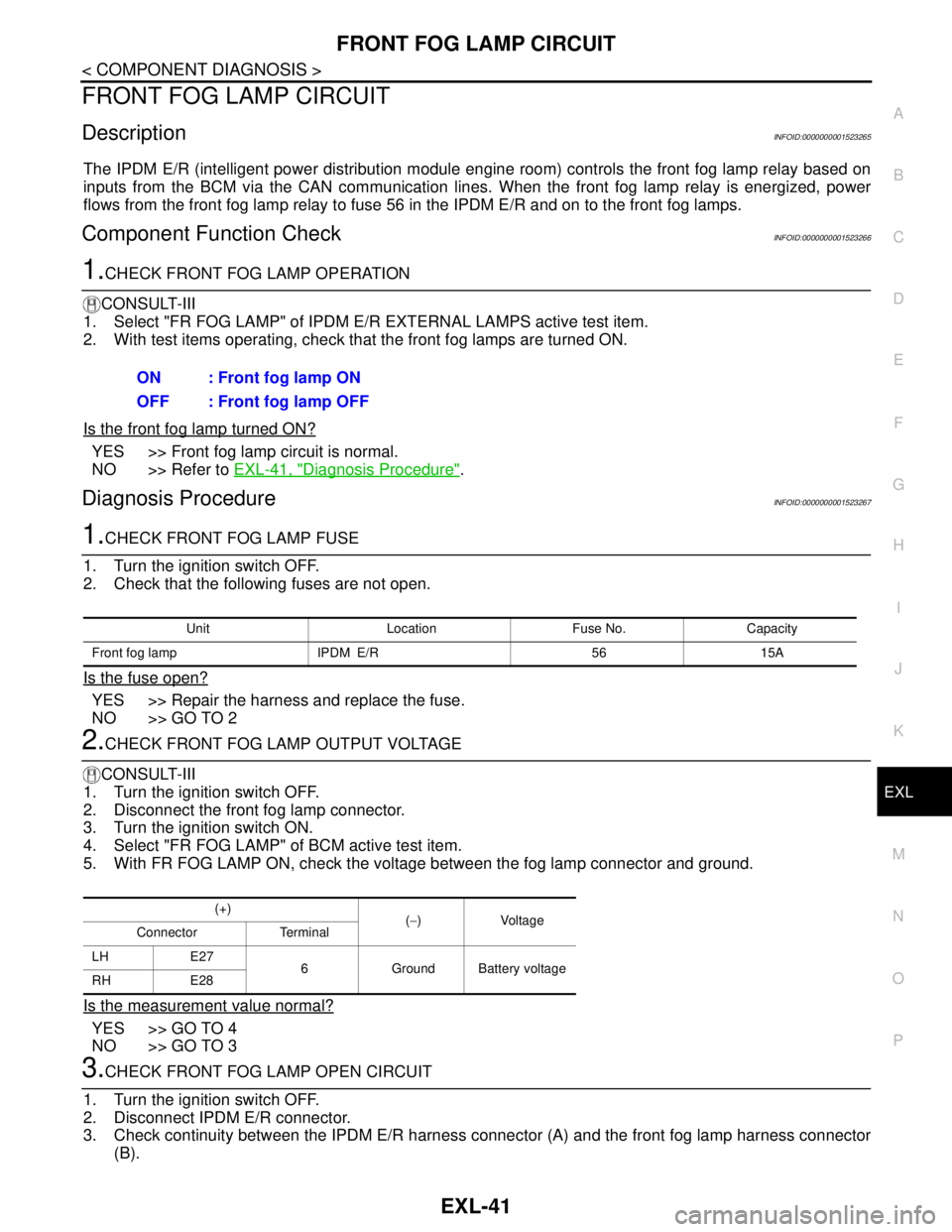
FRONT FOG LAMP CIRCUIT
DescriptionINFOID:0000000001523265
The IPDM E/R (intelligent power distribution module engine room) controls the front fog lamp relay based on
inputs from the BCM via the CAN communication lines. When the front fog lamp relay is energized, power
flows from the front fog lamp relay to fuse 56 in the IPDM E/R and on to the front fog lamps.
Component Function CheckINFOID:0000000001523266
1.CHECK FRONT FOG LAMP OPERATION
CONSULT-III
1. Select "FR FOG LAMP" of IPDM E/R EXTERNAL LAMPS active test item.
2. With test items operating, check that the front fog lamps are turned ON.
Is the front fog lamp turned ON?
YES >> Front fog lamp circuit is normal.
NO >> Refer to EXL-41, "
Diagnosis Procedure".
Diagnosis ProcedureINFOID:0000000001523267
1.CHECK FRONT FOG LAMP FUSE
1. Turn the ignition switch OFF.
2. Check that the following fuses are not open.
Is the fuse open?
YES >> Repair the harness and replace the fuse.
NO >> GO TO 2
2.CHECK FRONT FOG LAMP OUTPUT VOLTAGE
CONSULT-III
1. Turn the ignition switch OFF.
2. Disconnect the front fog lamp connector.
3. Turn the ignition switch ON.
4. Select "FR FOG LAMP" of BCM active test item.
5. With FR FOG LAMP ON, check the voltage between the fog lamp connector and ground.
Is the measurement value normal?
YES >> GO TO 4
NO >> GO TO 3
3.CHECK FRONT FOG LAMP OPEN CIRCUIT
1. Turn the ignition switch OFF.
2. Disconnect IPDM E/R connector.
3. Check continuity between the IPDM E/R harness connector (A) and the front fog lamp harness connector
(B).ON : Front fog lamp ON
OFF : Front fog lamp OFF
Unit Location Fuse No. Capacity
Front fog lamp IPDM E/R 56 15A
(+)
(−)Voltage
Connector Terminal
LH E27
6 Ground Battery voltage
RH E28
Page 3043 of 5883

EXL-42
< COMPONENT DIAGNOSIS >
FRONT FOG LAMP CIRCUIT
Does continuity exist?
YES >> GO TO 4
NO >> Repair the harnesses or connectors.
4.CHECK FRONT FOG LAMP GROUND CIRCUIT
1. Disconnect the front fog lamp connector.
2. Check continuity between the front fog lamp harness connector terminal and ground.
Does continuity exist?
YES >> Inspect the fog lamp bulb.
NO >> Repair the harness.
AB
Continuity
Connector Terminal Connector Terminal
LH
E4750 E27
6Yes
RH 51 E28
Connector Terminal — Continuity
LH E27 7
Ground Yes
RH E28 7
Page 3044 of 5883
REAR FOG LAMP CIRCUIT
EXL-43
< COMPONENT DIAGNOSIS >
C
D
E
F
G
H
I
J
K
MA
B
EXL
N
O
P
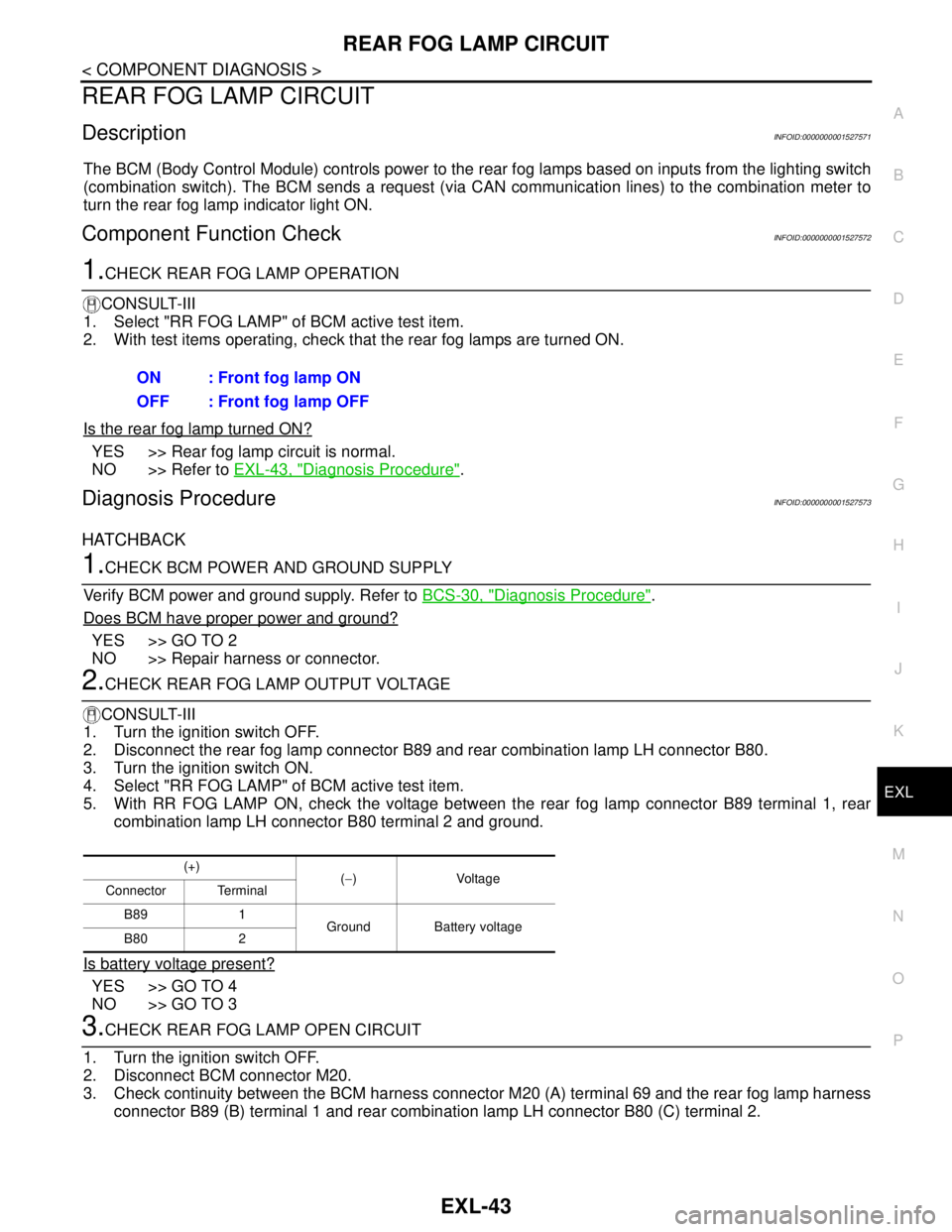
REAR FOG LAMP CIRCUIT
DescriptionINFOID:0000000001527571
The BCM (Body Control Module) controls power to the rear fog lamps based on inputs from the lighting switch
(combination switch). The BCM sends a request (via CAN communication lines) to the combination meter to
turn the rear fog lamp indicator light ON.
Component Function CheckINFOID:0000000001527572
1.CHECK REAR FOG LAMP OPERATION
CONSULT-III
1. Select "RR FOG LAMP" of BCM active test item.
2. With test items operating, check that the rear fog lamps are turned ON.
Is the rear fog lamp turned ON?
YES >> Rear fog lamp circuit is normal.
NO >> Refer to EXL-43, "
Diagnosis Procedure".
Diagnosis ProcedureINFOID:0000000001527573
HATCHBACK
1.CHECK BCM POWER AND GROUND SUPPLY
Verify BCM power and ground supply. Refer to BCS-30, "
Diagnosis Procedure".
Does BCM have proper power and ground?
YES >> GO TO 2
NO >> Repair harness or connector.
2.CHECK REAR FOG LAMP OUTPUT VOLTAGE
CONSULT-III
1. Turn the ignition switch OFF.
2. Disconnect the rear fog lamp connector B89 and rear combination lamp LH connector B80.
3. Turn the ignition switch ON.
4. Select "RR FOG LAMP" of BCM active test item.
5. With RR FOG LAMP ON, check the voltage between the rear fog lamp connector B89 terminal 1, rear
combination lamp LH connector B80 terminal 2 and ground.
Is battery voltage present?
YES >> GO TO 4
NO >> GO TO 3
3.CHECK REAR FOG LAMP OPEN CIRCUIT
1. Turn the ignition switch OFF.
2. Disconnect BCM connector M20.
3. Check continuity between the BCM harness connector M20 (A) terminal 69 and the rear fog lamp harness
connector B89 (B) terminal 1 and rear combination lamp LH connector B80 (C) terminal 2. ON : Front fog lamp ON
OFF : Front fog lamp OFF
(+)
(−)Voltage
Connector Terminal
B89 1
Ground Battery voltage
B80 2
Page 3045 of 5883
EXL-44
< COMPONENT DIAGNOSIS >
REAR FOG LAMP CIRCUIT
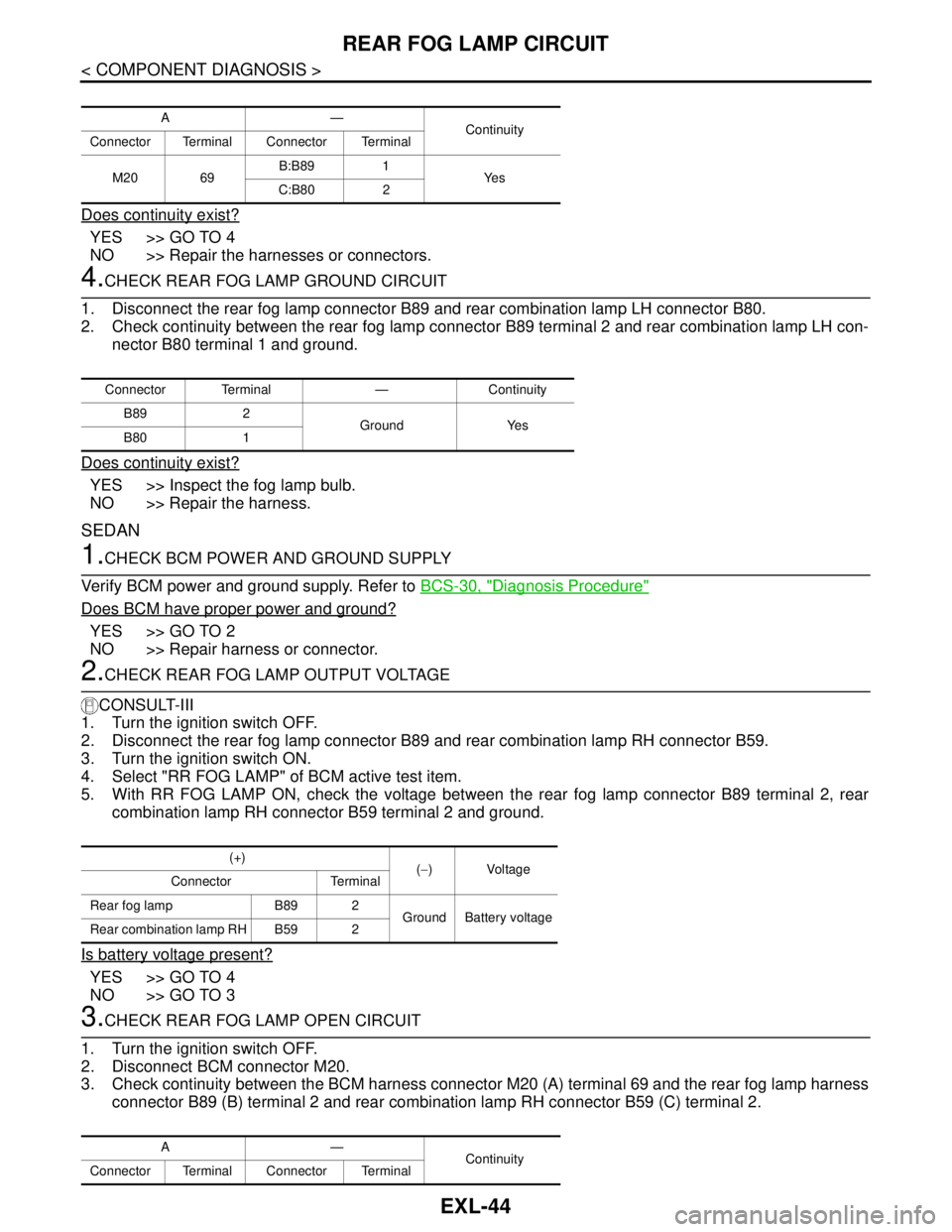
Does continuity exist?
YES >> GO TO 4
NO >> Repair the harnesses or connectors.
4.CHECK REAR FOG LAMP GROUND CIRCUIT
1. Disconnect the rear fog lamp connector B89 and rear combination lamp LH connector B80.
2. Check continuity between the rear fog lamp connector B89 terminal 2 and rear combination lamp LH con-
nector B80 terminal 1 and ground.
Does continuity exist?
YES >> Inspect the fog lamp bulb.
NO >> Repair the harness.
SEDAN
1.CHECK BCM POWER AND GROUND SUPPLY
Verify BCM power and ground supply. Refer to BCS-30, "
Diagnosis Procedure"
Does BCM have proper power and ground?
YES >> GO TO 2
NO >> Repair harness or connector.
2.CHECK REAR FOG LAMP OUTPUT VOLTAGE
CONSULT-III
1. Turn the ignition switch OFF.
2. Disconnect the rear fog lamp connector B89 and rear combination lamp RH connector B59.
3. Turn the ignition switch ON.
4. Select "RR FOG LAMP" of BCM active test item.
5. With RR FOG LAMP ON, check the voltage between the rear fog lamp connector B89 terminal 2, rear
combination lamp RH connector B59 terminal 2 and ground.
Is battery voltage present?
YES >> GO TO 4
NO >> GO TO 3
3.CHECK REAR FOG LAMP OPEN CIRCUIT
1. Turn the ignition switch OFF.
2. Disconnect BCM connector M20.
3. Check continuity between the BCM harness connector M20 (A) terminal 69 and the rear fog lamp harness
connector B89 (B) terminal 2 and rear combination lamp RH connector B59 (C) terminal 2.
A—
Continuity
Connector Terminal Connector Terminal
M20 69B:B89 1
Ye s
C:B80 2
Connector Terminal — Continuity
B89 2
Ground Yes
B80 1
(+)
(−) Voltage
Connector Terminal
Rear fog lamp B89 2
Ground Battery voltage
Rear combination lamp RH B59 2
A—
Continuity
Connector Terminal Connector Terminal
Page 3046 of 5883
REAR FOG LAMP CIRCUIT
EXL-45
< COMPONENT DIAGNOSIS >
C
D
E
F
G
H
I
J
K
MA
B
EXL
N
O
P
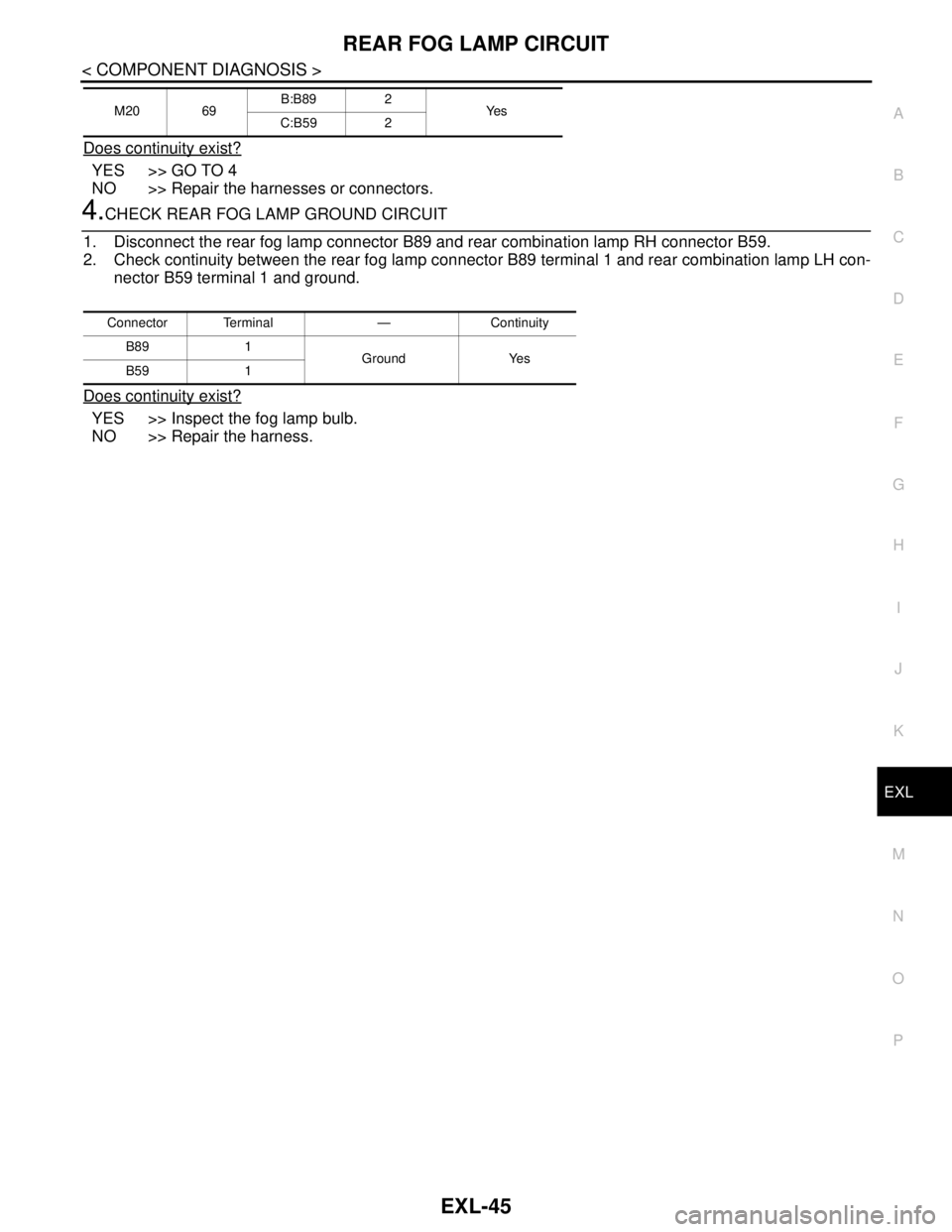
Does continuity exist?
YES >> GO TO 4
NO >> Repair the harnesses or connectors.
4.CHECK REAR FOG LAMP GROUND CIRCUIT
1. Disconnect the rear fog lamp connector B89 and rear combination lamp RH connector B59.
2. Check continuity between the rear fog lamp connector B89 terminal 1 and rear combination lamp LH con-
nector B59 terminal 1 and ground.
Does continuity exist?
YES >> Inspect the fog lamp bulb.
NO >> Repair the harness.
M20 69B:B89 2
Ye s
C:B59 2
Connector Terminal — Continuity
B89 1
Ground Yes
B59 1
Page 3065 of 5883
EXL-64
< COMPONENT DIAGNOSIS >
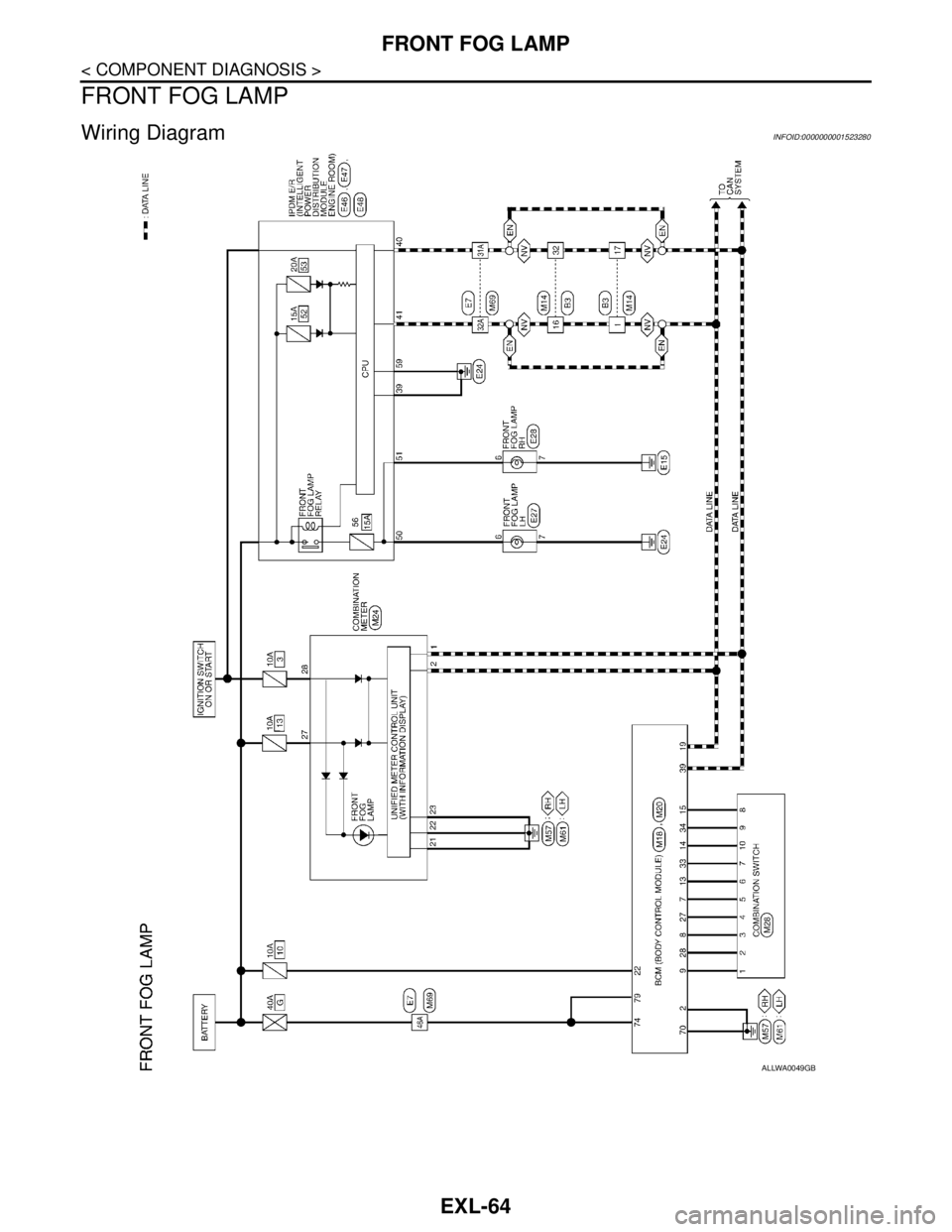
FRONT FOG LAMP
FRONT FOG LAMP
Wiring DiagramINFOID:0000000001523280
ALLWA0049GB