release NISSAN TIIDA 2008 Service Manual PDF
[x] Cancel search | Manufacturer: NISSAN, Model Year: 2008, Model line: TIIDA, Model: NISSAN TIIDA 2008Pages: 2771, PDF Size: 60.61 MB
Page 531 of 2771
INTELLIGENT KEY SYSTEM
BL-97
< SERVICE INFORMATION >
C
D
E
F
G
H
J
K
L
MA
B
BL
N
O
P
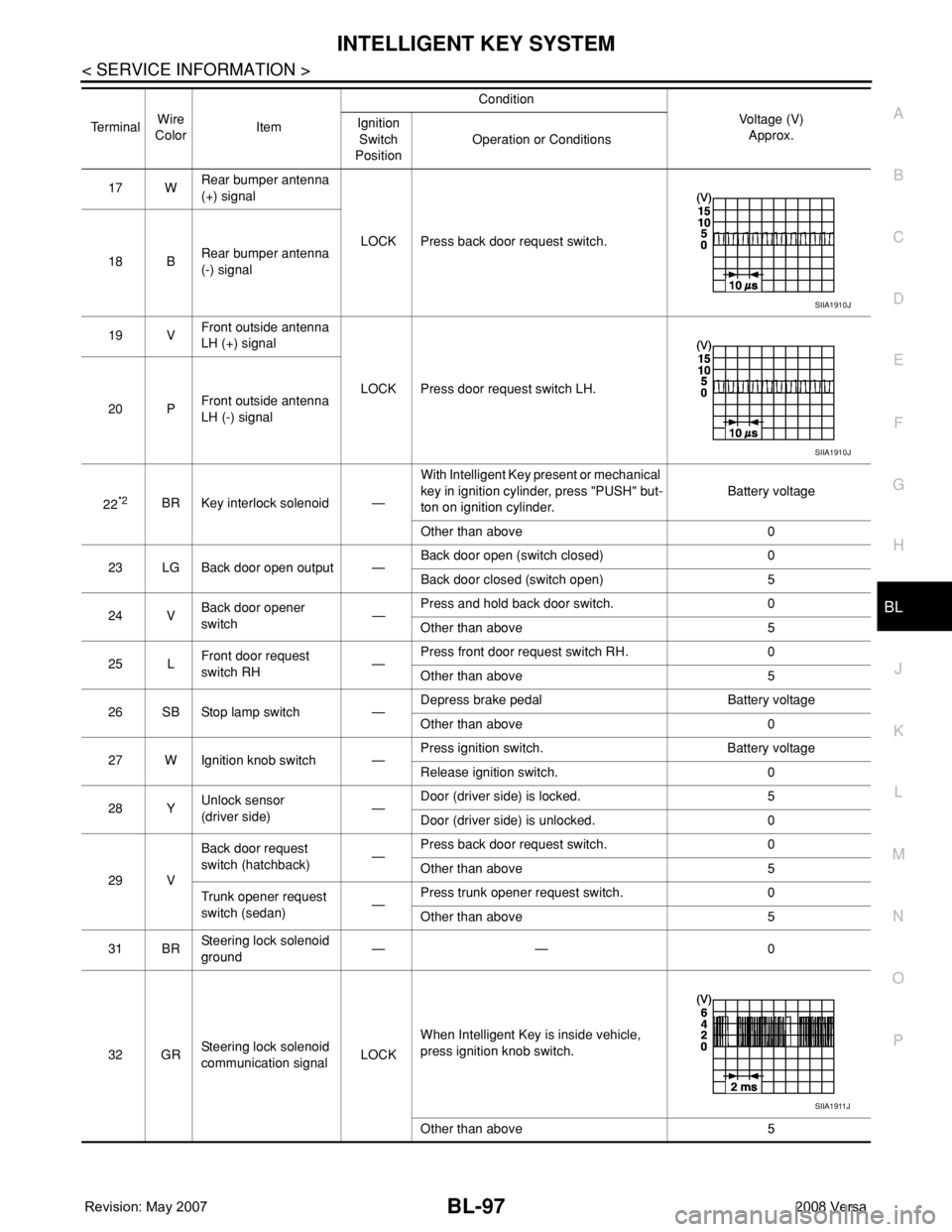
17 WRear bumper antenna
(+) signal
LOCK Press back door request switch.
18 BRear bumper antenna
(-) signal
19 VFront outside antenna
LH (+) signal
LOCK Press door request switch LH.
20 PFront outside antenna
LH (-) signal
22
*2BR Key interlock solenoid —With Intelligent Key present or mechanical
key in ignition cylinder, press "PUSH" but-
ton on ignition cylinder.Battery voltage
Other than above 0
23 LG Back door open output —Back door open (switch closed) 0
Back door closed (switch open) 5
24 VBack door opener
switch—Press and hold back door switch. 0
Other than above 5
25 LFront door request
switch RH—Press front door request switch RH. 0
Other than above 5
26 SB Stop lamp switch —Depress brake pedal Battery voltage
Other than above 0
27 W Ignition knob switch —Press ignition switch. Battery voltage
Release ignition switch. 0
28 YUnlock sensor
(driver side)—Door (driver side) is locked. 5
Door (driver side) is unlocked. 0
29 VBack door request
switch (hatchback)—Press back door request switch. 0
Other than above 5
Trunk opener request
switch (sedan)—Press trunk opener request switch. 0
Other than above 5
31 BRSteering lock solenoid
ground—— 0
32 GRSteering lock solenoid
communication signalLOCKWhen Intelligent Key is inside vehicle,
press ignition knob switch.
Other than above 5 TerminalWire
ColorItemCondition
Voltage (V)
Approx. Ignition
Switch
PositionOperation or Conditions
SIIA1910J
SIIA1910J
SIIA1911J
Page 547 of 2771
INTELLIGENT KEY SYSTEM
BL-113
< SERVICE INFORMATION >
C
D
E
F
G
H
J
K
L
MA
B
BL
N
O
P
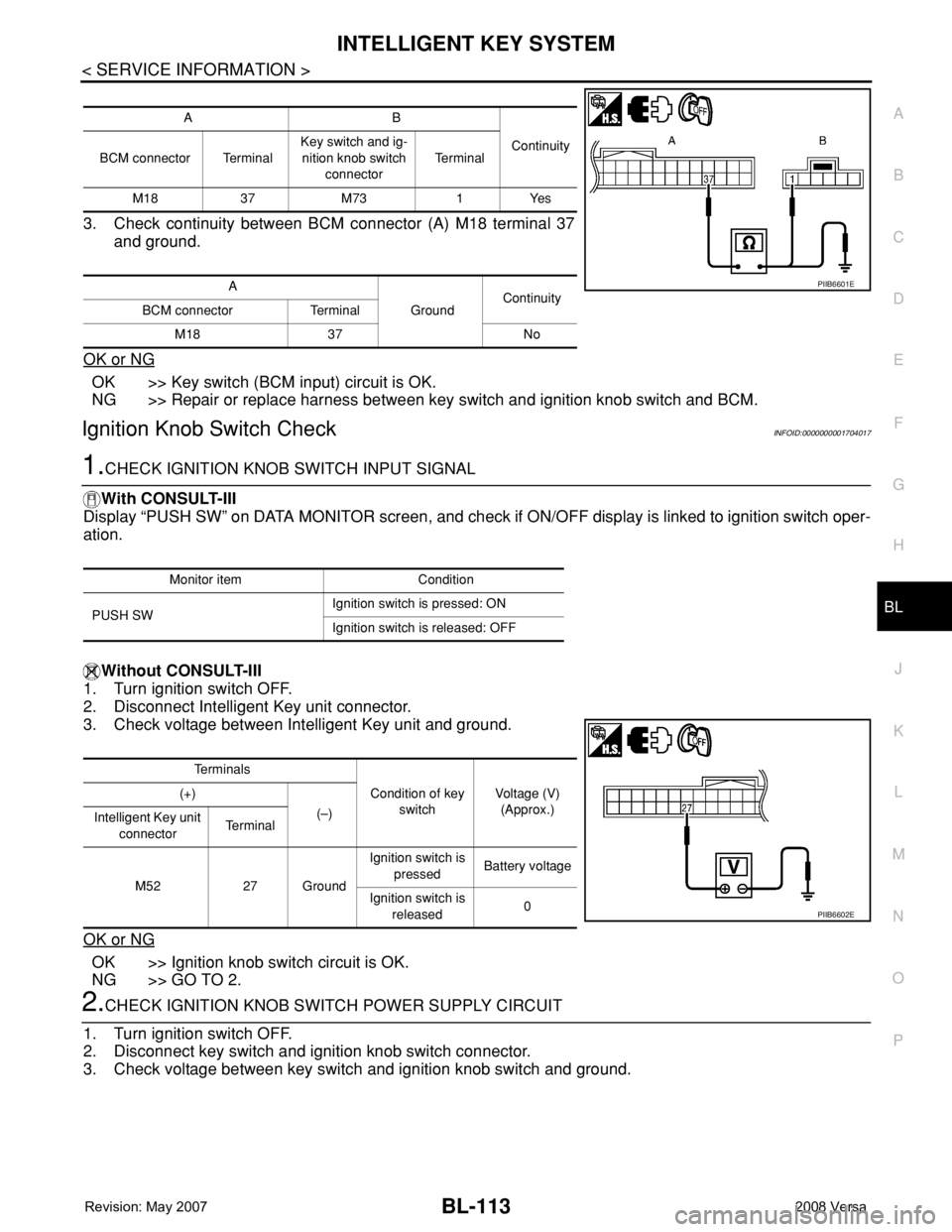
3. Check continuity between BCM connector (A) M18 terminal 37
and ground.
OK or NG
OK >> Key switch (BCM input) circuit is OK.
NG >> Repair or replace harness between key switch and ignition knob switch and BCM.
Ignition Knob Switch CheckINFOID:0000000001704017
1.CHECK IGNITION KNOB SWITCH INPUT SIGNAL
With CONSULT-III
Display “PUSH SW” on DATA MONITOR screen, and check if ON/OFF display is linked to ignition switch oper-
ation.
Without CONSULT-III
1. Turn ignition switch OFF.
2. Disconnect Intelligent Key unit connector.
3. Check voltage between Intelligent Key unit and ground.
OK or NG
OK >> Ignition knob switch circuit is OK.
NG >> GO TO 2.
2.CHECK IGNITION KNOB SWITCH POWER SUPPLY CIRCUIT
1. Turn ignition switch OFF.
2. Disconnect key switch and ignition knob switch connector.
3. Check voltage between key switch and ignition knob switch and ground.
AB
Continuity
BCM connector TerminalKey switch and ig-
nition knob switch
connectorTe r m i n a l
M18 37 M73 1 Yes
A
GroundContinuity
BCM connector Terminal
M18 37 No
PIIB6601E
Monitor item Condition
PUSH SWIgnition switch is pressed: ON
Ignition switch is released: OFF
Te r m i n a l s
Condition of key
switchVoltage (V)
(Approx.) (+)
(–)
Intelligent Key unit
connectorTe r m i n a l
M52 27 GroundIgnition switch is
pressedBattery voltage
Ignition switch is
released0
PIIB6602E
Page 548 of 2771
BL-114
< SERVICE INFORMATION >
INTELLIGENT KEY SYSTEM
OK or NG
OK >> GO TO 3.
NG >> Repair or replace key switch and ignition knob switch
power supply circuit.
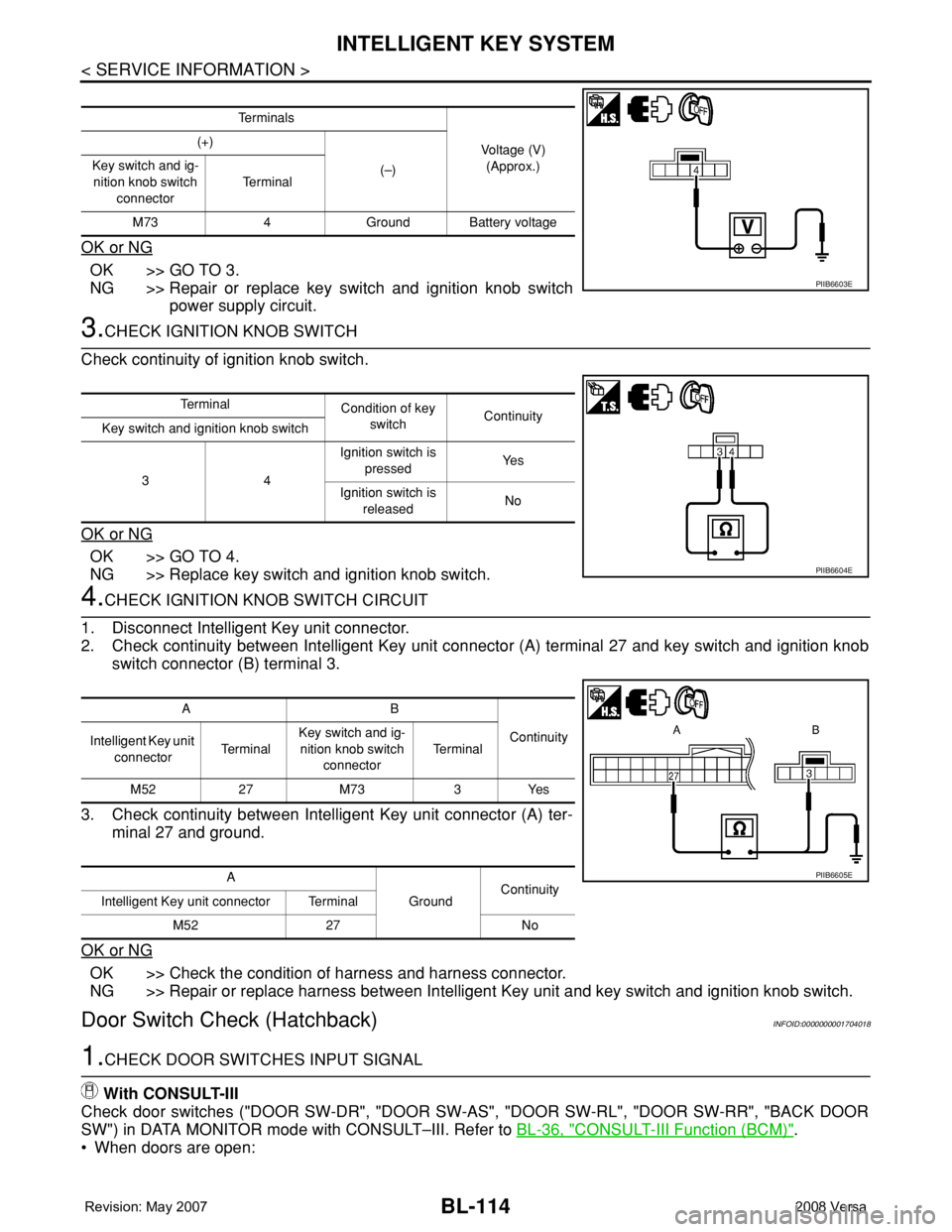
3.CHECK IGNITION KNOB SWITCH
Check continuity of ignition knob switch.
OK or NG
OK >> GO TO 4.
NG >> Replace key switch and ignition knob switch.
4.CHECK IGNITION KNOB SWITCH CIRCUIT
1. Disconnect Intelligent Key unit connector.
2. Check continuity between Intelligent Key unit connector (A) terminal 27 and key switch and ignition knob
switch connector (B) terminal 3.
3. Check continuity between Intelligent Key unit connector (A) ter-
minal 27 and ground.
OK or NG
OK >> Check the condition of harness and harness connector.
NG >> Repair or replace harness between Intelligent Key unit and key switch and ignition knob switch.
Door Switch Check (Hatchback)INFOID:0000000001704018
1.CHECK DOOR SWITCHES INPUT SIGNAL
With CONSULT-III
Check door switches ("DOOR SW-DR", "DOOR SW-AS", "DOOR SW-RL", "DOOR SW-RR", "BACK DOOR
SW") in DATA MONITOR mode with CONSULT–III. Refer to BL-36, "
CONSULT-III Function (BCM)".
• When doors are open:
Te r m i n a l s
Voltage (V)
(Approx.) (+)
(–) Key switch and ig-
nition knob switch
connectorTe r m i n a l
M73 4 Ground Battery voltage
PIIB6603E
Te r m i n a l
Condition of key
switchContinuity
Key switch and ignition knob switch
34Ignition switch is
pressedYe s
Ignition switch is
releasedNo
PIIB6604E
AB
Continuity
Intelligent Key unit
connectorTe r m i n a lKey switch and ig-
nition knob switch
connectorTe r m i n a l
M52 27 M73 3 Yes
A
GroundContinuity
Intelligent Key unit connector Terminal
M52 27 No
PIIB6605E
Page 550 of 2771
BL-116
< SERVICE INFORMATION >
INTELLIGENT KEY SYSTEM
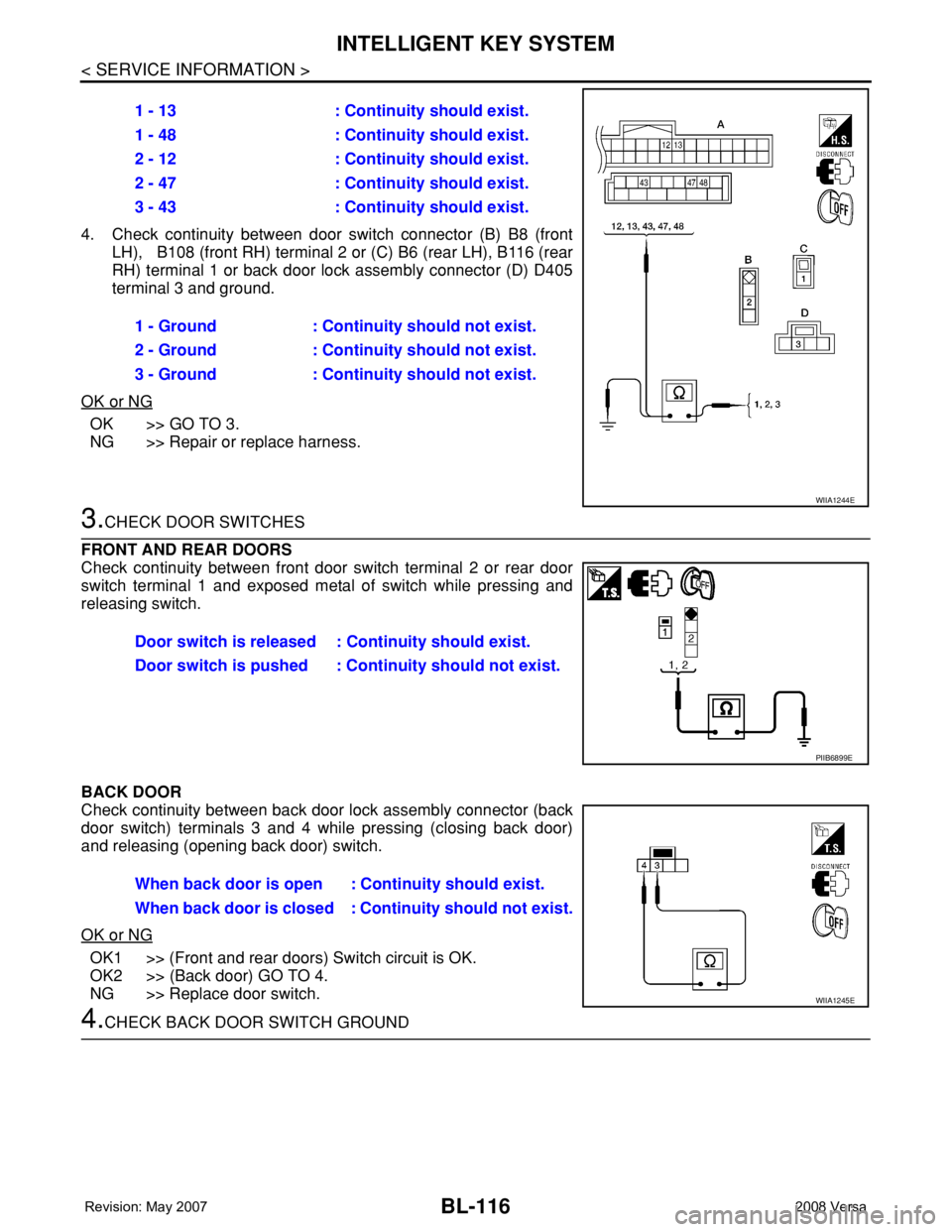
4. Check continuity between door switch connector (B) B8 (front
LH), B108 (front RH) terminal 2 or (C) B6 (rear LH), B116 (rear
RH) terminal 1 or back door lock assembly connector (D) D405
terminal 3 and ground.
OK or NG
OK >> GO TO 3.
NG >> Repair or replace harness.
3.CHECK DOOR SWITCHES
FRONT AND REAR DOORS
Check continuity between front door switch terminal 2 or rear door
switch terminal 1 and exposed metal of switch while pressing and
releasing switch.
BACK DOOR
Check continuity between back door lock assembly connector (back
door switch) terminals 3 and 4 while pressing (closing back door)
and releasing (opening back door) switch.
OK or NG
OK1 >> (Front and rear doors) Switch circuit is OK.
OK2 >> (Back door) GO TO 4.
NG >> Replace door switch.
4.CHECK BACK DOOR SWITCH GROUND1 - 13 : Continuity should exist.
1 - 48 : Continuity should exist.
2 - 12 : Continuity should exist.
2 - 47 : Continuity should exist.
3 - 43 : Continuity should exist.
1 - Ground : Continuity should not exist.
2 - Ground : Continuity should not exist.
3 - Ground : Continuity should not exist.
WIIA1244E
Door switch is released : Continuity should exist.
Door switch is pushed : Continuity should not exist.
PIIB6899E
When back door is open : Continuity should exist.
When back door is closed : Continuity should not exist.
WIIA1245E
Page 552 of 2771
BL-118
< SERVICE INFORMATION >
INTELLIGENT KEY SYSTEM
OK or NG
OK >> Door switch circuit is OK.
NG >> GO TO 2.
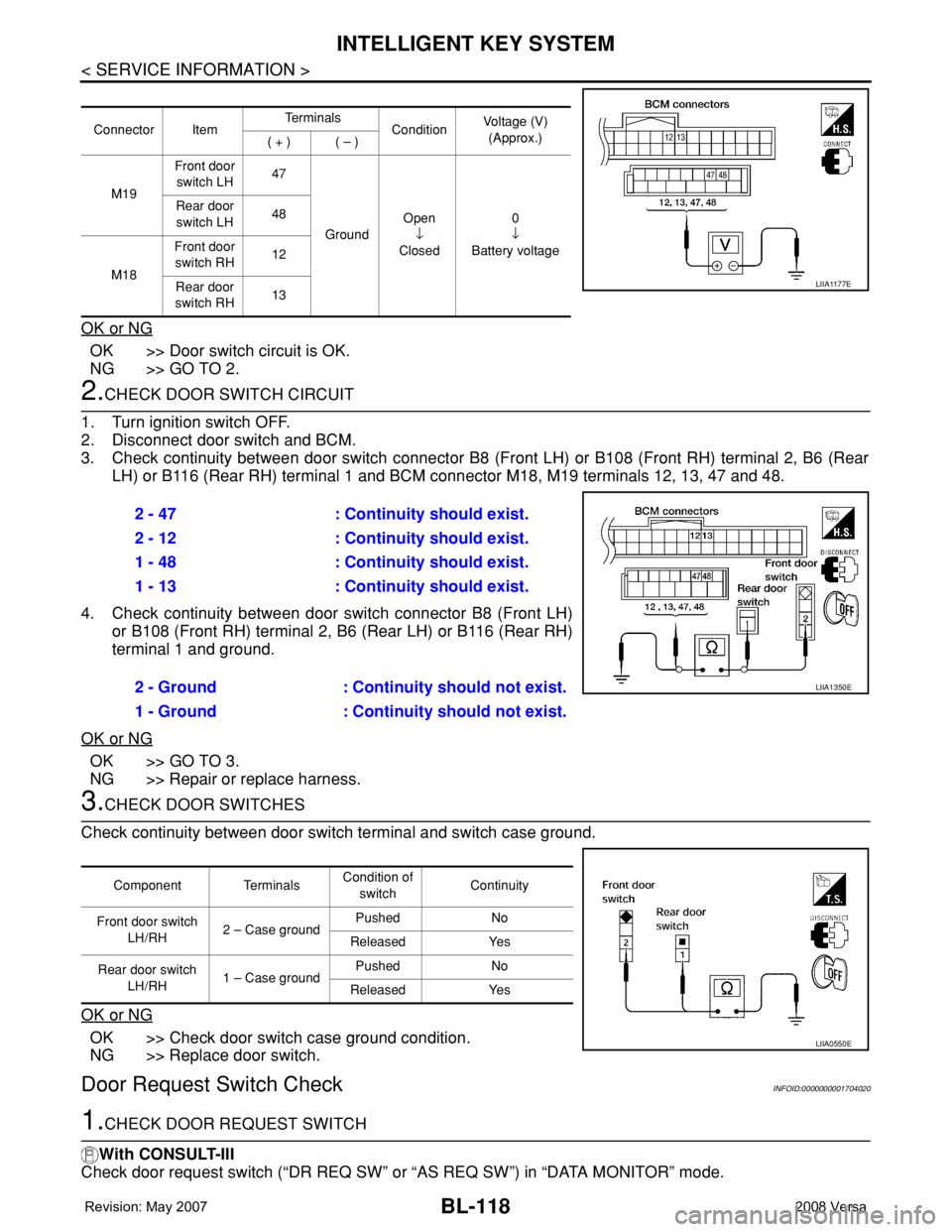
2.CHECK DOOR SWITCH CIRCUIT
1. Turn ignition switch OFF.
2. Disconnect door switch and BCM.
3. Check continuity between door switch connector B8 (Front LH) or B108 (Front RH) terminal 2, B6 (Rear
LH) or B116 (Rear RH) terminal 1 and BCM connector M18, M19 terminals 12, 13, 47 and 48.
4. Check continuity between door switch connector B8 (Front LH)
or B108 (Front RH) terminal 2, B6 (Rear LH) or B116 (Rear RH)
terminal 1 and ground.
OK or NG
OK >> GO TO 3.
NG >> Repair or replace harness.
3.CHECK DOOR SWITCHES
Check continuity between door switch terminal and switch case ground.
OK or NG
OK >> Check door switch case ground condition.
NG >> Replace door switch.
Door Request Switch CheckINFOID:0000000001704020
1.CHECK DOOR REQUEST SWITCH
With CONSULT-III
Check door request switch (“DR REQ SW” or “AS REQ SW”) in “DATA MONITOR” mode.
Connector ItemTe r m i n a l s
ConditionVoltage (V)
(Approx.)
( + ) ( – )
M19Front door
switch LH47
GroundOpen
↓
Closed0
↓
Battery voltage Rear door
switch LH48
M18Front door
switch RH12
Rear door
switch RH13
LIIA1177E
2 - 47 : Continuity should exist.
2 - 12 : Continuity should exist.
1 - 48 : Continuity should exist.
1 - 13 : Continuity should exist.
2 - Ground : Continuity should not exist.
1 - Ground : Continuity should not exist.
LIIA1350E
Component TerminalsCondition of
switchContinuity
Front door switch
LH/RH2 – Case groundPushed No
Released Yes
Rear door switch
LH/RH1 – Case groundPushed No
Released Yes
LIIA0550E
Page 553 of 2771
INTELLIGENT KEY SYSTEM
BL-119
< SERVICE INFORMATION >
C
D
E
F
G
H
J
K
L
MA
B
BL
N
O
P
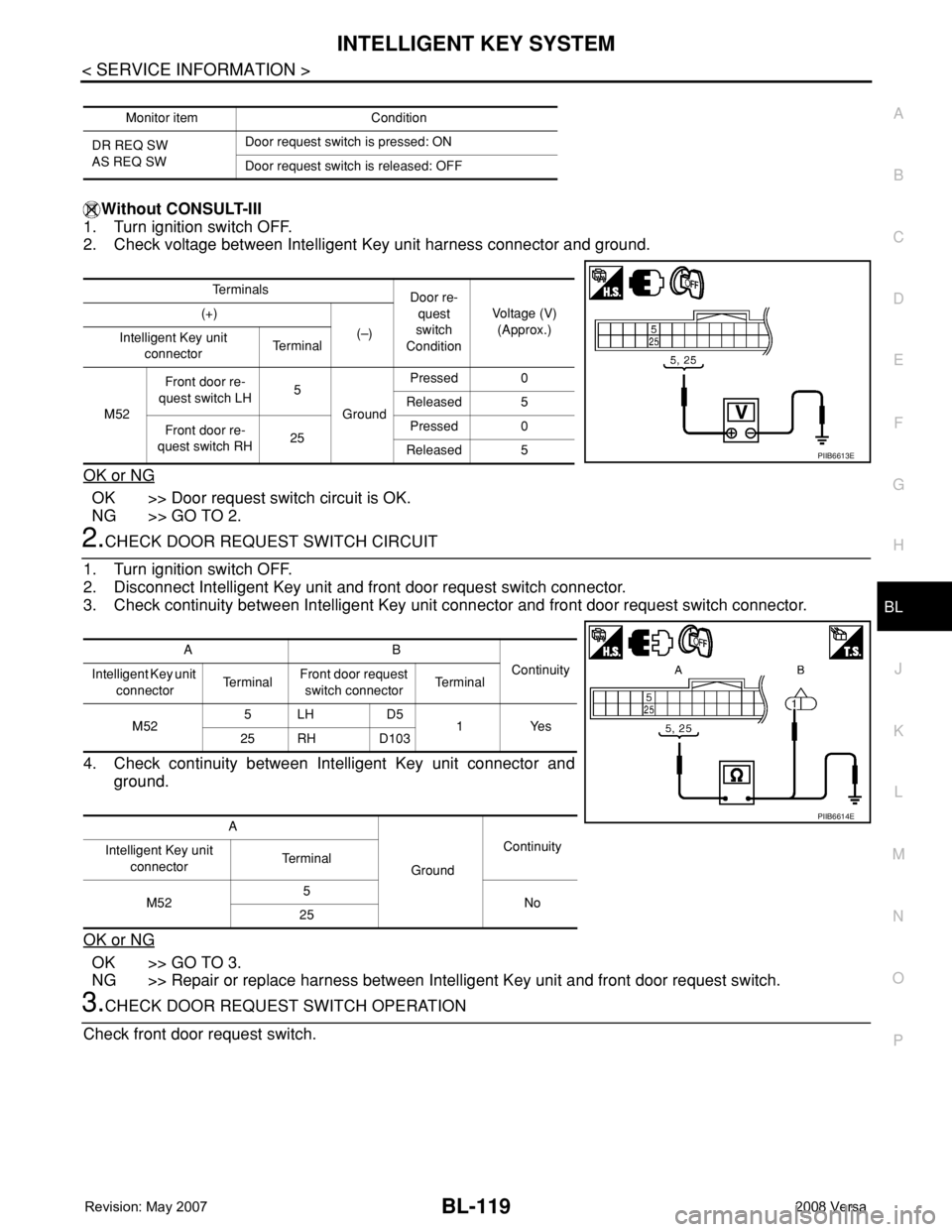
Without CONSULT-III
1. Turn ignition switch OFF.
2. Check voltage between Intelligent Key unit harness connector and ground.
OK or NG
OK >> Door request switch circuit is OK.
NG >> GO TO 2.
2.CHECK DOOR REQUEST SWITCH CIRCUIT
1. Turn ignition switch OFF.
2. Disconnect Intelligent Key unit and front door request switch connector.
3. Check continuity between Intelligent Key unit connector and front door request switch connector.
4. Check continuity between Intelligent Key unit connector and
ground.
OK or NG
OK >> GO TO 3.
NG >> Repair or replace harness between Intelligent Key unit and front door request switch.
3.CHECK DOOR REQUEST SWITCH OPERATION
Check front door request switch.
Monitor item Condition
DR REQ SW
AS REQ SWDoor request switch is pressed: ON
Door request switch is released: OFF
Te r m i n a l s
Door re-
quest
switch
ConditionVoltage (V)
(Approx.) (+)
(–)
Intelligent Key unit
connectorTe r m i n a l
M52Front door re-
quest switch LH5
GroundPressed 0
Released 5
Front door re-
quest switch RH25Pressed 0
Released 5
PIIB6613E
AB
Continuity
Intelligent Key unit
connectorTe r m i n a lFront door request
switch connectorTe r m i n a l
M525LH D5
1Yes
25 RH D103
A
GroundContinuity
Intelligent Key unit
connectorTe r m i n a l
M525
No
25
PIIB6614E
Page 554 of 2771
BL-120
< SERVICE INFORMATION >
INTELLIGENT KEY SYSTEM
OK or NG
OK >> GO TO 4.
NG >> Replace front door request switch.
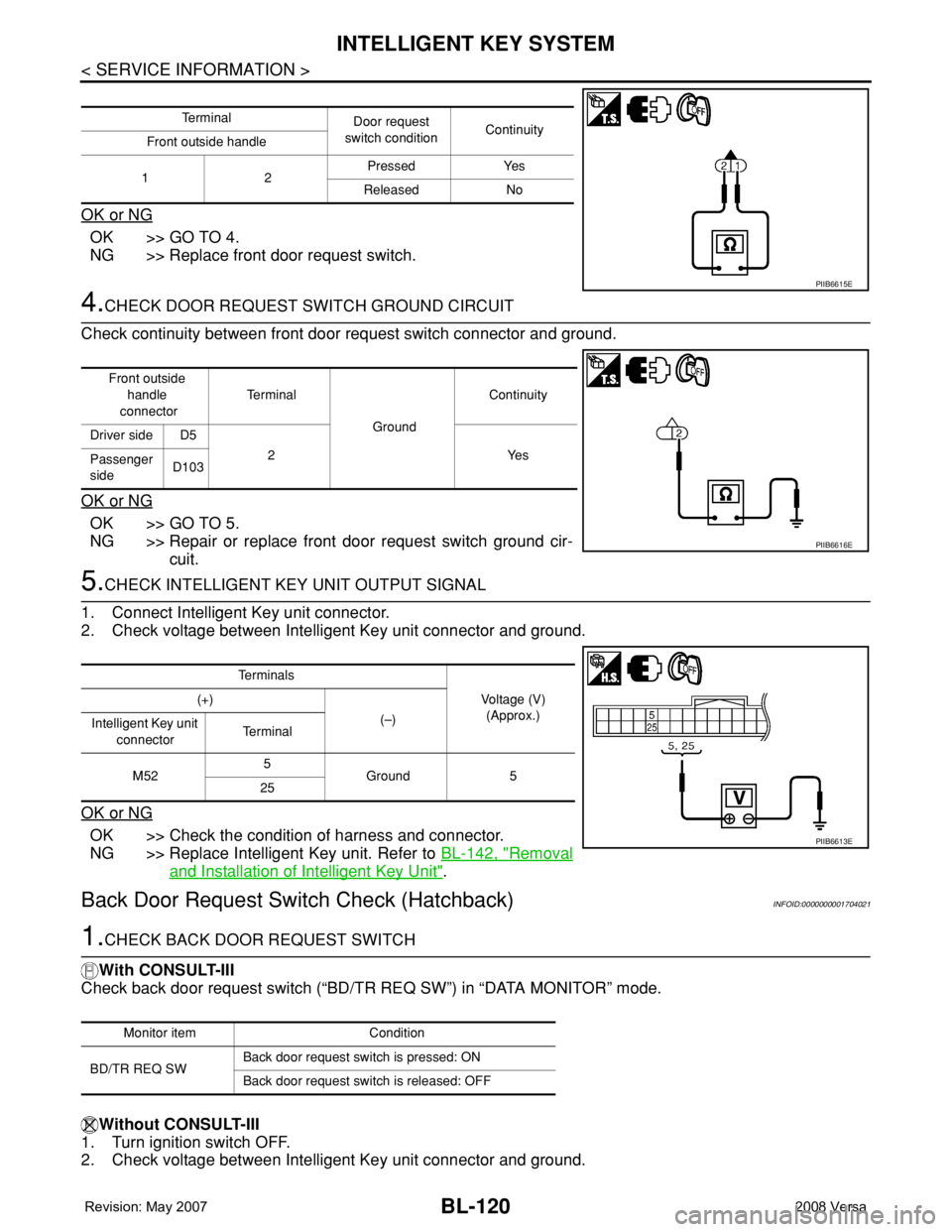
4.CHECK DOOR REQUEST SWITCH GROUND CIRCUIT
Check continuity between front door request switch connector and ground.
OK or NG
OK >> GO TO 5.
NG >> Repair or replace front door request switch ground cir-
cuit.
5.CHECK INTELLIGENT KEY UNIT OUTPUT SIGNAL
1. Connect Intelligent Key unit connector.
2. Check voltage between Intelligent Key unit connector and ground.
OK or NG
OK >> Check the condition of harness and connector.
NG >> Replace Intelligent Key unit. Refer to BL-142, "
Removal
and Installation of Intelligent Key Unit".
Back Door Request Switch Check (Hatchback)INFOID:0000000001704021
1.CHECK BACK DOOR REQUEST SWITCH
With CONSULT-III
Check back door request switch (“BD/TR REQ SW”) in “DATA MONITOR” mode.
Without CONSULT-III
1. Turn ignition switch OFF.
2. Check voltage between Intelligent Key unit connector and ground.
Te r m i n a l
Door request
switch conditionContinuity
Front outside handle
12Pressed Yes
Released No
PIIB6615E
Front outside
handle
connectorTe r m i n a l
GroundContinuity
Driver side D5
2Yes
Passenger
sideD103
PIIB6616E
Te r m i n a l s
Voltage (V)
(Approx.) (+)
(–)
Intelligent Key unit
connectorTe r m i n a l
M525
Ground 5
25
PIIB6613E
Monitor item Condition
BD/TR REQ SWBack door request switch is pressed: ON
Back door request switch is released: OFF
Page 555 of 2771
INTELLIGENT KEY SYSTEM
BL-121
< SERVICE INFORMATION >
C
D
E
F
G
H
J
K
L
MA
B
BL
N
O
P
OK or NG
OK >> Back door request switch circuit is OK.
NG >> GO TO 2.
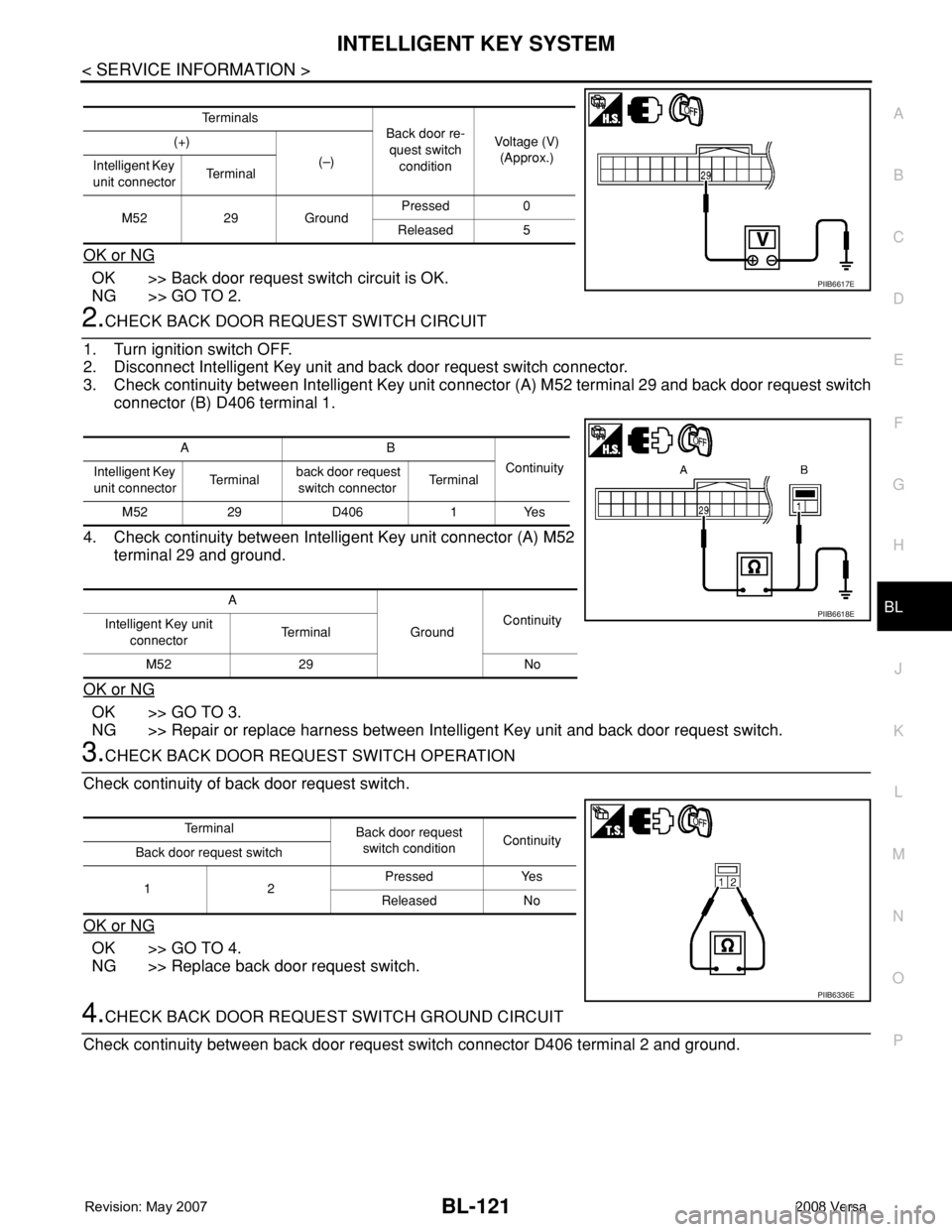
2.CHECK BACK DOOR REQUEST SWITCH CIRCUIT
1. Turn ignition switch OFF.
2. Disconnect Intelligent Key unit and back door request switch connector.
3. Check continuity between Intelligent Key unit connector (A) M52 terminal 29 and back door request switch
connector (B) D406 terminal 1.
4. Check continuity between Intelligent Key unit connector (A) M52
terminal 29 and ground.
OK or NG
OK >> GO TO 3.
NG >> Repair or replace harness between Intelligent Key unit and back door request switch.
3.CHECK BACK DOOR REQUEST SWITCH OPERATION
Check continuity of back door request switch.
OK or NG
OK >> GO TO 4.
NG >> Replace back door request switch.
4.CHECK BACK DOOR REQUEST SWITCH GROUND CIRCUIT
Check continuity between back door request switch connector D406 terminal 2 and ground.
Te r m i n a l s
Back door re-
quest switch
conditionVoltage (V)
(Approx.) (+)
(–)
Intelligent Key
unit connectorTe r m i n a l
M52 29 GroundPressed 0
Released 5
PIIB6617E
AB
Continuity
Intelligent Key
unit connectorTe r m i n a l back door request
switch connectorTe r m i n a l
M52 29 D406 1 Yes
A
GroundContinuity
Intelligent Key unit
connectorTe r m i n a l
M52 29 No
PIIB6618E
Te r m i n a l
Back door request
switch conditionContinuity
Back door request switch
12Pressed Yes
Released No
PIIB6336E
Page 556 of 2771
BL-122
< SERVICE INFORMATION >
INTELLIGENT KEY SYSTEM
OK or NG
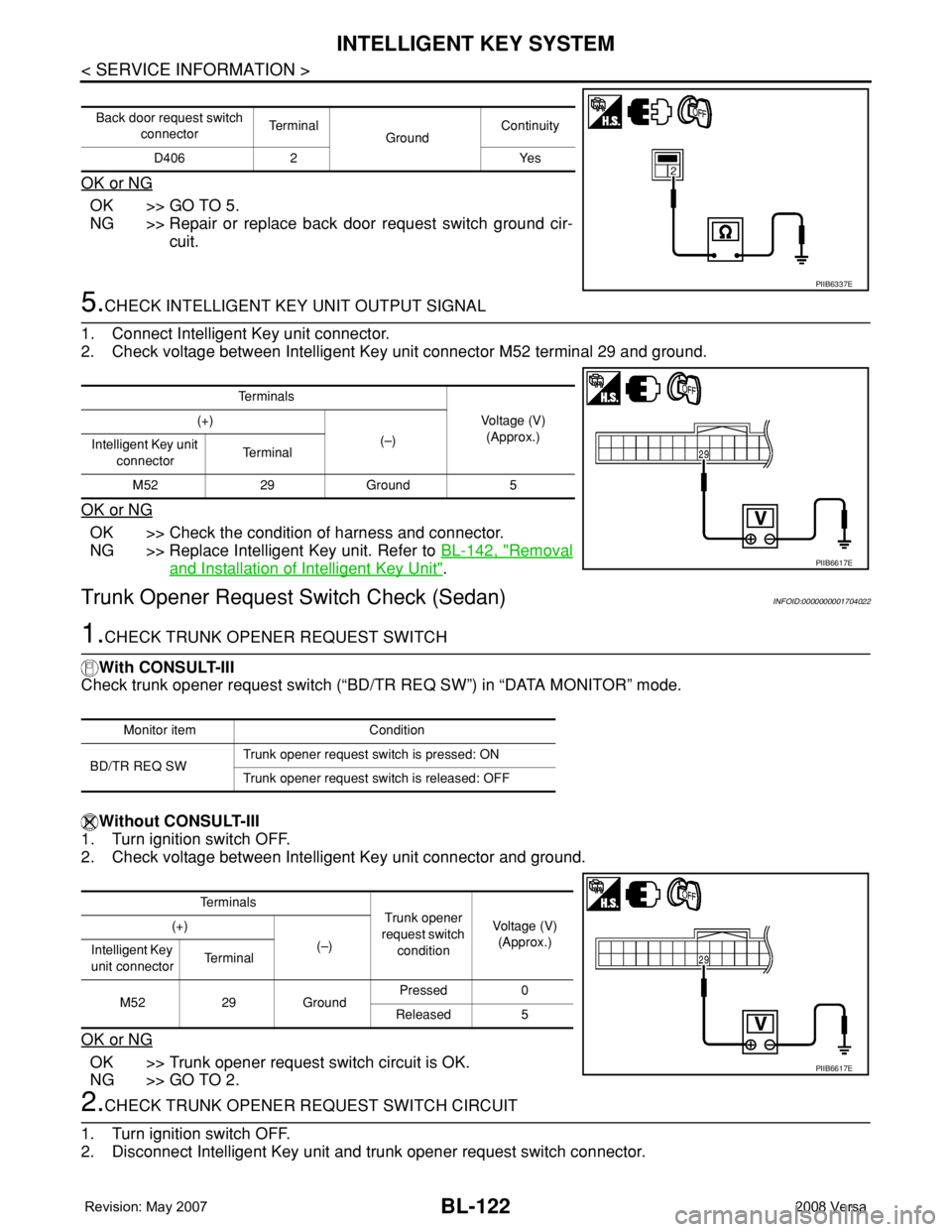
OK >> GO TO 5.
NG >> Repair or replace back door request switch ground cir-
cuit.
5.CHECK INTELLIGENT KEY UNIT OUTPUT SIGNAL
1. Connect Intelligent Key unit connector.
2. Check voltage between Intelligent Key unit connector M52 terminal 29 and ground.
OK or NG
OK >> Check the condition of harness and connector.
NG >> Replace Intelligent Key unit. Refer to BL-142, "
Removal
and Installation of Intelligent Key Unit".
Trunk Opener Request Switch Check (Sedan)INFOID:0000000001704022
1.CHECK TRUNK OPENER REQUEST SWITCH
With CONSULT-III
Check trunk opener request switch (“BD/TR REQ SW”) in “DATA MONITOR” mode.
Without CONSULT-III
1. Turn ignition switch OFF.
2. Check voltage between Intelligent Key unit connector and ground.
OK or NG
OK >> Trunk opener request switch circuit is OK.
NG >> GO TO 2.
2.CHECK TRUNK OPENER REQUEST SWITCH CIRCUIT
1. Turn ignition switch OFF.
2. Disconnect Intelligent Key unit and trunk opener request switch connector.
Back door request switch
connectorTe r m i n a l
GroundContinuity
D406 2 Yes
PIIB6337E
Te r m i n a l s
Voltage (V)
(Approx.) (+)
(–)
Intelligent Key unit
connectorTe r m i n a l
M52 29 Ground 5
PIIB6617E
Monitor item Condition
BD/TR REQ SWTrunk opener request switch is pressed: ON
Trunk opener request switch is released: OFF
Te r m i n a l s
Trunk opener
request switch
conditionVoltage (V)
(Approx.) (+)
(–)
Intelligent Key
unit connectorTe r m i n a l
M52 29 GroundPressed 0
Released 5
PIIB6617E
Page 557 of 2771
INTELLIGENT KEY SYSTEM
BL-123
< SERVICE INFORMATION >
C
D
E
F
G
H
J
K
L
MA
B
BL
N
O
P
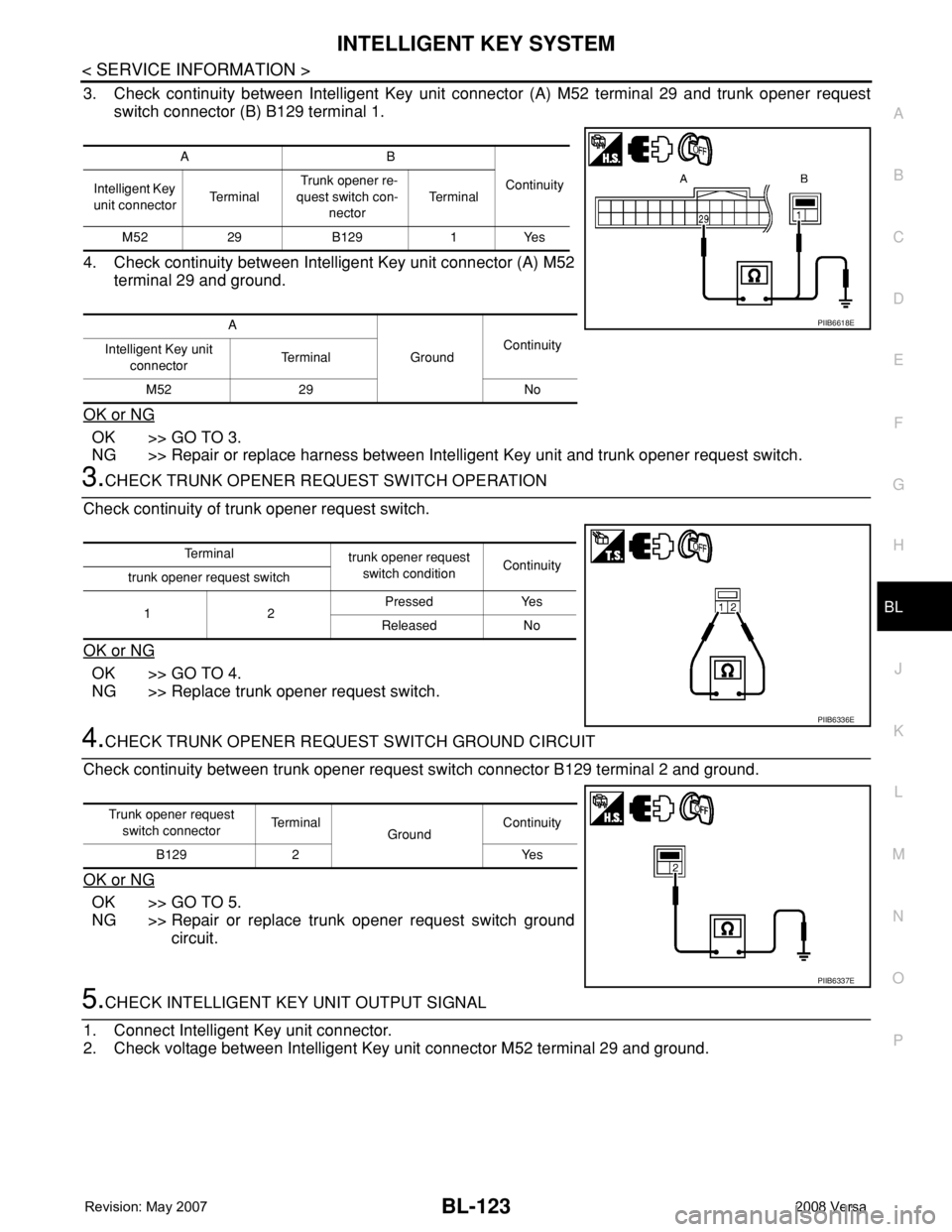
3. Check continuity between Intelligent Key unit connector (A) M52 terminal 29 and trunk opener request
switch connector (B) B129 terminal 1.
4. Check continuity between Intelligent Key unit connector (A) M52
terminal 29 and ground.
OK or NG
OK >> GO TO 3.
NG >> Repair or replace harness between Intelligent Key unit and trunk opener request switch.
3.CHECK TRUNK OPENER REQUEST SWITCH OPERATION
Check continuity of trunk opener request switch.
OK or NG
OK >> GO TO 4.
NG >> Replace trunk opener request switch.
4.CHECK TRUNK OPENER REQUEST SWITCH GROUND CIRCUIT
Check continuity between trunk opener request switch connector B129 terminal 2 and ground.
OK or NG
OK >> GO TO 5.
NG >> Repair or replace trunk opener request switch ground
circuit.
5.CHECK INTELLIGENT KEY UNIT OUTPUT SIGNAL
1. Connect Intelligent Key unit connector.
2. Check voltage between Intelligent Key unit connector M52 terminal 29 and ground.
AB
Continuity
Intelligent Key
unit connectorTe r m i n a l Trunk opener re-
quest switch con-
nectorTe r m i n a l
M52 29 B129 1 Yes
A
GroundContinuity
Intelligent Key unit
connectorTe r m i n a l
M52 29 No
PIIB6618E
Te r m i n a l
trunk opener request
switch conditionContinuity
trunk opener request switch
12Pressed Yes
Released No
PIIB6336E
Trunk opener request
switch connectorTe r m i n a l
GroundContinuity
B129 2 Yes
PIIB6337E