Pressure switch NISSAN TIIDA 2009 Service Repair Manual
[x] Cancel search | Manufacturer: NISSAN, Model Year: 2009, Model line: TIIDA, Model: NISSAN TIIDA 2009Pages: 4331, PDF Size: 58.04 MB
Page 4032 of 4331

PG
N
O P
D3 B100 GR/5 : Fuel level sensor unit and fuel pump C3 B116 W/1 : Rear door switch RH
G5 B101 W/16 : To M12 E3 B117 — : Body ground
G5 B102 W/24 : To M13 B2 B118 Y/2 : RH side curtain air bag module
F3 B103 B/2 : Console power socket D3 B119 W/8 : To D301
A4 B104 GR/3 : EVAP control system pressure sensor G5 B120 W/24 : To M14
A3 B105 B/2 : EVAP canister vent control valve A3 B121 W/32 : Bluetooth control unit
G5 B106 W/4 : To M11 A3 B122 GR/1 : Bluetooth control unit
A2 B107 BR/6 : Rear combination lamp RH D2 B123 B/2 : Rear wheel sensor LH
E4 B108 W/3 : Front door switch RH C3 B124 B/2 : Rear wheel sensor RH
F4 B109 Y/2 : Front RH side air bag module F3 B125 GR/2 : Front console antenna
F4 B110 W/10 : To B300 C3 B126 GR/2 : Rear floor antenna
E5 B111 Y/2 : RH side air bag (satellite) sensor A2 B132 — : Body ground
F4 B112 W/3 : Seat belt buckle switch RH B2 B133 W/2 : To D400
F3 B113 Y/12 : Air bag diagnosis sensor unit A2 B134 W/12 : To D401
E4 B114 — : Body ground E5 B138 B/3 : Belt tension sensor
E4 B115 Y/2 : Front RH seat belt pre-tensioner
Page 4238 of 4331
19, " SRS Operation Check " .
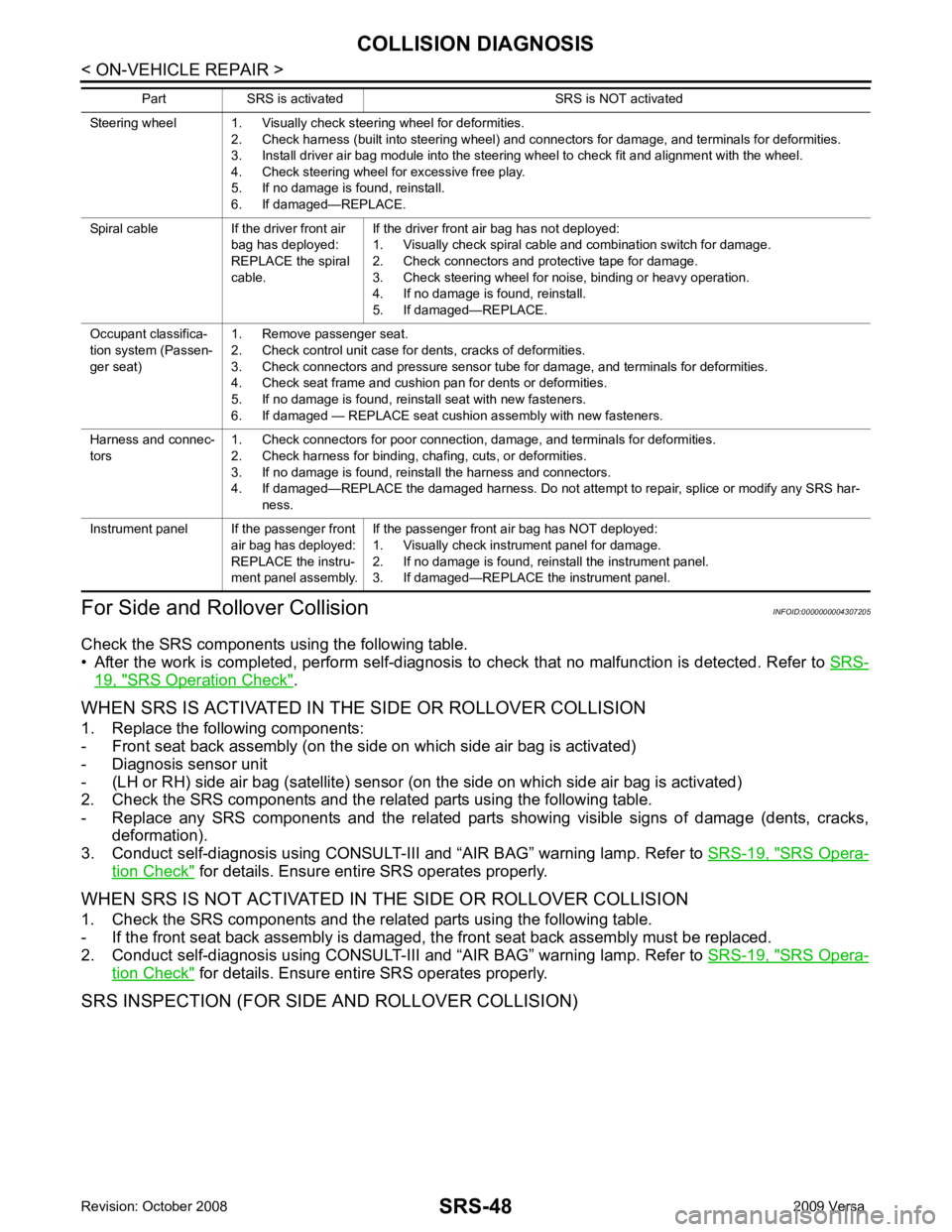
WHEN SRS IS ACTIVATED IN THE SIDE OR ROLLOVER COLLISION
1. Replace the following components:
- Front seat back assembly (on the side on which side air bag is activated)
- Diagnosis sensor unit
- (LH or RH) side air bag (satellite) sensor (on the side on which side air bag is activated)
2. Check the SRS components and the related parts using the following table.
- Replace any SRS components and the related parts showing visible signs of damage (dents, cracks, deformation).
3. Conduct self-diagnosis using CONSULT-III and “AIR BAG” warning lamp. Refer to SRS-19, " SRS Opera-
tion Check " for details. Ensure entire SRS operates properly.
WHEN SRS IS NOT ACTIVATED IN THE SIDE OR ROLLOVER COLLISION
1. Check the SRS components and the related parts using the following table.
- If the front seat back assembly is damaged, t he front seat back assembly must be replaced.
2. Conduct self-diagnosis using CONSULT-III and “AIR BAG” warning lamp. Refer to SRS-19, " SRS Opera-
tion Check " for details. Ensure entire SRS operates properly.
SRS INSPECTION (FOR SIDE AND ROLLOVER COLLISION) Steering wheel 1. Visually check steering wheel for deformities.
2. Check harness (built into steering wheel) and connectors for damage, and terminals for deformities.
3. Install driver air bag module into the steering wheel to check fit and alignment with the wheel.
4. Check steering wheel for excessive free play.
5. If no damage is found, reinstall.
6. If damaged—REPLACE.
Spiral cable If the driver front air bag has deployed:
REPLACE the spiral
cable. If the driver front air bag has not deployed:
1. Visually check spiral cable and combination switch for damage.
2. Check connectors and protective tape for damage.
3. Check steering wheel for noise, binding or heavy operation.
4. If no damage is found, reinstall.
5. If damaged—REPLACE.
Occupant classifica-
tion system (Passen-
ger seat) 1. Remove passenger seat.
2. Check control unit case for dents, cracks of deformities.
3. Check connectors and pressure sensor tube for damage, and terminals for deformities.
4. Check seat frame and cushion pan for dents or deformities.
5. If no damage is found, reinstall seat with new fasteners.
6. If damaged — REPLACE seat cushion assembly with new fasteners.
Harness and connec-
tors 1. Check connectors for poor connection, damage, and terminals for deformities.
2. Check harness for binding, chafing, cuts, or deformities.
3. If no damage is found, reinstall the harness and connectors.
4. If damaged—REPLACE the damaged harness. Do not attempt to repair, splice or modify any SRS har- ness.
Instrument panel If the passenger front air bag has deployed:
REPLACE the instru-
ment panel assembly. If the passenger front air bag has NOT deployed:
1. Visually check instrument panel for damage.
2. If no damage is found, reinstall the instrument panel.
3. If damaged—REPLACE the instrument panel.
Part SRS is activated SRS is NOT activated
Page 4243 of 4331
![NISSAN TIIDA 2009 Service Repair Manual PRECAUTIONS
STC-3
< SERVICE INFORMATION >
[EPS] C
D E
F
H I
J
K L
M A
B STC
N
O
P
5. When the repair work is completed, return the ignition switch to the
″LOCK ″ position before con](/img/5/57398/w960_57398-4242.png "NISSAN TIIDA 2009 Service Repair Manual PRECAUTIONS
STC-3
< SERVICE INFORMATION >
[EPS] C
D E
F
H I
J
K L
M A
B STC
N
O
P
5. When the repair work is completed, return the ignition switch to the
″LOCK ″ position before con")
PRECAUTIONS
STC-3
< SERVICE INFORMATION >
[EPS] C
D E
F
H I
J
K L
M A
B STC
N
O
P
5. When the repair work is completed, return the ignition switch to the
″LOCK ″ position before connecting
the battery cables. (At this time, the steering lock mechanism will engage.)
6. Perform a self-diagnosis check of al l control units using CONSULT-III.
Service Notice or Precaution for EPS System INFOID:0000000004307286
CAUTION:
Check or confirm the following item wh en performing the trouble diagnosis.
• Check any possible causes by interviewing the symptom and it’s condition from the customer if any
malfunction, such as EPS warn ing lamp turns ON, occurs.
• Check if air pressure and size of tires are proper, the specified part is used for the steering wheel,
and control unit is genuine part.
• Check if the connection of steer ing column assembly and steering gear assembly is proper (there is
not looseness of mounting bolts, damage of rods, boots or sealants, and leakage of grease, etc).
• Check if the wheel alignmen t is adjusted properly.
• Check if there is any damage or modification to su spension or body resulting in increased weight or
altered ground clearance.
• Check if installation conditions of each link and suspension are proper.
• Check if the battery voltage is proper
• Check connection conditions of each connector are proper.
• Before connecting or disconnect ing the EPS control unit har-
ness connector, turn ignition switch “OFF” and disconnect
battery ground cable. Because battery voltage is applied to
EPS control unit even if igniti on switch is turned “OFF”.
• When connecting or disconnect ing pin connectors into or
from EPS control unit, take care not to damage pin terminals
(bend or break).
When connecting pin connectors, make sure that there are no
bends or breaks on EPS control unit pin terminal.
• Before replacing EPS control unit, perform EPS control unit input/output signal inspectio n and make sure whether EPS
control unit functions properly or not. Refer to STC-9, " EPS
Control Unit Input/Output Signal Reference Value " . SEF289H
SEF291H
SDIA1848E
Page 4266 of 4331

WT
N
O P
CONTENTS
ROAD WHEELS & TIRES
SERVICE INFORMATION .. ..........................2
PRECAUTIONS .............................................. .....2
Precaution for Supplemental Restraint System
(SRS) "AIR BAG" and "SEAT BELT PRE-TEN-
SIONER" ............................................................. ......
2
Precaution Necessary fo r Steering Wheel Rota-
tion After Battery Disconnect ............................... ......
2
PREPARATION .............................................. .....4
Special Service Tool ........................................... ......4
Commercial Service Tool .................................... ......4
NOISE, VIBRATION AND HARSHNESS
(NVH) TROUBLESHOOTING ........................ .....5
NVH Troubleshooting Chart ................................ ......5
ROAD WHEEL ............................................... .....6
Inspection ............................................................ ......6
ROAD WHEEL TIRE ASSEMBLY ................. .....7
Balancing Wheels ............................................... ......7
Rotation ............................................................... ......7
TIRE PRESSURE MONITORING SYSTEM ... .....8
System Component ............................................. ......8
System Description ............................................. ......8
CAN COMMUNICATION ................................ ....10
System Description ............................................. ....10
TROUBLE DIAGNOSES ................................ ....11
Wiring Diagram- T/WARN - ................................. ....11
Terminal and Reference Value for BCM ............. ....11
ID Registration Procedure ................................... ....12 Transmitter Wake Up Oper
ation ..............................13
CONSULT-III Function (B CM) .................................13
How to Perform Trouble Diagnosis for Quick and
Accurate Repair ................................................... ....
14
Preliminary Check ............................................... ....15
Self-Diagnosis (With CONSULT-III) .................... ....16
Self-Diagnosis (Without CONSULT-III) ............... ....17
TROUBLE DIAGNOSIS FOR SELF-DIAG-
NOSTIC ITEMS ................................................. 19
Data from Transmitter Not Being Received ......... ....19
Transmitter Malfunction ....................................... ....19
Transmitter Pressure Malf unction ............................20
Vehicle Speed Signal .......................................... ....20
Vehicle Ignition Signal ......................................... ....21
TROUBLE DIAGNOSIS FOR SYMPTOMS ...... 22
Low Tire Pressure Warning Lamp Does Not Come
On When Ignition Switch Is Turned On ............... ....
22
Low Tire Pressure Warnin g Lamp Stays On When
Ignition Switch Is Turned On ............................... ....
22
Low Tire Pressure Warning Lamp Flashes When
Ignition Switch Is Turned On ............................... ....
23
Hazard Warning Lamps Flash When Ignition
Switch Is Turned On ............................................ ....
24
ID Registration Cannot Be Completed ....................24
REMOVAL AND INSTALLATION ..................... 25
Transmitter (Pressure Sens or) ................................25
SERVICE DATA AND SPECIFICATIONS
(SDS) ................................................................. 27
Road Wheel ......................................................... ....27
Tire ...................................................................... ....27
Page 4278 of 4331
TROUBLE DIAGNOSES
WT-13
< SERVICE INFORMATION >
C
D
F
G H
I
J
K L
M A
B WT
N
O P
6. Inflate all tires to proper pressure. Refer to
WT-27, " Tire " .
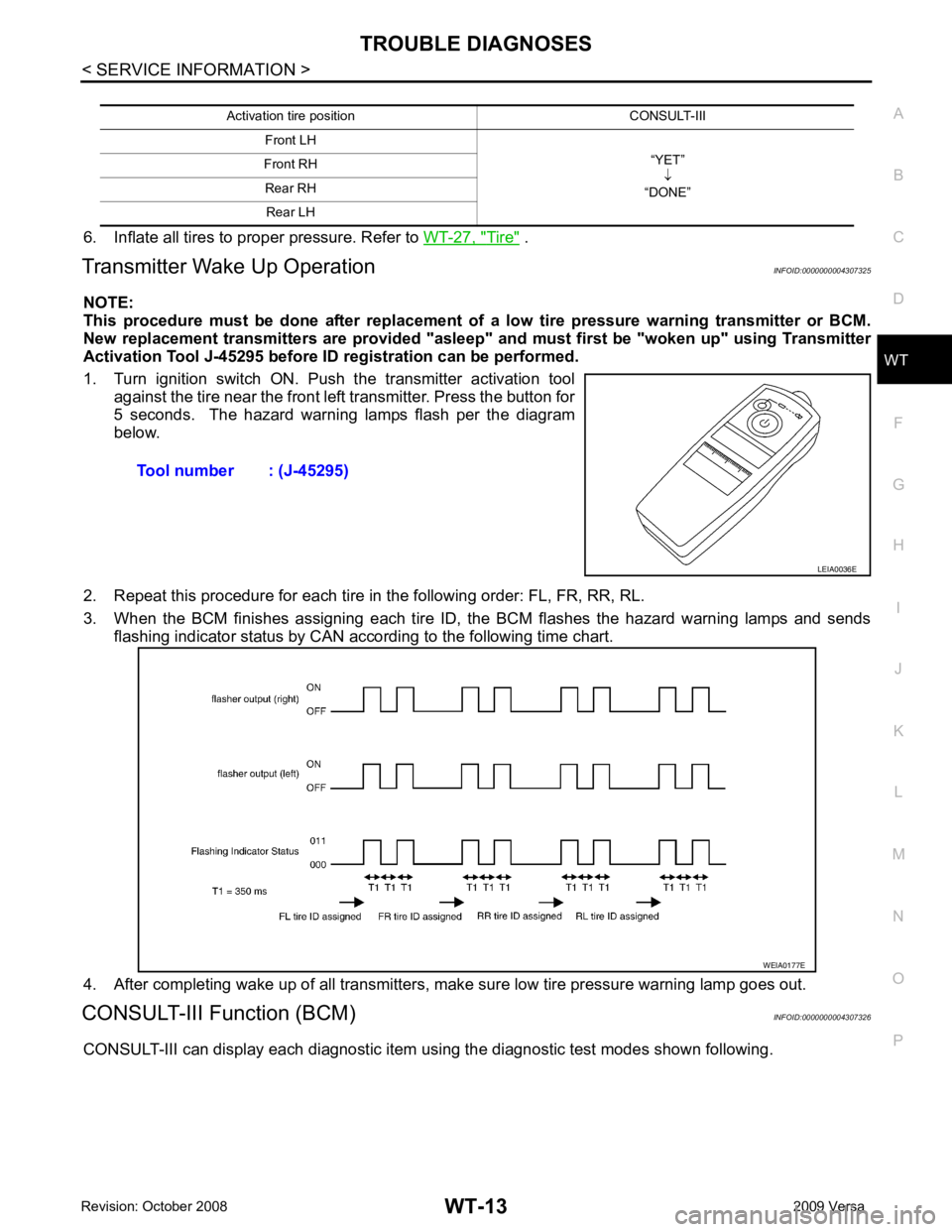
Transmitter Wake Up Operation INFOID:0000000004307325
NOTE:
This procedure must be done after replacement of a low tire pressure warning transmitter or BCM.
New replacement transmitters are provided "asleep" and must first be "woken up" using Transmitter
Activation Tool J-45295 before ID registration can be performed.
1. Turn ignition switch ON. Push the transmitter activation tool against the tire near the front left transmitter. Press the button for
5 seconds. The hazard warning lamps flash per the diagram
below.
2. Repeat this procedure for each tire in the following order: FL, FR, RR, RL.
3. When the BCM finishes assigning each tire ID, the BCM flashes the hazard warning lamps and sends flashing indicator status by CAN according to the following time chart.
4. After completing wake up of all transmitters, make sure low tire pressure warning lamp goes out.
CONSULT-III Function (BCM) INFOID:0000000004307326
CONSULT-III can display each diagnostic item using the diagnostic test modes shown following. Activation tire position CONSULT-III
Front LH “YET”↓
“DONE”
Front RH
Rear RH Rear LH Tool number : (J-45295)
LEIA0036E
WEIA0177E
Page 4280 of 4331

WT
N
O P
Preliminary Check
INFOID:0000000004307328
BASIC INSPECTION Tire " .
OK or NG OK >> GO TO 2.
NG >> Adjust tire pressure to specified value. YES >> GO TO 3.
NO >> GO TO WT-22, " Low Tire Pressure Warning Lamp Does Not Come On When Ignition Switch Is
Turned On " . Self-diagnosis :
WT-16 Trouble diagnosis for symptoms :
WT-22
Page 4282 of 4331
WT
N
O P
NOTE:
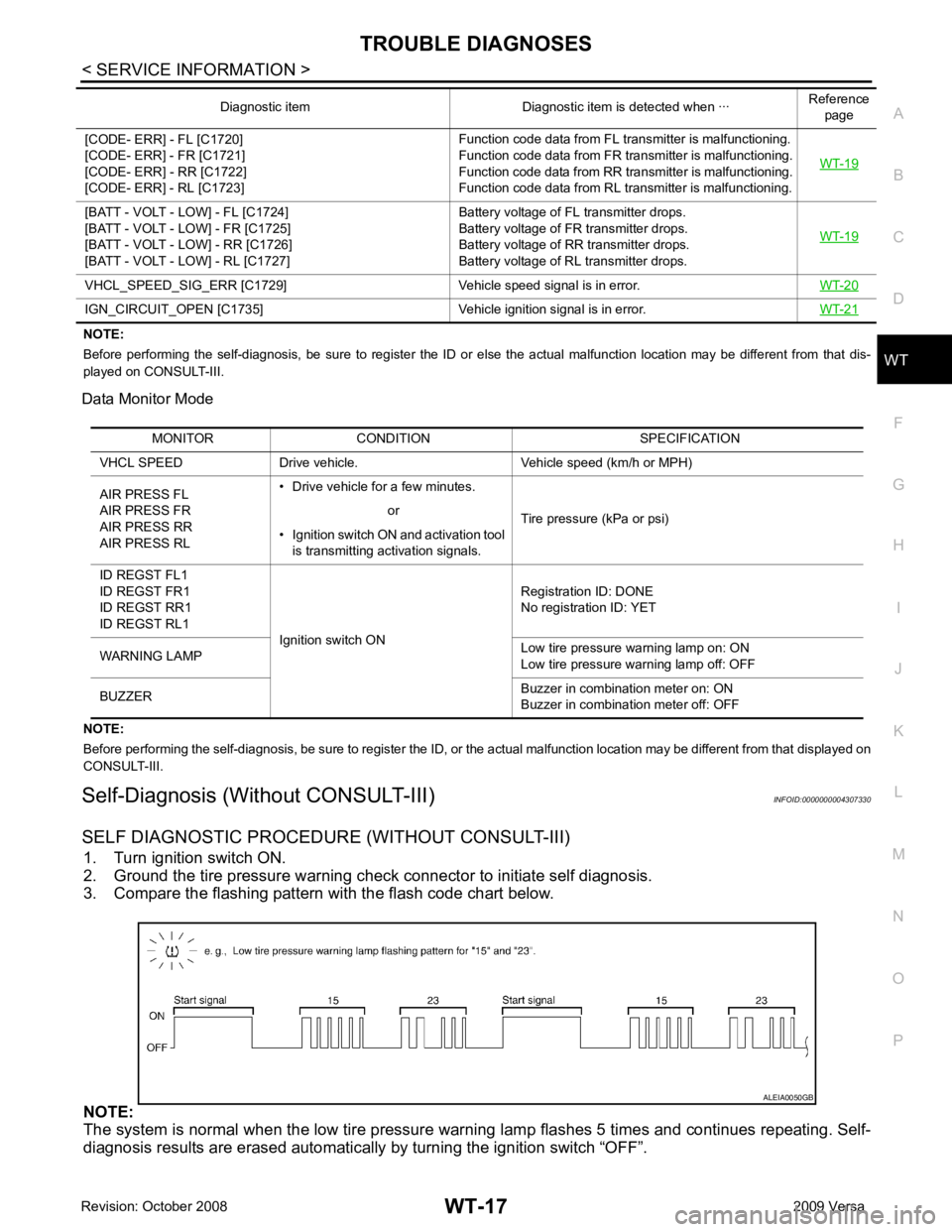
Before performing the self-diagnosis, be sure to register the ID or else the actual malfunction location may be different from that dis-
played on CONSULT-III.
Data Monitor Mode
NOTE:
Before performing the self-diagnosis, be sure to register the ID, or the actual malfunction location may be different from that displayed on
CONSULT-III.
Self-Diagnosis (Without CONSULT-III) INFOID:0000000004307330
SELF DIAGNOSTIC PROCE DURE (WITHOUT CONSULT-III)
1. Turn ignition switch ON.
2. Ground the tire pressure warning check connector to initiate self diagnosis.
3. Compare the flashing pattern with the flash code chart below.
NOTE:
The system is normal when the low tire pressure warni ng lamp flashes 5 times and continues repeating. Self-
diagnosis results are erased automatically by turning the ignition switch “OFF”.
[CODE- ERR] - FL [C1720]
[CODE- ERR] - FR [C1721]
[CODE- ERR] - RR [C1722]
[CODE- ERR] - RL [C1723] Function code data from FL transmitter is malfunctioning.
Function code data from FR transmitter is malfunctioning.
Function code data from RR transmitter is malfunctioning.
Function code data from RL transmitter is malfunctioning. WT-19[BATT - VOLT - LOW] - FL [C1724]
[BATT - VOLT - LOW] - FR [C1725]
[BATT - VOLT - LOW] - RR [C1726]
[BATT - VOLT - LOW] - RL [C1727] Battery voltage of FL transmitter drops.
Battery voltage of FR transmitter drops.
Battery voltage of RR transmitter drops.
Battery voltage of RL transmitter drops. WT-19VHCL_SPEED_SIG_ERR [C1729] Vehicle
speed signal is in error.WT-20IGN_CIRCUIT_OPEN [C1735] Vehicle
ignition signal is in error. WT-21Diagnostic item Diagnostic item is detected when ···
Reference
page MONITOR CONDITION SPECIFICATION
VHCL SPEED Drive vehicle. Vehicle speed (km/h or MPH)
AIR PRESS FL
AIR PRESS FR
AIR PRESS RR
AIR PRESS RL • Drive vehicle for a few minutes.
Tire pressure (kPa or psi)
or
• Ignition switch ON and activation tool is transmitting activation signals.
ID REGST FL1
ID REGST FR1
ID REGST RR1
ID REGST RL1 Ignition switch ON Registration ID: DONE
No registration ID: YET
WARNING LAMP Low tire pressure
warning lamp on: ON
Low tire pressure warning lamp off: OFF
BUZZER Buzzer in combination meter on: ON
Buzzer in combination meter off: OFF
Page 4283 of 4331
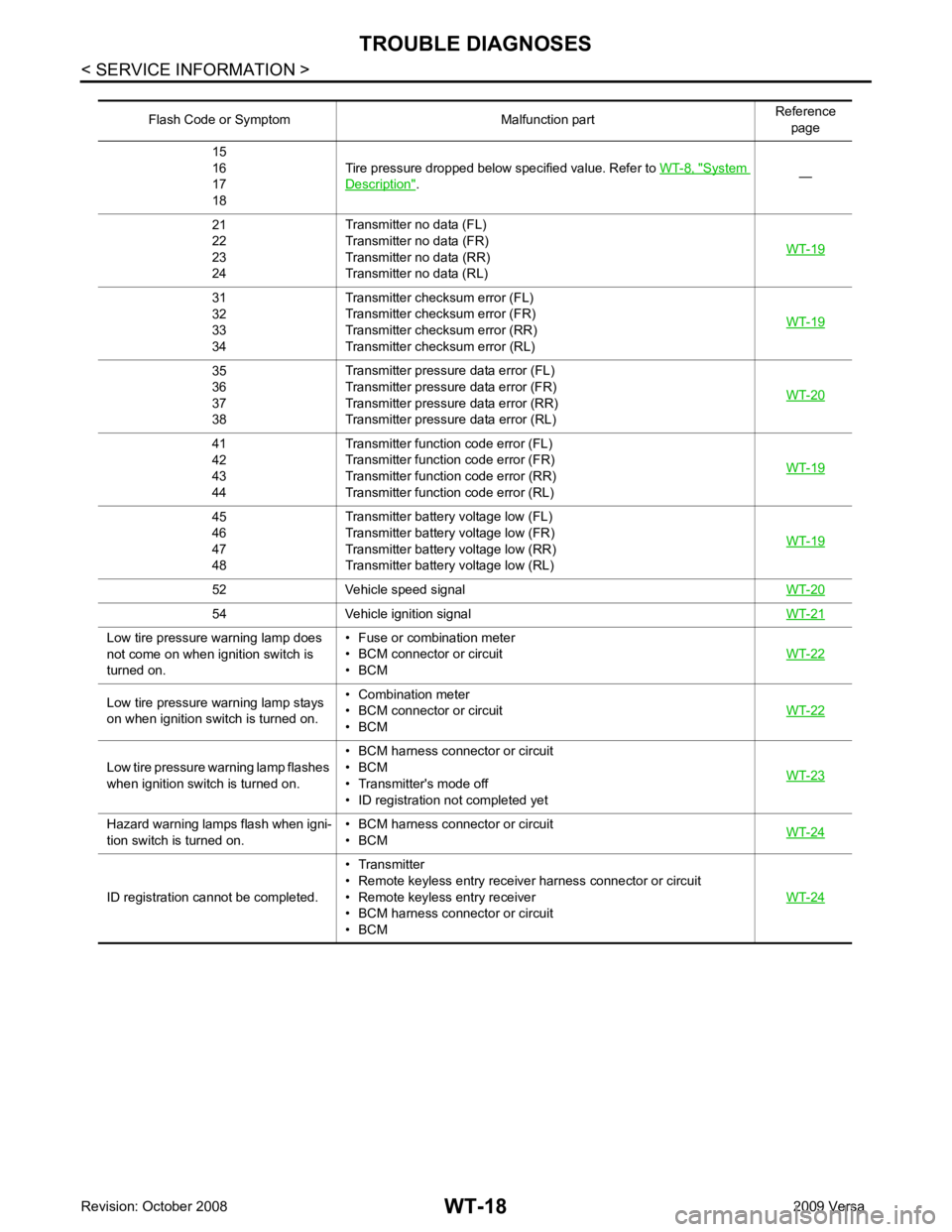
System
Description " .
—
21
22
23
24 Transmitter no data (FL)
Transmitter no data (FR)
Transmitter no data (RR)
Transmitter no data (RL) WT-1931
32
33
34 Transmitter chec
ksum error (FL)
Transmitter chec ksum error (FR)
Transmitter chec ksum error (RR)
Transmitter chec ksum error (RL) WT-1935
36
37
38 Transmitter pressure
data error (FL)
Transmitter pressure data error (FR)
Transmitter pressure data error (RR)
Transmitter pressure data error (RL) WT-2041
42
43
44 Transmitter function
code error (FL)
Transmitter function code error (FR)
Transmitter function code error (RR)
Transmitter function code error (RL) WT-1945
46
47
48 Transmitter battery voltage low (FL)
Transmitter battery voltage low (FR)
Transmitter battery voltage low (RR)
Transmitter battery voltage low (RL) WT-1952 Vehicle speed signal
WT-2054 Vehicle ignition signal
WT-21Low tire pressure warning lamp does
not come on when ignition switch is
turned on. • Fuse or combination meter
• BCM connector or circuit
• BCM WT-22Low tire pressure
warning lamp stays
on when ignition switch is turned on. • Combination meter
• BCM connector or circuit
• BCM WT-22Low tire pressure wa
rning lamp flashes
when ignition switch is turned on. • BCM harness connector or circuit
• BCM
• Transmitter's mode off
• ID registration not completed yet WT-23Hazard warning lamps flash when igni-
tion switch is turned on. • BCM harness connector or circuit
• BCM WT-24ID registration cannot be completed.
• Transmitter
• Remote keyless entry receiver harness connector or circuit
• Remote keyless entry receiver
• BCM harness connector or circuit
• BCM WT-24
Page 4287 of 4331
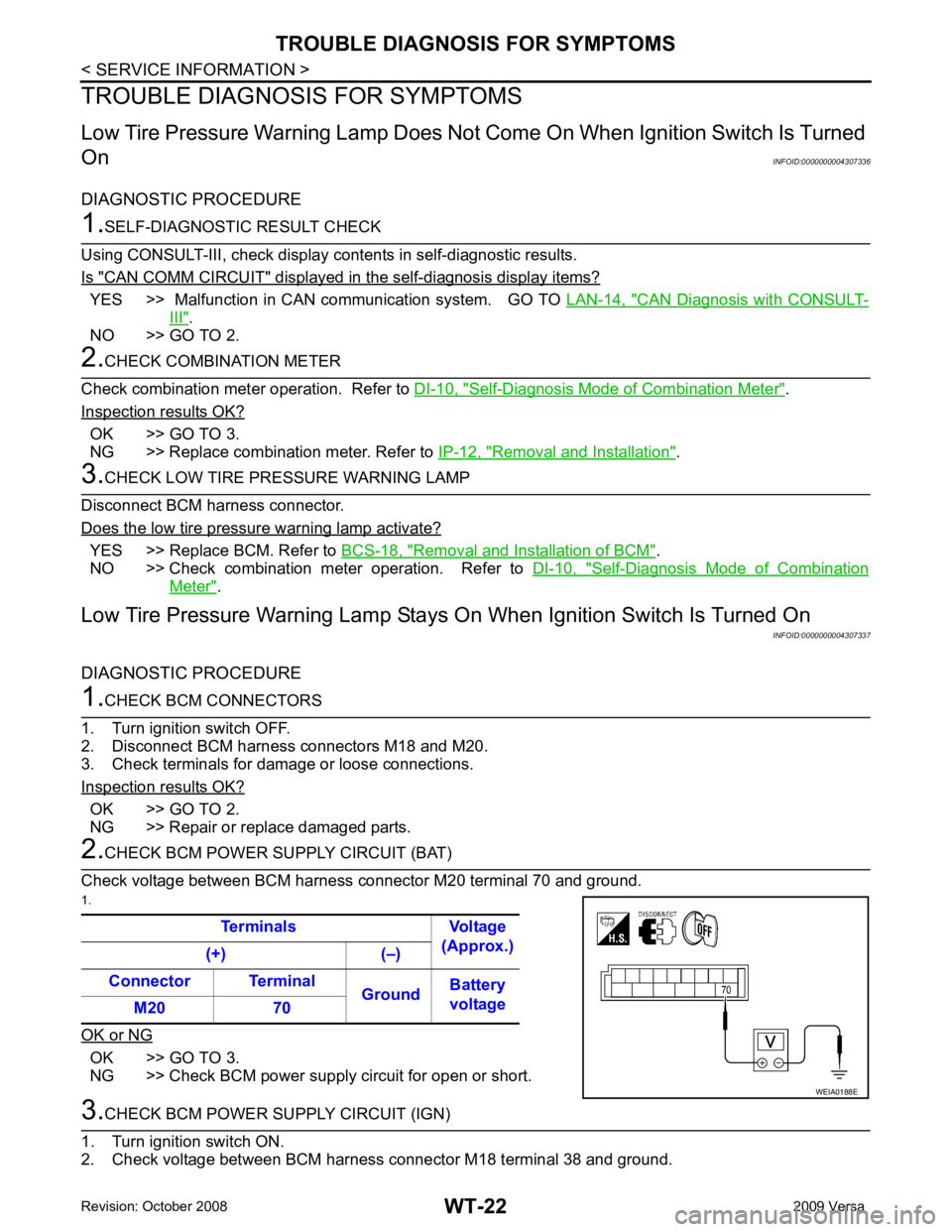
YES >> Malfunction in CAN communication system. GO TO
LAN-14, " CAN Diagnosis with CONSULT-
III " .
NO >> GO TO 2. Self-Diagnosis Mode of Combination Meter " .
Inspection results OK? OK >> GO TO 3.
NG >> Replace combination meter. Refer to IP-12, " Removal and Installation " .
YES >> Replace BCM. Refer to
BCS-18, " Removal and Installation of BCM " .
NO >> Check combination meter operation. Refer to DI-10, " Self-Diagnosis Mode of Combination
Meter " .
Low Tire Pressure Warning Lamp Stays On When Ignition Switch Is Turned On
INFOID:0000000004307337
DIAGNOSTIC PROCEDURE OK >> GO TO 2.
NG >> Repair or replace damaged parts. OK >> GO TO 3.
NG >> Check BCM power supply circuit for open or short.
Page 4288 of 4331
WT
N
O P
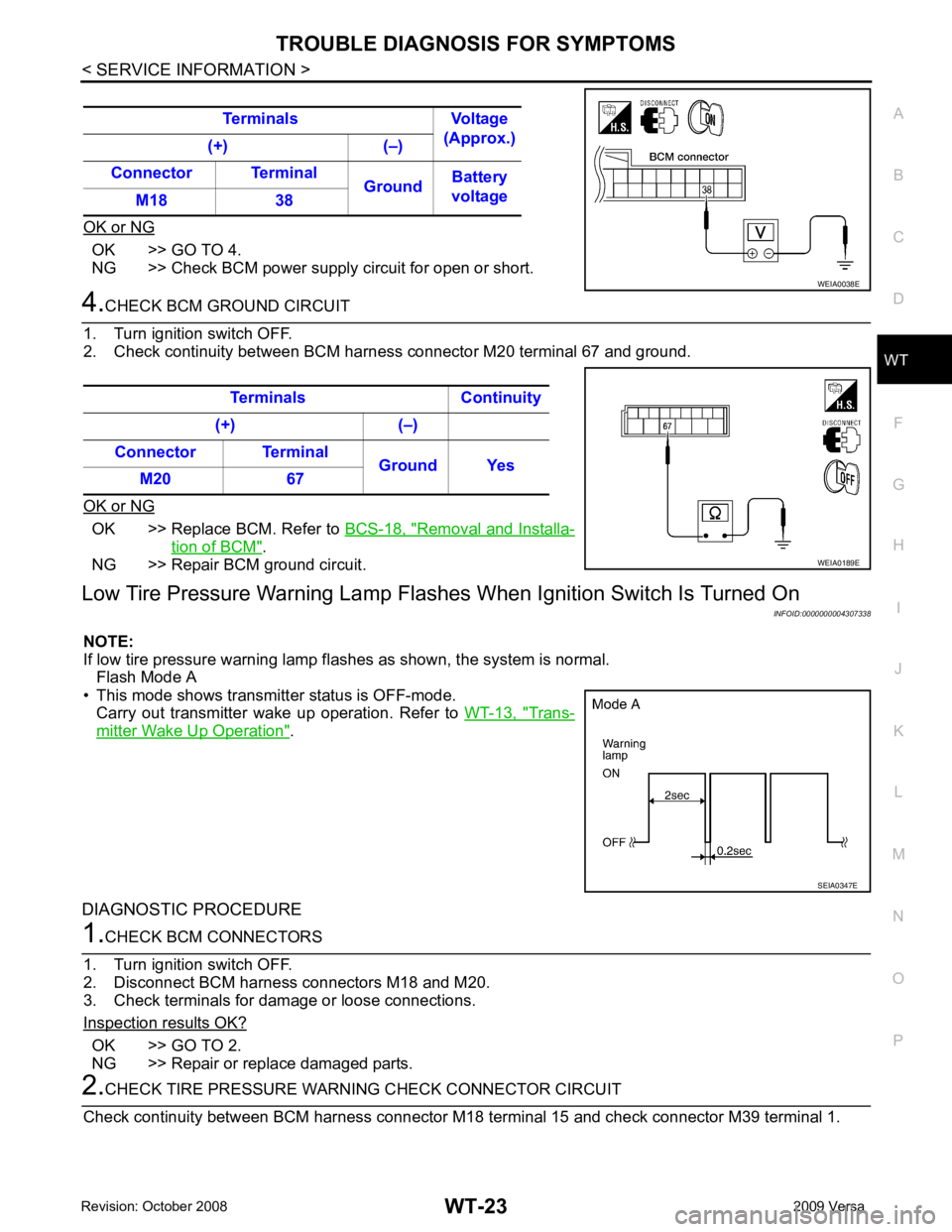
OK or NG OK >> GO TO 4.
NG >> Check BCM power supply circuit for open or short. OK >> Replace BCM. Refer to
BCS-18, " Removal and Installa-
tion of BCM " .
NG >> Repair BCM ground circuit.
Low Tire Pressure Warning Lamp Flas hes When Ignition Switch Is Turned On
INFOID:0000000004307338
NOTE:
If low tire pressure warning lamp fl ashes as shown, the system is normal.
Flash Mode A
• This mode shows transmitter status is OFF-mode. Carry out transmitter wake up operation. Refer to WT-13, " Trans-
mitter Wake Up Operation " .
DIAGNOSTIC PROCEDURE OK >> GO TO 2.
NG >> Repair or replace damaged parts.