compressor NISSAN TIIDA 2009 Service Service Manual
[x] Cancel search | Manufacturer: NISSAN, Model Year: 2009, Model line: TIIDA, Model: NISSAN TIIDA 2009Pages: 4331, PDF Size: 58.04 MB
Page 3922 of 4331
MTC
N
O P
OK >> GO TO 11.
NG >> Repair harness or connector. OK >> Replace the front blower motor resistor. Refer to
MTC-66, " Removal and Installation " .
NG >> Replace front air control. Refer to MTC-58, " Removal and Installation " .
Magnet Clutch Circuit (If Equipped) INFOID:0000000004307072
SYMPTOM: Magnet clutch does not engage.
INSPECTION FLOW YES >> GO TO 3.
NO >> GO TO 2. Operational Check " .
Does another symptom exist? YES >> Refer to
MTC-22, " How to Perform Trouble Diagnosis for Quick and Accurate Repair " .
NO >> System OK. Checking " (HR16DE) or
EM-136, " Checking Drive Belts "
(MR18DE).
OK or NG OK >> GO TO 5.
NG >> Adjust or replace A/C compressor belt. Refer to EM-15, " Removal and Installation " (HR16DE) or
EM-136, " Removal and Installation " (MR18DE).
Insufficient Cooling " .
OK or NG OK >> GO TO 6.
NG >> Perform trouble diagnosis for unusual pressure. Refer to MTC-45, " Insufficient Cooling " .
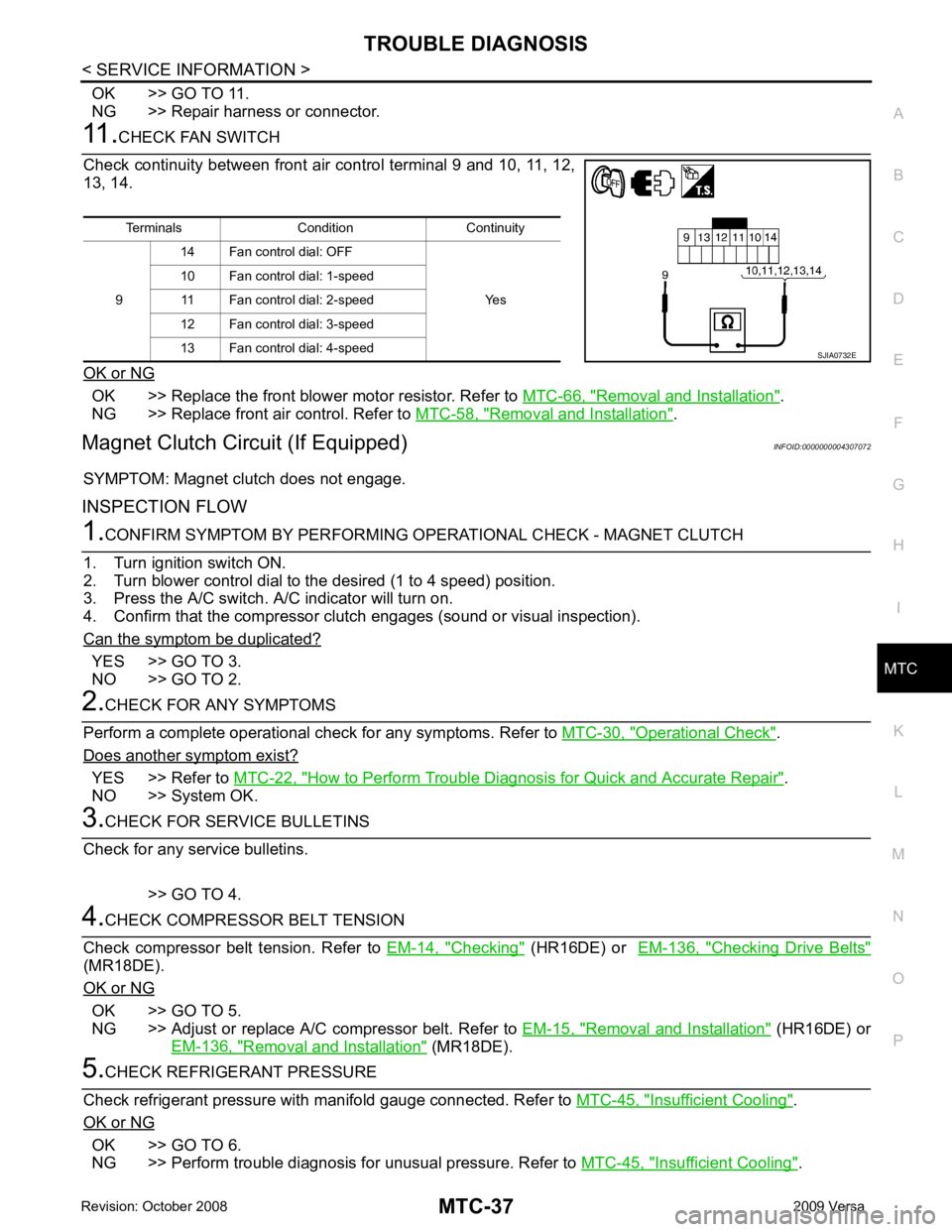
Terminals Condition Continuity
9 14 Fan control dial: OFF
Yes
10 Fan control dial: 1-speed
11 Fan control dial: 2-speed
12 Fan control dial: 3-speed
13 Fan control dial: 4-speed
Page 3923 of 4331
OK >> If the symptom still exists, perform
a complete operational check. Refer to MTC-30, " Operational
Check " . If other symptoms exist, refer to
MTC-22, " How to Perform Trouble Diagnosis for Quick
and Accurate Repair " .
NG >> Repair as necessary.
SYSTEM DESCRIPTION
Thermo control amp. controls A/C compressor operat ion by intake air temperature and signal from ECM.
The defrost A/C switch controls A/ C compressor operation by the BCM when the mode switch is turned to the
(DEF) position.
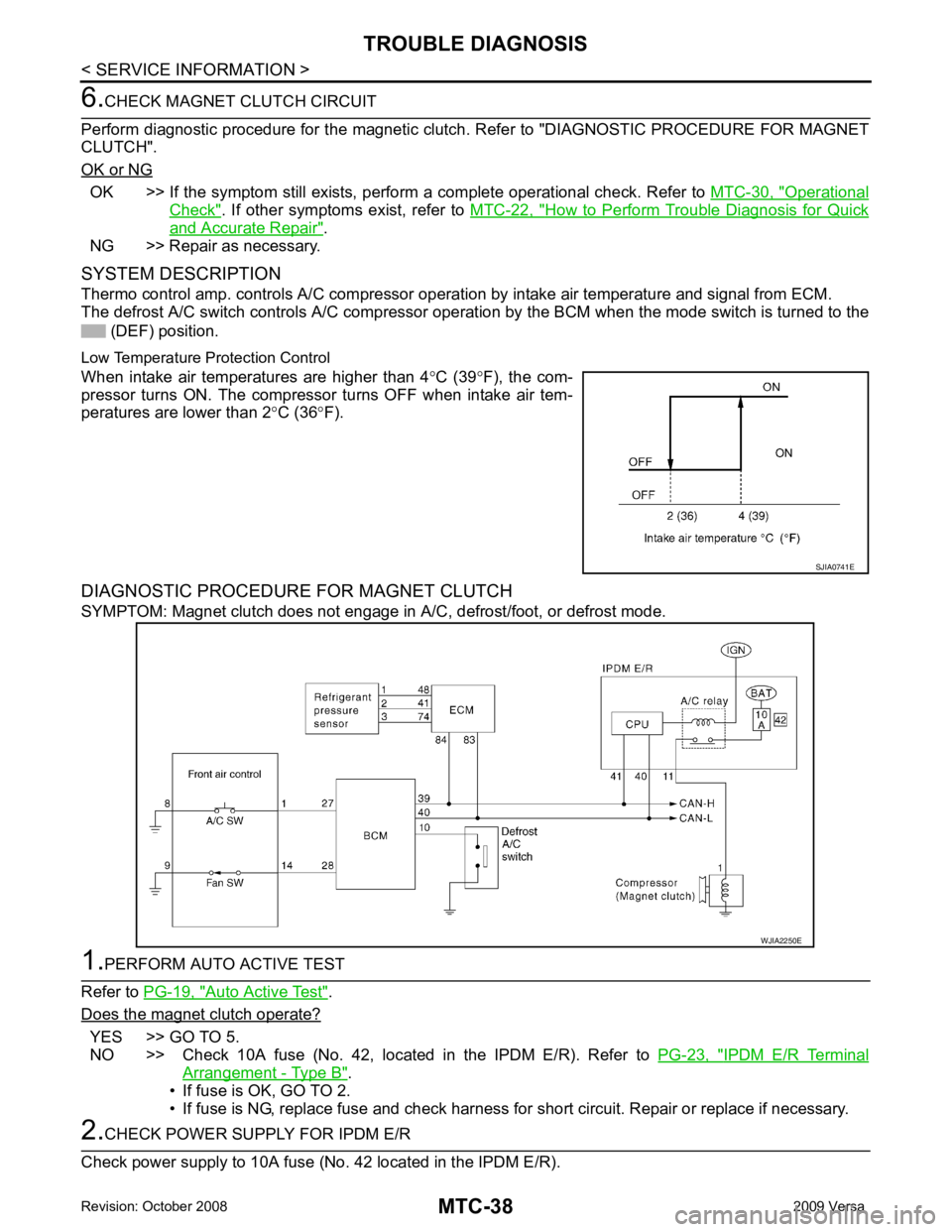
Low Temperature Protection Control
When intake air temperatures are higher than 4 °C (39 °F), the com-
pressor turns ON. The compressor turns OFF when intake air tem-
peratures are lower than 2 °C (36 °F).
DIAGNOSTIC PROCEDURE FOR MAGNET CLUTCH
SYMPTOM: Magnet clutch does not engage in A/C, defrost/foot, or defrost mode.Auto Active Test " .
Does the magnet clutch operate? YES >> GO TO 5.
NO >> Check 10A fuse (No. 42, located in the IPDM E/R). Refer to PG-23, " IPDM E/R Terminal
Arrangement - Type B " .
• If fuse is OK, GO TO 2.
• If fuse is NG, replace fuse and check harness for short circuit. Repair or replace if necessary.
Page 3924 of 4331
MTC
N
O P
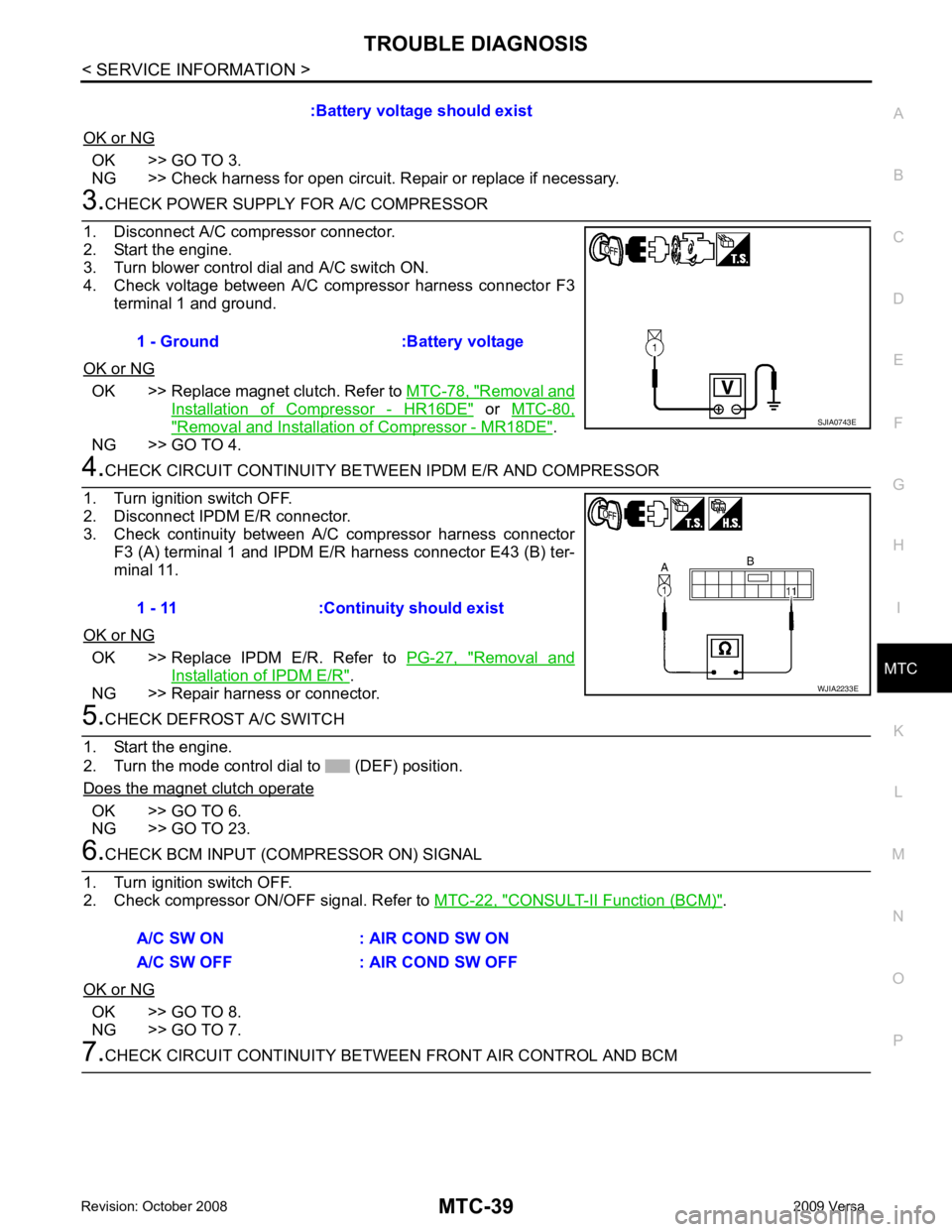
OK or NG OK >> GO TO 3.
NG >> Check harness for open circuit. Re pair or replace if necessary.OK >> Replace magnet clutch. Refer to
MTC-78, " Removal and
Installation of Compressor - HR16DE " or
MTC-80, " Removal and Installation of Compressor - MR18DE " .
NG >> GO TO 4. OK >> Replace IPDM E/R. Refer to
PG-27, " Removal and
Installation of IPDM E/R " .
NG >> Repair harness or connector. OK >> GO TO 6.
NG >> GO TO 23. CONSULT-II Function (BCM) " .
OK or NG OK >> GO TO 8.
NG >> GO TO 7.
Page 3930 of 4331
MTC
N
O P
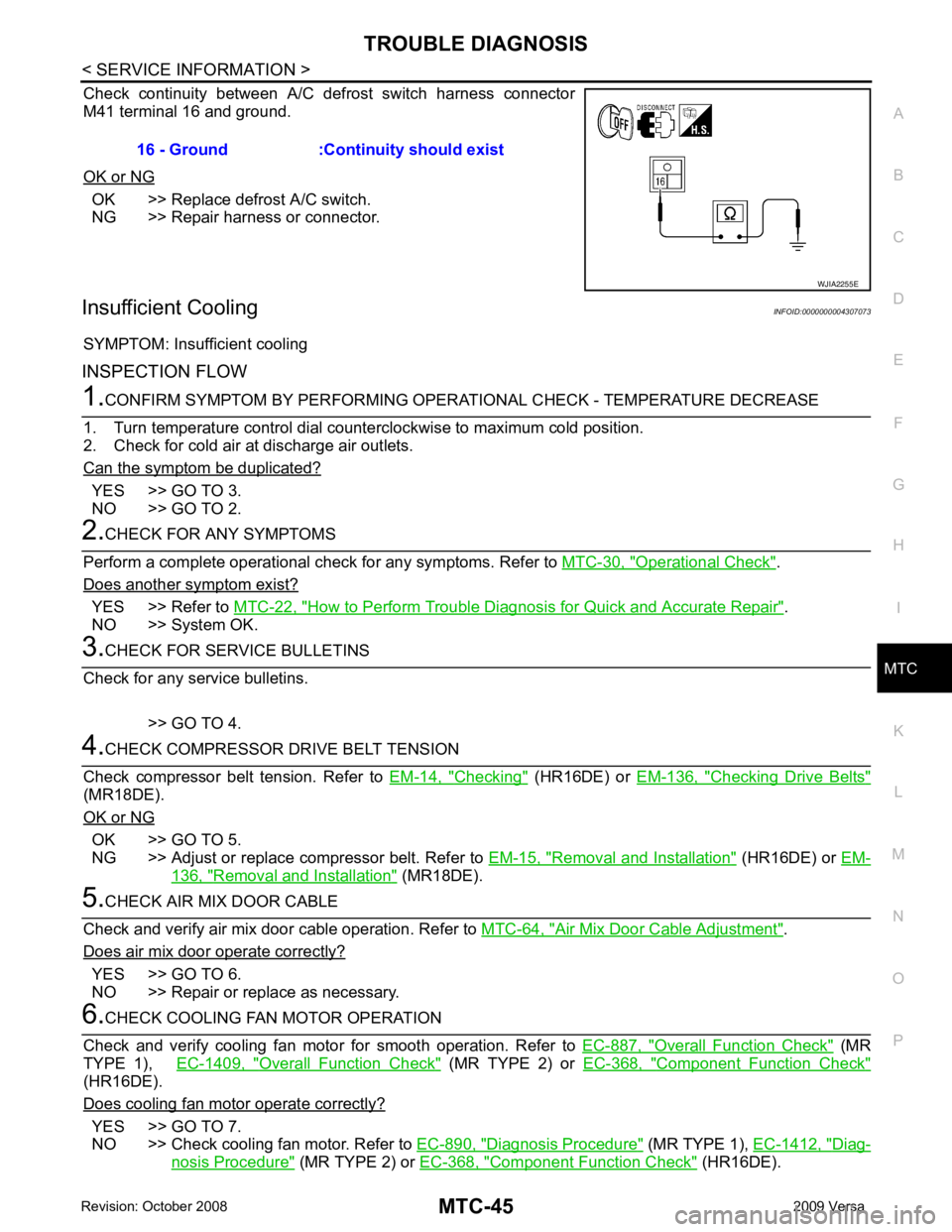
Check continuity between A/C def
rost switch harness connector
M41 terminal 16 and ground.
OK or NG OK >> Replace defrost A/C switch.
NG >> Repair harness or connector.
Insufficient Cooling INFOID:0000000004307073
SYMPTOM: Insufficient cooling
INSPECTION FLOW YES >> GO TO 3.
NO >> GO TO 2. Operational Check " .
Does another symptom exist? YES >> Refer to
MTC-22, " How to Perform Trouble Diagnosis for Quick and Accurate Repair " .
NO >> System OK. Checking " (HR16DE) or
EM-136, " Checking Drive Belts "
(MR18DE).
OK or NG OK >> GO TO 5.
NG >> Adjust or replace compressor belt. Refer to EM-15, " Removal and Installation " (HR16DE) or
EM- 136, " Removal and Installation " (MR18DE).
Air Mix Door Cable Adjustment " .
Does air mix door operate correctly? YES >> GO TO 6.
NO >> Repair or replace as necessary. Overall Function Check " (MR
TYPE 1), EC-1409, " Overall Function Check " (MR TYPE 2) or
EC-368, " Component Function Check "
(HR16DE).
Does cooling fan motor operate correctly? YES >> GO TO 7.
NO >> Check cooling fan motor. Refer to EC-890, " Diagnosis Procedure " (MR TYPE 1),
EC-1412, " Diag-
nosis Procedure " (MR TYPE 2) or
EC-368, " Component Function Check " (HR16DE).
16 - Ground :Continuity should exist
Page 3932 of 4331
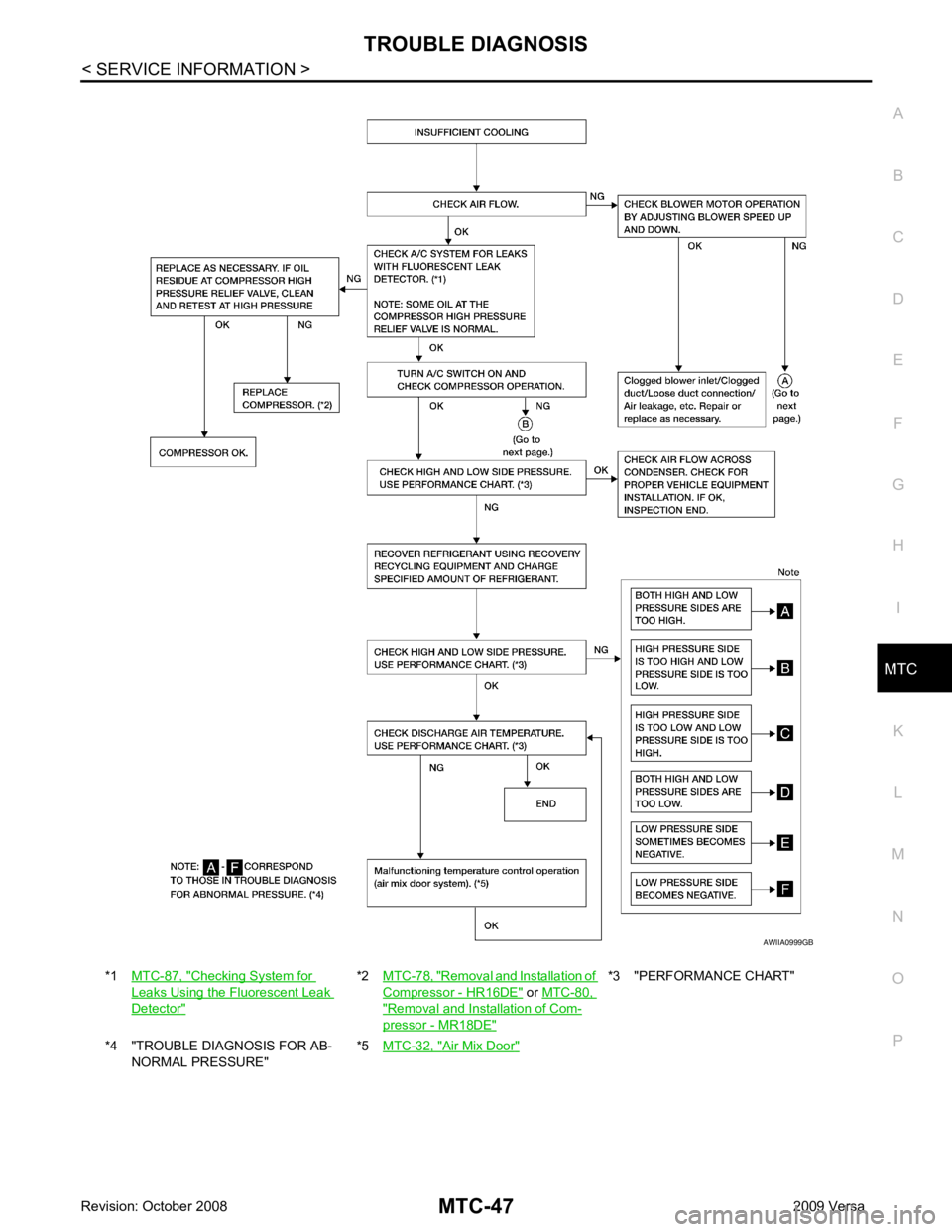
MTC
N
O P
*1
MTC-87, " Checking System for
Leaks Using the Fluorescent Leak
Detector " *2
MTC-78, " Removal and Installation of
Compressor - HR16DE " or
MTC-80, " Removal and Installation of Com-
pressor - MR18DE " *3 "PERFORMANCE CHART"
*4 "TROUBLE DIAGNOSIS FOR AB- NORMAL PRESSURE" *5
MTC-32, " Air Mix Door "
Page 3933 of 4331
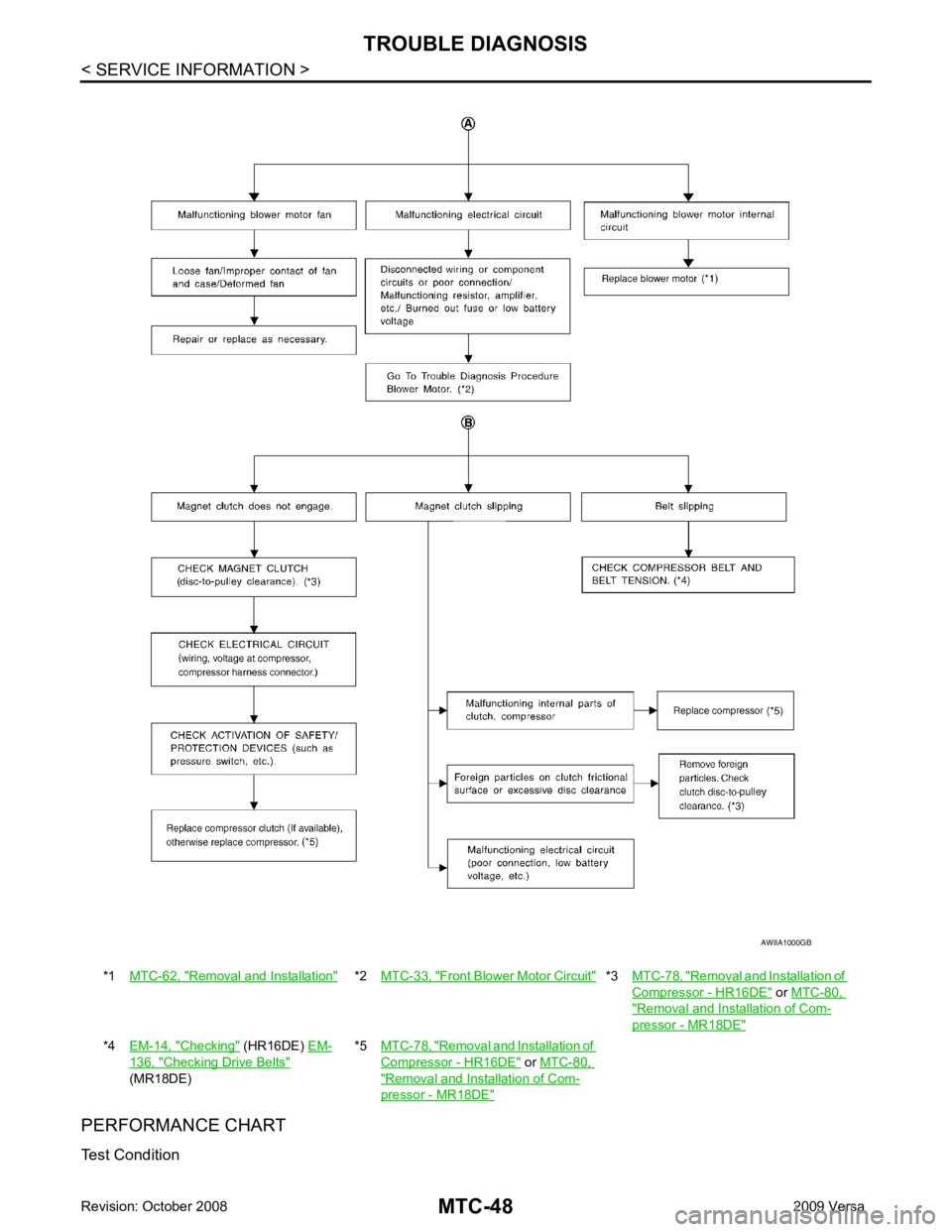
Removal and Installation " *2
MTC-33, " Front Blower Motor Circuit " *3
MTC-78, " Removal and Installation of
Compressor - HR16DE " or
MTC-80, " Removal and Installation of Com-
pressor - MR18DE "
*4
EM-14, " Checking " (HR16DE)
EM- 136, " Checking Drive Belts "
(MR18DE) *5
MTC-78, " Removal and Installation of
Compressor - HR16DE " or
MTC-80, " Removal and Installation of Com-
pressor - MR18DE "
Page 3936 of 4331
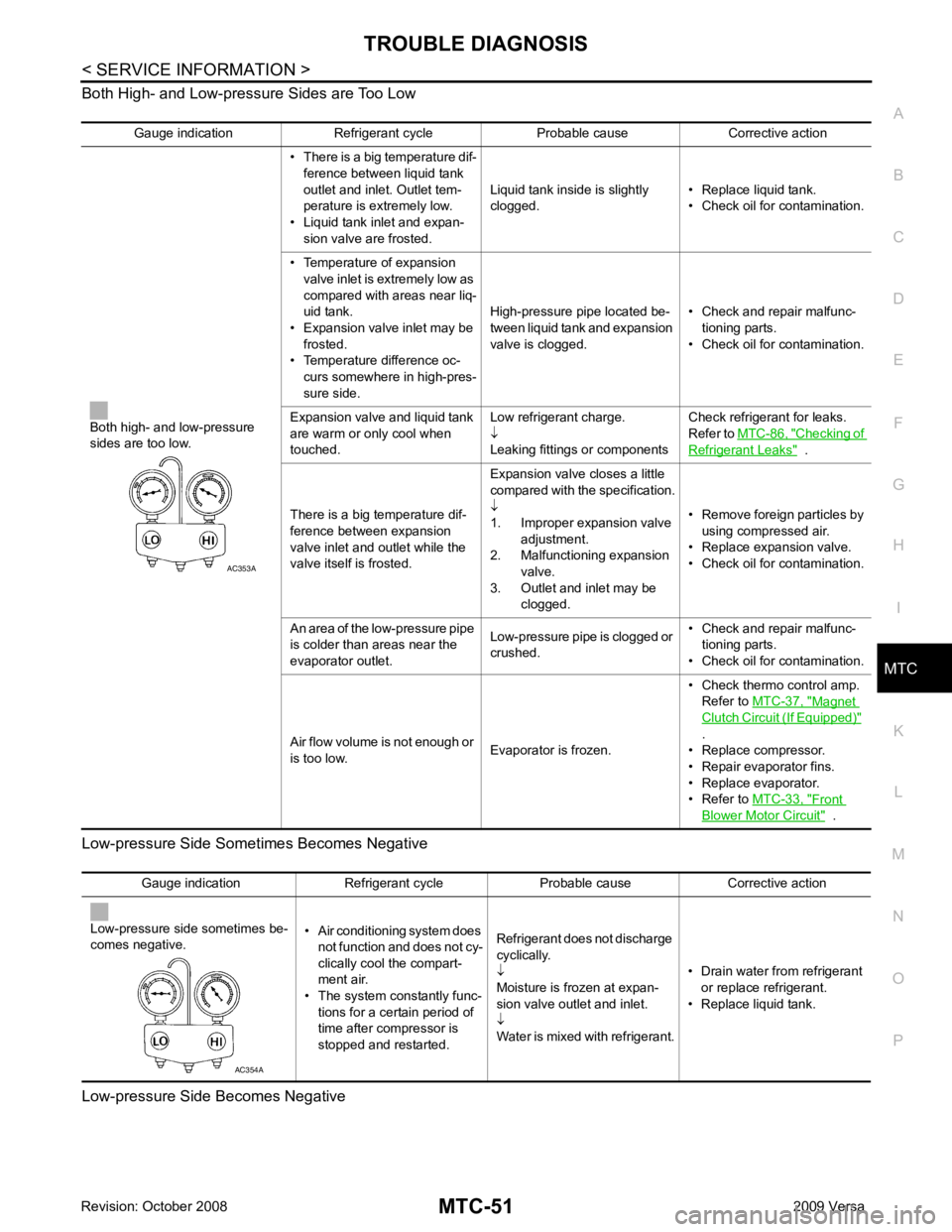
MTC
N
O P
Both High- and Low-pressure Sides are Too Low
Low-pressure Side Some times Becomes Negative
Low-pressure Side Becomes Negative Gauge indication Refrigerant cycle Probable cause Corrective action
Both high- and low-pressure
sides are too low. • There is a big temperature dif-
ference between liquid tank
outlet and inlet. Outlet tem-
perature is extremely low.
• Liquid tank inlet and expan- sion valve are frosted. Liquid tank inside is slightly
clogged. • Replace liquid tank.
• Check oil for contamination.
• Temperature of expansion valve inlet is extremely low as
compared with areas near liq-
uid tank.
• Expansion valve inlet may be
frosted.
• Temperature difference oc- curs somewhere in high-pres-
sure side. High-pressure pipe located be-
tween liquid tank and expansion
valve is clogged. • Check and repair malfunc-
tioning parts.
• Check oil for contamination.
Expansion valve and liquid tank
are warm or only cool when
touched. Low refrigerant charge.
↓
Leaking fittings or components Check refrigerant for leaks.
Refer to MTC-86, " Checking of
Refrigerant Leaks " .
There is a big temperature dif-
ference between expansion
valve inlet and outlet while the
valve itself is frosted. Expansion valve closes a little
compared with the specification.
↓
1. Improper expansion valve
adjustment.
2. Malfunctioning expansion valve.
3. Outlet and inlet may be clogged. • Remove foreign particles by
using compressed air.
• Replace expansion valve.
• Check oil for contamination.
An area of the low-pressure pipe
is colder than areas near the
evaporator outlet. Low-pressure pipe is clogged or
crushed. • Check and repair malfunc-
tioning parts.
• Check oil for contamination.
Air flow volume is not enough or
is too low. Evaporator is frozen.• Check thermo control amp.
Refer to MTC-37, " Magnet
Clutch Circuit (If Equipped) "
.
• Replace compressor.
• Repair evaporator fins.
• Replace evaporator.
• Refer to MTC-33, " Front
Blower Motor Circuit " .
Page 3939 of 4331
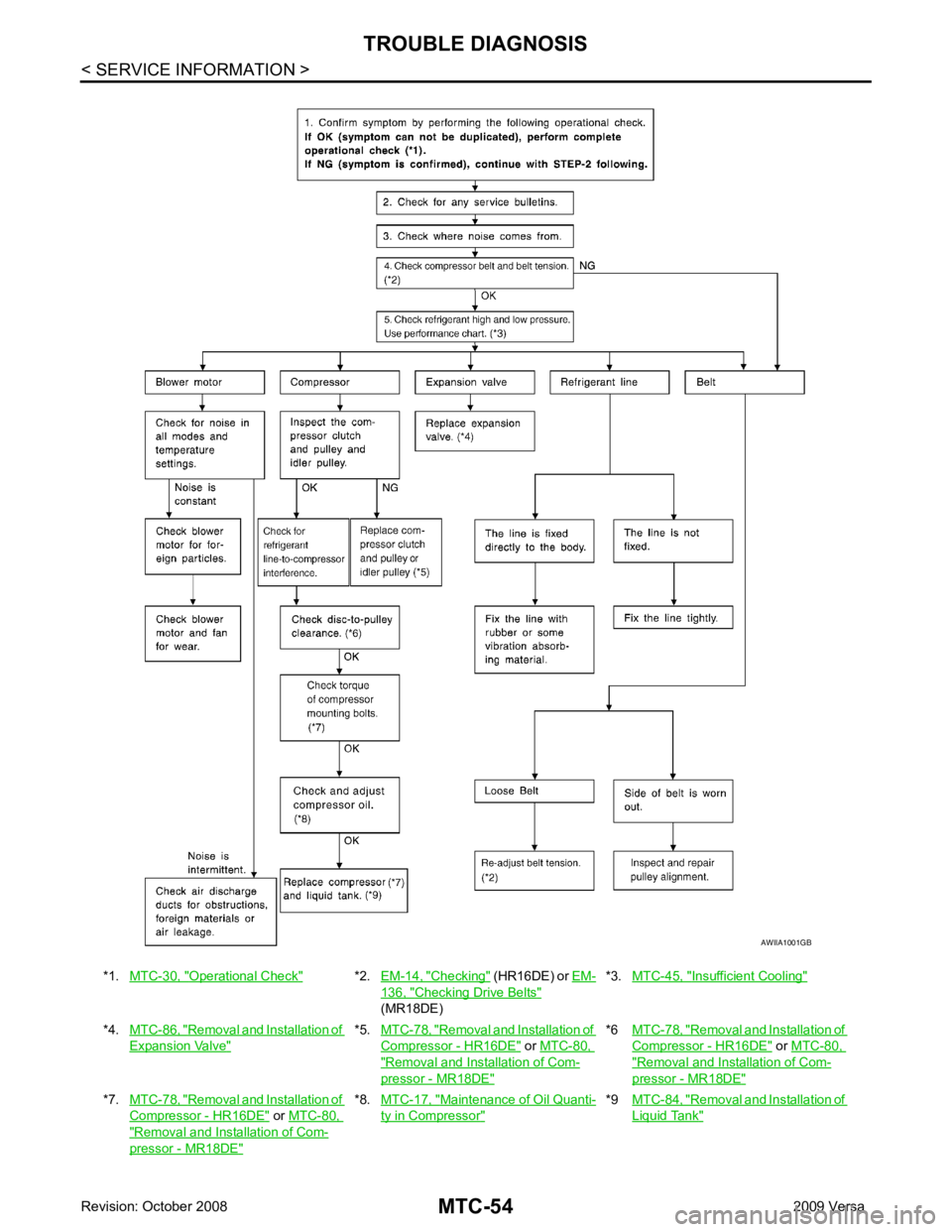
Operational Check " *2.
EM-14, " Checking " (HR16DE) or
EM- 136, " Checking Drive Belts "
(MR18DE) *3.
MTC-45, " Insufficient Cooling "
*4.
MTC-86, " Removal and Installation of
Expansion Valve " *5.
MTC-78, " Removal and Installation of
Compressor - HR16DE " or
MTC-80, " Removal and Installation of Com-
pressor - MR18DE " *6
MTC-78, " Removal and Installation of
Compressor - HR16DE " or
MTC-80, " Removal and Installation of Com-
pressor - MR18DE "
*7.
MTC-78, " Removal and Installation of
Compressor - HR16DE " or
MTC-80, " Removal and Installation of Com-
pressor - MR18DE " *8.
MTC-17, " Maintenance of Oil Quanti-
ty in Compressor " *9
MTC-84, " Removal and Installation of
Liquid Tank "
Page 3942 of 4331

MTC
N
O P
THERMO CONTROL AMPLIFIER
Removal and Installation INFOID:0000000004307078
NOTE:
Only MR18DE - TYPE 2 systems are equipped with a thermo control amplifier.
REMOVAL 1. Remove evaporator. Refer to MTC-85, " Removal and Installation of Evaporator " .
CAUTION:
Cap or wrap the joint of the pipe with suitable ma terial such as vinyl tape to avoid the entry of air.
2. Mark the mounting position of the thermo control amp. and then remove thermo control amp. (1) from evaporator (2).
INSTALLATION Installation is in the reverse order of removal.
CAUTION:
• Replace O-rings for A/C piping with new on es, and apply compressor oil when installing.
• Install the thermo control amp. at the mark made during removal of the thermo control amp.
• When recharging refrigerant, check for leaks.
Page 3944 of 4331
MTC
N
O P
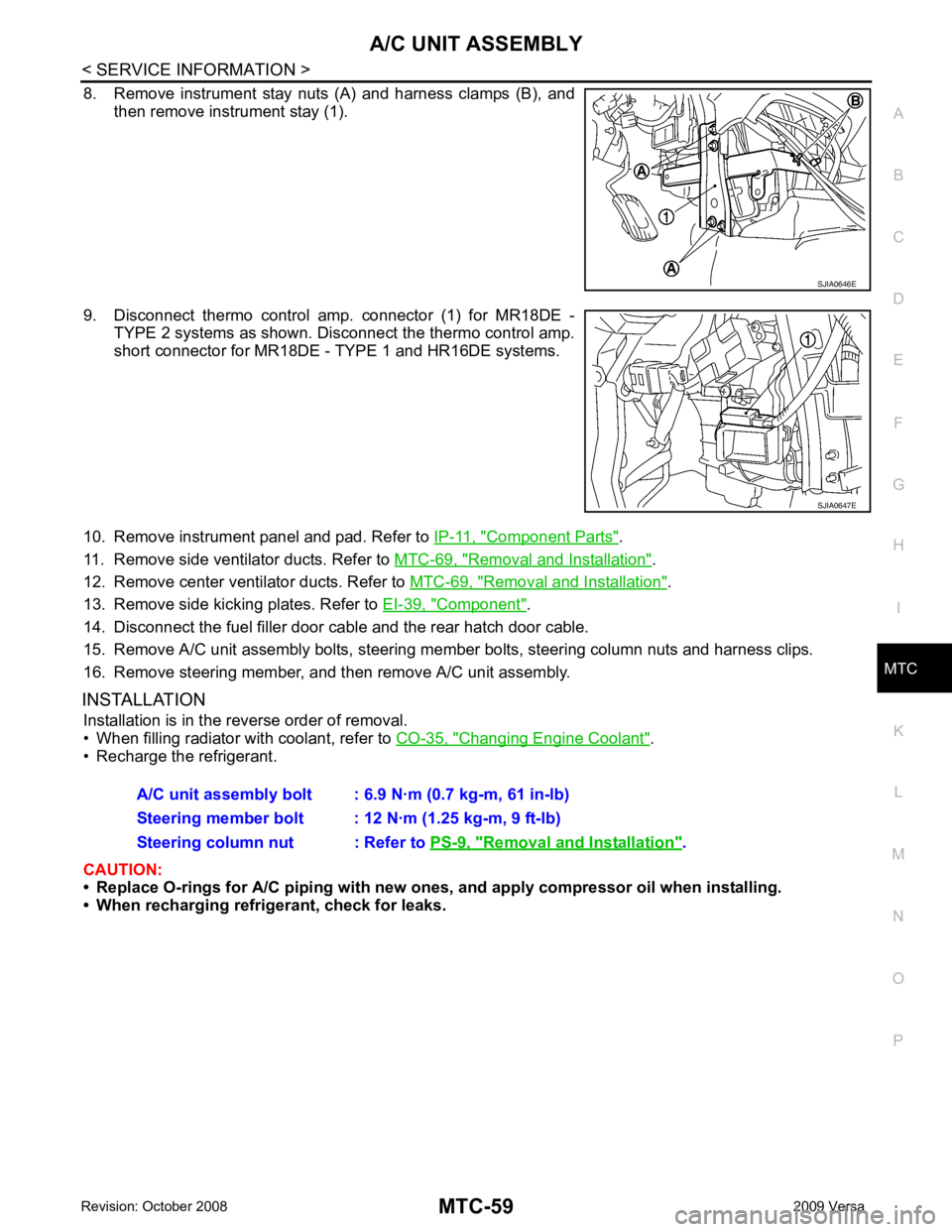
8. Remove instrument stay nuts (A) and harness clamps (B), and
then remove instrument stay (1).
9. Disconnect thermo control amp. connector (1) for MR18DE - TYPE 2 systems as shown. Disconnect the thermo control amp.
short connector for MR18DE - TYPE 1 and HR16DE systems.
10. Remove instrument panel and pad. Refer to IP-11, " Component Parts " .
11. Remove side ventilator ducts. Refer to MTC-69, " Removal and Installation " .
12. Remove center ventilator ducts. Refer to MTC-69, " Removal and Installation " .
13. Remove side kicking plates. Refer to EI-39, " Component " .
14. Disconnect the fuel filler door cable and the rear hatch door cable.
15. Remove A/C unit assembly bolts, steering member bolts, steering column nuts and harness clips.
16. Remove steering member, and then remove A/C unit assembly.
INSTALLATION Installation is in the reverse order of removal.
• When filling radiator with coolant, refer to CO-35, " Changing Engine Coolant " .
• Recharge the refrigerant.
CAUTION:
• Replace O-rings for A/C piping with new on es, and apply compressor oil when installing.
• When recharging refrigerant, check for leaks. Removal and Installation " .