ESP NISSAN TIIDA 2010 Service Repair Manual
[x] Cancel search | Manufacturer: NISSAN, Model Year: 2010, Model line: TIIDA, Model: NISSAN TIIDA 2010Pages: 3745, PDF Size: 73.67 MB
Page 2556 of 3745
![NISSAN TIIDA 2010 Service Repair Manual CYLINDER BLOCKEM-197
< SERVICE INFORMATION > [MR18DE]
C
D
E
F
G H
I
J
K L
M A
EM
NP
O
CAUTION:
• Avoid impacts such as a dropping.
• Never disassemble.
• Keep it away from metal particles.
• N](/img/5/57397/w960_57397-2555.png "NISSAN TIIDA 2010 Service Repair Manual CYLINDER BLOCKEM-197
< SERVICE INFORMATION > [MR18DE]
C
D
E
F
G H
I
J
K L
M A
EM
NP
O
CAUTION:
• Avoid impacts such as a dropping.
• Never disassemble.
• Keep it away from metal particles.
• N")
CYLINDER BLOCKEM-197
< SERVICE INFORMATION > [MR18DE]
C
D
E
F
G H
I
J
K L
M A
EM
NP
O
CAUTION:
• Avoid impacts such as a dropping.
• Never disassemble.
• Keep it away from metal particles.
• Never place sensor in a location wher
e it is exposed to magnetism.
8. Remove oil filter (for intake valve timing control).
9. Remove pilot converter (1) using Tool (A). (A/T or CVT models)
NOTE:
M/T models have no pilot converter.
10. Position crankshaft pin corresponding to connecting rod to be removed onto the bottom dead center. NOTE:
Before removing piston and connecting rod assembly, check the connecting rod side clearance. Refer to
EM-212, "
Inspection After Disassembly".
11. Remove connecting rod cap.
12. Using a suitable tool, push piston and connecting rod assembly out to the cylinder head side.
CAUTION:
• Be careful not to damage matching surface with connect-ing rod cap.
• Be careful not to damage the cylinder wall and crankshaft pin, resulting from an inte rference of the connecting rod
big end.
13. Remove connecting rod bearings. CAUTION:
When removing them, note the installation position. Keep them in the correct order.
14. Remove piston rings from piston. • Before removing piston rings, check the piston ring side clearance. Refer to EM-212, "
Inspection After
Disassembly".
15. Using a suitable tool (A) remove piston rings. CAUTION:
• When removing piston rings, be careful not to damage thepiston.
• Be careful not to damage piston rings by expanding them excessively.Tool number :ST16610001 (J-23907)
PBIC3229J
PBIC0259E
PBIC3233J
Revision: January 20102010 Versa
Page 2561 of 3745
![NISSAN TIIDA 2010 Service Repair Manual EM-202
< SERVICE INFORMATION >[MR18DE]
CYLINDER BLOCK
• Position each ring with the gap as shown referring to the pis-
ton front mark.
CAUTION:
Never contact the rail end gap under the oil ring with](/img/5/57397/w960_57397-2560.png "NISSAN TIIDA 2010 Service Repair Manual EM-202
< SERVICE INFORMATION >[MR18DE]
CYLINDER BLOCK
• Position each ring with the gap as shown referring to the pis-
ton front mark.
CAUTION:
Never contact the rail end gap under the oil ring with")
EM-202
< SERVICE INFORMATION >[MR18DE]
CYLINDER BLOCK
• Position each ring with the gap as shown referring to the pis-
ton front mark.
CAUTION:
Never contact the rail end gap under the oil ring with the
oil drain cast groove of piston.
• Install second ring with the stamped surface facing upward.
20. Install connecting rod bearing upper (2) and lower (3) to con- necting rod (1) and connecting rod cap (4).
• Install the connecting rod in the dimension shown.
• Make sure that connecting rod bearing oil hole (A) is com-pletely in the inside of connecting rod oil hole chamfered area
(B).
• When installing connecting rod bearings, apply new engine oil to the bearing surface (inside). Do not apply new engine oil to
the back surface, but thoroughly clean it.
NOTE:
• There is no positioning tab.
• Install the connecting rod bearings in the center of connect-ing rod and connecting rod bearing cap as shown. For ser-
vice operation, the center position can be checked, visually.
21. Install piston and connecting rod assembly to crankshaft. • Position crankshaft pin corresponding to connecting rod to be installed onto the bottom dead center.
• Apply new engine oil sufficiently to the cylinder bore, piston and crankshaft pin.
• Match the cylinder position with the cylinder number (C) onconnecting rod to install.
• Install so that front mark (A) on the piston head faces the front of engine.
A : Oil ring upper or lower rail gap
B : Front mark
C : Second ring and oil ring spacer gap
D : Top ring gap
E : Stamped mark
PBIC3588J
C : Oil hole (connecting rod)
D : Arrow view
: Engine front
PBIC4541E
B : Oil hole
D : Big end diameter grade
E : Small end diameter grade
F : Front mark (connecting rod bearing cap)
PBIC3587J
Revision: January 20102010 Versa
Page 2568 of 3745
![NISSAN TIIDA 2010 Service Repair Manual CYLINDER BLOCKEM-209
< SERVICE INFORMATION > [MR18DE]
C
D
E
F
G H
I
J
K L
M A
EM
NP
O
1. “Main Bearing Selection Table” rows correspond to main bearing
housing grade on rear left side of cylinder](/img/5/57397/w960_57397-2567.png "NISSAN TIIDA 2010 Service Repair Manual CYLINDER BLOCKEM-209
< SERVICE INFORMATION > [MR18DE]
C
D
E
F
G H
I
J
K L
M A
EM
NP
O
1. “Main Bearing Selection Table” rows correspond to main bearing
housing grade on rear left side of cylinder")
CYLINDER BLOCKEM-209
< SERVICE INFORMATION > [MR18DE]
C
D
E
F
G H
I
J
K L
M A
EM
NP
O
1. “Main Bearing Selection Table” rows correspond to main bearing
housing grade on rear left side of cylinder block (L).
• If there is a correction stamp mark on cylinder block, use it asa correct reference.
2. Apply main journal diameter grade stamped on crankshaft front side to column in the “Main Bearing Selection Table”.
3. Read the symbol at the cross point of selected row and column in the “Main Bearing Selection Table”. CAUTION:
There are two main bearing selection tables. One is for No. 1, 4 and 5 journals and the other is for
No. 2 and 3 journals. Make certain to use the approp riate table. This is due to differences in the
specified clearances.
4. Apply the symbol obtained to the “Main B earing Grade Table” to select main bearing.
NOTE:
Service part is available as a set of both upper and lower.
When Cylinder Block and Crankshaft are Reused
1. Measure the dimensions of the cylinder block ma in bearing housing inner diameter and crankshaft main
journal diameter individually. Refer to EM-212, "
Inspection After Disassembly" and EM-212, "Inspection
After Disassembly".
2. Apply the measured dimension to the “Main Bearing Selection Table”.
3. Read the symbol at the cross point of selected row and column in the “Main Bearing Selection Table”. CAUTION:
There are two main bearing selection tables. One is for No. 1, 4 and 5 journals and the other is for
No. 2 and 3 journals. Make certain to use the ap propriate table. This is due to differences in the
specified clearances.
4. Apply the symbol obtained to the “Main B earing Grade Table” to select main bearing.
NOTE:
A : Correction stamp
B : Standard stamp
C : Cylinder No. 1 bore grade
D : Cylinder No. 2 bore grade
E : Cylinder No. 3 bore grade
F : Cylinder No. 4 bore grade
G : No. 1 main bearing housing grade
H : No. 2 main bearing housing grade
I : No. 3 main bearing housing grade
J : No. 4 main bearing housing grade
K : No. 5 main bearing housing grade
: Engine front
PBIC3264J
A : No. 1 pin journal diameter grade
B : No. 2 pin journal diameter grade
C : No. 3 pin journal diameter grade
D : No. 4 pin journal diameter grade
E : No. 1 main journal diameter grade
F : No. 2 main journal diameter grade
G : No. 3 main journal diameter grade
H : No. 4 main journal diameter grade
I : No. 5 main journal diameter grade
PBIC3261J
Revision: January 20102010 Versa
Page 2579 of 3745
![NISSAN TIIDA 2010 Service Repair Manual EM-220
< SERVICE INFORMATION >[MR18DE]
CYLINDER BLOCK
• If clearance exceeds the limit, select proper main
bearing according to main bearing inner diameter and
crankshaft main journal diameter to o](/img/5/57397/w960_57397-2578.png "NISSAN TIIDA 2010 Service Repair Manual EM-220
< SERVICE INFORMATION >[MR18DE]
CYLINDER BLOCK
• If clearance exceeds the limit, select proper main
bearing according to main bearing inner diameter and
crankshaft main journal diameter to o")
EM-220
< SERVICE INFORMATION >[MR18DE]
CYLINDER BLOCK
• If clearance exceeds the limit, select proper main
bearing according to main bearing inner diameter and
crankshaft main journal diameter to obtain specified bearing oil clearance. Refer to EM-205, "
How to Select
Piston and Bearing".
Method of Using Plastigage
• Remove engine oil and dust on crankshaft main journal and the surfaces of each bearing completely.
• Cut a plastigage slightly shorter than the bearing width, and place it in crankshaft axial direction, avoiding oil
holes.
• Install main bearings to cylinder block and main bearing cap, and tighten main bearing cap bolts to the spec- ified torque. Refer to EM-196, "
Disassembly and Assembly" for the tightening procedure.
CAUTION:
Never rotate crankshaft.
• Remove main bearing cap and bearings, and using the scale (A) on the plastigage bag, measure the plastigage width.
NOTE:
The procedure when the measured value exceeds the limit is
same as that described in the “Method by Calculation”.
MAIN BEARING CRUSH HEIGHT
• When main bearing cap is removed after being tightened to thespecified torque with main bearings (1) installed, the tip end of
bearing must protrude (B). Refer to EM-196, "
Disassembly and
Assembly" for the tightening procedure.
• If the standard is not met, replace main bearings.
CONNECTING ROD BEARING CRUSH HEIGHT
• When connecting rod bearing cap is removed after being tightened to the specified torque with connecting rod bearings (1) installed,
the tip end of bearing must protrude. Refer to EM-196, "
Disassem-
bly and Assembly" for the tightening procedure (B).
• If the standard is not met, replace connecting rod bearings.
MAIN BEARING CAP BOLT OUTER DIAMETER
PBIC3278J
A : Example
Standard : There must be crush height.
PBIC3279J
A : Example
Standard : There must be crush height.
PBIC3279J
Revision: January 20102010 Versa
Page 2637 of 3745
FUEL LEVEL SENSOR UNIT, FUEL FILTER AND FUEL PUMP ASSEMBLYFL-7
< SERVICE INFORMATION >
C
DE
F
G H
I
J
K L
M A
FL
NP
O
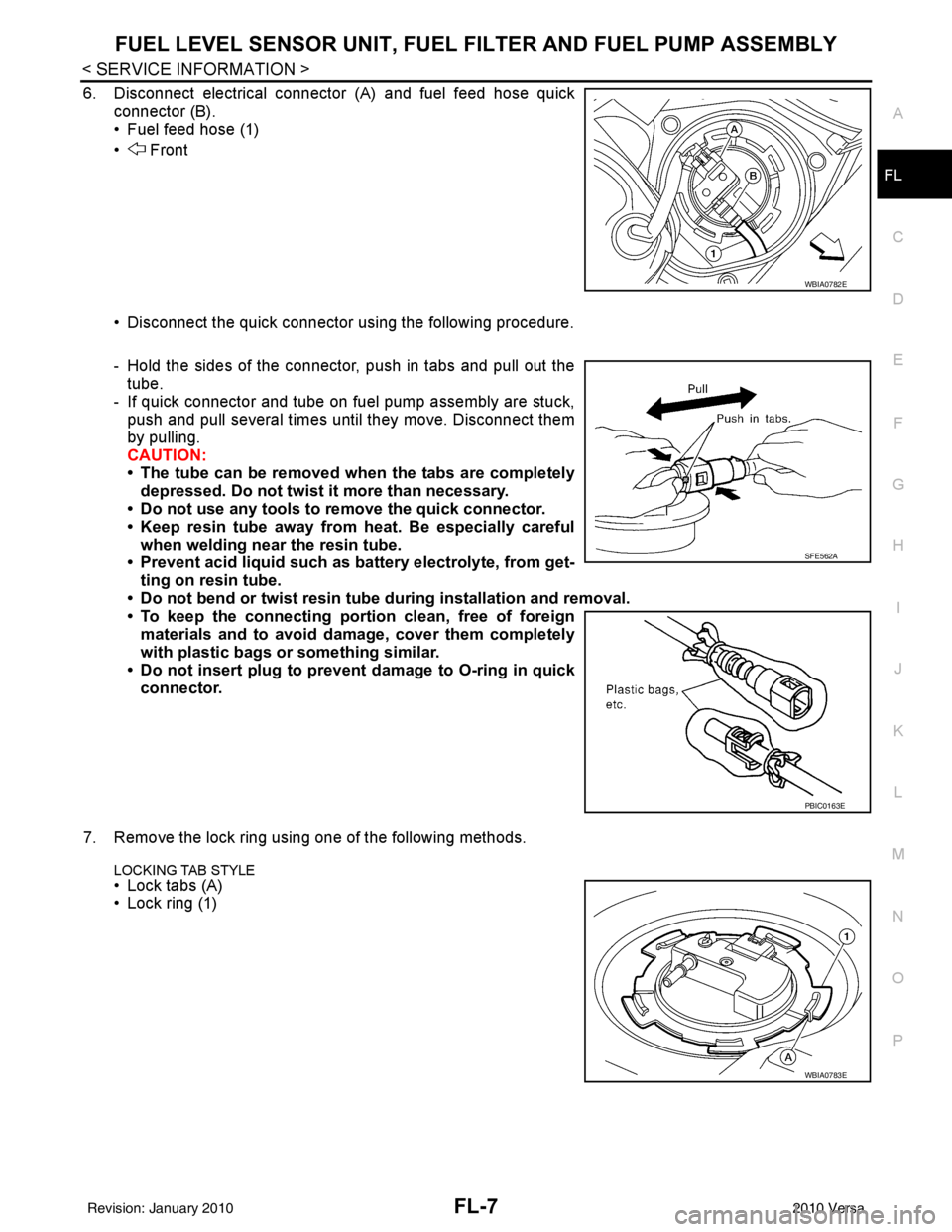
6. Disconnect electrical connector (A) and fuel feed hose quick
connector (B).
• Fuel feed hose (1)
• Front
• Disconnect the quick connector using the following procedure.
- Hold the sides of the connector, push in tabs and pull out thetube.
- If quick connector and tube on fuel pump assembly are stuck, push and pull several times until they move. Disconnect them
by pulling.
CAUTION:
• The tube can be removed when the tabs are completely
depressed. Do not twist it more than necessary.
• Do not use any tools to remove the quick connector.
• Keep resin tube away from heat. Be especially careful
when welding near the resin tube.
• Prevent acid liquid such as battery electrolyte, from get- ting on resin tube.
• Do not bend or twist resin tube during installation and removal.
• To keep the connecting port ion clean, free of foreign
materials and to avoid damage, cover them completely
with plastic bags or something similar.
• Do not insert plug to prevent damage to O-ring in quick connector.
7. Remove the lock ring using one of the following methods.
LOCKING TAB STYLE
• Lock tabs (A)
• Lock ring (1)
WBIA0782E
SFE562A
PBIC0163E
WBIA0783E
Revision: January 20102010 Versa
Page 2643 of 3745
FUEL TANKFL-13
< SERVICE INFORMATION >
C
DE
F
G H
I
J
K L
M A
FL
NP
O
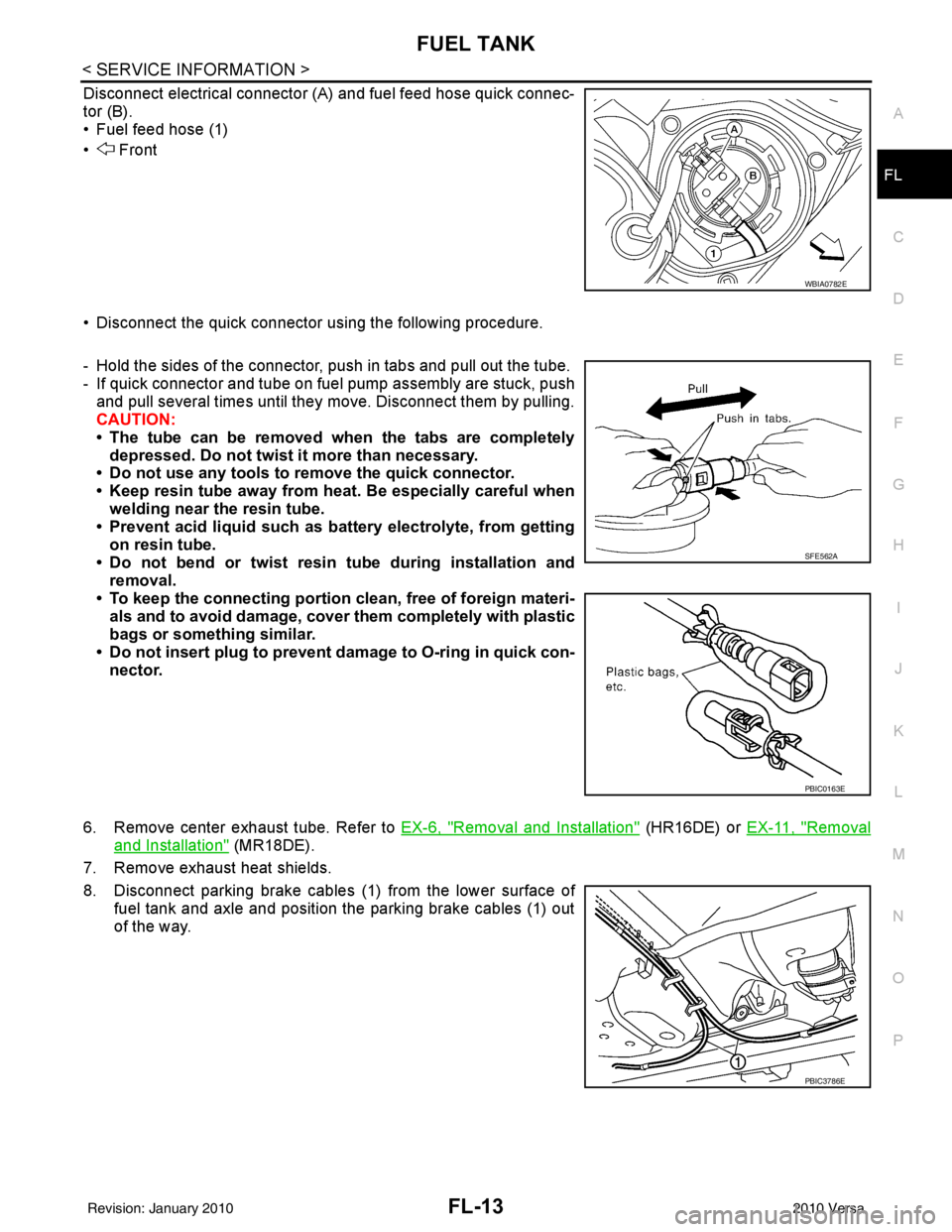
Disconnect electrical connector (A
) and fuel feed hose quick connec-
tor (B).
• Fuel feed hose (1)
• Front
• Disconnect the quick connector using the following procedure.
- Hold the sides of the connector, push in tabs and pull out the tube.
- If quick connector and tube on fuel pump assembly are stuck, push and pull several times until they move. Disconnect them by pulling.
CAUTION:
• The tube can be removed when the tabs are completely depressed. Do not twist it more than necessary.
• Do not use any tools to remove the quick connector.
• Keep resin tube away from heat. Be especially careful when welding near the resin tube.
• Prevent acid liquid such as ba ttery electrolyte, from getting
on resin tube.
• Do not bend or twist resin tube during installation and removal.
• To keep the connecting portion clean, free of foreign materi- als and to avoid damage, cover them completely with plastic
bags or something similar.
• Do not insert plug to prevent damage to O-ring in quick con-
nector.
6. Remove center exhaust tube. Refer to EX-6, "
Removal and Installation" (HR16DE) or EX-11, "Removal
and Installation" (MR18DE).
7. Remove exhaust heat shields.
8. Disconnect parking brake cables (1) from the lower surface of
fuel tank and axle and position the parking brake cables (1) out
of the way.
WBIA0782E
SFE562A
PBIC0163E
PBIC3786E
Revision: January 20102010 Versa
Page 2644 of 3745
FL-14
< SERVICE INFORMATION >
FUEL TANK
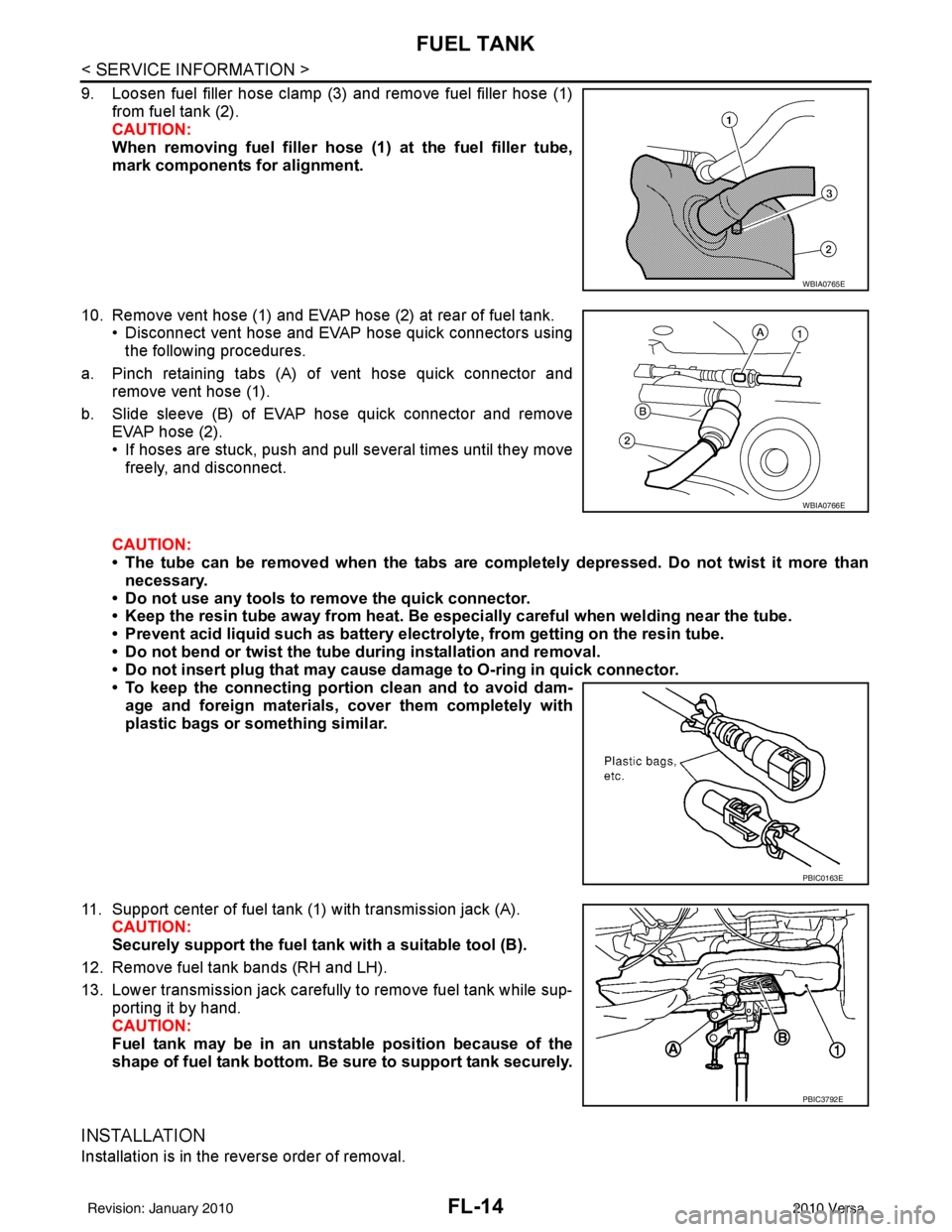
9. Loosen fuel filler hose clamp (3) and remove fuel filler hose (1)from fuel tank (2).
CAUTION:
When removing fuel filler hose (1) at the fuel filler tube,
mark components for alignment.
10. Remove vent hose (1) and EVAP hose (2) at rear of fuel tank. • Disconnect vent hose and EVAP hose quick connectors using
the following procedures.
a. Pinch retaining tabs (A) of vent hose quick connector and remove vent hose (1).
b. Slide sleeve (B) of EVAP hose quick connector and remove EVAP hose (2).
• If hoses are stuck, push and pull several times until they movefreely, and disconnect.
CAUTION:
• The tube can be removed when the tabs are completely depressed. Do not twist it more than necessary.
• Do not use any tools to remove the quick connector.
• Keep the resin tube away from heat. Be especially careful when we lding near the tube.
• Prevent acid liquid such as battery electro lyte, from getting on the resin tube.
• Do not bend or twist the tube during installation and removal.
• Do not insert plug that may cause da mage to O-ring in quick connector.
• To keep the connecting portio n clean and to avoid dam-
age and foreign materials, cover them completely with
plastic bags or something similar.
11. Support center of fuel tank (1) with transmission jack (A). CAUTION:
Securely support the fuel tank with a suitable tool (B).
12. Remove fuel tank bands (RH and LH).
13. Lower transmission jack carefully to remove fuel tank while sup- porting it by hand.
CAUTION:
Fuel tank may be in an unst able position because of the
shape of fuel tank bottom. Be sure to support tank securely.
INSTALLATION
Installation is in the reverse order of removal.
WBIA0765E
WBIA0766E
PBIC0163E
PBIC3792E
Revision: January 20102010 Versa
Page 2669 of 3745
PRECAUTIONSGI-3
< SERVICE INFORMATION >
C
DE
F
G H
I
J
K L
M B
GI
N
O P
2. Use the Intelligent Key or mechanical key to turn the ignition switch to the ″ACC ″ position. At this time, the
steering lock will be released.
3. Disconnect both battery cables. The steering lock will remain released and the steering wheel can be
rotated.
4. Perform the necessary repair operation.
5. When the repair work is completed, return the ignition switch to the ″LOCK ″ position before connecting
the battery cables. (At this time, the steering lock mechanism will engage.)
6. Perform a self-diagnosis check of al l control units using CONSULT-III.
General PrecautionINFOID:0000000005399835
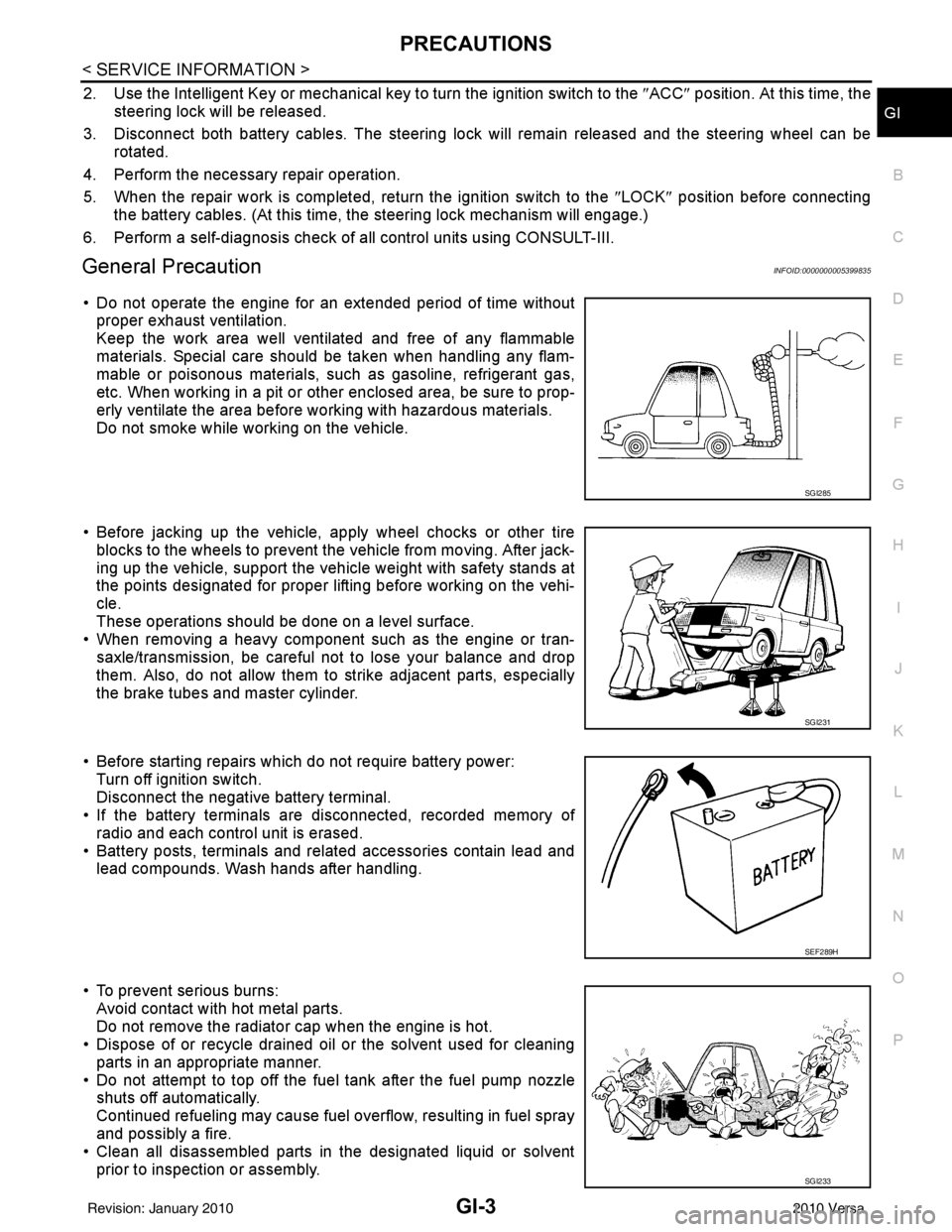
• Do not operate the engine for an extended period of time without
proper exhaust ventilation.
Keep the work area well ventilated and free of any flammable
materials. Special care should be taken when handling any flam-
mable or poisonous materials, such as gasoline, refrigerant gas,
etc. When working in a pit or ot her enclosed area, be sure to prop-
erly ventilate the area before working with hazardous materials.
Do not smoke while working on the vehicle.
• Before jacking up the vehicle, apply wheel chocks or other tire blocks to the wheels to prevent t he vehicle from moving. After jack-
ing up the vehicle, support the vehicle weight with safety stands at
the points designated for proper lifting before working on the vehi-
cle.
These operations should be done on a level surface.
• When removing a heavy component such as the engine or tran-
saxle/transmission, be careful not to lose your balance and drop
them. Also, do not allow them to strike adjacent parts, especially
the brake tubes and master cylinder.
• Before starting repairs which do not require battery power: Turn off ignition switch.
Disconnect the negative battery terminal.
• If the battery terminals are disconnected, recorded memory of
radio and each control unit is erased.
• Battery posts, terminals and related accessories contain lead and lead compounds. Wash hands after handling.
• To prevent serious burns: Avoid contact with hot metal parts.
Do not remove the radiator cap when the engine is hot.
• Dispose of or recycle drained oil or the solvent used for cleaning
parts in an appropriate manner.
• Do not attempt to top off the fuel tank after the fuel pump nozzle shuts off automatically.
Continued refueling may cause fuel overflow, resulting in fuel spray
and possibly a fire.
• Clean all disassembled parts in the designated liquid or solvent
prior to inspection or assembly.
SGI285
SGI231
SEF289H
SGI233
Revision: January 20102010 Versa
Page 2680 of 3745
GI-14
< SERVICE INFORMATION >
HOW TO USE THIS MANUAL
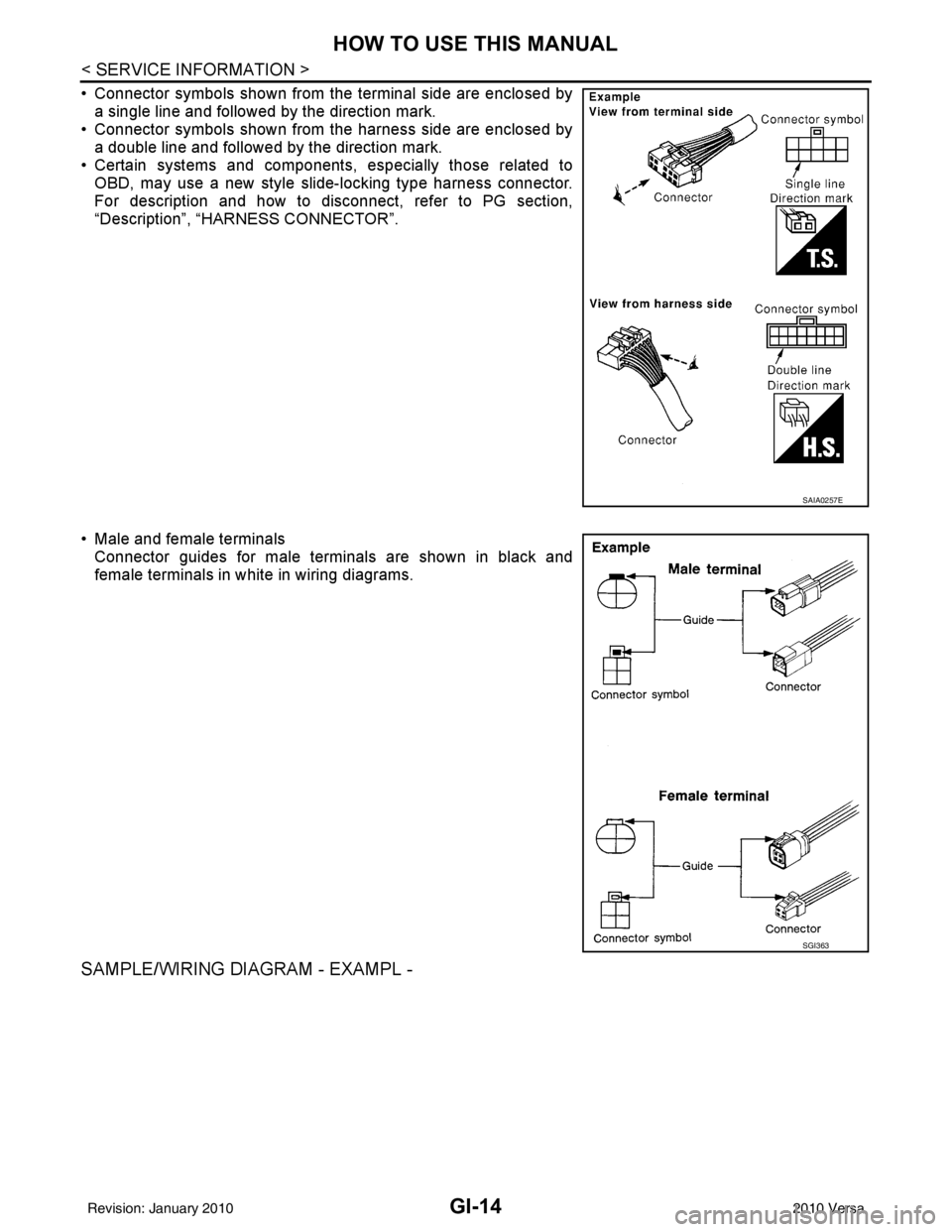
• Connector symbols shown from the terminal side are enclosed bya single line and followed by the direction mark.
• Connector symbols shown from the harness side are enclosed by
a double line and followed by the direction mark.
• Certain systems and components, especially those related to OBD, may use a new style slide-locking type harness connector.
For description and how to disconnect, refer to PG section,
“Description”, “HARNESS CONNECTOR”.
• Male and female terminals Connector guides for male terminals are shown in black and
female terminals in white in wiring diagrams.
SAMPLE/WIRING DIAGRAM - EXAMPL -
SAIA0257E
SGI363
Revision: January 20102010 Versa
Page 2683 of 3745
HOW TO USE THIS MANUALGI-17
< SERVICE INFORMATION >
C
DE
F
G H
I
J
K L
M B
GI
N
O P
Harness Indication
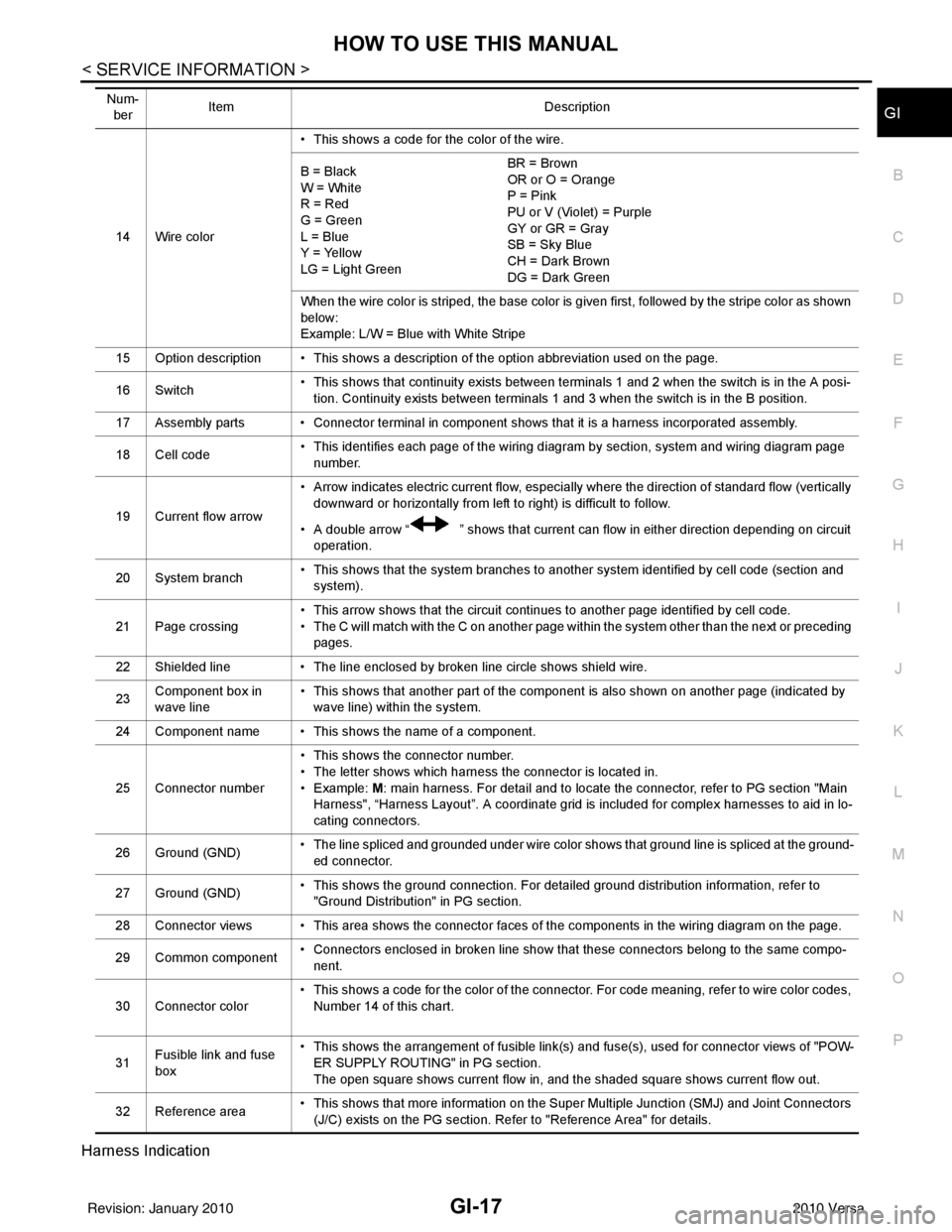
14 Wire color • This shows a code for the color of the wire.
B = Black
W = White
R = Red
G = Green
L = Blue
Y = Yellow
LG = Light Green BR = Brown
OR or O = Orange
P = Pink
PU or V (Violet) = Purple
GY or GR = Gray
SB = Sky Blue
CH = Dark Brown
DG = Dark Green
When the wire color is striped, the base color is given first, followed by the stripe color as shown
below:
Example: L/W = Blue with White Stripe
15 Option description • This shows a description of the option abbreviation used on the page.
16 Switch • This shows that continuity exists between terminals 1 and 2 when the switch is in the A posi-
tion. Continuity exists between terminals 1 and 3 when the switch is in the B position.
17 Assembly parts • Connector terminal in component shows that it is a harness incorporated assembly.
18 Cell code • This identifies each page of the wiring diagram by section, system and wiring diagram page
number.
19 Current flow arrow • Arrow indicates electric current flow, especially where the direction of standard flow (vertically
downward or horizontally from left to right) is difficult to follow.
• A double arrow “ ” shows that current can flow in either direction depending on circuit operation.
20 System branch • This shows that the system branches to another system identified by cell code (section and
system).
21 Page crossing • This arrow shows that the circuit continues to another page identified by cell code.
• The C will match with the C on another page within the system other than the next or preceding
pages.
22 Shielded line • The line enclosed by broken line circle shows shield wire.
23 Component box in
wave line • This shows that another part of the component is also shown on another page (indicated by
wave line) within the system.
24 Component name • This shows the name of a component.
25 Connector number • This shows the connector number.
• The letter shows which harness the connector is located in.
•Example:
M: main harness. For detail and to locate the connector, refer to PG section "Main
Harness", “Harness Layout”. A coordinate grid is included for complex harnesses to aid in lo-
cating connectors.
26 Ground (GND) • The line spliced and grounded under wire color shows that ground line is spliced at the ground-
ed connector.
27 Ground (GND) • This shows the ground connection. For detailed ground distribution information, refer to
"Ground Distribution" in PG section.
28 Connector views • This area shows the connector faces of the components in the wiring diagram on the page.
29 Common component • Connectors enclosed in broken line show that these connectors belong to the same compo-
nent.
30 Connector color • This shows a code for the color of the connector. For code meaning, refer to wire color codes,
Number 14 of this chart.
31 Fusible link and fuse
box • This shows the arrangement of fusible link(s) and fuse(s), used for connector views of "POW-
ER SUPPLY ROUTING" in PG section.
The open square shows current flow in, and the shaded square shows current flow out.
32 Reference area • This shows that more information on the Super Multiple Junction (SMJ) and Joint Connectors
(J/C) exists on the PG section. Refer to "Reference Area" for details.
Num-
ber Item
Description
Revision: January 20102010 Versa