clock NISSAN TIIDA 2010 Service User Guide
[x] Cancel search | Manufacturer: NISSAN, Model Year: 2010, Model line: TIIDA, Model: NISSAN TIIDA 2010Pages: 3745, PDF Size: 73.67 MB
Page 854 of 3745
BR-6
< SERVICE INFORMATION >
BRAKE PEDAL
BRAKE PEDAL
Inspection and AdjustmentINFOID:0000000005396978
INSPECTION
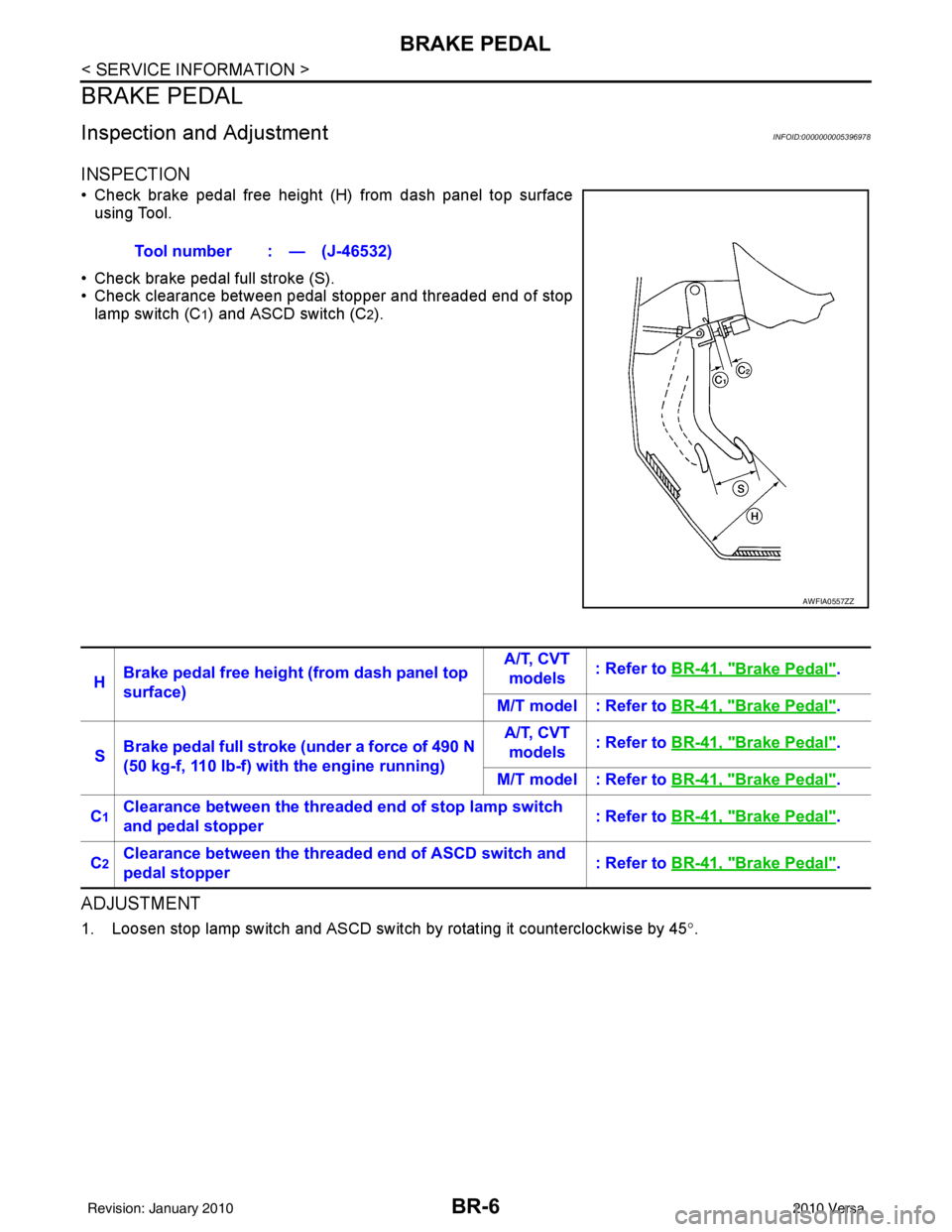
• Check brake pedal free height (H) from dash panel top surfaceusing Tool.
• Check brake pedal full stroke (S).
• Check clearance between pedal stopper and threaded end of stop lamp switch (C
1) and ASCD switch (C2).
ADJUSTMENT
1. Loosen stop lamp switch and ASCD switch by rotating it counterclockwise by 45 °.
Tool number : — (J-46532)
AWFIA0557ZZ
H
Brake pedal free height (from dash panel top
surface) A/T, CVT
models : Refer to
BR-41, "Brake Pedal".
M/T model : Refer to BR-41, "
Brake Pedal".
S Brake pedal full stroke (under a force of 490 N
(50 kg-f, 110 lb-f) with the engine running) A/T, CVT
models : Refer to
BR-41, "
Brake Pedal".
M/T model : Refer to BR-41, "
Brake Pedal".
C
1Clearance between the threaded end of stop lamp switch
and pedal stopper : Refer to
BR-41, "Brake Pedal".
C
2Clearance between the threaded end of ASCD switch and
pedal stopper : Refer to
BR-41, "Brake Pedal".
Revision: January 20102010 Versa
Page 855 of 3745
BRAKE PEDALBR-7
< SERVICE INFORMATION >
C
DE
G H
I
J
K L
M A
B
BR
N
O P
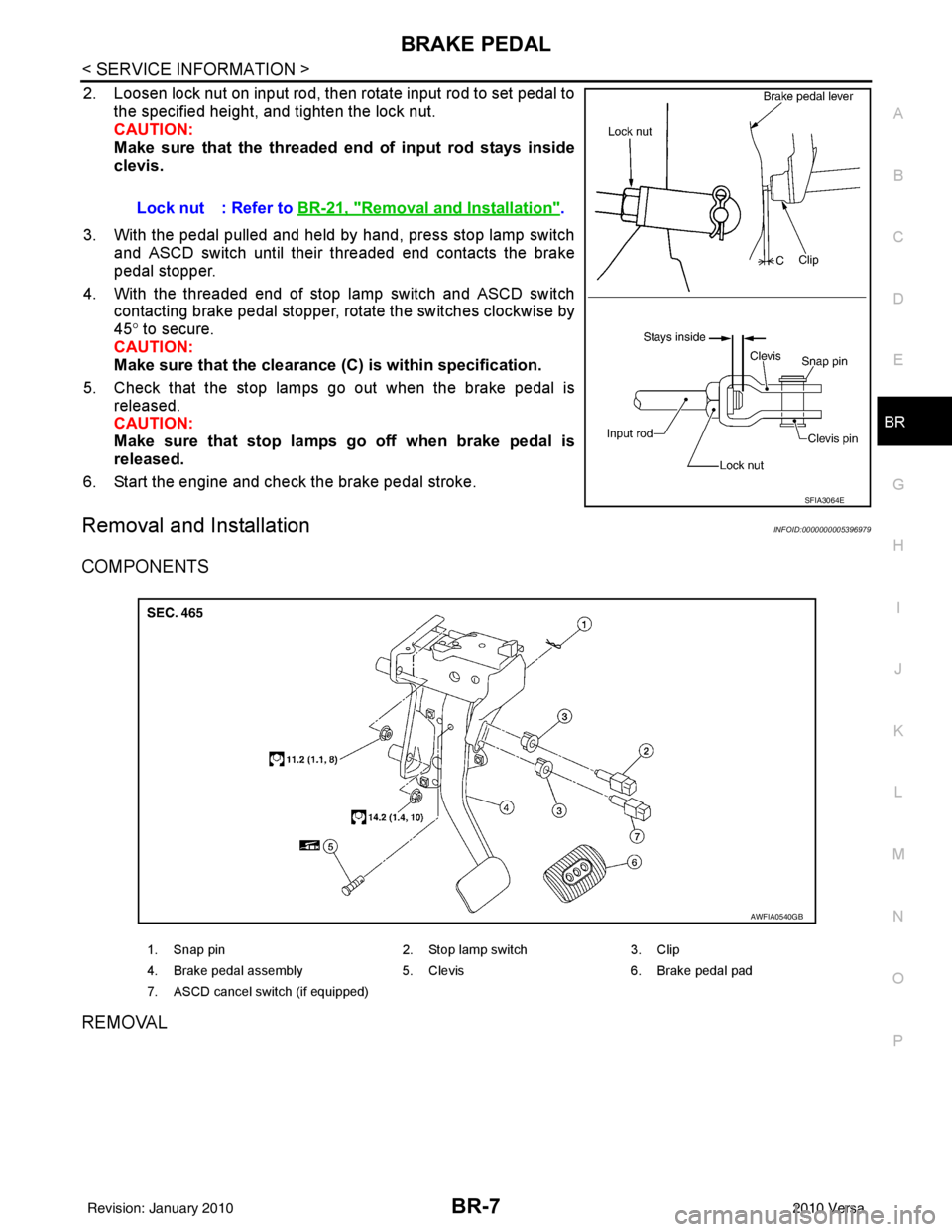
2. Loosen lock nut on input rod, then rotate input rod to set pedal to the specified height, and tighten the lock nut.
CAUTION:
Make sure that the threaded end of input rod stays inside
clevis.
3. With the pedal pulled and held by hand, press stop lamp switch and ASCD switch until their threaded end contacts the brake
pedal stopper.
4. With the threaded end of stop lamp switch and ASCD switch contacting brake pedal stopper, rotate the switches clockwise by
45° to secure.
CAUTION:
Make sure that the clearance (C) is within specification.
5. Check that the stop lamps go out when the brake pedal is released.
CAUTION:
Make sure that stop lamps go off when brake pedal is
released.
6. Start the engine and check the brake pedal stroke.
Removal and InstallationINFOID:0000000005396979
COMPONENTS
REMOVAL
Lock nut : Refer to BR-21, "Removal and Installation".
SFIA3064E
1. Snap pin 2. Stop lamp switch3. Clip
4. Brake pedal assembly 5. Clevis6. Brake pedal pad
7. ASCD cancel switch (if equipped)
AWFIA0540GB
Revision: January 20102010 Versa
Page 860 of 3745
BR-12
< SERVICE INFORMATION >
BRAKE TUBE AND HOSE
• All tubes and hoses must be free from excessive bending, twisting and pulling.
• Make sure there is no interference with other part s when turning steering both clockwise and coun-
terclockwise.
• Brake tubes and hoses are an important safety part. Always disassemble the parts and retighten
their fittings, if a brake fluid leak is detected. Replace applicable part with a new one, if damaged part
is detected.
• Be careful not to splash brake fluid on painted areas; it may cause paint damage. If brake fluid is
splashed on painted surfaces of body , immediately wipe them with cloth and then wash it away with
water.
• Do not bend or twist brake hose sharply, or strongly pull it.
• When removing components, cover brake line connect ions so that dirt, dust, or other foreign mat-
ters do not get in.
• Refill using recommended brake fluid. Refer to MA-14, "
Fluids and Lubricants".
• Never reuse drained brake fluid.
Front Brake Tube and HoseINFOID:0000000005396984
REMOVAL
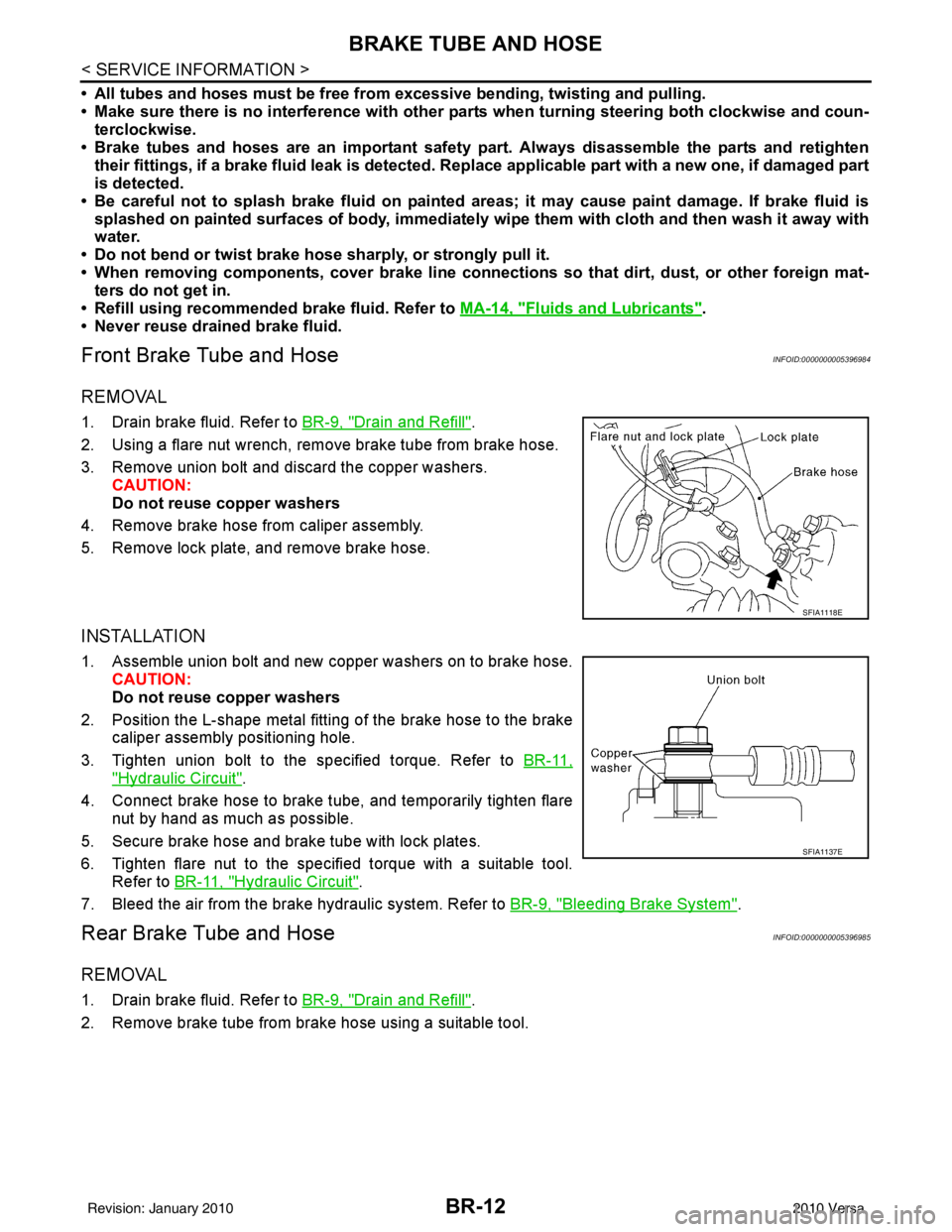
1. Drain brake fluid. Refer to BR-9, "Drain and Refill".
2. Using a flare nut wrench, remove brake tube from brake hose.
3. Remove union bolt and discard the copper washers. CAUTION:
Do not reuse copper washers
4. Remove brake hose from caliper assembly.
5. Remove lock plate, and remove brake hose.
INSTALLATION
1. Assemble union bolt and new copper washers on to brake hose. CAUTION:
Do not reuse copper washers
2. Position the L-shape metal fitting of the brake hose to the brake caliper assembly positioning hole.
3. Tighten union bolt to the specified torque. Refer to BR-11,
"Hydraulic Circuit".
4. Connect brake hose to brake tube, and temporarily tighten flare nut by hand as much as possible.
5. Secure brake hose and brake tube with lock plates.
6. Tighten flare nut to the specified torque with a suitable tool. Refer to BR-11, "
Hydraulic Circuit".
7. Bleed the air from the brake hydraulic system. Refer to BR-9, "
Bleeding Brake System".
Rear Brake Tube and HoseINFOID:0000000005396985
REMOVAL
1. Drain brake fluid. Refer to BR-9, "Drain and Refill".
2. Remove brake tube from brake hose using a suitable tool.
SFIA1118E
SFIA1137E
Revision: January 20102010 Versa
Page 1042 of 3745
![NISSAN TIIDA 2010 Service User Guide PRECAUTIONSCVT-9
< SERVICE INFORMATION > [RE0F08B]
D
E
F
G H
I
J
K L
M A
B
CVT
N
O P
6. Turn ignition switch ON. CAUTION:
Never start engine.
7. Select “Self Diagnostic Results” in “TRANSMISSION](/img/5/57397/w960_57397-1041.png "NISSAN TIIDA 2010 Service User Guide PRECAUTIONSCVT-9
< SERVICE INFORMATION > [RE0F08B]
D
E
F
G H
I
J
K L
M A
B
CVT
N
O P
6. Turn ignition switch ON. CAUTION:
Never start engine.
7. Select “Self Diagnostic Results” in “TRANSMISSION")
PRECAUTIONSCVT-9
< SERVICE INFORMATION > [RE0F08B]
D
E
F
G H
I
J
K L
M A
B
CVT
N
O P
6. Turn ignition switch ON. CAUTION:
Never start engine.
7. Select “Self Diagnostic Results” in “TRANSMISSION”.
8. Shift the selector lever to “R” position.
9. Depress slightly the accelerator pedal (Pedal angle: 2/8) while depressing the brake pedal.
10. Select “Erase” with step 9.
11. Release brake pedal and accelerator pedal.
12. Turn ignition switch OFF while keeping the selector lever in “R” position.
13. Wait approximately 10 seconds.
14. Turn ignition switch ON while keeping the selector lever in “R” position.
15. Select “Special function” in “TRANSMISSION”.
16. Check that the value on “CALIB DATA” in CONSULT-II I is the same as the data listed in the table below.
• Restart the procedure from step 3 if the values are not the same.
CALIB DATA
17. Shift the selector lever to “P” position.
18. Check that the shift position indicator in combinat ion meter turns ON. (It indicates approximately 1 or 2
seconds after shifting the selector lever to “P” position.)
• Check the following items if shift position indicator does not turn ON. Repair or replace accordingly as
necessary.
- The harness between TCM and ROM ASSY in transaxle assembly is open or shorted.
- Terminals disconnected, loose, or bent from connector housing.
- Power supply and ground of TCM. Refer to CVT-113, "
Description".
PATTERN C
1. Replace transaxle assembly first, and then replace TCM.
2. Perform the service of “PATTERN A”.
(Perform the service of “PATTERN B” if TCM is replaced first.)
Removal and Installation Procedure for CVT Unit ConnectorINFOID:0000000005397762
REMOVAL
Rotate bayonet ring counterclockwise, pull out CVT unit harness
connector upward and disconnect it.
INSTALLATION
Item name Display value
UNIT CLB ID 1 00
UNIT CLB ID 2 00
UNIT CLB ID 3 00
UNIT CLB ID 4 00
UNIT CLB ID 5 00
UNIT CLB ID 6 00
SCIA2096E
Revision: January 20102010 Versa
Page 1043 of 3745
![NISSAN TIIDA 2010 Service User Guide CVT-10
< SERVICE INFORMATION >[RE0F08B]
PRECAUTIONS
1. Align CVT unit harness connector terminal body marking with
bayonet ring marking, insert CVT unit harness connector, and
then rotate bayonet ring](/img/5/57397/w960_57397-1042.png "NISSAN TIIDA 2010 Service User Guide CVT-10
< SERVICE INFORMATION >[RE0F08B]
PRECAUTIONS
1. Align CVT unit harness connector terminal body marking with
bayonet ring marking, insert CVT unit harness connector, and
then rotate bayonet ring")
CVT-10
< SERVICE INFORMATION >[RE0F08B]
PRECAUTIONS
1. Align CVT unit harness connector terminal body marking with
bayonet ring marking, insert CVT unit harness connector, and
then rotate bayonet ring clockwise.
2. Rotate bayonet ring clockwise until CVT unit harness connector terminal body marking is aligned with the bayonet ring marking
(linear slit) as shown.
CAUTION:
• Securely align CVT unit ha rness connector terminal body
marking with bayonet ring mark ing (linear slit). Do not
make a half fit condition as shown.
• Do not mistake the bayonet ring marking (linear slit) for
other dent portion.
PrecautionINFOID:0000000005397763
NOTE:
If any malfunction occurs in the RE0F08B m odel transaxle, replace the entire transaxle assembly.
• Before connecting or disconn ecting the TCM harness connec-
tor, turn ignition switch OFF and disconnect negative battery
cable. Because battery voltage is applied to TCM even if igni-
tion switch is turned OFF.
SCIA2097E
SCIA2098E
SCIA2099E
SEF289H
Revision: January 20102010 Versa
Page 1207 of 3745
![NISSAN TIIDA 2010 Service User Guide CVT-174
< SERVICE INFORMATION >[RE0F08B]
TRANSAXLE ASSEMBLY
2. Disconnect the primary speed sensor (A) and the secondary
speed sensor connector (B) and CVT unit connector (C). Refer
to CVT-9, "
Remova](/img/5/57397/w960_57397-1206.png "NISSAN TIIDA 2010 Service User Guide CVT-174
< SERVICE INFORMATION >[RE0F08B]
TRANSAXLE ASSEMBLY
2. Disconnect the primary speed sensor (A) and the secondary
speed sensor connector (B) and CVT unit connector (C). Refer
to CVT-9, \"
Remova")
CVT-174
< SERVICE INFORMATION >[RE0F08B]
TRANSAXLE ASSEMBLY
2. Disconnect the primary speed sensor (A) and the secondary
speed sensor connector (B) and CVT unit connector (C). Refer
to CVT-9, "
Removal and Installation Procedure for CVT Unit
Connector".
3. Remove the harness from the transaxle.
4. Remove the four drive plate to torque converter nuts. NOTE:
Rotate the crankshaft clockwise as viewed from front of engine
for access to drive plate to torque converter nuts.
5. Put matching marks on the drive plate and torque converter alignment stud. CAUTION:
For matching marks, use paint. Never dama ge the drive plate or torque converter.
6. Remove the transaxle to engine and engine to transaxle bolts.
7. Separate the transaxle from the engine.
8. If necessary, remove the following from the transaxle: • CVT fluid charging pipe
• Engine mounting bracket (LH)
• Fluid cooler tubes
• Air breather hose
• Any necessary brackets
INSTALLATION
Installation is in the reverse order of removal.
CAUTION:
• When replacing an engine or transmission you must make sure any dowels are installed correctly
during re-assembly.
• Improper alignment caused by missing dowels m ay cause vibration, oil leaks or breakage of drive
train components.
• Do not reuse O-rings and copper washers.
• When turning crankshaft, turn it clockwi se as viewed from the front of the engine.
• When tightening the nuts for the torque converte r while securing the crankshaft pulley bolt, be sure
to confirm the tightening torque of the crankshaft pulley bolt. Refer to EM-156
.
• After converter is installed to drive plate, ro tate crankshaft several turns to check that transaxle
rotates freely without binding.
AWDIA0661GB
WCIA0616E
Revision: January 20102010 Versa
Page 1291 of 3745
![NISSAN TIIDA 2010 Service User Guide EC-26
< BASIC INSPECTION >[HR16DE]
INSPECTION AND ADJUSTMENT
• Each time electric throttle control actuator or ECM is replaced.
• Idle speed or ignition timing is out of specification.
IDLE AIR VO](/img/5/57397/w960_57397-1290.png "NISSAN TIIDA 2010 Service User Guide EC-26
< BASIC INSPECTION >[HR16DE]
INSPECTION AND ADJUSTMENT
• Each time electric throttle control actuator or ECM is replaced.
• Idle speed or ignition timing is out of specification.
IDLE AIR VO")
EC-26
< BASIC INSPECTION >[HR16DE]
INSPECTION AND ADJUSTMENT
• Each time electric throttle control actuator or ECM is replaced.
• Idle speed or ignition timing is out of specification.
IDLE AIR VOLUME LEARNING
: Special Repair RequirementINFOID:0000000005398245
1.PRECONDITIONING
Make sure that all of the following conditions are satisfied.
Learning will be cancelled if any of the follo wing conditions are missed for even a moment.
• Battery voltage: More than 12.9 V (At idle)
• Engine coolant temperature: 70 - 100 °C (158 - 212° F)
• Selector lever: P or N (A/T), Neutral (M/T)
• Electric load switch: OFF (Air conditioner, headlamp, rear window defogger)
On vehicles equipped with daytime light systems, if the parking brake is applied before the engine is
started the headlamp will not be illuminated.
• Steering wheel: Neutral (Straight-ahead position)
• Vehicle speed: Stopped
• Transmission: Warmed-up
- A/T models
• With CONSULT-III: Drive vehicle until “FLUID TEMP SE” in “DATA MONITOR” mode of “TRANSMISSION”
system indicates less than 0.9 V.
• Without CONSULT-III: Drive vehicle for 10 minutes.
- M/T models
• Drive vehicle for 10 minutes.
Do you have CONSULT-III?
YES >> GO TO 2.
NO >> GO TO 3.
2.IDLE AIR VOLUME LEARNING
With CONSULT-III
1. Perform Accelerator Pedal Released Position Learning. Refer to EC-25, "
ACCELERATOR PEDAL
RELEASED POSITION LEARNING : Special Repair Requirement".
2. Perform Throttle Valve Closed Position Learning. Refer to EC-25, "
THROTTLE VALVE CLOSED POSI-
TION LEARNING : Special Repair Requirement".
3. Start engine and warm it up to normal operating temperature.
4. Select “IDLE AIR VOL LEARN” in “WORK SUPPORT” mode.
5. Touch “START” and wait 20 seconds.
Is
“CMPLT” displayed on CONSULT-III screen?
YES >> GO TO 4.
NO >> GO TO 5.
3.IDLE AIR VOLUME LEARNING
Without CONSULT-III
NOTE:
• It is better to count the ti me accurately with a clock.
• It is impossible to switch the di agnostic mode when an accelerator pedal position sensor circuit has
a malfunction.
1. Perform Accelerator Pedal Released Position Learning. Refer to EC-25, "
ACCELERATOR PEDAL
RELEASED POSITION LEARNING : Special Repair Requirement".
2. Perform Throttle Valve Closed Position Learning. Refer to EC-25, "
THROTTLE VALVE CLOSED POSI-
TION LEARNING : Special Repair Requirement".
3. Start engine and warm it up to normal operating temperature.
4. Turn ignition switch OFF and wait at least 10 seconds.
5. Confirm that accelerator pedal is fully releas ed, turn ignition switch ON and wait 3 seconds.
6. Repeat the following procedure quickly five times within 5 seconds.
- Fully depress the accelerator pedal.
- Fully release the accelerator pedal.
7. Wait 7 seconds, fully depress the accelerator pedal and keep it for approx. 20 seconds until the MIL stops
blinking and turned ON.
8. Fully release the accelerator pedal within 3 seconds after the MIL turned ON.
Revision: January 20102010 Versa
Page 1358 of 3745
![NISSAN TIIDA 2010 Service User Guide ON BOARD DIAGNOSTIC (OBD) SYSTEMEC-93
< FUNCTION DIAGNOSIS > [HR16DE]
C
D
E
F
G H
I
J
K L
M A
EC
NP
OThis DTC number is clarified in Diagnostic Test Mode II (SELF-DIAGNOSTIC RESULTS)
Diagnostic Test M](/img/5/57397/w960_57397-1357.png "NISSAN TIIDA 2010 Service User Guide ON BOARD DIAGNOSTIC (OBD) SYSTEMEC-93
< FUNCTION DIAGNOSIS > [HR16DE]
C
D
E
F
G H
I
J
K L
M A
EC
NP
OThis DTC number is clarified in Diagnostic Test Mode II (SELF-DIAGNOSTIC RESULTS)
Diagnostic Test M")
ON BOARD DIAGNOSTIC (OBD) SYSTEMEC-93
< FUNCTION DIAGNOSIS > [HR16DE]
C
D
E
F
G H
I
J
K L
M A
EC
NP
OThis DTC number is clarified in Diagnostic Test Mode II (SELF-DIAGNOSTIC RESULTS)
Diagnostic Test Mode II — Self-diagnostic Results
In this mode, the DTC and 1st trip DTC are indicated
by the number of blinks of the MIL as shown below.
The DTC and 1st trip DTC are displayed at the same time. If the MIL does not illuminate in diagnostic test
mode I (Malfunction warning), all displayed items are 1st trip DTCs. If onl y one code is displayed when the MIL
illuminates in diagnostic test mode II (SELF-DIAGNOSTIC RESULTS), it is a DTC; if two or more codes are
displayed, they may be either DTCs or 1st trip DTCs. DTC No. is same as that of 1st trip DTC. These uniden-
tified codes can be identified by using the CONSULT-II I or GST. A DTC will be used as an example for how to
read a code.
A particular trouble code can be identified by the number of four-digit numeral flashes as per the following.
The length of time the 1,000th-digit numeral flashes on and off is 1.2 seconds consisting of an ON (0.6-sec-
onds) - OFF (0.6-seconds) cycle.
The 100th-digit numeral and lower digit numerals consis t of a 0.3-seconds ON and 0.3-seconds OFF cycle.
A change from one digit numeral to another occurs at an inte rval of 1.0-second OFF. In other words, the later
numeral appears on the display 1.3 seconds after the former numeral has disappeared.
A change from one trouble code to another occurs at an interval of 1.8-seconds OFF.
In this way, all the detected malfunctions are classi fied by their DTC numbers. The DTC 0000 refers to no mal-
function. (See EC-468, "
DTCIndex")
How to Switch Diagnostic Test Mode
NOTE:
•It is better to count the time accurately with a clock.
MIL Condition
ON When the malfunction is detected.
OFF No malfunction.
JMBIA1140GB
Number 0 123456789 A B C D E F
Flashes 10 123456789 11 12 13 14 15 16
Revision: January 20102010 Versa
Page 1545 of 3745
![NISSAN TIIDA 2010 Service User Guide EC-280
< COMPONENT DIAGNOSIS >[HR16DE]
P0442 EVAP CONTROL SYSTEM
2. Check for genuine NISSAN fuel filler cap design.
Is the inspection result normal?
YES >> GO TO 2.
NO >> Replace with genuine NISSAN](/img/5/57397/w960_57397-1544.png "NISSAN TIIDA 2010 Service User Guide EC-280
< COMPONENT DIAGNOSIS >[HR16DE]
P0442 EVAP CONTROL SYSTEM
2. Check for genuine NISSAN fuel filler cap design.
Is the inspection result normal?
YES >> GO TO 2.
NO >> Replace with genuine NISSAN")
EC-280
< COMPONENT DIAGNOSIS >[HR16DE]
P0442 EVAP CONTROL SYSTEM
2. Check for genuine NISSAN fuel filler cap design.
Is the inspection result normal?
YES >> GO TO 2.
NO >> Replace with genuine NISSAN fuel filler cap.
2.CHECK FUEL FILLER CAP INSTALLATION
Check that the cap is tightened proper ly by rotating the cap clockwise.
Is the inspection result normal?
YES >> GO TO 3.
NO >> Open fuel filler cap, then clean cap and fuel filler neck threads using air blower. Then retighten until ratcheting sound is heard.
3.CHECK FUEL FILLER CAP FUNCTION
Check for air releasing sound while opening the fuel filler cap.
Is the inspection result normal?
YES >> GO TO 5.
NO >> GO TO 4.
4.CHECK FUEL TANK VACUUM RELIEF VALVE
Refer to EC-283, "
Component Inspection (Fuel filler cap)".
Is the inspection result normal?
YES >> GO TO 5.
NO >> Replace fuel filler cap with a genuine one.
5.CHECK FOR EVAP LEAK
Refer to EC-498, "
Inspection".
Is there any leak in EVAP line?
YES >> Repair or replace.
NO >> GO TO 6.
6.CHECK DRAIN FILTER
Refer to EC-283, "
Component Inspection (Drain filter)".
Is the inspection result normal?
YES >> GO TO 7.
NO >> Replace drain filter.
7.CHECK EVAP CANISTER VENT CONTROL VALVE
Check the following.
• EVAP canister vent control valve is installed properly. Refer to EC-500, "
Exploded View".
• EVAP canister vent control valve. Refer to EC-298, "
Component Inspection".
Is the inspection result normal?
YES >> GO TO 8.
NO >> Repair or replace EVAP cani ster vent control valve and O-ring.
8.CHECK IF EVAP CANISTER IS SATURATED WITH WATER
1. Remove EVAP canister with EVAP canister vent control valve and EVAP control system pressure sensor attached.
SEF915U
Revision: January 20102010 Versa
Page 1590 of 3745
![NISSAN TIIDA 2010 Service User Guide P0455 EVAP CONTROL SYSTEMEC-325
< COMPONENT DIAGNOSIS > [HR16DE]
C
D
E
F
G H
I
J
K L
M A
EC
NP
O
1. Turn ignition switch OFF.
2. Check for genuine NISSAN fuel filler cap design.
Is the inspection resu](/img/5/57397/w960_57397-1589.png "NISSAN TIIDA 2010 Service User Guide P0455 EVAP CONTROL SYSTEMEC-325
< COMPONENT DIAGNOSIS > [HR16DE]
C
D
E
F
G H
I
J
K L
M A
EC
NP
O
1. Turn ignition switch OFF.
2. Check for genuine NISSAN fuel filler cap design.
Is the inspection resu")
P0455 EVAP CONTROL SYSTEMEC-325
< COMPONENT DIAGNOSIS > [HR16DE]
C
D
E
F
G H
I
J
K L
M A
EC
NP
O
1. Turn ignition switch OFF.
2. Check for genuine NISSAN fuel filler cap design.
Is the inspection result normal?
YES >> GO TO 2.
NO >> Replace with genuine NISSAN fuel filler cap.
2.CHECK FUEL FILLER CAP INSTALLATION
Check that the cap is tightened properly by rotating the cap clockwise.
Is the inspection result normal?
YES >> GO TO 3.
NO >> Open fuel filler cap, then clean cap and fuel fi ller neck threads using air blower. Then retighten
until ratcheting sound is heard.
3.CHECK FUEL FILLER CAP FUNCTION
Check for air releasing sound while opening the fuel filler cap.
Is the inspection result normal?
YES >> GO TO 5.
NO >> GO TO 4.
4.CHECK FUEL TANK VACUUM RELIEF VALVE
Refer to EC-327, "
Component Inspection (Fuel filler cap)".
Is the inspection result normal?
YES >> GO TO 5.
NO >> Replace fuel filler cap with a genuine one.
5.CHECK EVAP PURGE LINE
Check EVAP purge line (pipe, rubber tube, fuel tank and EVAP canister) for cracks, improper connection or
disconnection.
Refer to EC-68, "
System Description".
Is the inspection result normal?
YES >> GO TO 6.
NO >> Repair or reconnect the hose.
6.CLEAN EVAP PURGE LINE
Clean EVAP purge line (pipe and rubber tube) using air blower.
>> GO TO 7.
7.CHECK DRAIN FILTER
Refer to EC-328, "
Component Inspection (Drain filter)".
Is the inspection result normal?
YES >> GO TO 8.
NO >> Replace drain filter.
8.CHECK EVAP CANISTER VENT CONTROL VALVE
Check the following.
• EVAP canister vent control valve is installed properly. Refer to EC-500, "
Exploded View".
• EVAP canister vent control valve. Refer to EC-298, "
Component Inspection".
SEF915U
Revision: January 20102010 Versa