motor NISSAN TIIDA 2010 Service Repair Manual
[x] Cancel search | Manufacturer: NISSAN, Model Year: 2010, Model line: TIIDA, Model: NISSAN TIIDA 2010Pages: 3745, PDF Size: 73.67 MB
Page 3712 of 3745

FRONT WIPER AND WASHER SYSTEMWW-7
< SERVICE INFORMATION >
C
DE
F
G H
I
J
L
M A
B
WW
N
O P
AUTO STOP OPERATION
With wiper switch turned OFF, wiper motor will cont inue to operate until wiper arms reach windshield base.
When the wiper arms are not located at base of wi ndshield with wiper switch OFF, ground is supplied
• from IPDM E/R terminal 33
• to front wiper motor terminal 3, in order to continue wiper motor operation at low speed.
When the wiper arms reach base of windshield, front wiper motor terminals 4 and 2 are connected, and
ground is supplied
• to IPDM E/R terminal 38
• through front wiper motor terminals 4 and 2, and
• through grounds E15 and E24.
Then the IPDM E/R sends auto stop operation signal to BCM with CAN communication line.
When the BCM receives auto-stop operation signal, BCM sends wiper stop signal to IPDM E/R with CAN com-
munication line.
IPDM E/R stops wiper motor. Wiper motor wi ll then stop wiper arms at the STOP position.
WASHER OPERATION
When the wiper switch is in front wiper washer positi on, BCM detect front wiper washer signal by BCM combi-
nation switch reading function. Refer to BCS-4, "
System Description" .
Combination switch power is supplied• through combination switch terminal 14
• to washer motor terminal 1.
Ground is supplied• to front washer motor terminal 2
• through combination switch terminal 11, and
• through combination switch terminal 12
• through grounds M57 and M61.
With ground supplied, front washer motor is operated.
When the BCM detects that front washer motor has operated for 0.4 seconds or longer, BCM operates front
wiper motor for low speed.
When the BCM detects washer switch is OFF, low speed operation cycles approximately 2 times and stops.
MIST OPERATION
When the wiper switch is turned to the mist position, wiper low speed operation cycles once and then stops.
For additional information about wiper operation under th is condition, refer to "LOW SPEED WIPER OPERA-
TION" .
If switch is held in mist posit ion, low speed operation continues.
FAIL-SAFE FUNCTION
If an abnormality occurs in CAN communications, IPDM E/ R holds the condition just before fail-safe status is
initiated until ignition switch is turned OFF. (If wipers we re operating in LO just before the initiation of fail-safe
status, they continue to operate in LO until ignition switch is turned OFF.)
COMBINATION SWITCH READING FUNCTION
Refer to BCS-4, "System Description" .
CAN Communication System DescriptionINFOID:0000000005395056
Refer to LAN-7, "System Description".
Revision: January 20102010 Versa
Page 3719 of 3745
WW-14
< SERVICE INFORMATION >
FRONT WIPER AND WASHER SYSTEM
Front Wiper Does Not Operate
INFOID:0000000005395065
CAUTION:
• During IPDM E/R fail-safe control, fr ont wipers may not operate. Refer to PG-17, "
System Descrip-
tion" in “PG IPDM E/R” to make sure that it is not in fail-safe status.
1.ACTIVE TEST
With CONSULT-lIl
1. Select “IPDM E/R” on CONSULT-III, and sele ct “ACTIVE TEST” on “SELECT DIAG MODE” screen.
2. Select “FRONT WIPER” on “SELECT TEST ITEM” screen.
3. Touch “LO” or “HI” screen.
Without CONSULT-lIl
Start up auto active test. Refer to PG-20, "
Auto Active Test" .
Does front wiper operate normally?
YES >> GO TO 2.
NO >> GO TO 4.
2.CHECK CIRCUIT BETWEEN COMB INATION SWITCH AND BCM
With CONSULT-llI
1. Select “BCM” on CONSULT-III, and sele ct “WIPER” on “SELECT TEST ITEM” screen.
2. Select “DATA MONITOR” on “SELECT DIAG MODE ” screen. Make sure that “FR WIPER INT”, “FR
WIPER LOW”, and “FR WIPER HI” turn ON-OFF according to wiper switch operation.
Without CONSULT-lIl
Refer to LT-66, "
Combination Switch Inspection" .
OK or NG
OK >> GO TO 3.
NG >> Check combination switch (wiper switch). Refer to LT-66, "
Combination Switch Inspection" .
3.CHECK CIRCUIT BETWEEN IPDM E/R AND BCM
Select “BCM” on CONSULT-III, and perform self-diagnosis for “BCM”.
Displayed self
-diagnosis results
NO DTC>>Replace BCM. Refer to BCS-19, "Removal and Installation of BCM" .
CAN COMM CIRCUIT>>Check CAN communi cation line of BCM. Refer to BCS-18, "
CAN Communication
Inspection Using CONSULT-III (Self-Diagnosis)" .
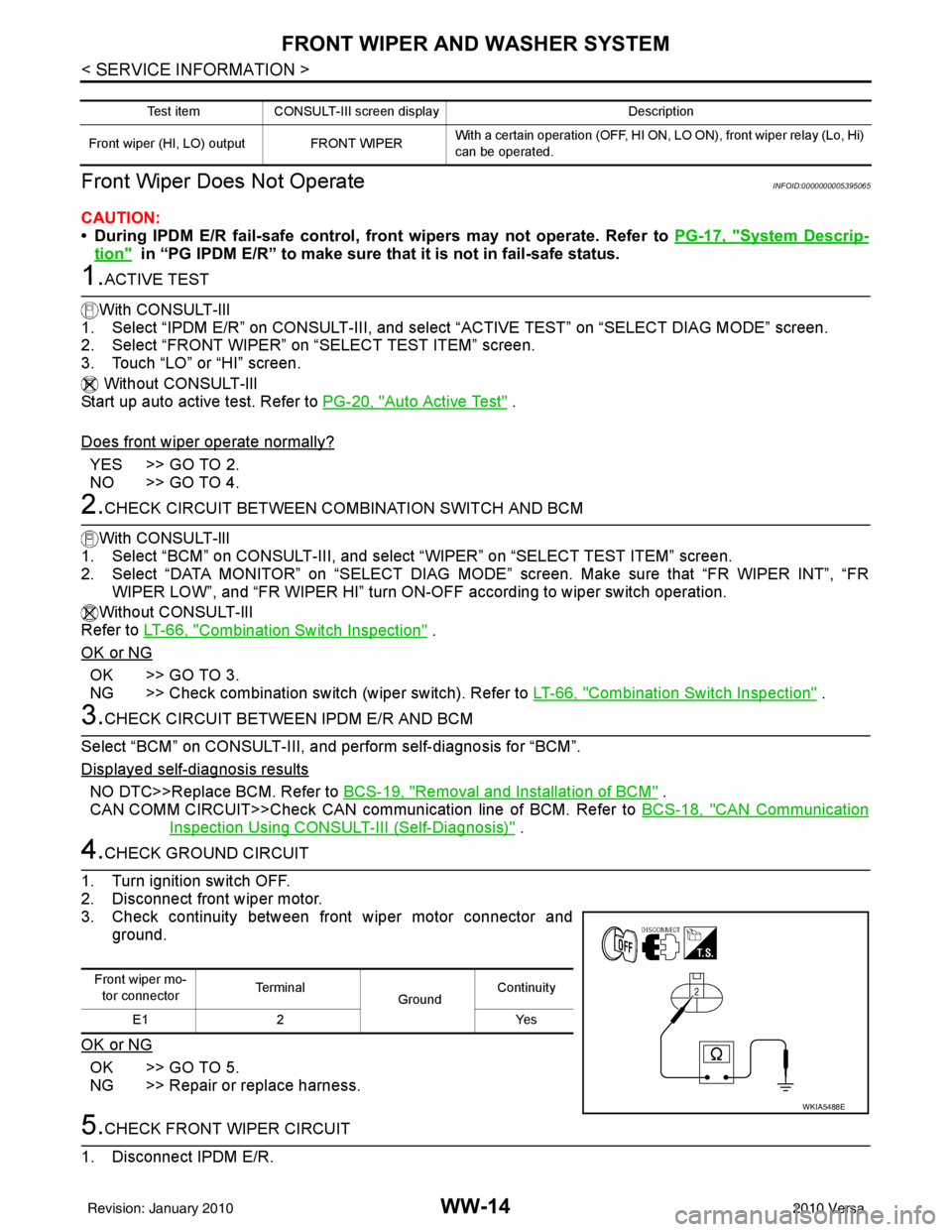
4.CHECK GROUND CIRCUIT
1. Turn ignition switch OFF.
2. Disconnect front wiper motor.
3. Check continuity between front wiper motor connector and ground.
OK or NG
OK >> GO TO 5.
NG >> Repair or replace harness.
5.CHECK FRONT WIPER CIRCUIT
1. Disconnect IPDM E/R.
Test item CONSULT-III screen display Description
Front wiper (HI, LO) output FRONT WIPER With a certain operation (OFF, HI ON,
LO ON), front wiper relay (Lo, Hi)
can be operated.
Front wiper mo- tor connector Te r m i n a l
GroundContinuity
E1 2 Yes
WKIA5488E
Revision: January 20102010 Versa
Page 3720 of 3745
FRONT WIPER AND WASHER SYSTEMWW-15
< SERVICE INFORMATION >
C
DE
F
G H
I
J
L
M A
B
WW
N
O P
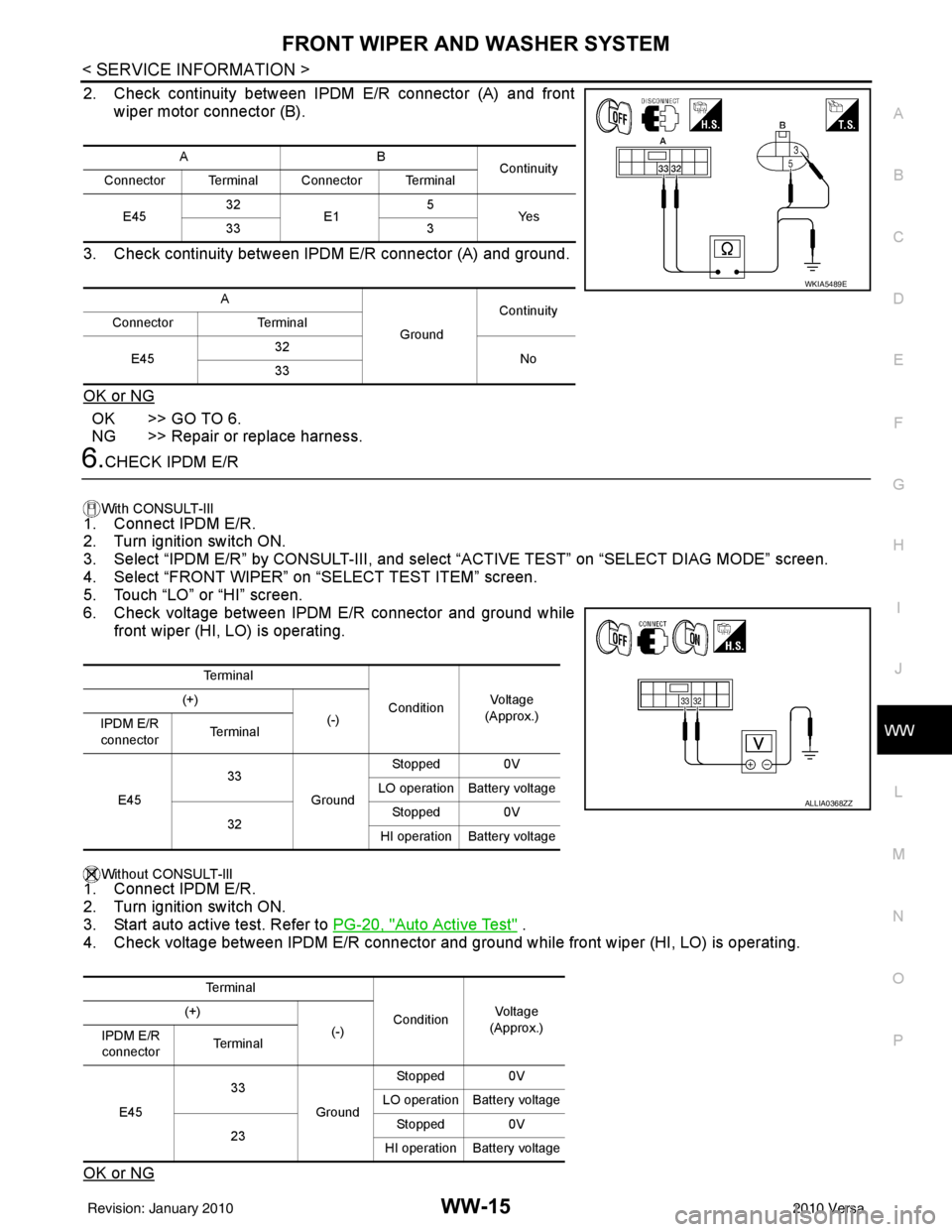
2. Check continuity between IPDM E/R connector (A) and front wiper motor connector (B).
3. Check continuity between IPDM E/R connector (A) and ground.
OK or NG
OK >> GO TO 6.
NG >> Repair or replace harness.
6.CHECK IPDM E/R
With CONSULT-lIl
1. Connect IPDM E/R.
2. Turn ignition switch ON.
3. Select “IPDM E/R” by CONSULT-III, and sele ct “ACTIVE TEST” on “SELECT DIAG MODE” screen.
4. Select “FRONT WIPER” on “SELECT TEST ITEM” screen.
5. Touch “LO” or “HI” screen.
6. Check voltage between IPDM E/R connector and ground while
front wiper (HI, LO) is operating.
Without CONSULT-llI1. Connect IPDM E/R.
2. Turn ignition switch ON.
3. Start auto active test. Refer to PG-20, "
Auto Active Test" .
4. Check voltage between IPDM E/R connector and gr ound while front wiper (HI, LO) is operating.
OK or NG
AB Continuity
Connector Terminal Connector Terminal
E45 32
E1 5
Ye s
33 3
A GroundContinuity
Connector Terminal
E45 32
No
33
WKIA5489E
Te r m i n a l
ConditionVo l ta g e
(Approx.)
(+)
(-)
IPDM E/R
connector Te r m i n a l
E45 33
GroundStopped 0V
LO operation Battery voltage
32 Stopped 0V
HI operation Battery voltage
Te r m i n a l ConditionVol tag e
(Approx.)
(+)
(-)
IPDM E/R
connector Te r m i n a l
E45 33
GroundStopped 0V
LO operation Battery voltage
23 Stopped 0V
HI operation Battery voltage
ALLIA0368ZZ
Revision: January 20102010 Versa
Page 3721 of 3745
WW-16
< SERVICE INFORMATION >
FRONT WIPER AND WASHER SYSTEM
OK >> Replace front wiper motor. Refer to WW-21, "Removal and Installation of Front Wiper Drive
Assembly" .
NG >> Replace IPDM E/R. Refer to PG-28, "
Removal and Installation of IPDM E/R" .
Front Wiper Does Not Return to Stop Positi on (After Front Wiper Operates for 10 Sec-
onds, They Stop for 20 Second s, and After Repeating the Operation Five Times, They
Become Inoperative)
INFOID:0000000005395066
CAUTION:
• When auto-stop signal has not varied for 10 seconds or longer while IPDM E/R is operating front wip-
ers, IPDM E/R considers that front wipers are locked, and stops wiper output. That causes this symp-
tom.
• This status can be checked by “DATA MONITOR” of “IPDM E/R” on which “WIPER PROT” item
shows “BLOCK”.
1.CHECK FRONT WIPER STOP SIGNAL
With CONSULT-lIl
Select “IPDM E/R” on CONSULT-III. With “DATA MONITOR”, make sure that “WIP AUTO STOP” turns “ACT
P” - “STOP P” linked with wiper operation.
Without CONSULT-llI
GO TO 2.
OK or NG
OK >> Replace IPDM E/R. Refer to PG-28, "Removal and Installation of IPDM E/R" .
NG >> GO TO 2.
2.CHECK IPDM E/R
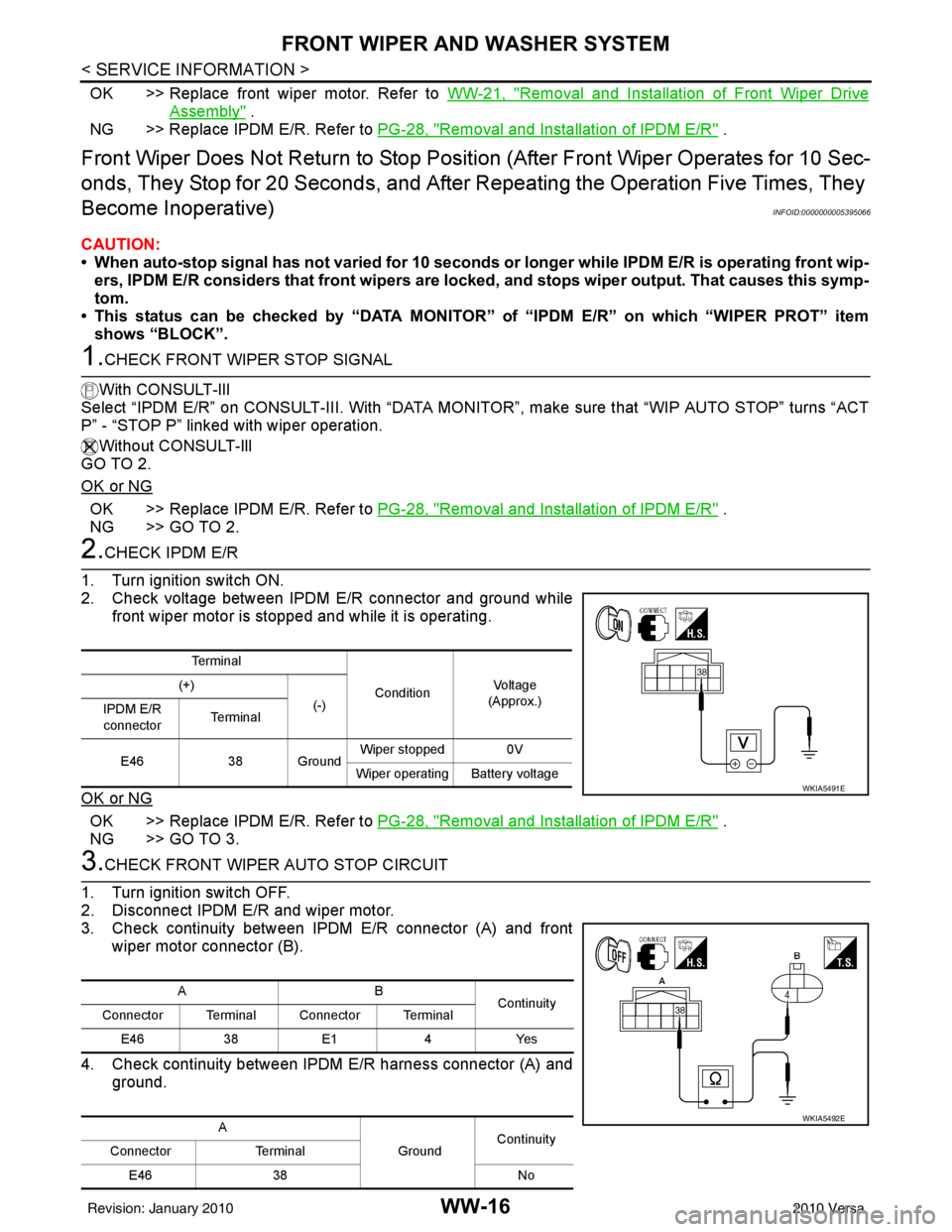
1. Turn ignition switch ON.
2. Check voltage between IPDM E/R connector and ground while front wiper motor is stopped and while it is operating.
OK or NG
OK >> Replace IPDM E/R. Refer to PG-28, "Removal and Installation of IPDM E/R" .
NG >> GO TO 3.
3.CHECK FRONT WIPER AUTO STOP CIRCUIT
1. Turn ignition switch OFF.
2. Disconnect IPDM E/R and wiper motor.
3. Check continuity between IPDM E/R connector (A) and front wiper motor connector (B).
4. Check continuity between IPDM E/R harness connector (A) and
ground.
Te r m i n a l
ConditionVo l ta g e
(Approx.)
(+)
(-)
IPDM E/R
connector Te r m i n a l
E46 38 Ground Wiper stopped 0V
Wiper operating Battery voltage
WKIA5491E
AB Continuity
Connector Terminal Connector Terminal
E46 38E1 4Yes
A GroundContinuity
Connector Terminal
E46 38 No
WKIA5492E
Revision: January 20102010 Versa
Page 3722 of 3745
FRONT WIPER AND WASHER SYSTEMWW-17
< SERVICE INFORMATION >
C
DE
F
G H
I
J
L
M A
B
WW
N
O P
OK or NG
OK >> Replace front wiper motor. Refer to WW-21, "Removal and Installation of Front Wiper Drive
Assembly" .
NG >> Repair or replace harness.
Only Front Wiper Low Does Not OperateINFOID:0000000005395067
1.ACTIVE TEST
With CONSULT-lIl
1. Select “IPDM E/R” on CONSUL T-III, and select “ACTIVE TEST” on “SELECT DIAG MODE” screen.
2. Select “FRONT WIPER” on “SELECT TEST ITEM” screen.
3. Touch “LO” screen.
Without CONSULT-lIl
Start auto active test. Refer to PG-20, "
Auto Active Test" .
Does front wiper operate normally?
YES >> Refer to LT-66, "Combination Switch Inspection" .
NO >> GO TO 2.
2.CHECK FRONT WIPER MOTOR CIRCUIT
1. Turn ignition switch OFF.
2. Disconnect IPDM E/R and front wiper motor.
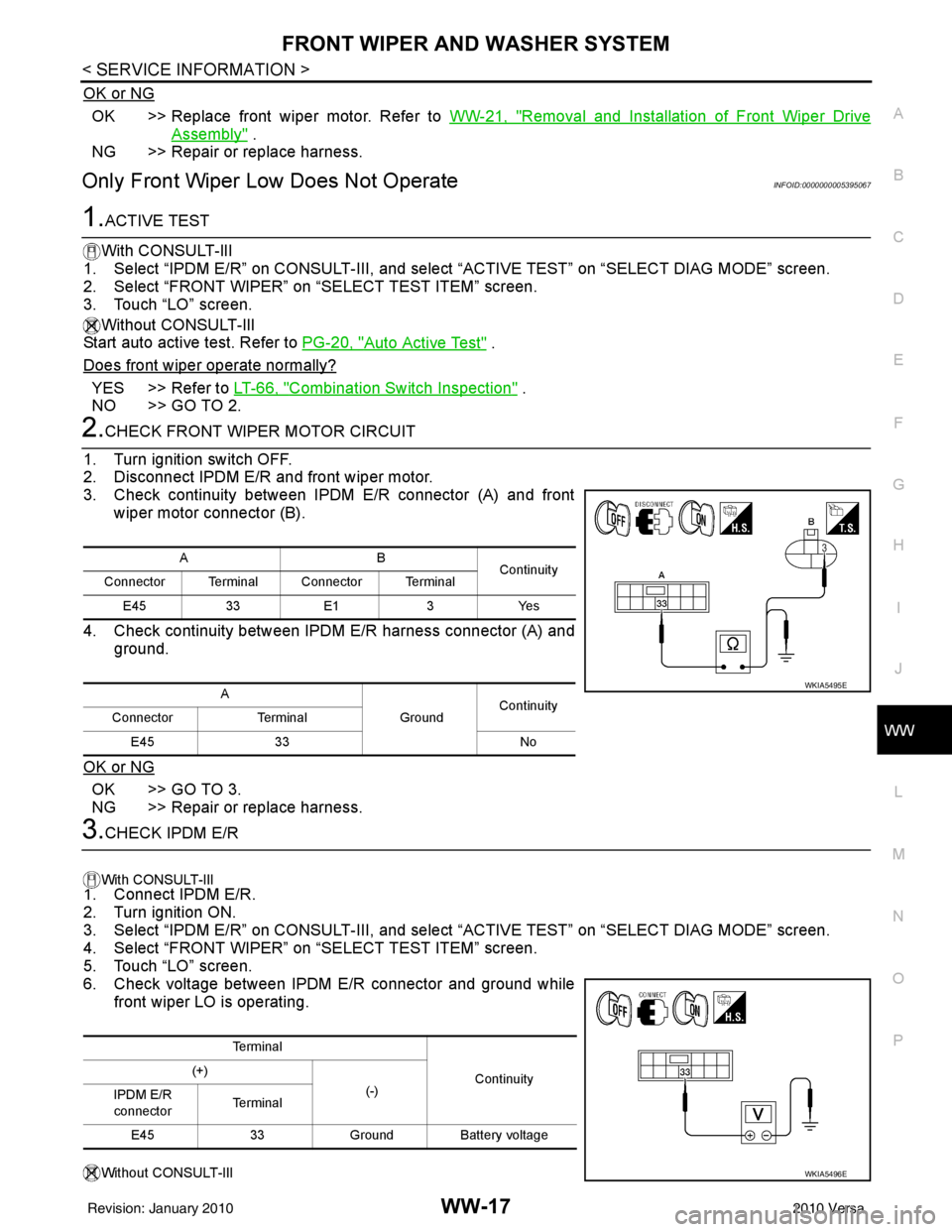
3. Check continuity between IPDM E/R connector (A) and front wiper motor connector (B).
4. Check continuity between IPDM E/R harness connector (A) and ground.
OK or NG
OK >> GO TO 3.
NG >> Repair or replace harness.
3.CHECK IPDM E/R
With CONSULT-lIl
1. Connect IPDM E/R.
2. Turn ignition ON.
3. Select “IPDM E/R” on CONSUL T-III, and select “ACTIVE TEST” on “SELECT DIAG MODE” screen.
4. Select “FRONT WIPER” on “SELECT TEST ITEM” screen.
5. Touch “LO” screen.
6. Check voltage between IPDM E/R connector and ground while front wiper LO is operating.
Without CONSULT-lIl
AB Continuity
Connector Terminal Connector Terminal
E45 33E1 3Yes
A GroundContinuity
Connector Terminal
E45 33 No
WKIA5495E
Te r m i n a l
Continuity
(+)
(-)
IPDM E/R
connector Te r m i n a l
E45 33Ground Battery voltage
WKIA5496E
Revision: January 20102010 Versa
Page 3723 of 3745
WW-18
< SERVICE INFORMATION >
FRONT WIPER AND WASHER SYSTEM
1. Connect IPDM E/R.
2. Turn ignition ON.
3. Start auto active test. Refer to PG-20, "
Auto Active Test" .
4. Check voltage between IPDM E/R connector and ground while front wiper LO is operating.
OK or NG
OK >> Replace front wiper motor. Refer to WW-21, "Removal and Installation of Front Wiper Drive
Assembly" .
NG >> Replace IPDM E/R. Refer to PG-28, "
Removal and Installation of IPDM E/R" .
Only Front Wiper High Does Not OperateINFOID:0000000005395068
1.ACTIVE TEST
With CONSULT-Ill
1. Select “IPDM E/R” on CONSULT-III, and sele ct “ACTIVE TEST” on “SELECT DIAG MODE” screen.
2. Select “FRONT WIPER” on “SELECT TEST ITEM” screen.
3. Touch “HI” screen.
Without CONSULT-lIl
Start auto active test. Refer to PG-20, "
Auto Active Test" .
Does front wiper operate normally?
YES >> Refer to LT-66, "Combination Switch Inspection" .
NO >> GO TO 2.
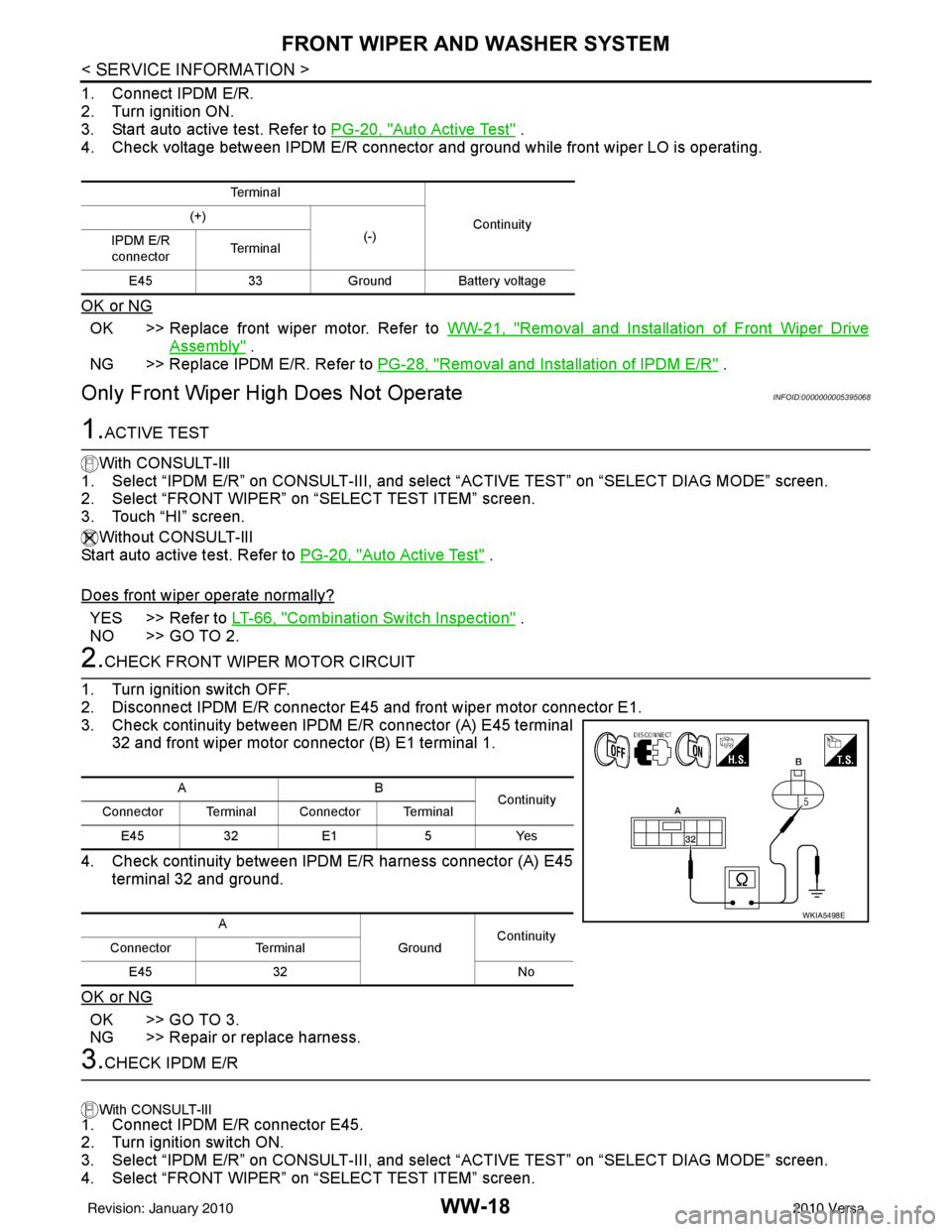
2.CHECK FRONT WIPER MOTOR CIRCUIT
1. Turn ignition switch OFF.
2. Disconnect IPDM E/R connector E45 and front wiper motor connector E1.
3. Check continuity between IPDM E/R connector (A) E45 terminal 32 and front wiper motor connector (B) E1 terminal 1.
4. Check continuity between IPDM E/R harness connector (A) E45 terminal 32 and ground.
OK or NG
OK >> GO TO 3.
NG >> Repair or replace harness.
3.CHECK IPDM E/R
With CONSULT-lIl
1. Connect IPDM E/R connector E45.
2. Turn ignition switch ON.
3. Select “IPDM E/R” on CONSULT-III, and sele ct “ACTIVE TEST” on “SELECT DIAG MODE” screen.
4. Select “FRONT WIPER” on “SELECT TEST ITEM” screen.
Te r m i n a l
Continuity
(+)
(-)
IPDM E/R
connector Te r m i n a l
E45 33Ground Battery voltage
AB
Continuity
Connector Terminal Connector Terminal
E45 32E1 5Yes
A GroundContinuity
Connector Terminal
E45 32 No
WKIA5498E
Revision: January 20102010 Versa
Page 3724 of 3745
FRONT WIPER AND WASHER SYSTEMWW-19
< SERVICE INFORMATION >
C
DE
F
G H
I
J
L
M A
B
WW
N
O P
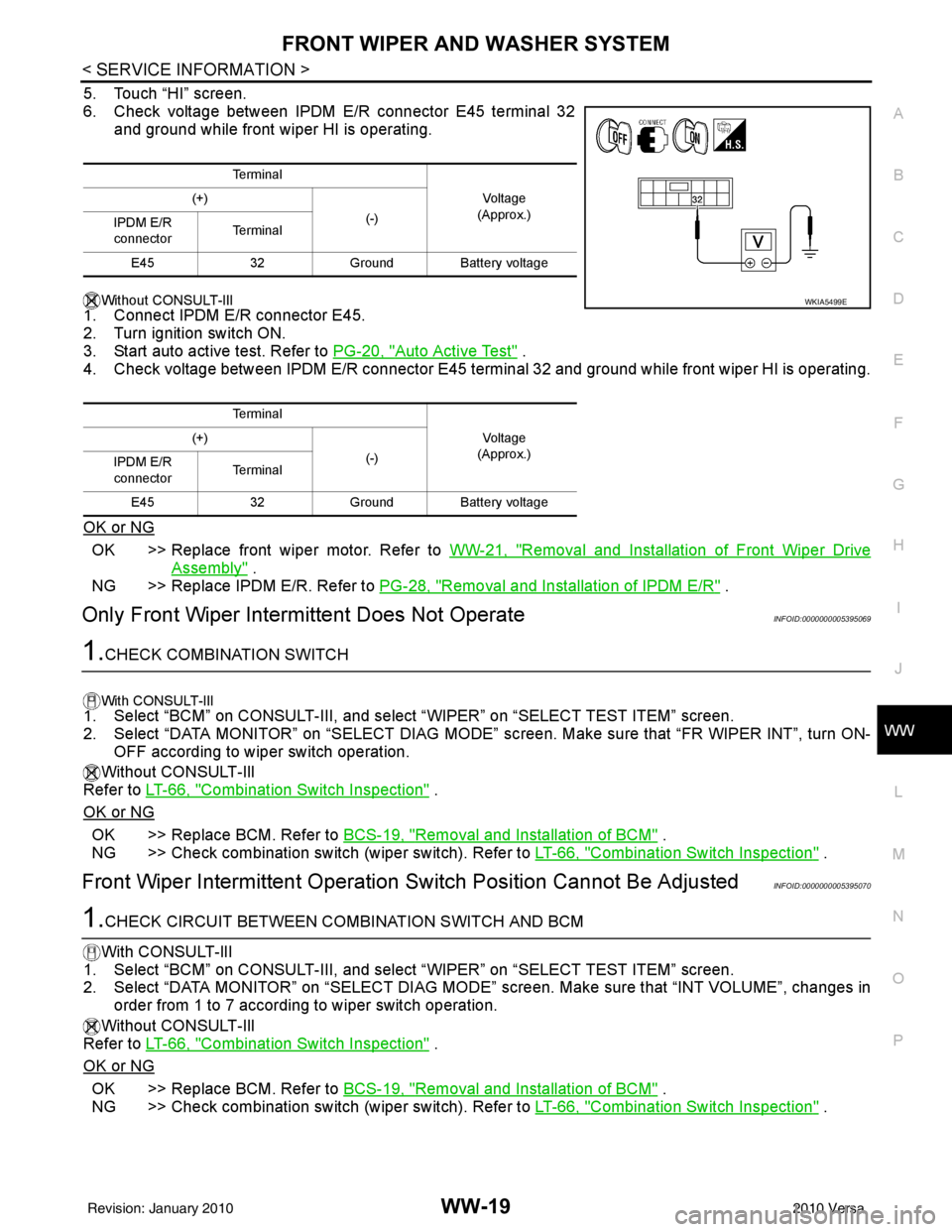
5. Touch “HI” screen.
6. Check voltage between IPDM E/R connector E45 terminal 32 and ground while front wiper HI is operating.
Without CONSULT-lIl
1. Connect IPDM E/R connector E45.
2. Turn ignition switch ON.
3. Start auto active test. Refer to PG-20, "
Auto Active Test" .
4. Check voltage between IPDM E/R connector E45 terminal 32 and ground while front wiper HI is operating.
OK or NG
OK >> Replace front wiper motor. Refer to WW-21, "Removal and Installation of Front Wiper Drive
Assembly" .
NG >> Replace IPDM E/R. Refer to PG-28, "
Removal and Installation of IPDM E/R" .
Only Front Wiper Intermittent Does Not OperateINFOID:0000000005395069
1.CHECK COMBINATION SWITCH
With CONSULT-lIl1. Select “BCM” on CONSULT-III, and sele ct “WIPER” on “SELECT TEST ITEM” screen.
2. Select “DATA MONITOR” on “SELECT DIAG MODE” sc reen. Make sure that “FR WIPER INT”, turn ON-
OFF according to wiper switch operation.
Without CONSULT-Ill
Refer to LT-66, "
Combination Switch Inspection" .
OK or NG
OK >> Replace BCM. Refer to BCS-19, "Removal and Installation of BCM" .
NG >> Check combination switch (wiper switch). Refer to LT-66, "
Combination Switch Inspection" .
Front Wiper Intermittent Operation Switch Position Cannot Be AdjustedINFOID:0000000005395070
1.CHECK CIRCUIT BETWEEN COMB INATION SWITCH AND BCM
With CONSULT-lIl
1. Select “BCM” on CONSULT-III, and select “WIPER” on “SELECT TEST ITEM” screen.
2. Select “DATA MONITOR” on “SELECT DIAG MODE” screen. Make sure that “INT VOLUME”, changes in
order from 1 to 7 according to wiper switch operation.
Without CONSULT-Ill
Refer to LT-66, "
Combination Switch Inspection" .
OK or NG
OK >> Replace BCM. Refer to BCS-19, "Removal and Installation of BCM" .
NG >> Check combination switch (wiper switch). Refer to LT-66, "
Combination Switch Inspection" .
Te r m i n a l
Vo l ta g e
(Approx.)
(+)
(-)
IPDM E/R
connector Te r m i n a l
E45 32Ground Battery voltage
Te r m i n a l Vo l ta g e
(Approx.)
(+)
(-)
IPDM E/R
connector Te r m i n a l
E45 32Ground Battery voltage
WKIA5499E
Revision: January 20102010 Versa
Page 3725 of 3745
WW-20
< SERVICE INFORMATION >
FRONT WIPER AND WASHER SYSTEM
Wiper Does Not Wipe Wh en Front Washer Operates
INFOID:0000000005395071
1.CHECK CIRCUIT BETWEEN COMB INATION SWITCH AND BCM
With CONSULT-lIl
1. Select “BCM” on CONSULT-III, and sele ct “WIPER” on “SELECT TEST ITEM” screen.
2. Select “DATA MONITOR” on “SELECT DIAG MODE” screen. Make sure that “FR WASHER SW” turn ON-
OFF according to front wiper switch operation.
Without CONSULT-Ill
Refer to LT-66, "
Combination Switch Inspection" .
OK or NG
OK >> Replace BCM. Refer to BCS-19, "Removal and Installation of BCM" .
NG >> Check combination switch (wiper switch). Refer to LT-66, "
Combination Switch Inspection" .
Front Wiper Does Not StopINFOID:0000000005395072
1.CHECK CIRCUIT BETWEEN COMBINATION SWITCH AND BCM
With CONSULT-lIl
1. Select “BCM” on CONSULT-III, and sele ct “WIPER” on “SELECT TEST ITEM” screen.
2. Select “DATA MONITOR” on “SELECT DIAG MODE ” screen. Make sure that “FR WIPER INT”, “FR
WIPER LOW”, “FR WIPER HI”, and “FR WASHER SW” turn ON-OFF according to front wiper switch
operation.
Without CONSULT-Ill
Refer to LT-66, "
Combination Switch Inspection" .
OK or NG
OK >> Replace IPDM E/R. Refer to PG-27, "IPDM E/R Power/Ground Circuit Inspection" .
NG >> Check combination switch (wiper switch). Refer to LT-66, "
Combination Switch Inspection" .
Removal and Installation of Front Wiper ArmsINFOID:0000000005395073
REMOVAL
1. Turn wiper switch on to operate wiper motor, and then turn wiper switch off (auto stop).
2. Open hood, remove wiper arm caps, and remove wiper arm nuts.
3. Raise wiper arm, and remove wiper arm from the vehicle.
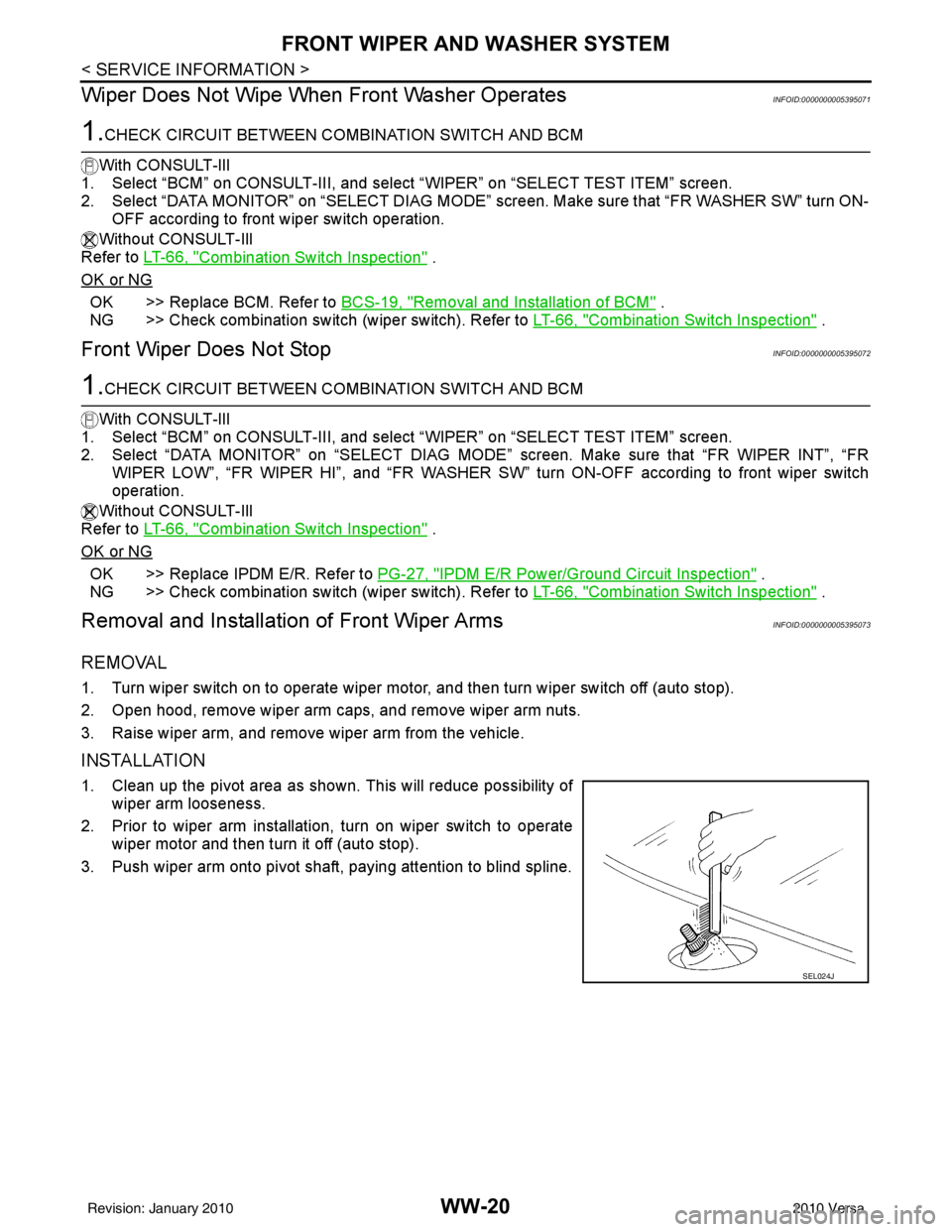
INSTALLATION
1. Clean up the pivot area as shown. This will reduce possibility of
wiper arm looseness.
2. Prior to wiper arm installation, turn on wiper switch to operate wiper motor and then turn it off (auto stop).
3. Push wiper arm onto pivot shaft, paying attention to blind spline.
SEL024J
Revision: January 20102010 Versa
Page 3726 of 3745
FRONT WIPER AND WASHER SYSTEMWW-21
< SERVICE INFORMATION >
C
DE
F
G H
I
J
L
M A
B
WW
N
O P
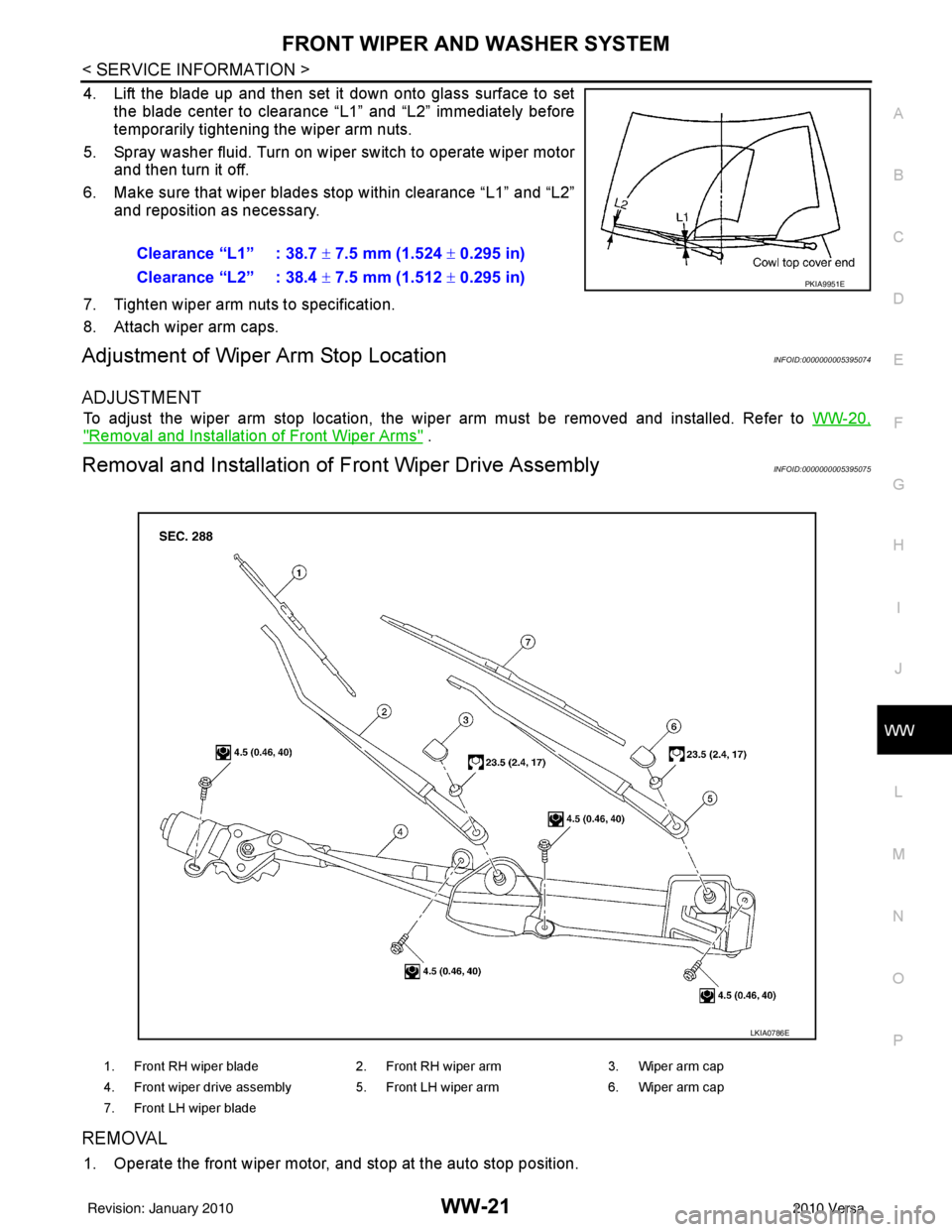
4. Lift the blade up and then set it down onto glass surface to set the blade center to clearance “L1” and “L2” immediately before
temporarily tightening the wiper arm nuts.
5. Spray washer fluid. Turn on wiper switch to operate wiper motor and then turn it off.
6. Make sure that wiper blades stop within clearance “L1” and “L2” and reposition as necessary.
7. Tighten wiper arm nuts to specification.
8. Attach wiper arm caps.
Adjustment of Wiper Arm Stop LocationINFOID:0000000005395074
ADJUSTMENT
To adjust the wiper arm stop location, the wiper arm must be removed and installed. Refer to WW-20,
"Removal and Installation of Front Wiper Arms" .
Removal and Installation of Front Wiper Drive AssemblyINFOID:0000000005395075
REMOVAL
1. Operate the front wiper motor, and stop at the auto stop position.Clearance “L1” : 38.7
± 7.5 mm (1.524 ± 0.295 in)
Clearance “L2” : 38.4 ± 7.5 mm (1.512 ± 0.295 in)
PKIA9951E
1. Front RH wiper blade 2. Front RH wiper arm 3. Wiper arm cap
4. Front wiper drive assembly 5. Front LH wiper arm 6. Wiper arm cap
7. Front LH wiper blade
LKIA0786E
Revision: January 20102010 Versa
Page 3727 of 3745
WW-22
< SERVICE INFORMATION >
FRONT WIPER AND WASHER SYSTEM
2. Remove wiper arms. Refer to WW-20, "Removal and Installation of Front Wiper Arms" .
3. Remove cowl top cover. Refer to EI-22
.
4. Disconnect wiper motor connector.
5. Remove front wiper drive assembly bolts, and remove front wiper drive assembly.
INSTALLATION
1. Install front wiper drive assembly.
2. Connect wiper motor connector. Turn wiper switch on to operate wiper motor, then turn wiper switch off
(auto stop).
3. Install cowl top cover. Refer to EI-22
.
4. Install the wiper arms. Refer to WW-20, "
Removal and Installation of Front Wiper Arms" .
Removal and Installation of Front Washer NozzleINFOID:0000000005395076
REMOVAL
1. Remove cowl top cover. Refer to EI-22, "Removal and Installation" .
2. Remove washer tube.
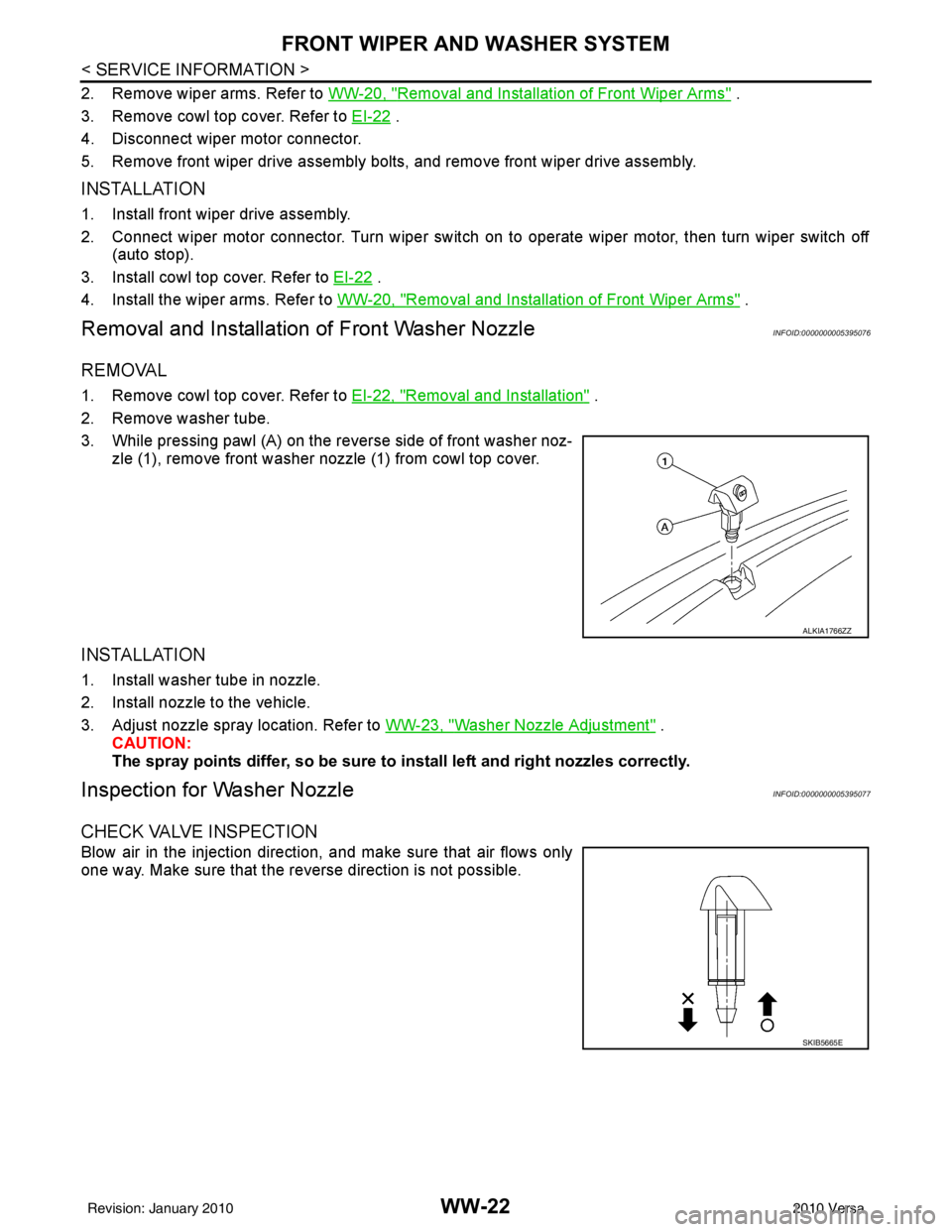
3. While pressing pawl (A) on the reverse side of front washer noz- zle (1), remove front washer nozzle (1) from cowl top cover.
INSTALLATION
1. Install washer tube in nozzle.
2. Install nozzle to the vehicle.
3. Adjust nozzle spray location. Refer to WW-23, "
Washer Nozzle Adjustment" .
CAUTION:
The spray points differ, so be sure to install left and right nozzles correctly.
Inspection for Washer NozzleINFOID:0000000005395077
CHECK VALVE INSPECTION
Blow air in the injection direction, and make sure that air flows only
one way. Make sure that the reverse direction is not possible.
ALKIA1766ZZ
SKIB5665E
Revision: January 20102010 Versa