Light front NISSAN TIIDA 2010 Service Owner's Manual
[x] Cancel search | Manufacturer: NISSAN, Model Year: 2010, Model line: TIIDA, Model: NISSAN TIIDA 2010Pages: 3745, PDF Size: 73.67 MB
Page 933 of 3745
![NISSAN TIIDA 2010 Service Owners Manual SYSTEM DESCRIPTIONBRC-43
< SERVICE INFORMATION > [VDC/TCS/ABS]
C
D
E
G H
I
J
K L
M A
B
BRC
N
O P
SYSTEM DESCRIPTION
System ComponentINFOID:0000000005612142
ABS FunctionINFOID:0000000005612143
• The](/img/5/57397/w960_57397-932.png "NISSAN TIIDA 2010 Service Owners Manual SYSTEM DESCRIPTIONBRC-43
< SERVICE INFORMATION > [VDC/TCS/ABS]
C
D
E
G H
I
J
K L
M A
B
BRC
N
O P
SYSTEM DESCRIPTION
System ComponentINFOID:0000000005612142
ABS FunctionINFOID:0000000005612143
• The")
SYSTEM DESCRIPTIONBRC-43
< SERVICE INFORMATION > [VDC/TCS/ABS]
C
D
E
G H
I
J
K L
M A
B
BRC
N
O P
SYSTEM DESCRIPTION
System ComponentINFOID:0000000005612142
ABS FunctionINFOID:0000000005612143
• The Anti-Lock Brake System detects wheel revolution while braking and improves handling stability during sudden braking by electrically preventing wheel lockup. Maneuverability is also improved for avoiding obsta-
cles.
• If the electrical system malfunctions, the Fail-Safe function is activated, t he ABS becomes inoperative and
the ABS warning lamp turns on.
• The electrical system can be diagnosed using CONSULT-III.
• During ABS operation, the brake pedal may vibrate lightly and a mechanical noise may be heard. This is normal.
• Just after starting the vehicle, the brake pedal may vibrate or a motor operating noise may be heard from engine compartment. This is a normal status of operation check.
• Stopping distance may be longer than that of vehicles without ABS when vehicle drives on rough, gravel, or snow-covered (fresh, deep snow) roads.
EBD FunctionINFOID:0000000005612144
• Electronic Brake Distribution is a function that detects subtle slippages between the front and rear wheelsduring braking, and it improves handling stability by elec tronically controlling the brake fluid pressure which
results in reduced rear wheel slippage.
• If the electrical system malfunctions, the Fail-Safe function is activated, the EBD and ABS become inopera- tive, and the ABS warning lamp and BRAKE warning lamp are turned on.
• The electrical system can be diagnosed using CONSULT-III.
• During EBD operation, the brake pedal may vibrate lightly and a mechanical noise may be heard. This is
normal.
• Just after starting the vehicle, the brake pedal may vibrate or a motor operating noise may be heard from engine compartment. This is a normal status of operation check.
• Stopping distance may be longer than that of vehicles without EBD when vehicle drives on rough, gravel, or
snow-covered (fresh, deep snow) roads.
AWFIA0604GB
Revision: January 20102010 Versa
Page 934 of 3745
![NISSAN TIIDA 2010 Service Owners Manual BRC-44
< SERVICE INFORMATION >[VDC/TCS/ABS]
SYSTEM DESCRIPTION
TCS Function
INFOID:0000000005612145
• Spinning of the drive wheels is detected by the A BS/TCS/VDC control unit using inputs from the](/img/5/57397/w960_57397-933.png "NISSAN TIIDA 2010 Service Owners Manual BRC-44
< SERVICE INFORMATION >[VDC/TCS/ABS]
SYSTEM DESCRIPTION
TCS Function
INFOID:0000000005612145
• Spinning of the drive wheels is detected by the A BS/TCS/VDC control unit using inputs from the")
BRC-44
< SERVICE INFORMATION >[VDC/TCS/ABS]
SYSTEM DESCRIPTION
TCS Function
INFOID:0000000005612145
• Spinning of the drive wheels is detected by the A BS/TCS/VDC control unit using inputs from the wheel
speed sensors. If wheel spin occurs, the drive wheel right and left brake fluid pressure control and engine
fuel cut are conducted while the throttle value is restricted to reduce the engine torque and decrease the
amount of wheel spin. In addition, the throttle openi ng is controlled to achieve the optimum engine torque.
• Depending on road condition, the vehicle may have a sluggish feel. This is normal, because optimum trac- tion has the highest priority during TCS operation.
• TCS may be activated during sudden vehicle acceleration, wide open throttle acceleration, sudden transmis- sion shifts or when the vehicle is driven on a road with a varying surface friction coefficient.
• The SLIP indicator lamp flashes to inform the driver of TCS operation.
VDC FunctionINFOID:0000000005612146
• In addition to the ABS/TCS function, the driver steering amount and brake operation amount are detected
from the steering angle sensor, and the vehicle's drivi ng status (amount of under steering/over steering) is
determined using inputs from the yaw rate/side/decel G sensor, wheel speed sensors, etc. and this informa-
tion is used to improve vehicle stability by cont rolling the braking and engine torque application to the
wheels.
• The SLIP indicator lamp flashes to inform the driver of VDC operation.
• During VDC operation, the vehicle body and brake pedal may vibrate lightly and a mechanical noise may be
heard. This is normal.
• The ABS warning lamp, VDC OFF indicator lamp and SLIP indicator lamp may turn on when the vehicle is
subject to strong shaking or large vibration, such as when the vehicle is on a turn table or a ship while the
engine is running or steep slope. In this case, rest art the engine on a normal road and if the ABS warning
lamp, VDC OFF indicator lamp and SLIP indicator lamp turn off, there is no problem.
Wheel SensorsINFOID:0000000005612147
The front sensor units consist of a gear-shaped sensor rotor and a
sensor element. The element contains a magnet around which a coil
is wound. The front wheel sensors are installed on the front of the
wheel knuckles. As the wheel rotates, the sensor generates a
square-wave signal. The frequency in creases as the wheel speed
increases.
The rear sensor units consist of w heel hubs with a series of internal
magnets and a sensor element. The rear wheel sensors are installed
on the inner side of the wheel knuckles. As the wheel rotates, the
sensor generates a square-wave signal. The frequency increases as
the wheel speed increases.
Fail-Safe FunctionINFOID:0000000005612148
ABS/EBD SYSTEM
In case of an electrical malfunction with the ABS, t he ABS warning lamp, VDC OFF indicator lamp and SLIP
indicator lamp will turn on. In case of an electrical malfunction with the EBD system, the BRAKE warning lamp,
ABS warning lamp, VDC OFF indicator lamp and SLIP indicator lamp will turn on.
LBR333
WFIA0033E
Revision: January 20102010 Versa
Page 1195 of 3745
![NISSAN TIIDA 2010 Service Owners Manual CVT-162
< SERVICE INFORMATION >[RE0F08B]
SHIFT CONTROL SYSTEM
7. Remove the plate (1) from the CVT shift selector assembly.
: Vehicle front
8. Remove the lock plate (1) from the control cable (2). : V](/img/5/57397/w960_57397-1194.png "NISSAN TIIDA 2010 Service Owners Manual CVT-162
< SERVICE INFORMATION >[RE0F08B]
SHIFT CONTROL SYSTEM
7. Remove the plate (1) from the CVT shift selector assembly.
: Vehicle front
8. Remove the lock plate (1) from the control cable (2). : V")
CVT-162
< SERVICE INFORMATION >[RE0F08B]
SHIFT CONTROL SYSTEM
7. Remove the plate (1) from the CVT shift selector assembly.
: Vehicle front
8. Remove the lock plate (1) from the control cable (2). : Vehicle front
9. Remove the control cable (2) from the CVT shift selector assem- bly.
10. Insert suitable tool at points (A) and (B) as shown, and press both tabs (E) and (F) at the front (C) and rear (D) slightly toward
the center of the CVT shift selector assembly to remove the CVT
shift selector assembly from the underside of the vehicle.
: Vehicle front
INSTALLATION
Installation is in the reverse order of removal.
SCIA6967E
SCIA6968E
SCIA6970E
Revision: January 20102010 Versa
Page 1196 of 3745
![NISSAN TIIDA 2010 Service Owners Manual SHIFT CONTROL SYSTEMCVT-163
< SERVICE INFORMATION > [RE0F08B]
D
E
F
G H
I
J
K L
M A
B
CVT
N
O P
• When installing the control cable (1) to the CVT shift selector assembly (2), make sure that the con](/img/5/57397/w960_57397-1195.png "NISSAN TIIDA 2010 Service Owners Manual SHIFT CONTROL SYSTEMCVT-163
< SERVICE INFORMATION > [RE0F08B]
D
E
F
G H
I
J
K L
M A
B
CVT
N
O P
• When installing the control cable (1) to the CVT shift selector assembly (2), make sure that the con")
SHIFT CONTROL SYSTEMCVT-163
< SERVICE INFORMATION > [RE0F08B]
D
E
F
G H
I
J
K L
M A
B
CVT
N
O P
• When installing the control cable (1) to the CVT shift selector assembly (2), make sure that the control cable (1) is fully pressed
in with the ribbed surface (A) fa cing downward from the vehicle.
: Vehicle front
• After installation is completed, adjust and check the CVT position.
Refer to CVT-164, "
Adjustment of CVT Position" and CVT-164,
"Checking of CVT Position".
CVT Shift Selector Disassembly and AssemblyINFOID:0000000005398000
DISASSEMBLY
NOTE:
Refer to CVT-160, "
Removal and Installation" to disassemble.
1. Remove shift lever handle from CVT shift selector assembly. Refer to CVT-163, "
Shift Lever Handle
Removal and Installation".
2. Remove position lamp from position indicator plate (1).
3. Insert a suitable tool to (A) (at 4 locations) as shown, and bend each hook slightly to raise position indicator plate (1) and
remove from CVT shift selector assembly (2).
4. Remove bracket from CVT sh ift selector assembly (2).
5. Remove CVT shift selector harness connector from CVT shift selector assembly (2).
6. Release tabs (A) on shift lock solenoid and park position switch assembly from hooks (B) on CVT shift selector assembly to shift
lock solenoid and park position switch assembly.
ASSEMBLY
Assembly is in the reverse order of disassembly.
Shift Lever Handle Removal and InstallationINFOID:0000000005398001
REMOVAL
CAUTION:
Make sure that parking brake is a pplied before removal/installation.
SCIA6253E
SCIA6969E
SCIA6977E
Revision: January 20102010 Versa
Page 1211 of 3745

DI-1
ELECTRICAL
C
DE
F
G H
I
J
L
M
SECTION DI
A
B
DI
N
O P
CONTENTS
DRIVER INFORMATION SYSTEM
SERVICE INFORMATION .. ..........................2
PRECAUTION ................................................ .....2
Precaution for Supplemental Restraint System
(SRS) "AIR BAG" and "SEAT BELT PRE-TEN-
SIONER" ............................................................. ......
2
Precaution Necessary for Steering Wheel Rota-
tion After Battery Disconnect ............................... ......
2
COMBINATION METERS ...................................4
Component Parts and Harness Connector Loca-
tion ...................................................................... ......
4
System Description ...................................................4
Arrangement of Combination Meter ..........................6
Internal Circuit ...........................................................7
Wiring Diagram - METER - .......................................8
Combination Meter Harness Connector Terminal
Layout .....................................................................
10
Terminal and Reference Value for Combination
Meter .......................................................................
10
Self-Diagnosis Mode of Combination Meter ........ ....11
CONSULT-III Function (METER/M&A) ............... ....13
Trouble Diagnosis ...................................................14
Symptom Chart .......................................................15
Power Supply and Ground Circuit Inspection .........15
Vehicle Speed Signal Inspection .............................16
Engine Speed Signal Inspection .............................17
Fuel Level Sensor Signal Inspection .......................17
Fuel Gauge Fluctuates, Indicates Wrong Value, or
Varies ......................................................................
19
Fuel Gauge Does Not Move to Full-position ...........19
DTC [U1000] CAN Communication Circuit ......... ....19
Electrical Component Inspection .............................20
Removal and Installation .........................................20
WARNING LAMPS ......................................... ....21
Schematic ........................................................... ....21
Wiring Diagram - WARN - ................................... ....22
Oil Pressure Warning Lamp Stays Off (Ignition
Switch ON) .......................................................... ....
30
Oil Pressure Warning Lamp Does Not Turn Off
(Oil Pressure Is Normal) ...................................... ....
32
Component Inspection .............................................32
A/T INDICATOR ................................................34
System Description ..................................................34
Wiring Diagram - AT/IND - .......................................35
A/T Indicator Does Not Illuminate ............................36
CVT INDICATOR ...............................................38
System Description ..................................................38
Schematic ................................................................38
Wiring Diagram - CVTIND - .....................................39
CVT Indicator Does Not Illuminate ..........................41
WARNING CHIME .............................................43
Component Parts and Harness Connector Loca-
tion ....................................................................... ....
43
System Description ..................................................43
Wiring Diagram - CHIME - .......................................46
Terminal and Reference Value for BCM ..................47
CONSULT-III Function (B CM) .................................47
Trouble Diagnosis ................................................ ....48
Combination Meter Buzzer Circuit Inspection .........49
Front Door Switch LH Signal Inspection .............. ....50
Key Switch Signal Inspection (Without Intelligent
Key) ..................................................................... ....
51
Key Switch and Ignition Knob Switch Signal In-
spection (With Intelligent Key, When Mechanical
Key Is Used) ........................................................ ....
52
Lighting Switch Signal Inspection ............................54
Parking Brake Switch Signal Inspection ..................54
Electrical Component Inspection .............................55
Revision: January 20102010 Versa
Page 1253 of 3745
WARNING CHIMEDI-43
< SERVICE INFORMATION >
C
DE
F
G H
I
J
L
M A
B
DI
N
O P
WARNING CHIME
Component Parts and Har ness Connector LocationINFOID:0000000005395039
System DescriptionINFOID:0000000005395040
• Buzzer for warning chime system is installed in the combination meter.
• The buzzer sounds when combination meter receives buzzer output signal with CAN communication line.
POWER SUPPLY AND GROUND CIRCUIT
Power is supplied at all times
• through 40A fusible link (letter g, located in the fuse and fusible link box)
• to BCM terminal 70,
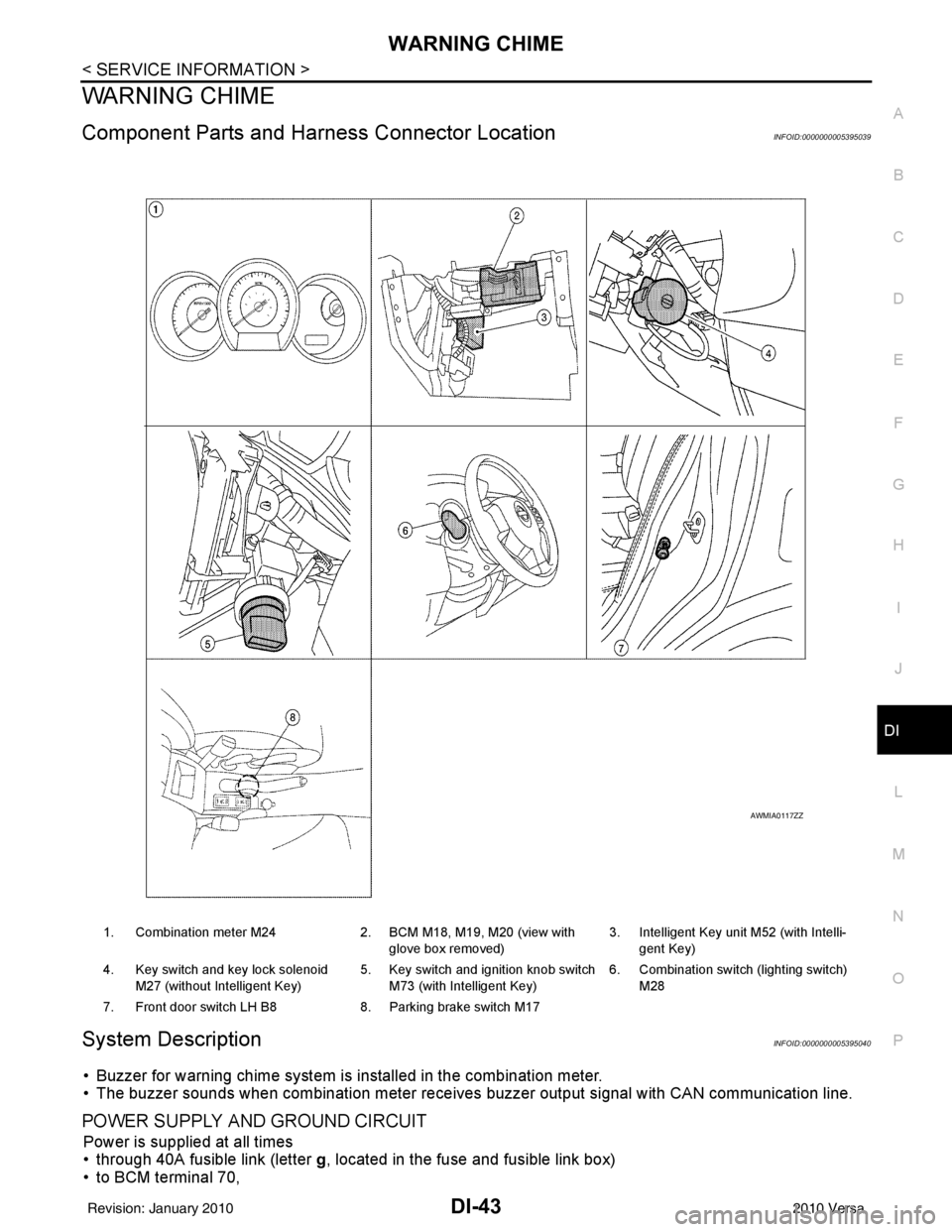
1. Combination meter M24 2. BCM M18, M19, M20 (view with
glove box removed) 3. Intelligent Key unit M52 (with Intelli-
gent Key)
4. Key switch and key lock solenoid M27 (without Intelligent Key) 5. Key switch and ignition knob switch
M73 (with Intelligent Key) 6. Combination switch (lighting switch)
M28
7. Front door switch LH B8 8. Parking brake switch M17
AWMIA0117ZZ
Revision: January 20102010 Versa
Page 1258 of 3745
![NISSAN TIIDA 2010 Service Owners Manual DI-48
< SERVICE INFORMATION >
WARNING CHIME
DATA MONITOR
Display Item List
ACTIVE TEST
Display Item List
SELF-DIAG RESULTS
Display Item List
NOTE:
If “CAN communication [U1000]” is indicated, afte](/img/5/57397/w960_57397-1257.png "NISSAN TIIDA 2010 Service Owners Manual DI-48
< SERVICE INFORMATION >
WARNING CHIME
DATA MONITOR
Display Item List
ACTIVE TEST
Display Item List
SELF-DIAG RESULTS
Display Item List
NOTE:
If “CAN communication [U1000]” is indicated, afte")
DI-48
< SERVICE INFORMATION >
WARNING CHIME
DATA MONITOR
Display Item List
ACTIVE TEST
Display Item List
SELF-DIAG RESULTS
Display Item List
NOTE:
If “CAN communication [U1000]” is indicated, after printing the monitor item, go to “LAN system”. Refer to
LAN-17, "
Trouble Diagnosis Flow Chart".
Trouble DiagnosisINFOID:0000000005395044
HOW TO PERFORM TROUBLE DIAGNOSIS
1. Confirm the symptom and customer complaint.
2. Understand the outline of system. Refer to DI-43, "
System Description".
3. Perform the preliminary inspection. Refer to "PRELIMINARY INSPECTION".
4. According to symptom chart, repair or replac e the cause of the malfunction. Refer to "SYMPTOM
CHART".
5. Does warning chime system operate normally? If it operates normally, GO TO 6. If not, GO TO 4.
6. Inspection End.
PRELIMINARY INSPECTION
BCM diagnostic test item Diagnostic mode
Description
Inspection by part WORK SUPPORT
Supports inspections and adjustments. Commands are transmitted to the BCM for
setting the status suitable for required operation, input/output signals are received
from the BCM and received data is displayed.
DATA MONITOR Displays BCM input/output data in real time. ACTIVE TEST Operation of electrical loads can be checked by sending drive signal to them.
SELF-DIAG RESULTS Displays BCM self-diagnosis results.
CAN DIAG SUPPORT MNTR The result of transmit/receive diagnosis of CAN communication can be read. ECU PART NUMBER BCM part number can be read.CONFIGURATION Performs BCM configuration read/write functions.
Monitored item ALL SIGNALS SELECTION
FROM MENU Contents
IGN ON SW XX Indicates [ON/OFF] condition of ignition switch.
KEY ON SW XX Indicates [ON/OFF] condition of key switch.
DOOR SW-DR XX Indicates [ON/OFF] condition of front door switch LH.
LIGHT SW 1ST XX Indicates [ON/OFF] condition of lighting switch.
BUCKLE SW XX Indicates [ON/OFF] condition of seat belt buckle switch LH.
Test item Malfunction is detected when···
IGN KEY WARN ALM This test is able to check key warning chime operation.
LIGHT WARN ALM This test is able to check light warning chime operation.
SEAT BELT WARN TEST This test is able to check seat belt warning chime operation.
Display item [Code] Malfunction is detected when...
CAN communication [U1000] Malfunction is detected in CAN communication.
Revision: January 20102010 Versa
Page 1259 of 3745
WARNING CHIMEDI-49
< SERVICE INFORMATION >
C
DE
F
G H
I
J
L
M A
B
DI
N
O P
1.CHECK BCM
Perform self-diagnosis of BCM. Refer to DI-47, "
CONSULT-III Function (BCM)".
Self
-diagnostic results content
No malfunction detected>> GO TO 2.
Malfunction detected>> Check applicable parts, and repair or replace corresponding parts.
2.CHECK COMBINATION METER
Perform self-diagnosis of combination meter. Refer to DI-13, "
CONSULT-III Function (METER/M&A)".
Self
-diagnostic results content
No malfunction detected>> Inspection End.
Malfunction detected>> Check applicable parts, and repair or replace corresponding parts.
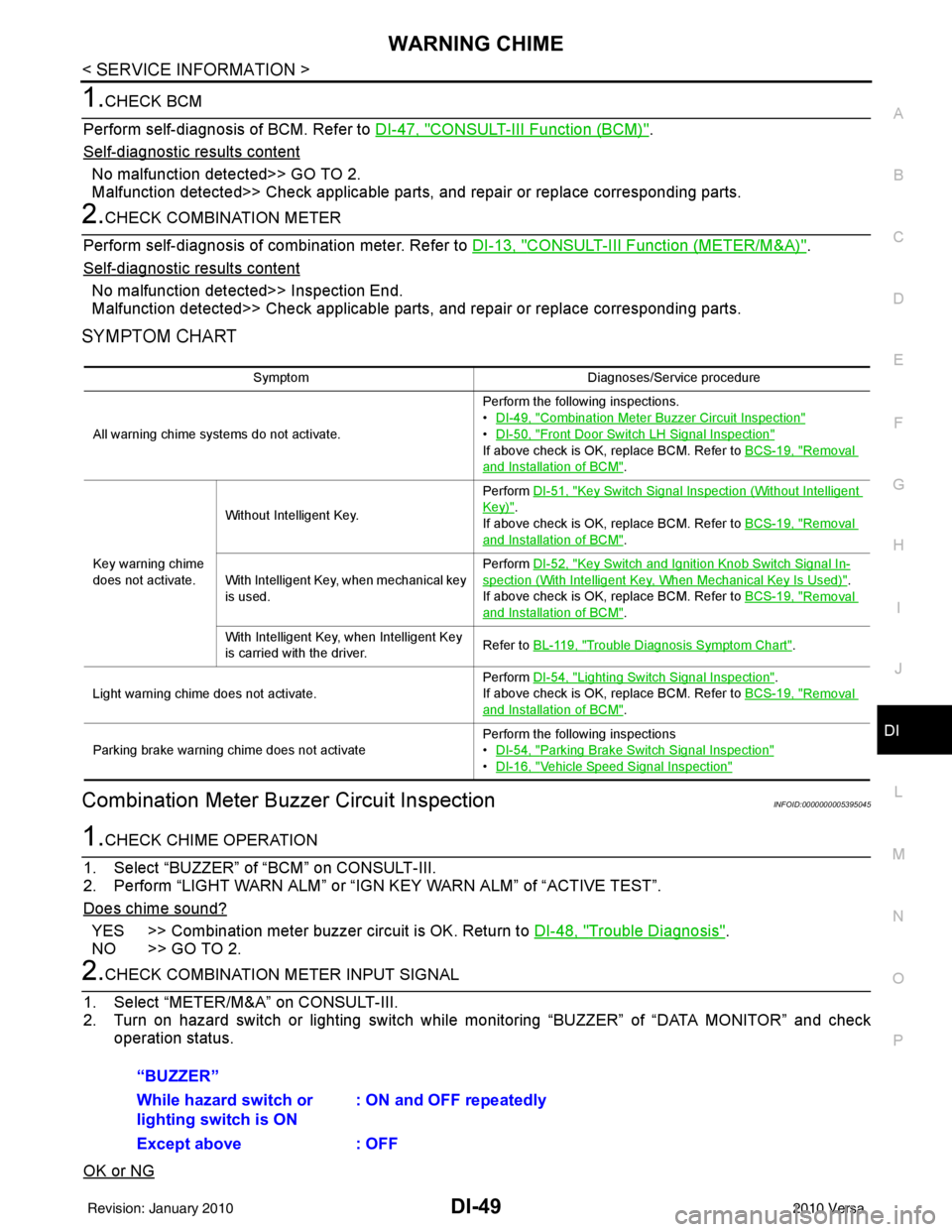
SYMPTOM CHART
Combination Meter Buzzer Circuit InspectionINFOID:0000000005395045
1.CHECK CHIME OPERATION
1. Select “BUZZER” of “BCM” on CONSULT-III.
2. Perform “LIGHT WARN ALM” or “IGN KEY WARN ALM” of “ACTIVE TEST”.
Does chime sound?
YES >> Combination meter buzzer circuit is OK. Return to DI-48, "Trouble Diagnosis".
NO >> GO TO 2.
2.CHECK COMBINATION METER INPUT SIGNAL
1. Select “METER/M&A” on CONSULT-III.
2. Turn on hazard switch or lighting switch while monitoring “BUZZER” of “DATA MONITOR” and check
operation status.
OK or NG
Symptom Diagnoses/Service procedure
All warning chime systems do not activate. Perform the following inspections.
•
DI-49, "
Combination Meter Buzzer Circuit Inspection"
•DI-50, "Front Door Switch LH Signal Inspection"
If above check is OK, replace BCM. Refer to BCS-19, "Removal
and Installation of BCM".
Key warning chime
does not activate. Without Intelligent Key.
Perform
DI-51, "
Key Switch Signal Inspection (Without Intelligent
Key)".
If above check is OK, replace BCM. Refer to BCS-19, "
Removal
and Installation of BCM".
With Intelligent Key, when mechanical key
is used. Perform
DI-52, "
Key Switch and Ignition Knob Switch Signal In-
spection (With Intelligent Key, When Mechanical Key Is Used)".
If above check is OK, replace BCM. Refer to BCS-19, "
Removal
and Installation of BCM".
With Intelligent Key, when Intelligent Key
is carried with the driver. Refer to BL-119, "
Trouble Diagnosis Symptom Chart".
Light warning chime does not activate. Perform
DI-54, "
Lighting Switch Signal Inspection".
If above check is OK, replace BCM. Refer to BCS-19, "
Removal
and Installation of BCM".
Parking brake warning chime does not activate Perform the following inspections
•
DI-54, "
Parking Brake Switch Signal Inspection"
•DI-16, "Vehicle Speed Signal Inspection"
“BUZZER”
While hazard switch or
lighting switch is ON : ON and OFF repeatedly
Except above : OFF
Revision: January 20102010 Versa
Page 1289 of 3745
![NISSAN TIIDA 2010 Service Owners Manual EC-24
< BASIC INSPECTION >[HR16DE]
INSPECTION AND ADJUSTMENT
IDLE SPEED
IDLE SPEED : DescriptionINFOID:0000000005398234
This describes how to check the idle speed. For the
actual procedure, follow th](/img/5/57397/w960_57397-1288.png "NISSAN TIIDA 2010 Service Owners Manual EC-24
< BASIC INSPECTION >[HR16DE]
INSPECTION AND ADJUSTMENT
IDLE SPEED
IDLE SPEED : DescriptionINFOID:0000000005398234
This describes how to check the idle speed. For the
actual procedure, follow th")
EC-24
< BASIC INSPECTION >[HR16DE]
INSPECTION AND ADJUSTMENT
IDLE SPEED
IDLE SPEED : DescriptionINFOID:0000000005398234
This describes how to check the idle speed. For the
actual procedure, follow the instructions in “BASIC
INSPECTION”.
IDLE SPEED : Special Repair RequirementINFOID:0000000005398235
1.CHECK IDLE SPEED
With CONSULT-III
Check idle speed in “DATA MONITOR” mode with CONSULT-III.
With GST
Check idle speed with Service $01 of GST.
>> INSPECTION END
IGNITION TIMING
IGNITION TIMING : DescriptionINFOID:0000000005398236
This describes how to check the ignition timing. For the actual procedure, follow the instructions in “BASIC
INSPECTION”.
IGNITION TIMING : Special Repair RequirementINFOID:0000000005398237
1.CHECK IGNITION TIMING
1. Attach timing light to No. 1 ignition coil (1) wire as shown.
2. Check ignition timing.
>> INSPECTION END
VIN REGISTRATION
VIN REGISTRATION : DescriptionINFOID:0000000005398238
VIN Registration is an operation to registering VIN in ECM. It must be performed each time ECM is replaced.
NOTE:
Accurate VIN which is registered in ECM ma y be required for Inspection & Maintenance (I/M).
2 : Timing light
: Vehicle front
PBIB2955E
1 : Timing indicator
MBIB1331E
Revision: January 20102010 Versa
Page 1843 of 3745
![NISSAN TIIDA 2010 Service Owners Manual EC-578
< SERVICE INFORMATION >[MR18DE]
BASIC SERVICE PROCEDURE
1. Substitute another known-good ECM to check ECM function. (ECM may be the cause of an incident, but
this is a rare case.)
2. Perform in](/img/5/57397/w960_57397-1842.png "NISSAN TIIDA 2010 Service Owners Manual EC-578
< SERVICE INFORMATION >[MR18DE]
BASIC SERVICE PROCEDURE
1. Substitute another known-good ECM to check ECM function. (ECM may be the cause of an incident, but
this is a rare case.)
2. Perform in")
EC-578
< SERVICE INFORMATION >[MR18DE]
BASIC SERVICE PROCEDURE
1. Substitute another known-good ECM to check ECM function. (ECM may be the cause of an incident, but
this is a rare case.)
2. Perform initialization of NVIS (NATS) system and registration of all NVIS (NATS) ignition key IDs.
Refer to BL-249, "
ECM Re-communicating Function".
>> GO TO 4.
19.INSPECTION END
Did you replace ECM, referring this Basic Inspection procedure?
Ye s o r N o
Yes >> 1. Perform EC-580, "VIN Registration".
2. INSPECTION END
No >> INSPECTION END
Idle Speed and Ignition Timing CheckINFOID:0000000005532405
IDLE SPEED
With CONSULT-III
Check idle speed in “DATA MONITOR” mode with CONSULT-III.
With GST
Check idle speed in Service $01 with GST.
IGNITION TIMING
Any of following two methods may be used.
Method A
1. Attach timing light to loop wire (1) as shown.
• : Vehicle front
2. Check ignition timing. • Timing indicator (1)
Method B
1. Remove No. 4 ignition coil (1).
PBIB3320E
PBIB3263E
Revision: January 20102010 Versa