reset NISSAN TITAN 2008 1.G Owners Manual
[x] Cancel search | Manufacturer: NISSAN, Model Year: 2008, Model line: TITAN, Model: NISSAN TITAN 2008 1.GPages: 408, PDF Size: 5.58 MB
Page 21 of 408
FRONT POWER SEAT
ADJUSTMENT (if so equipped)
Operating tips
cThe power seat motor has an auto-reset
overload protection circuit. If the motor
stops during operation, wait 30 seconds,
then reactivate the switch.
cDo not operate the power seat switch for a
long period of time when the engine is off.
This will discharge the battery.
See “Automatic drive positioner (if so equipped)”
in “Pre-driving checks and adjustments” for auto-
matic drive positioner operation.
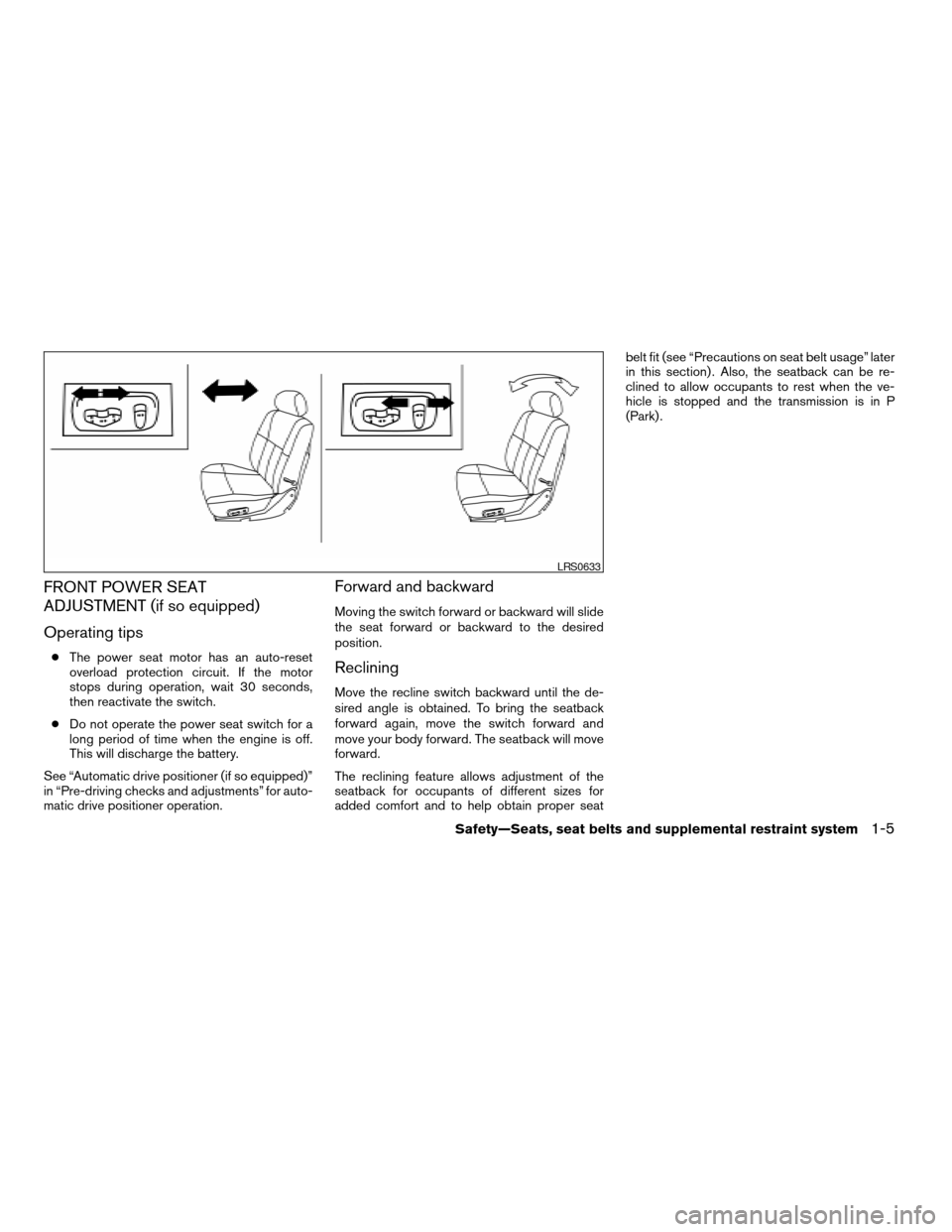
Forward and backward
Moving the switch forward or backward will slide
the seat forward or backward to the desired
position.
Reclining
Move the recline switch backward until the de-
sired angle is obtained. To bring the seatback
forward again, move the switch forward and
move your body forward. The seatback will move
forward.
The reclining feature allows adjustment of the
seatback for occupants of different sizes for
added comfort and to help obtain proper seatbelt fit (see “Precautions on seat belt usage” later
in this section) . Also, the seatback can be re-
clined to allow occupants to rest when the ve-
hicle is stopped and the transmission is in P
(Park) .
LRS0633
Safety—Seats, seat belts and supplemental restraint system1-5
ZREVIEW COPYÐ2008 Titan(tzw)
Owners ManualÐUSA_English(nna)
03/05/07Ðtbrooks
X
Page 85 of 408

1. Speedometer
2. Odometer/twin trip display
3. Change button
SPEEDOMETER AND ODOMETER
Speedometer
The speedometer indicates vehicle speed in
miles per hour (MPH) and kilometers per hour
(km/h) .
Odometer/Twin trip odometer
The odometer/twin trip odometer is displayed
when the ignition switch is in the ON position.The odometer records the total distance the ve-
hicle has been driven.
The twin trip odometer records the distance of
individual trips.Changing the display:
Pushing the change button changes the display
as follows:
Trip
!Trip!Odometer only
Resetting the trip odometer:
Pushing the change button for more than 1 sec-
ond resets the trip odometer to zero.
Elapsed time, driving distance and average
speed information is also available for vehicles
with navigation system (if so equipped) . Refer to
“Control panel buttons” in the “Display screen,
heater, air conditioner and audio systems” sec-
tion later in this manual.
WIC1244WIC1245
Instruments and controls2-5
ZREVIEW COPYÐ2008 Titan(tzw)
Owners ManualÐUSA_English(nna)
03/05/07Ðtbrooks
X
Page 97 of 408
WARNING
cIf the light does illuminate with the ig-
nition switch in the ON position, have
the vehicle checked by a NISSAN dealer
as soon as possible.
cIf the light illuminates while driving,
avoid sudden steering maneuvers or
abrupt braking, reduce vehicle speed,
pull off the road to a safe location and
stop the vehicle as soon as possible.
Driving with under-inflated tires may
permanently damage the tires and in-
crease the likelihood of tire failure. Se-
rious vehicle damage could occur and
may lead to an accident and could re-
sult in serious personal injury. Check
the tire pressure for all four tires. Adjust
the tire pressure to the recommended
COLD tire pressure shown on the Tire
and Loading Information label to turn
the low tire pressure warning light OFF.
If the light still comes on while driving
after adjusting the tire pressure, a tire
may be flat. If you have a flat tire, re-
place it with a spare tire as soon as
possible.cWhen a spare tire is mounted or a wheel
is replaced, tire pressure will not be
indicated, the TPMS will not function
and the low tire pressure warning light
will flash for approximately 1 minute.
The light will remain on after 1 minute.
Contact your NISSAN dealer as soon as
possible for tire replacement and/or
system resetting.
cReplacing tires with those not originally
specified by NISSAN could affect the
proper operation of the TPMS.
CAUTION
cThe TPMS is not a substitute for the
regular tire pressure check. Be sure to
check the tire pressure regularly.
cIf the vehicle is being driven at speeds
of less than 16 MPH (25 km/h) , the
TPMS may not operate correctly.
cBe sure to install the specified size of
tires to the 4 wheels correctly.
Master warning light
This light comes on when various vehicle infor-
mation display warnings appear.
Seat belt warning light and
chime
The light and chime remind you to fasten your
seat belts. The light illuminates whenever the
ignition key is turned to the ON or START position
and remains illuminated until the driver’s seat belt
is fastened. At the same time, the chime sounds
for about 6 seconds unless the driver’s seat belt
is securely fastened.
The seat belt warning light may also illuminate if
the front passenger’s seat belt is not fastened
when the front passenger’s seat is occupied . For
7 seconds after the ignition switch is in the ON
position, the system does not activate the warn-
ing light for the front passenger.
Refer to “Seat belts” in the “Safety—Seats, seat
belts and supplemental restraint system” section
for precautions on seat belt usage.
Supplemental air bag warning
light
When the ignition key is in the ON or START
position, the supplemental air bag warning light
illuminates for about 7 seconds and then turns
off. This means the system is operational.
If any of the following conditions occur, the
supplemental front air bags, front seat-mounted
side-impact supplemental air bags (if so
Instruments and controls2-17
ZREVIEW COPYÐ2008 Titan(tzw)
Owners ManualÐUSA_English(nna)
03/05/07Ðtbrooks
X
Page 102 of 408

Fuel Economy mode (If so equipped)
The fuel economy mode can be selected to dis-
play the instant fuel economy since the last reset.Average speed mode (If so equipped)
The average speed mode can be selected dis-
play the average miles per gallon and miles per
hour since the last reset.Time/Miles (km) mode (if so equipped)
The time/miles (km) mode can be selected to
show the time and distance driven since the last
reset.
LIC1093LIC1097WIC1266
2-22Instruments and controls
ZREVIEW COPYÐ2008 Titan(tzw)
Owners ManualÐUSA_English(nna)
03/05/07Ðtbrooks
X
Page 103 of 408

Range mode (If so equipped)
The range mode can be selected to give you an
estimation of the distance that can be driven
before refueling. The range is constantly calcu-
lated based on the amount of fuel in the fuel tank
and the actual fuel consumption.Setting mode (If so equipped)
The setting mode allows you to set reminders or
preferences for maintenance intervals or lan-
guage displays.
In the setting mode screen rotate the INFO but-
ton to move to:
cMaintenance
cDisplay
and press the INFO button to select the menu.Reset mode (If so equipped)
The reset mode can be selected in any screen
that allows for preferences to be programmed.
Once the screen is selected, you have the option
to reset their selected distances or time to a new
setting.
LIC1095LIC1162WIC1163
Instruments and controls2-23
ZREVIEW COPYÐ2008 Titan(tzw)
Owners ManualÐUSA_English(nna)
03/05/07Ðtbrooks
X
Page 104 of 408

Maintenance mode (If so equipped)
The maintenance mode allows you to set alerts
for the reminding of maintenance intervals for the
following:
cengine oil
coil filter
ctires
cother.
Set a desired interval by rotating the INFO button
to highlight the maintenance field, then press the
INFO button to select. The reset mode will open
up and allow you to enter the desired distance.Display mode (If so equipped)
The LANGUAGE/UNIT screen will appear when
selecting the “Language/Unit” key and pressing
the INFO button.
Language: English or French
Unit: US — mile, °F, MPG
Metric — km, °C, L/100 km
You can select the language and unit by rotating,
then pressing the INFO button.
The settings are automatically saved when you
exit the menu by pressing the BACK button or
any other mode button.Warning mode
The warning mode can be selected to view any
warnings that may be present. Once the screen is
selected you have the option of skipping the
warning or viewing it in detail.
Warnings can be present for issues such as an
open door or low fuel. For more information about
potential warnings see “Vehicle Information Dis-
play indicator lights and warnings” later in this
chapter.
WIC1164WIC1165WIC1166
2-24Instruments and controls
ZREVIEW COPYÐ2008 Titan(tzw)
Owners ManualÐUSA_English(nna)
03/05/07Ðtbrooks
X
Page 112 of 408
CAUTION
Use the headlights with the engine run-
ning to avoid discharging the vehicle
battery.
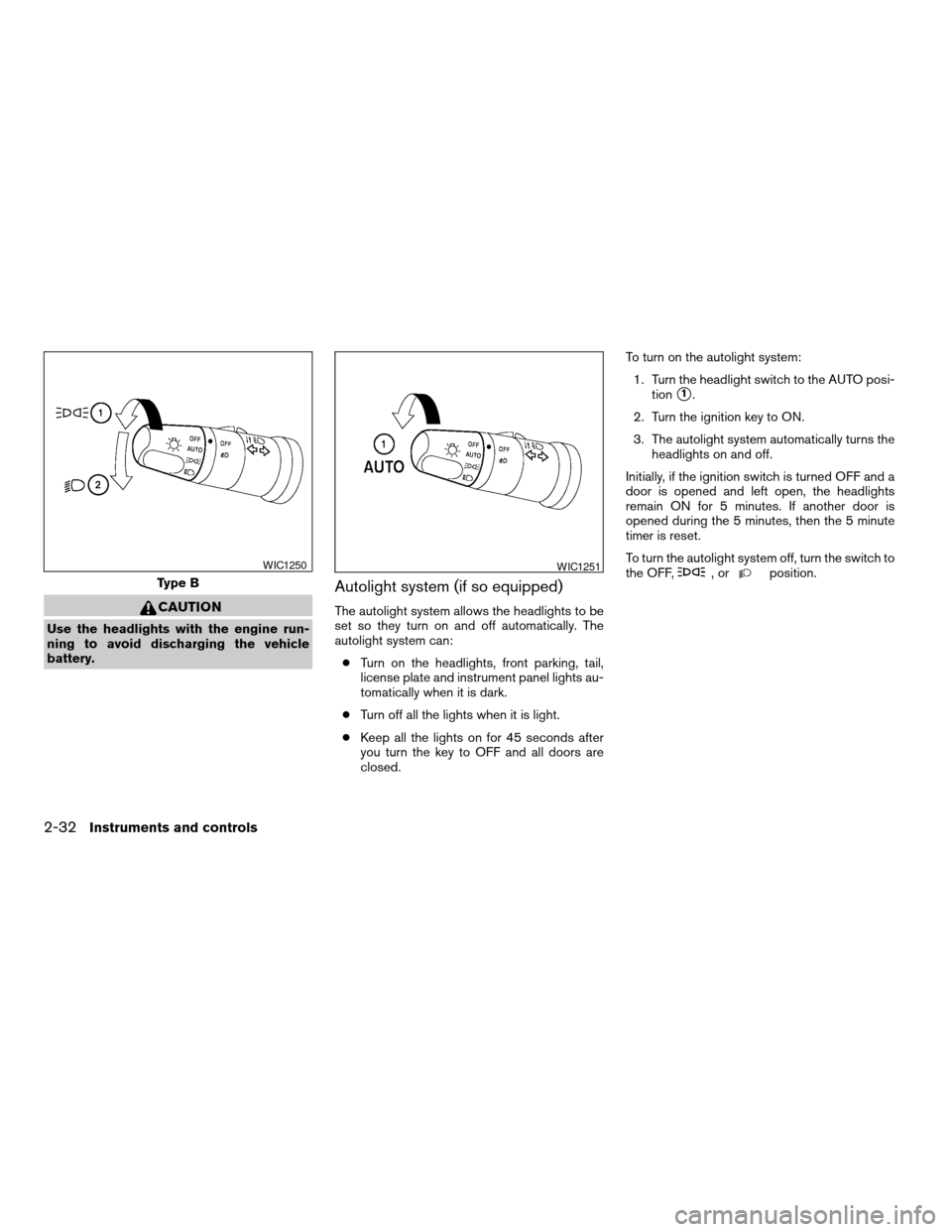
Autolight system (if so equipped)
The autolight system allows the headlights to be
set so they turn on and off automatically. The
autolight system can:
cTurn on the headlights, front parking, tail,
license plate and instrument panel lights au-
tomatically when it is dark.
cTurn off all the lights when it is light.
cKeep all the lights on for 45 seconds after
you turn the key to OFF and all doors are
closed.To turn on the autolight system:
1. Turn the headlight switch to the AUTO posi-
tion
s1.
2. Turn the ignition key to ON.
3. The autolight system automatically turns the
headlights on and off.
Initially, if the ignition switch is turned OFF and a
door is opened and left open, the headlights
remain ON for 5 minutes. If another door is
opened during the 5 minutes, then the 5 minute
timer is reset.
To turn the autolight system off, turn the switch to
the OFF,
,orposition.Type B
WIC1250WIC1251
2-32Instruments and controls
ZREVIEW COPYÐ2008 Titan(tzw)
Owners ManualÐUSA_English(nna)
03/05/07Ðtbrooks
X
Page 119 of 408

the indicator light on the switch will illuminate.
Push the switch again to enable the system. The
indicator light will go off.
The system will automatically reset the next time
the ignition switch is turned on.
See “Rear sonar system” in the “Starting and
driving” section.
Tow mode should be used when pulling a heavy
trailer or hauling a heavy load. Using tow mode at
other times may cause unnecessary transmission
shifting and reduced fuel economy.
Press the tow mode switch to activate tow mode.
The indicator light on the tow mode switch illumi-
nates when tow mode is selected. Press the tow
mode switch again to turn tow mode OFF.
Tow mode is automatically canceled when the
key is turned OFF.
For additional information, refer to “Tow mode” in
the “Technical and consumer information” sec-
tion later in this manual.The power outlets are for powering electrical
accessories such as cellular telephones.
The power outlets located on the driver’s side of
the instrument panel and in the truck box are
powered directly by the vehicle’s battery.
The power outlets located on the passenger’s
side of the instrument panel, inside the center
armrest, and in the 2nd row are powered only
when the ignition key is in the ACC or ON posi-
tion.
Open the cap to use a power outlet.
LIC0594
Front row
LIC1160
TOW MODE SWITCH POWER OUTLET
Instruments and controls2-39
ZREVIEW COPYÐ2008 Titan(tzw)
Owners ManualÐUSA_English(nna)
03/05/07Ðtbrooks
X
Page 134 of 408

NOTE:
If the rear power window (if so equipped) is
lowered while the defroster switch is on,
the rear window defroster will automati-
cally shut off. The heated outside mirrors (if
so equipped) will remain on. The rear win-
dow defroster will automatically turn on
when the rear power window is fully closed
if the switch is on.
AUTOMATIC SUNROOF
The sunroof will only operate when the ignition
switch is in the ON position. The automatic sun-
roof is operational for about 45 seconds, even if
the ignition switch is turned to the ACC or OFF
position. If the driver’s door or the front passen-
ger’s door is opened during this period of about
45 seconds, power to the sunroof is canceled.
Sliding the sunroof
To fully open the sunroof, push the switch toward
the open position
s3.
To fully close the sunroof, push the switch toward
the close position
s4.To open or close the sunroof part way, push the
switch in any direction
s5while the roof is sliding
open or closed to stop it in the desired position.
Tilting the sunroof
To tilt the sunroof up, push the tilt switch toward
the up position
s1.
To tilt the sunroof down, push the tilt switch
toward the down position
s2.
Restarting the sunroof sliding switch
The sliding switch will become inoperable after
the battery terminal is disconnected, the electri-
cal supply interrupted and/or some abnormality
detected. Use the following reset procedure to
return sunroof operation to normal.
1. If the sunroof lid is open, push the tilting
switch repeatedly toward the down position
s2to fully close the lid.
2. Push and hold the tilting switch for more
than 2 seconds toward the down position
s2to reestablish the lid’s home position.
The sunroof should now operate normally.
Auto reverse function (when closing or
tilting down the sunroof)
The auto reverse function can be activated when
the sunroof is closed or tilted down by automatic
WIC0812
SUNROOF (if so equipped)
2-54Instruments and controls
ZREVIEW COPYÐ2008 Titan(tzw)
Owners ManualÐUSA_English(nna)
03/05/07Ðtbrooks
X
Page 169 of 408

9. GUIDE VOICE button*
10.
zoom out button*
11.
zoom in button*
*For Navigation system control buttons, refer to
the separate Navigation System Owner’s
Manual.
When you use this system, make sure the engine
is running.
If you use the system with the engine not
running (ignition ON or ACC) for a long
time, it will use up all the battery power,
and the engine will not start.
Reference symbols:
ENTER button — This is a button on the control
panel.
“Display” key — This is a select key on the screen.
By selecting this key you can proceed to the next
function.
HOW TO USE THE JOYSTICK AND
ENTER BUTTON
Use the joystick to choose an item on the display
screen. Move the joystick up, down, left or right to
highlight an item. Then press the ENTER button
to select the item or perform the action.
HOW TO USE THE BACK BUTTON
This button has two functions.
cGo back to the previous display (cancel) .
If you press the BACK button during setup, the
setup will be canceled and/or the display will
return to the previous screen.
cFinish setup.
In some screens pressing the BACK button ac-
cepts the changes made during setup.
SETTING UP THE START-UP
SCREEN
When you turn the ignition key to ACC or ON, the
system start-up warning is displayed on the
screen. Read the warning and select the “OK”
key by pressing the ENTER button.
If you do not press the ENTER button, the Navi-
gation system will not proceed to the next step in
the Navigation display.
If you do not touch a button or screen key for
more than 1 minute on the system start-up warn-
ing screen, the screen will change to the audio
screen automatically.
To proceed to the next step, refer to the separate
Navigation System Owner’s Manual.HOW TO USE THE TRIP BUTTON
When the TRIP button is pressed, the following
modes will display on the screen.
Warning message (if any)!TRIP 1!TRIP 2!
FUEL ECONOMY!MAINTENANCE!Audio
or OFF!TRIP 1
Each trip display tracks an independent trip and
displays the following:
cElapsed Time - Journey time since the last
reset up to a maximum of 99 hours and 59
minutes.
cDriving Distance - Distance driven (mile or
km) since the last reset.
LHA0552
Display screen, heater, air conditioner, audio and phone systems4-3
ZREVIEW COPYÐ2008 Titan(tzw)
Owners ManualÐUSA_English(nna)
03/05/07Ðtbrooks
X