engine oil NISSAN TITAN 2018 Owner´s Manual
[x] Cancel search | Manufacturer: NISSAN, Model Year: 2018, Model line: TITAN, Model: NISSAN TITAN 2018Pages: 650, PDF Size: 7.54 MB
Page 17 of 650
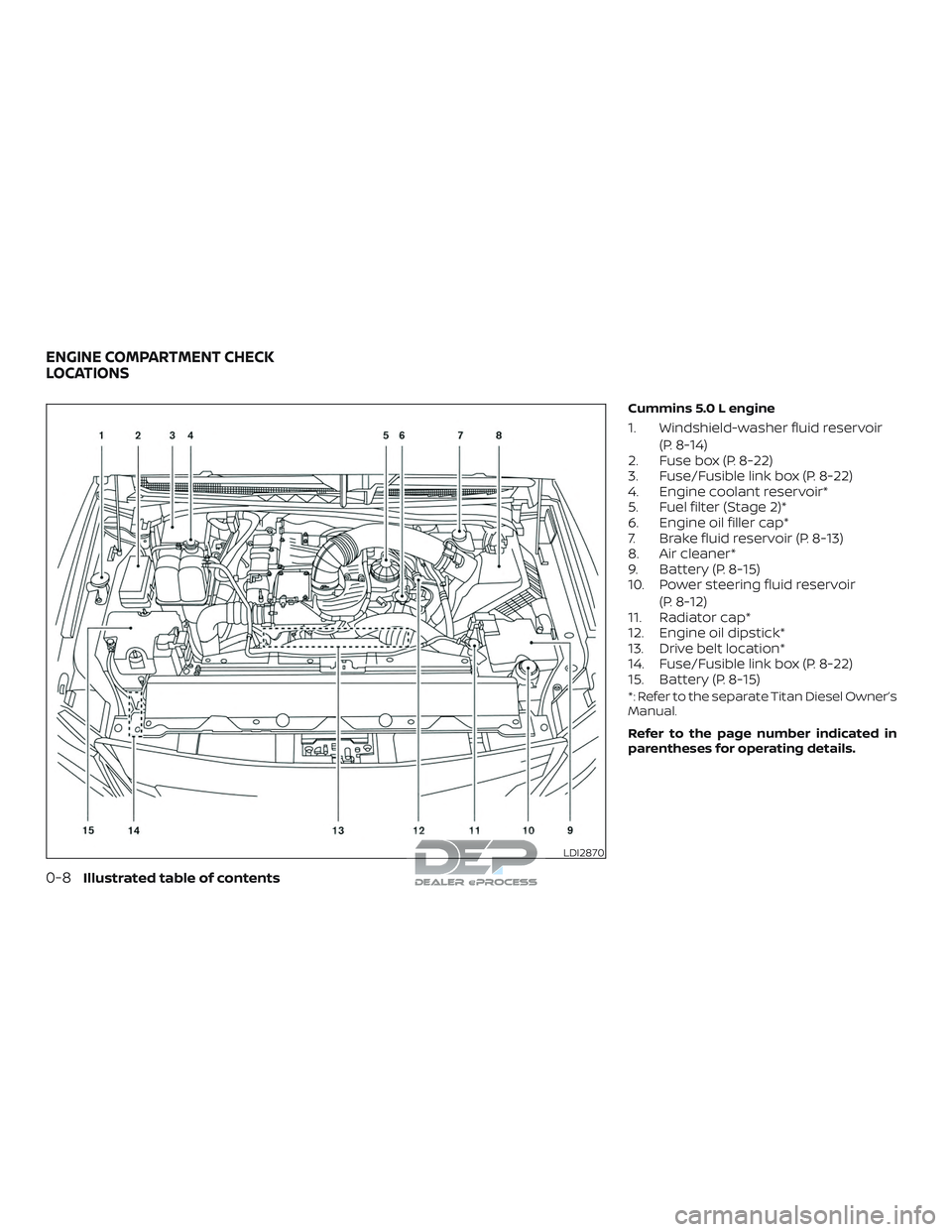
Cummins 5.0 L engine
1. Windshield-washer fluid reservoir(P. 8-14)
2. Fuse box (P. 8-22)
3. Fuse/Fusible link box (P. 8-22)
4. Engine coolant reservoir*
5. Fuel filter (Stage 2)*
6. Engine oil filler cap*
7. Brake fluid reservoir (P. 8-13)
8. Air cleaner*
9. Battery (P. 8-15)
10. Power steering fluid reservoir
(P. 8-12)
11. Radiator cap*
12. Engine oil dipstick*
13. Drive belt location*
14. Fuse/Fusible link box (P. 8-22)
15. Battery (P. 8-15)
*: Refer to the separate Titan Diesel Owner’s
Manual.
Refer to the page number indicated in
parentheses for operating details.
LDI2870
ENGINE COMPARTMENT CHECK
LOCATIONS
0-8Illustrated table of contents
Page 18 of 650
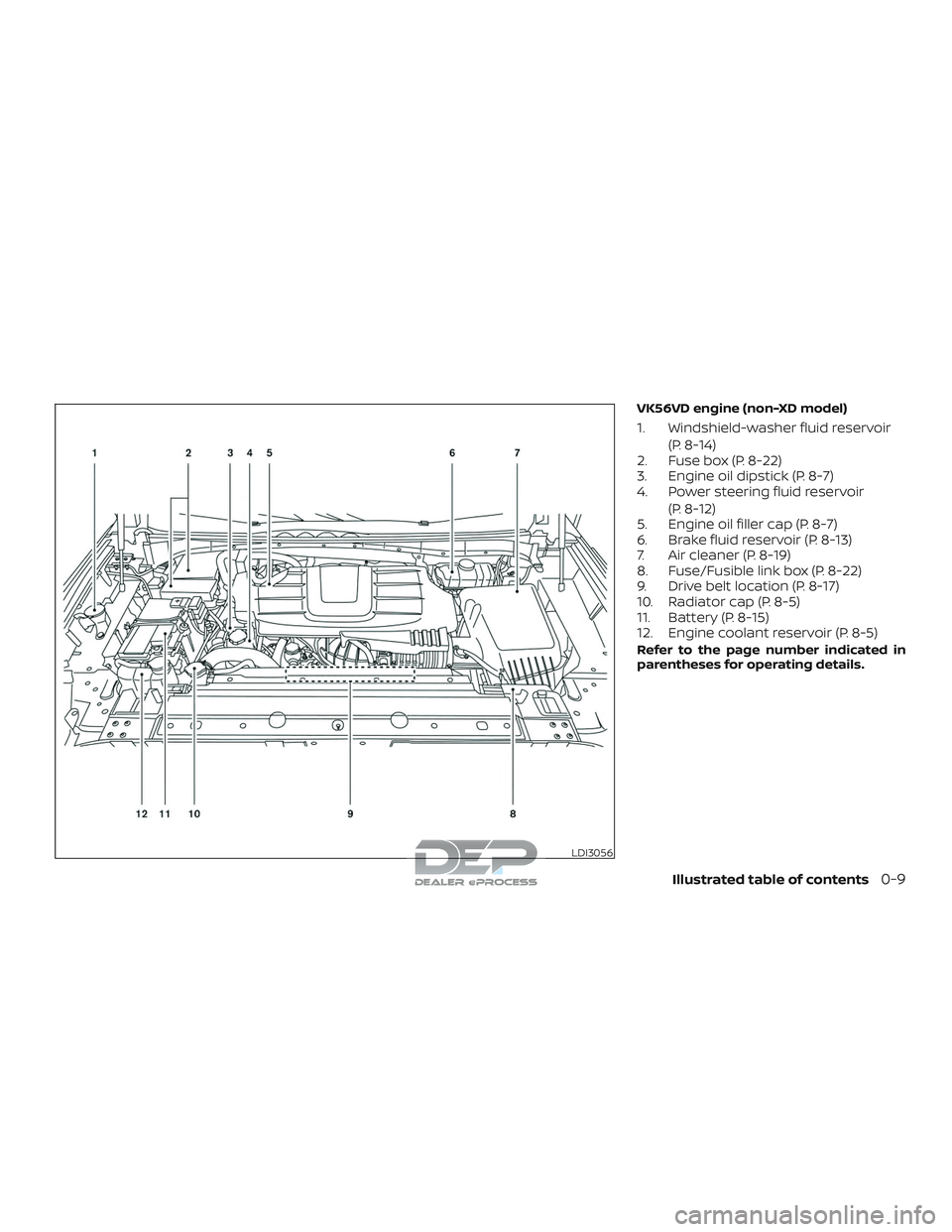
VK56VD engine (non-XD model)
1. Windshield-washer fluid reservoir(P. 8-14)
2. Fuse box (P. 8-22)
3. Engine oil dipstick (P. 8-7)
4. Power steering fluid reservoir
(P. 8-12)
5. Engine oil filler cap (P. 8-7)
6. Brake fluid reservoir (P. 8-13)
7. Air cleaner (P. 8-19)
8. Fuse/Fusible link box (P. 8-22)
9. Drive belt location (P. 8-17)
10. Radiator cap (P. 8-5)
11. Battery (P. 8-15)
12. Engine coolant reservoir (P. 8-5)
Refer to the page number indicated in
parentheses for operating details.
LDI3056
Illustrated table of contents0-9
Page 19 of 650
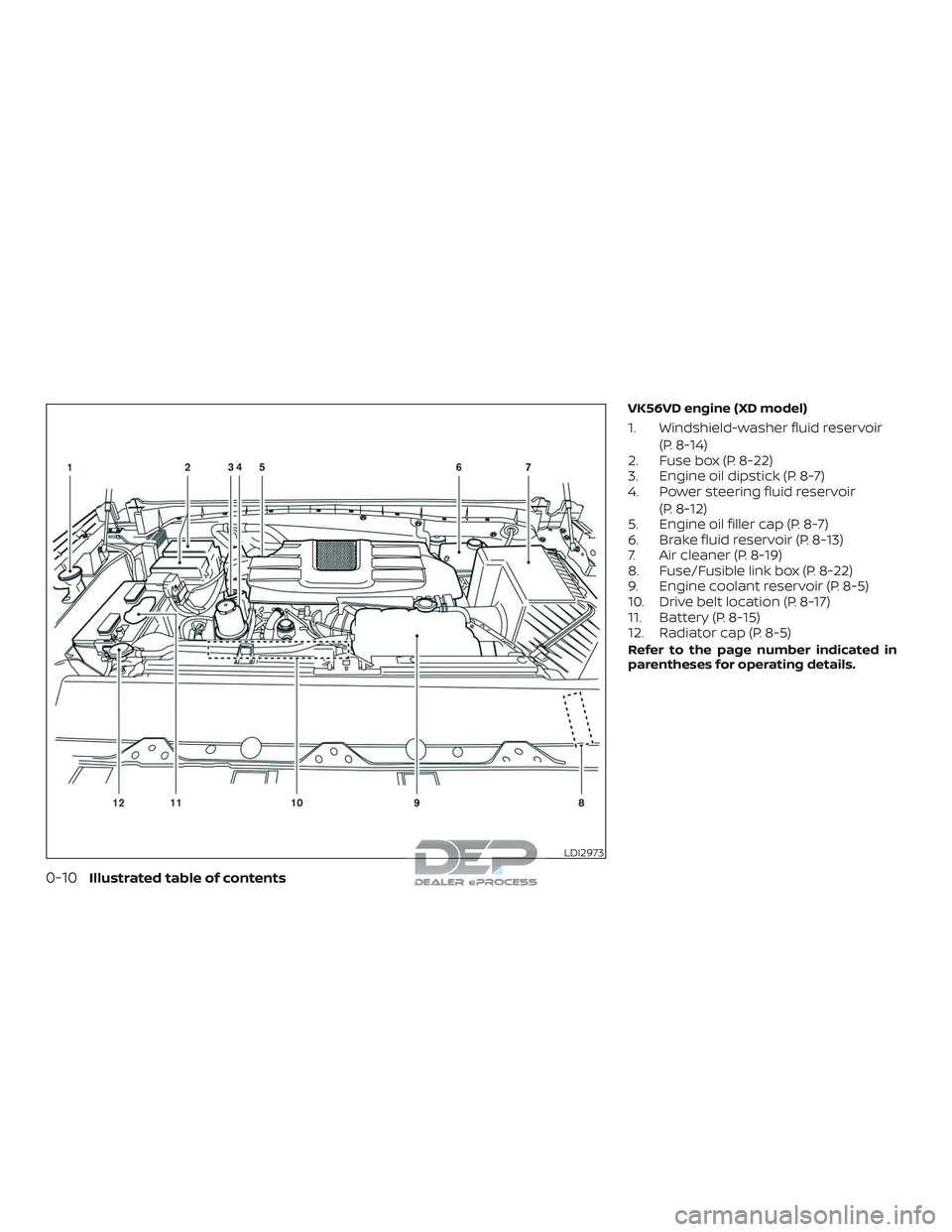
VK56VD engine (XD model)
1. Windshield-washer fluid reservoir(P. 8-14)
2. Fuse box (P. 8-22)
3. Engine oil dipstick (P. 8-7)
4. Power steering fluid reservoir
(P. 8-12)
5. Engine oil filler cap (P. 8-7)
6. Brake fluid reservoir (P. 8-13)
7. Air cleaner (P. 8-19)
8. Fuse/Fusible link box (P. 8-22)
9. Engine coolant reservoir (P. 8-5)
10. Drive belt location (P. 8-17)
11. Battery (P. 8-15)
12. Radiator cap (P. 8-5)
Refer to the page number indicated in
parentheses for operating details.
LDI2973
0-10Illustrated table of contents
Page 20 of 650
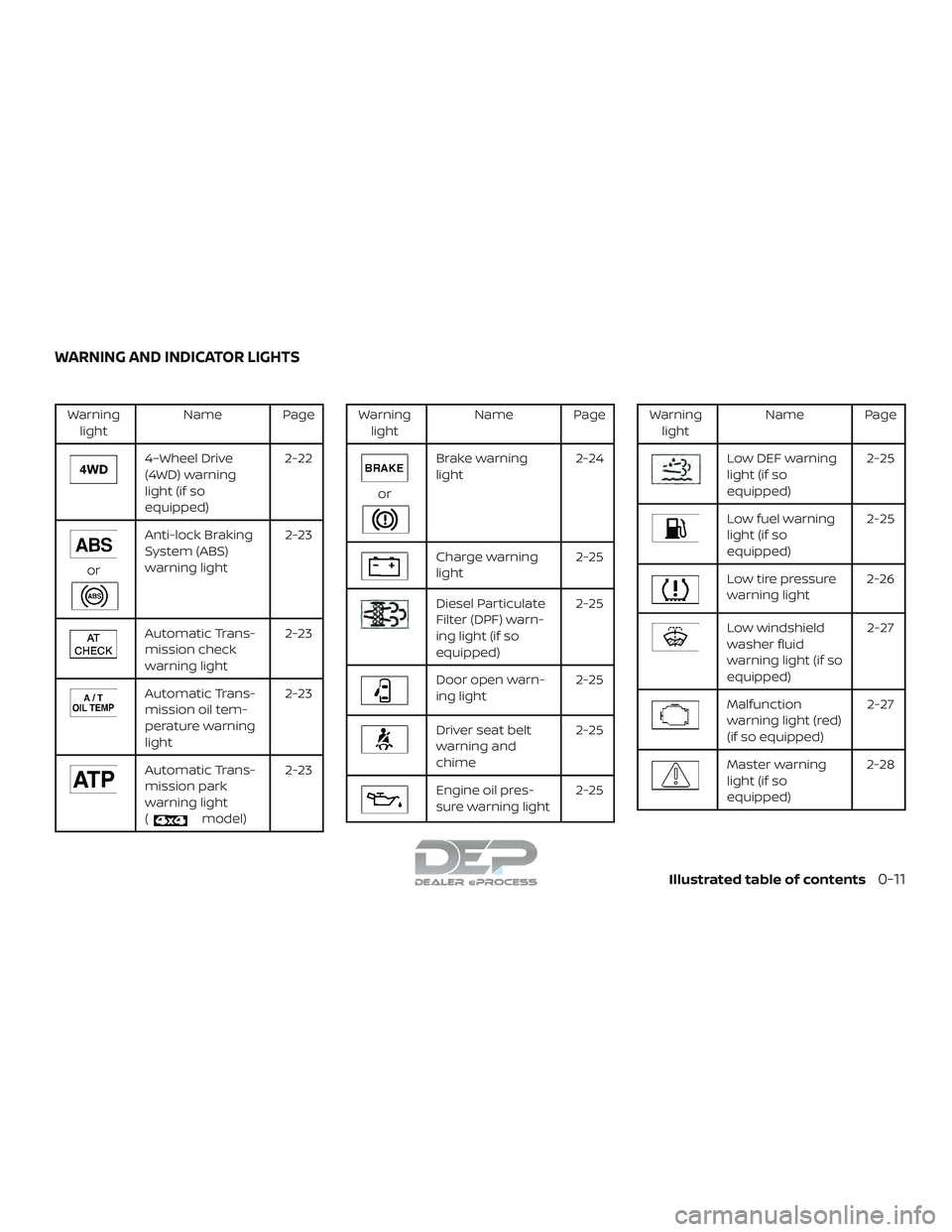
Warninglight Name Page
4–Wheel Drive
(4WD) warning
light (if so
equipped) 2-22
or
Anti-lock Braking
System (ABS)
warning light
2-23
Automatic Trans-
mission check
warning light2-23
Automatic Trans-
mission oil tem-
perature warning
light2-23
Automatic Trans-
mission park
warning light
(
model)2-23
Warning
light Name Page
or
Brake warning
light 2-24
Charge warning
light 2-25
Diesel Particulate
Filter (DPF) warn-
ing light (if so
equipped)2-25
Door open warn-
ing light
2-25
Driver seat belt
warning and
chime2-25
Engine oil pres-
sure warning light
2-25
Warning
light Name Page
Low DEF warning
light (if so
equipped) 2-25
Low fuel warning
light (if so
equipped)2-25
Low tire pressure
warning light
2-26
Low windshield
washer fluid
warning light (if so
equipped) 2-27
Malfunction
warning light (red)
(if so equipped)
2-27
Master warning
light (if so
equipped)2-28
WARNING AND INDICATOR LIGHTS
Illustrated table of contents0-11
Page 116 of 650
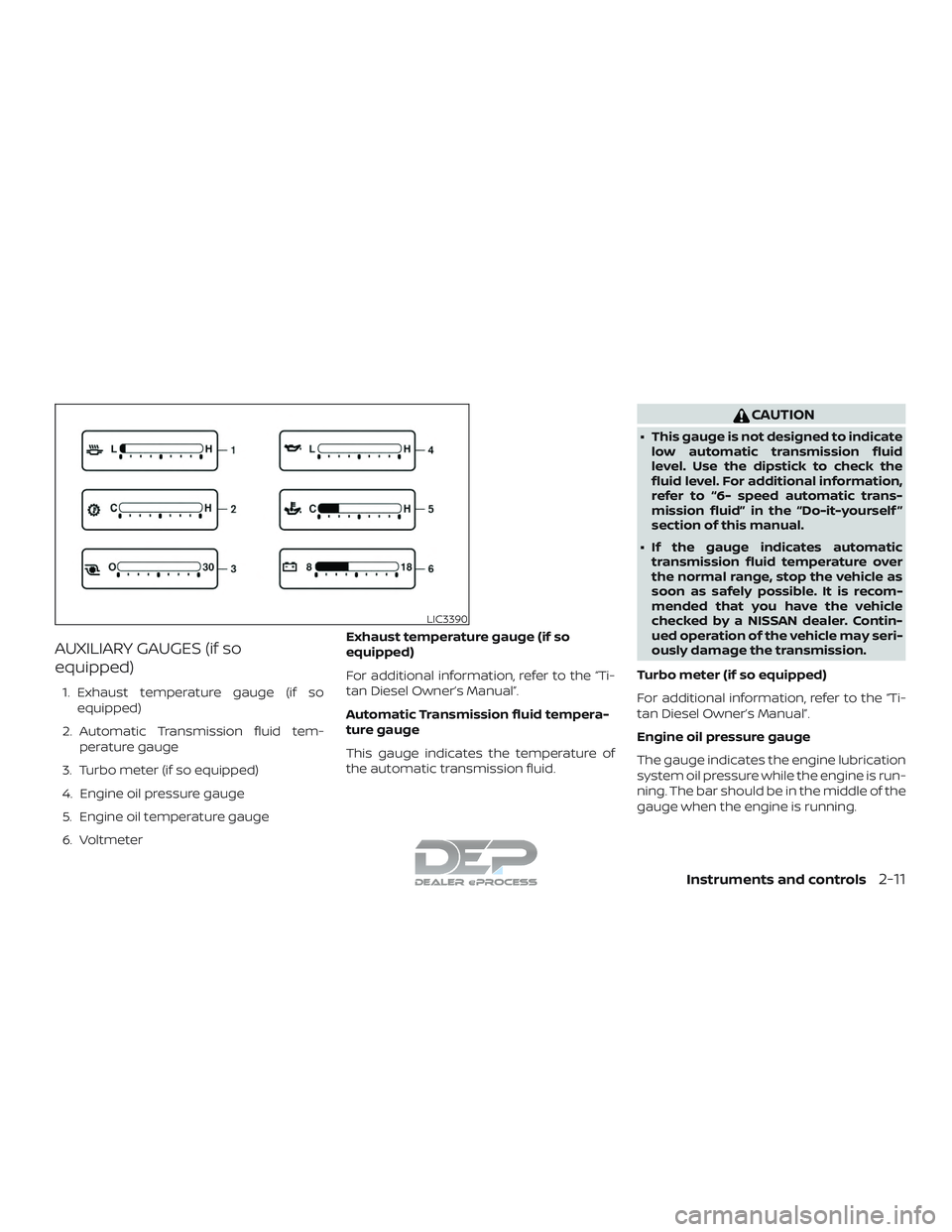
AUXILIARY GAUGES (if so
equipped)
1. Exhaust temperature gauge (if soequipped)
2. Automatic Transmission fluid tem- perature gauge
3. Turbo meter (if so equipped)
4. Engine oil pressure gauge
5. Engine oil temperature gauge
6. Voltmeter Exhaust temperature gauge (if so
equipped)
For additional information, refer to the “Ti-
tan Diesel Owner’s Manual”.
Automatic Transmission fluid tempera-
ture gauge
This gauge indicates the temperature of
the automatic transmission fluid.
CAUTION
∙ This gauge is not designed to indicate
low automatic transmission fluid
level. Use the dipstick to check the
fluid level. For additional information,
refer to “6- speed automatic trans-
mission fluid” in the “Do-it-yourself ”
section of this manual.
∙ If the gauge indicates automatic transmission fluid temperature over
the normal range, stop the vehicle as
soon as safely possible. It is recom-
mended that you have the vehicle
checked by a NISSAN dealer. Contin-
ued operation of the vehicle may seri-
ously damage the transmission.
Turbo meter (if so equipped)
For additional information, refer to the “Ti-
tan Diesel Owner’s Manual”.
Engine oil pressure gauge
The gauge indicates the engine lubrication
system oil pressure while the engine is run-
ning. The bar should be in the middle of the
gauge when the engine is running.
LIC3390
Instruments and controls2-11
Page 117 of 650
CAUTION
∙ This gauge is not designed to indicatelow engine oil level. Use the dipstick to
check the oil level. For additional in-
formation, refer to “Engine oil” in the
“Do-it-yourself ” section of this
manual.
∙ If the gauge needle does not move with the proper amount of engine oil,
it is recommended that you have the
vehicle checked by a NISSAN dealer.
Continued vehicle operation in such a
condition could cause serious dam-
age to the engine.
Engine oil temperature gauge
This gauge measures the temperature of
the engine oil.
Voltmeter
When the ignition switch is placed in the ON
position, the voltmeter indicates the bat-
tery voltage. When the engine is running, it
indicates the generator voltage. While cranking the engine, the volts drop
below the normal range. If the range is not
within the normal range (11 – 15 volts) while
the engine is running, it may indicate that
the charging system is not functioning
properly. Have the system checked. It is
recommended that you visit a NISSAN
dealer for this service.
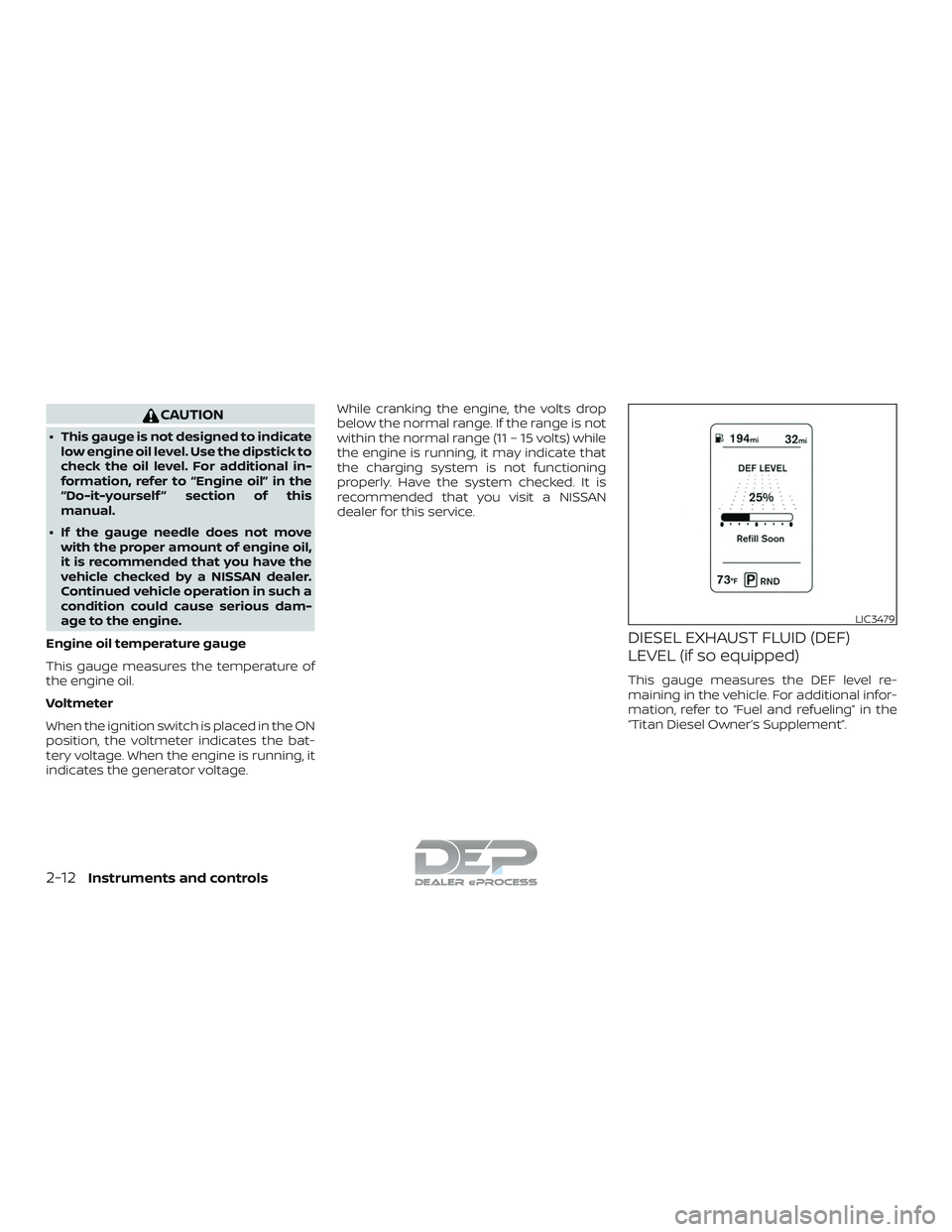
DIESEL EXHAUST FLUID (DEF)
LEVEL (if so equipped)
This gauge measures the DEF level re-
maining in the vehicle. For additional infor-
mation, refer to “Fuel and refueling” in the
“Titan Diesel Owner’s Supplement”.
LIC3479
2-12Instruments and controls
Page 120 of 650
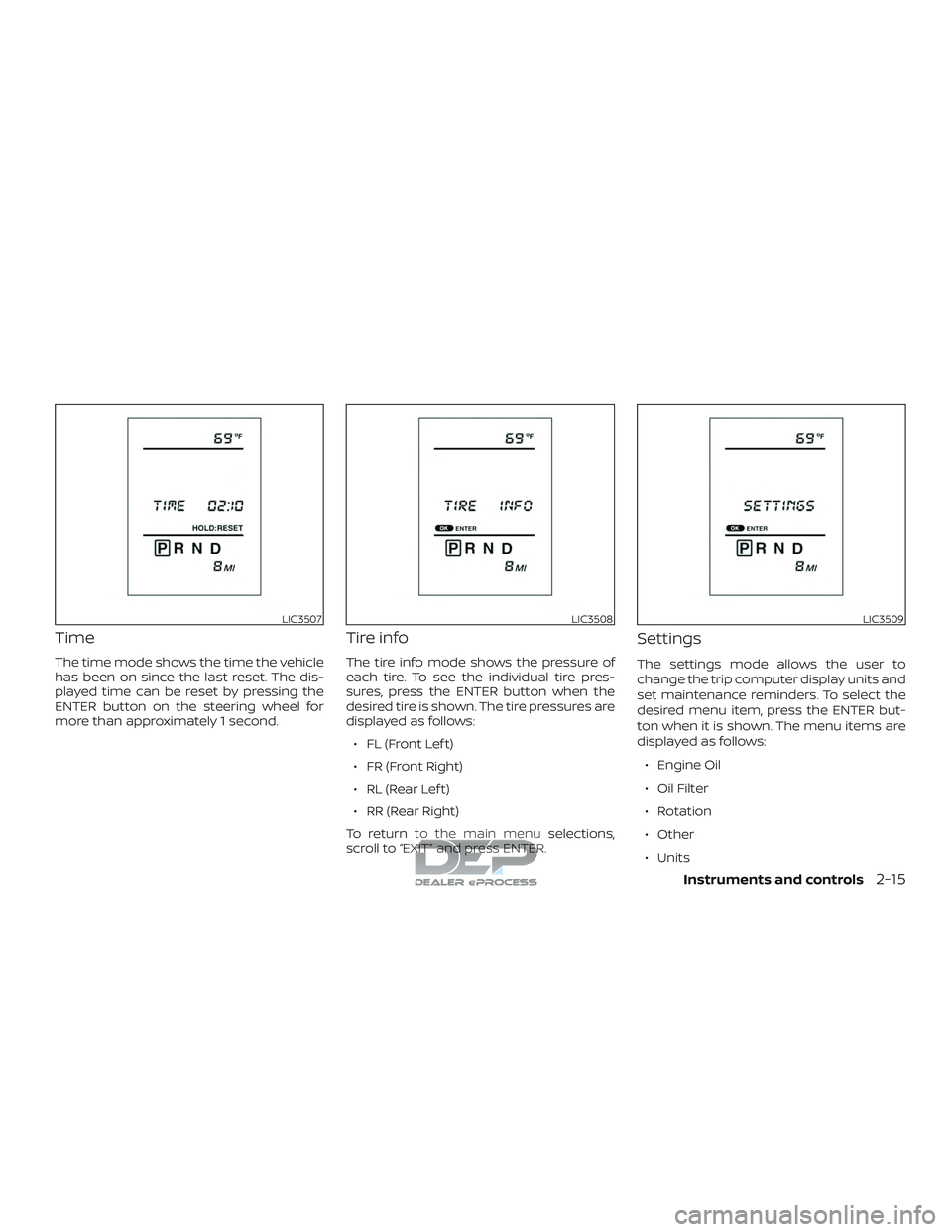
Time
The time mode shows the time the vehicle
has been on since the last reset. The dis-
played time can be reset by pressing the
ENTER button on the steering wheel for
more than approximately 1 second.
Tire info
The tire info mode shows the pressure of
each tire. To see the individual tire pres-
sures, press the ENTER button when the
desired tire is shown. The tire pressures are
displayed as follows:∙ FL (Front Lef t)
∙ FR (Front Right)
∙ RL (Rear Lef t)
∙ RR (Rear Right)
To return to the main menu selections,
scroll to “EXIT” and press ENTER.
Settings
The settings mode allows the user to
change the trip computer display units and
set maintenance reminders. To select the
desired menu item, press the ENTER but-
ton when it is shown. The menu items are
displayed as follows:
∙ Engine Oil
∙ Oil Filter
∙ Rotation
∙ Other
∙ Units
LIC3507LIC3508LIC3509
Instruments and controls2-15
Page 121 of 650
To return to the main menu selections,
scroll to “EXIT” and press ENTER.
Engine oil
The engine oil menu item allows the user
to set a maintenance reminder at a spe-
cific interval. To set the reminder, press the
ENTER button when “ENGINE OIL” is shown.
Using the
buttons, set the desired
interval to receive a maintenance re-
minder.
To reset the mileage, press and hold the
ENTER button for approximately 1 second.
To return to the main menu selections,
scroll to “EXIT” and press ENTER.
For additional information, refer to “Mainte-
nance schedules” in the “Maintenance and
schedules” section of this manual.
Oil filter
The oil filter menu item allows the user to
set a maintenance reminder at a specific
interval. To set the reminder, press the EN-
TER button when “OIL FILTER” is shown. Us-
ing the
buttons, set the desired in-
terval to receive a maintenance reminder.
To reset the mileage, press and hold the
ENTER button for approximately 1 second. To return to the main menu selections,
scroll to “EXIT” and press ENTER.
For additional information, refer to “Mainte-
nance schedules” in the “Maintenance and
schedules” section of this manual.
Rotation
The rotation menu item allows the user to
set a maintenance reminder at a specific
interval. To set the reminder, press the EN-
TER button when “ROTATION” is shown. Us-
ing the
buttons, set the desired in-
terval to receive a maintenance reminder.
To reset the mileage, press and hold the
ENTER button for approximately 1 second.
To return to the main menu selections,
scroll to “EXIT” and press ENTER.
For additional information, refer to “Mainte-
nance schedules” in the “Maintenance and
schedules” section of this manual.
WARNING
The tire replacement indicator is not a
substitute for regular tire checks, in-
cluding tire pressure checks. For addi-
tional information, refer to “Changing
wheels and tires” in the “Do-it-yourself ”
section of this manual. Many factors in-
cluding tire inflation, alignment, driving
habits and road conditions affect tire
wear and when tires should be re-
placed. Setting the tire replacement in-
dicator for a certain driving distance
does not mean your tires will last that
long. Use the tire replacement indicator
as a guide only and always perform
regular tire checks. Failure to perform
regular tire checks, including tire pres-
sure checks could result in tire failure.
Serious vehicle damage could occur
and may lead to a collision, which could
result in serious personal injury or
death.
2-16Instruments and controls
Page 127 of 650
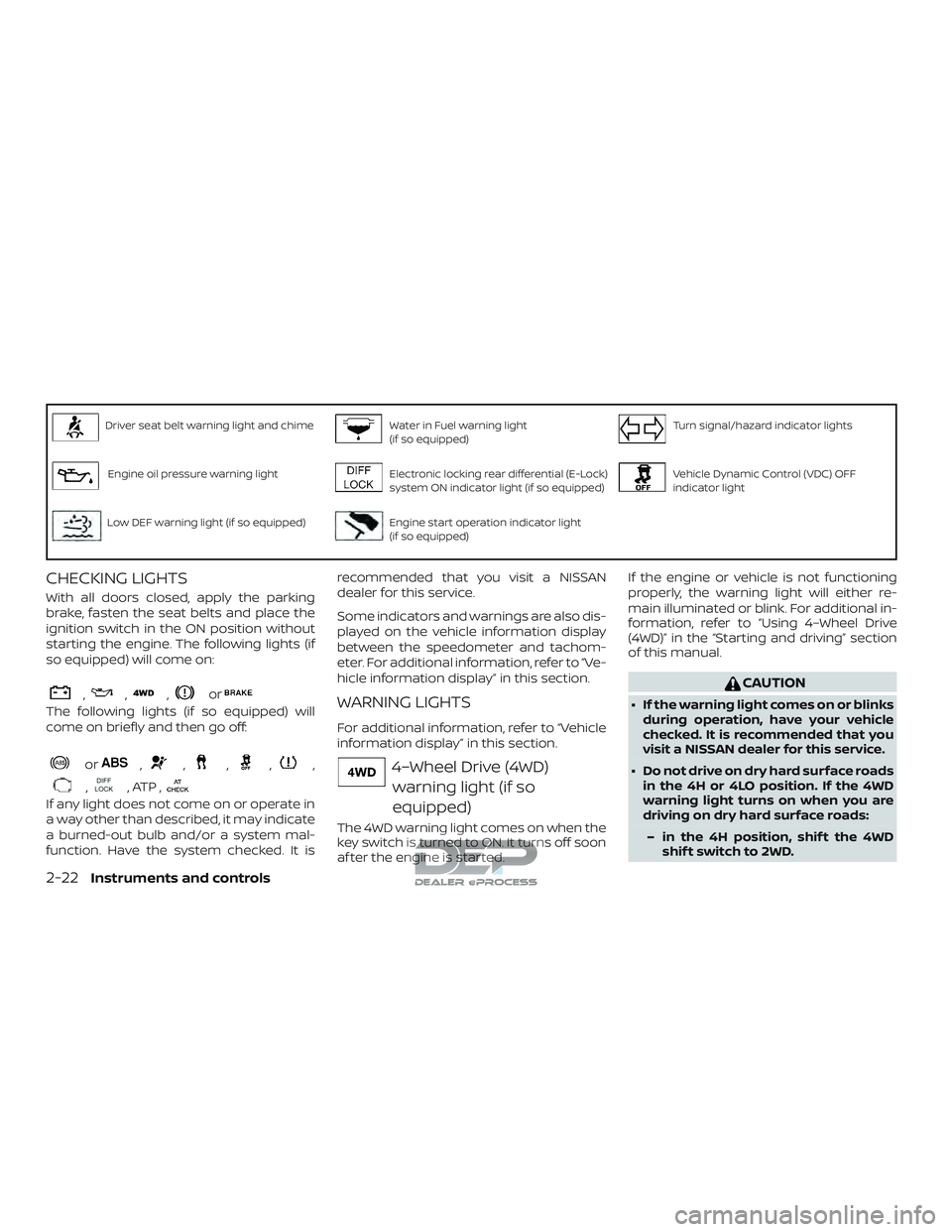
Driver seat belt warning light and chimeWater in Fuel warning light
(if so equipped)Turn signal/hazard indicator lights
Engine oil pressure warning lightElectronic locking rear differential (E-Lock)
system ON indicator light (if so equipped)Vehicle Dynamic Control (VDC) OFF
indicator light
Low DEF warning light (if so equipped)Engine start operation indicator light
(if so equipped)
CHECKING LIGHTS
With all doors closed, apply the parking
brake, fasten the seat belts and place the
ignition switch in the ON position without
starting the engine. The following lights (if
so equipped) will come on:
,,,or
The following lights (if so equipped) will
come on briefly and then go off:
or,,,,,
,, ATP ,
If any light does not come on or operate in
a way other than described, it may indicate
a burned-out bulb and/or a system mal-
function. Have the system checked. It isrecommended that you visit a NISSAN
dealer for this service.
Some indicators and warnings are also dis-
played on the vehicle information display
between the speedometer and tachom-
eter. For additional information, refer to “Ve-
hicle information display” in this section.
WARNING LIGHTS
For additional information, refer to “Vehicle
information display” in this section.
4–Wheel Drive (4WD)
warning light (if so
equipped)
The 4WD warning light comes on when the
key switch is turned to ON. It turns off soon
af ter the engine is started. If the engine or vehicle is not functioning
properly, the warning light will either re-
main illuminated or blink. For additional in-
formation, refer to “Using 4–Wheel Drive
(4WD)” in the “Starting and driving” section
of this manual.
CAUTION
∙ If the warning light comes on or blinks
during operation, have your vehicle
checked. It is recommended that you
visit a NISSAN dealer for this service.
∙ Do not drive on dry hard surface roads in the 4H or 4LO position. If the 4WD
warning light turns on when you are
driving on dry hard surface roads:
– in the 4H position, shif t the 4WD shif t switch to 2WD.
2-22Instruments and controls
Page 128 of 650
– in the 4LO position, stop the ve-hicle, move the shif t lever to the N
(Neutral) position with the brake
pedal depressed, and shif t the
4WD shif t switch to 2WD.
∙ If the warning light is still on af ter the above operation, have your vehicle
checked. It is recommended that you
visit a NISSAN dealer for this service as
soon as possible.
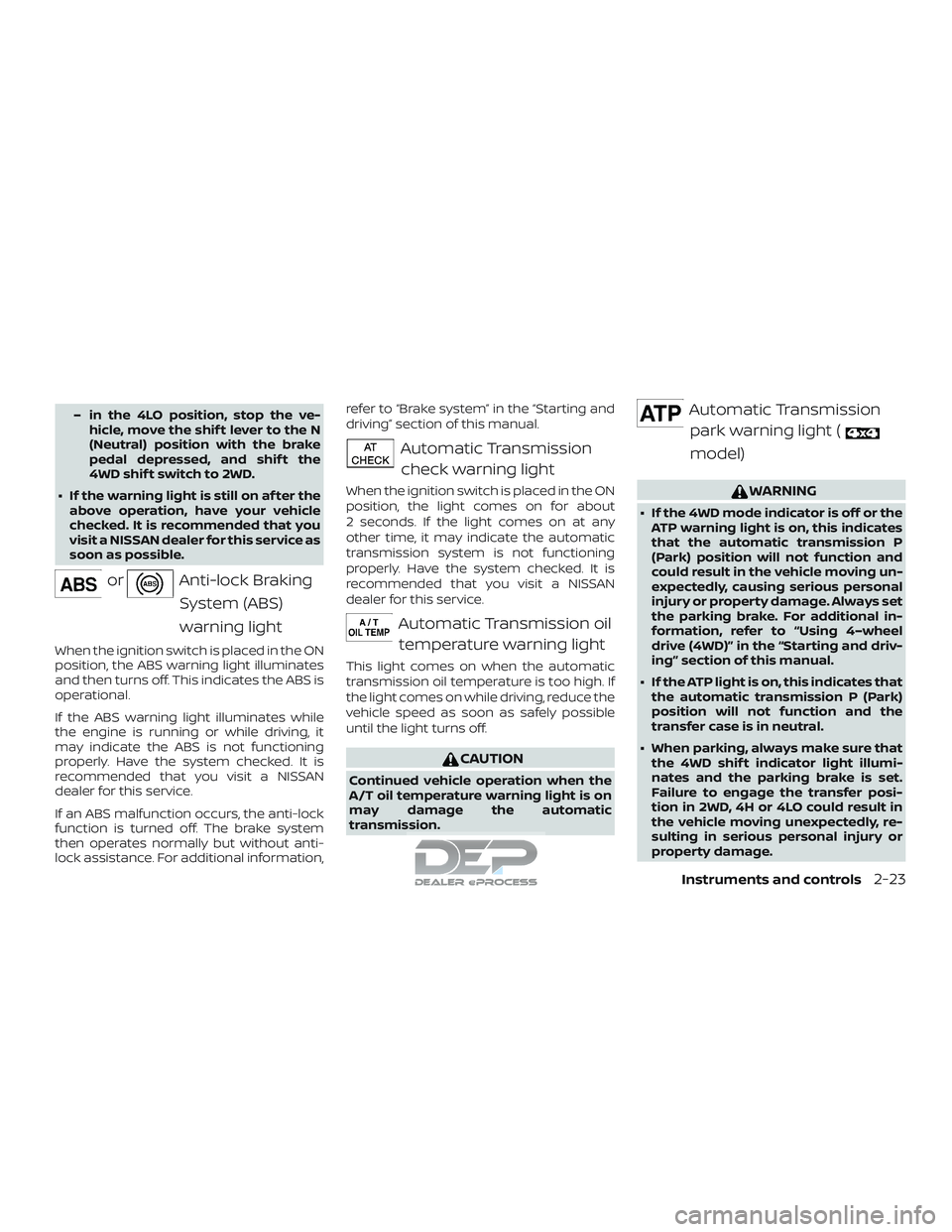
orAnti-lock Braking
System (ABS)
warning light
When the ignition switch is placed in the ON
position, the ABS warning light illuminates
and then turns off. This indicates the ABS is
operational.
If the ABS warning light illuminates while
the engine is running or while driving, it
may indicate the ABS is not functioning
properly. Have the system checked. It is
recommended that you visit a NISSAN
dealer for this service.
If an ABS malfunction occurs, the anti-lock
function is turned off. The brake system
then operates normally but without anti-
lock assistance. For additional information, refer to “Brake system” in the “Starting and
driving” section of this manual.
Automatic Transmission
check warning light
When the ignition switch is placed in the ON
position, the light comes on for about
2 seconds. If the light comes on at any
other time, it may indicate the automatic
transmission system is not functioning
properly. Have the system checked. It is
recommended that you visit a NISSAN
dealer for this service.
Automatic Transmission oiltemperature warning light
This light comes on when the automatic
transmission oil temperature is too high. If
the light comes on while driving, reduce the
vehicle speed as soon as safely possible
until the light turns off.
CAUTION
Continued vehicle operation when the
A/T oil temperature warning light is on
may damage the automatic
transmission.
Automatic Transmissionpark warning light (
model)
WARNING
∙ If the 4WD mode indicator is off or the ATP warning light is on, this indicates
that the automatic transmission P
(Park) position will not function and
could result in the vehicle moving un-
expectedly, causing serious personal
injury or property damage. Always set
the parking brake. For additional in-
formation, refer to “Using 4–wheel
drive (4WD)” in the “Starting and driv-
ing” section of this manual.
∙ If the ATP light is on, this indicates that the automatic transmission P (Park)
position will not function and the
transfer case is in neutral.
∙ When parking, always make sure that the 4WD shif t indicator light illumi-
nates and the parking brake is set.
Failure to engage the transfer posi-
tion in 2WD, 4H or 4LO could result in
the vehicle moving unexpectedly, re-
sulting in serious personal injury or
property damage.
Instruments and controls2-23