power steering NISSAN TITAN 2021 Owner´s Manual
[x] Cancel search | Manufacturer: NISSAN, Model Year: 2021, Model line: TITAN, Model: NISSAN TITAN 2021Pages: 638, PDF Size: 4.31 MB
Page 16 of 638
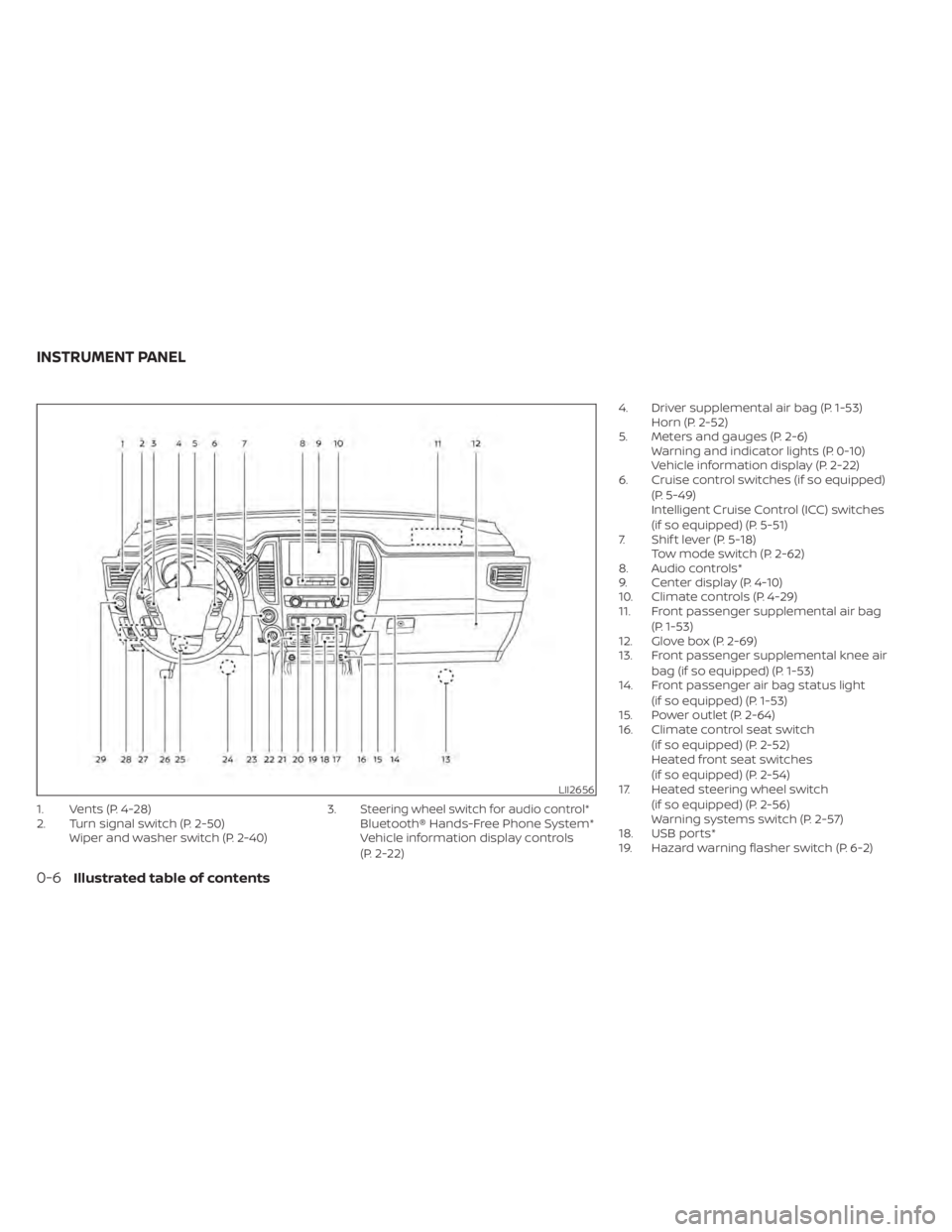
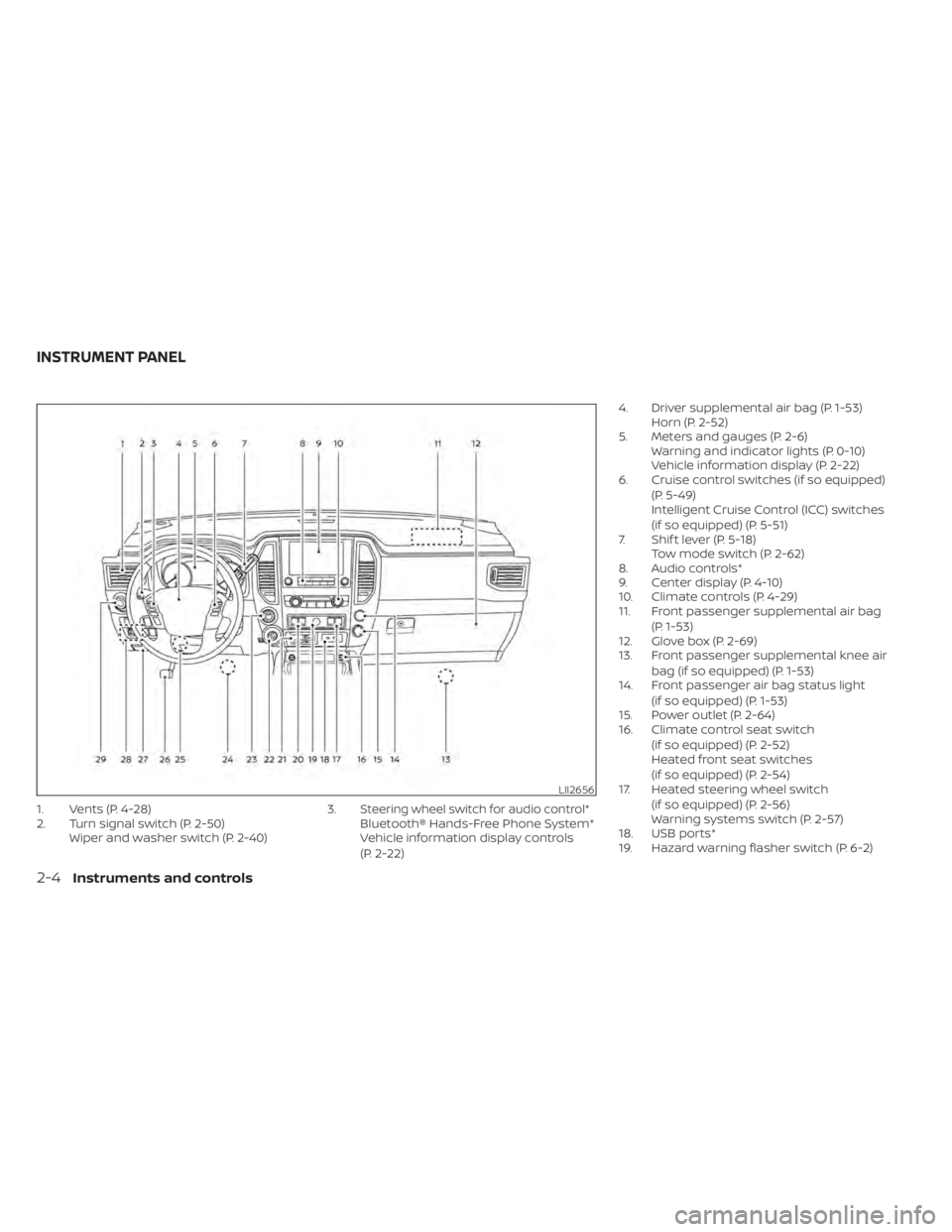
1. Vents (P. 4-28)
2. Turn signal switch (P. 2-50)Wiper and washer switch (P. 2-40) 3.Steering wheel switch for audio control*Bluetooth® Hands-Free Phone System*
Vehicle information display controls
(P. 2-22)4. Driver supplemental air bag (P. 1-53)
Horn (P. 2-52)
5. Meters and gauges (P. 2-6) Warning and indicator lights (P. 0-10)
Vehicle information display (P. 2-22)
6. Cruise control switches (if so equipped)
(P. 5-49)
Intelligent Cruise Control (ICC) switches
(if so equipped) (P. 5-51)
7. Shif t lever (P. 5-18) Tow mode switch (P. 2-62)
8. Audio controls*
9. Center display (P. 4-10)
10. Climate controls (P. 4-29)
11. Front passenger supplemental air bag
(P. 1-53)
12. Glove box (P. 2-69)
13. Front passenger supplemental knee air
bag (if so equipped) (P. 1-53)
14. Front passenger air bag status light
(if so equipped) (P. 1-53)
15. Power outlet (P. 2-64)
16. Climate control seat switch
(if so equipped) (P. 2-52)
Heated front seat switches
(if so equipped) (P. 2-54)
17. Heated steering wheel switch
(if so equipped) (P. 2-56)
Warning systems switch (P. 2-57)
18. USB ports*
19. Hazard warning flasher switch (P. 6-2)
LII2656
INSTRUMENT PANEL
0-6Illustrated table of contents
Page 17 of 638
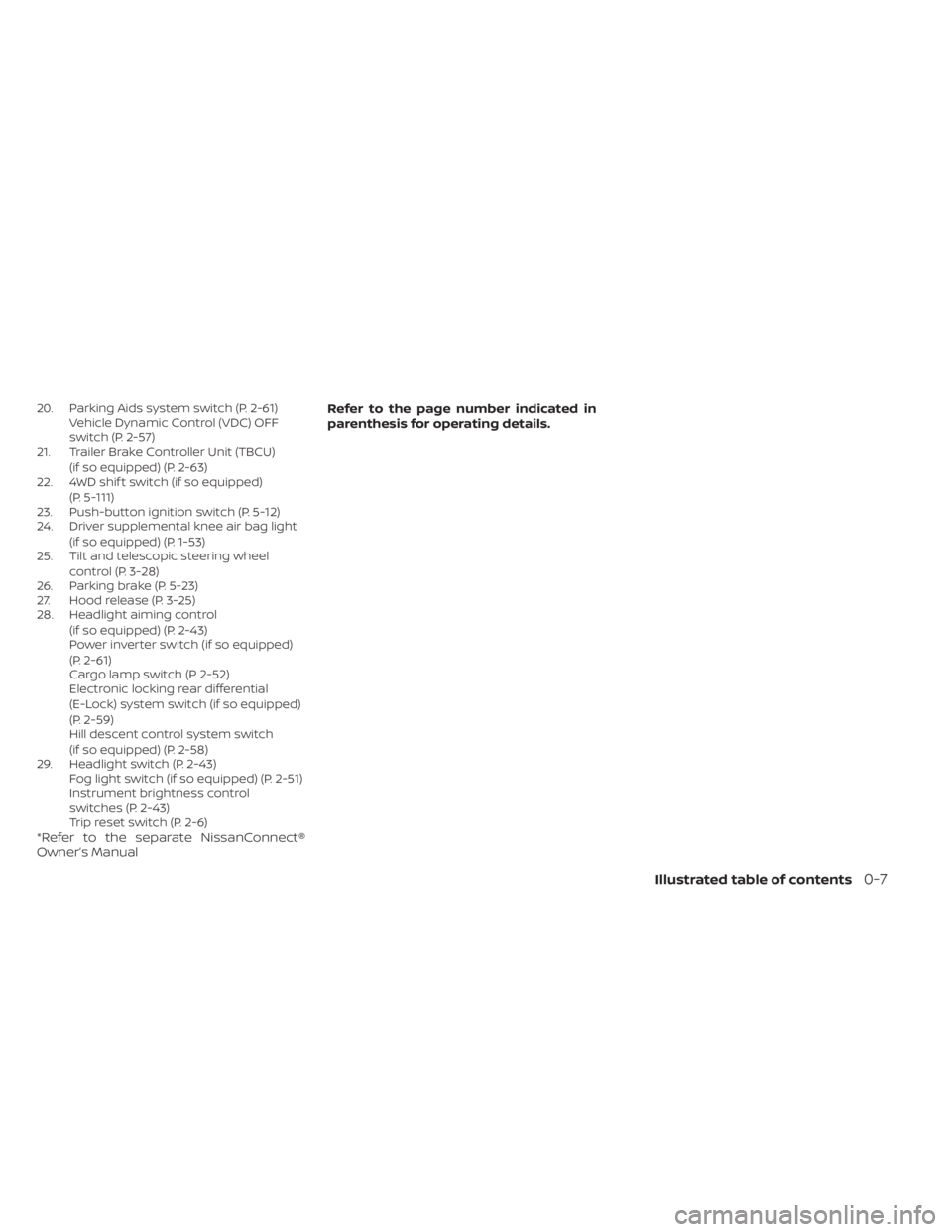
20. Parking Aids system switch (P. 2-61)Vehicle Dynamic Control (VDC) OFF
switch (P. 2-57)
21. Trailer Brake Controller Unit (TBCU)
(if so equipped) (P. 2-63)
22. 4WD shif t switch (if so equipped)
(P. 5-111)
23. Push-button ignition switch (P. 5-12)
24. Driver supplemental knee air bag light
(if so equipped) (P. 1-53)
25. Tilt and telescopic steering wheel
control (P. 3-28)
26. Parking brake (P. 5-23)
27. Hood release (P. 3-25)
28. Headlight aiming control
(if so equipped) (P. 2-43)
Power inverter switch (if so equipped)
(P. 2-61)
Cargo lamp switch (P. 2-52)
Electronic locking rear differential
(E-Lock) system switch (if so equipped)
(P. 2-59)
Hill descent control system switch
(if so equipped) (P. 2-58)
29. Headlight switch (P. 2-43) Fog light switch (if so equipped) (P. 2-51)
Instrument brightness control
switches (P. 2-43)
Trip reset switch (P. 2-6)
*Refer to the separate NissanConnect®
Owner’s Manual Refer to the page number indicated in
parenthesis for operating details.
Illustrated table of contents0-7
Page 18 of 638
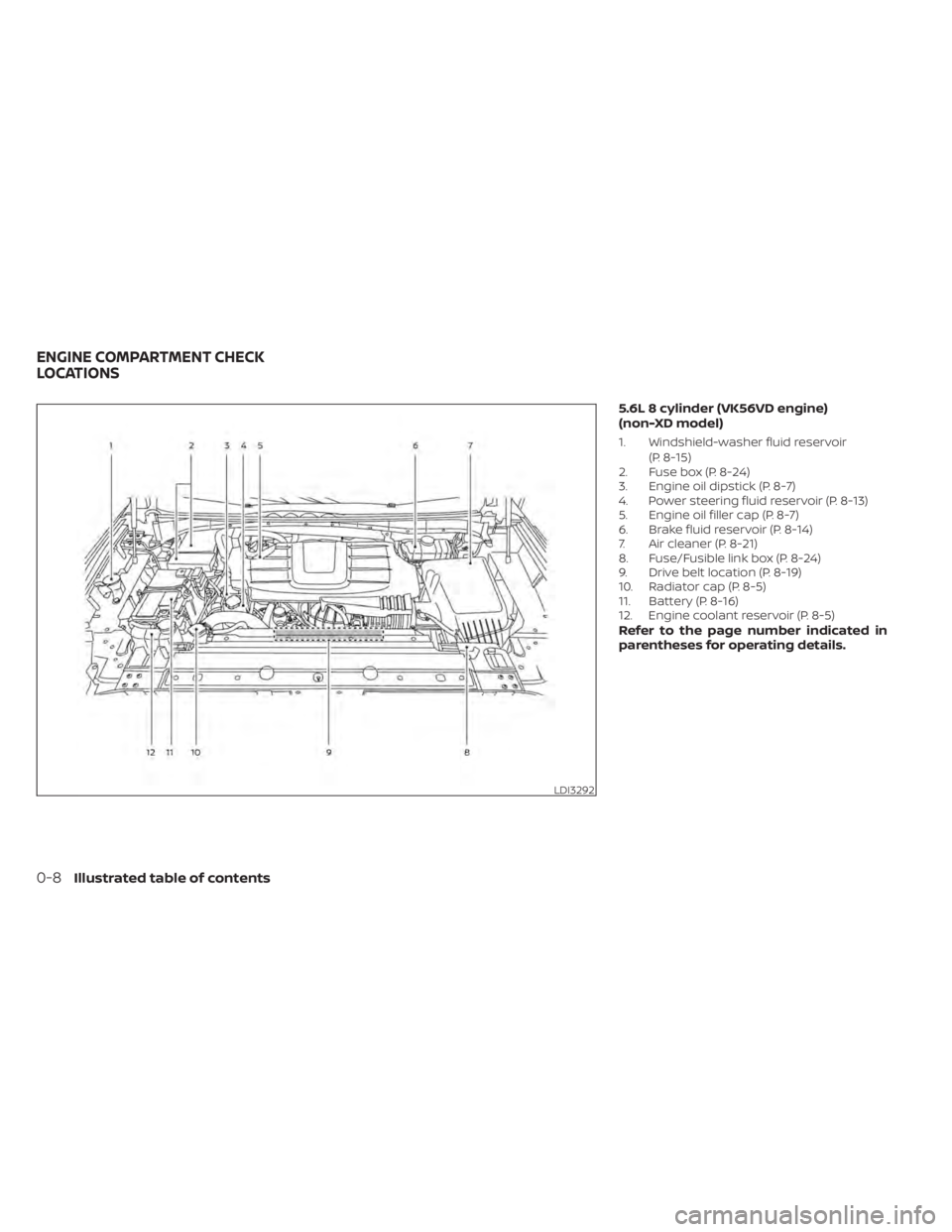
5.6L 8 cylinder (VK56VD engine)
(non-XD model)
1. Windshield-washer fluid reservoir(P. 8-15)
2. Fuse box (P. 8-24)
3. Engine oil dipstick (P. 8-7)
4. Power steering fluid reservoir (P. 8-13)
5. Engine oil filler cap (P. 8-7)
6. Brake fluid reservoir (P. 8-14)
7. Air cleaner (P. 8-21)
8. Fuse/Fusible link box (P. 8-24)
9. Drive belt location (P. 8-19)
10. Radiator cap (P. 8-5)
11. Battery (P. 8-16)
12. Engine coolant reservoir (P. 8-5)
Refer to the page number indicated in
parentheses for operating details.
LDI3292
ENGINE COMPARTMENT CHECK
LOCATIONS
0-8Illustrated table of contents
Page 19 of 638
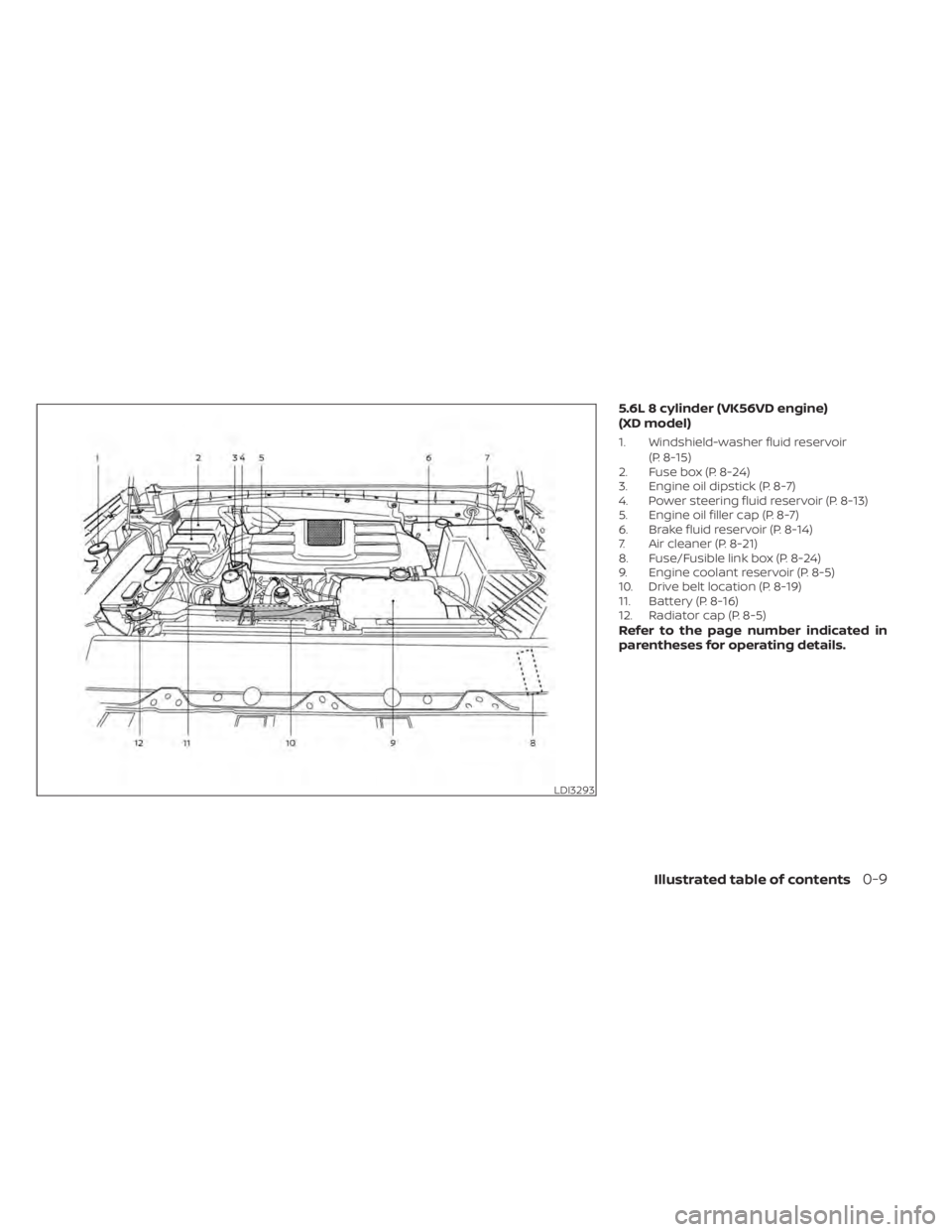
5.6L 8 cylinder (VK56VD engine)
(XD model)
1. Windshield-washer fluid reservoir(P. 8-15)
2. Fuse box (P. 8-24)
3. Engine oil dipstick (P. 8-7)
4. Power steering fluid reservoir (P. 8-13)
5. Engine oil filler cap (P. 8-7)
6. Brake fluid reservoir (P. 8-14)
7. Air cleaner (P. 8-21)
8. Fuse/Fusible link box (P. 8-24)
9. Engine coolant reservoir (P. 8-5)
10. Drive belt location (P. 8-19)
11. Battery (P. 8-16)
12. Radiator cap (P. 8-5)
Refer to the page number indicated in
parentheses for operating details.
LDI3293
Illustrated table of contents0-9
Page 110 of 638
1. Vents (P. 4-28)
2. Turn signal switch (P. 2-50)Wiper and washer switch (P. 2-40) 3.Steering wheel switch for audio control*Bluetooth® Hands-Free Phone System*
Vehicle information display controls
(P. 2-22)4. Driver supplemental air bag (P. 1-53)
Horn (P. 2-52)
5. Meters and gauges (P. 2-6) Warning and indicator lights (P. 0-10)
Vehicle information display (P. 2-22)
6. Cruise control switches (if so equipped)
(P. 5-49)
Intelligent Cruise Control (ICC) switches
(if so equipped) (P. 5-51)
7. Shif t lever (P. 5-18) Tow mode switch (P. 2-62)
8. Audio controls*
9. Center display (P. 4-10)
10. Climate controls (P. 4-29)
11. Front passenger supplemental air bag
(P. 1-53)
12. Glove box (P. 2-69)
13. Front passenger supplemental knee air
bag (if so equipped) (P. 1-53)
14. Front passenger air bag status light
(if so equipped) (P. 1-53)
15. Power outlet (P. 2-64)
16. Climate control seat switch
(if so equipped) (P. 2-52)
Heated front seat switches
(if so equipped) (P. 2-54)
17. Heated steering wheel switch
(if so equipped) (P. 2-56)
Warning systems switch (P. 2-57)
18. USB ports*
19. Hazard warning flasher switch (P. 6-2)
LII2656
INSTRUMENT PANEL
2-4Instruments and controls
Page 111 of 638
20. Parking Aids system switch (P. 2-61)Vehicle Dynamic Control (VDC) OFF
switch (P. 2-57)
21. Trailer Brake Controller Unit (TBCU)
(if so equipped) (P. 2-63)
22. 4WD shif t switch (if so equipped)
(P. 5-111)
23. Push-button ignition switch (P. 5-12)
24. Driver supplemental knee air bag light
(if so equipped) (P. 1-53)
25. Tilt and telescopic steering wheel
control (P. 3-28)
26. Parking brake (P. 5-23)
27. Hood release (P. 3-25)
28. Headlight aiming control
(if so equipped) (P. 2-43)
Power inverter switch (if so equipped)
(P. 2-61)
Cargo lamp switch (P. 2-52)
Electronic locking rear differential
(E-Lock) system switch (if so equipped)
(P. 2-59)
Hill descent control system switch
(if so equipped) (P. 2-58)
29. Headlight switch (P. 2-43) Fog light switch (if so equipped) (P. 2-51)
Instrument brightness control
switches (P. 2-43)
Trip reset switch (P. 2-6)
*Refer to the separate NissanConnect®
Owner’s Manual Refer to the page number indicated in
parenthesis for operating details.
Instruments and controls2-5
Page 163 of 638
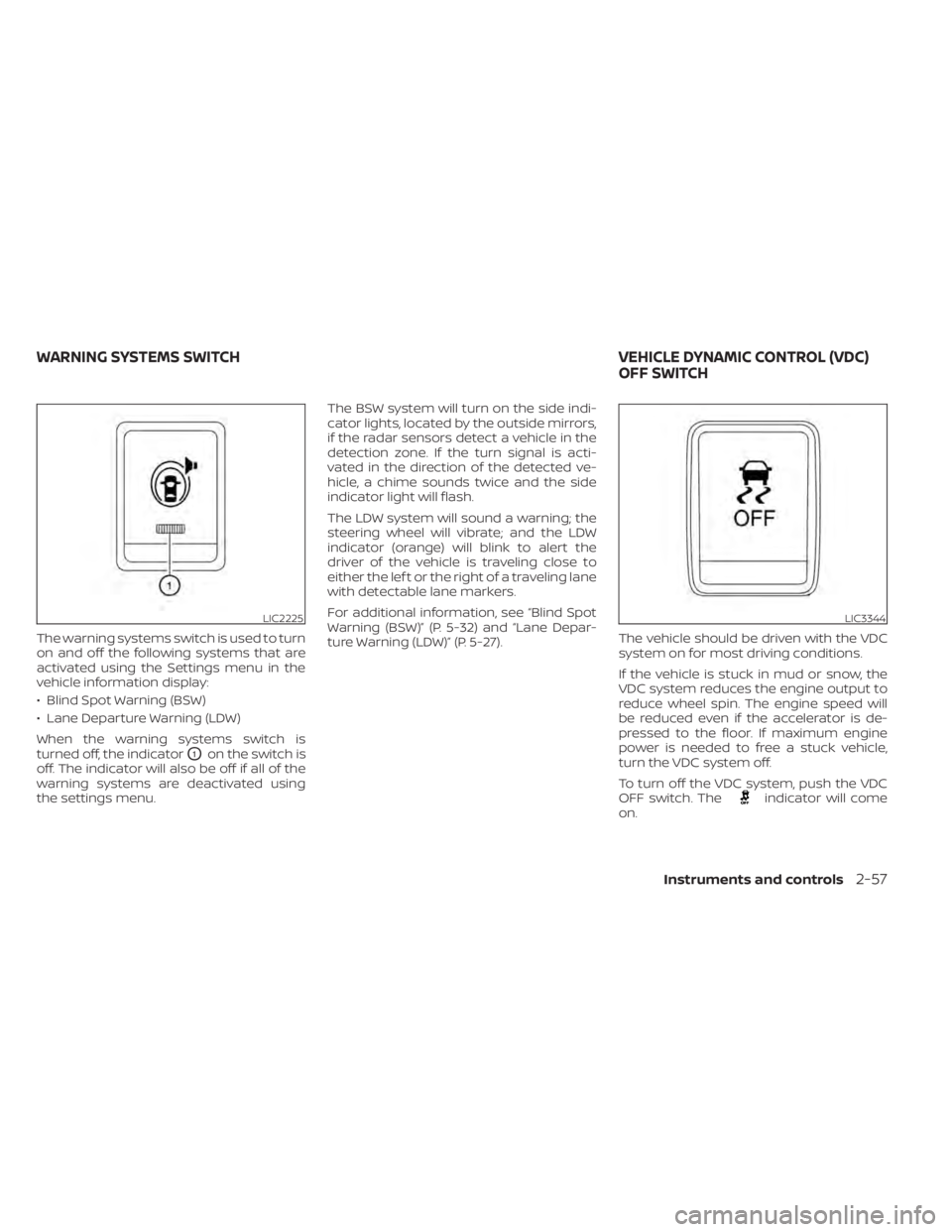
The warning systems switch is used to turn
on and off the following systems that are
activated using the Settings menu in the
vehicle information display:
• Blind Spot Warning (BSW)
• Lane Departure Warning (LDW)
When the warning systems switch is
turned off, the indicator
O1on the switch is
off. The indicator will also be off if all of the
warning systems are deactivated using
the settings menu. The BSW system will turn on the side indi-
cator lights, located by the outside mirrors,
if the radar sensors detect a vehicle in the
detection zone. If the turn signal is acti-
vated in the direction of the detected ve-
hicle, a chime sounds twice and the side
indicator light will flash.
The LDW system will sound a warning; the
steering wheel will vibrate; and the LDW
indicator (orange) will blink to alert the
driver of the vehicle is traveling close to
either the lef t or the right of a traveling lane
with detectable lane markers.
For additional information, see “Blind Spot
Warning (BSW)” (P. 5-32) and “Lane Depar-
ture Warning (LDW)” (P. 5-27).
The vehicle should be driven with the VDC
system on for most driving conditions.
If the vehicle is stuck in mud or snow, the
VDC system reduces the engine output to
reduce wheel spin. The engine speed will
be reduced even if the accelerator is de-
pressed to the floor. If maximum engine
power is needed to free a stuck vehicle,
turn the VDC system off.
To turn off the VDC system, push the VDC
OFF switch. The
indicator will come
on.
LIC2225LIC3344
WARNING SYSTEMS SWITCH VEHICLE DYNAMIC CONTROL (VDC)
OFF SWITCH
Instruments and controls2-57
Page 201 of 638
3 Pre-driving checks and adjustments
Keys.............................................3-2NISSAN Intelligent Key® .......................3-2
NISSAN Vehicle Immobilizer System
keys..........................................3-4
Doors ...........................................3-4
Locking with key .............................3-5
Locking with inside lock knob ................3-6
Locking with power door lock switch .........3-6
Rear doors (King Cab® models) ............... 3-7
Automatic door locks (if so equipped) ........3-8
Child safety rear door lock
(if so equipped) ...............................3-9
NISSAN Intelligent Key® system ..................3-9
Operating range ............................. 3-11
Door locks/unlocks precaution ...............3-11
NISSAN Intelligent Key® Operation ...........3-12
How to use the remote keyless entry
function ..................................... 3-15
Warning signals ............................. 3-19
Troubleshooting guide ......................3-20
Remote Engine Start (if so equipped) ...........3-22
Remote Engine Start operating range .......3-22
Remote starting the vehicle .................3-23
Extending engine run time ..................3-23
Canceling a Remote Engine Start ...........3-23
Conditions the Remote Engine Start will
notwork .................................... 3-24Hood
........................................... 3-25
Fuel-filler door .................................. 3-25
Gasoline fuel engines .......................3-26
Steering wheel ................................. 3-28
Manual operation (if so equipped) ...........3-28
Automatic operation (if so equipped) ........3-29
Sun visors ...................................... 3-30
Vanity mirrors (if so equipped) ...............3-30
Card holder (driver’s side only) ...............3-31
Mirrors ......................................... 3-31
Manual anti-glare rearview mirror
(if so equipped) .............................. 3-31
Automatic anti-glare rearview mirror
(if so equipped) .............................. 3-31
Outside mirrors ............................. 3-32
Truck box ...................................... 3-36
Tailgate ..................................... 3-36
Tie down hooks ............................. 3-40
Memor
y Seat (if so equipped) ..................3-40
Memory storage function ...................3-41
Linking a key fob to a stored memory
position ..................................... 3-41
Entry/exit function .......................... 3-42
System operation ........................... 3-42
Page 335 of 638
Intelligent Driver Alertness (I-DA)
system limitations......................... 5-102
Break-in schedule ............................. 5-103
Fuel efficient driving tips .......................5-104
Increasing fuel economy ......................5-105
Using 4–Wheel Drive (4WD) (if so equipped) ....5-105
Transfer case shif ting procedures ..........5-106
Electronic locking rear differential (E-Lock)
system (if so equipped) ........................ 5-112
Eco Drive Report (if so equipped) ..............5-113
Parking/parking on hills .......................5-114
Power steering ................................ 5-115
Brake system ................................. 5-115
Brake precautions .......................... 5-115
Anti-lock Braking System (ABS) .............5-116
Brake Assist ................................. 5-117
Active Brake Limited Slip (ABLS) system ........5-117
Vehicle Dynamic Control (VDC) system ........5-118 Brake force distribution
....................5-120
Hill descent control system (if so equipped) . . . 5-121
Hill start assist system ........................5-122
Front and rear sonar system (if so equipped) . . 5-122 System operation .......................... 5-123
How to enable/disable the sonar
system ..................................... 5-125
Sonar limitations ........................... 5-126
System maintenance ......................5-126
Cold weather driving .......................... 5-127
Freeing a frozen door lock ..................5-127
Antifreeze .................................. 5-127
Battery..................................... 5-127
Draining of coolant water ..................5-127
Tire equipment ............................. 5-127
Special winter equipment ..................5-128
Driving on snow or ice ......................5-128
Engine block heater (if so equipped) ........5-128
Page 447 of 638
3. To help prevent the vehicle from rollinginto traffic when parked on an incline, it
is a good practice to turn the wheels as
illustrated.
• HEADED DOWNHILL WITH CURB
OA:
Turn the wheels into the curb and
move the vehicle forward until the
curb side wheel gently touches the
curb.
• HEADED UPHILL WITH CURB
OB:
Turn the wheels away from the curb
and move the vehicle back until the
curb side wheel gently touches the
curb.
• HEADED UPHILL OR DOWNHILL, NO
CURB
OC:
Turn the wheels toward the side of the
road so the vehicle will move away
from the center of the road if it moves.
4. Place the ignition switch in the LOCK position. The power assisted steering uses a hy-
draulic pump, driven by the engine, to as-
sist steering.
If the engine stops or the drive belt breaks,
you will still have control of the vehicle.
However, much greater steering effort is
needed, especially in sharp turns and at
low speeds.
WARNING
If the engine is not running or is turned
off while driving, the power assist for
the steering will not work. Steering will
be harder to operate. The brake system has two separate hy-
draulic circuits. If one circuit malfunctions,
you will still have braking at two wheels.
BRAKE PRECAUTIONS
Using the brakes
Avoid resting your foot on the brake pedal
while driving. This will overheat the brakes,
wear out the brake pads faster, and reduce
gas mileage.
To help reduce brake wear and to prevent
the brakes from overheating, reduce speed
and downshif t to a lower gear before going
down a slope or long grade. Overheated
brakes may reduce braking performance
and could result in loss of vehicle control.
WARNING
• While driving on a slippery surface,
be careful when braking, accelerat-
ing or downshif ting. Abrupt braking
or accelerating could cause the
wheels to skid and result in an
accident.
• If the engine is not running or is
turned off while driving, the power
assist for the brakes will not work.
Braking will be harder.
POWER STEERING BRAKE SYSTEM
Starting and driving5-115