set clock NISSAN VERSA NOTE 2018 Owner´s Manual
[x] Cancel search | Manufacturer: NISSAN, Model Year: 2018, Model line: VERSA NOTE, Model: NISSAN VERSA NOTE 2018Pages: 878, PDF Size: 9.62 MB
Page 608 of 878
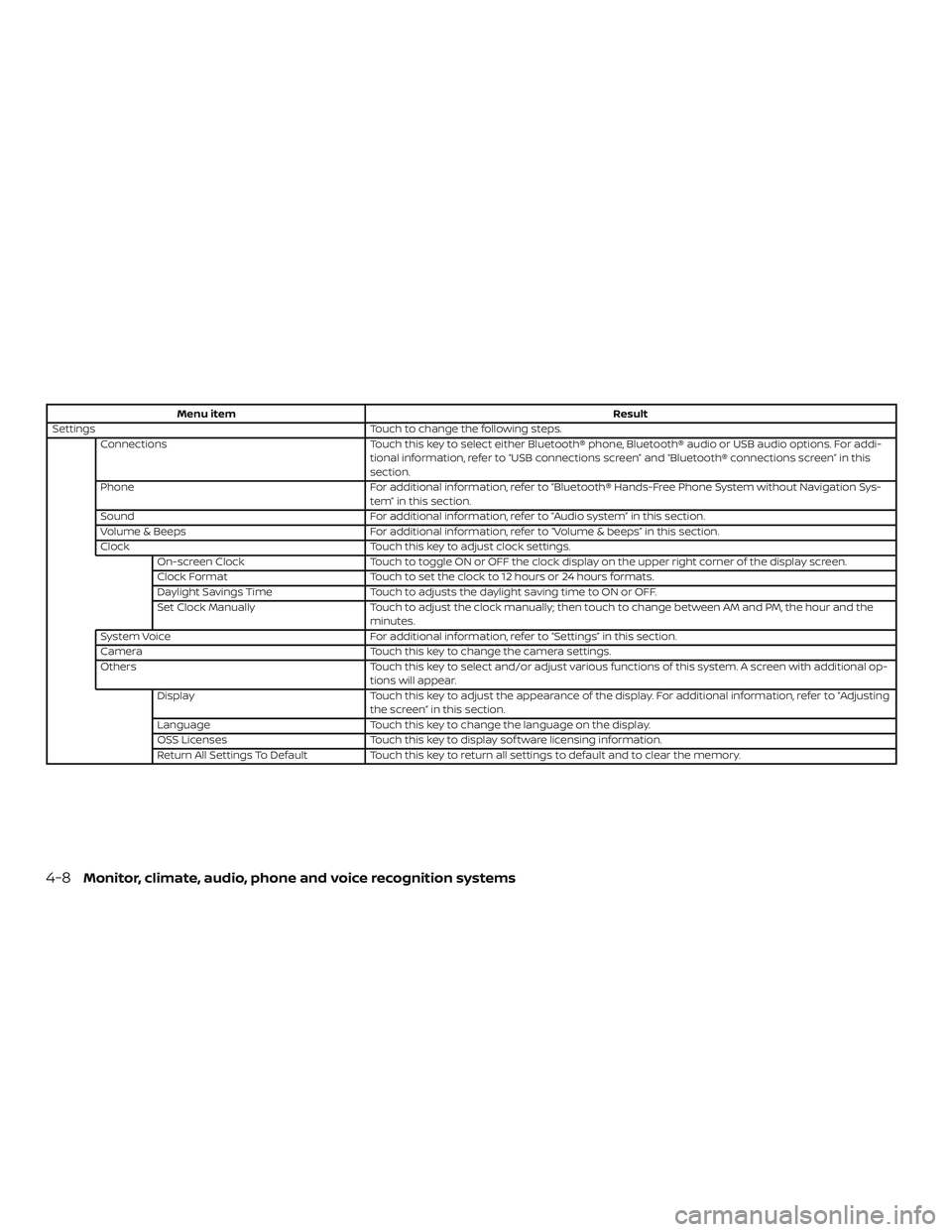
Menu itemResult
Settings Touch to change the following steps.
Connections Touch this key to select either Bluetooth® phone, Bluetooth® audio or USB audio options. For addi-
tional information, refer to “USB connections screen” and “Bluetooth® connections screen” in this
section.
Phone For additional information, refer to “Bluetooth® Hands-Free Phone System without Navigation Sys-
tem” in this section.
Sound For additional information, refer to “Audio system” in this section.
Volume & Beeps For additional information, refer to “Volume & beeps” in this section.
Clock Touch this key to adjust clock settings.
On-screen Clock Touch to toggle ON or OFF the clock display on the upper right corner of the display screen.
Clock Format Touch to set the clock to 12 hours or 24 hours formats.
Daylight Savings Time Touch to adjusts the daylight saving time to ON or OFF.
Set Clock Manually Touch to adjust the clock manually; then touch to change between AM and PM, the hour and the
minutes.
System Voice For additional information, refer to “Settings” in this section.
Camera Touch this key to change the camera settings.
Others Touch this key to select and/or adjust various functions of this system. A screen with additional op-
tions will appear.
Display Touch this key to adjust the appearance of the display. For additional information, refer to “Adjusting
the screen” in this section.
Language Touch this key to change the language on the display.
OSS Licenses Touch this key to display sof tware licensing information.
Return All Settings To Default Touch this key to return all settings to default and to clear the memory.
4-8Monitor, climate, audio, phone and voice recognition systems
Page 614 of 878
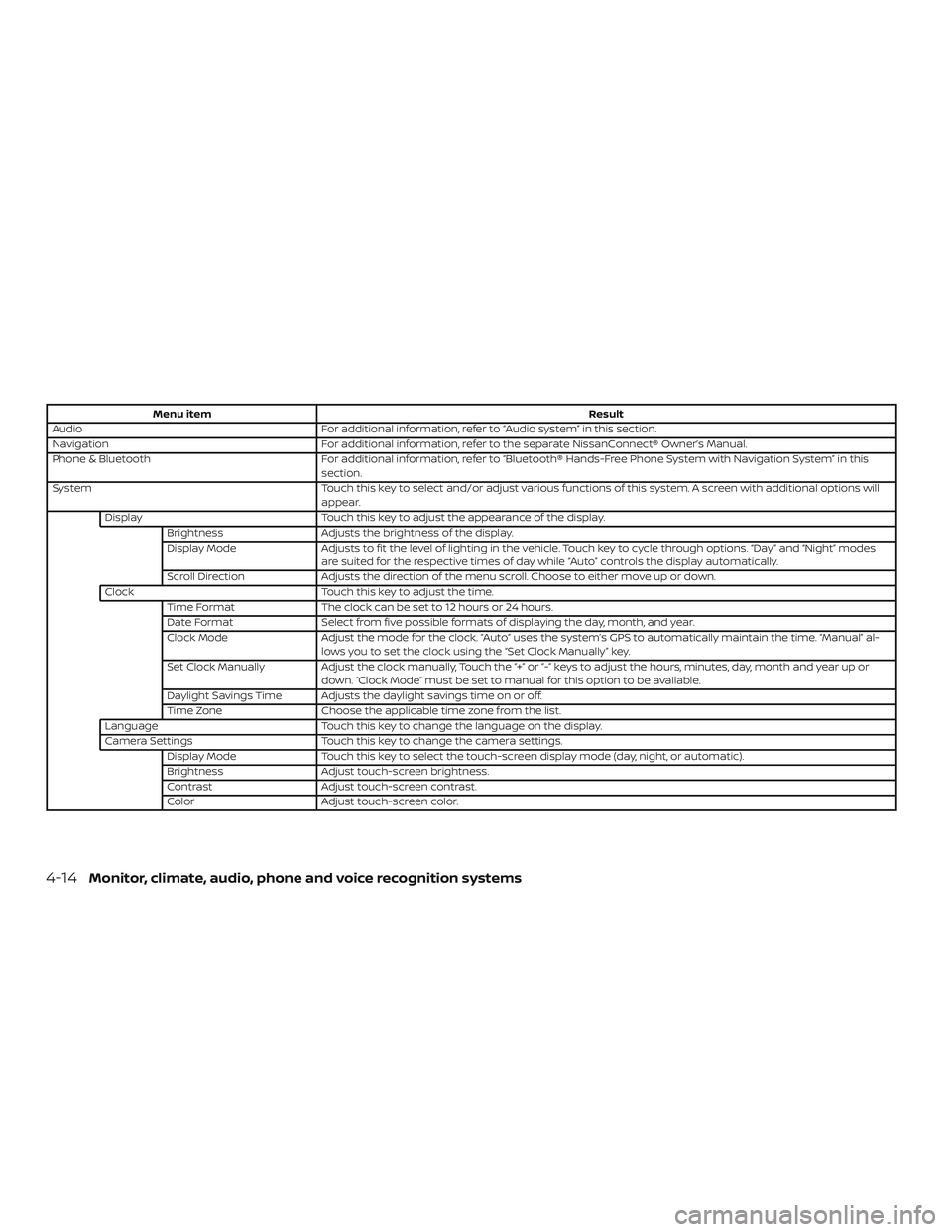
Menu itemResult
Audio For additional information, refer to “Audio system” in this section.
Navigation For additional information, refer to the separate NissanConnect® Owner’s Manual.
Phone & Bluetooth For additional information, refer to “Bluetooth® Hands-Free Phone System with Navigation System” in this
section.
System Touch this key to select and/or adjust various functions of this system. A screen with additional options will
appear.
Display Touch this key to adjust the appearance of the display.
Brightness Adjusts the brightness of the display.
Display Mode Adjusts to fit the level of lighting in the vehicle. Touch key to cycle through options. “Day” and “Night” modes
are suited for the respective times of day while “Auto” controls the display automatically.
Scroll Direction Adjusts the direction of the menu scroll. Choose to either move up or down.
Clock Touch this key to adjust the time.
Time Format The clock can be set to 12 hours or 24 hours.
Date Format Select from five possible formats of displaying the day, month, and year.
Clock Mode Adjust the mode for the clock. “Auto” uses the system’s GPS to automatically maintain the time. “Manual” al-
lows you to set the clock using the “Set Clock Manually” key.
Set Clock Manually Adjust the clock manually, Touch the “+” or “-” keys to adjust the hours, minutes, day, month and year up or
down. “Clock Mode” must be set to manual for this option to be available.
Daylight Savings Time Adjusts the daylight savings time on or off.
Time Zone Choose the applicable time zone from the list.
Language Touch this key to change the language on the display.
Camera Settings Touch this key to change the camera settings.
Display Mode Touch this key to select the touch-screen display mode (day, night, or automatic).
Brightness Adjust touch-screen brightness.
Contrast Adjust touch-screen contrast.
Color Adjust touch-screen color.
4-14Monitor, climate, audio, phone and voice recognition systems
Page 615 of 878
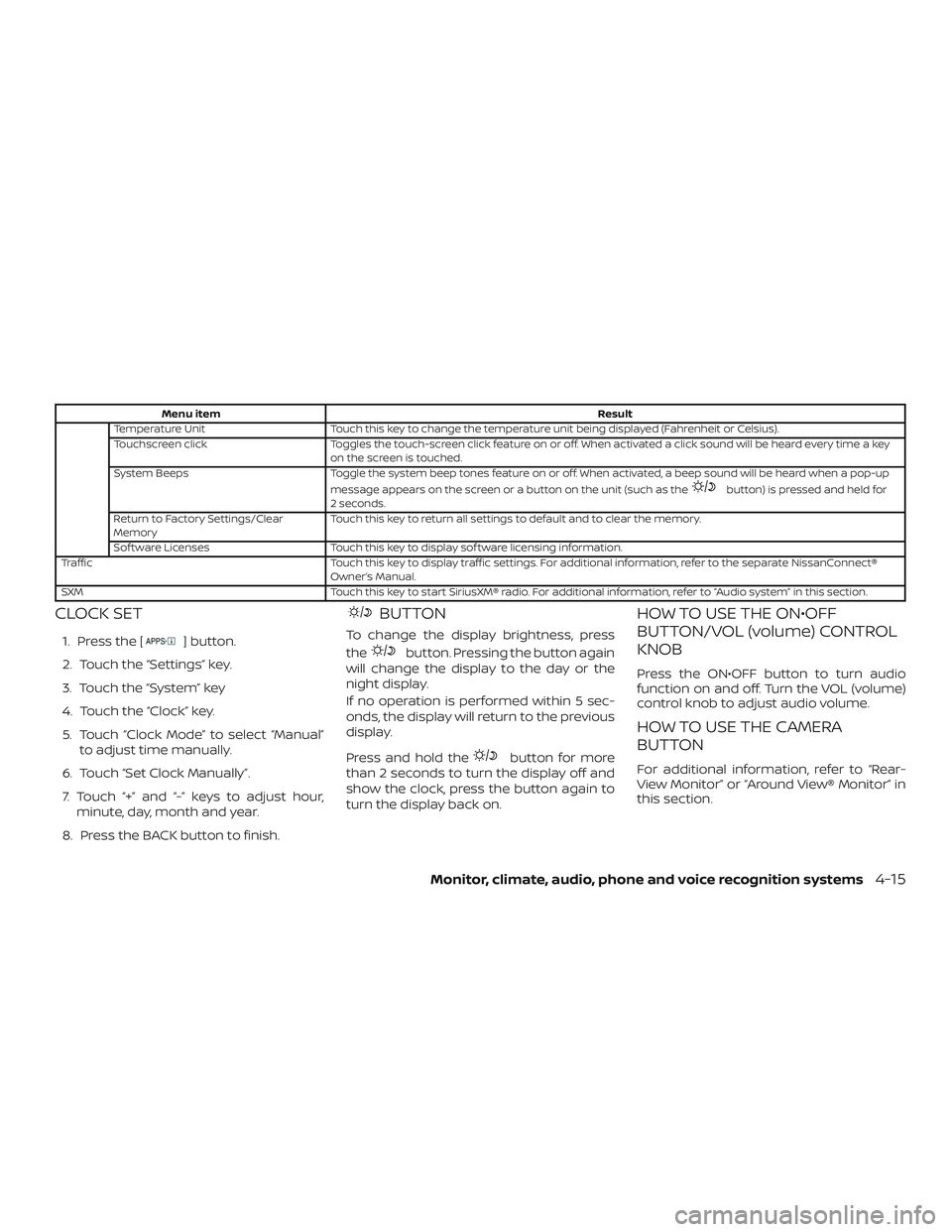
Menu itemResult
Temperature Unit Touch this key to change the temperature unit being displayed (Fahrenheit or Celsius).
Touchscreen click Toggles the touch-screen click feature on or off. When activated a click sound will be heard every time a key
on the screen is touched.
System Beeps Toggle the system beep tones feature on or off. When activated, a beep sound will be heard when a pop-up
message appears on the screen or a button on the unit (such as the
button) is pressed and held for
2 seconds.
Return to Factory Settings/Clear
Memory Touch this key to return all settings to default and to clear the memory.
Sof tware Licenses Touch this key to display sof tware licensing information.
Traffic Touch this key to display traffic settings. For additional information, refer to the separate NissanConnect®
Owner’s Manual.
SXM Touch this key to start SiriusXM® radio. For additional information, refer to “Audio system” in this section.
CLOCK SET
1. Press the [] button.
2. Touch the “Settings” key.
3. Touch the “System” key
4. Touch the “Clock” key.
5. Touch “Clock Mode” to select “Manual” to adjust time manually.
6. Touch “Set Clock Manually”.
7. Touch “+” and “-” keys to adjust hour, minute, day, month and year.
8. Press the BACK button to finish.
BUTTON
To change the display brightness, press
the
button. Pressing the button again
will change the display to the day or the
night display.
If no operation is performed within 5 sec-
onds, the display will return to the previous
display.
Press and hold the
button for more
than 2 seconds to turn the display off and
show the clock, press the button again to
turn the display back on.
HOW TO USE THE ON•OFF
BUTTON/VOL (volume) CONTROL
KNOB
Press the ON•OFF button to turn audio
function on and off. Turn the VOL (volume)
control knob to adjust audio volume.
HOW TO USE THE CAMERA
BUTTON
For additional information, refer to “Rear-
View Monitor” or “Around View® Monitor” in
this section.
Monitor, climate, audio, phone and voice recognition systems4-15
Page 868 of 878
C
Capacities and recommended fuel/
lubricants....................10-2
Cargocover...................2-39
Cargo
(See vehicle loading information) .....10-14
Car phone or CB radio ............4-90
CDcareandcleaning.............4-81
CD player (See audio system) ........4-62
Checking bulbs .................2-15
Childrestraints........1-20, 1-21, 1-23, 1-25 LATCH (Lower Anchors and Tethers for
CHildren)System..............1-25
Precautions on child
restraints .........1-23, 1-30, 1-36, 1-41
Top tether strap anchor point
locations.................. .1-28
Child restraint with top tether strap . . . .1-27
Child safety rear door lock ..........3-8
Chimes, audible reminders .........2-23
Cleaningexteriorandinterior......7-2,7-4
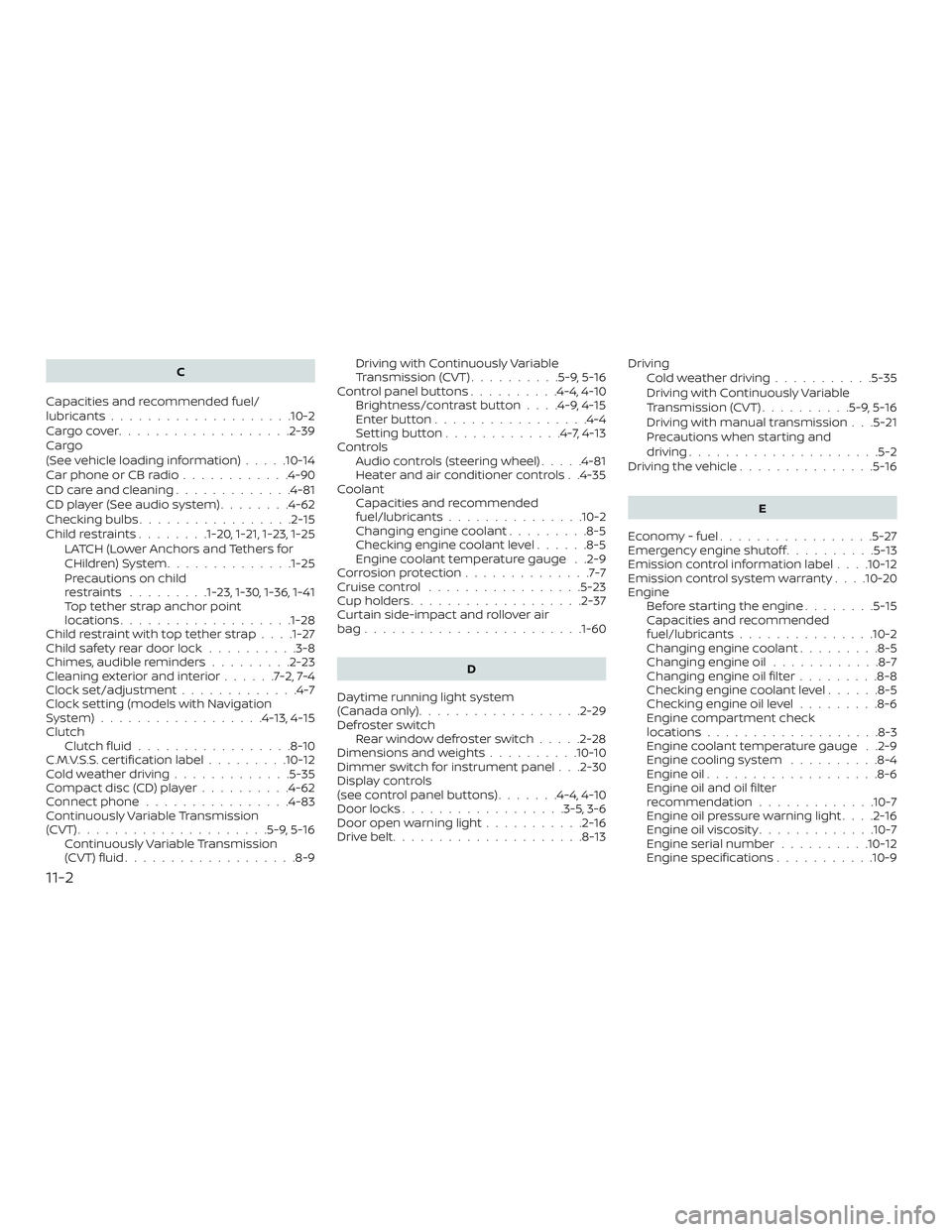
Clock set/adjustment .............4-7
Clock setting (models with Navigation
System)..................4-13,4-15
Clutch Clutchfluid.................8-10
C.M.V.S.S. certification label .........10-12
Coldweatherdriving.............5-35
Compact disc (CD) player ..........4-62
Connect phone ................4-83
Continuously Variable Transmission
(CVT) .....................5-9,5-16
Continuously Variable Transmission
(CVT) fluid ...................8-9 Driving with Continuously Variable
Transmission (CVT)
..........5-9,5-16
Control panel buttons ..........4-4,4-10
Brightness/contrast button ....4-9,4-15
Enterbutton.................4-4
Settingbutton.............4-7,4-13
Controls Audio controls (steering wheel) .....4-81
Heater and air conditioner controls . .4-35
Coolant Capacities and recommended
fuel/lubricants...............10-2
Changing engine coolant .........8-5
Checking engine coolant level ......8-5
Engine coolant temperature gauge . .2-9
Corrosionprotection..............7-7
Cruisecontrol .................5-23
Cupholders...................2-37
Curtain side-impact and rollover air
bag....................... .1-60
D
Daytime running light system
(Canada only) ..................2-29
Defroster switch Rearwindowdefrosterswitch.....2-28
Dimensions and weights ..........10-10
Dimmer switch for instrument panel . . .2-30
Display controls
(see control panel buttons) .......4-4,4-10
Door locks ..................3-5,3-6
Door open warning light ...........2-16
Drivebelt.....................8-13 Driving
Coldweatherdriving...........5-35
Driving with Continuously Variable
Transmission (CVT) ..........5-9,5-16
Driving with manual transmission . . .5-21
Precautions when starting and
driving .....................5-2
Driving the vehicle ...............5-16
E
Economy - fuel .................5-27
Emergency engine shutoff ..........5-13
Emission control information label . . . .10-12
Emission control system warranty . . . .10-20
Engine Before starting the engine ........5-15
Capacities and recommended
fuel/lubricants...............10-2
Changing engine coolant .........8-5
Changing engine oil ............8-7
Changing engine oil filter .........8-8
Checking engine coolant level ......8-5
Checking engine oil level .........8-6
Engine compartment check
l
ocations...................8-3
Engine coolant temperature gauge . .2-9
Engine cooling system ..........8-4
Engine oil ...................8-6
Engine oil and oil filter
recommendation .............10-7
Engine oil pressure warning light . . . .2-16
Engine oil viscosity .............10-7
Engine serial number ..........10-12
Engine specifications ...........10-9
11-2