CD player NISSAN VERSA SEDAN 2018 Owner´s Manual
[x] Cancel search | Manufacturer: NISSAN, Model Year: 2018, Model line: VERSA SEDAN, Model: NISSAN VERSA SEDAN 2018Pages: 702, PDF Size: 8.98 MB
Page 166 of 702
5. SCAN button
6. USB button
7. AUX button
8. A-Z button
9. ENTER button and TUNE/MENU knob
10.
(back) button
11. SETUP button
12. DISP button
13. Station select (1–6) buttons
14.
Forward and Backward
SEEK/TRACK buttons
15. VOL (volume) control knob/
(power) button
16. CD button
17. FM•AM button
Audio main operation
(power) button/ VOL (volume)
control knob
Place the ignition switch in the ACC or ON
position, then press the
(power) but-
ton. If you listen to the radio with the engine
not running, place the ignition in the ACC
position. The mode (radio or CD) that was
playing immediately before the system
was turned off resumes playing.
When no CD is loaded, the radio comes on.
Pressing the
(power) button again
turns the system off.
Turn the VOL (volume) control knob to the
right to increase volume or to the lef t to
decrease volume.
AUX button
The AUX IN audio input jack accepts any
standard analog audio input such as from
a portable cassette tape/CD player, MP3
player or a laptop computer. Press the AUX
button to play a compatible device
plugged into the AUX IN jack. Pressing the
AUX button repeatedly will cycle through
available input sources:AUX line in→USB (if so equipped)→AUX
line in
NOTE:
Sources only shown in menu if they are
connected and/or detected.
DISP (display) button
Pressing the DISP button displays song in-
formation, if available, such as artist, album,
track name, folder name, and source.
NOTE:
The DISP button only provides this infor-
mation in non-radio modes.
How to use the SETUP button
To select and/or adjust several functions,
features and modes that are available for
your vehicle:
1. Press the SETUP button.
2. Turn the TUNE/MENU knob until the de-
sired item is selected on the menu list
and then press the ENTER button.
Display screen, heater, air conditioner, audio and phone systems4-31
Page 169 of 702
3. The station memory position (P1–P6)
will now be displayed next to the band.
Programming is now complete.
4. Other buttons can be set in the same
manner.
If the battery cable is disconnected or if the
fuse opens, the radio memory will be can-
celed. In that case, reset the desired sta-
tions.
Compact disc (CD) player
operation
If the radio is already operating, it automati-
cally turns off and the compact disc begins
to play.
CD button
When the CD button is pressed with the
system off and the compact disc loaded,
the system will turn on and the compact
disc will start to play.
When the CD button is pressed with a com-
pact disc loaded and the radio playing, the
radio will automatically be turned off and
the compact disc will start to play.DISP button
When the DISP button is pressed while a CD
is playing, the display will change as follows:
CD:
Track Time→Album→Artist→Track Time
CD with MP3 or WMA:
Track time→Folder title→Artist→Song
title→Track number
SEEK/TRACK (Reverse or
Fast Forward) button
Press and hold the SEEK/TRACK
button
orfor 1.5 seconds while
the compact disc is playing to reverse or
fast forward the track being played. The
compact disc plays at an increased speed
while reversing or fast forwarding. When
the button is released, the compact disc
returns to normal play speed.
SEEK/TRACK button
Press the SEEK/TRACK button
while a
CD or MP3/WMA CD is playing to return to
the beginning of the current track. Press
the SEEK/TRACK button
several
times to skip backward several tracks.Press the SEEK/TRACK button
while a
CD or MP3/WMA CD is playing to advance
one track. Press the SEEK/TRACK
button
several times to skip forward
several tracks. If the last track on a CD is
skipped, the first track on the disc is played.
If the last track in a folder of an MP3/WMA
CD is skipped, the first track of the next
folder is played.
TUNE/MENU knob (MP3/WMA CD only)
If an MP3/WMA CD with multiple folders is
playing, press the ENTER button to view the
track list and press the button again to
view the folder list. To select a folder or
track, turn the TUNE/MENU knob to scroll
through the folders/songs and press the
ENTER button to make selection.
RPT (repeat) button
When the RPT button (Preset station num-
ber 1) is pressed while a compact disc is
playing, the repeat mode is toggled.
RDM (random) button
When the RDM button (Preset station num-
ber 2) is pressed while a compact disc is
playing, the Random mode is toggled.
4-34Display screen, heater, air conditioner, audio and phone systems
Page 170 of 702
CD EJECT button
When the
button is pressed with a
compact disc loaded, the compact disc will
eject and the last source will be played.
Additional features
For additional information, refer to “iPod®
player operation” in this section.
For additional information, refer to “USB
(Universal Serial Bus) connection port” in
this section.
FM/AM/SAT RADIO WITH
COMPACT DISC (CD) PLAYER (if so
equipped)
For additional information, refer to “Audio
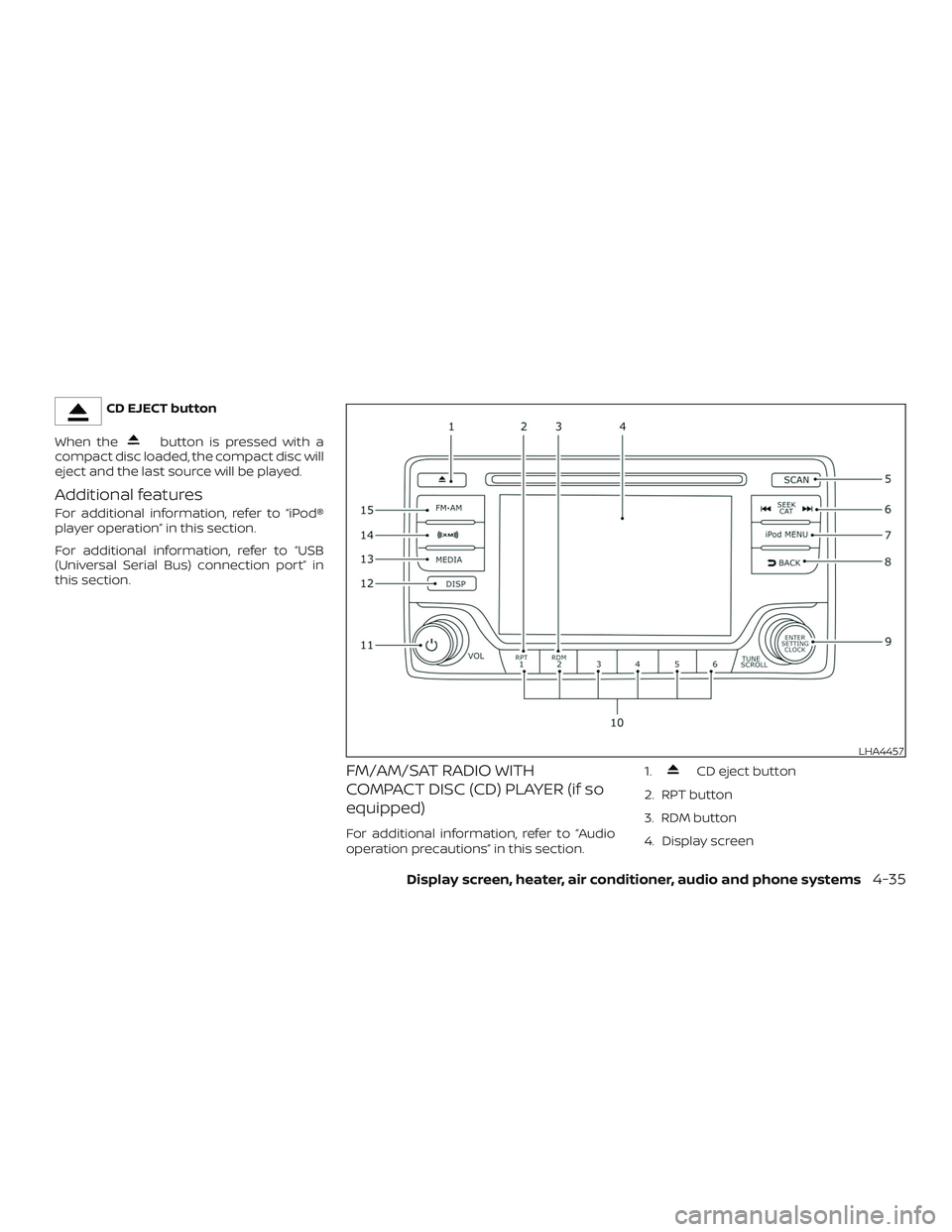
operation precautions” in this section.1.
CD eject button
2. RPT button
3. RDM button
4. Display screen
LHA4457
Display screen, heater, air conditioner, audio and phone systems4-35
Page 173 of 702
Clock Set
1. Press the ENTER/CLOCK button.
2. Turn the TUNE/SCROLL knob to select
“Clock Adjust”.
3. Press the ENTER/CLOCK button.
4. Rotate the TUNE/SCROLL knob to ad-
just hours.
5. Press the ENTER/CLOCK button.
6. Turn the TUNE/SCROLL knob to adjust
minutes.
7. Press the ENTER/CLOCK button.
8. Press the
BACK button to finish.
iPod MENU button
This button can only be used for iPod® op-
erations. For additional information, refer to
“iPod® player operation” in this section.
DISP (display) button
The DISP (display) button turns the display
screen on or off.
BACK button
Press the
BACK button to return to
the previous menu screen.
FM/AM/SAT radio operation
FM·AM button
Press the FM·AM button to change the
band as follows:
AM→FM1→FM2→AM
If another audio source is playing when the
FM·AM button is pressed, the audio source
playing will automatically be turned off and
the last radio station played will begin play-
ing.
XM band select
Press the XM button to change the band as
follows:
XM1*→XM2*→XM3*→XM1 (satellite, if so
equipped)
When the XM button is pressed while the
ignition switch is in the ACC or ON position,
the radio will come on at the station last
played.
The last station played will also come on
when the
(power) button is pressed
on.
*When the XM button is pressed, the satel-
lite radio reception will not be available un-
less an optional satellite receiver and an-
tenna are installed and a SiriusXM® SatelliteRadio service subscription is active. Satel-
lite radio is not available in Alaska, Hawaii
and Guam.
If a compact disc is playing when the XM
button is pressed, the compact disc will
automatically be turned off and the last
radio station played will come on.
TUNE/SCROLL knob (Tuning)
Turn the TUNE/SCROLL knob to the lef t or
right for manual tuning.
SEEK tuning
Press the
SEEK button orTRACK button to tune from low to high or
high to low frequencies and to stop at the
next broadcasting station.
SCAN tuning
Press the SCAN button to stop at each
broadcasting station for 5 seconds. SCAN
will appear on the screen while the radio is
scan tuning.
Pressing the button again during this
5 second period will stop SCAN tuning and
the radio will remain tuned to that station. If
the SCAN button is not pressed within
5 seconds, SCAN tuning moves to the next
station.
4-38Display screen, heater, air conditioner, audio and phone systems
Page 174 of 702
1 to 6 Station memory operations
Six stations can be set for the AM band.
Twelve stations can be set for the FM band
(6 for FM1, 6 for FM2). Eighteen channels can
be set for the satellite radio (6 for XM1, 6 for
XM2, 6 for XM3).
1. Choose the radio band AM, FM1 or FM2
using the FM·AM select button, or
choose the satellite band XM1, XM2 or
XM3 using the XM button.
2. Tune to the desired station using
manual, SEEK or SCAN tuning. Press
and hold any of the desired station
memory buttons (1 – 6) until the preset
number is updated on the display and
the sound is briefly muted.
3. The channel indicator will then come
on and the sound will resume. Pro-
gramming is now complete.
4. Other buttons can be set in the same
manner.
If the battery cable is disconnected, or if the
fuse opens, the radio memory will be can-
celed. In that case, reset the desired sta-
tions.Compact disc (CD) player
operation
If the radio is already operating, it automati-
cally turns off and the compact disc begins
to play.
MEDIA button
With a CD loaded, press the MEDIA button
until the CD mode is displayed on the
screen.
CD/MP3 display mode
While listening to an MP3/WMA CD, certain
text may be displayed on the screen if the
CD has been encoded with text informa-
tion. Depending on how the MP3/WMA CD
is encoded, information such as Artist,
Song and Folder will be displayed.
The track number and the total number of
tracks in the current folder or on the cur-
rent disc are displayed on the screen as
well.
SEEK/CAT (Reverse or
Fast Forward) button
Press and hold the SEEK/CAT button
orfor 1.5 seconds while the compact
disc is playing to reverse or fast forward the
track being played. The compact disc playsat an increased speed while reversing or
fast forwarding. When the button is re-
leased, the compact disc returns to normal
play speed.
SEEK/CAT button
Press the SEEK/CAT button
while a
CD or MP3/WMA CD is playing to return to
the beginning of the current track. Press
the SEEK/CAT button
several times
to skip backward several tracks.
Press the SEEK/CAT button
while a
CD or MP3/WMA CD is playing to advance
one track. Press the SEEK/CAT button
several times to skip forward several
tracks. If the last track on a CD is skipped,
the first track on the disc is played. If the last
track in a folder of an MP3/WMA CD is
skipped, the first track of the next folder is
played.
TUNE/SCROLL knob (MP3/WMA CD only)
If a MP3/WMA CD with multiple folders is
playing, turn the TUNE/SCROLL knob to
change folders. Turn the knob to the lef t to
skip back a folder. Turn the knob to the right
to skip ahead a folder.
Display screen, heater, air conditioner, audio and phone systems4-39
Page 175 of 702
RPT (repeat) button
When the RPT button is pressed while a
compact disc is playing, the play pattern
can be changed as follows:
CD:
1 Track Repeat←→OFF
CD with MP3 or WMA:
1 Folder Repeat→1 Track Repeat→OFF
1 Track Repeat: the current track will be
repeated.
1 Folder Repeat: the current folder will be
repeated.
OFF: No repeat play pattern is applied. The
indicator on the display will turn off.
The current play pattern of the CD is dis-
played on the screen unless no pattern is
applied.
RDM (random) button
When the RDM button is pressed while a
compact disc is playing, the play pattern
can be changed as follows:
CD:
1 Disc Random←→OFFCD with MP3 or WMA:
1 Disc Random→1 Folder Random→OFF
1 Disc Random: all tracks on the disc will be
played randomly.
1 Folder Random: all tracks in the current
folder will be played randomly.
OFF: No random play pattern is applied. The
indicator on the display will turn off.
The current play pattern of the CD is dis-
played on the screen unless no pattern is
applied.
EJECT button
When the
button is pressed with a
compact disc loaded, the compact disc will
eject and the last source will be played.
When the
button is pressed twice
with a compact disc loaded, the compact
disc will be ejected further for easier CD
removal. If the disc is not removed within
20 seconds, the disc will reload.
Additional features
For additional information, refer to “iPod®
player operation” in this section.
For additional information, refer to “USB
(Universal Serial Bus) connection port” in
this section.
For additional information, refer to
“Bluetooth® streaming audio” in this sec-
tion.
4-40Display screen, heater, air conditioner, audio and phone systems
Page 178 of 702
iPod®* PLAYER OPERATION (if so
equipped)
Connecting iPod®
WARNING
Do not connect, disconnect or operate
the USB device while driving. Doing so
can be a distraction. If distracted you
could lose control of your vehicle and
cause an accident or serious injury.
CAUTION
∙ Do not force the USB device into the
USB port. Inserting the USB device
tilted or up-side-down into the port
may damage the port. Make sure that
the USB device is connected correctly
into the USB port.
∙ Do not grab the USB port cover (if so
equipped) when pulling the USB de-
vice out of the port. This could dam-
age the port and the cover.
∙ Do not leave the USB cable in a place
where it can be pulled unintentionally.
Pulling the cable may damage the
port.
For additional information, refer to your de-
vice manufacturer’s owner information re-
garding the proper use and care of the
device.
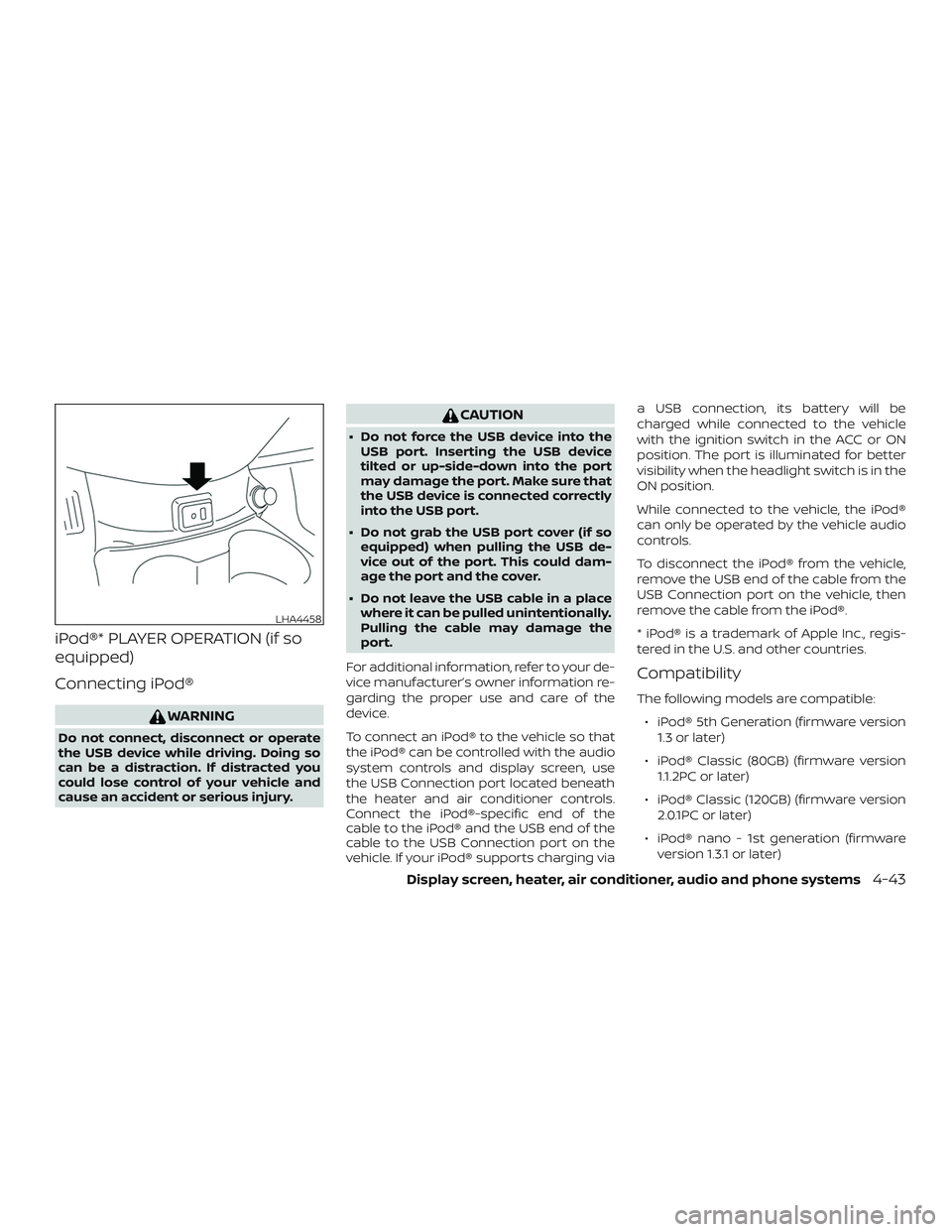
To connect an iPod® to the vehicle so that
the iPod® can be controlled with the audio
system controls and display screen, use
the USB Connection port located beneath
the heater and air conditioner controls.
Connect the iPod®-specific end of the
cable to the iPod® and the USB end of the
cable to the USB Connection port on the
vehicle. If your iPod® supports charging viaa USB connection, its battery will be
charged while connected to the vehicle
with the ignition switch in the ACC or ON
position. The port is illuminated for better
visibility when the headlight switch is in the
ON position.
While connected to the vehicle, the iPod®
can only be operated by the vehicle audio
controls.
To disconnect the iPod® from the vehicle,
remove the USB end of the cable from the
USB Connection port on the vehicle, then
remove the cable from the iPod®.
* iPod® is a trademark of Apple Inc., regis-
tered in the U.S. and other countries.
Compatibility
The following models are compatible:
∙ iPod® 5th Generation (firmware version
1.3 or later)
∙ iPod® Classic (80GB) (firmware version
1.1.2PC or later)
∙ iPod® Classic (120GB) (firmware version
2.0.1PC or later)
∙ iPod® nano - 1st generation (firmware
version 1.3.1 or later)
LHA4458
Display screen, heater, air conditioner, audio and phone systems4-43
Page 180 of 702
(RDM) RANDOM
When the RDM button is pressed while a
track is being played, the play pattern can
be changed as follows:
Shuffle Off→Track Shuffle→Album Shuffle
→Shuffle Off
Track Shuffle: the tracks in the current list
will be played randomly.
Album Shuffle: the albums in the current list
will be played randomly.
Shuffle Off: no random play pattern is ap-
plied.
BACK button
When the
BACK button is pressed, it
returns to the previous menu.
BLUETOOTH® STREAMING AUDIO
(if so equipped)
If you have a compatible Bluetooth® audio
device that is capable of playing audio files,
the device can be connected to the vehi-
cle’s audio system so that the audio files on
the device play through the vehicle’s
speakers. For additional information, refer
to “FM/AM/SAT radio with compact disc
(CD) player” in this section.NOTE:
For additional information, refer to the
cellular phone Owner’s Manual.
Connecting Bluetooth® audio
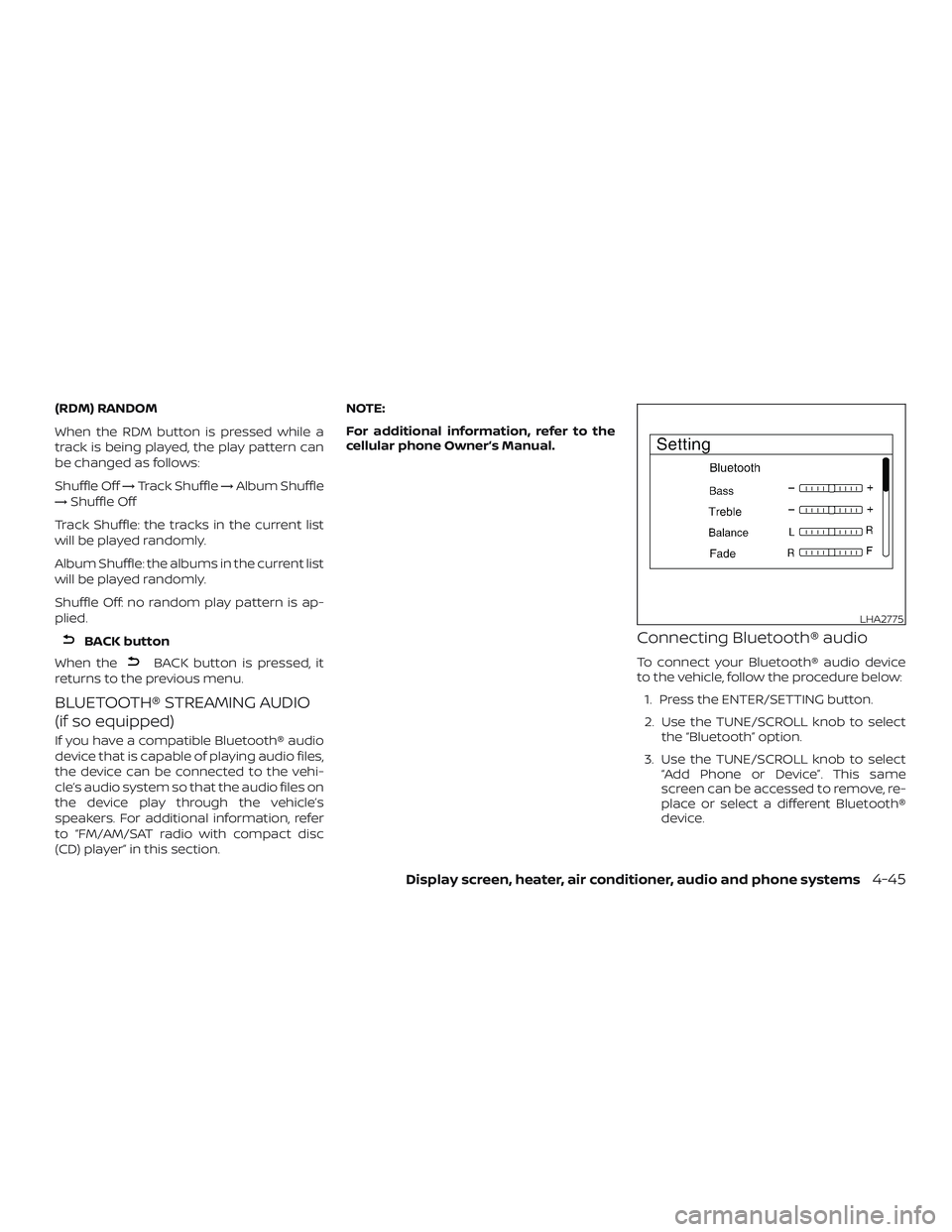
To connect your Bluetooth® audio device
to the vehicle, follow the procedure below:
1. Press the ENTER/SETTING button.
2. Use the TUNE/SCROLL knob to select
the “Bluetooth” option.
3. Use the TUNE/SCROLL knob to select
“Add Phone or Device”. This same
screen can be accessed to remove, re-
place or select a different Bluetooth®
device.
LHA2775
Display screen, heater, air conditioner, audio and phone systems4-45
Page 219 of 702
1. Apply the parking brake.
2.Continuously Variable Transmission
models:
Move the shif t lever to P (Park) or N
(Neutral). P (Park) is recommended.
The shif t lever cannot be moved out
of P (Park) and into any of the other
gear positions if the ignition key is
turned to the OFF position or if the
key is removed from the ignition
switch.
The starter is designed not to oper-
ate if the shif t lever is in any of the
driving positions.
Manual transmission (M/T) models:
For best practice when operating an
M/T, depressing the clutch before
moving the shif t lever is ideal.
Move the shif t lever to N (Neutral). De-
press the clutch pedal to the floor
while cranking the engine.
The starter is designed not to oper-
ate unless the clutch pedal is fully
depressed.3. Crank the enginewith your foot off
the accelerator pedalby turning the
ignition key to the START position. Re-
lease the key when the engine starts. If
the engine starts, but fails to run, repeat
the above procedure.
∙ If the engine is very hard to start in
extremely cold weather or when re-
starting, depress the accelerator
pedal a little (approximately 1/3 to the
floor) and hold it and then crank the
engine. Release the key and the ac-
celerator pedal when the engine
starts.
∙ If the engine is very hard to start be-
cause it is flooded, depress the accel-
erator pedal all the way to the floor
and hold it. Crank the engine for
5-6 seconds. Af ter cranking the en-
gine, release the accelerator pedal.
Crank the enginewith your foot off
the accelerator pedalby turning the
ignition key to the START position. Re-
lease the key when the engine starts.
If the engine starts, but fails to run,
repeat the above procedure.CAUTION
Do not operate the starter for more
than 15 seconds at a time. If the engine
does not start, turn the key off and wait
10 seconds before cranking again, oth-
erwise the starter could be damaged.
4. Allow the engine to idle for at least
30 seconds af ter starting. Do not race
the engine while warming it up. Drive at
a moderate speed for a short distance
first, especially in cold weather.
NOTE:
Care should be taken to avoid situations
that can lead to potential battery dis-
charge and potential no-start conditions
such as:
1.Installation or extended use of elec-
tronic accessories that consume bat-
tery power when the engine is not
running (phone chargers, GPS, DVD
players, etc.).
2.The vehicle is not driven regularly
and/or only driven short distances.
In these cases, the battery may need
to be charged to maintain battery
health.
STARTING THE ENGINE
5-10Starting and driving
Page 274 of 702

CAUTION
∙ Do not substitute engine antifreeze
coolant for windshield-washer solu-
tion. This may result in damage to the
paint.
∙ Do not fill the windshield-washer fluid
reservoir with washer fluid concen-
trates at full strength. Some methyl
alcohol based washer fluid concen-
trates may permanently stain the
grille if spilled while filling the
windshield-washer fluid reservoir.
∙ Pre-mix windshield-washer fluid con-
centrates with water to the manufac-
turer’s recommended levels before
pouring the fluid into the windshield-
washer fluid reservoir. Do not use the
windshield-washer fluid reservoir to
mix the washer fluid concentrate and
water.∙ Keep the battery surface clean and dry.
Clean the battery with a solution of bak-
ing soda and water.
∙ Make certain the terminal connections
are clean and securely tightened.
∙ If the vehicle is not to be used for
30 days or longer, disconnect the nega-
tive (-) battery terminal cable to prevent
discharge.
NOTE:
Care should be taken to avoid situations
that can lead to potential battery dis-
charge and potential no-start conditions
such as:
1.Installation or extended use of elec-
tronic accessories that consume bat-
tery power when the engine is not
running (Phone chargers, GPS, DVD
players, etc.).
2.Vehicle is not driven regularly and/or
only driven short distances.
In these cases, the battery may need to
be charged to maintain battery health.
WARNING
∙ Do not expose the battery to flames,
an electrical spark or a cigarette. Hy-
drogen gas generated by the battery
is explosive. Explosive gases can
cause blindness or injury. Do not allow
battery fluid to contact your skin,
eyes, fabrics or painted surfaces. Sul-
furic acid can cause blindness or in-
jury. Af ter touching a battery or bat-
tery cap, do not touch or rub your
eyes. Thoroughly wash your hands. If
the acid contacts your eyes, skin or
clothing, immediately flush with wa-
ter for at least 15 minutes and seek
medical attention.
∙ Do not operate the vehicle if the fluid
in the battery is low. Low battery fluid
can cause a higher load on the battery
which can generate heat, reduce bat-
tery life, and in some cases lead to an
explosion.
∙ When working on or near a battery,
always wear suitable eye protection
and remove all jewelry.
BATTERY
Do-it-yourself8-11