CD player NISSAN VERSA SEDAN 2018 Owner´s Manual
[x] Cancel search | Manufacturer: NISSAN, Model Year: 2018, Model line: VERSA SEDAN, Model: NISSAN VERSA SEDAN 2018Pages: 702, PDF Size: 8.98 MB
Page 307 of 702
Seats:Check seat position controls such
as seat adjusters, seatback recliner, etc., to
ensure they operate smoothly and all
latches lock securely in every position.
Check that the head restraints/headrests
move up and down smoothly and the locks
(if so equipped) hold securely in all latched
positions.
Seat belts:Check that all parts of the seat
belt system (for example, buckles, anchors,
adjusters and retractors) operate properly
and smoothly, and are installed securely.
Check the belt webbing for cuts, fraying,
wear or damage.
Steering wheel:Check for changes in the
steering system, such as excessive free
play, hard steering or strange noises.
Warning lights and chimes:Make sure all
warning lights and chimes are operating
properly.
Windshield defroster:Check that the air
comes out of the defroster outlets properly
and in sufficient quantity when operating
the heater or air conditioner.
Windshield wiper and washer*:Check
that the wipers and washer operate prop-
erly and that the wipers do not streak.Under the hood and vehicle
The maintenance items listed here should
be checked periodically (for example, each
time you check the engine oil or refuel).
Battery*:Check the fluid level in each cell.
The fluid should be at the bottom of the
filler opening. Vehicles operated in high
temperatures or under severe conditions
require frequent checks of the battery fluid
level.
NOTE:
Care should be taken to avoid situations
that can lead to potential battery dis-
charge and potential no-start conditions
such as:
1.Installation or extended use of elec-
tronic accessories that consume bat-
tery power when the engine is not
running (Phone chargers, GPS, DVD
players, etc.).
2.Vehicle is not driven regularly and/or
only driven short distances.
In these cases, the battery may need to
be charged to maintain battery health.
Brake and clutch (if so equipped) fluid
level*:Make sure that the brake and clutchfluid levels are between the MIN and MAX
lines on the reservoir.
Engine coolant level*:Check the coolant
level when the engine is cold.
Engine drive belts*:Make sure the drive
belts are not frayed, worn, cracked or oily.
Engine oil level*:Check the level af ter
parking the vehicle on a level surface with
the engine off. Wait more than 15 minutes
for the oil to drain back into the oil pan.
Exhaust system:Make sure there are no
loose supports, cracks or holes. If the
sound of the exhaust seems unusual or
there is a smell of exhaust fumes, immedi-
ately have the exhaust system inspected. It
is recommended that you visit a NISSAN
dealer for this service. For additional infor-
mation, refer to “Exhaust gas (carbon mon-
oxide)” in the “Starting and driving” section
of this manual.
Fluid leaks:Check under the vehicle for
fuel, oil, water or other fluid leaks af ter the
vehicle has been parked for a while. Water
dripping from the air conditioner af ter use
is normal. If you should notice any leaks or if
fuel fumes are evident, check for the cause
and have it corrected immediately.
9-4Maintenance and schedules
Page 342 of 702
11 Index
A
Air bag (See supplemental restraint
system).....................1-42
Air bag system
Front (See supplemental front impact air
bagsystem)................1-51
Air bag warning labels............1-59
Airbagwarninglight..........1-60, 2-18
Air bag warning light, supplemental . . .1-60,
2-18
Air cleaner housing filter..........8-15
Air conditioner
Air conditioner operation........4-12
Air conditioner service..........4-16
Air conditioner specification label . .10-12
Air conditioner system refrigerant
and oil recommendations.......10-7
Air conditioner system refrigerant
recommendations............10-7
Heater and air conditioner controls . .4-8
Servicing air conditioner........4-16
Air flow charts.................4-13
Anchor point locations...........1-25
Antenna....................4-48
Antifreeze...................5-28
Anti-lock brake warning light........2-13
Anti-lock Braking System (ABS)......5-24
Audible reminders..............2-20
Audio system.................4-16
AMradioreception............4-17
Bluetooth® audio.............4-45Compact disc (CD)
player.............4-28,4-34,4-39
FM/AM radio with compact disc (CD)
player....................4-30
FM-AM radio with compact disc (CD)
player....................4-26
FM/AM/SAT radio with compact disc (CD)
player....................4-35
FMradioreception............4-16
iPod®Player................4-43
iPod® player operation.........4-43
Radio....................4-16
Steering wheel audio control
switch....................4-47
USBinterface...............4-41
USB (Universal Serial Bus) Connection
Port.....................4-41
Automatic
Automatic power window switch . . .2-32
Automatic door locks.............3-5
AUXjack.................4-29,4-31
B
Battery..................5-28,8-11
Charge warning light...........2-14
Battery replacement............8-20
Keyfob................8-20,8-21
Before starting the engine..........5-9
Belt(Seedrivebelt)..............8-14
Block heater
Engine...................5-30Bluetooth® audio...............4-45
Bluetooth® hands-free phone
system..................4-49,4-64
Booster seats.................1-38
Brake
Anti-lock Braking System (ABS)....5-24
Brakefluid..................8-9
Brakelight(Seestoplight).......8-24
Brakesystem...............5-24
Brakewarninglight............2-13
Brakewearindicators.......2-20,8-17
Parking brake operation.........5-17
Self-adjustingbrakes ..........8-17
Brakeassist..................5-25
Brakefluid....................8-9
Brakes......................8-17
Brakesystem.................5-24
Break-in schedule..............5-20
Brightness control
Instrument panel.............2-24
Bulb check/instrument panel.......2-13
Bulb replacement..............8-24
C
Capacities and recommended fuel/
lubricants....................10-2
Cargo
(See vehicle loading information).....10-13
Car phone or CB radio
...........4-48
CDcareandcleaning............4-46
Page 343 of 702
CD player
(See audio system).......4-28,4-34,4-39
Childrestraints........1-18, 1-18, 1-20, 1-23
LATCH (Lower Anchors and Tethers for
CHildren)System..............1-23
Precautions on child
restraints .........1-20, 1-27, 1-33, 1-38
Top tether strap anchor point
locations...................1-25
Child safety rear door lock..........3-6
Chimes, audible reminders.........2-20
Cleaningexteriorandinterior......7-2,7-4
Clock set/adjustment . . .4-27, 4-31, 4-33, 4-36
Clock setting (models without Navigation
System)..................4-27,4-38
Clutch
Clutchfluid.................8-10
Coldweatherdriving.............5-28
Compact disc (CD) player . . .4-28, 4-34, 4-39
Continuously Variable Transmission
(CVT).....................5-8,5-11
Continuously Variable Transmission
(CVT) fluid...................8-9
Driving with Continuously Variable
Transmission (CVT)..........5-8,5-11
Controls
Audio controls (steering wheel).....4-47
Heater and air conditioner controls. . .4-8
Coolant
Capacities and recommended
fuel/lubricants...............10-2
Changing engine coolant.........8-5
Checking engine coolant level......8-5
Engine coolant temperature gauge . .2-9
Corrosionprotection..............7-7
Cruisecontrol..................5-18Cupholders...................2-29
Curtain side-impact and rollover air
bag........................1-57
D
Defroster switch
Rearwindowdefrosterswitch.....2-22
Dimensions and weights...........10-9
Dimmer switch for instrument panel . . .2-24
Door locks..................3-3,3-4
Door open warning light...........2-14
Drivebelt ....................8-14
Driving
Cold weather driving...........5-28
Driving with Continuously Variable
Transmission (CVT)..........5-8,5-11
Driving with manual
transmission..............5-9,5-15
Precautions when starting and
driving.....................5-2
Drivingthevehicle...............5-11
E
Economy - fuel.................5-21
Emission control information label. . . .10-11
Emission control system warranty . . . .10-18
Engine
Before starting the engine........5-9
Blockheater................5-30
Capacities and recommended
fuel/lubricants...............10-2
Changing engine coolant.........8-5Changing engine oil............8-7
Changing engine oil filter.........8-8
Checking engine coolant level......8-5
Checking engine oil level.........8-6
Engine compartment check
locations...................8-3
Engine coolant temperature gauge . .2-9
Engine cooling system..........8-4
Engine oil...................8-6
Engine oil and oil filter
recommendation.............10-6
Engine oil pressure warning light....2-14
Engine oil viscosity.............10-7
Engine serial number...........10-11
Engine specifications...........10-8
Starting the engine............5-10
Engine coolant temperature gauge....2-9
EventDatarecorders............10-20
Exhaust gas (Carbon monoxide).......5-2
Explanation of maintenance items.....9-2
Explanation of scheduled maintenance
items .......................9-5
Extended storage switch..........8-20
F
Flashers
(Seehazardwarningflasherswitch)....6-2
Flattire....................6-2,6-3
Floormatpositioningaid...........7-6
Fluid
Brakefluid..................8-9
Capacities and recommended
fuel/lubricants...............10-2
Clutchfluid.................8-10
11-2
Page 344 of 702
Continuously Variable Transmission
(CVT) fluid...................8-9
Engine coolant...............8-4
Engine oil...................8-6
F.M.V.S.S. certification label..........10-11
Foglightswitch................2-25
Front air bag system
(See supplemental restraint system). . . .1-51
Front-door pocket...............2-27
Frontseats....................1-2
Fuel
Capacities and recommended
fuel/lubricants...............10-2
Fuel economy...............5-21
Fuel-filler cap................3-13
Fuel-filler door lock opener lever....3-13
Fuel-filler lid.................3-13
Fuel gauge..................2-9
Fueloctanerating.............10-5
Fuel recommendation..........10-4
Loose fuel cap warning..........2-7
Fuelefficientdrivingtips...........5-20
Fuel-filler door.................3-13
Fuel gauge....................2-9
Fuses.......................8-18
Fusiblelinks...................8-18
G
Gascap .....................3-13
Gauge
Engine coolant temperature gauge . .2-9
Fuel gauge..................2-9
Odometer..................2-6
Speedometer................2-5Tachometer.................2-8
Trip computer...............2-10
Trip odometer.............2-5,2-6
General maintenance.............9-2
Glovebox....................2-29
H
Hands-free phone system,
Bluetooth®................4-49,4-64
Hazard warning flasher switch........6-2
Headlight and turn signal switch......2-22
Headlightcontrolswitch...........2-22
Headlights ...................8-22
Headrestraints .................1-5
Heater
Heater and air conditioner controls. . .4-8
Heater operation..............4-10
Hood.......................3-10
Horn.......................2-25
I
Ignition switch..................5-8
Important vehicle information label. . . .10-11
Increasing fuel economy...........5-21
Indicator lights and audible reminders
(See warning/indicator lights and audible
reminders)....................2-18
Instrument brightness control.......2-24
Instrument panel.............0-6,2-2
Instrument panel dimmer switch.....2-24
Interiorlight ...............2-32,2-33
Interiortrunklidrelease ...........3-12iPod®Player...................4-43
ISOFIX child restraints.............1-23
J
Jumpstarting...............6-8,8-13
K
Key.........................3-2
Key fob battery replacement.....8-20,8-21
Keyless entry
Without Intelligent Key system
(See remote keyless entry system). .3-6, 3-7
L
Labels
Air conditioner specification label . . .10-12
Emission control information label . .10-11
Engine serial number...........10-11
F.M.V.S.S. certification label........10-11
Tire and Loading Information label . .10-12
Vehicle identification number (VIN) . .10-10
Vehicle identification number (VIN)
plate.....................10-10
Warning labels (for SRS)..........1-59
LATCH (Lower Anchors and Tethers for
CHildren)System................1-23
License plate
Installing the license plate.......10-12
Light
Airbagwarninglight........1-60, 2-18
11-3
Page 346 of 702
Precautions when starting and
driving.....................5-2
Push starting..................6-10
R
Radio
Car phone or CB radio..........4-48
FM-AM radio with compact disc (CD)
player ....................4-26
FM/AM radio with compact disc (CD)
player ....................4-30
FM/AM/SAT radio with compact disc (CD)
player ....................4-35
Steering wheel audio control
switch....................4-47
Readiness for inspection maintenance
(I/M)test....................10-20
Rearpowerwindows.............2-31
Rearseat.....................1-4
Rearviewmirror ................3-17
RearViewMonitor.............4-2,4-4
Rearwindowdefrosterswitch.......2-22
Recommended Fluids............10-2
Recorders
EventData.................10-20
Refrigerant recommendation........10-7
Registering a vehicle in another
country.....................10-10
Remote keyless entry system......3-6,3-7
Reporting safety defects (US only). . . .10-19S
Safety
Child safety rear door lock........3-6
Childseatbelts......1-20, 1-27, 1-33, 1-38
Reporting safety defects (US only) . .10-19
Seat adjustment
Front manual seat adjustment......1-3
Rear seat adjustment...........1-4
Seatback pockets...............2-28
Seat belt
Childsafety.................1-18
Infants and small children........1-18
InjuredPerson................1-13
Largerchildren...............1-19
Precautions on seat belt usage.....1-10
Pregnant women..............1-13
Seat belt extenders............1-17
Seat belt maintenance..........1-17
Seatbelts................1-10, 7-7
Shoulder belt height adjustment. . . .1-16
Three-pointtypewithretractor.....1-13
Seat belt extenders..............1-17
Seatbeltwarninglight .........1-13, 2-17
Seats
Adjustment..................1-2
Frontseats..................1-2
Manual front seat adjustment......1-3
Rearseat...................1-4
Self-adjustingbrakes.............8-17
Service manual order form.........10-21
Servicing air conditioner...........4-16
Shif ting
Continuously Variable Transmission
(CVT).....................5-12Manual transmission...........5-16
Shoulder belt height adjustment......1-16
Side air bag system (See supplemental
side air bag, curtain and rollover air bag
systems).....................1-57
Spark plug replacement...........8-14
Spark plugs...................8-14
Specifications.................10-8
Speedometer..................2-5
SRS warning label...............1-59
Stability control................5-26
Standard maintenance............9-8
Starting
Before starting the engine........5-9
Jumpstarting.............6-8,8-13
Precautions when starting and
driving.....................5-2
Push starting................6-10
Starting the engine............5-10
Starting the engine..............5-10
Steering
Power steering system..........5-23
Tilting steering wheel...........3-16
Steering wheel.................3-16
Steering wheel audio control switch . . .4-47
Stoplight....................8-24
Storage .....................2-27
Storagetray ..................2-28
Sunvisors....................3-16
Supplemental air bag warning labels . . .1-59
Supplemental air bag warning
light.....................1-60, 2-18
Supplemental front impact air bag
system......................1-51
Supplemental restraint system
Information and warning labels. . . .1-59
11-5
Page 488 of 702
4 Display screen, heater, air conditioner,
audio and phone systems
Control panel buttons...........................4-2
How to use the touch-screen .................4-3
How to use the
MENU button ...........4-5
(brightness control) button .............4-7
How to use the VOL (volume) knob /
PUSH
(power)button ...................4-7
Selecting menu from launch bar .............4-7
RearView Monitor ...............................4-8
RearView Monitor system operation ..........4-9
How to read the displayed lines ..............4-10
Difference between predicted and
actual distances ............................. 4-10
Adjusting the screen ........................ 4-12
RearView Monitor system limitations ........4-13
System maintenance ........................ 4-14
Vents ........................................... 4-14
Heater and air conditioner (manual) ............4-15
Controls ..................................... 4-16
Heater operation ............................ 4-17
Air conditioner operation ....................4-18
Air flow charts ............................... 4-19
Servicing air conditioner ........................4-23
Audio system ................................... 4-23Radio
........................................ 4-23
FM radio reception .......................... 4-23
AM radio reception .......................... 4-24
Audio operation precautions ................4-24
FM/AM radio ................................. 4-28
USB (Universal Serial Bus) Connection
Port......................................... 4-33
iPod®* player operation ......................4-36
Bluetooth® streaming audio .................4-39
Steering wheel switch for audio control ......4-43
Antenna ..................................... 4-43
Siri® Eyes Free (if so equipped) ..................4-44
Requirements ............................... 4-44
Operating Siri® Eyes Free ....................4-45
Troubleshooting guide ......................4-46
Car phone or CB radio ..........................4-47
Bluetooth® Hands-Free Phone System .........4-47
Regulatory information ......................4-49
Using the system ............................ 4-50
Indicators ................................... 4-51
C
ontrol buttons ............................. 4-51
Connecting procedure ......................4-52
Voice commands ........................... 4-54
Page 513 of 702
∙ ID3/WMA Tag — The ID3/WMA tag is thepart of the encoded MP3 or WMA file
that contains information about the
digital music file such as song title, art-
ist, encoding bit rate, track time dura-
tion, etc. ID3 tag information is displayed
on the Artist/song title line on the dis-
play.
* Windows® and Windows Media® are reg-
istered trademarks and trademarks in the
United States of America and other coun-
tries of Microsof t Corporation of the USA.
USB (Universal Serial Bus)
Connection Port
WARNING
Do not connect, disconnect or operate
the USB device while driving. Doing so
can be a distraction. If distracted you
could lose control of your vehicle and
cause an accident or serious injury.
CAUTION
∙ Do not force the USB device into the USB port. Inserting the USB device
tilted or up-side-down into the port
may damage the port. Make sure that
the USB device is connected correctly
into the USB port.
∙ Do not grab the USB port cover (if so equipped) when pulling the USB de-
vice out of the port. This could dam-
age the port and the cover.
∙ Do not leave the USB cable in a place where it can be pulled unintentionally.
Pulling the cable may damage the
port.
The vehicle is not equipped with a USB de-
vice. USB devices should be purchased
separately as necessary.
This system cannot be used to format USB
devices. To format a USB device, use a per-
sonal computer.
In some jurisdictions, the USB device for the
front seats plays only sound without im-
ages for regulatory reasons, even when the
vehicle is parked.
This system supports various USB
memory devices, USB hard drives and iPod® players. Some USB devices may not
be supported by this system.
∙ Partitioned USB devices may not play correctly.
∙ Some characters used in other lan- guages (Chinese, Japanese, etc.) may
not appear properly in the display. Using
English language characters with a USB
device is recommended.
General notes for USB use: ∙ For additional information, refer to your device manufacturer’s owner informa-
tion regarding the proper use and care
of the device.
Notes for iPod® use:
iPod® is a trademark of Apple Inc., regis-
tered in the U.S. and other countries. ∙ Improperly plugging in the iPod® may cause a checkmark to be displayed on
and off (flickering). Always make sure
that the iPod® is connected properly.
∙ An iPod® nano (1st Generation) may re- main in fast forward or rewind mode if it
is connected during a seek operation. In
this case, please manually reset the
iPod®.
Display screen, heater, air conditioner, audio and phone systems4-25
Page 514 of 702
∙ An iPod® nano (2nd Generation) willcontinue to fast-forward or rewind if it is
disconnected during a seek operation.
∙ An incorrect song title may appear when the Play Mode is changed while
using an iPod® nano (2nd Generation).
∙ Audiobooks may not play in the same order as they appear on an iPod®.
∙ Large video files cause slow responses in an iPod®. The vehicle center display
may momentarily black out, but will
soon recover.
∙ If an iPod® automatically selects large video files while in the shuffle mode, the
vehicle center display may momen-
tarily black out, but will soon recover.
iPod®* player
∙ Some characters used in other lan-guages (Chinese, Japanese, etc.) are not
displayed properly on the vehicle center
screen. We recommend using English
or Spanish language characters with an
iPod®.
∙ Large video podcast files cause slow responses in the iPod®. The vehicle cen-
ter display may momentarily black out,
but it will soon recover. ∙ If the iPod® automatically selects large
video podcast files while in the shuffle
mode, the vehicle center display may
momentarily black out, but it will soon
recover.
∙ Improperly plugging in the iPod® may cause a checkmark to be displayed on
and off (flickering). Always make sure
that the iPod® is connected properly.
∙ The iPod® nano (2nd Generation) will continue to fast forward or rewind if it is
disconnected during a seek operation.
∙ An incorrect song title may appear when the Play Mode is changed while
using the iPod® nano (2nd Generation).
∙ Audiobooks may not play in the same order as they appear on the iPod®.
∙ The iPod® nano (1st Generation) may remain in fast forward or rewind mode if
it is connected during a seek operation.
In this case, please manually reset the
iPod®.
∙ If you are using an iPod® (3rd Generation with Dock connector), do not use very
long names for the song title, album
name or artist name to prevent the
iPod® from resetting itself. ∙ Be careful not to do the following, or the
cable could be damaged and a loss of
function may occur:
∙ Bend the cable excessively (1.6 in (40 mm) radius maximum).
∙ Twist the cable excessively (more than 180 degrees).
∙ Pull or drop the cable.
∙ Do not force the iPod® cable connec- tor into the device port.
∙ Close the center console lid on the cable or connectors.
∙ Store objects with sharp edges in the storage where the cable is stored.
∙ Spill liquids on the cable and connec- tors.
∙ Do not connect the cable to the iPod® if the cable and/or connectors are wet. It
may damage the iPod®.
∙ If the cable and connectors are ex- posed to water, allow the cable and/or
connectors to dry completely before
connecting the cable to the iPod® (wait
24 hours for it to dry).
4-26Display screen, heater, air conditioner, audio and phone systems
Page 520 of 702
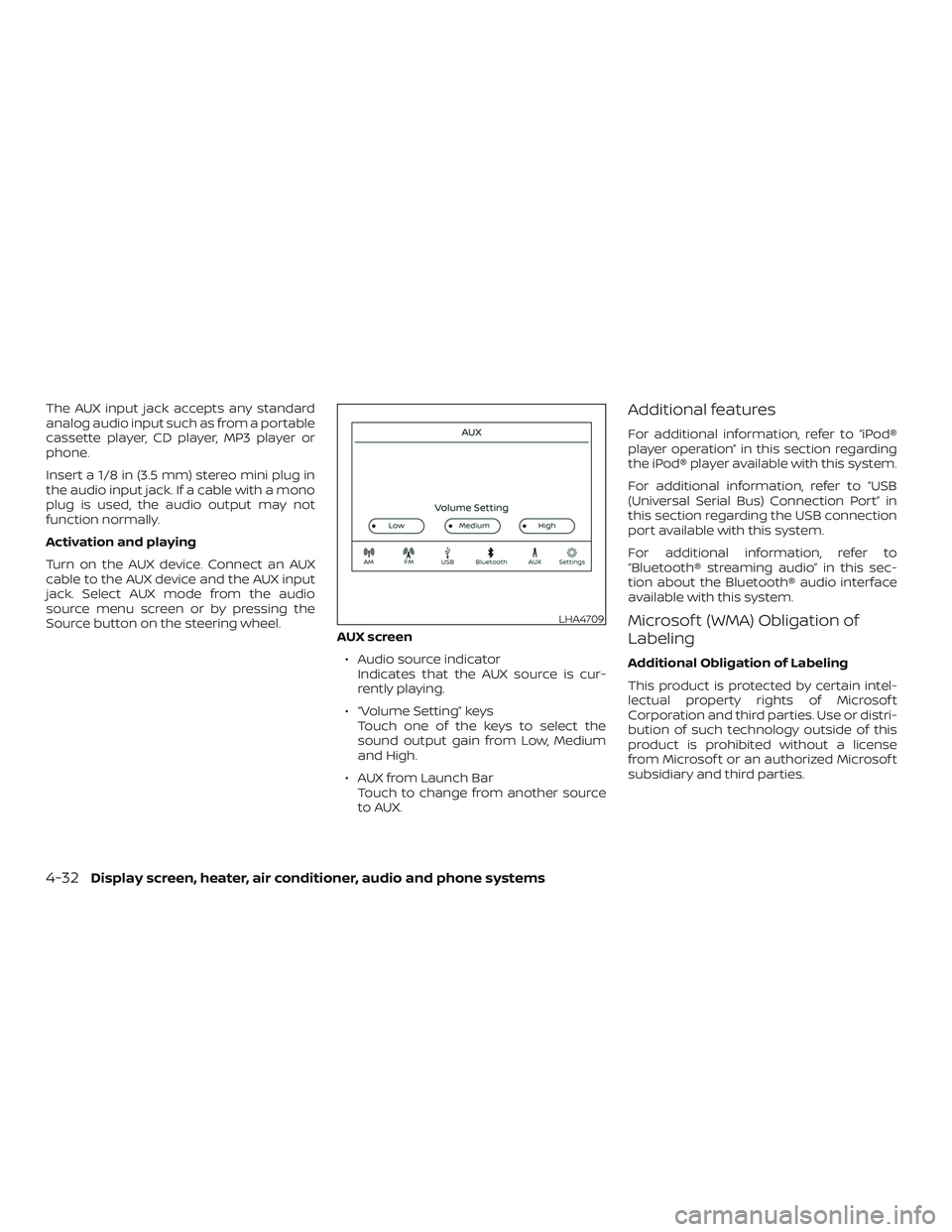
The AUX input jack accepts any standard
analog audio input such as from a portable
cassette player, CD player, MP3 player or
phone.
Insert a 1/8 in (3.5 mm) stereo mini plug in
the audio input jack. If a cable with a mono
plug is used, the audio output may not
function normally.
Activation and playing
Turn on the AUX device. Connect an AUX
cable to the AUX device and the AUX input
jack. Select AUX mode from the audio
source menu screen or by pressing the
Source button on the steering wheel.AUX screen
∙ Audio source indicator Indicates that the AUX source is cur-
rently playing.
∙ “Volume Setting” keys Touch one of the keys to select the
sound output gain from Low, Medium
and High.
∙ AUX from Launch Bar Touch to change from another source
to AUX.Additional features
For additional information, refer to “iPod®
player operation” in this section regarding
the iPod® player available with this system.
For additional information, refer to “USB
(Universal Serial Bus) Connection Port” in
this section regarding the USB connection
port available with this system.
For additional information, refer to
“Bluetooth® streaming audio” in this sec-
tion about the Bluetooth® audio interface
available with this system.
Microsof t (WMA) Obligation of
Labeling
Additional Obligation of Labeling
This product is protected by certain intel-
lectual property rights of Microsof t
Corporation and third parties. Use or distri-
bution of such technology outside of this
product is prohibited without a license
from Microsof t or an authorized Microsof t
subsidiary and third parties.
LHA4709
4-32Display screen, heater, air conditioner, audio and phone systems
Page 523 of 702
USB memory device player
operation
Activation and playing
Connecting the USB memory device into
the port will start playing the USB memory.
USB memory device can also be played by
touching the “USB” key on the Menu screen
or by touching USB on the Launch Bar.
To pause playing the USB memory device
touch the “
” key. To resume playing,
touch the “
”key.
Skipping tracks
To skip the tracks, push the
orbuttons on the control panel or touch the
“
”or“” keys on the screen repeat-
edly until the preferred track is selected.
NOTE:
Depending on the condition, skipping to
the previous track may require pushing
the button or touching the key twice.
Pushing the button or touching the key
once may only restart the current track
from the beginning. Fast-forwarding/rewinding
To rewind or fast-forward the track, push
and hold the
orbuttons on the
control panel or touch and hold the “
”
or “
” keys on the screen.
Changing play mode
Repeat mode
Touch the “
” key on the USB screen to
change the repeat mode.
The following modes are available:
No text displayed: Repeat off
All: Repeat all
1 Folder: Repeat folder/sub-folder
1 Track: Repeat track Random mode
Touch the “
” key on the screen to
change the random mode as follows:
No text displayed: Random off
Random: Random play
All: Repeat all
1 Folder: Repeat folder/sub-folder
USB menu
Touch the “USB Menu” key on the USB
screen to display the USB Menu screen.
“Now Playing” key Touch to display the USB
screen.
“Folder List” key Touch to display the folder list. Touch an item on the list
to select the folder. The sub-
folder or track list will be
displayed. Select a sub-folder
or track from the list.
“Album Artwork” Touch to run on/off the al- bum artwork display on the
USB screen.
Display screen, heater, air conditioner, audio and phone systems4-35