fog light NISSAN VERSA SEDAN 2018 Owner´s Manual
[x] Cancel search | Manufacturer: NISSAN, Model Year: 2018, Model line: VERSA SEDAN, Model: NISSAN VERSA SEDAN 2018Pages: 702, PDF Size: 8.98 MB
Page 12 of 702
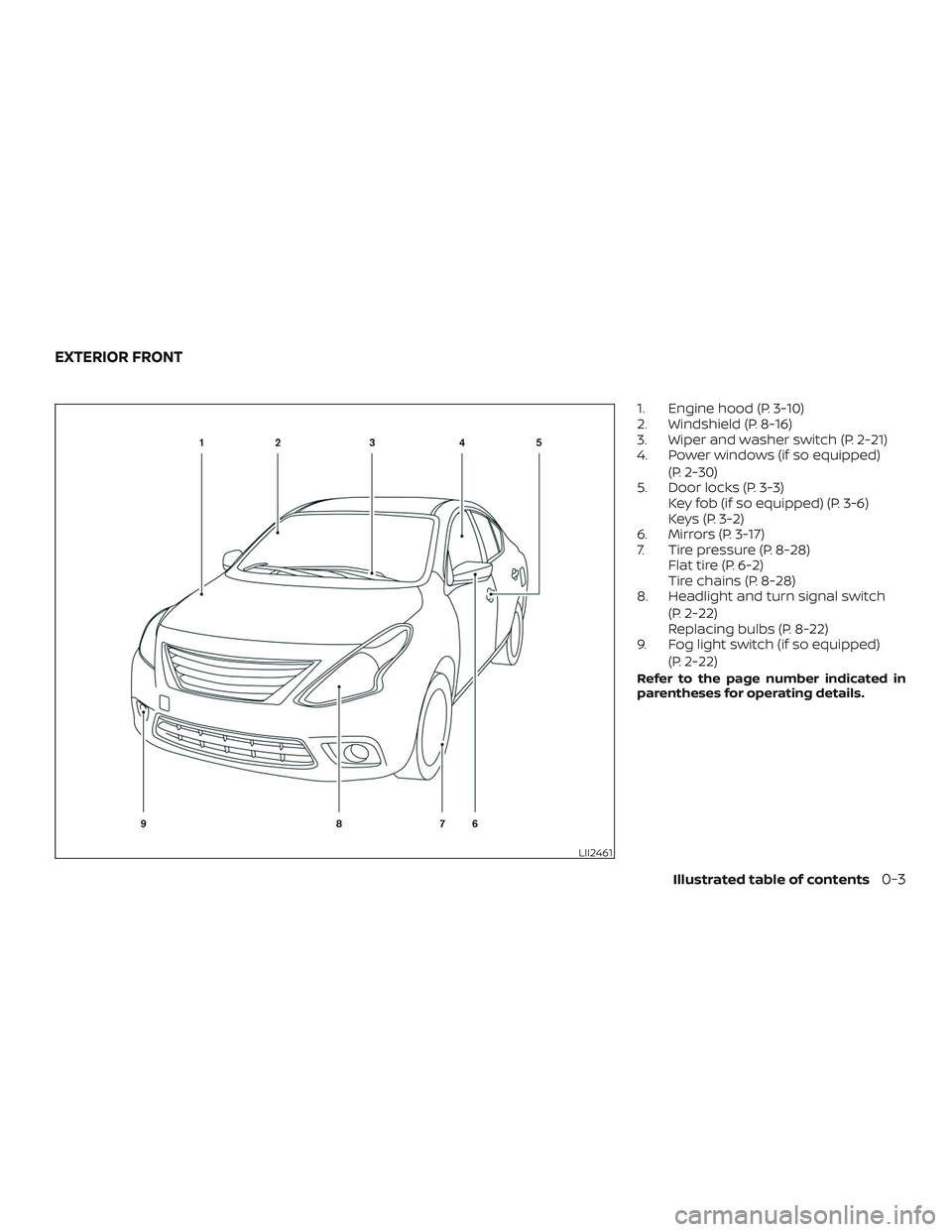
1. Engine hood (P. 3-10)
2. Windshield (P. 8-16)
3. Wiper and washer switch (P. 2-21)
4. Power windows (if so equipped)
(P. 2-30)
5. Door locks (P. 3-3)
Key fob (if so equipped) (P. 3-6)
Keys (P. 3-2)
6. Mirrors (P. 3-17)
7. Tire pressure (P. 8-28)
Flat tire (P. 6-2)
Tire chains (P. 8-28)
8. Headlight and turn signal switch
(P. 2-22)
Replacing bulbs (P. 8-22)
9. Fog light switch (if so equipped)
(P. 2-22)
Refer to the page number indicated in
parentheses for operating details.
LII2461
EXTERIOR FRONT
Illustrated table of contents0-3
Page 15 of 702
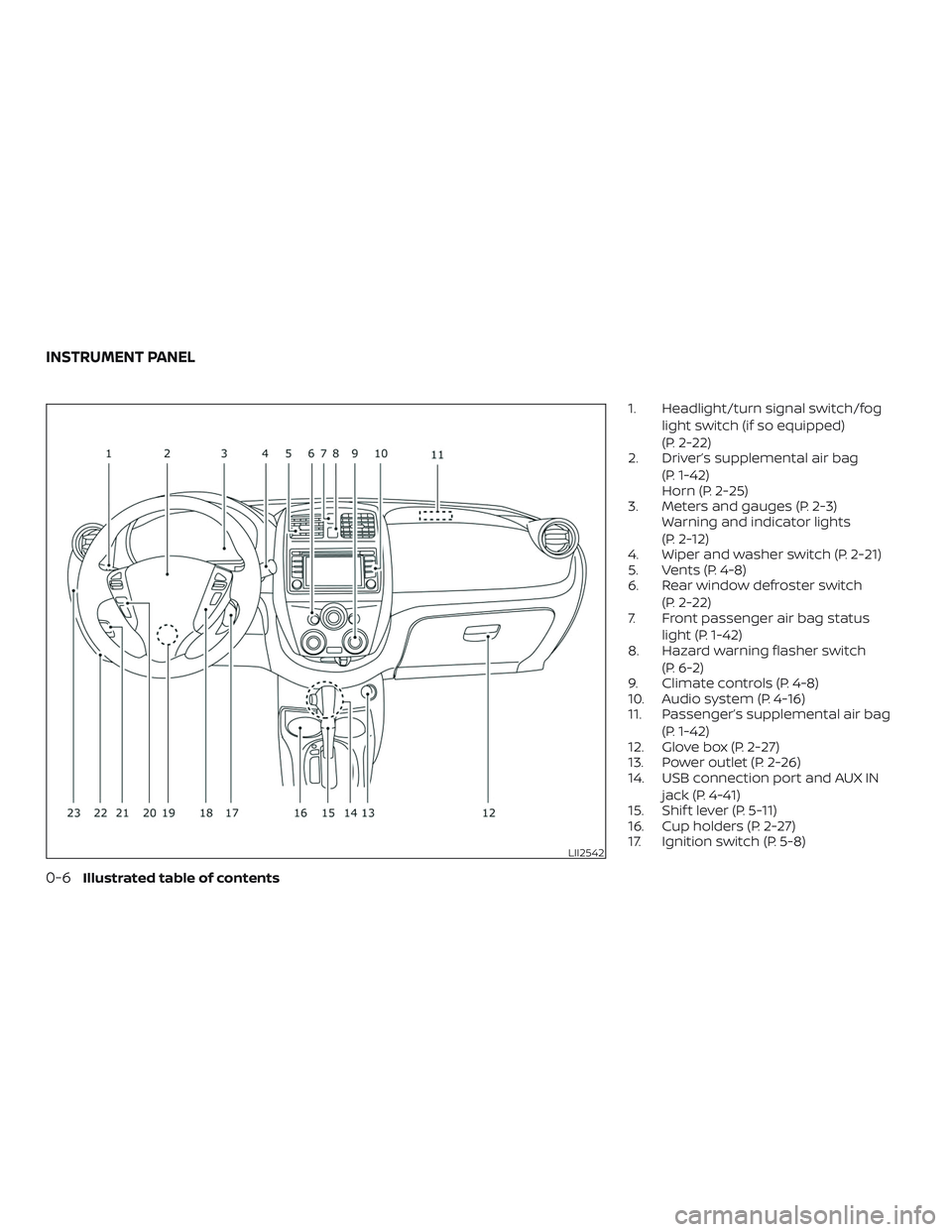
1. Headlight/turn signal switch/fog
light switch (if so equipped)
(P. 2-22)
2. Driver’s supplemental air bag
(P. 1-42)
Horn (P. 2-25)
3. Meters and gauges (P. 2-3)
Warning and indicator lights
(P. 2-12)
4. Wiper and washer switch (P. 2-21)
5. Vents (P. 4-8)
6. Rear window defroster switch
(P. 2-22)
7. Front passenger air bag status
light (P. 1-42)
8. Hazard warning flasher switch
(P. 6-2)
9. Climate controls (P. 4-8)
10. Audio system (P. 4-16)
11. Passenger’s supplemental air bag
(P. 1-42)
12. Glove box (P. 2-27)
13. Power outlet (P. 2-26)
14. USB connection port and AUX IN
jack (P. 4-41)
15. Shif t lever (P. 5-11)
16. Cup holders (P. 2-27)
17. Ignition switch (P. 5-8)
LII2542
INSTRUMENT PANEL
0-6Illustrated table of contents
Page 18 of 702
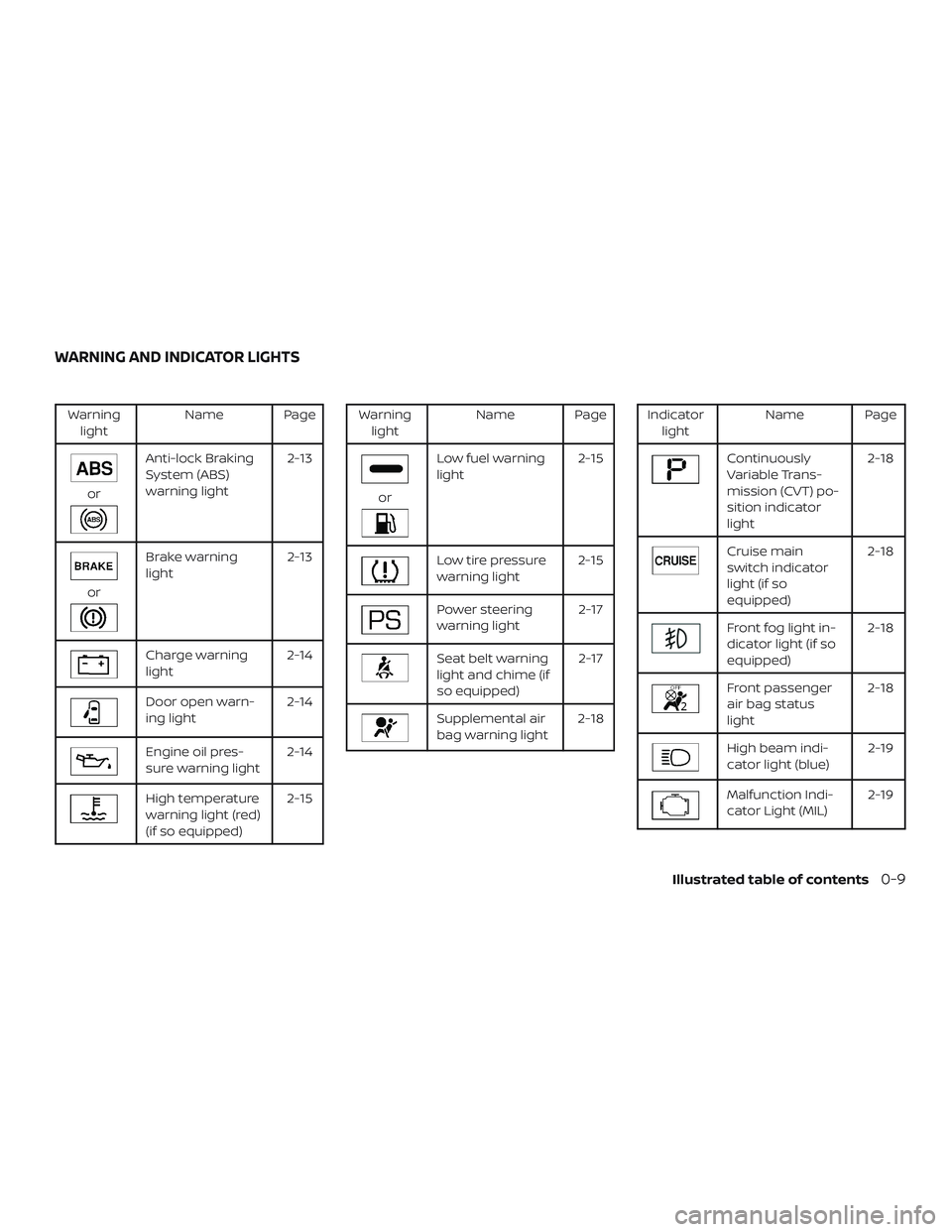
Warning
lightName Page
or
Anti-lock Braking
System (ABS)
warning light2-13
or
Brake warning
light2-13
Charge warning
light2-14
Door open warn-
ing light2-14
Engine oil pres-
sure warning light2-14
High temperature
warning light (red)
(if so equipped)2-15
Warning
lightName Page
or
Low fuel warning
light2-15
Low tire pressure
warning light2-15
Power steering
warning light2-17
Seat belt warning
light and chime (if
so equipped)2-17
Supplemental air
bag warning light2-18
Indicator
lightName Page
Continuously
Variable Trans-
mission (CVT) po-
sition indicator
light2-18
Cruise main
switch indicator
light (if so
equipped)2-18
Front fog light in-
dicator light (if so
equipped)2-18
Front passenger
air bag status
light2-18
High beam indi-
cator light (blue)2-19
Malfunction Indi-
cator Light (MIL)2-19
WARNING AND INDICATOR LIGHTS
Illustrated table of contents0-9
Page 82 of 702
2 Instruments and controls
Instrument panel................................2-2
Meters and gauges..............................2-3
Speedometer and odometer.................2-5
Tachometer..................................2-8
Engine coolant temperature gauge
(if so equipped)...............................2-9
Fuel gauge...................................2-9
Trip computer...............................2-10
Warning lights, indicator lights and audible
reminders......................................2-12
Checking lights..............................2-13
Warning lights...............................2-13
Indicator lights..............................2-18
Audible reminders...........................2-20
Wiper and washer switch.......................2-21
Switch operation............................2-21
Rear window defroster switch..................2-22
Headlight and turn signal switch...............2-22
Headlight control switch.....................2-22Instrument brightness control...............2-24
Turn signal switch...........................2-24
Fog light switch (if so equipped).............2-25
Horn...........................................2-25
Vehicle Dynamic Control (VDC) OFF switch......2-26
Power outlets..................................2-26
Storage ........................................2-27
Front-door pockets..........................2-27
Seatback pocket (if so equipped)............2-28
Storagetray.................................2-28
Glovebox....................................2-29
Cup holders.................................2-29
Windows.......................................2-30
Power windows (if so equipped).............2-30
Manual windows (if so equipped)............2-32
Interior lights...................................2-32
Map light (if so equipped)....................2-33
Trunk light......................................2-34
Page 83 of 702
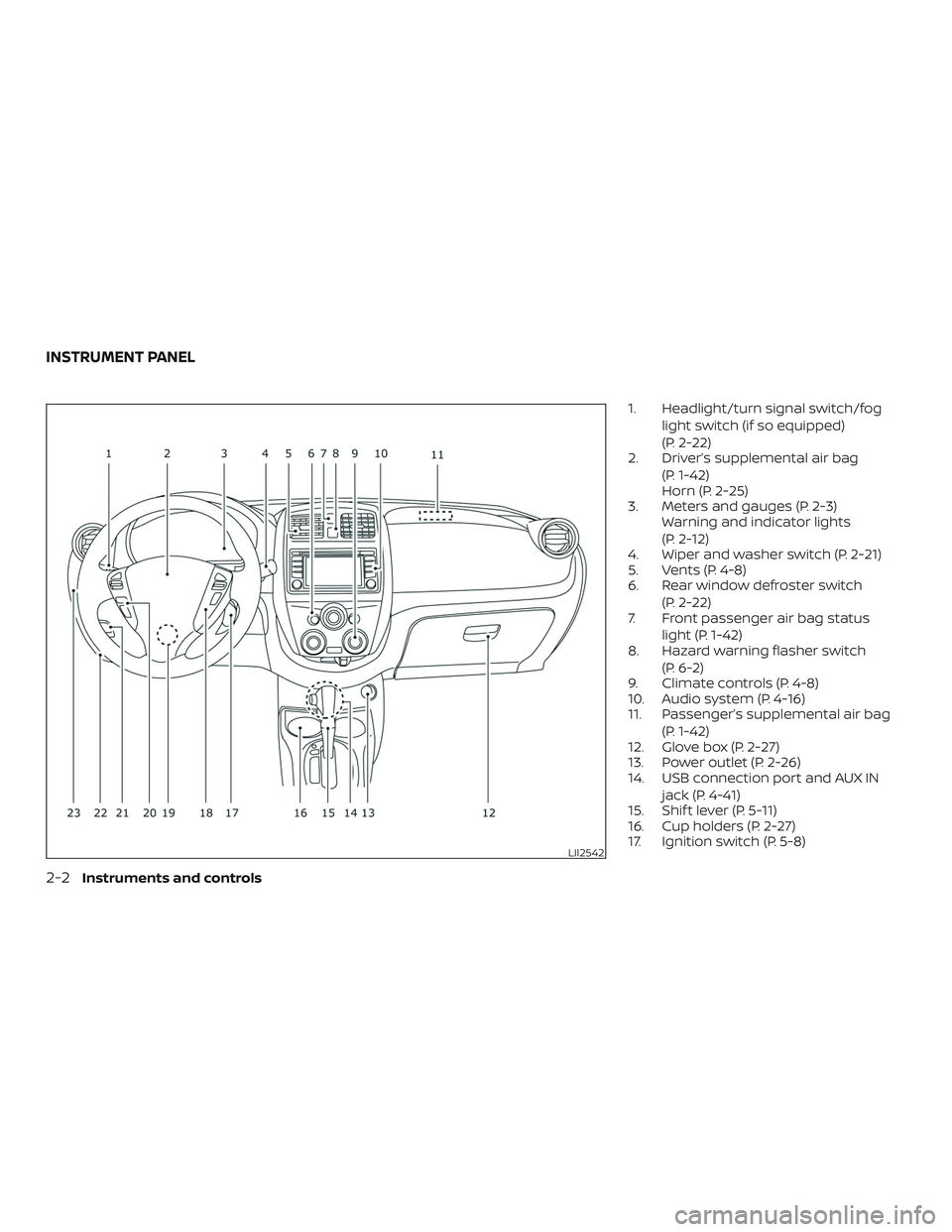
1. Headlight/turn signal switch/fog
light switch (if so equipped)
(P. 2-22)
2. Driver’s supplemental air bag
(P. 1-42)
Horn (P. 2-25)
3. Meters and gauges (P. 2-3)
Warning and indicator lights
(P. 2-12)
4. Wiper and washer switch (P. 2-21)
5. Vents (P. 4-8)
6. Rear window defroster switch
(P. 2-22)
7. Front passenger air bag status
light (P. 1-42)
8. Hazard warning flasher switch
(P. 6-2)
9. Climate controls (P. 4-8)
10. Audio system (P. 4-16)
11. Passenger’s supplemental air bag
(P. 1-42)
12. Glove box (P. 2-27)
13. Power outlet (P. 2-26)
14. USB connection port and AUX IN
jack (P. 4-41)
15. Shif t lever (P. 5-11)
16. Cup holders (P. 2-27)
17. Ignition switch (P. 5-8)
LII2542
INSTRUMENT PANEL
2-2Instruments and controls
Page 93 of 702
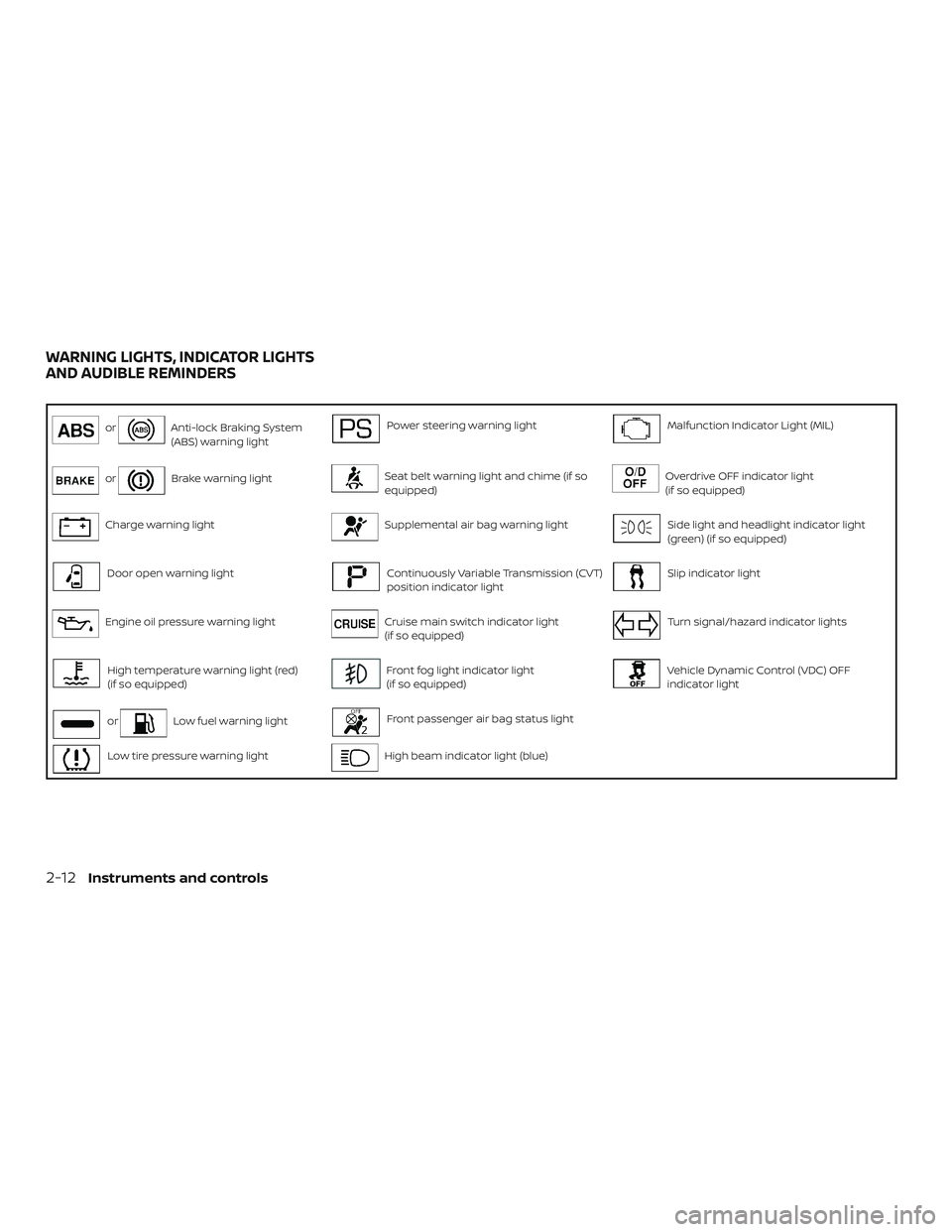
orAnti-lock Braking System
(ABS) warning lightPower steering warning lightMalfunction Indicator Light (MIL)
orBrake warning lightSeat belt warning light and chime (if so
equipped)Overdrive OFF indicator light
(if so equipped)
Charge warning lightSupplemental air bag warning lightSide light and headlight indicator light
(green) (if so equipped)
Door open warning lightContinuously Variable Transmission (CVT)
position indicator lightSlip indicator light
Engine oil pressure warning lightCruise main switch indicator light
(if so equipped)Turn signal/hazard indicator lights
High temperature warning light (red)
(if so equipped)Front fog light indicator light
(if so equipped)Vehicle Dynamic Control (VDC) OFF
indicator light
orLow fuel warning lightFront passenger air bag status light
Low tire pressure warning lightHigh beam indicator light (blue)
WARNING LIGHTS, INDICATOR LIGHTS
AND AUDIBLE REMINDERS
2-12Instruments and controls
Page 99 of 702
For additional information, refer to “Seat
belts” in the “Safety—Seats, seat belts and
supplemental restraint system” section of
this manual.
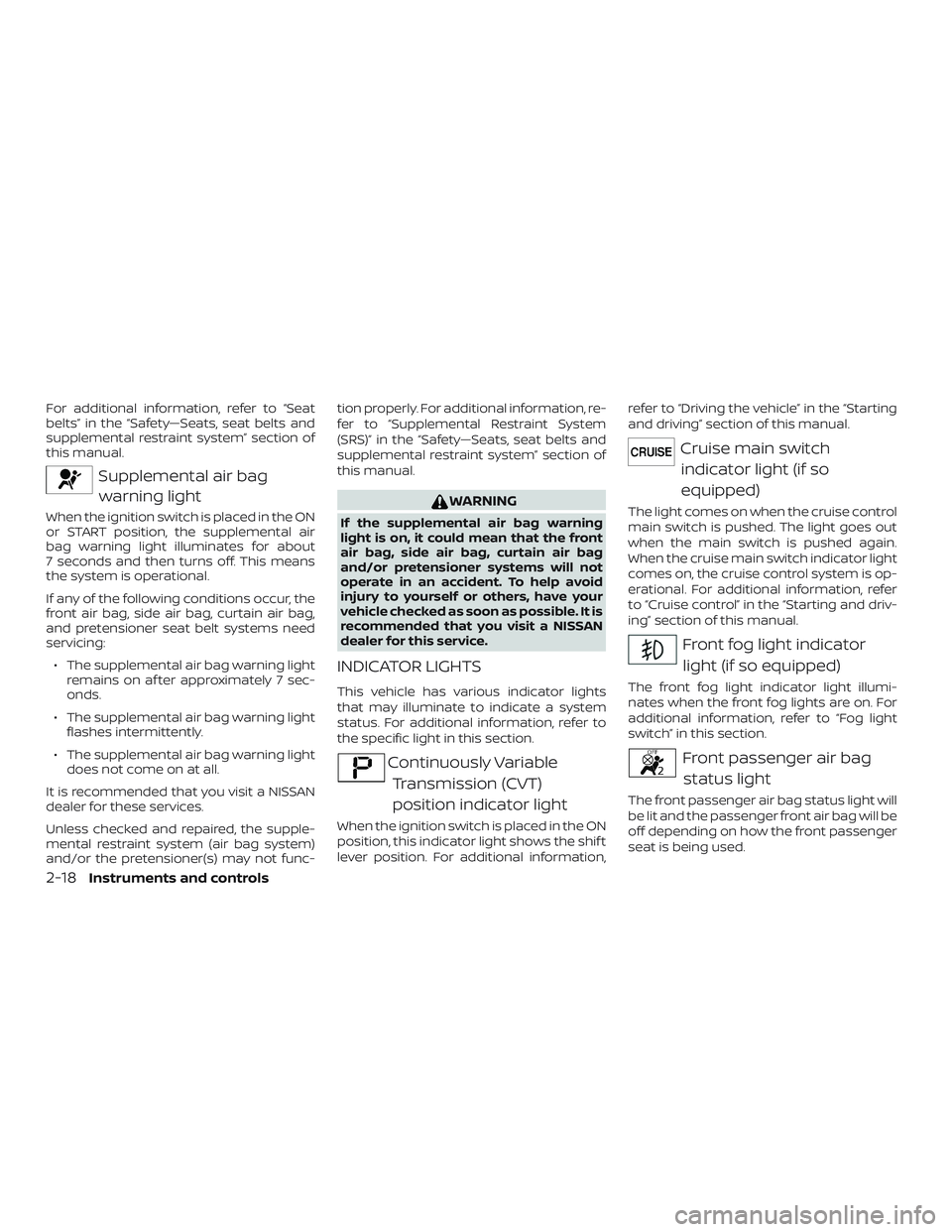
Supplemental air bag
warning light
When the ignition switch is placed in the ON
or START position, the supplemental air
bag warning light illuminates for about
7 seconds and then turns off. This means
the system is operational.
If any of the following conditions occur, the
front air bag, side air bag, curtain air bag,
and pretensioner seat belt systems need
servicing:
∙ The supplemental air bag warning light
remains on af ter approximately 7 sec-
onds.
∙ The supplemental air bag warning light
flashes intermittently.
∙ The supplemental air bag warning light
does not come on at all.
It is recommended that you visit a NISSAN
dealer for these services.
Unless checked and repaired, the supple-
mental restraint system (air bag system)
and/or the pretensioner(s) may not func-tion properly. For additional information, re-
fer to “Supplemental Restraint System
(SRS)” in the “Safety—Seats, seat belts and
supplemental restraint system” section of
this manual.
WARNING
If the supplemental air bag warning
light is on, it could mean that the front
air bag, side air bag, curtain air bag
and/or pretensioner systems will not
operate in an accident. To help avoid
injury to yourself or others, have your
vehicle checked as soon as possible. It is
recommended that you visit a NISSAN
dealer for this service.
INDICATOR LIGHTS
This vehicle has various indicator lights
that may illuminate to indicate a system
status. For additional information, refer to
the specific light in this section.
Continuously Variable
Transmission (CVT)
position indicator light
When the ignition switch is placed in the ON
position, this indicator light shows the shif t
lever position. For additional information,refer to “Driving the vehicle” in the “Starting
and driving” section of this manual.
Cruise main switch
indicator light (if so
equipped)
The light comes on when the cruise control
main switch is pushed. The light goes out
when the main switch is pushed again.
When the cruise main switch indicator light
comes on, the cruise control system is op-
erational. For additional information, refer
to “Cruise control” in the “Starting and driv-
ing” section of this manual.
Front fog light indicator
light (if so equipped)
The front fog light indicator light illumi-
nates when the front fog lights are on. For
additional information, refer to “Fog light
switch” in this section.
Front passenger air bag
status light
The front passenger air bag status light will
be lit and the passenger front air bag will be
off depending on how the front passenger
seat is being used.
2-18Instruments and controls
Page 106 of 702
Hold the lever until the lane change is
completed.
Move the lever up or down until the
turn signal begins to flash, but the lever
does not latch, and release the lever.
The turn signal will automatically flash
three times.
Choose the appropriate method to signal
a lane change based on road and traffic
conditions.
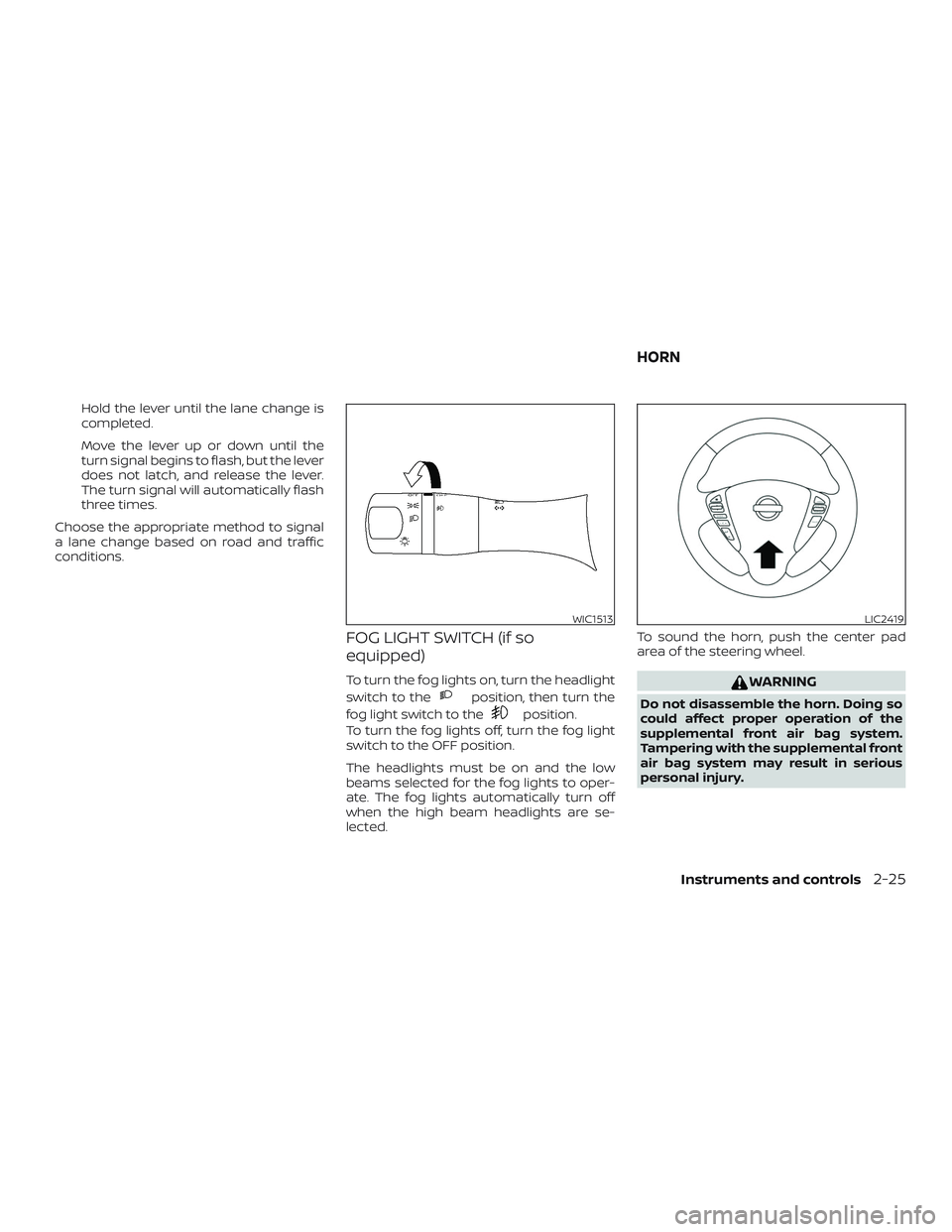
FOG LIGHT SWITCH (if so
equipped)
To turn the fog lights on, turn the headlight
switch to the
position, then turn the
fog light switch to the
position.
To turn the fog lights off, turn the fog light
switch to the OFF position.
The headlights must be on and the low
beams selected for the fog lights to oper-
ate. The fog lights automatically turn off
when the high beam headlights are se-
lected.To sound the horn, push the center pad
area of the steering wheel.
WARNING
Do not disassemble the horn. Doing so
could affect proper operation of the
supplemental front air bag system.
Tampering with the supplemental front
air bag system may result in serious
personal injury.
WIC1513LIC2419
HORN
Instruments and controls2-25
Page 145 of 702
Temperature control dial
The temperature control dial allows you to
adjust the temperature of the outlet air. To
lower the temperature, turn the dial to the
lef t. To increase the temperature, turn the
dial to the right.
Fresh air
Move the air intake lever to theposi-
tion. The air flow is drawn from outside the
vehicle.
Air recirculation
Move the air intake lever to theposi-
tion to recirculate air inside the vehicle.
Use the
selection:
∙ when driving on a dusty road.
∙ to prevent traffic fumes from entering
passenger compartment.
∙ for maximum cooling when using the
air conditioner.
Air conditioner button
Start the engine, turn the fan control dial to
the desired position and press the
button to turn on the air conditioner. The
indicator light comes on when the air con-ditioner is operating. To turn off the air con-
ditioner, press the
button again.
The air conditioner cooling function op-
erates only when the engine is running.
Rear window defroster switch
For additional information, refer to “Rear
window defroster switch” in the “Instru-
ments and controls” section of this manual.
HEATER OPERATION
Heating
This mode is used to direct heated air to
the foot outlets. Some air also flows from
the defrost outlets.
1. Move the air intake lever to the
position for normal heating.
2. Turn the air flow control dial to
the
position.
3. Turn the
fan control dial to the
desired position.
4. Turn the temperature control dial to
the desired position between the
middle and the hot position.
Ventilation
This mode directs outside air to the side
and center vents.
1. Move the air intake lever to the
position.
2. Turn the air flow control dial to
the
position.
3. Turn the
fan control dial to the
desired position.
4. Turn the temperature control dial to
the desired position.
Defrosting or defogging
This mode directs the air to the defrost
outlets to defrost/defog the windows.
1. Move the
air intake lever to the
position.
2. Turn the air flow control dial to
the
position.
3. Turn the
fan control dial to the
desired position.
4. Turn the temperature control dial to
the desired position between the
middle and the hot position.
4-10Display screen, heater, air conditioner, audio and phone systems
Page 147 of 702
Operating tips
Clear snow and ice from the wiper blades
and air inlet in front of the windshield.
This improves heater operation.
AIR CONDITIONER OPERATION
Start the engine, turn thefan control
dial to the desired position, and press
the
button to activate the air condi-
tioner. When the air conditioner is on, cool-
ing and dehumidif ying functions are
added to the heater operation.
The air conditioner cooling function op-
erates only when the engine is running.
Cooling
This mode is used to cool and dehumidif y
the air.
1. Move the air intake lever to the
position.
2. Turn the air flow control dial to
the
position.
3. Turn the
fan control dial to the
desired position.
4. Press the
button. The indicator
light comes on.5. Turn the temperature control dial to
the desired position.
∙ For quick cooling when the outside
temperature is high, move the air intake
lever to the
position. Be sure to re-
turn to the
position for normal
cooling.
Dehumidified heating
This mode is used to heat and dehumidif y
the air.
1. Move the air intake lever to the
position.
2. Turn the air flow control dial to
the
position.
3. Turn the
fan control dial to the
desired position.
4. Press the
button. The indicator
light comes on.
5. Turn the temperature control dial to
the desired position.
Dehumidified defogging
This mode is used to defog the windows
and dehumidif y the air.
1. Move the air intake lever to the
position.2. Turn the air flow control dial to
the
position.
3. Turn the
fan control dial to the
desired position.
4. Turn the temperature control dial to
the desired position.
Operating tips
∙ Keep the windows closed while the air
conditioner is in operation.
∙ Af ter parking in the sun, drive for 2 or
3 minutes with the windows open to
vent hot air from the passenger com-
partment. Then, close the windows.
This allows the air conditioner to cool
the interior more quickly.
∙The air conditioning system should
be operated for approximately
10 minutes at least once a month.
This helps prevent damage to the
system due to lack of lubrication.
∙ A visible mist may be seen coming from
the ventilators in hot, humid conditions
as the air is cooled rapidly. This does not
indicate a malfunction.
4-12Display screen, heater, air conditioner, audio and phone systems