key battery NISSAN X-TRAIL 2001 Service User Guide
[x] Cancel search | Manufacturer: NISSAN, Model Year: 2001, Model line: X-TRAIL, Model: NISSAN X-TRAIL 2001Pages: 3833, PDF Size: 39.49 MB
Page 2486 of 3833
![NISSAN X-TRAIL 2001 Service User Guide AT-408
[ALL]
A/T SHIFT LOCK SYSTEM
Diagnostic Procedure
ECS00408
SYMPTOM 1:
●Selector lever cannot be moved from “P” position with key in ON position and brake pedal
applied.
●Selec](/img/5/57405/w960_57405-2485.png "NISSAN X-TRAIL 2001 Service User Guide AT-408
[ALL]
A/T SHIFT LOCK SYSTEM
Diagnostic Procedure
ECS00408
SYMPTOM 1:
●Selector lever cannot be moved from “P” position with key in ON position and brake pedal
applied.
●Selec")
AT-408
[ALL]
A/T SHIFT LOCK SYSTEM
Diagnostic Procedure
ECS00408
SYMPTOM 1:
●Selector lever cannot be moved from “P” position with key in ON position and brake pedal
applied.
●Selector lever can be moved from “P” position with key in ON position and brake pedal released.
●Selector lever can be moved from “P” position when key is removed from key cylinder.
SYMPTOM 2:
●Ignition key cannot be removed when selector lever is set to “P” position.
●Ignition key can be removed when selector lever is set to any position except “P”.
1. CHECK KEY INTERLOCK CABLE
Check key interlock cable for damage.
OK or NG
OK >> GO TO 2.
NG >> Repair key interlock cable. Refer to AT- 4 1 2 , "
KEY INTERLOCK CABLE" .
2. CHECK SELECTOR LEVER POSITION
Check selector lever position for damage.
OK or NG
OK >> GO TO 3.
NG >> Check selector lever. Refer to AT- 4 1 6 , "
Park/Neutral Position (PNP) Switch Adjustment" .
3. CHECK POWER SOURCE
1. Turn ignition switch to “ON” position.
(Do not start engine.)
2. Check voltage between A/T device harness connector M58 ter-
minal 5 (G) and ground.
OK or NG
OK >> GO TO 5.
NG >> GO TO 4.
4. DETECT MALFUNCTIONING ITEM
Check the following items:
1. Harness for short or open between ignition switch and A/T device harness terminal 5
2. Fuse
3. Ignition switch (Refer to PG-2, "
POWER SUPPLY ROUTING" .)
OK or NG
OK >> GO TO 5.
NG >> Repair or replace damaged parts.Voltage: Battery voltage
SCIA1165E
Page 3022 of 3833
![NISSAN X-TRAIL 2001 Service User Guide SRS-20
TROUBLE DIAGNOSIS
10. After repairing the malfunction, touch “SELF-DIAG [CURRENT]”
to check that “No DTC IS DETECTED” is displayed.
●After checking the display, touch “ERASE”.
●](/img/5/57405/w960_57405-3021.png "NISSAN X-TRAIL 2001 Service User Guide SRS-20
TROUBLE DIAGNOSIS
10. After repairing the malfunction, touch “SELF-DIAG [CURRENT]”
to check that “No DTC IS DETECTED” is displayed.
●After checking the display, touch “ERASE”.
●")
SRS-20
TROUBLE DIAGNOSIS
10. After repairing the malfunction, touch “SELF-DIAG [CURRENT]”
to check that “No DTC IS DETECTED” is displayed.
●After checking the display, touch “ERASE”.
●If any malfunction is displayed on “SELF-DIAG [CURRENT],
repair or replace the malfunctioning again.
11. Touch “BACK” key of CONSULT-II to “SELECT SYSTEM”
screen. Touch “SELF-DIAG [PAST].
12. Check that no malfunction is detected on “SELF-DIAG [PAST].
●If any malfunction is deployed, Touch “ERASE” in the “SELF-
DIAG [CURRENT]” screen, and check the display.
13. Turn ignition switch OFF, then turn off and disconnect CONSULT - I I .
14. Turn ignition switch ON, and check the system with the SRS air bag warning lamp (User mode).
15. Check that no malfunction is detected. Now the diagnosis is complete.
DIAGNOSTIC PROCEDURE 3
Inspecting SRS Malfunctioning Record
If any malfunction is detected in "SRS Operation Check", but no malfunction is detected in “SELF-DIAG [CUR-
RENT]” on CONSULT-II, carry out the following steps.
1. CHECK BATTERY VOLTAGE
Disconnect both battery cables and check that the battery voltage is 9 V or more.
OK or NG
OK >> GO TO 2.
NG >> Charge the battery.
2. CONSIDER POSSIBILITY OF NOT ERASING SELF-DIAGNOSTIC RESULT AFTER REPAIRING.
Is it the first time for maintenance of SRS?
YES or NO
YES >> GO TO 3.
NO >> Erase the self-diagnostic results, and Check the "SRS Operation Check". Refer to SRS-16, "
SRS
Operation Check"
3. CHECK "SELF-DIAG [PAST]" BY CONSULT-II
Store the memory in "SELF-DIAG [PAST]"
YES or NO
YES >> Repair the part of "SELF-DIAG[PAST]"
NO >> Check the "TROUBLE DIAG RECORD", and then repair it. Refer to SRS-21, "
DIAGNOSTIC
CODE CHART"
SRS701
SRS702
Page 3053 of 3833
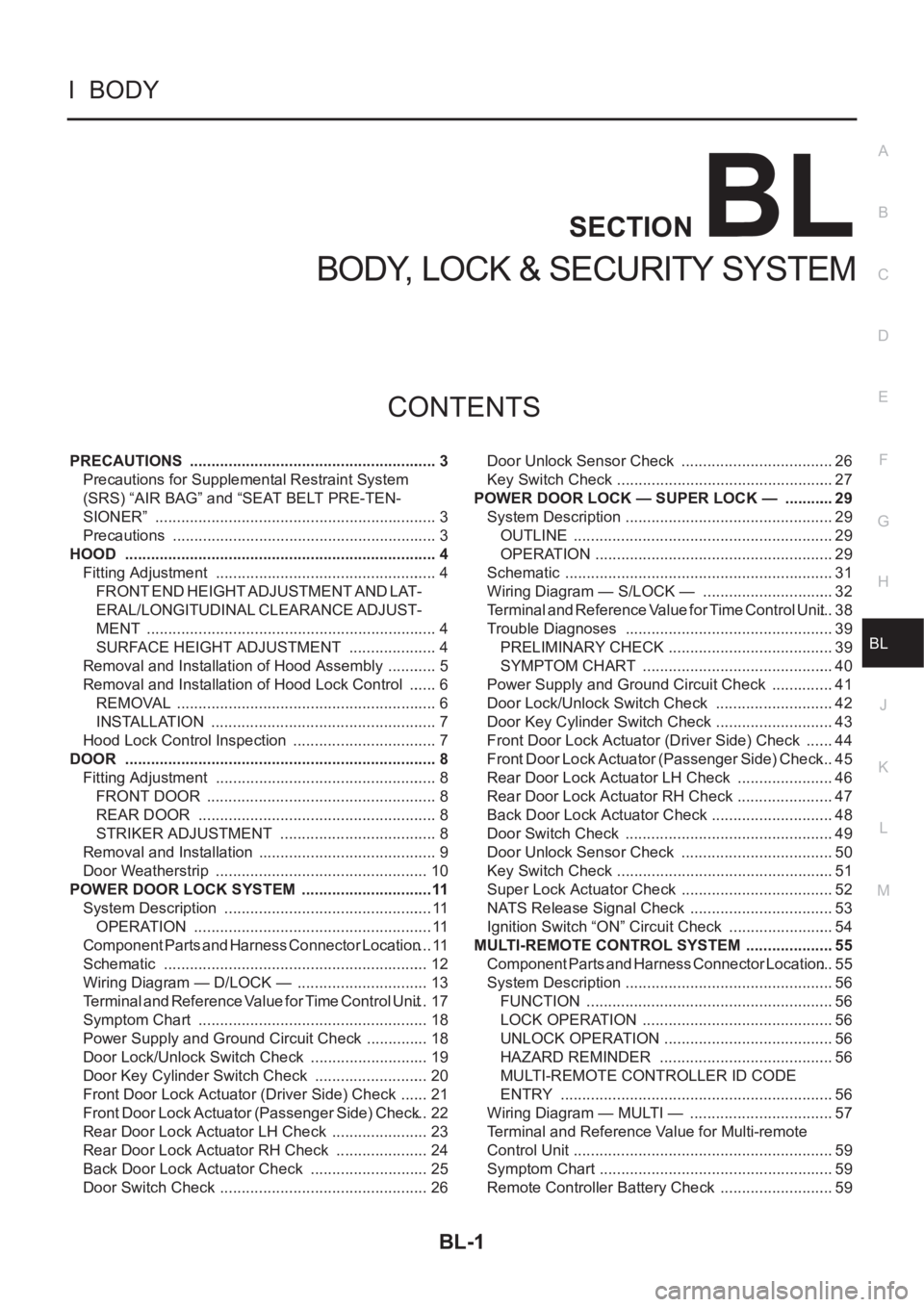
BL-1
BODY, LOCK & SECURITY SYSTEM
I BODY
CONTENTS
C
D
E
F
G
H
J
K
L
M
SECTION
A
B
BL
BODY, LOCK & SECURITY SYSTEM
PRECAUTIONS .......................................................... 3
Precautions for Supplemental Restraint System
(SRS) “AIR BAG” and “SEAT BELT PRE-TEN-
SIONER” .................................................................. 3
Precautions .............................................................. 3
HOOD ......................................................................... 4
Fitting Adjustment .................................................... 4
FRONT END HEIGHT ADJUSTMENT AND LAT-
ERAL/LONGITUDINAL CLEARANCE ADJUST-
MENT .................................................................... 4
SURFACE HEIGHT ADJUSTMENT ..................... 4
Removal and Installation of Hood Assembly ............ 5
Removal and Installation of Hood Lock Control ....... 6
REMOVAL ............................................................. 6
INSTALLATION ..................................................... 7
Hood Lock Control Inspection .................................. 7
DOOR ......................................................................... 8
Fitting Adjustment .................................................... 8
FRONT DOOR ...................................................... 8
REAR DOOR ........................................................ 8
STRIKER ADJUSTMENT ..................................... 8
Removal and Installation .......................................... 9
Door Weatherstrip .................................................. 10
POWER DOOR LOCK SYSTEM ...............................11
System Description ................................................. 11
OPERATION ........................................................ 11
Component Parts and Harness Connector Location .... 11
Schematic .............................................................. 12
Wiring Diagram — D/LOCK — ............................... 13
Terminal and Reference Value for Time Control Unit ... 17
Symptom Chart ...................................................... 18
Power Supply and Ground Circuit Check ............... 18
Door Lock/Unlock Switch Check ............................ 19
Door Key Cylinder Switch Check ........................... 20
Front Door Lock Actuator (Driver Side) Check ....... 21
Front Door Lock Actuator (Passenger Side) Check ... 22
Rear Door Lock Actuator LH Check ....................... 23
Rear Door Lock Actuator RH Check ...................... 24
Back Door Lock Actuator Check ............................ 25
Door Switch Check ................................................. 26Door Unlock Sensor Check .................................... 26
Key Switch Check ................................................... 27
POWER DOOR LOCK — SUPER LOCK — ............ 29
System Description ................................................. 29
OUTLINE ............................................................. 29
OPERATION .....................................................
... 29
Schematic ............................................................... 31
Wiring Diagram — S/LOCK — ............................... 32
Terminal and Reference Value for Time Control Unit ... 38
Trouble Diagnoses ................................................. 39
PRELIMINARY CHECK ....................................... 39
SYMPTOM CHART ............................................. 40
Power Supply and Ground Circuit Check ............... 41
Door Lock/Unlock Switch Check ............................ 42
Door Key Cylinder Switch Check ............................ 43
Front Door Lock Actuator (Driver Side) Check ....... 44
Front Door Lock Actuator (Passenger Side) Check ... 45
Rear Door Lock Actuator LH Check ....................... 46
Rear Door Lock Actuator RH Check ....................... 47
Back Door Lock Actuator Check ............................. 48
Door Switch Check ................................................. 49
Door Unlock Sensor Check .................................... 50
Key Switch Check ................................................... 51
Super Lock Actuator Check .................................... 52
NATS Release Signal Check .................................. 53
Ignition Switch “ON” Circuit Check ......................... 54
MULTI-REMOTE CONTROL SYSTEM ..................... 55
Component Parts and Harness Connector Location ... 55
System Description ................................................. 56
FUNCTION .......................................................... 56
LOCK OPERATION ............................................. 56
UNLOCK OPERATION ........................................ 56
HAZARD REMINDER ......................................... 56
MULTI-REMOTE CONTROLLER ID CODE
ENTRY ................................................................ 56
Wiring Diagram — MULTI — .................................. 57
Terminal and Reference Value for Multi-remote
Control Unit ............................................................. 59
Symptom Chart ....................................................... 59
Remote Controller Battery Check ........................... 59
Page 3070 of 3833
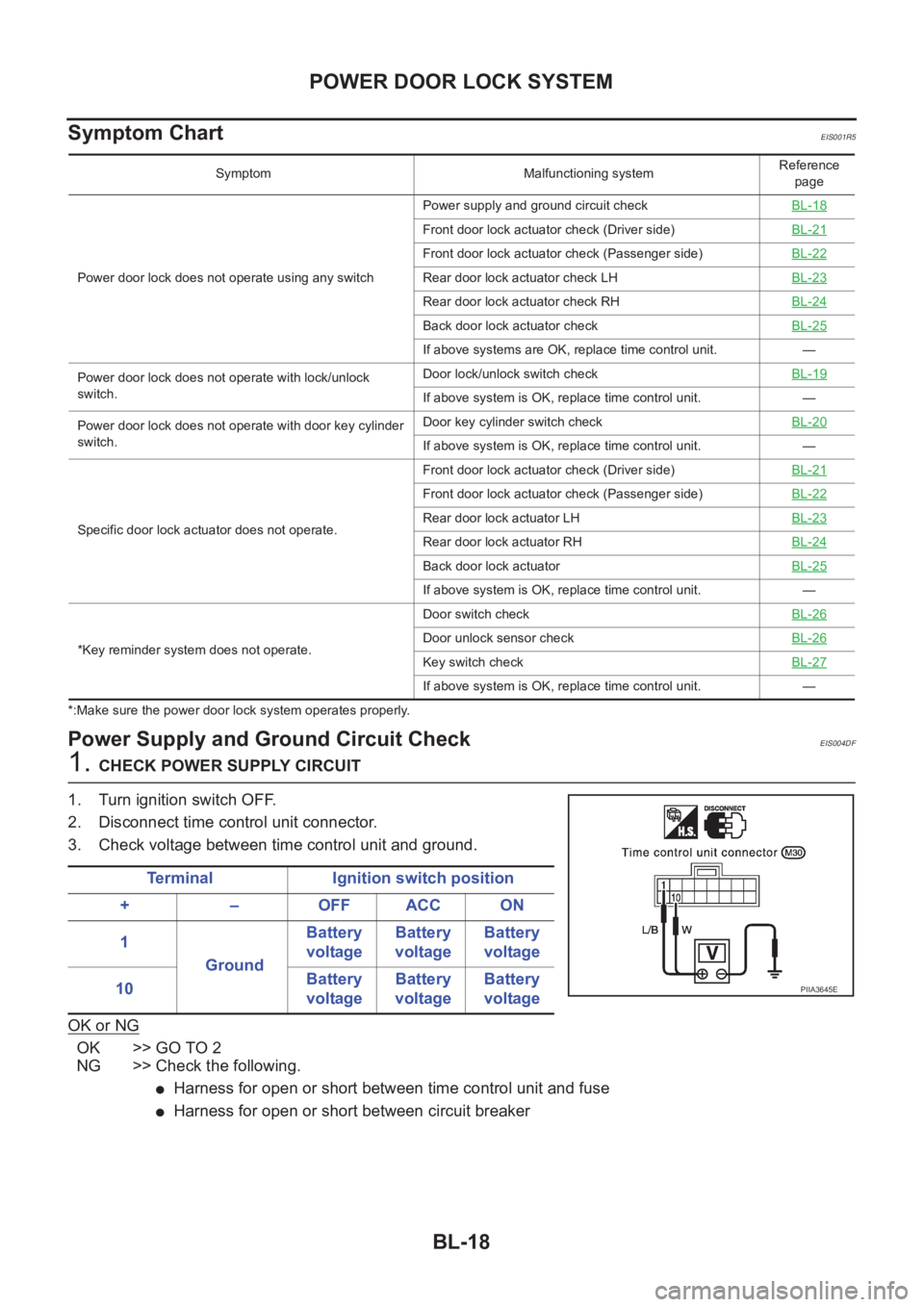
BL-18
POWER DOOR LOCK SYSTEM
Symptom Chart
EIS001R5
*:Make sure the power door lock system operates properly.
Power Supply and Ground Circuit CheckEIS004DF
1. CHECK POWER SUPPLY CIRCUIT
1. Turn ignition switch OFF.
2. Disconnect time control unit connector.
3. Check voltage between time control unit and ground.
OK or NG
OK >> GO TO 2
NG >> Check the following.
●Harness for open or short between time control unit and fuse
●Harness for open or short between circuit breaker
Symptom Malfunctioning systemReference
page
Power door lock does not operate using any switchPower supply and ground circuit checkBL-18
Front door lock actuator check (Driver side)BL-21
Front door lock actuator check (Passenger side)BL-22
Rear door lock actuator check LH BL-23
Rear door lock actuator check RHBL-24
Back door lock actuator checkBL-25
If above systems are OK, replace time control unit. —
Power door lock does not operate with lock/unlock
switch.Door lock/unlock switch checkBL-19
If above system is OK, replace time control unit. —
Power door lock does not operate with door key cylinder
switch.Door key cylinder switch checkBL-20
If above system is OK, replace time control unit. —
Specific door lock actuator does not operate.Front door lock actuator check (Driver side)BL-21
Front door lock actuator check (Passenger side)BL-22
Rear door lock actuator LHBL-23
Rear door lock actuator RHBL-24
Back door lock actuatorBL-25
If above system is OK, replace time control unit. —
*Key reminder system does not operate.Door switch checkBL-26
Door unlock sensor checkBL-26
Key switch checkBL-27
If above system is OK, replace time control unit. —
Terminal Ignition switch position
+ – OFF ACC ON
1
GroundBattery
voltageBattery
voltageBattery
voltage
10Battery
voltageBattery
voltageBattery
voltage
PIIA3645E
Page 3082 of 3833
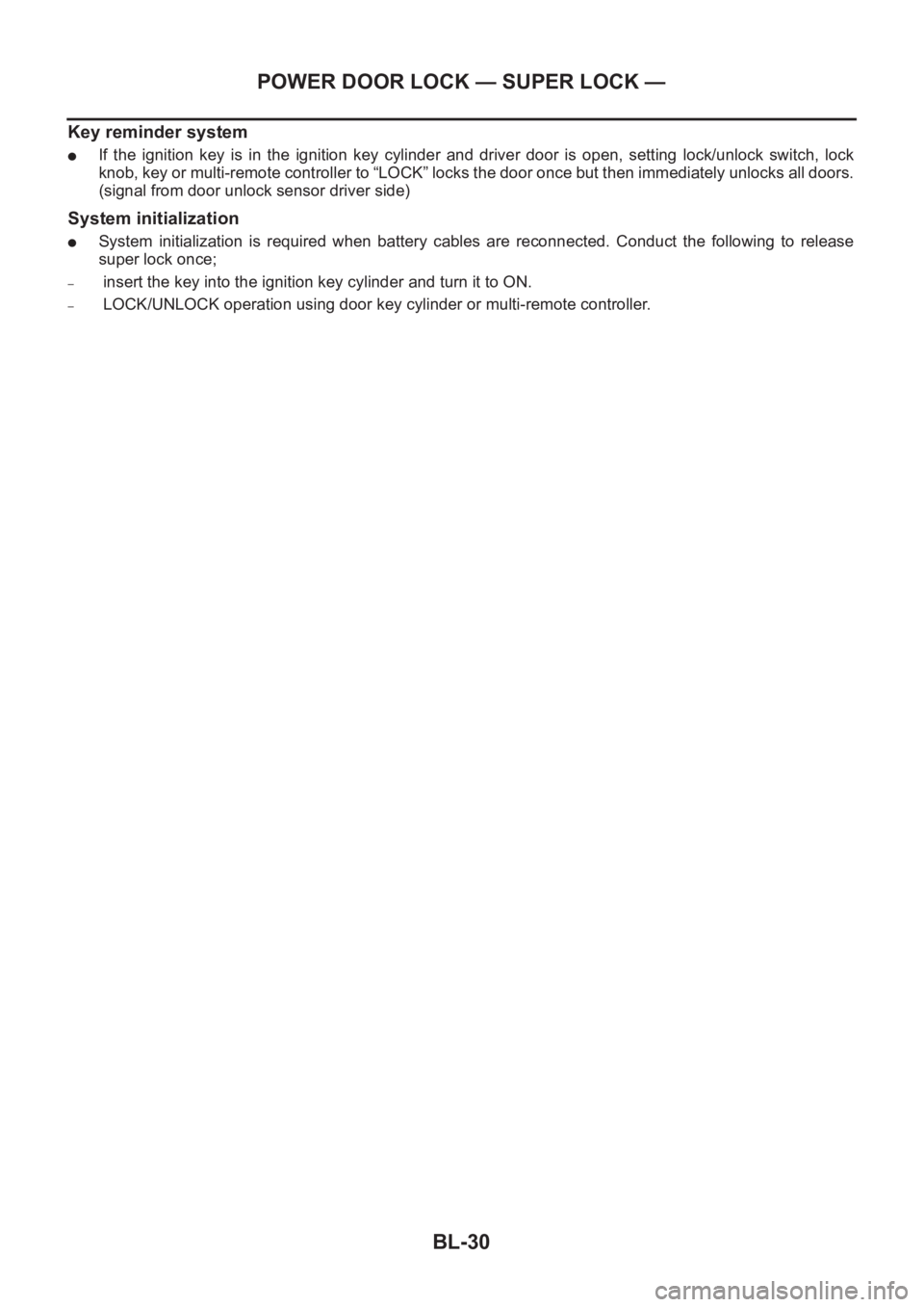
BL-30
POWER DOOR LOCK — SUPER LOCK —
Key reminder system
●If the ignition key is in the ignition key cylinder and driver door is open, setting lock/unlock switch, lock
knob, key or multi-remote controller to “LOCK” locks the door once but then immediately unlocks all doors.
(signal from door unlock sensor driver side)
System initialization
●System initialization is required when battery cables are reconnected. Conduct the following to release
super lock once;
– insert the key into the ignition key cylinder and turn it to ON.
– LOCK/UNLOCK operation using door key cylinder or multi-remote controller.
Page 3090 of 3833
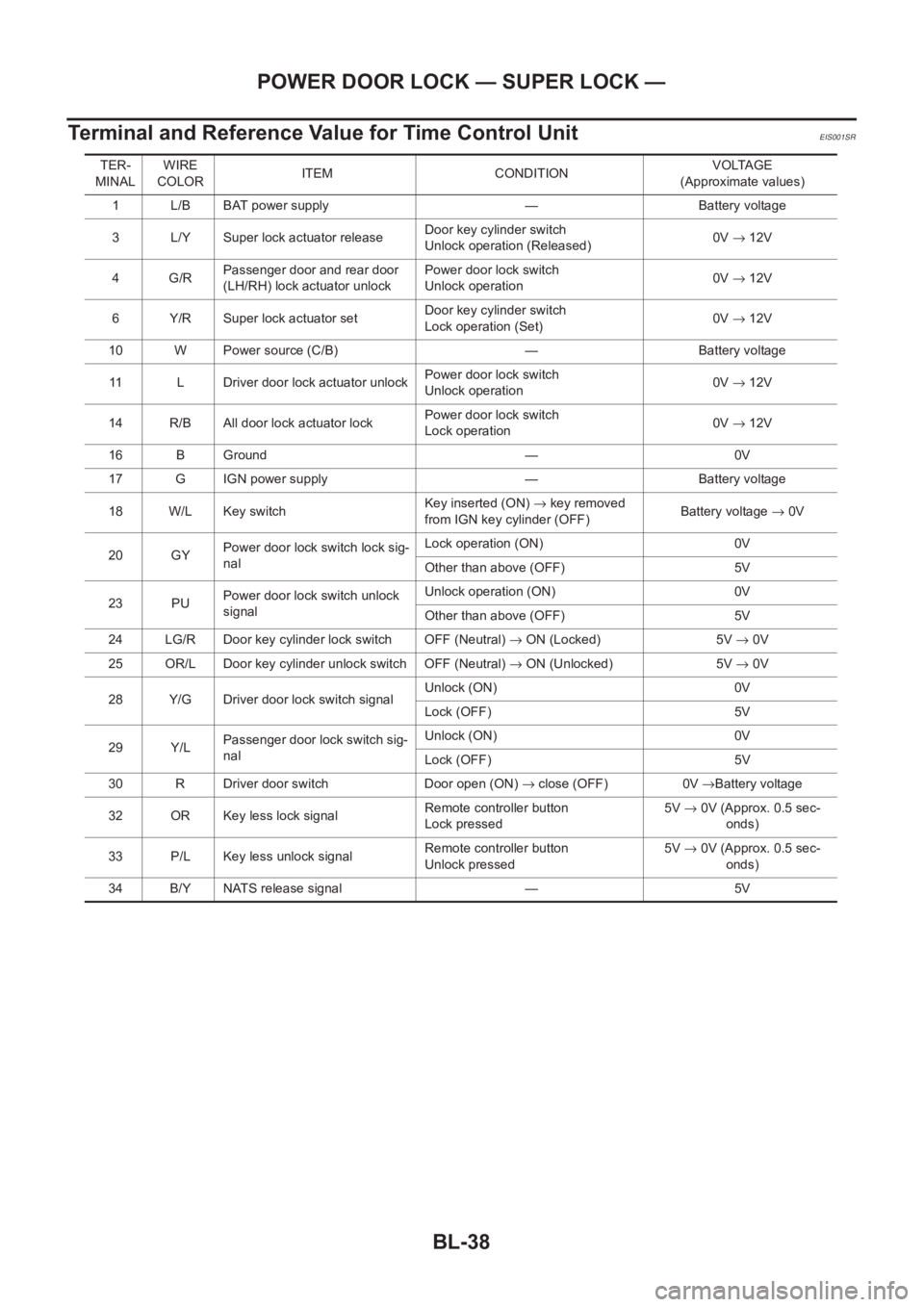
BL-38
POWER DOOR LOCK — SUPER LOCK —
Terminal and Reference Value for Time Control Unit
EIS001SR
TER-
MINALWIRE
COLORITEM CONDITIONVOLTAGE
(Approximate values)
1 L/B BAT power supply — Battery voltage
3 L/Y Super lock actuator releaseDoor key cylinder switch
Unlock operation (Released)0V→ 12V
4G/RPassenger door and rear door
(LH/RH) lock actuator unlockPower door lock switch
Unlock operation0V→ 12V
6 Y/R Super lock actuator setDoor key cylinder switch
Lock operation (Set)0V→ 12V
10 W Power source (C/B) — Battery voltage
11 L Driver door lock actuator unlockPower door lock switch
Unlock operation0V→ 12V
14 R/B All door lock actuator lockPower door lock switch
Lock operation0V→ 12V
16 B Ground — 0V
17 G IGN power supply — Battery voltage
18 W/L Key switchKey inserted (ON) → key removed
from IGN key cylinder (OFF)Battery voltage → 0V
20 GYPower door lock switch lock sig-
nalLock operation (ON) 0V
Other than above (OFF) 5V
23 PUPower door lock switch unlock
signalUnlock operation (ON) 0V
Other than above (OFF) 5V
24 LG/R Door key cylinder lock switch OFF (Neutral) → ON (Locked) 5V → 0V
25 OR/L Door key cylinder unlock switch OFF (Neutral) → ON (Unlocked) 5V → 0V
28 Y/G Driver door lock switch signalUnlock (ON) 0V
Lock (OFF) 5V
29 Y/LPassenger door lock switch sig-
nalUnlock (ON) 0V
Lock (OFF) 5V
30 R Driver door switch Door open (ON) → close (OFF) 0V →Battery voltage
32 OR Key less lock signalRemote controller button
Lock pressed5V→ 0V (Approx. 0.5 sec-
onds)
33 P/L Key less unlock signalRemote controller button
Unlock pressed5V→ 0V (Approx. 0.5 sec-
onds)
34 B/Y NATS release signal — 5V
Page 3111 of 3833
MULTI-REMOTE CONTROL SYSTEM
BL-59
C
D
E
F
G
H
J
K
L
MA
B
BL
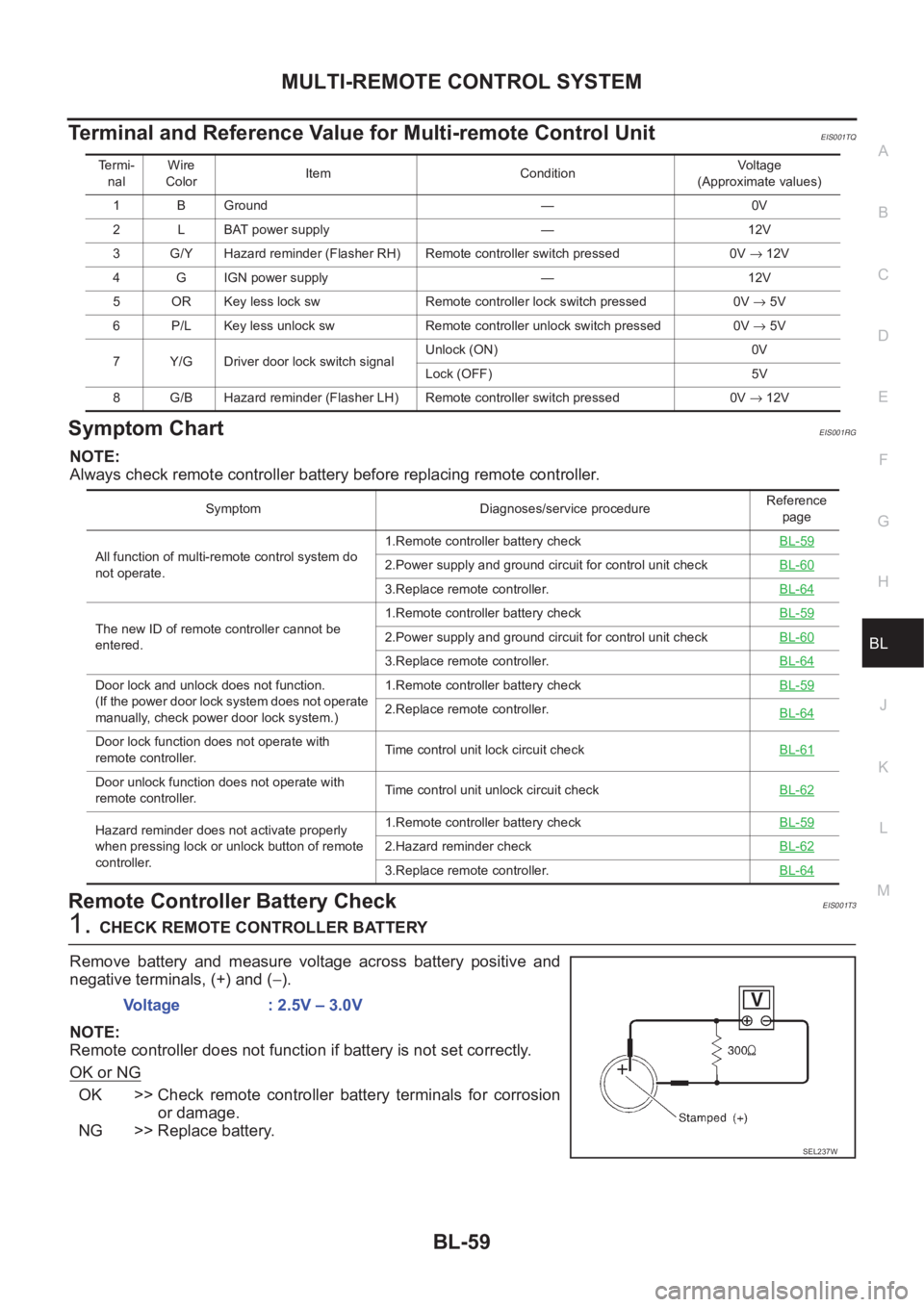
Terminal and Reference Value for Multi-remote Control UnitEIS001TQ
Symptom ChartEIS001RG
NOTE:
Always check remote controller battery before replacing remote controller.
Remote Controller Battery CheckEIS001T3
1.CHECK REMOTE CONTROLLER BATTERY
Remove battery and measure voltage across battery positive and
negative terminals, (+) and (−).
NOTE:
Remote controller does not function if battery is not set correctly.
OK or NG
OK >> Check remote controller battery terminals for corrosion
or damage.
NG >> Replace battery.
Te r m i -
nalWire
ColorItem ConditionVo l ta g e
(Approximate values)
1 B Ground — 0V
2 L BAT power supply — 12V
3 G/Y Hazard reminder (Flasher RH) Remote controller switch pressed0V → 12V
4 G IGN power supply — 12V
5 OR Key less lock sw Remote controller lock switch pressed 0V → 5V
6 P/L Key less unlock sw Remote controller unlock switch pressed 0V → 5V
7 Y/G Driver door lock switch signalUnlock (ON) 0V
Lock (OFF) 5V
8 G/B Hazard reminder (Flasher LH) Remote controller switch pressed0V → 12V
Symptom Diagnoses/service procedureReference
page
All function of multi-remote control system do
not operate.1.Remote controller battery checkBL-59
2.Power supply and ground circuit for control unit checkBL-60
3.Replace remote controller.BL-64
The new ID of remote controller cannot be
entered.1.Remote controller battery checkBL-592.Power supply and ground circuit for control unit checkBL-60
3.Replace remote controller.BL-64
Door lock and unlock does not function.
(If the power door lock system does not operate
manually, check power door lock system.)1.Remote controller battery check BL-59
2.Replace remote controller.
BL-64
Door lock function does not operate with
remote controller.Time control unit lock circuit checkBL-61
Door unlock function does not operate with
remote controller.Time control unit unlock circuit check BL-62
Hazard reminder does not activate properly
when pressing lock or unlock button of remote
controller.1.Remote controller battery check BL-59
2.Hazard reminder checkBL-62
3.Replace remote controller.BL-64
Voltage : 2.5V – 3.0V
SEL237W
Page 3141 of 3833
NATS (NISSAN ANTI-THEFT SYSTEM)
BL-89
C
D
E
F
G
H
J
K
L
MA
B
BL
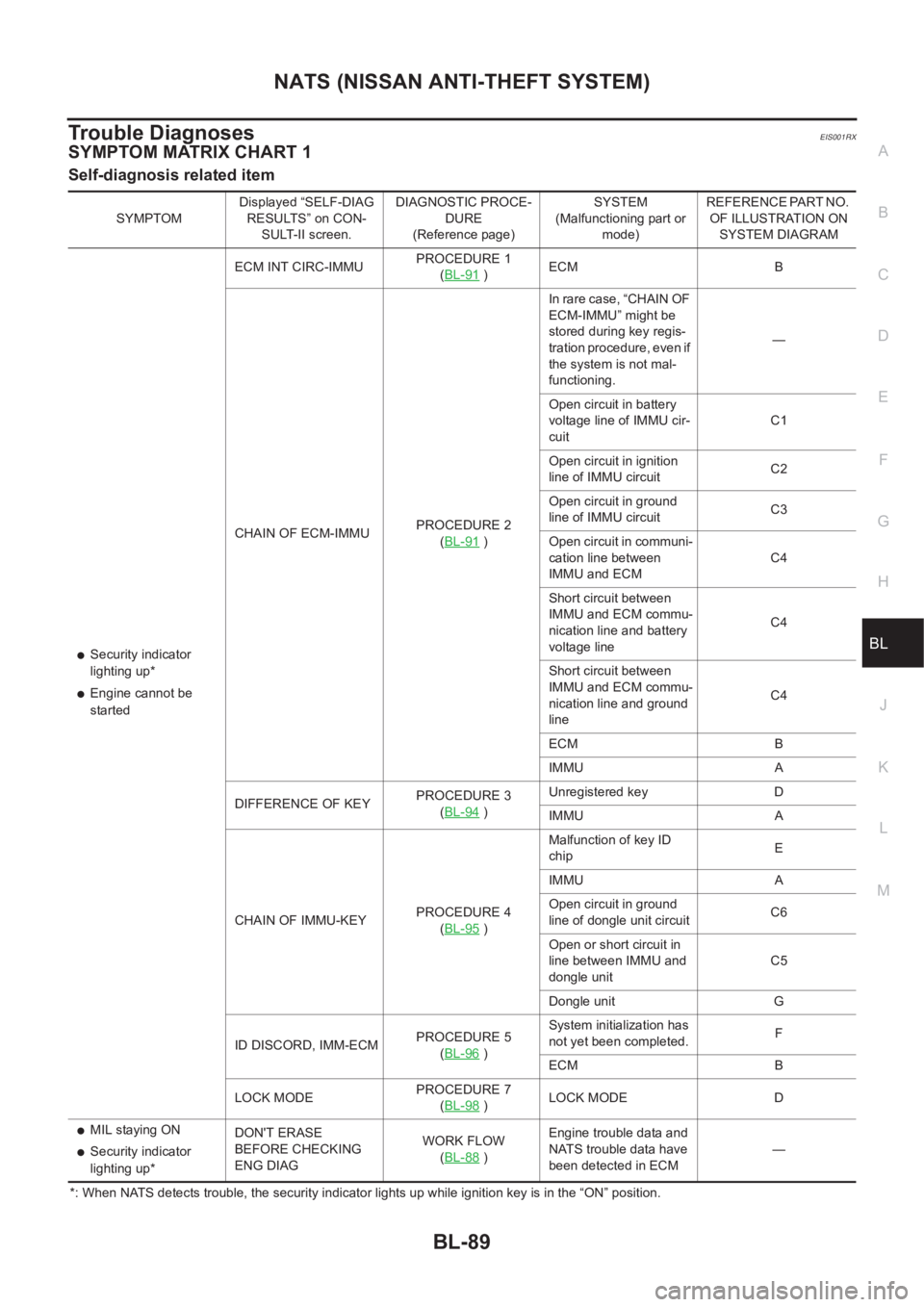
Trouble DiagnosesEIS001RX
SYMPTOM MATRIX CHART 1
Self-diagnosis related item
*: When NATS detects trouble, the security indicator lights up while ignition key is in the “ON” position. SYMPTOMDisplayed “SELF-DIAG
RESULTS” on CON-
SULT-II screen.DIAGNOSTIC PROCE-
DURE
(Reference page)SYSTEM
(Malfunctioning part or
mode)REFERENCE PART NO.
OF ILLUSTRATION ON
SYSTEM DIAGRAM
●Security indicator
lighting up*
●Engine cannot be
startedECM INT CIRC-IMMUPROCEDURE 1
(BL-91
)ECM B
CHAIN OF ECM-IMMUPROCEDURE 2
(BL-91
)In rare case, “CHAIN OF
ECM-IMMU” might be
stored during key regis-
tration procedure, even if
the system is not mal-
functioning.—
Open circuit in battery
voltage line of IMMU cir-
cuitC1
Open circuit in ignition
line of IMMU circuitC2
Open circuit in ground
line of IMMU circuitC3
Open circuit in communi-
cation line between
IMMU and ECMC4
Short circuit between
IMMU and ECM commu-
nication line and battery
voltage lineC4
Short circuit between
IMMU and ECM commu-
nication line and ground
lineC4
ECM B
IMMU A
DIFFERENCE OF KEYPROCEDURE 3
(BL-94
)Unregistered key D
IMMU A
CHAIN OF IMMU-KEYPROCEDURE 4
(BL-95
)Malfunction of key ID
chipE
IMMU A
Open circuit in ground
line of dongle unit circuitC6
Open or short circuit in
line between IMMU and
dongle unitC5
Dongle unit G
ID DISCORD, IMM-ECMPROCEDURE 5
(BL-96
)System initialization has
not yet been completed.F
ECM B
LOCK MODEPROCEDURE 7
(BL-98
)LOCK MODE D
●MIL staying ON
●Security indicator
lighting up*DON'T ERASE
BEFORE CHECKING
ENG DIAGWORK FLOW
(BL-88 )Engine trouble data and
NATS trouble data have
been detected in ECM—
Page 3143 of 3833
NATS (NISSAN ANTI-THEFT SYSTEM)
BL-91
C
D
E
F
G
H
J
K
L
MA
B
BL
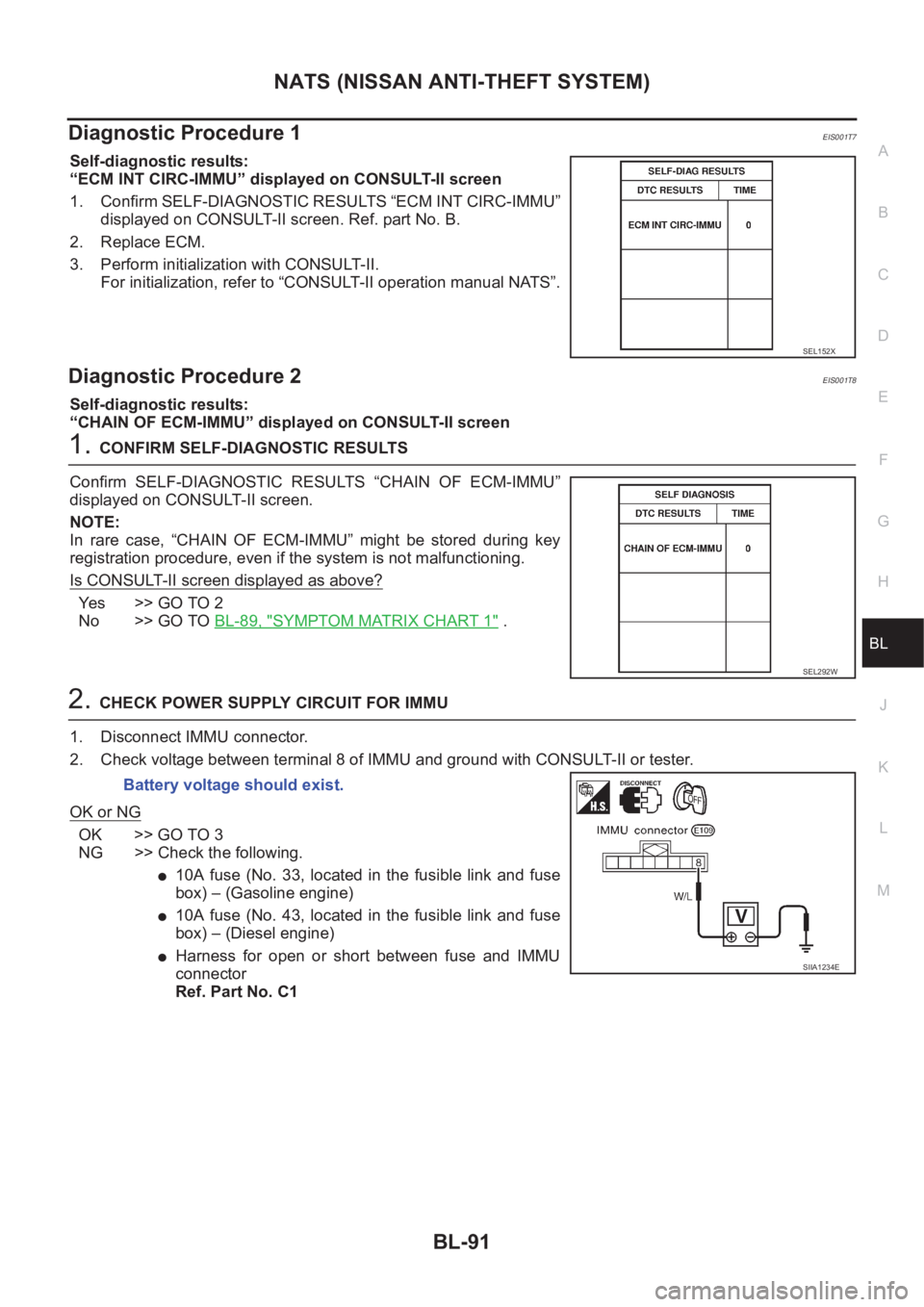
Diagnostic Procedure 1EIS001T7
Self-diagnostic results:
“ECM INT CIRC-IMMU” displayed on CONSULT-II screen
1. Confirm SELF-DIAGNOSTIC RESULTS “ECM INT CIRC-IMMU”
displayed on CONSULT-II screen. Ref. part No. B.
2. Replace ECM.
3. Perform initialization with CONSULT-II.
For initialization, refer to “CONSULT-II operation manual NATS”.
Diagnostic Procedure 2EIS001T8
Self-diagnostic results:
“CHAIN OF ECM-IMMU” displayed on CONSULT-II screen
1.CONFIRM SELF-DIAGNOSTIC RESULTS
Confirm SELF-DIAGNOSTIC RESULTS “CHAIN OF ECM-IMMU”
displayed on CONSULT-II screen.
NOTE:
In rare case, “CHAIN OF ECM-IMMU” might be stored during key
registration procedure, even if the system is not malfunctioning.
Is CONSULT-II screen displayed as above?
Ye s > > G O T O 2
No >> GO TO BL-89, "
SYMPTOM MATRIX CHART 1" .
2.CHECK POWER SUPPLY CIRCUIT FOR IMMU
1. Disconnect IMMU connector.
2. Check voltage between terminal 8 of IMMU and ground with CONSULT-II or tester.
OK or NG
OK >> GO TO 3
NG >> Check the following.
●10A fuse (No. 33, located in the fusible link and fuse
box) – (Gasoline engine)
●10A fuse (No. 43, located in the fusible link and fuse
box) – (Diesel engine)
●Harness for open or short between fuse and IMMU
connector
Ref. Part No. C1
SEL152X
SEL292W
Battery voltage should exist.
SIIA1234E
Page 3552 of 3833
LT-62
INTERIOR ROOM LAMP
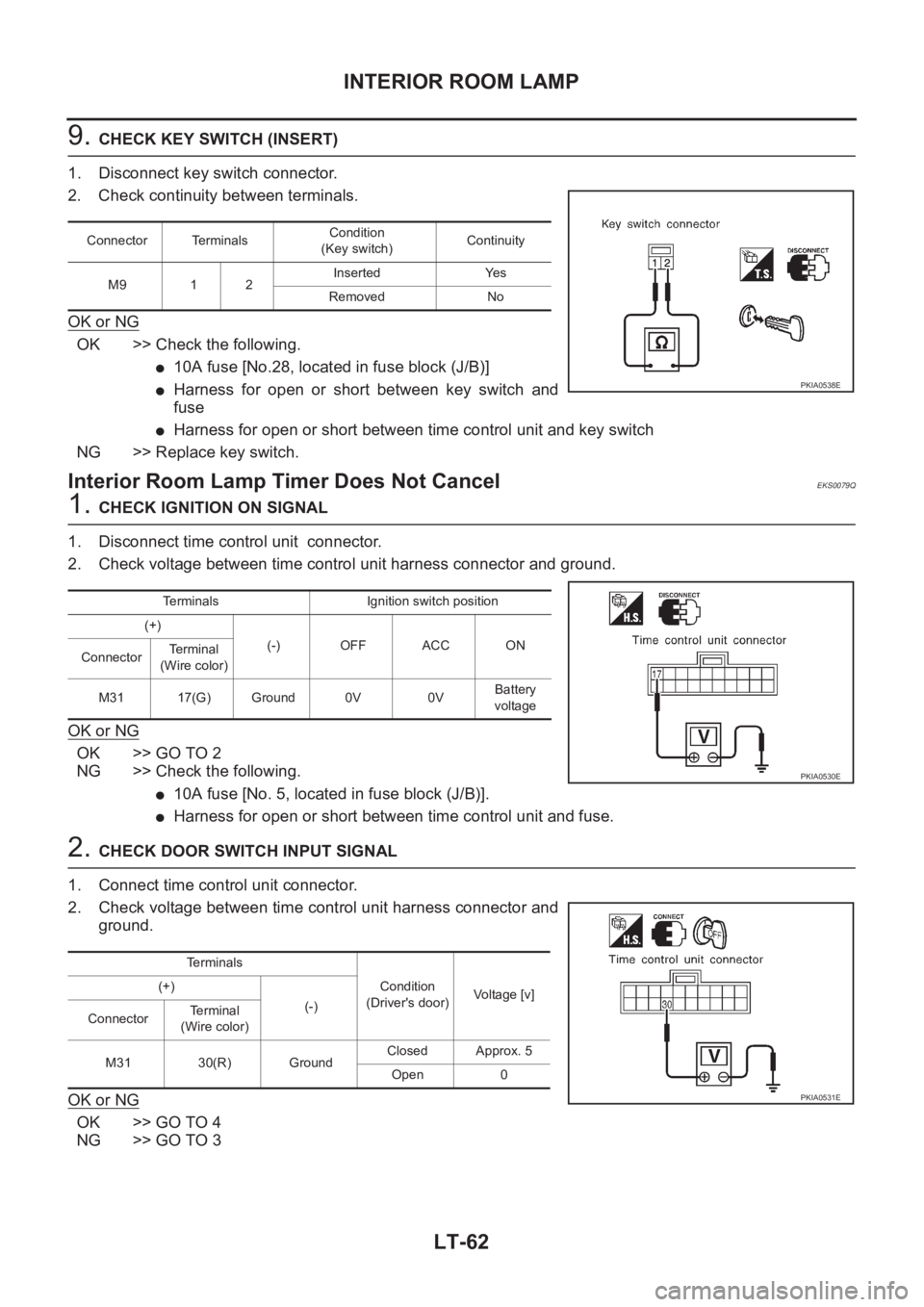
9. CHECK KEY SWITCH (INSERT)
1. Disconnect key switch connector.
2. Check continuity between terminals.
OK or NG
OK >> Check the following.
●10A fuse [No.28, located in fuse block (J/B)]
●Harness for open or short between key switch and
fuse
●Harness for open or short between time control unit and key switch
NG >> Replace key switch.
Interior Room Lamp Timer Does Not CancelEKS0079Q
1. CHECK IGNITION ON SIGNAL
1. Disconnect time control unit connector.
2. Check voltage between time control unit harness connector and ground.
OK or NG
OK >> GO TO 2
NG >> Check the following.
●10A fuse [No. 5, located in fuse block (J/B)].
●Harness for open or short between time control unit and fuse.
2. CHECK DOOR SWITCH INPUT SIGNAL
1. Connect time control unit connector.
2. Check voltage between time control unit harness connector and
ground.
OK or NG
OK >> GO TO 4
NG >> GO TO 3
Connector TerminalsCondition
(Key switch)Continuity
M9 1 2Inserted Yes
Removed No
PKIA0538E
Terminals Ignition switch position
(+)
(-) OFF ACC ON
ConnectorTerminal
(Wire color)
M31 17(G) Ground 0V 0VBattery
voltage
PKIA0530E
Te r m i n a l s
Condition
(Driver's door)Voltage [v] (+)
(-)
ConnectorTe r m i n a l
(Wire color)
M31 30(R) GroundClosed Approx. 5
Open 0
PKIA0531E