wiring NISSAN X-TRAIL 2001 Service User Guide
[x] Cancel search | Manufacturer: NISSAN, Model Year: 2001, Model line: X-TRAIL, Model: NISSAN X-TRAIL 2001Pages: 3833, PDF Size: 39.49 MB
Page 26 of 3833
GI-24
SERVICE INFORMATION FOR ELECTRICAL INCIDENT
●Heat sensitive
●Freezing
●Water intrusion
●Electrical load
●Cold or hot start up
Get a thorough description of the incident from the customer. It is important for simulating the conditions of the
problem.
Vehicle Vibration
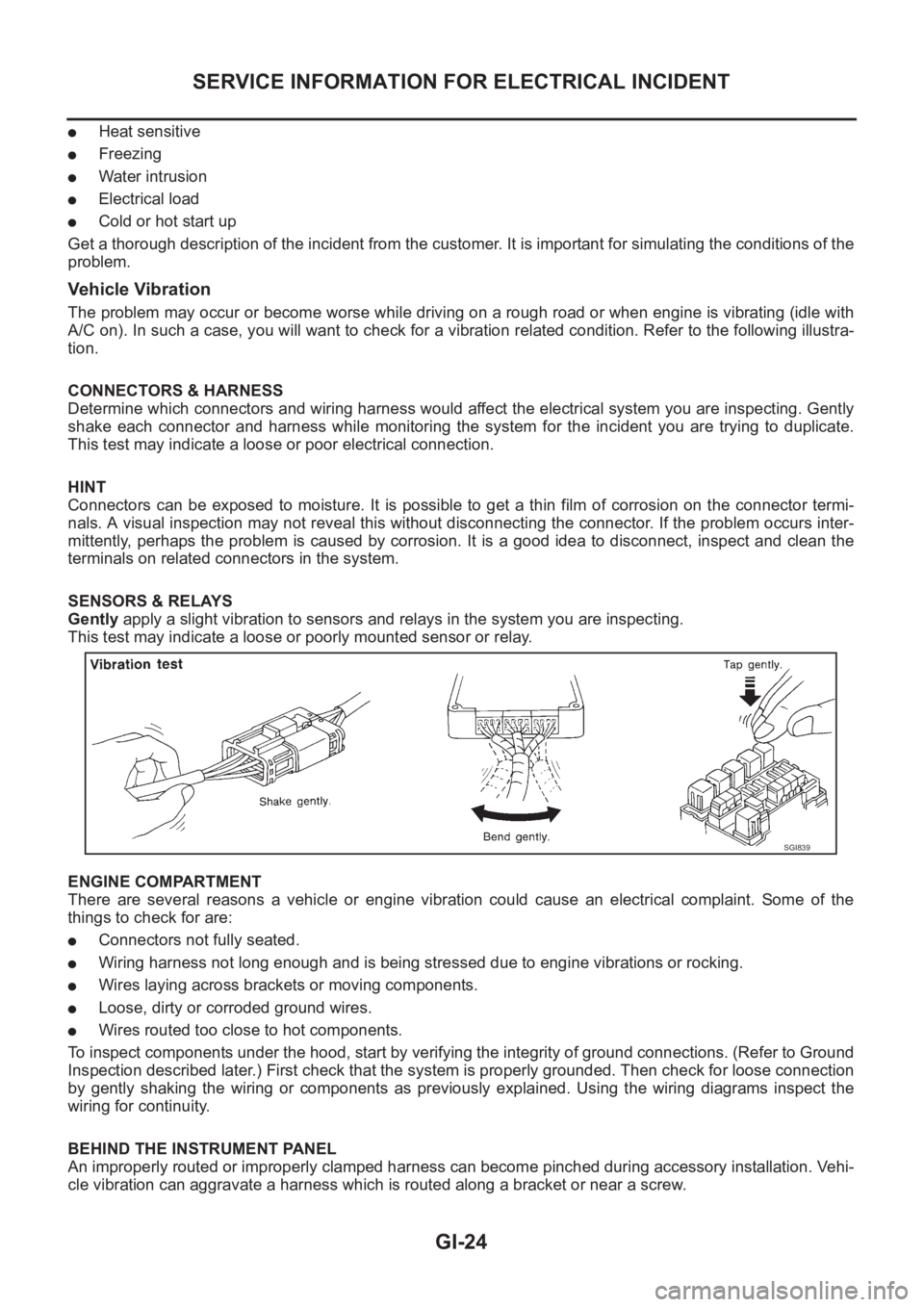
The problem may occur or become worse while driving on a rough road or when engine is vibrating (idle with
A/C on). In such a case, you will want to check for a vibration related condition. Refer to the following illustra-
tion.
CONNECTORS & HARNESS
Determine which connectors and wiring harness would affect the electrical system you are inspecting. Gently
shake each connector and harness while monitoring the system for the incident you are trying to duplicate.
This test may indicate a loose or poor electrical connection.
HINT
Connectors can be exposed to moisture. It is possible to get a thin film of corrosion on the connector termi-
nals. A visual inspection may not reveal this without disconnecting the connector. If the problem occurs inter-
mittently, perhaps the problem is caused by corrosion. It is a good idea to disconnect, inspect and clean the
terminals on related connectors in the system.
SENSORS & RELAYS
Gently apply a slight vibration to sensors and relays in the system you are inspecting.
This test may indicate a loose or poorly mounted sensor or relay.
ENGINE COMPARTMENT
There are several reasons a vehicle or engine vibration could cause an electrical complaint. Some of the
things to check for are:
●Connectors not fully seated.
●Wiring harness not long enough and is being stressed due to engine vibrations or rocking.
●Wires laying across brackets or moving components.
●Loose, dirty or corroded ground wires.
●Wires routed too close to hot components.
To inspect components under the hood, start by verifying the integrity of ground connections. (Refer to Ground
Inspection described later.) First check that the system is properly grounded. Then check for loose connection
by gently shaking the wiring or components as previously explained. Using the wiring diagrams inspect the
wiring for continuity.
BEHIND THE INSTRUMENT PANEL
An improperly routed or improperly clamped harness can become pinched during accessory installation. Vehi-
cle vibration can aggravate a harness which is routed along a bracket or near a screw.
SGI839
Page 27 of 3833
SERVICE INFORMATION FOR ELECTRICAL INCIDENT
GI-25
C
D
E
F
G
H
I
J
K
L
MB
GI
UNDER SEATING AREAS
An unclamped or loose harness can cause wiring to be pinched by seat components (such as slide guides)
during vehicle vibration. If the wiring runs under seating areas, inspect wire routing for possible damage or
pinching.
Heat Sensitive
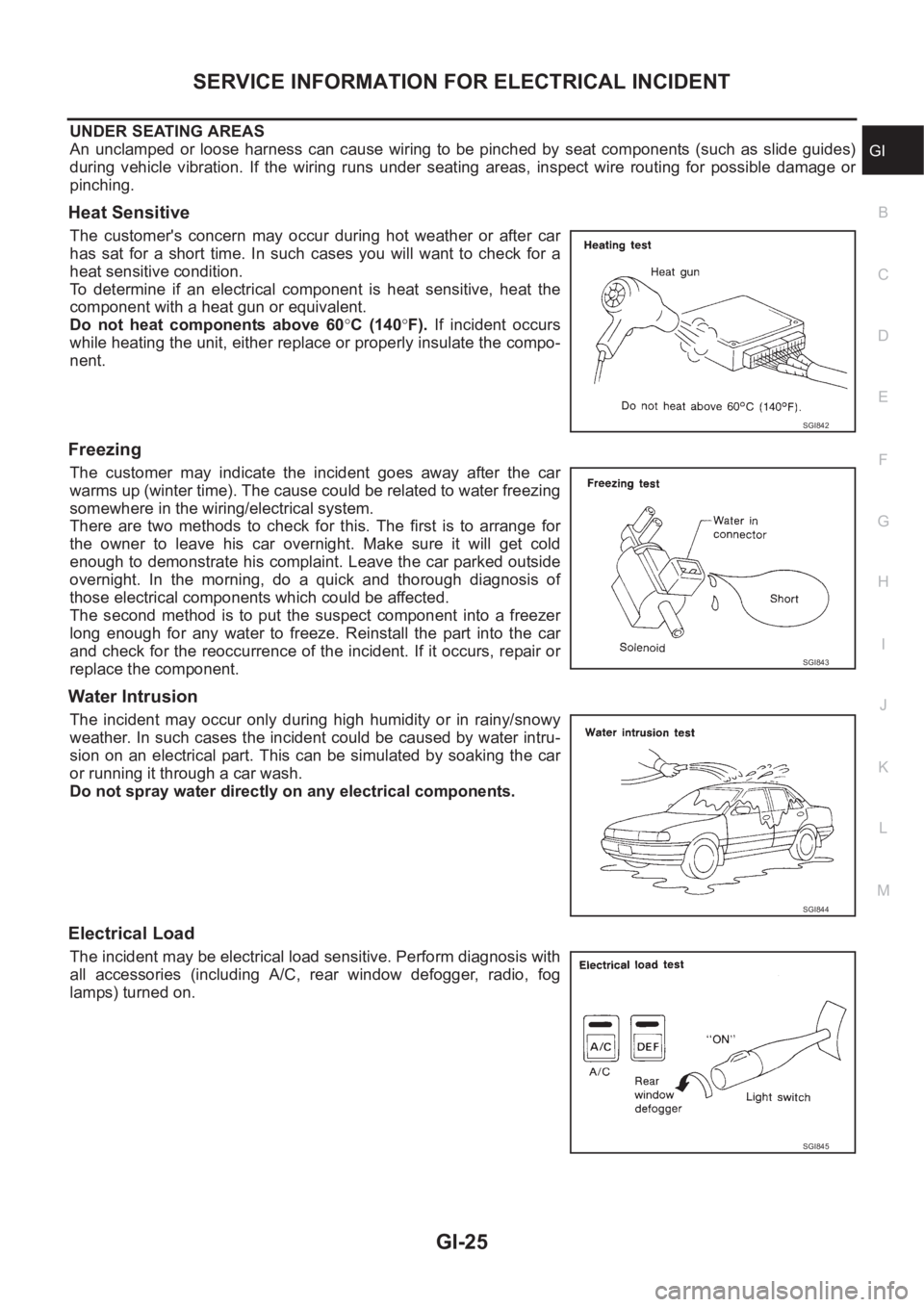
The customer's concern may occur during hot weather or after car
has sat for a short time. In such cases you will want to check for a
heat sensitive condition.
To determine if an electrical component is heat sensitive, heat the
component with a heat gun or equivalent.
Do not heat components above 60°C (140°F). If incident occurs
while heating the unit, either replace or properly insulate the compo-
nent.
Freezing
The customer may indicate the incident goes away after the car
warms up (winter time). The cause could be related to water freezing
somewhere in the wiring/electrical system.
There are two methods to check for this. The first is to arrange for
the owner to leave his car overnight. Make sure it will get cold
enough to demonstrate his complaint. Leave the car parked outside
overnight. In the morning, do a quick and thorough diagnosis of
those electrical components which could be affected.
The second method is to put the suspect component into a freezer
long enough for any water to freeze. Reinstall the part into the car
and check for the reoccurrence of the incident. If it occurs, repair or
replace the component.
Water Intrusion
The incident may occur only during high humidity or in rainy/snowy
weather. In such cases the incident could be caused by water intru-
sion on an electrical part. This can be simulated by soaking the car
or running it through a car wash.
Do not spray water directly on any electrical components.
Electrical Load
The incident may be electrical load sensitive. Perform diagnosis with
all accessories (including A/C, rear window defogger, radio, fog
lamps) turned on.
SGI842
SGI843
SGI844
SGI845
Page 28 of 3833
GI-26
SERVICE INFORMATION FOR ELECTRICAL INCIDENT
Cold or Hot Start Up
On some occasions an electrical incident may occur only when the car is started cold, or it may occur when
the car is restarted hot shortly after being turned off. In these cases you may have to keep the car overnight to
make a proper diagnosis.
CIRCUIT INSPECTION
Introduction
In general, testing electrical circuits is an easy task if it is approached in a logical and organized method.
Before beginning it is important to have all available information on the system to be tested. Also, get a thor-
ough understanding of system operation. Then you will be able to use the appropriate equipment and follow
the correct test procedure.
You may have to simulate vehicle vibrations while testing electrical components. Gently shake the wiring har-
ness or electrical component to do this.
NOTE:
Refer to “How to Check Terminal” to probe or check terminal.
Testing for “Opens” in the Circuit
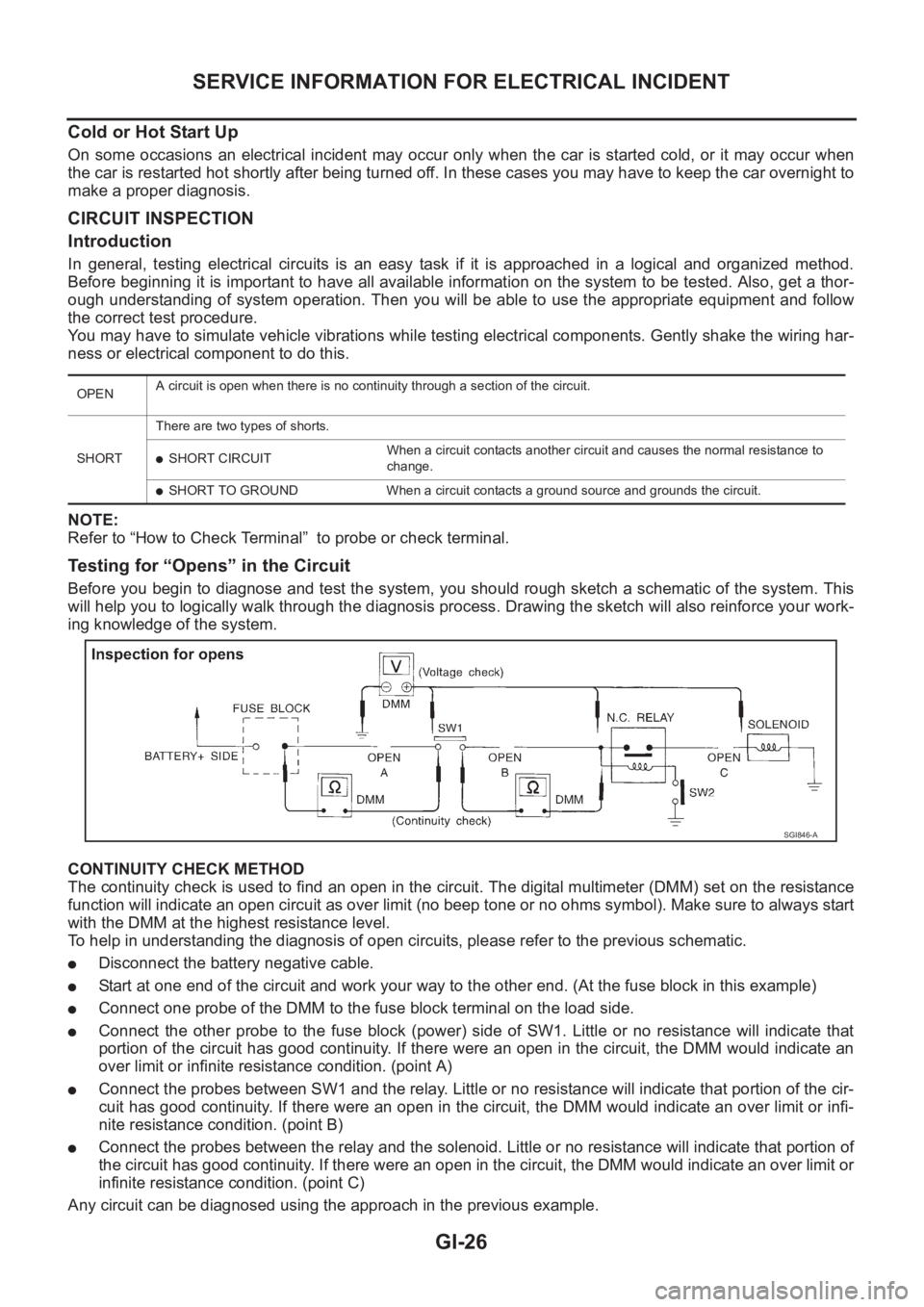
Before you begin to diagnose and test the system, you should rough sketch a schematic of the system. This
will help you to logically walk through the diagnosis process. Drawing the sketch will also reinforce your work-
ing knowledge of the system.
CONTINUITY CHECK METHOD
The continuity check is used to find an open in the circuit. The digital multimeter (DMM) set on the resistance
function will indicate an open circuit as over limit (no beep tone or no ohms symbol). Make sure to always start
with the DMM at the highest resistance level.
To help in understanding the diagnosis of open circuits, please refer to the previous schematic.
●Disconnect the battery negative cable.
●Start at one end of the circuit and work your way to the other end. (At the fuse block in this example)
●Connect one probe of the DMM to the fuse block terminal on the load side.
●Connect the other probe to the fuse block (power) side of SW1. Little or no resistance will indicate that
portion of the circuit has good continuity. If there were an open in the circuit, the DMM would indicate an
over limit or infinite resistance condition. (point A)
●Connect the probes between SW1 and the relay. Little or no resistance will indicate that portion of the cir-
cuit has good continuity. If there were an open in the circuit, the DMM would indicate an over limit or infi-
nite resistance condition. (point B)
●Connect the probes between the relay and the solenoid. Little or no resistance will indicate that portion of
the circuit has good continuity. If there were an open in the circuit, the DMM would indicate an over limit or
infinite resistance condition. (point C)
Any circuit can be diagnosed using the approach in the previous example.
OPENA circuit is open when there is no continuity through a section of the circuit.
SHORTThere are two types of shorts.
●SHORT CIRCUITWhen a circuit contacts another circuit and causes the normal resistance to
change.
●SHORT TO GROUND When a circuit contacts a ground source and grounds the circuit.
SGI846-A
Page 30 of 3833
GI-28
SERVICE INFORMATION FOR ELECTRICAL INCIDENT
no voltage; short is further down the circuit than SW1.
●With SW1 closed, relay and solenoid disconnected and the DMM leads across both fuse terminals, check
for voltage.
voltage; short is between SW1 and the relay (point B).
no voltage; short is further down the circuit than the relay.
●With SW1 closed, relay contacts jumped with fused jumper wire check for voltage.
voltage; short is down the circuit of the relay or between the relay and the disconnected solenoid (point C).
no voltage; retrace steps and check power to fuse block.
Ground Inspection
Ground connections are very important to the proper operation of electrical and electronic circuits. Ground
connections are often exposed to moisture, dirt and other corrosive elements. The corrosion (rust) can
become an unwanted resistance. This unwanted resistance can change the way a circuit works.
Electronically controlled circuits are very sensitive to proper grounding. A loose or corroded ground can drasti-
cally affect an electronically controlled circuit. A poor or corroded ground can easily affect the circuit. Even
when the ground connection looks clean, there can be a thin film of rust on the surface.
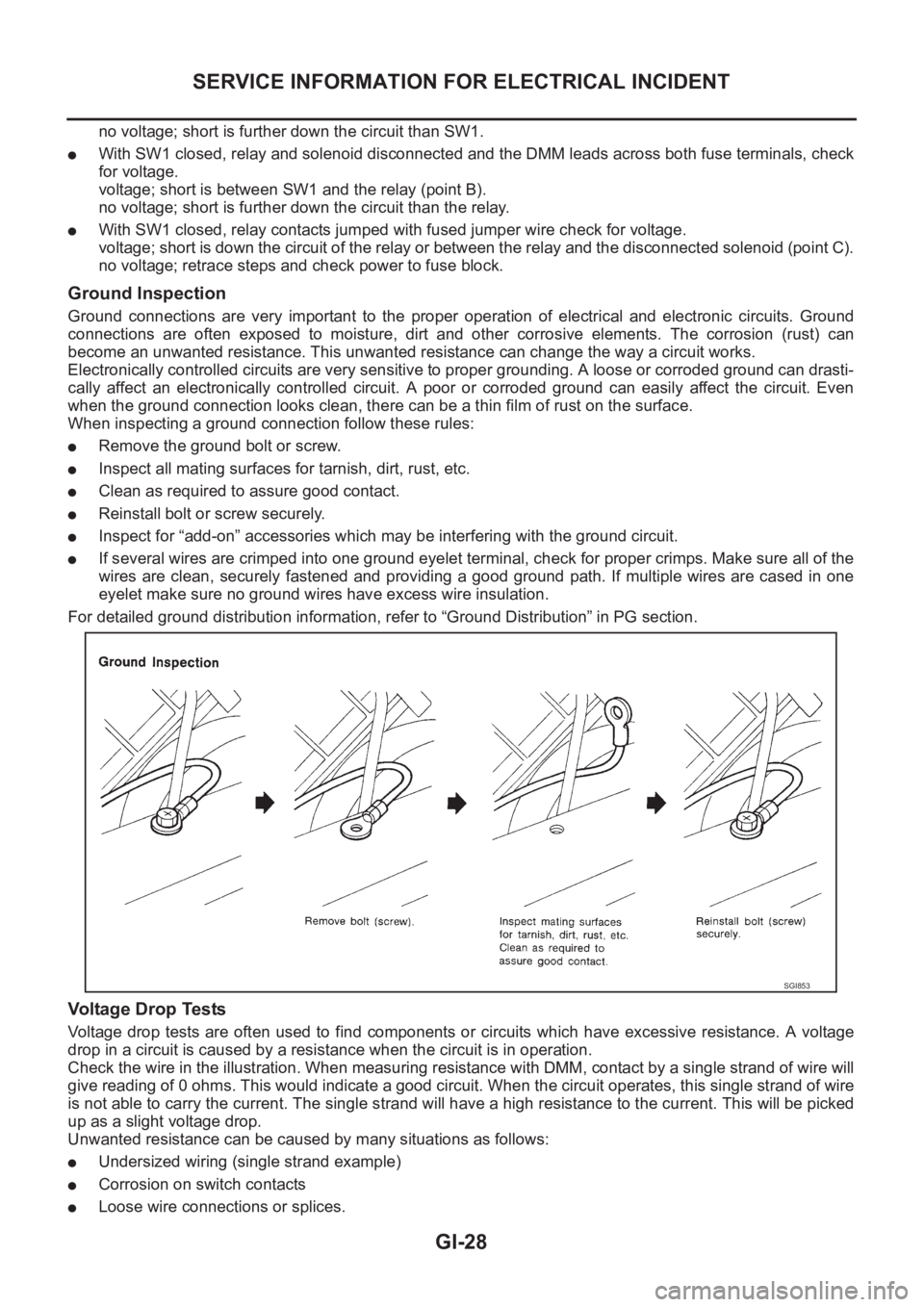
When inspecting a ground connection follow these rules:
●Remove the ground bolt or screw.
●Inspect all mating surfaces for tarnish, dirt, rust, etc.
●Clean as required to assure good contact.
●Reinstall bolt or screw securely.
●Inspect for “add-on” accessories which may be interfering with the ground circuit.
●If several wires are crimped into one ground eyelet terminal, check for proper crimps. Make sure all of the
wires are clean, securely fastened and providing a good ground path. If multiple wires are cased in one
eyelet make sure no ground wires have excess wire insulation.
For detailed ground distribution information, refer to “Ground Distribution” in PG section.
Voltage Drop Tests
Voltage drop tests are often used to find components or circuits which have excessive resistance. A voltage
drop in a circuit is caused by a resistance when the circuit is in operation.
Check the wire in the illustration. When measuring resistance with DMM, contact by a single strand of wire will
give reading of 0 ohms. This would indicate a good circuit. When the circuit operates, this single strand of wire
is not able to carry the current. The single strand will have a high resistance to the current. This will be picked
up as a slight voltage drop.
Unwanted resistance can be caused by many situations as follows:
●Undersized wiring (single strand example)
●Corrosion on switch contacts
●Loose wire connections or splices.
SGI853
Page 36 of 3833
GI-34
CONSULT-II CHECKING SYSTEM
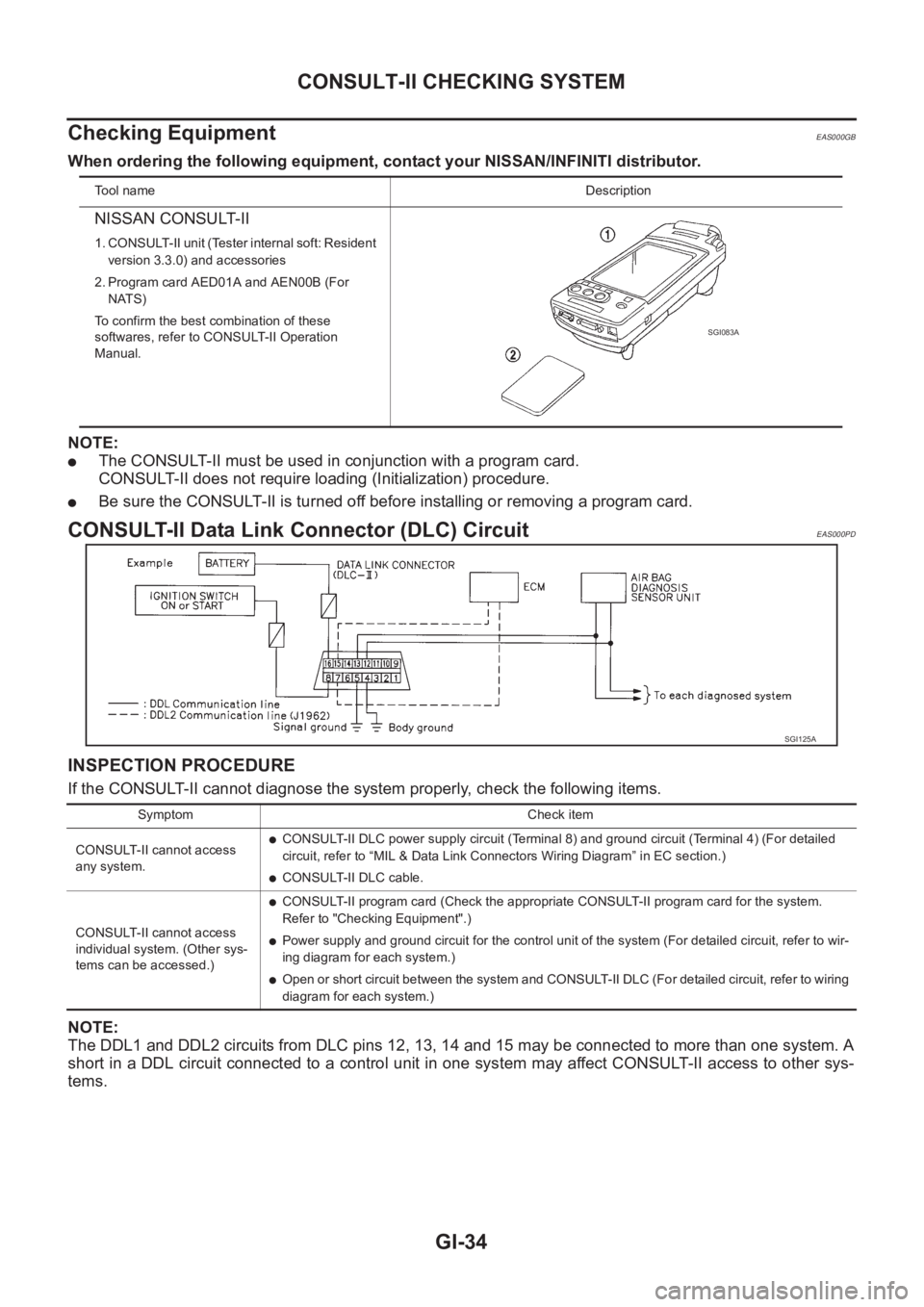
Checking Equipment
EAS000GB
When ordering the following equipment, contact your NISSAN/INFINITI distributor.
NOTE:
●The CONSULT-II must be used in conjunction with a program card.
CONSULT-II does not require loading (Initialization) procedure.
●Be sure the CONSULT-II is turned off before installing or removing a program card.
CONSULT-II Data Link Connector (DLC) CircuitEAS000PD
INSPECTION PROCEDURE
If the CONSULT-II cannot diagnose the system properly, check the following items.
NOTE:
The DDL1 and DDL2 circuits from DLC pins 12, 13, 14 and 15 may be connected to more than one system. A
short in a DDL circuit connected to a control unit in one system may affect CONSULT-II access to other sys-
tems.
To o l n a m eDescription
NISSAN CONSULT-II
1. CONSULT-II unit (Tester internal soft: Resident
version 3.3.0) and accessories
2. Program card AED01A and AEN00B (For
NATS)
To confirm the best combination of these
softwares, refer to CONSULT-II Operation
Manual.
SGI083A
SGI125A
Symptom Check item
CONSULT-II cannot access
any system.
●CONSULT-II DLC power supply circuit (Terminal 8) and ground circuit (Terminal 4) (For detailed
circuit, refer to “MIL & Data Link Connectors Wiring Diagram” in EC section.)
●CONSULT-II DLC cable.
CONSULT-II cannot access
individual system. (Other sys-
tems can be accessed.)
●CONSULT-II program card (Check the appropriate CONSULT-II program card for the system.
Refer to "Checking Equipment".)
●Power supply and ground circuit for the control unit of the system (For detailed circuit, refer to wir-
ing diagram for each system.)
●Open or short circuit between the system and CONSULT-II DLC (For detailed circuit, refer to wiring
diagram for each system.)
Page 177 of 3833
![NISSAN X-TRAIL 2001 Service User Guide EXHAUST MANIFOLD AND TURBOCHARGER
EM-127
[YD22DDTi]
C
D
E
F
G
H
I
J
K
L
MA
EM
EXHAUST MANIFOLD AND TURBOCHARGERPFP:14004
Removal and InstallationEBS00LRH
REMOVAL
1. Drain engine coolant. Refer to CO-2](/img/5/57405/w960_57405-176.png "NISSAN X-TRAIL 2001 Service User Guide EXHAUST MANIFOLD AND TURBOCHARGER
EM-127
[YD22DDTi]
C
D
E
F
G
H
I
J
K
L
MA
EM
EXHAUST MANIFOLD AND TURBOCHARGERPFP:14004
Removal and InstallationEBS00LRH
REMOVAL
1. Drain engine coolant. Refer to CO-2")
EXHAUST MANIFOLD AND TURBOCHARGER
EM-127
[YD22DDTi]
C
D
E
F
G
H
I
J
K
L
MA
EM
EXHAUST MANIFOLD AND TURBOCHARGERPFP:14004
Removal and InstallationEBS00LRH
REMOVAL
1. Drain engine coolant. Refer to CO-29, "Changing Engine Coolant" .
2. Remove charge air cooler. Refer to EM-122, "
Removal and Installation" .
3. Remove air duct and air inlet pipe. Refer to EM-120, "
Removal and Installation" .
4. Remove engine undercover.
5. Remove radiator upper and lower hoses.
6. Remove radiator fan. Refer to CO-33, "
Disassembly and Assembly Radiator Fan" .
7. Remove radiator mount bracket and radiator. Refer to CO-32, "
Removal and Installation" .
8. Remove water inlet pipe.
9. Disconnect exhaust front tube. Refer to EX-2, "
EXHAUST SYSTEM" .
10. Remove catalyst. Refer to EM-126, "
Removal and Installation" .
11. Remove exhaust manifold cover.
12. Remove insulator.
13. Each wiring and piping (disconnect/move)
PBIC1228E
1. Electronic EGR volume control valve 2. Gasket 3. EGR Cooler
4. Air inlet pipe 5.Exhaust manifold & turbocharger
assembly6. Oil return hose
7. Turbo insulator 8. Exhaust manifold insulator 9. Air inlet pipe
Page 351 of 3833
EC-1
ENGINE CONTROL SYSTEM
B ENGINE
CONTENTS
C
D
E
F
G
H
I
J
K
L
M
SECTION
A
EC
ENGINE CONTROL SYSTEM
QR25(WITH EURO-OBD)
INDEX FOR DTC ...................................................... 20
Alphabetical Index .................................................. 20
DTC No. Index ....................................................... 22
PRECAUTIONS ........................................................ 25
Precautions for Supplemental Restraint System
(SRS) “AIR BAG” and “SEAT BELT PRE-TEN-
SIONER” ................................................................ 25
On Board Diagnostic (OBD) System of Engine and
A/T .......................................................................... 25
Precaution .............................................................. 25
Wiring Diagrams and Trouble Diagnosis ................ 28
PREPARATION ......................................................... 29
Special Service Tools ............................................. 29
Commercial Service Tools ...................................... 29
ENGINE CONTROL SYSTEM .................................. 31
System Diagram ..................................................... 31
Vacuum Hose Drawing ........................................... 32
System Chart ......................................................... 33
Multiport Fuel Injection (MFI) System .................... 33
Electronic Ignition (EI) System ............................... 35
Air Conditioning Cut Control ................................... 36
Fuel Cut Control (at No Load and High Engine
Speed) .................................................................... 37
CAN Communication .............................................. 37
BASIC SERVICE PROCEDURE .............................. 38
Idle Speed and Ignition Timing Check .................... 38
Accelerator Pedal Released Position Learning ...... 39
Throttle Valve Closed Position Learning ................ 39
Idle Air Volume Learning ........................................ 39
Fuel Pressure Check .............................................. 42
ON BOARD DIAGNOSTIC (OBD) SYSTEM ............ 44
Introduction ............................................................ 44
Two Trip Detection Logic ........................................ 44
Emission-related Diagnostic Information ................ 45
NATS (Nissan Anti-theft System) ........................... 58
Malfunction Indicator (MI) ....................................... 58
OBD System Operation Chart ................................ 61
TROUBLE DIAGNOSIS ............................................ 67
Trouble Diagnosis Introduction ............................... 67DTC Inspection Priority Chart ................................. 70
Fail-safe Chart ........................................................ 71
Basic Inspection ..................................................... 73
Symptom Matrix Chart ............................................ 77
Engine Control Component Parts Location ............ 81
Circuit Diagram ....................................................... 85
ECM Harness Connector Terminal Layout ............. 87
ECM Terminals and Reference Value ..................
... 87
CONSULT-II Function ............................................. 94
Generic Scan Tool (GST) Function .......................104
CONSULT-II Reference Value in Data Monitor .....106
Major Sensor Reference Graph in Data Monitor
Mode .....................................................................109
TROUBLE DIAGNOSIS - SPECIFICATION VALUE ..111
Description .............................................................111
Testing Condition ...................................................111
Inspection Procedure .............................................111
Diagnostic Procedure ...........................................112
TROUBLE DIAGNOSIS FOR INTERMITTENT INCI-
DENT .......................................................................115
Description ............................................................115
Diagnostic Procedure ...........................................115
POWER SUPPLY CIRCUIT FOR ECM ...................116
Wiring Diagram .....................................................116
ECM Terminals and Reference Value ...................117
Diagnostic Procedure ...........................................117
Component Inspection ..........................................121
DTC U1000 CAN COMMUNICATION LINE ............122
Description ............................................................122
On Board Diagnosis Logic ....................................122
DTC Confirmation Procedure ...............................122
Wiring Diagram .....................................................123
Diagnostic Procedure ...........................................124
DTC P0011 IVT CONTROL .....................................125
Description ............................................................125
CONSULT-II Reference Value in Data Monitor Mode
.125
ECM Terminals and Reference Value ...................125
On Board Diagnosis Logic ....................................126
Page 352 of 3833
EC-2
DTC Confirmation Procedure ...............................126
Diagnostic Procedure ...........................................127
DTC P0031, P0032 HO2S1 HEATER .....................128
Description ............................................................128
CONSULT-II Reference Value in Data Monitor Mode
.128
ECM Terminals and Reference Value ...................128
On Board Diagnosis Logic ....................................129
DTC Confirmation Procedure ...............................129
Wiring Diagram .....................................................130
Diagnostic Procedure ...........................................131
Component Inspection ..........................................132
Removal and Installation ......................................132
DTC P0037, P0038 HO2S2 HEATER .....................133
Description ............................................................133
CONSULT-II Reference Value in Data Monitor Mode
.133
ECM Terminals and Reference Value ...................133
On Board Diagnosis Logic ....................................134
DTC Confirmation Procedure ...............................134
Wiring Diagram .....................................................135
Diagnostic Procedure ...........................................136
Component Inspection ..........................................137
Removal and Installation ......................................137
DTC P0102, P0103 MAF SENSOR .........................138
Component Description ........................................138
CONSULT-II Reference Value in Data Monitor Mode
.138
ECM Terminals and Reference Value ...................138
On Board Diagnosis Logic ....................................138
DTC Confirmation Procedure ...............................139
Wiring Diagram .....................................................140
Diagnostic Procedure ...........................................141
Component Inspection ..........................................142
Removal and Installation ......................................143
DTC P0112, P0113 IAT SENSOR ...........................144
Component Description ........................................144
On Board Diagnosis Logic ....................................144
DTC Confirmation Procedure ...............................144
Wiring Diagram .....................................................146
Diagnostic Procedure ...........................................147
Component Inspection ..........................................148
Removal and Installation ......................................148
DTC P0117, P0118 ECT SENSOR ..........................149
Component Description ........................................149
On Board Diagnosis Logic ....................................149
DTC Confirmation Procedure ...............................150
Wiring Diagram .....................................................151
Diagnostic Procedure ...........................................152
Component Inspection ..........................................153
Removal and Installation ......................................153
DTC P0122, P0123 TP SENSOR ............................154
Component Description ........................................154
CONSULT-II Reference Value in Data Monitor Mode
.154
On Board Diagnosis Logic ....................................154
DTC Confirmation Procedure ...............................154
Wiring Diagram .....................................................156
Diagnostic Procedure ...........................................157Component Inspection ..........................................159
Remove and Installation .......................................159
DTC P0127 IAT SENSOR ........................................160
Component Description ........................................160
On Board Diagnosis Logic ....................................160
DTC Confirmation Procedure ................................160
Diagnostic Procedure ............................................161
Component Inspection ..........................................161
Removal and Installation .......................................162
DTC P0132 HO2S1 ................................................ .163
Component Description ........................................163
CONSULT-II Reference Value in Data Monitor Mode
.163
ECM Terminals and Reference Value ...................163
On Board Diagnosis Logic ....................................164
DTC Confirmation Procedure ................................164
Wiring Diagram .....................................................165
Diagnostic Procedure ............................................166
Component Inspection ..........................................167
Removal and Installation .......................................168
DTC P0133 HO2S1 ................................................ .169
Component Description ........................................169
CONSULT-II Reference Value in Data Monitor Mode
.169
ECM Terminals and Reference Value ...................169
On Board Diagnosis Logic ....................................170
DTC Confirmation Procedure ................................170
Overall Function Check .........................................171
Wiring Diagram .....................................................172
Diagnostic Procedure ............................................173
Component Inspection ..........................................175
Removal and Installation .......................................177
DTC P0134 HO2S1 ................................................ .178
Component Description ........................................178
CONSULT-II Reference Value in Data Monitor Mode
.178
ECM Terminals and Reference Value ...................178
On Board Diagnosis Logic ....................................179
DTC Confirmation Procedure ................................179
Overall Function Check .........................................180
Wiring Diagram ....................................................
.181
Diagnostic Procedure ............................................182
Component Inspection ..........................................183
Removal and Installation .......................................184
DTC P0138 HO2S2 ................................................ .185
Component Description ........................................185
CONSULT-II Reference Value in Data Monitor Mode
.185
ECM Terminals and Reference Value ...................185
On Board Diagnosis Logic ....................................185
DTC Confirmation Procedure ................................186
Wiring Diagram .....................................................187
Diagnostic Procedure ............................................188
Component Inspection ..........................................189
Removal and Installation .......................................191
DTC P0139 HO2S2 ................................................ .192
Component Description ........................................192
CONSULT-II Reference Value in Data Monitor Mode
.192
Page 353 of 3833
EC-3
C
D
E
F
G
H
I
J
K
L
M
ECA ECM Terminals and Reference Value .................. 192
On Board Diagnosis Logic ................................... 192
DTC Confirmation Procedure ............................... 193
Overall Function Check ........................................ 193
Wiring Diagram .................................................... 195
Diagnostic Procedure ........................................... 196
Component Inspection ......................................... 197
Removal and Installation ...................................... 199
DTC P0171 FUEL INJECTION SYSTEM FUNCTION . 200
On Board Diagnosis Logic ................................... 200
DTC Confirmation Procedure ............................... 200
Wiring Diagram .................................................... 202
Diagnostic Procedure ........................................... 203
DTC P0172 FUEL INJECTION SYSTEM FUNCTION . 206
On Board Diagnosis Logic ................................... 206
DTC Confirmation Procedure ............................... 206
Wiring Diagram .................................................... 208
Diagnostic Procedure ........................................... 209
DTC P0222, P0223 TP SENSOR ........................... 212
Component Description ........................................ 212
CONSULT-II Reference Value in Data Monitor Mode
. 212
ECM Terminals and Reference Value .................. 212
On Board Diagnosis Logic ................................... 213
DTC Confirmation Procedure ............................... 213
Wiring Diagram .................................................... 214
Diagnostic Procedure ........................................... 215
Component Inspection ......................................... 216
Remove and Installation ....................................... 216
DTC P0300 - P0304 MULTIPLE CYLINDER MIS-
FIRE, NO. 1 - 4 CYLINDER MISFIRE ..................... 217
On Board Diagnosis Logic ................................... 217
DTC Confirmation Procedure ............................... 217
Diagnostic Procedure ........................................... 218
DTC P0327, P0328 KS ........................................... 222
Component Description ........................................ 222
ECM Terminals and Reference Value .................. 222
On Board Diagnosis Logic ................................... 222
DTC Confirmation Procedure ............................... 222
Wiring Diagram .................................................... 224
Diagnostic Procedure ........................................... 225
Component Inspection ......................................... 226
Removal and Installation ...................................... 226
DTC P0335 CKP SENSOR (POS) .......................... 227
Component Description ........................................ 227
CONSULT-II Reference Value in Data Monitor Mode
. 227
ECM Terminals and Reference Value .................. 227
On Board Diagnosis Logic ................................... 228
DTC Confirmation Procedure ............................... 228
Wiring Diagram .................................................... 229
Diagnostic Procedure ........................................... 230
Component Inspection ......................................... 231
Removal and Installation ...................................... 232
DTC P0340 CMP SENSOR (PHASE) ..................... 233
Component Description ........................................ 233
ECM Terminals and Reference Value .................. 233
On Board Diagnosis Logic ................................... 233
DTC Confirmation Procedure ............................... 234Wiring Diagram .....................................................235
Diagnostic Procedure ...........................................236
Component Inspection ..........................................238
Removal and Installation ......................................238
DTC P0420 THREE WAY CATALYST FUNCTION . 239
On Board Diagnosis Logic ....................................239
DTC Confirmation Procedure ...............................239
Overall Function Check ........................................240
Diagnostic Procedure ...........................................241
DTC P0444, P0445 EVAP CANISTER PURGE VOL-
UME CONTROL SOLENOID VALVE ......................244
Description ............................................................244
CONSULT-II Reference Value in Data Monitor Mode
.244
ECM Terminals and Reference Value ...................244
On Board Diagnosis Logic ....................................245
DTC Confirmation Procedure ...............................245
Wiring Diagram .....................................................246
Diagnostic Procedure ...........................................247
Component Inspection ..........................................248
Removal and Installation ......................................249
DTC P0500 VSS ......................................................250
Component Description ........................................250
ECM Terminals and Reference Value ...................250
On Board Diagnosis Logic ....................................250
DTC Confirmation Procedure ...............................250
Overall Function Check ........................................251
Wiring Diagram .....................................................252
Diagnostic Procedure ...........................................254
DTC P0550 PSP SENSOR .....................................255
Component Description ........................................255
CONSULT-II Reference Value in Data Monitor Mode
.255
ECM Terminals and Reference Value ...................255
On Board Diagnosis Logic ....................................255
DTC Confirmation Procedure ...............................255
Wiring Diagram .....................................................257
Diagnostic Procedure ...........................................258
Component Inspection ..........................................259
DTC P0605 ECM .....................................................260
Component Description ........................................260
On Board Diagnosis Logic ....................................260
DTC Confirmation Procedure ...............................260
Diagnostic Procedure ...........................................261
DTC P0650 MI .........................................................263
Component Description ........................................263
On Board Diagnosis Logic ....................................263
DTC Confirmation Procedure ...............................263
Wiring Diagram .....................................................264
Diagnostic Procedure ...........................................265
DTC P1065 ECM POWER SUPPLY .......................267
Component Description ........................................267
On Board Diagnosis Logic ....................................267
DTC Confirmation Procedure ...............................267
Wiring Diagram .....................................................268
Diagnostic Procedure ...........................................269
DTC P1111 IVT CONTROL SOLENOID VALVE .....271
Component Description ........................................271
CONSULT-II Reference Value in Data Monitor Mode
Page 354 of 3833
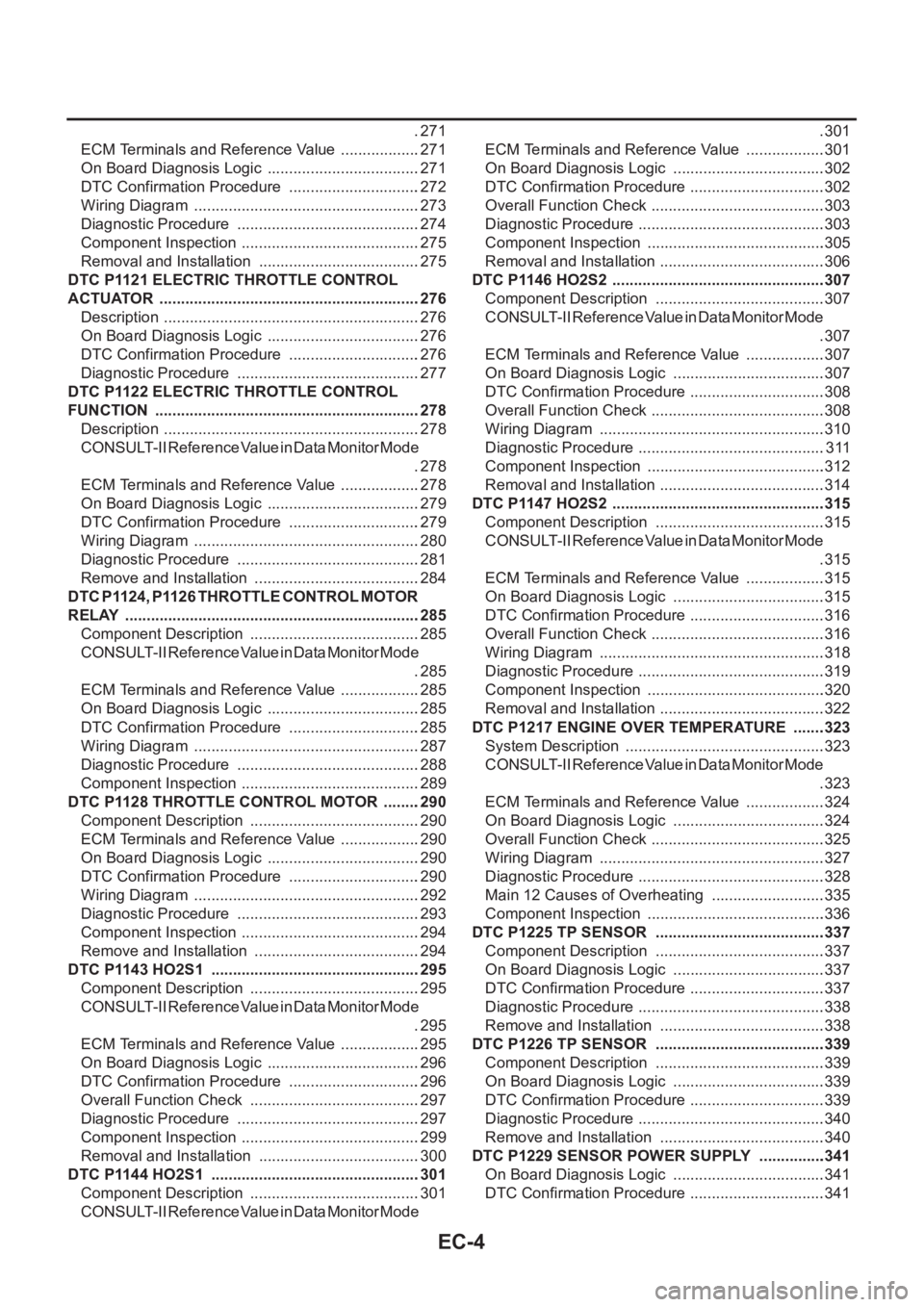
EC-4
.271
ECM Terminals and Reference Value ...................271
On Board Diagnosis Logic ....................................271
DTC Confirmation Procedure ...............................272
Wiring Diagram .....................................................273
Diagnostic Procedure ...........................................274
Component Inspection ..........................................275
Removal and Installation ......................................275
DTC P1121 ELECTRIC THROTTLE CONTROL
ACTUATOR .............................................................276
Description ............................................................276
On Board Diagnosis Logic ....................................276
DTC Confirmation Procedure ...............................276
Diagnostic Procedure ...........................................277
DTC P1122 ELECTRIC THROTTLE CONTROL
FUNCTION ..............................................................278
Description ............................................................278
CONSULT-II Reference Value in Data Monitor Mode
.278
ECM Terminals and Reference Value ...................278
On Board Diagnosis Logic ....................................279
DTC Confirmation Procedure ...............................279
Wiring Diagram .....................................................280
Diagnostic Procedure ...........................................281
Remove and Installation .......................................284
DTC P1124, P1126 THROTTLE CONTROL MOTOR
RELAY .....................................................................285
Component Description ........................................285
CONSULT-II Reference Value in Data Monitor Mode
.285
ECM Terminals and Reference Value ...................285
On Board Diagnosis Logic ....................................285
DTC Confirmation Procedure ...............................285
Wiring Diagram .....................................................287
Diagnostic Procedure ...........................................288
Component Inspection ..........................................289
DTC P1128 THROTTLE CONTROL MOTOR .........290
Component Description ........................................290
ECM Terminals and Reference Value ...................290
On Board Diagnosis Logic ....................................290
DTC Confirmation Procedure ...............................290
Wiring Diagram .....................................................292
Diagnostic Procedure ...........................................293
Component Inspection ..........................................294
Remove and Installation .......................................294
DTC P1143 HO2S1 .................................................295
Component Description ........................................295
CONSULT-II Reference Value in Data Monitor Mode
.295
ECM Terminals and Reference Value ...................295
On Board Diagnosis Logic ....................................296
DTC Confirmation Procedure ...............................296
Overall Function Check ........................................297
Diagnostic Procedure ...........................................297
Component Inspection ..........................................299
Removal and Installation ......................................300
DTC P1144 HO2S1 .................................................301
Component Description ........................................301
CONSULT-II Reference Value in Data Monitor Mode .301
ECM Terminals and Reference Value ...................301
On Board Diagnosis Logic ....................................302
DTC Confirmation Procedure ................................302
Overall Function Check .........................................303
Diagnostic Procedure ............................................303
Component Inspection ..........................................305
Removal and Installation .......................................306
DTC P1146 HO2S2 ..................................................307
Component Description ........................................307
CONSULT-II Reference Value in Data Monitor Mode
.307
ECM Terminals and Reference Value ...................307
On Board Diagnosis Logic ....................................307
DTC Confirmation Procedure ................................308
Overall Function Check .........................................308
Wiring Diagram .....................................................310
Diagnostic Procedure ............................................311
Component Inspection ..........................................312
Removal and Installation .......................................314
DTC P1147 HO2S2 ..................................................315
Component Description ........................................315
CONSULT-II Reference Value in Data Monitor Mode
.315
ECM Terminals and Reference Value ...................315
On Board Diagnosis Logic ....................................315
DTC Confirmation Procedure ................................316
Overall Function Check .........................................316
Wiring Diagram .....................................................318
Diagnostic Procedure ............................................319
Component Inspection ..........................................320
Removal and Installation .......................................322
DTC P1217 ENGINE OVER TEMPERATURE ........323
System Description ...............................................323
CONSULT-II Reference Value in Data Monitor Mode
.323
ECM Terminals and Reference Value ...................324
On Board Diagnosis Logic ....................................324
Overall Function Check .........................................325
Wiring Diagram .....................................................327
Diagnostic Procedure ............................................328
Main 12 Causes of Overheating ...........................335
Component Inspection ..........................................336
DTC P1225 TP SENSOR ........................................337
Component Description ........................................337
On Board Diagnosis Logic ....................................337
DTC Confirmation Procedure ................................337
Diagnostic Procedure ............................................338
Remove and Installation .......................................338
DTC P1226 TP SENSOR ........................................339
Component Description ........................................339
On Board Diagnosis Logic ....................................339
DTC Confirmation Procedure ................................339
Diagnostic Procedure ............................................340
Remove and Installation .......................................340
DTC P1229 SENSOR POWER SUPPLY ................341
On Board Diagnosis Logic ....................................341
DTC Confirmation Procedure ................................341