key NISSAN X-TRAIL 2001 Service Workshop Manual
[x] Cancel search | Manufacturer: NISSAN, Model Year: 2001, Model line: X-TRAIL, Model: NISSAN X-TRAIL 2001Pages: 3833, PDF Size: 39.49 MB
Page 3020 of 3833
SRS-18
TROUBLE DIAGNOSIS
Trouble Diagnoses With CONSULT–II
EHS000O8
DIAGNOSTIC PROCEDURE 2
Inspecting SRS Malfunctioning Parts by Using CONSULT-II — DIAGNOSIS MODE
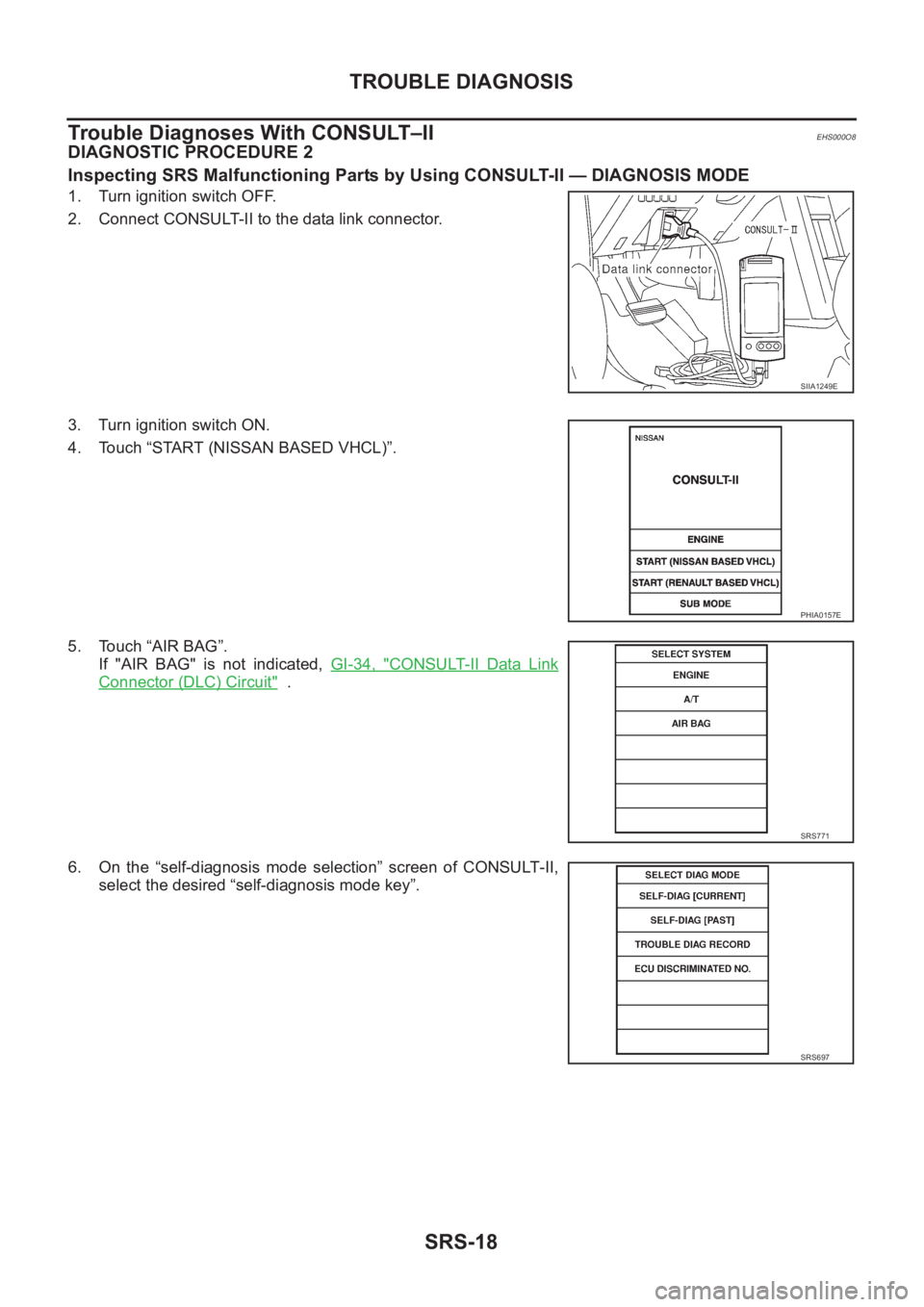
1. Turn ignition switch OFF.
2. Connect CONSULT-II to the data link connector.
3. Turn ignition switch ON.
4. Touch “START (NISSAN BASED VHCL)”.
5. Touch “AIR BAG”.
If "AIR BAG" is not indicated, GI-34, "
CONSULT-II Data Link
Connector (DLC) Circuit" .
6. On the “self-diagnosis mode selection” screen of CONSULT-II,
select the desired “self-diagnosis mode key”.
SIIA1249E
PHIA0157E
SRS771
SRS697
Page 3022 of 3833
![NISSAN X-TRAIL 2001 Service Workshop Manual SRS-20
TROUBLE DIAGNOSIS
10. After repairing the malfunction, touch “SELF-DIAG [CURRENT]”
to check that “No DTC IS DETECTED” is displayed.
●After checking the display, touch “ERASE”.
●](/img/5/57405/w960_57405-3021.png "NISSAN X-TRAIL 2001 Service Workshop Manual SRS-20
TROUBLE DIAGNOSIS
10. After repairing the malfunction, touch “SELF-DIAG [CURRENT]”
to check that “No DTC IS DETECTED” is displayed.
●After checking the display, touch “ERASE”.
●")
SRS-20
TROUBLE DIAGNOSIS
10. After repairing the malfunction, touch “SELF-DIAG [CURRENT]”
to check that “No DTC IS DETECTED” is displayed.
●After checking the display, touch “ERASE”.
●If any malfunction is displayed on “SELF-DIAG [CURRENT],
repair or replace the malfunctioning again.
11. Touch “BACK” key of CONSULT-II to “SELECT SYSTEM”
screen. Touch “SELF-DIAG [PAST].
12. Check that no malfunction is detected on “SELF-DIAG [PAST].
●If any malfunction is deployed, Touch “ERASE” in the “SELF-
DIAG [CURRENT]” screen, and check the display.
13. Turn ignition switch OFF, then turn off and disconnect CONSULT - I I .
14. Turn ignition switch ON, and check the system with the SRS air bag warning lamp (User mode).
15. Check that no malfunction is detected. Now the diagnosis is complete.
DIAGNOSTIC PROCEDURE 3
Inspecting SRS Malfunctioning Record
If any malfunction is detected in "SRS Operation Check", but no malfunction is detected in “SELF-DIAG [CUR-
RENT]” on CONSULT-II, carry out the following steps.
1. CHECK BATTERY VOLTAGE
Disconnect both battery cables and check that the battery voltage is 9 V or more.
OK or NG
OK >> GO TO 2.
NG >> Charge the battery.
2. CONSIDER POSSIBILITY OF NOT ERASING SELF-DIAGNOSTIC RESULT AFTER REPAIRING.
Is it the first time for maintenance of SRS?
YES or NO
YES >> GO TO 3.
NO >> Erase the self-diagnostic results, and Check the "SRS Operation Check". Refer to SRS-16, "
SRS
Operation Check"
3. CHECK "SELF-DIAG [PAST]" BY CONSULT-II
Store the memory in "SELF-DIAG [PAST]"
YES or NO
YES >> Repair the part of "SELF-DIAG[PAST]"
NO >> Check the "TROUBLE DIAG RECORD", and then repair it. Refer to SRS-21, "
DIAGNOSTIC
CODE CHART"
SRS701
SRS702
Page 3053 of 3833
BL-1
BODY, LOCK & SECURITY SYSTEM
I BODY
CONTENTS
C
D
E
F
G
H
J
K
L
M
SECTION
A
B
BL
BODY, LOCK & SECURITY SYSTEM
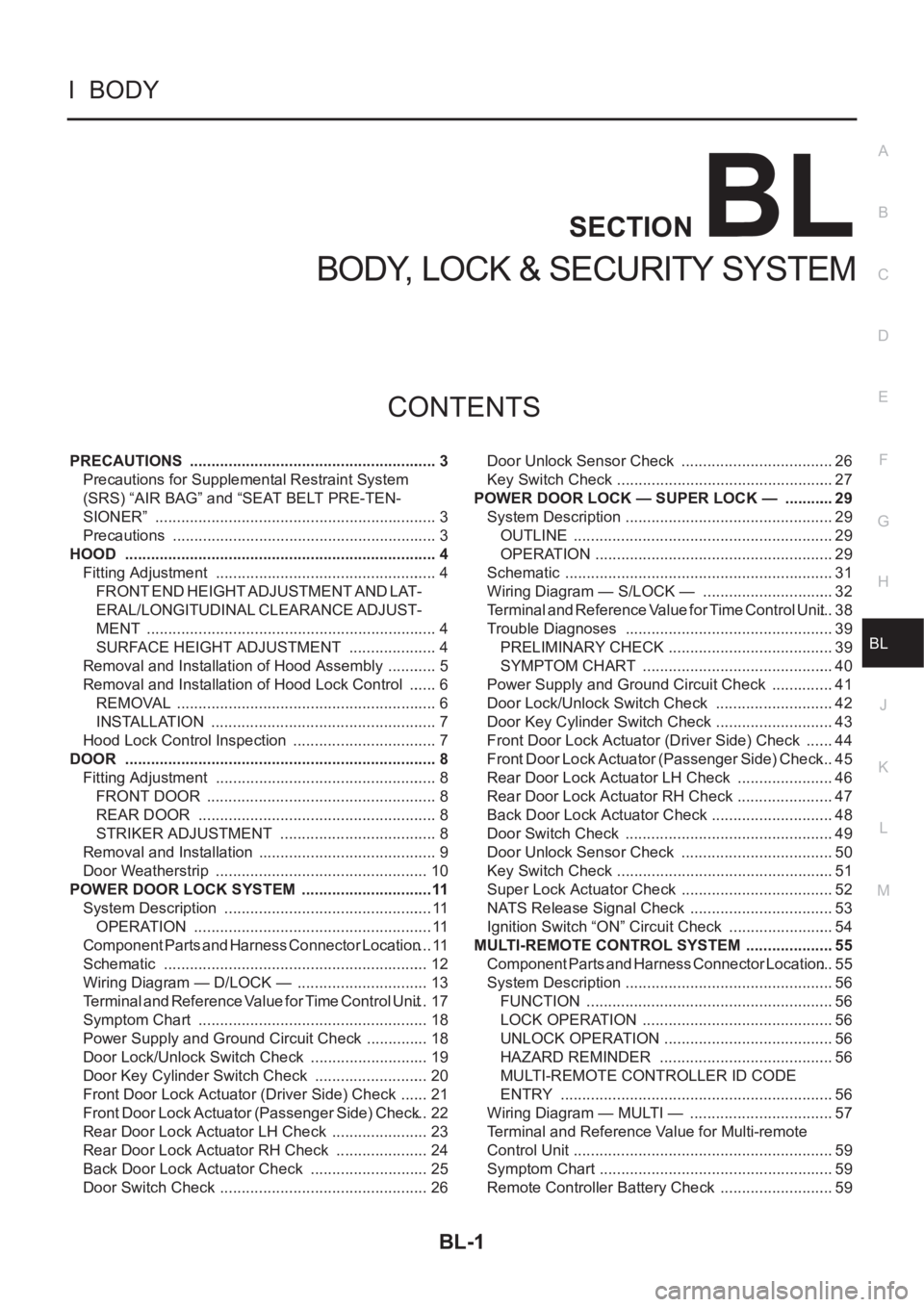
PRECAUTIONS .......................................................... 3
Precautions for Supplemental Restraint System
(SRS) “AIR BAG” and “SEAT BELT PRE-TEN-
SIONER” .................................................................. 3
Precautions .............................................................. 3
HOOD ......................................................................... 4
Fitting Adjustment .................................................... 4
FRONT END HEIGHT ADJUSTMENT AND LAT-
ERAL/LONGITUDINAL CLEARANCE ADJUST-
MENT .................................................................... 4
SURFACE HEIGHT ADJUSTMENT ..................... 4
Removal and Installation of Hood Assembly ............ 5
Removal and Installation of Hood Lock Control ....... 6
REMOVAL ............................................................. 6
INSTALLATION ..................................................... 7
Hood Lock Control Inspection .................................. 7
DOOR ......................................................................... 8
Fitting Adjustment .................................................... 8
FRONT DOOR ...................................................... 8
REAR DOOR ........................................................ 8
STRIKER ADJUSTMENT ..................................... 8
Removal and Installation .......................................... 9
Door Weatherstrip .................................................. 10
POWER DOOR LOCK SYSTEM ...............................11
System Description ................................................. 11
OPERATION ........................................................ 11
Component Parts and Harness Connector Location .... 11
Schematic .............................................................. 12
Wiring Diagram — D/LOCK — ............................... 13
Terminal and Reference Value for Time Control Unit ... 17
Symptom Chart ...................................................... 18
Power Supply and Ground Circuit Check ............... 18
Door Lock/Unlock Switch Check ............................ 19
Door Key Cylinder Switch Check ........................... 20
Front Door Lock Actuator (Driver Side) Check ....... 21
Front Door Lock Actuator (Passenger Side) Check ... 22
Rear Door Lock Actuator LH Check ....................... 23
Rear Door Lock Actuator RH Check ...................... 24
Back Door Lock Actuator Check ............................ 25
Door Switch Check ................................................. 26Door Unlock Sensor Check .................................... 26
Key Switch Check ................................................... 27
POWER DOOR LOCK — SUPER LOCK — ............ 29
System Description ................................................. 29
OUTLINE ............................................................. 29
OPERATION .....................................................
... 29
Schematic ............................................................... 31
Wiring Diagram — S/LOCK — ............................... 32
Terminal and Reference Value for Time Control Unit ... 38
Trouble Diagnoses ................................................. 39
PRELIMINARY CHECK ....................................... 39
SYMPTOM CHART ............................................. 40
Power Supply and Ground Circuit Check ............... 41
Door Lock/Unlock Switch Check ............................ 42
Door Key Cylinder Switch Check ............................ 43
Front Door Lock Actuator (Driver Side) Check ....... 44
Front Door Lock Actuator (Passenger Side) Check ... 45
Rear Door Lock Actuator LH Check ....................... 46
Rear Door Lock Actuator RH Check ....................... 47
Back Door Lock Actuator Check ............................. 48
Door Switch Check ................................................. 49
Door Unlock Sensor Check .................................... 50
Key Switch Check ................................................... 51
Super Lock Actuator Check .................................... 52
NATS Release Signal Check .................................. 53
Ignition Switch “ON” Circuit Check ......................... 54
MULTI-REMOTE CONTROL SYSTEM ..................... 55
Component Parts and Harness Connector Location ... 55
System Description ................................................. 56
FUNCTION .......................................................... 56
LOCK OPERATION ............................................. 56
UNLOCK OPERATION ........................................ 56
HAZARD REMINDER ......................................... 56
MULTI-REMOTE CONTROLLER ID CODE
ENTRY ................................................................ 56
Wiring Diagram — MULTI — .................................. 57
Terminal and Reference Value for Multi-remote
Control Unit ............................................................. 59
Symptom Chart ....................................................... 59
Remote Controller Battery Check ........................... 59
Page 3063 of 3833
POWER DOOR LOCK SYSTEM
BL-11
C
D
E
F
G
H
J
K
L
MA
B
BL
POWER DOOR LOCK SYSTEMPFP:24814
System DescriptionEIS001SE
OPERATION
Power door lock/unlock operation by door key cylinder
●With the key inserted into driver's door key cylinder, turning it to LOCK will lock all doors.
●With the key inserted into driver's door key cylinder, turning it to UNLOCK will unlock all doors.
Power door lock/unlock operation by lock/unlock switch
●With lock/unlock switch setting to LOCK will lock all doors.
●With lock/unlock switch setting to UNLOCK will unlock all doors.
Key reminder system
●If the ignition key is in the ignition key cylinder and driver door is open, setting lock/unlock switch, lock
knob, key or multi-remote controller to “LOCK” locks the door once but then immediately unlocks all doors.
(signal from door unlock sensor driver side)
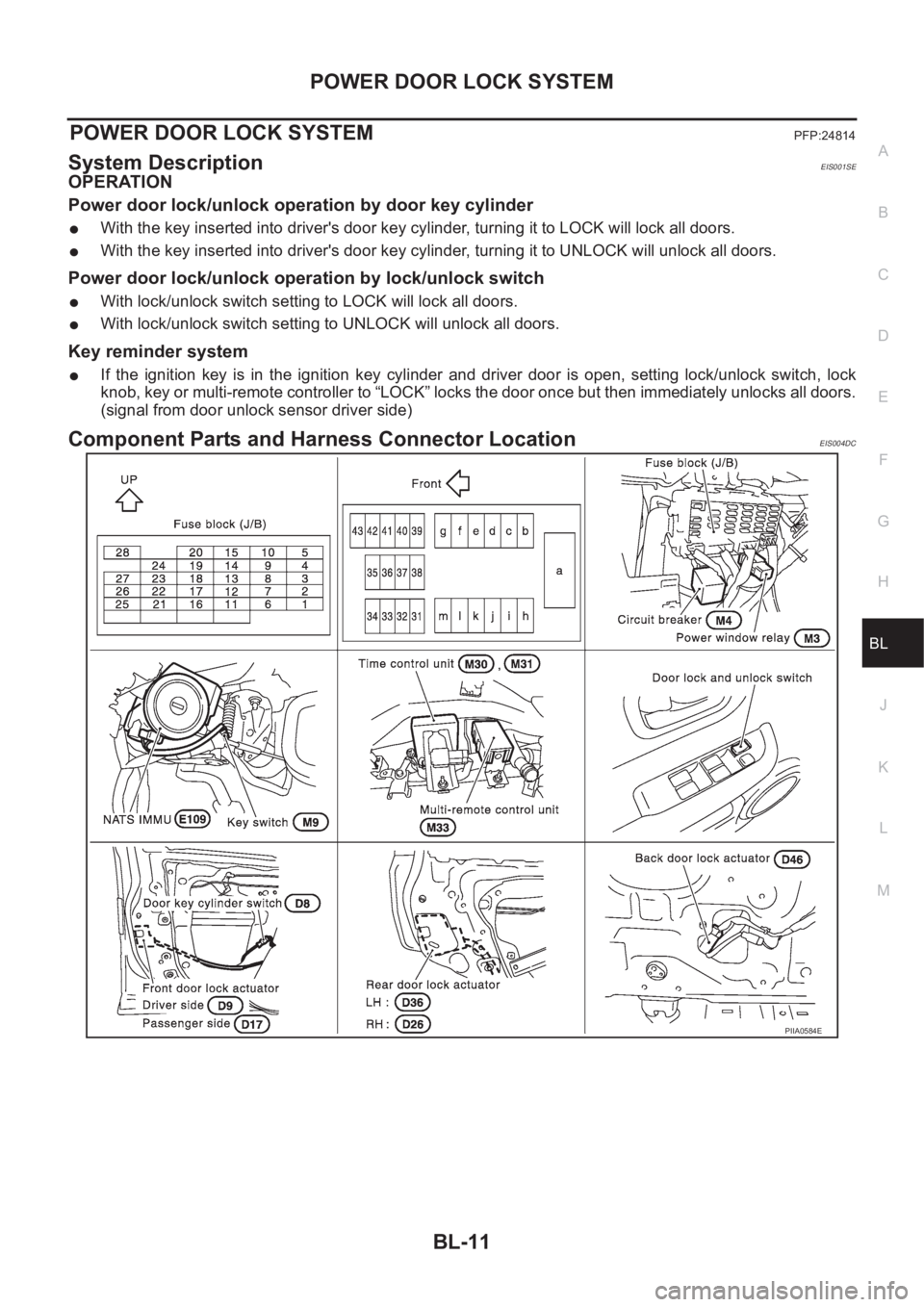
Component Parts and Harness Connector LocationEIS004DC
PIIA0584E
Page 3069 of 3833
POWER DOOR LOCK SYSTEM
BL-17
C
D
E
F
G
H
J
K
L
MA
B
BL
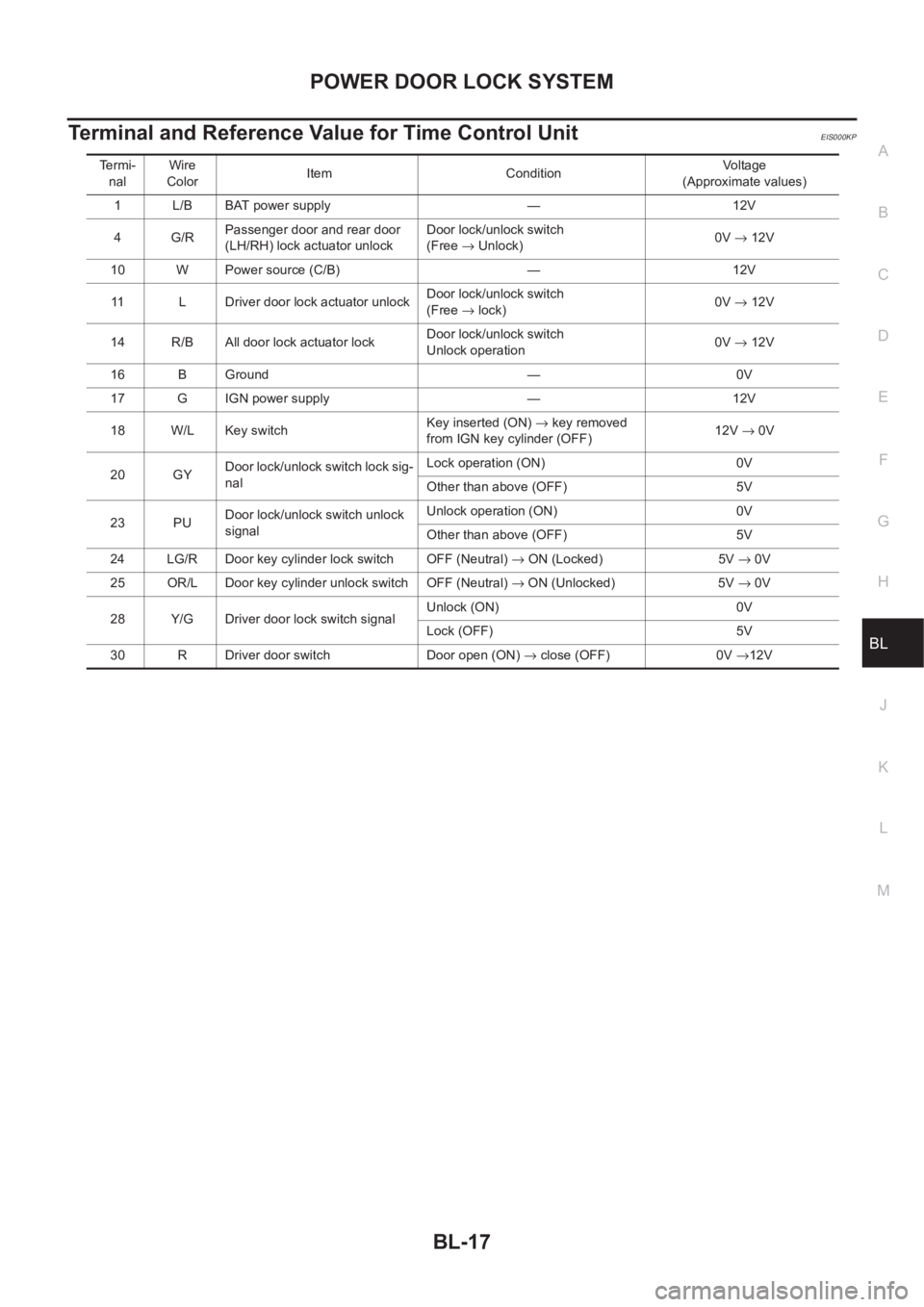
Terminal and Reference Value for Time Control UnitEIS000KP
Termi-
nalWire
ColorItem ConditionVo l ta g e
(Approximate values)
1 L/B BAT power supply — 12V
4 G/RPassenger door and rear door
(LH/RH) lock actuator unlockDoor lock/unlock switch
(Free → Unlock)0V → 12V
10 W Power source (C/B) — 12V
11 L Driver door lock actuator unlockDoor lock/unlock switch
(Free → lock)0V → 12V
14 R/B All door lock actuator lockDoor lock/unlock switch
Unlock operation0V → 12V
16 B Ground — 0V
17 G IGN power supply — 12V
18 W/L Key switchKey inserted (ON) → key removed
from IGN key cylinder (OFF)12V → 0V
20 GYDoor lock/unlock switch lock sig-
nalLock operation (ON) 0V
Other than above (OFF) 5V
23 PUDoor lock/unlock switch unlock
signalUnlock operation (ON) 0V
Other than above (OFF) 5V
24 LG/R Door key cylinder lock switch OFF (Neutral) → ON (Locked) 5V → 0V
25 OR/L Door key cylinder unlock switch OFF (Neutral) → ON (Unlocked) 5V → 0V
28 Y/G Driver door lock switch signalUnlock (ON) 0V
Lock (OFF) 5V
30 R Driver door switch Door open (ON) → close (OFF) 0V →12V
Page 3070 of 3833
BL-18
POWER DOOR LOCK SYSTEM
Symptom Chart
EIS001R5
*:Make sure the power door lock system operates properly.
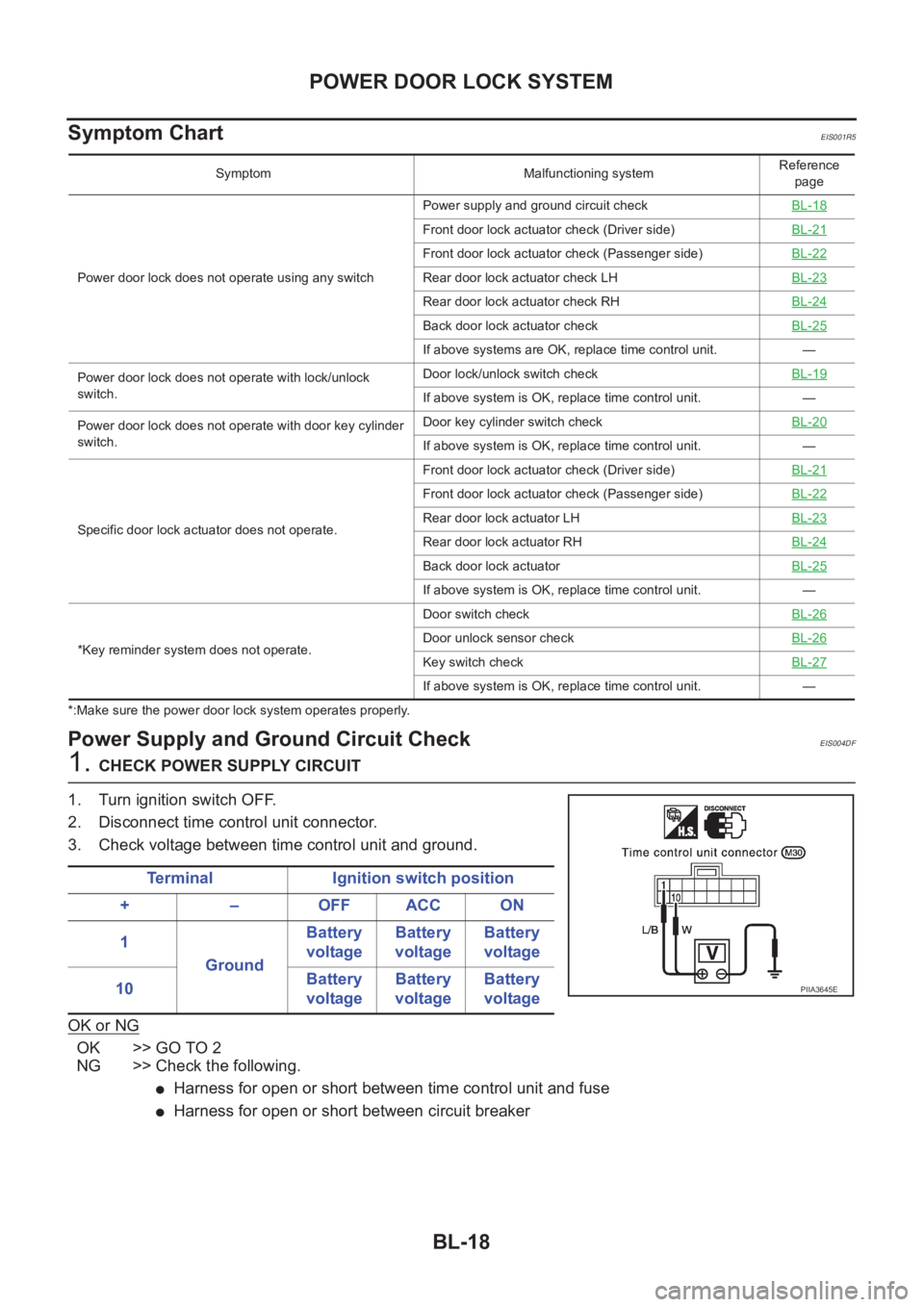
Power Supply and Ground Circuit CheckEIS004DF
1. CHECK POWER SUPPLY CIRCUIT
1. Turn ignition switch OFF.
2. Disconnect time control unit connector.
3. Check voltage between time control unit and ground.
OK or NG
OK >> GO TO 2
NG >> Check the following.
●Harness for open or short between time control unit and fuse
●Harness for open or short between circuit breaker
Symptom Malfunctioning systemReference
page
Power door lock does not operate using any switchPower supply and ground circuit checkBL-18
Front door lock actuator check (Driver side)BL-21
Front door lock actuator check (Passenger side)BL-22
Rear door lock actuator check LH BL-23
Rear door lock actuator check RHBL-24
Back door lock actuator checkBL-25
If above systems are OK, replace time control unit. —
Power door lock does not operate with lock/unlock
switch.Door lock/unlock switch checkBL-19
If above system is OK, replace time control unit. —
Power door lock does not operate with door key cylinder
switch.Door key cylinder switch checkBL-20
If above system is OK, replace time control unit. —
Specific door lock actuator does not operate.Front door lock actuator check (Driver side)BL-21
Front door lock actuator check (Passenger side)BL-22
Rear door lock actuator LHBL-23
Rear door lock actuator RHBL-24
Back door lock actuatorBL-25
If above system is OK, replace time control unit. —
*Key reminder system does not operate.Door switch checkBL-26
Door unlock sensor checkBL-26
Key switch checkBL-27
If above system is OK, replace time control unit. —
Terminal Ignition switch position
+ – OFF ACC ON
1
GroundBattery
voltageBattery
voltageBattery
voltage
10Battery
voltageBattery
voltageBattery
voltage
PIIA3645E
Page 3072 of 3833
BL-20
POWER DOOR LOCK SYSTEM
Door Key Cylinder Switch Check
EIS004DH
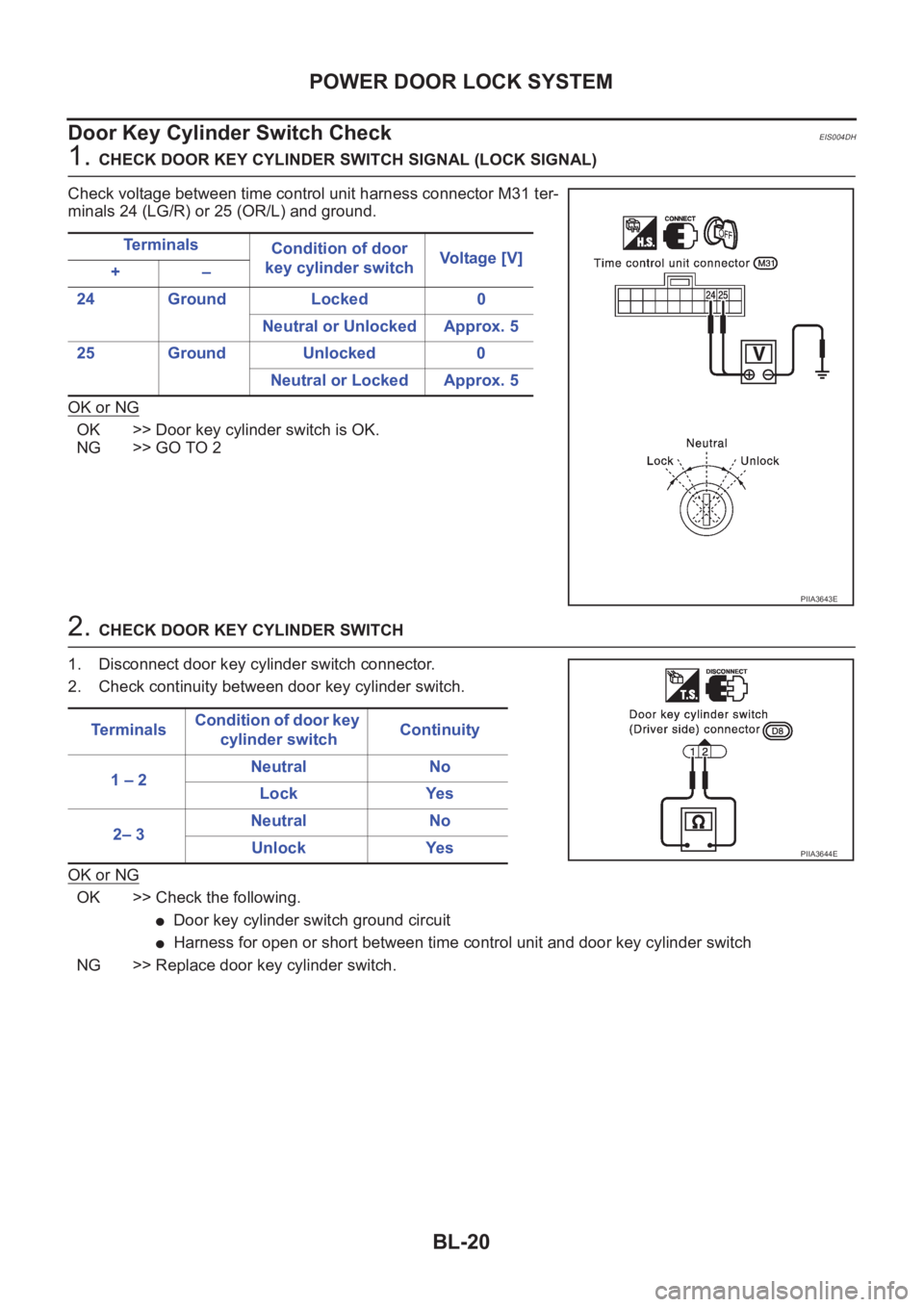
1. CHECK DOOR KEY CYLINDER SWITCH SIGNAL (LOCK SIGNAL)
Check voltage between time control unit harness connector M31 ter-
minals 24 (LG/R) or 25 (OR/L) and ground.
OK or NG
OK >> Door key cylinder switch is OK.
NG >> GO TO 2
2. CHECK DOOR KEY CYLINDER SWITCH
1. Disconnect door key cylinder switch connector.
2. Check continuity between door key cylinder switch.
OK or NG
OK >> Check the following.
●Door key cylinder switch ground circuit
●Harness for open or short between time control unit and door key cylinder switch
NG >> Replace door key cylinder switch.Te r m i n a l s
Condition of door
key cylinder switchVoltage [V]
+–
24 Ground Locked 0
Neutral or Unlocked Approx. 5
25 Ground Unlocked 0
Neutral or Locked Approx. 5
PIIA3643E
Te r m i n a l sCondition of door key
cylinder switchContinuity
1 – 2Neutral No
Lock Yes
2– 3Neutral No
Unlock Yes
PIIA3644E
Page 3079 of 3833
POWER DOOR LOCK SYSTEM
BL-27
C
D
E
F
G
H
J
K
L
MA
B
BL
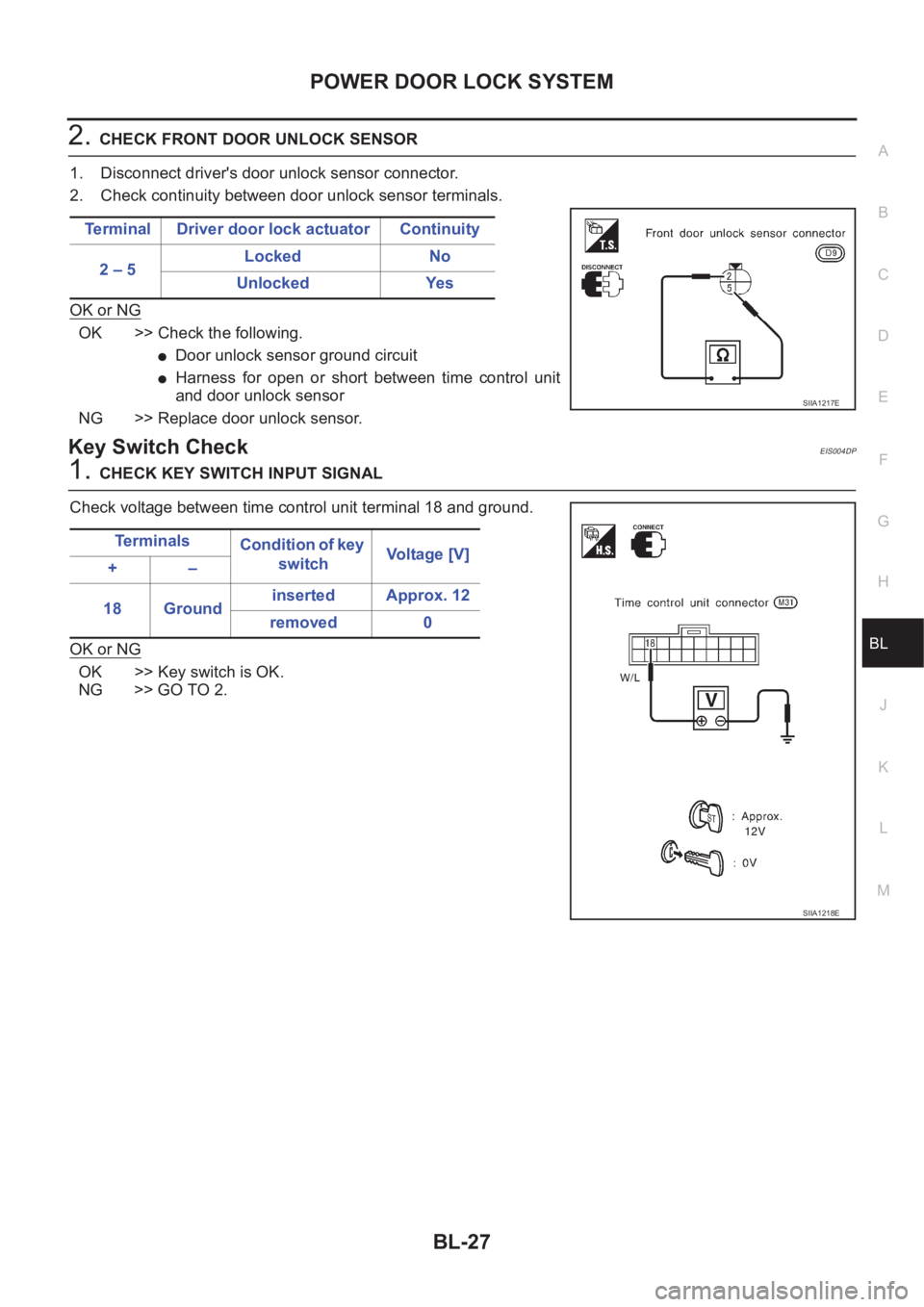
2.CHECK FRONT DOOR UNLOCK SENSOR
1. Disconnect driver's door unlock sensor connector.
2. Check continuity between door unlock sensor terminals.
OK or NG
OK >> Check the following.
●Door unlock sensor ground circuit
●Harness for open or short between time control unit
and door unlock sensor
NG >> Replace door unlock sensor.
Key Switch CheckEIS004DP
1.CHECK KEY SWITCH INPUT SIGNAL
Check voltage between time control unit terminal 18 and ground.
OK or NG
OK >> Key switch is OK.
NG >> GO TO 2.Terminal Driver door lock actuator Continuity
2 – 5Locked No
Unlocked Yes
SIIA1217E
Te r m i n a l s
Condition of key
switchVo l ta g e [ V ]
+–
18 Groundinserted Approx. 12
removed 0
SIIA1218E
Page 3080 of 3833
BL-28
POWER DOOR LOCK SYSTEM
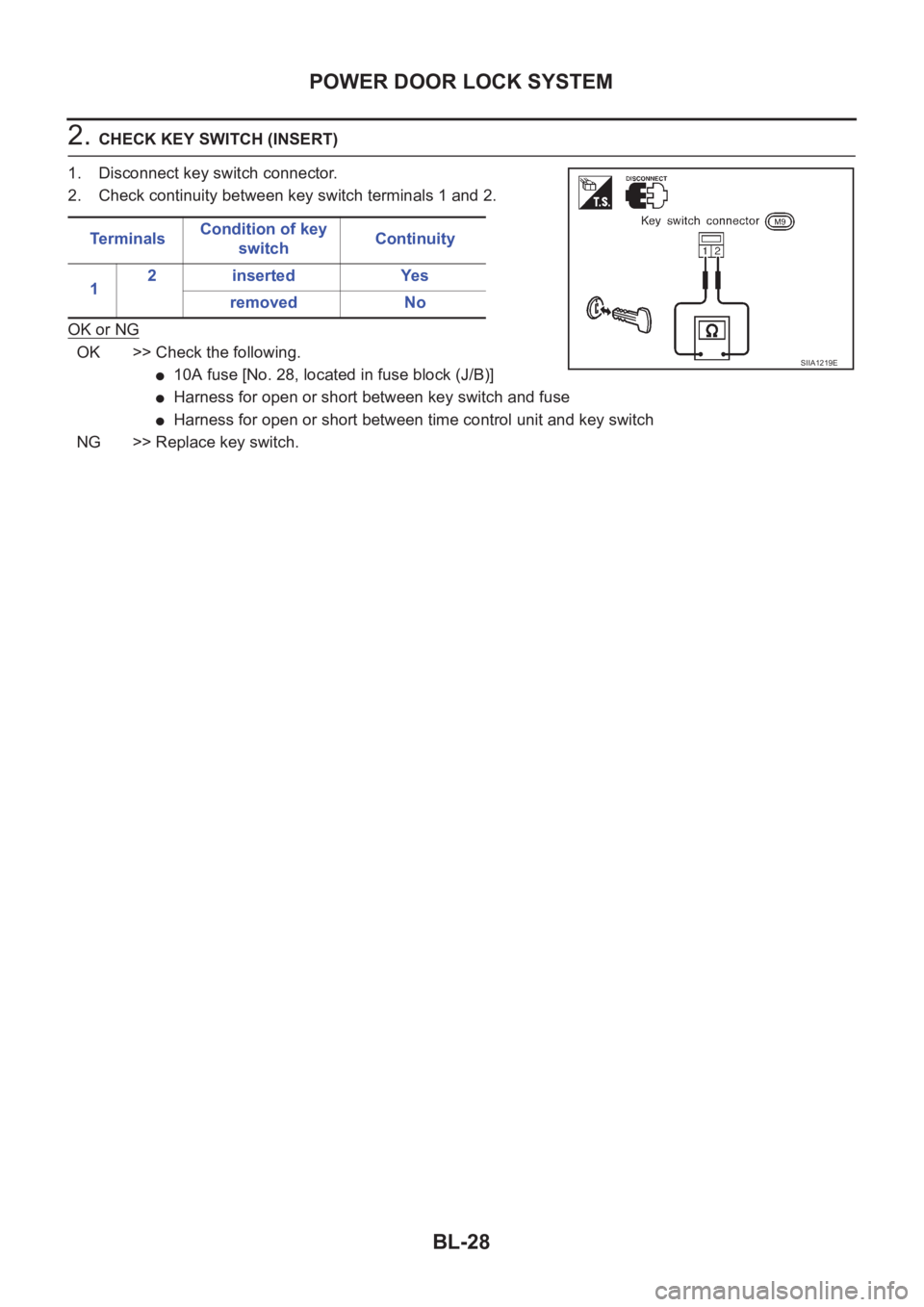
2. CHECK KEY SWITCH (INSERT)
1. Disconnect key switch connector.
2. Check continuity between key switch terminals 1 and 2.
OK or NG
OK >> Check the following.
●10A fuse [No. 28, located in fuse block (J/B)]
●Harness for open or short between key switch and fuse
●Harness for open or short between time control unit and key switch
NG >> Replace key switch.Te r m i n a l sCondition of key
switchContinuity
12 inserted Yes
removed No
SIIA1219E
Page 3081 of 3833
POWER DOOR LOCK — SUPER LOCK —
BL-29
C
D
E
F
G
H
J
K
L
MA
B
BL
POWER DOOR LOCK — SUPER LOCK —PFP:24814
System DescriptionEIS001R6
OUTLINE
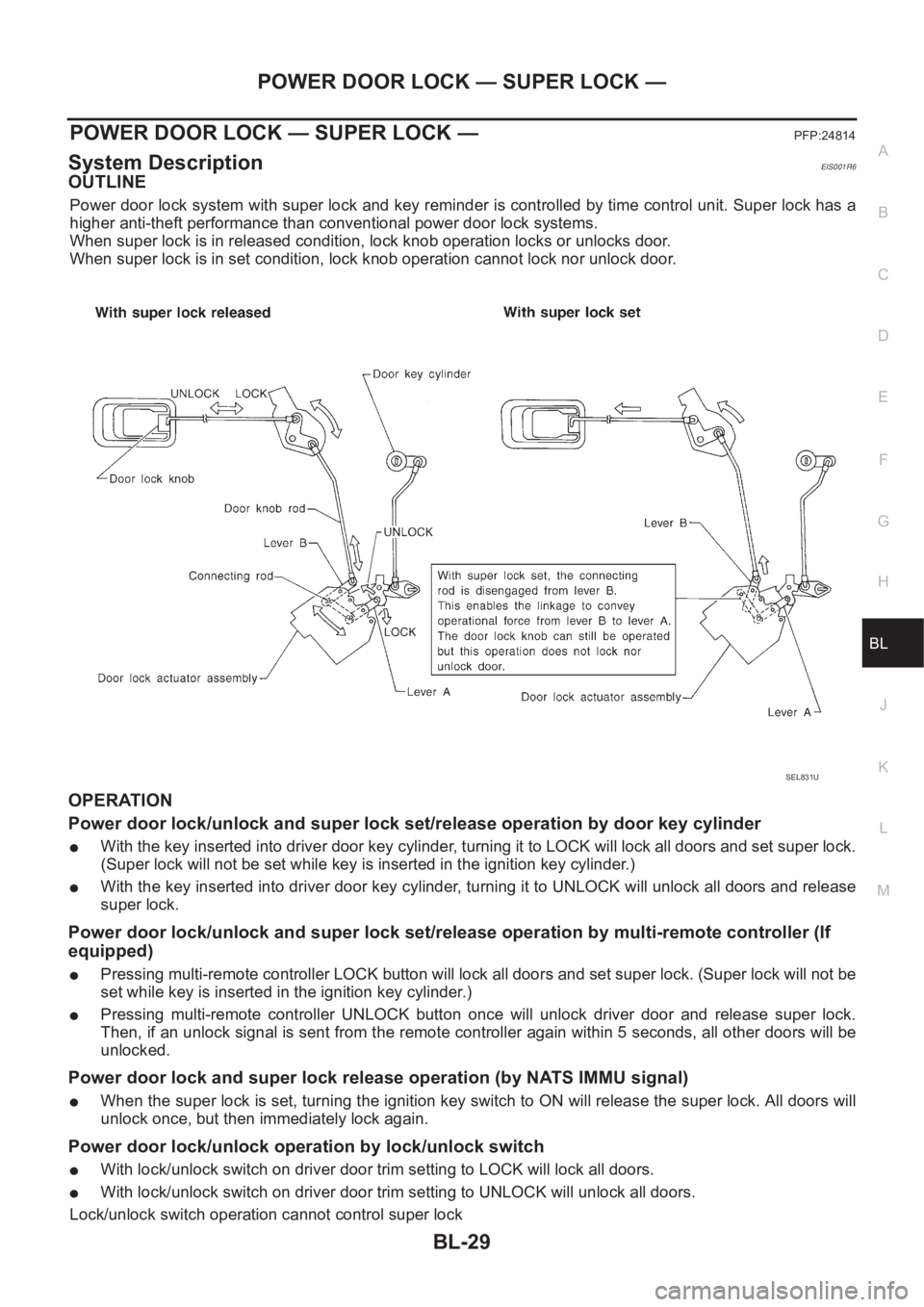
Power door lock system with super lock and key reminder is controlled by time control unit. Super lock has a
higher anti-theft performance than conventional power door lock systems.
When super lock is in released condition, lock knob operation locks or unlocks door.
When super lock is in set condition, lock knob operation cannot lock nor unlock door.
OPERATION
Power door lock/unlock and super lock set/release operation by door key cylinder
●With the key inserted into driver door key cylinder, turning it to LOCK will lock all doors and set super lock.
(Super lock will not be set while key is inserted in the ignition key cylinder.)
●With the key inserted into driver door key cylinder, turning it to UNLOCK will unlock all doors and release
super lock.
Power door lock/unlock and super lock set/release operation by multi-remote controller (If
equipped)
●Pressing multi-remote controller LOCK button will lock all doors and set super lock. (Super lock will not be
set while key is inserted in the ignition key cylinder.)
●Pressing multi-remote controller UNLOCK button once will unlock driver door and release super lock.
Then, if an unlock signal is sent from the remote controller again within 5 seconds, all other doors will be
unlocked.
Power door lock and super lock release operation (by NATS IMMU signal)
●When the super lock is set, turning the ignition key switch to ON will release the super lock. All doors will
unlock once, but then immediately lock again.
Power door lock/unlock operation by lock/unlock switch
●With lock/unlock switch on driver door trim setting to LOCK will lock all doors.
●With lock/unlock switch on driver door trim setting to UNLOCK will unlock all doors.
Lock/unlock switch operation cannot control super lock
SEL831U