radio Oldsmobile Achieva 1995 s User Guide
[x] Cancel search | Manufacturer: OLDSMOBILE, Model Year: 1995, Model line: Achieva, Model: Oldsmobile Achieva 1995Pages: 340, PDF Size: 16.99 MB
Page 137 of 340
Presets: The five numbered pushbuttons can be used to
preset up to
ten radio stations (five AM and five FM).
The buttons
have other uses when you are playing a
compact disc.
1.
2.
3.
4.
Tune in the desired station.
Press
SET. The word SET will appear on the digital
display for five seconds.
While SET is displayed, press
one of the five
pushbuttons. Whenever
you press this button again,
the preset station will be tuned in.
Repeat steps
1-3 for each of five AM and five FM
stations.
Setting the Tone
BASS:
Press the up or down arrows to increase or
decrease the bass level. Press the center
of the button for
the factory preset level. The bass level will appear on
the display for approximately ten seconds.
TREB: Press the up or down arrows to increase or
decrease the treble level. Press the center
of the button
for the factory preset level. The treble level will appear
on
the display for approximately ten seconds. If a station
is weak or noisy, reduce
the treble.
Adjusting the Speakers
R-L BALANCE: The control ring behind the upper
knob adjusts the left/right speaker balance.
F-R FADE: The control ring behind the lower knob
adjusts the fronthear speaker balance.
Compact Disc Player
Many of the controls for the radio also have functions
for
the compact disc player, as explained here.
Don’t use mini-discs that are called singles. They won’t
eject.
Use only.fLdl-size compact discs.
1. Turn the PWR-VOL knob to turn on the power.
2. Insert a disc part-way into the slot, with the label
side up. The player
will pull it in. Within a few
seconds, the disc should play.
To insert a disc with
the ignition in the OFF position, press EJCT then
insert the disc.
If the disc comes back out and/or Err appears on the
display:
The disc may be upside down.
0 The disc may be dirty, scratched or wet.
3-11
Page 138 of 340
There may be too much moisture in the air (wait
The player may be too hot, too cold or the road may
about
one hour
and try again).
be too rough for
the disc to play. As soon as things
get back to normal, the disc should play.
While a disc is playing, the
CD indicator is displayed on
the digital display, as is the clock.
RCL: Press this button once to see what track is
playing. Press again within five seconds to see how long
your selection has been playing. The track number also
will be displayed when the volume is changed
or a new
track starts to play.
COMP: Pressing this button makes soft and loud
passages more equal in volume. Press again to resume
normal play.
RDM: Press to play tracks in random, rather than
sequential, order.
RDM will be displayed on the digital
display when this function is active.
Press the button again
to play tracks sequentially.
REV: Press and hold to rapidly reverse the disc. Release
to resume playing.
FWD: Press and hold to rapidly advance the disc.
Release to resume playing.
SCAN: Press this button to sample each track for
approximately ten seconds.
SCAN will continue until
another button is pressed.
PREV. Press to play a track again. If you keep pressing
the PREV button, the disc will keep backing up to
previous tracks.
NEXT Press to advance to the next track. If you keep
pressing the NEXT button, the disc will keep advancing
to other tracks.
When Finished with the Compact Disc Player
If you use the PWR-VOL knob to turn off the power, or
turn off the ignition, the disc will stay in the player and
start again when you turn
on the ignition or the
PWR-VOL knob. The disc will begin playing at the
point where
it had been stopped.
ST-PL: Press to stop the disc player; the radio will play.
Press again to play the disc (the player
will start playing
the disc where
it had stopped earlier).
EJCT Press to eject the disc; the radio will play. You
can
also eject the disc with the radio or ignition off.
3-12
Page 139 of 340
CD Player Theft Deterrent Feature
Delco LOC 11’ is an theft deterrent feature for the
compact disc player. It can be used or ignored. If
ignored, the system plays normally. If it is used, your
player won’t be usable if
it is ever stolen because it will
go to “LOC” mode any time battery power is removed.
It will also
go to LOC mode any time power from the
battery is turned off by the Battery Rundown Protection
feature (see“Battery Rundown Protection”
in the Index).
Until an unlock code is entered, it will not turn on.
The instructions below tell you how to enter a secret
code into the system. If your vehicle loses battery power
for any reason, you must unlock
the system with the
secret code before your audio system will turn on.
Setting the Anti-Theft System
1. Write down any six-digit number and keep it in a
2. Turn the ignition to the ACC or RUN position.
3. Turn the PWR-VOL knob to turn the radio off.
safe place. This is your secret c.ode.
4. Press station preset buttons 1 and 4 at the same time
and hold
until bb---’’ shows on the display.
You now have only 15 seconds between each of the
following steps.
5. Press SET, and “000” will appear on the display.
6. Press SCAN until the first digit of your code
appears.
7. Press SEEK until the second and third digits of your
8. Press the TUNE knob (“000” will appear again on
code
appear.
the display).
9. Press SCAN until the fourth digit of your code
appears.
10. Press SEEK until the fifth and sixth digits of your
code appear.
11. Press the TUNE knob (“rEP’ will appear for five
seconds,
then 000 ).
12. Repeat steps 6 through 10. Then press the TUNE
knob again. SEC will appear, indicating that Delco
LOC IT’ is set, and your audio system is secure. If
bb---” appears, the steps were not successful, and
you must repeat the entire procedure.
3-13
Page 140 of 340
Disabling the Anti-Theft System
Enter your secret code by following these steps (you
will have only
15 seconds between each step).
1. Turn the ignition to the ACC or RUN position, and
turn
the radio off.
2. Press station preset buttons 1 and 4 at the same time.
SEC will appear in the display, indicating the audio
system is secure.
3. Press SET, and “OOO” will appear on the display.
4. Press SCAN until the first digit of your secret code
appears.
5. Press SEEK until the second and third digits of your
code appear.
display).
6. Press the TUNE knob (“000” will appear on the
7. Press SCAN until the fourth digit of your code appears.
8. Press SEEK until the fifth and sixth digits of your
code appear.
9. Press the TUNE knob. If the display shows “---,” the
radio is unsecured and will play again. If the display
shows SEC, the disabling sequence was unsuccessful
and the numbers did not match
the secret code.
If
you lose or forget your code, see your retailer.
Unlocking the System After a Power Loss
When battery power is reapplied to a secured audio
system after a
loss of power, the audio system will not
turn on and
LOC will appear on the digital display. You
will need to unlock the Delco LOC
11s system.
1. Turn the ignition to the ACC or RUN position, and
turn the radio
off.
2. Press SET, and “000” will appear on the display.
3. Follow steps 4-8 for disabling your anti-theft
system.
digital display if you are successful.
If SEC appears,
however, the numbers did not match, and your audio
system
is still locked.
4. Press the lower knob. The time will appear on the
Understanding Radio Reception
FM Stereo
FM stereo will give you the best sound, but FM signals
will reach only about
10 to 40 miles ( 16 to 65 km). Tall
buildings or hills can interfere with FM signals, causing
the sound to come and go.
3-14
Page 141 of 340
AM
The range for most AM stations is greater than for FM,
especially at night. The longer range, however, can
cause stations to interfere with each other.
AM can also
pick up noise from things like storms and power lines.
To lower this noise, try reducing the treble level.
Be aware that hearing damage from loud noise is almost
undetectable until it is too late. Your hearing can adapt
to higher volumes of sound. Sound that seems normal
can be loud and harmful to your hearing. Take
precautions by adjusting the volume control
on your
radio to a safe sound level before your hearing adapts to
it.
To help avoid hearing loss or damage:
Adjust the volume control to the lowest setting.
Increase volume slowly until you hear comfortably
and clearly.
NOTICE:
Before you add any sound equipment to your
vehicle
-- like a tape player, CB radio, mobile
telephone
or two-way radio -- be sure you can
add what you want. If you can, it’s very
important to do it properly. Added sound
equipment may interfere with the operation of
your vehicle’s engine, Delco@ radio or other
systems, and even damage them. And, your
vehicle’s systems may interfere with the
operation
of sound equipment that has been
added improperly.
So, before adding sound equipment, check with
your retailer and be sure
to check Federal rules
covering mobile radio and telephone units.
3-15
Page 143 of 340
Fixed Mast Antenna
The fixed mast antenna can withstand most car washes
without being damaged.
If the mast should ever become
slightly bent,
you can straighten it out by hand. If the
mast
is badly bent, as it might be by vandals, you should
replace it.
Check every once in
a while to be sure the mast is still
tightened to the fender.
Rear Window Defogger Antenna (Option)
This particular rear window defogger also serves as a
radio antenna. If you have this option, do not apply
aftermarket glass tinting. The metallic film in some
tinting materials will interfere with or distort the
incoming radio reception.
3-17
Page 185 of 340
You could be injured if the vehicles roll. Set the
parking brake firmly on each vehicle. Put an
automatic transaxle in PARK
(P) or a manual
transaxle in NEUTRAL (N).
3. Turn off the ignition on both vehicles. Turn off all
lamps that aren’t needed, and radios. This will avoid
sparks and help save both batteries. And it could
save your radio!
NOTICE:
If you leave your radio on, it could be badly
damaged. The repairs wouldn’t be covered by
your warranty.
4. Open the hoods and locate the batteries. Find the
positive
(+) and negative (-) terminals on
each battery.
5-3
Page 262 of 340
-L- El
F/P IN.1 e,
iNST LPS GAUGES
I I
H3LP CIRCUIT BREAKER
~ CIRCUIT PWR WDO
BREAKER
PWA ACC
BREAKEI? - CIRCUIT
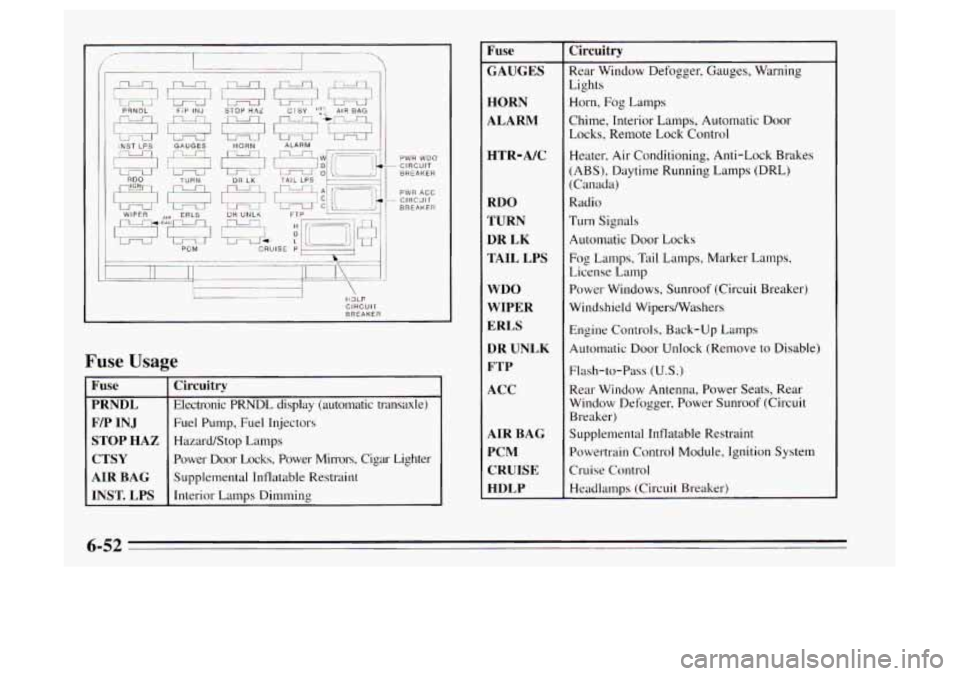
Fuse Usage
PRNDL
F/P INJ
STOP HAZ
AIR BAG
INST. LPS Circuitry
Electronic PRNDL display (automatic transaxle)
Fuel
Pump, Fuel Injectors
Hazard/Stop Lamps
Power Door Locks, Power Mirrors, Cigar Lighter
Supplemental Inflatable Restraint
Interior Lamps Dimming
Fuse
GAUGES
HORN
ALARM
HTR-A/C
RDO
TURN DR
LK
TAIL LPS
WDO
WIPER
ERLS DR UNLK
FTP
ACC
AIR BAG PCM CRUISE
HDLP Circuitry
Rear Window Defogger,
Gauges, Warning
Lights
Horn, Fog Lamps
Chime, Interior Lamps, Automatic Door
Locks, Remote Lock Control
Heater, Air Conditioning, Anti-Lock Brakes
(ABS), Daytime Running Lamps (DRL)
(Canada)
Radio
Turn Signals
Automatic Door Locks
Fog Lamps, Tail Lamps, Marker Lamps,
License Lamp
Power Windows, Sunroof (Circuit Breaker)
Windshield Wipersmashers
Engine Controls, Back-up Lamps
Automatic Door Unlock (Remove
to Disable)
Flash-to-Pass
(U.S.)
Rear Window Antenna, Power Seats, Rear
Window Defogger, Power Sunroof (Circuit
Breaker)
Supplemental Inflatable Restraint
Powertrain Control Module, Ignition System
Cruise Control
Headlamps (Circuit Breaker)
6-52
Page 334 of 340
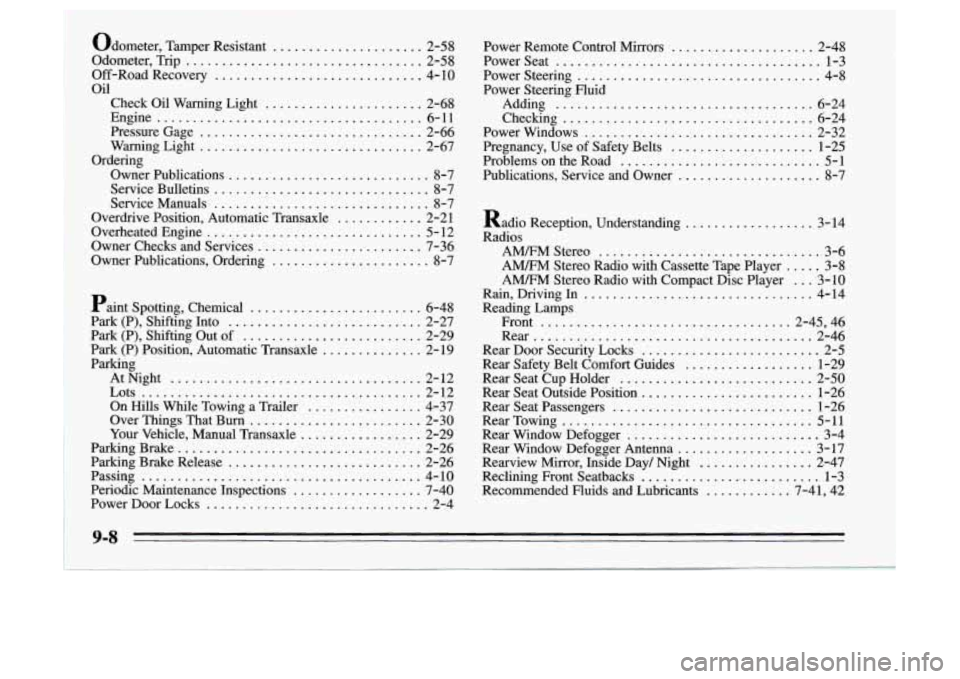
Odometer. Tamper Resistant ..................... 2-58
Odometer. Trip
................................. 2-58
Off-Road Recovery
............................. 4- 10
Check Oil Warning Light
...................... 2-68
Engine
..................................... 6-11
Pressure Gage
............................... 2-66
WamingLight
............................... 2-67
OwnerPublications
............................ 8-7
Service Bulletins
.............................. 8-7
Service Manuals
.............................. 8-7
Overdrive Position, Automatic Transaxle
............ 2-21
Overheated Engine
.............................. 5-12
Owner Checks and Services
....................... 7-36
Owner Publications, Ordering
...................... 8-7
Oil
Ordering
i Paint Spotting. Chemical ........................ 6-48
Park (P). Shifting Into
........................... 2-27
Park (P). Shifting Out of
......................... 2-29
Park (P) Position. Automatic Transaxle
.............. 2-19
Parking AtNight
................................... 2-12
On Hills While Towing a Trailer
................ 4-37
Lots
....................................... 2-12
Over Things That Burn
........................ 2-30
Your Vehicle. Manual Transaxle ................. 2-29
ParkingBrake
.................................. 2-26
Parking Brake Release
........................... 2-26
Periodic Maintenance Inspections
.................. 7-40
Passing ....................................... 4-10
PowerDoorLocks
............................... 2-4 Power Remote Control Mirrors
.................... 2-48
Power Steering
.................................. 4-8
Checking
................................... 6-24
Power Windows
................................ 2-32
Pregnancy, Use of Safety Belts
.................... 1-25
Problems on the Road
............................ 5-1
Publications, Service and Owner
.................... 8-7
PowerSeat
..................................... 1-3
Power Steering Fluid Adding
.................................... 6-24
Radio Reception. Understanding
.................. 3-14
Radios A"Stere0
............................... 3-6
A" Stereo Radio with Compact Disc Player ... 3-10
A" Stereo Radio with Cassette Tape Player ..... 3-8
Rain. Driving In
................................ 4-14
Reading Lamps Front
...................................2-45, 46
Rear
....................................... 2-46
Rear Door Security Locks ......................... 2-5
Rear Safety Belt Comfort Guides
.................. 1-29
Rear Seat Cup Holder
........................... 2-50
Rear Seat Outside Position
........................ 1-26
Rear Seat Passengers
............................ 1-26
RearTowing
................................... 5-11
Rear Window Defogger
........................... 3-4
Rear Window Defogger Antenna
................... 3-17
Rearview Mirror, Inside Day/ Night
................ 2-47
Reclining Front Seatbacks
.......................... 1-3
Recommended Fluids and Lubricants ............ 7-41, 42
9-8