battery OLDSMOBILE AURORA 1996 Owner's Manual
[x] Cancel search | Manufacturer: OLDSMOBILE, Model Year: 1996, Model line: AURORA, Model: OLDSMOBILE AURORA 1996Pages: 388, PDF Size: 20.24 MB
Page 214 of 388

7. Connect the red positive (+) cable to the
remote positive
(+) terminal of the vehicle with
the dead battery.
8. Don’t let the other end touch metal. Connect it to
the positive (+) terminal of the good battery. Use a
remote positive
(+) terminal if the vehicle has one.
ProCarManuals.com
Page 215 of 388

9. Now connect the
black negative
(-) cable
to the good battery's
negative
(-) terminal.
Don't let the other end touch anything until the next
step. The other end of the negative cable
doesn't go to
the dead battery.
It goes to a heavy unpainted metal part
on the engine
of the vehicle with the dead battery.
10.
11.
Attach the cable at least 18 inches (45 cm) away
from the dead battery, but not near engine parts that
move. The electrical connection is just as good
there, but the chance of sparks getting back to the
battery is much less.
Now start the vehicle with the good battery and run
the engine for a while.
ProCarManuals.com
Page 216 of 388

12. Try to start the vehicle with the dead battery. If
it won’t start after a few tries, it probably needs
service.
13. Remove the cables in reverse order to prevent electrical shorting. Take care that they don’t touch
each other or any other metal.
- +
B
A. Heavy Metal Engine Part
B . Good Battery
C. Dead Battery
Towing Your Vehicle
Try to have a GM dealer or a professional towing
service tow your vehicle.
If your vehicle has been changed or modified since it
was factory-new by adding aftermarket items like fog
lamps, aero skirting, or special tires and wheels, these
instructions and illustrations may not be correct.
Before you do anything, turn on the hazard warning
flashers.
When you call, tell the towing service:
That your vehicle can only be towed from the front
0 That your vehicle has front-wheel drive.
0 The make, model and year of your vehicle.
0 Whether you can still move the shift lever.
If there was an accident, what was damaged.
When the towing service arrives, let the tow operator
know that this manual contains detailed towing
instructions and illustrations. The operator may want to
see them. with
sling type equipment.
ProCarManuals.com
Page 255 of 388
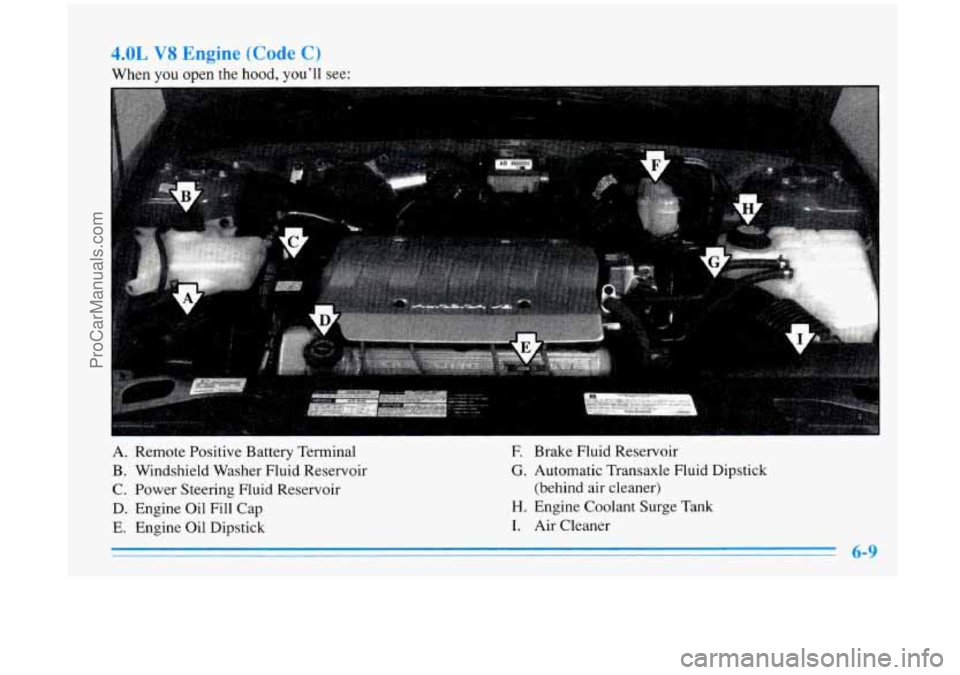
When you open the hood, you’li see:
A. Remote Positive Battery Terminal
B. Windshield Washer Fluid Reservoir
C. Power Steering Fluid Reservoir
D. Engine Oil Fill Cap
E. Engine Oil Dipstick
E Brake Fluid Reservoir
G. Automatic Transaxle Fluid Dipstick
(behind air cleaner)
H. Engine Coolant Surge Tank
I. Air Cleaner
6-9
ProCarManuals.com
Page 276 of 388

Battery
Every new Aurora has a Delco Freedom@ battery. You
never have to add water to one of these. When it’s time
for a new battery, we recommend a Delco Freedom@
battery. Get one that has the replacement number shown
on the original battery’s label.
The battery is located under the rear seat cushion.
To
access the battery, see “Removing the Rear Seat
Cushion” in the Index.
You don’t need to access the
battery to jump start your vehicle. See “Jump Starting”
in the Index.
CAUTION:
-
A battery that isn’t properly vented can let
sulfuric acid fumes into the area under the rear
seat cushion. These fumes can damage your rear
seat safety belt systems. You may not be able to
see this damage, and the safety belts might not
provide the protection needed in
a crash. If a
replacement battery is ever needed, it must be
vented in the same manner as the original battery. Always make sure that the vent hose
is properly reattached before reinstalling the
seat cushion.
ProCarManuals.com
Page 277 of 388
Vehicle Storage
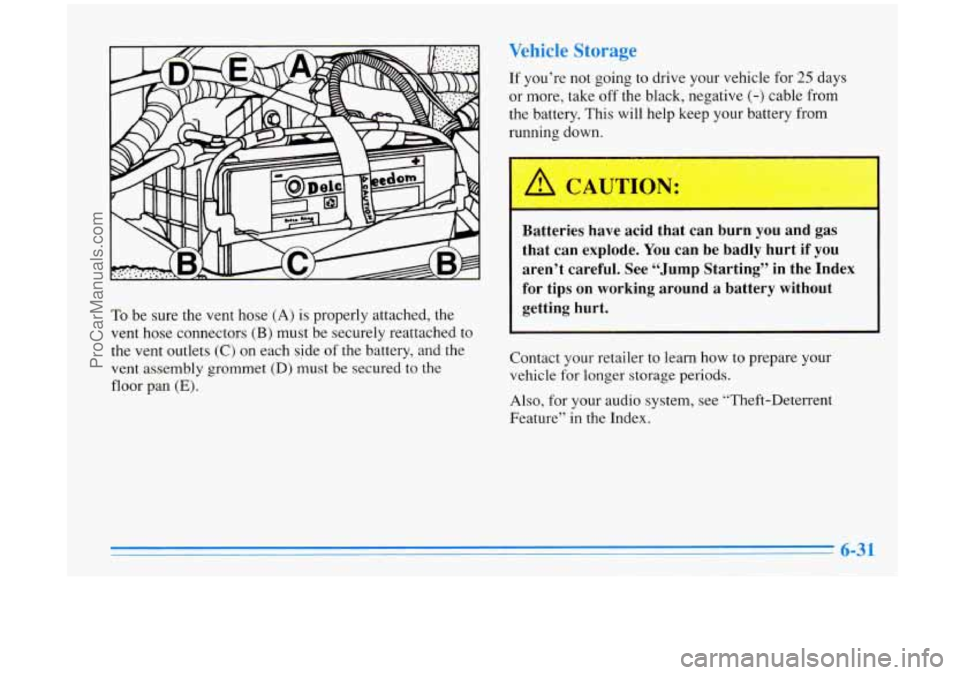
To be sure the vent hose (A) is properly attached, the
vent hose connectors
(B) must be securely reattached to
the vent outlets
(C) on each side of the battery, and the
vent assembly grommet (D) must
be secured to the
floor pan
(E).
If you’re not going to drive your vehicle for 25 days
or more, take off the black, negative
(-) cable from
the battery. This will help keep your battery from
running down.
I’
Batteries have acid that can burn you and gas
that can explode.
You can be badly hurt if you
aren’t careful. See “Jump Starting’’ in the Index
for tips on working around a battery without
getting hurt.
Contact your retailer to learn how to prepare your
vehicle
for longer storage periods.
Also, for your audio system, see “Theft-Deterrent
Feature” in the Index.
ProCarManuals.com
Page 306 of 388

Fuse
17
18
19
20
21
22
23
24
25
26
27
28 Usage
Driver Information
Center
Converter Oxygen Sensors
Radio
Open
Climate Control Relay
Open
Windshield Wipers Open
TMNSS
Cigarette Lighter
Crank,
Air Bag Module
Climate Control Blower
Removing the Rear Seat Cushion
To access the battery and rear compartment fuse panels,
the rear seat cushion must be removed.
This procedure is
somewhat difficult. You may wish to have your retailer
do this for you.
I NOTICE:
The battery and main fuse boxes are located under
the rear seat cushion. The battery’s ground
terminal and some relay wires are exposed. To help
avoid damage to the battery and wires, be careful
when removing
or reinstalling the seat cushion. Do
not remove covers from covered parts. Do not store
anything under the seat,
as objects could touch
exposed wires and cause a short.
To Remove the Rear Seat Cushion
1. Pull up on the front of the cushion to release the
front hooks.
2. Pull the cushion up and out toward the front of the
vehicle.
6-60
ProCarManuals.com
Page 308 of 388

Rear Compartment Fuse Blocks
Once the seat is removed,
you’ll find two fuse panels
on the driver’s side
of the
battery. Each is protected by
a plastic box with four tabs.
Pull up on all four tabs at
the same time to loosen
them and pull off the box.
Of these two panels, the cover on the passenger’s side
fuse panel has an extra plastic cap attachment. You’ll
need to slide this out of the grooves which hold
it there
before removing the rest
of the box.
To replace the covers, line the four tabs up and simply
snap them back into place. The extra plastic cap
attachment slides back into place.
REAR COMPARTMENT
DRIVER SIDE FUSE BLOCK
I 112 3
1 OPEN 1, 11 REL TRUNK
c B A
1 OPEN II FPMP I D/DooR UNLOCK F E Dl
11
DEFG - RR #2
B
12
DEFG- RR #i
A
ACSRY DAP OPEN
ProCarManuals.com
Page 311 of 388

Fuse
21
22
23
24
25
26
27 28
29
30
31
32
Usage
Rear Defogger Trunk and
Fuel Door Releases and
Trunk Pull Down
Heated Seat
Electronic Level Control, Instrument Panel
Exterior Lamps
Base@ Stereo (If so equipped)
Power Door Locks
Interior Lamps
Hazard Lamps, Stoplamps
Parking Lamps Heated Outside Mirror
Open
Fuse
33
34
35
36
37
38 39
40
41
42
Usage
Fuel Door Release
Open Battery Thermistor
Instrument Panel
-- Power
Antenna, Remote CD Changer,
Radio Chassis
Instrument Panel
-- Remote
Accessory Power Module, Oil
Level Indicator,
ALDL
Electronic Level Control
Fuel Pump
Open
Rear Defog
1
Rear Defog 2
6-65
ProCarManuals.com
Page 375 of 388
Accessory Power Outlet ......................... 2-54
AirBag
....................................... 1-18
How Does it Restrain
........................... 1-22
How it Works
................................ 1-20
Location
.................................... 1-20
Readiness Light ......................... 1 . 19, 2-64
Servicing
................................... 1-23
What Makes it Inflate
.......................... 1-21
What Will
You See After it Inflates ............... 1-22
When Should it Inflate
......................... 1-21
Air Cleaner
.................................... 6-14
Air Conditioning
................................ 3-5
Air Conditioning Refrigerants ..................... 6-69
Air Control. Climate Control System
............. 3.3. 3.4
Alarm. Universal Theft-Deterrent .................. 2- 15
Alignment and Balance. Tire
...................... 6-46
Aluminum Wheels. Cleaning
...................... 6-53
Antenna. Power
................................ 3-28
Antifreeze
...................................... 6-20
Anti-Lock
Brakes
...................................... 4-6
Brake System Warning Light
................ 2.66. 4.6
Anti-LockoutFeature
............................ 2-7
Anti.Theft. Radio
.............................. 3-23
Appearance Care
................................ 6-48
Appearance Care Materials
....................... 6-55
Arbitration Program
............................... 8-6 Ashtrays
....................................... 2-52
Audio Equipment, Adding
........................ 3-26
Audio Systems
................................. 3-10
Automatic
DoorLocks
................................... 2-4
Electronic Climate Control
...................... 3-1
Overdrive
................................... 2-25
Check
...................................... 7-39
Fluid
....................................... 6-17
Operation
................................... 2-23
Park Mechanism Check
........................ 7-41
Auto-Push Knob, Climate Control
.................. 3-2
Averagespeed
................................. 2-76
Battery
........................ : ............. 6-30
Jump Starting ................................. 5-2
Replacement
.................................. 2-11
Saver
...................................... 2-47
Audio
Controls, Steering Wheel Touch Control
....... 3-25
Automatic Transaxle
WarningLight
............................... 2-64
Warnings
................................ 5-2, 5-5
Belt, Engine Accessory
.......................... 6-70
Battery
Voltage Message
......................... 2-76
BBB Auto Line
................................. 8-6
Better Business Bureau Mediation
................... 8-6
9-1
ProCarManuals.com