phone OLDSMOBILE SILHOUETTE 1997 Owners Manual
[x] Cancel search | Manufacturer: OLDSMOBILE, Model Year: 1997, Model line: SILHOUETTE, Model: OLDSMOBILE SILHOUETTE 1997Pages: 436, PDF Size: 21.87 MB
Page 172 of 436
Accessory Power Outlet
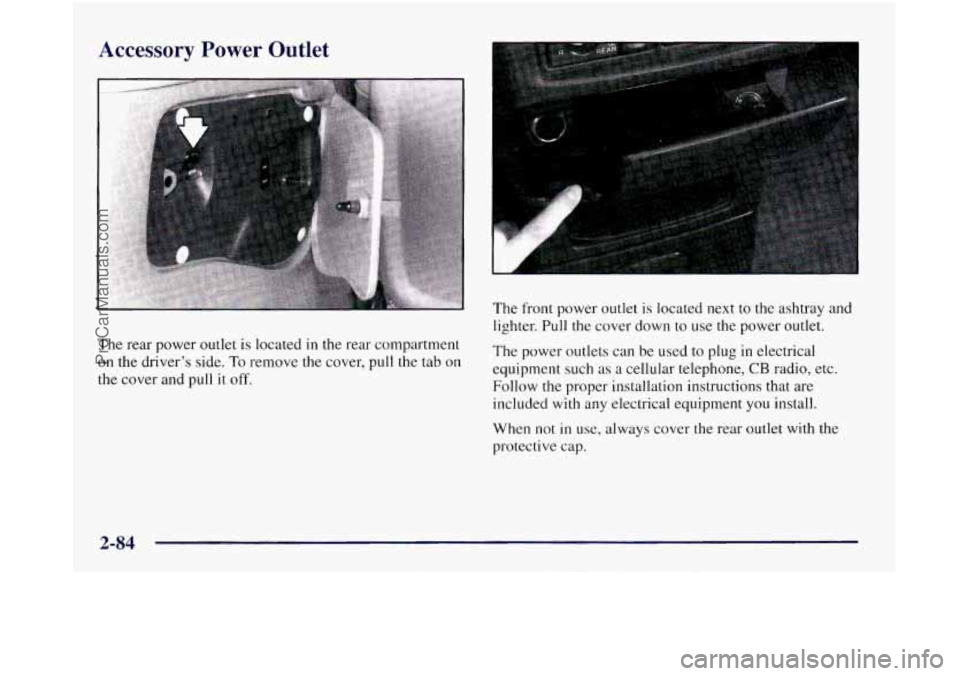
The rear power outlet is located in the rear compartment
on the driver’s side. To remove the cover, pull the tab on
the cover and pull it off.
The front power outlet is located next to the ashtray and
lighter. Pull the cover down to use the power outlet.
The power outlets can be used to plug in electrical
equipment such as
a cellular telephone, CB radio, etc.
Follow the proper installation instructions that are
included with any electrical equipment you install.
When not
in use, always cover the rear outlet with the
protective cap.
2-84
ProCarManuals.com
Page 209 of 436
AM-FM: Press this button to play the radio when a
tape is in the player.
TAPE AUX: Press this button to change the tape
function when the radio
is on. The tape symbol with an
arrow will appear
on the display when the tape is active.
EJECT Press this button to remove the tape. The radio
will play. EJECT may be activated with either the
ignition or radio off. Cassettes may be loaded with
the
radio off if this button is pressed first.
CLN: If this message appears on the display, the
cassette tape player needs to be cleaned.
It will still play
tapes, but you should clean
it as soon as possible to
prevent damage
to the tapes and player. See “Care of
Your Cassette Tape Player” in the Index. After you clean
the player, press and hold EJECT for
five seconds to
reset the
CLN indicator. The radio will display --- to
show the indicator was reset.
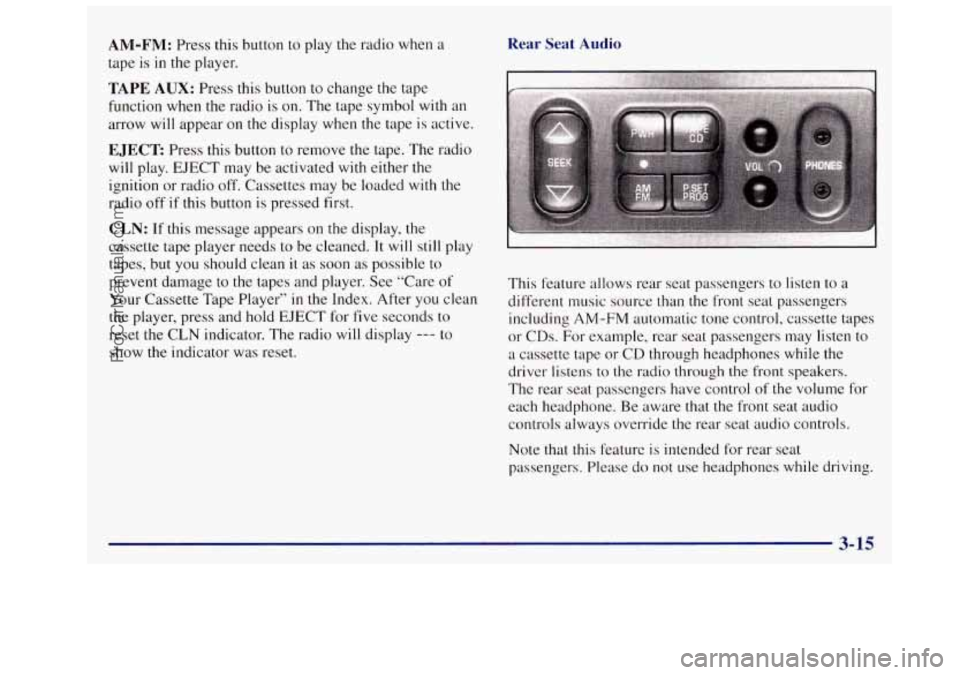
Rear Seat Audio
This feature allows rear seat passengers to listen to a
different music source than the front seat passengers
including
AM-FM automatic tone control, cassette tapes
or CDs. For example, rear
seat passengers may listen to
a cassette tape or CD through headphones while the
driver listens to the radio through the front speakers.
The rear seat passengers have control
of the volume for
each headphone. Be aware that
the front seat audio
controls always override
the rear seat audio controls.
Note that this feature is intended for rear seat
passengers. Please do not use headphones while driving.
3-15
ProCarManuals.com
Page 210 of 436
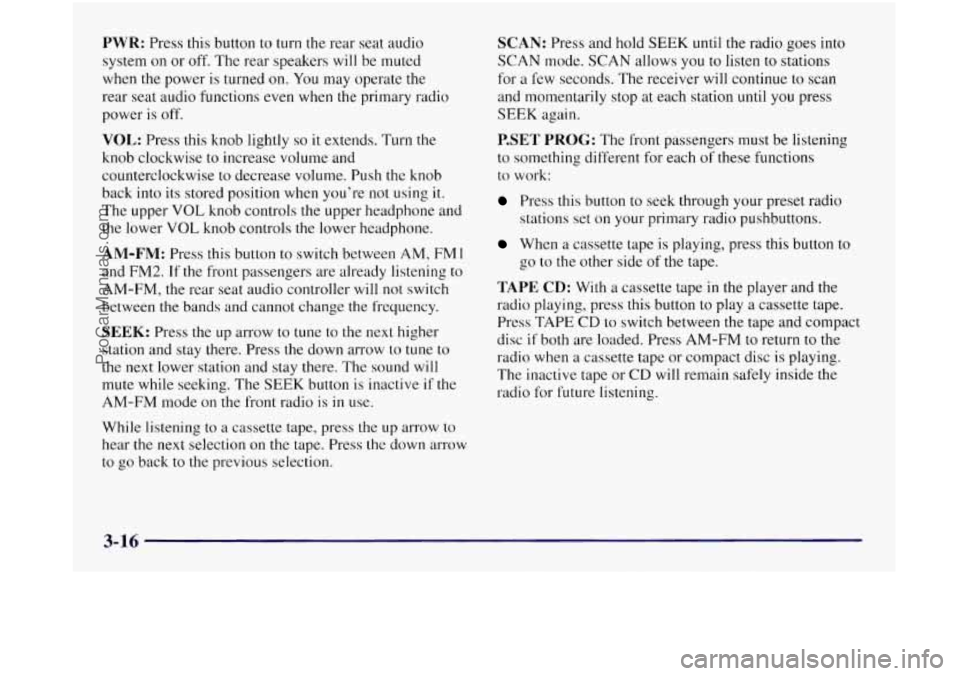
PWR: Press this button to turn the rear seat audio
system on or off. The rear speakers will be muted
when
the power is turned on. You may operate the
rear seat audio functions even when the primary radio
power
is off.
VOL: Press this knob lightly so it extends. Turn the
knob clockwise to increase volume and
counterclockwise to decrease volume. Push the knob
back into its stored position when you’re not using
it.
The upper VOL knob controls the upper headphone and
the lower
VOL knob controls the lower headphone.
AM-FM: Press this button to switch between AM, FM 1
and FM2. If the front passengers are already listening to
AM-FM, the rear seat audio controller will not switch
between
the bands and cannot change the frequency.
SEEK: Press the up arrow to tune to the next higher
station and stay there. Press the down arrow to tune
to
the next lower station and stay there. The sound will
mute while seeking. The SEEK button
is inactive if the
AM-FM mode on the front radio is
in use.
While listening
to a cassette tape, press the up arrow to
hear
the next selection on the tape. Press the down arrow
to go back to the previous selection.
SCAN: Press and hold SEEK until the radio goes into
SCAN mode. SCAN allows you
to listen to stations
for
a few seconds. The receiver will continue to scan
and momentarily stop at each station
until you press
SEEK again.
P.SET PROG: The front passengers must be listening
to something different for each
of these functions
to work:
Press this button to seek through your preset radio
stations set on your primary radio pushbuttons.
When a cassette tape is playing, press this button to
TAPE CD: With a cassette tape in the player and the
radio playing, press this button to play
a cassette tape.
Press TAPE
CD to switch between the tape and compact
disc
if both are loaded. Press AM-FM to return to the
radio when a cassette tape or compact disc is playing.
The inactive tape
or CD will remain safely inside the
radio for future listening.
go
to the other side
of the tape.
3-16
ProCarManuals.com
Page 217 of 436
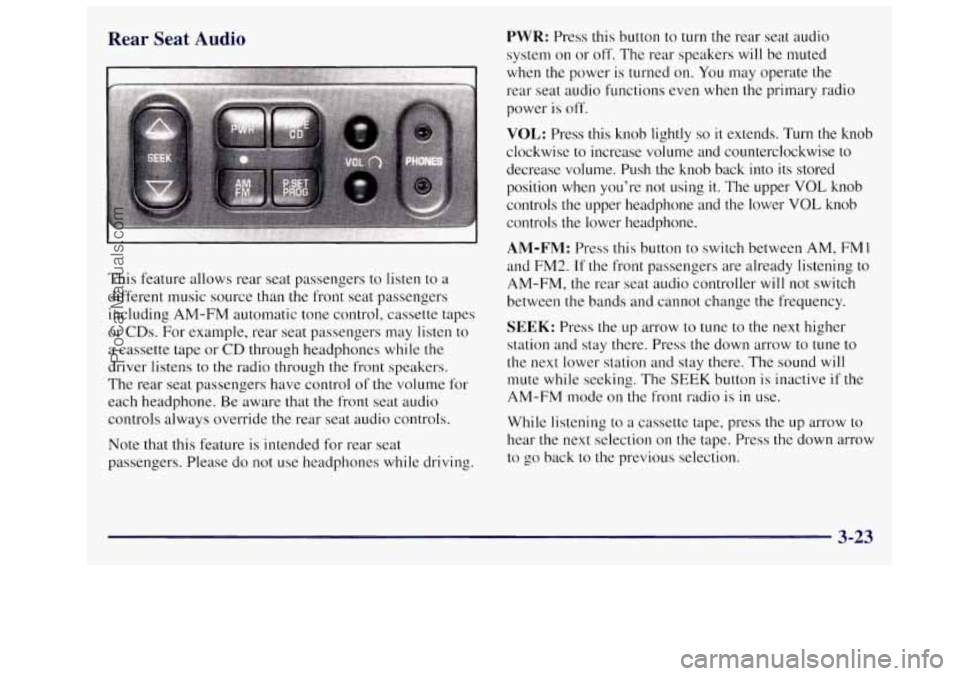
Rear Seat Audio
This feature allows rear seat passengers to listen to a
different music source than
the front seat passengers
including AM-FM automatic tone control, cassette tapes
or
CDs. For example, rear seat passengers may listen to
a cassette tape or
CD through headphones while the
driver listens to the radio through the front speakers.
The rear seat passengers have control of
the volume for
each headphone. Be aware that the front seat audio
controls always override
the rear seat audio controls.
note that this feature is intended for rear seat
passengers. Please do not use headphones while driving.
PWR: Press this button to turn the rear seat audio
system on or off. The rear speakers will be muted
when the power is turned
on. You may operate the
rear seat audio functions even when the primary radio
power is off.
VOL: Press this knob lightly so it extends. Turn the knob
clockwise to increase volume and counterclockwise to
decrease volume. Push the knob back into its stored
position
when you’re not using it. The upper VOL knob
controls
the upper headphone and the lower VOL knob
controls the lower headphone.
AM-FM: Press this button to switch between AM, FM I
and FM2. If the front passengers are already listening to
AM-FM, the rear seat audio controller will not switch
between the bands and cannot change the frequency.
SEEK: Press the up arrow to tune to the next higher
station and stay there. Press the down arrow to tune to
the next lower station and stay there. The sound
will
mute while seeking. The SEEK button is inactive if the
AM-FM mode on the front radio is in use.
While listening to a cassette tape, press the
up arrow to
hear the next selection on the tape. Press the down arrow
to go back to the previous selection.
3-23
ProCarManuals.com
Page 222 of 436
To help avoid hearing loss or damage:
Adjust the volume control to the lowest setting.
Increase volume slowly until you hear comfortably
and clearly.
NOTICE:
r
Before you add any sound equipment to your
vehicle
-- like a tape player, CB radio, mobile
telephone or two-way radio
-- be sure you can add
what you want.
If you can, it’s very important to
do it properly. Added sound equipment may
interfere with the operation of your vehicle’s
engine, Delco radio or other systems, and even
damage them. Your vehicle’s systems may
interfere with the operation of sound equipment
that has been added improperly.
So, before adding sound equipment, check with
your retailer and be sure to check Federal rules
covering mobile radio and telephone units.
Care of Your Cassette Tape Player
A tape player that is not cleaned regularly can cause
reduced sound quality, ruined cassettes or a damaged
mechanism. Cassette tapes should be stored in their
cases away from contaminants, direct sunlight and
extreme heat. If they aren’t, they may not operate
properly or may cause failure of the tape player.
Your tape player should be cleaned regularly after every
50 hours of use. Your radio may display CLN to indicate
that you have used your tape player for
50 hours without
resetting the tape clean timer. If this message appears
on the display, your cassette tape player needs to be
cleaned.
It will still play tapes, but you should clean it
as soon as possible to prevent damage to your tapes and
player. If you notice a reduction in sound quality, try a
known good cassette
to see if it is the tape or the tape
player at fault. If this other cassette has no improvement
in sound quality, clean the tape player.
3-28
ProCarManuals.com
Page 245 of 436
Hydroplaning
Hydroplaning is dangerous. So much water can build up
under your tires that they can actually ride on the water.
This can happen if the road
is wet enough and you’re
going fast enough. When your vehicle is hydroplaning,
it has little or no contact with the road.
Hydroplaning doesn’t happen often. But it can if your
tires do not have much tread or if
the pressure in one or
more is low. It can happen if a lot of water is standing on
the road. If you can see reflections from trees, telephone
poles
or other vehicles, and raindrops “dimple” the
water’s surface, there could be hydroplaning.
Hydroplaning usually happens at higher speeds. There
just isn’t a hard and fast rule about hydroplaning. The
best advice is to slow down when it is raining.
Driving Through Deep Standing Water
I
NOTICE:
If you drive too quickly through deep puddles or
standing water, water can come in through your
engine’s air intake and badly damage your
engine. Never drive through water that is slightly
lower than the underbody of your vehicle. If you
can’t avoid deep puddles or standing water, drive
through them very slowly.
Some Other Rainy Weather Tips
a
a
a
Turn on your low-beam headlamps -- not just
your parking lamps
-- to help make you more
visible to others.
Besides slowing down, allow some extra following
distance. And be especially careful when you pass
another vehicle. Allow yourself more clear room
ahead, and be prepared to have your view restricted
by road spray.
Have good tires with proper tread depth. (See “Tires” in the Index.)
4-19
ProCarManuals.com
Page 409 of 436
Section 8 Customer Assistance Information
Here you will find out how to contact Oldsmobile if you need assistance. This section also tells you how to obtain
service publications and how to report any safety defects.
8-2 8-3
8-4
8-4
8-5
8-5 8-6 Customer Satisfaction Procedure
Customer
Assistance Information
Address for Writing to Oldsmobile
Assistance for Text Telephone (TTY) Users
Oldsmobile Roadside Assistance Program
Phone Number for Roadside Assistance Oldsmobile Courtesy Transportation
BBB Autoline Information
Reporting Safety Defects to the United States
Reporting Safety Defects to Canada
Reporting Safety Defects to General Motors
Ordering Service Publications in Canada
How to Order Service Publications
Order Form for Service Publications
8-7
8-8
8-9
8-9
8-9
8-
10
8-11
8-1
ProCarManuals.com
Page 412 of 436
For prompt assistance, please have the following
information available to give the Customer
Assistance Representative:
Your name, address, home and business
telephone numbers
Vehicle Identification Number (This is available
from the vehicle registration or title, or the plate at
the top left of the instrument panel and visible
through the windshield.)
Retail facility name and location
Vehicle delivery date and present mileage
Nature of concern
We encourage you to call
us so we can give your inquiry
prompt attention. However,
if you wish to write
Oldsmobile, address your inquiry to:
Customer Assistance Representative
Oldsmobile Central Office
920 Townsend Street
P.O. Box 30095
Lansing, MI 48909 Refer to your
Warranty and Owner Assistance
Information booklet for addresses of
GM Overseas offices.
When contacting Oldsmobile, please remember that your concern will likely be resolved
in the retail facility,
using the retailer’s facilities, equipment and personnel.
That is why we suggest you follow Step One first
if you
have
a concern.
Customer Assistance for Text
Telephone (TTY) Users
To assist customers who are deaf, hard of hearing, or
speech-impaired and who use Text Telephones
(TTYs).
Oldsmobile has TTY equipment available at its
Customer Assistance Center.
Any TTY user
can communicate with Oldsmobile by dialing:
I -800-833-OLDS. (TTY users in Canada can dial
1-800-263-3830.)
In Canada, write to:
General Motors of Canada Limited
Customer Communication Centre,
163-005
1908 Colonel Sam Drive
Oshawa, Ontario
LI H 8P7
8-4
ProCarManuals.com
Page 413 of 436
Oldsmobile Roadside Assistance
Program Features and Benefits
n
The Oldsmobile Roadside Assistance program means
help is just
a toll-free call away -- 24 hours a day,
365 days a year.
Courteous and capable Customer Assistance Advisors
are on-call to provide you with prompt assistance.
24-Hour Oldsmobile Roadside Assistance
Telephone Number
I-800-442-OLDS (6537) is the one number to call
for assistance
in the United States. Trained Customer
Assistance Advisors,
on-call to render assistance to
Oldsmobile drivers, can dispatch roadside assistance
and towing service, locate the nearest Oldsmobile
retail facility, take your request for an Oldsmobile
computerized trip routing or simply answer any
questions
the Oldsmobile driver may have about the
coverage provided by your Oldsmobile Roadside
Assistance Program. The Oldsmobile Roadside
Assistance number is fully staffed and operational
24 hours a day, 365 days a year.
Who Is Covered?
Oldsmobile Roadside Assistance covers all
1997 Oldsmobile vehicles.
Coverage is for the Oldsmobile vehicle,
regardless of
tlze driver, and is concurrent with the Bumper to Bumper
warranty period.
Oldsmobile reserves the right to
limit services or
reimbursement to an owner or driver when in
Oldsmobile’s judgement the claims become excessive
in
frequency or type of occurrence.
8-5
ProCarManuals.com
Page 415 of 436
GM Participation in an Alternative
Dispute Resolution Program
This program is available in all 50 states and the District
of Columbia. Canadian owners refer to your Warranty
and Owner Assistance Information booklet. General
Motors reserves the right
to change eligibility
limitations and/or to discontinue its participation in
this program.
Both Oldsmobile and your Oldsmobile retailer are
committed to making sure
you are completely satisfied
with your new vehicle. Our experience has shown that,
if a
situation arises where you feel your concern has not been
adequately addressed, the Customer Satisfaction Procedure
described earlier
in this section is very successful.
There may be instances where an impartial third party
can assist
in arriving at a solution to a disagreement
regarding vehicle repairs or interpretation
of the New
Vehicle Limited Warranty.
To assist in resolving these
disagreements, Oldsmobile voluntarily participates
in
BBB AUTO LINE. BBB
AUTO LINE is an
out-of-court program
administered by
the Better Business Bureau system to
settle automotive disputes. This prograin is available
free of charge to customers who currently own or lease a
GM vehicle.
If you are not satisfied after following the Customer
Satisfaction Procedure, you may contact the BBB using
the toll-free telephone number, or write
them at the
following address:
BBB AUTO
LINE
Council of Better Business Bureaus, Inc.
4200 Wilson Boulevard
Suite
800
Arlington, VA 22203- 1804
Telephone:
1 -800-955-5 100
To file a claim, you will be asked to provide your name
and address, your Vehicle Identification Number
(VTN)
and a statement of the nature of your complaint.
Eligibility is limited by vehicle age and mileage, and
other factors.
8-7
ProCarManuals.com