wheel Oldsmobile Silhouette 2004 s User Guide
[x] Cancel search | Manufacturer: OLDSMOBILE, Model Year: 2004, Model line: Silhouette, Model: Oldsmobile Silhouette 2004Pages: 462, PDF Size: 3.1 MB
Page 157 of 462

Instrument Panel Overview...............................3-4
Hazard Warning Flashers................................3-6
Other Warning Devices...................................3-7
Horn.............................................................3-7
Tilt Wheel.....................................................3-7
Turn Signal/Multifunction Lever.........................3-8
Exterior Lamps.............................................3-16
Interior Lamps..............................................3-18
Switchbanks.................................................3-23
Instrument Panel Switchbank..........................3-23
Overhead Console Switchbank.......................3-24
Ultrasonic Rear Parking Assist (URPA)............3-24
Accessory Power Outlets...............................3-27
Climate Controls............................................3-28
Climate Control System.................................3-28
Dual Climate Control System..........................3-31
Outlet Adjustment.........................................3-34
Rear Climate Control System
(Without Entertainment System)...................3-34
Rear Climate Control System
(With Entertainment System).......................3-36
Passenger Compartment Air Filter...................3-39
Warning Lights, Gages and Indicators.............3-41
Instrument Panel Cluster................................3-42
Speedometer and Odometer...........................3-43Safety Belt Reminder Light.............................3-44
Air Bag Readiness Light................................3-45
Brake System Warning Light..........................3-46
Anti-Lock Brake System Warning Light.............3-47
Traction Control System (TCS)
Warning Light...........................................3-47
Engine Coolant Temperature Gage..................3-48
Malfunction Indicator Lamp.............................3-49
Fuel Gage...................................................3-52
Message Center.............................................3-53
Service Traction System
Warning Message......................................3-53
Traction Active Message................................3-54
Engine Coolant Temperature
Warning Message......................................3-54
Charging System Indicator Message................3-55
Low Oil Pressure Message............................3-55
Change Engine Oil Message..........................3-56
Power Sliding Door Warning Message.............3-57
Door Ajar Warning Message...........................3-57
Rear Hatch Ajar Warning Message..................3-58
PASS-Key
žIII Security Message....................3-58
All-Wheel Drive Disable
Warning Message......................................3-59
Low Fuel Warning Message...........................3-59
Section 3 Instrument Panel
3-1
Page 158 of 462

Driver Information Center (DIC).......................3-60
Audio System(s).............................................3-63
Setting the Time...........................................3-63
Radio with Cassette and CD..........................3-64
Radio with Six-Disc CD.................................3-74
Entertainment System....................................3-85
Rear Seat Audio (RSA)
(Without Entertainment System)...................3-92
Rear Seat Audio (RSA)
(With Entertainment System).......................3-94Theft-Deterrent Feature..................................3-96
Audio Steering Wheel Controls.......................3-97
DVD Distortion.............................................3-98
Radio Reception...........................................3-98
Care of Your Cassette Tape Player.................3-98
Care of Your CDs and DVDs.........................3-99
Care of Your CD and DVD Player.................3-100
Cleaning Your DVD Player...........................3-100
Cleaning the Video Screen...........................3-100
Fixed Mast Antenna....................................3-100
Section 3 Instrument Panel
3-2
Page 161 of 462

A. Side Outlets. SeeOutlet Adjustment on page 3-34.
B. Front Outlets. See
Outlet Adjustment on page 3-34.
C. Turn Signal/Multifunction Lever. See
Turn
Signal/Multifunction Lever on page 3-8.
D. Hazard Warning Flasher Switch. See
Hazard
Warning Flashers on page 3-6.
E. Instrument Panel Cluster. See
Instrument Panel
Cluster on page 3-42.
F. Center Outlets. See
Outlet Adjustment on page 3-34.
G. Audio System. See
Audio System(s) on page 3-63.
H. Side Outlets. See
Outlet Adjustment on page 3-34.
I. Exterior Lamps Control. See
Exterior Lamps
on page 3-16.
J. Hood Release. See
Hood Release on page 5-10.
K. Audio Steering Wheel Controls. See
Audio Steering
Wheel Controls on page 3-97.
L. Horn. See
Horn on page 3-7.
M. Ignition Switch. See
Ignition Positions on page 2-31.N. Audio Steering Wheel Controls. See
Audio Steering
Wheel Controls on page 3-97.
O. Climate Controls. See
Climate Control System
on page 3-28orDual Climate Control System
on page 3-31.
P. Rear Fan Controls. See
Rear Climate Control
System (Without Entertainment System) on
page 3-34
orRear Climate Control System
(With Entertainment System) on page 3-36.
Q. Cupholder Tray. See
Cupholder(s) on page 2-52.
R. Accessory Power Outlet. See
Accessory Power
Outlets on page 3-27.
S. Instrument Panel Switchbank. See
Instrument Panel
Switchbank on page 3-23.
T. Glove Box. See
Glove Box on page 2-51.
U. Front Outlets. See
Outlet Adjustment on page 3-34.
V. Instrument Panel Fuse Block. See
Fuses and
Circuit Breakers on page 5-101.
3-5
Page 163 of 462
Other Warning Devices
If you carry re¯ective triangles, you can set one up at
the side of the road about 300 feet (100 m) behind
your vehicle.
Horn
You can sound the horn by pressing the horn symbols
on your steering wheel.
Tilt Wheel
A tilt wheel allows you to adjust the steering wheel
before you drive. You can raise it to the highest level to
give your legs more room when you exit and enter
the vehicle.
The lever that allows you to tilt the steering wheel is
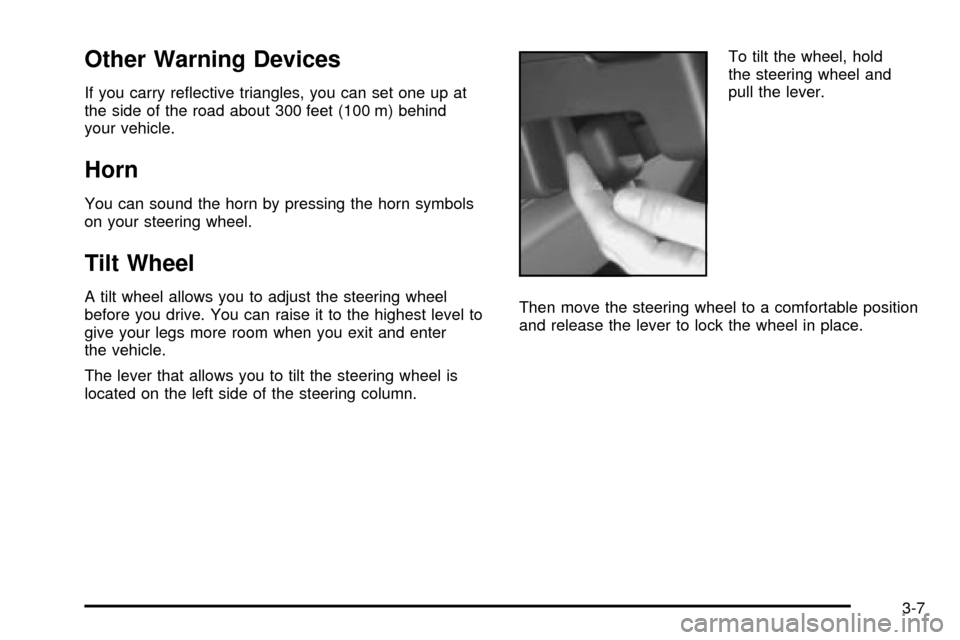
located on the left side of the steering column.To tilt the wheel, hold
the steering wheel and
pull the lever.
Then move the steering wheel to a comfortable position
and release the lever to lock the wheel in place.
3-7
Page 168 of 462
Cruise Control
Your vehicle may have cruise control. With cruise
control, you can maintain a speed of about 25 mph
(40 km/h) or more without keeping your foot on
the accelerator. This can really help on long trips.
Cruise control does not work at speeds below about
25 mph (40 km/h).
When you apply your brakes, the cruise control
disengages.
{CAUTION:
Cruise control can be dangerous where you
can not drive safely at a steady speed. So, do
not use your cruise control on winding roads
or in heavy traffic.
CAUTION: (Continued)
CAUTION: (Continued)
Cruise control can be dangerous on slippery
roads. On such roads, fast changes in tire
traction can cause needless wheel spinning,
and you could lose control. Do not use cruise
control on slippery roads.
If your vehicle is in cruise control when the optional
traction control system begins to limit wheel spin, the
cruise control will automatically disengage. See
Traction
Control System (TCS) on page 4-8. When road
conditions allow you to safely use it again, you may turn
the cruise control back on.
3-12
Page 174 of 462

Fog Lamps
Your vehicle may have
fog lamps. If it does, the
fog lamps switch is located
in the instrument panel
switchbank. Press the
fog lamp symbol on
the switch to turn on
the lamps.
The indicator light will be lit while the fog lamps are on.
Press the top part of the switch to turn them off.
When your DRL are on, the exterior lamps control must
®rst be turned from the off position before the fog
lamps can be turned on.
Your parking lamps or headlamps must be on for your
fog lamps to turn on.At night, when the light sensor automatically turns on
your headlamps, the fog lamps can be turned on
while the exterior lamps control is in any position.
Your fog lamps will go off when you switch to high
beams. Using your high beams in fog is not
recommended.
Interior Lamps
Instrument Panel Brightness
The thumbwheel for this feature is located below the
exterior lamps control. Turn the thumbwheel to the right
to brighten the lights, or to the left to dim them.
Interior Lamps Control
Turn the thumbwheel all the way to the right to turn on
the interior lamps, if the interior lamps override
switch is off. Turn the thumbwheel to the left to turn the
lamps off.
3-18
Page 178 of 462

Rear Reading Lamps
There may be two reading lamps in the third row
headliner. To turn either reading lamp on or off, press
the lens of the lamp.
There is also a reading lamp in the second row,
integrated with the dome lamp. To turn the second row
reading lamp on or off, press the button next to the
lamp lens.
Rear reading lamps will not turn on if the interior lamps
override switch is on. See ªInterior Lamps Overrideº
earlier in this section.
Cargo Lamp
The cargo lamp is located in the rear of your vehicle,
above the liftgate opening, and does not have a switch.
The cargo lamp will come on each time you open a
door, unless you turn on the interior lamps override.
See ªInterior Lamps Overrideº earlier in this section.
Battery Run-Down Protection
Your vehicle has a feature to help prevent you from
draining the battery, in case you accidentally leave the
interior lamps on. If you leave any interior lamps on while
the ignition is in LOCK or OFF, they will automatically turn
off after 10 minutes. The lamps will not come back on
again until you do one of the following:
·Turn the ignition to RUN or ACCESSORY.
·Turn the interior lamps thumbwheel all the way
to the right, then slightly back to the left.
·Open a closed door, or close and reopen a door.
If your vehicle has less than 15 miles (25 km) on
the odometer, the battery saver will turn off the
lamps after only three minutes.
3-22
Page 209 of 462

Message Center
The message center is located in the instrument panel
cluster. It gives you important safety and maintenance
facts.
Service Traction System Warning
Message
If your vehicle has the traction control system and this
message is displayed when you're driving, there may be
a problem with your traction control system. Your vehicle
may need service.When this message is displayed, the traction control
system will not limit wheel spin. Adjust your driving
accordingly.
The message may appear for the following reasons:
·If there's a brake system problem that is speci®cally
related to traction control, the traction control
system will turn off and the warning message will
come on.
·If your brakes begin to overheat, the traction control
system will turn off and the warning message will
come on until your brakes cool down.
·If the traction control system is affected by an
engine-related problem, the system will turn off and
the warning message will come on.
If the traction control system warning message comes
on and stays on for an extended period of time when the
system is turned on, your vehicle needs service. United States
Canada
3-53
Page 210 of 462
Traction Active Message
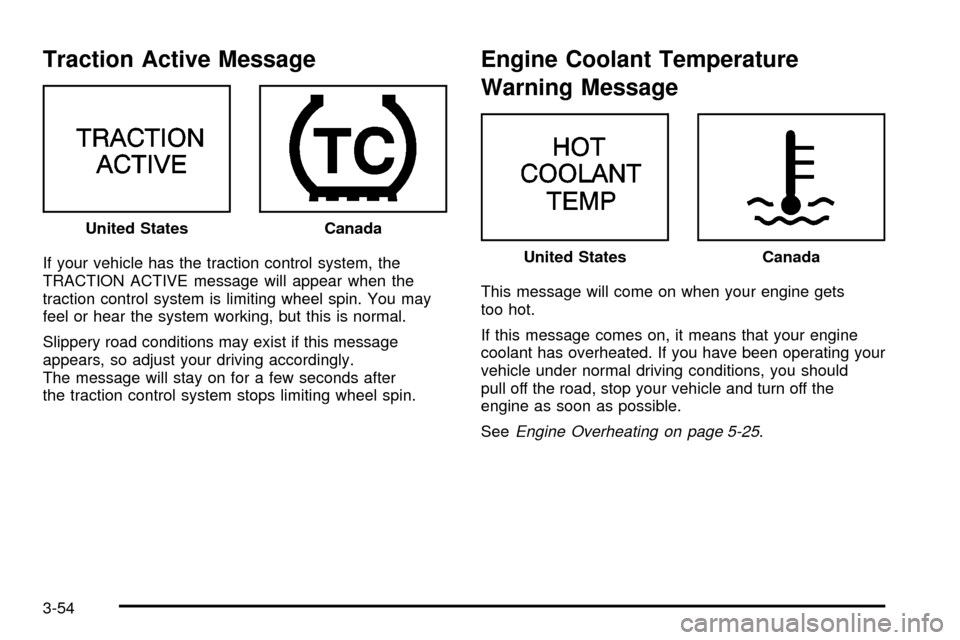
If your vehicle has the traction control system, the
TRACTION ACTIVE message will appear when the
traction control system is limiting wheel spin. You may
feel or hear the system working, but this is normal.
Slippery road conditions may exist if this message
appears, so adjust your driving accordingly.
The message will stay on for a few seconds after
the traction control system stops limiting wheel spin.
Engine Coolant Temperature
Warning Message
This message will come on when your engine gets
too hot.
If this message comes on, it means that your engine
coolant has overheated. If you have been operating your
vehicle under normal driving conditions, you should
pull off the road, stop your vehicle and turn off the
engine as soon as possible.
See
Engine Overheating on page 5-25. United States
Canada
United StatesCanada
3-54
Page 215 of 462
All-Wheel Drive Disable Warning
Message
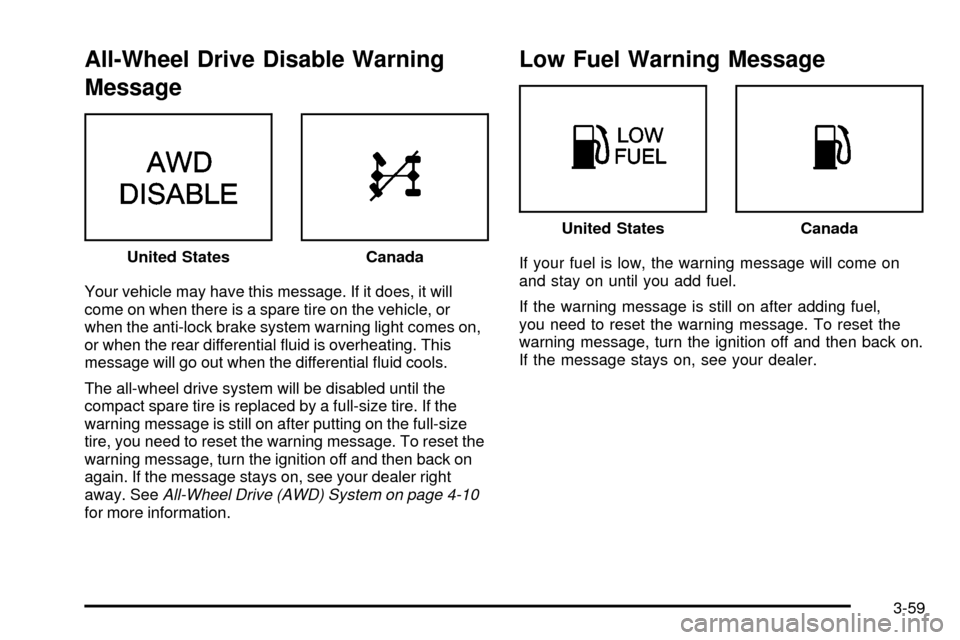
Your vehicle may have this message. If it does, it will
come on when there is a spare tire on the vehicle, or
when the anti-lock brake system warning light comes on,
or when the rear differential ¯uid is overheating. This
message will go out when the differential ¯uid cools.
The all-wheel drive system will be disabled until the
compact spare tire is replaced by a full-size tire. If the
warning message is still on after putting on the full-size
tire, you need to reset the warning message. To reset the
warning message, turn the ignition off and then back on
again. If the message stays on, see your dealer right
away. See
All-Wheel Drive (AWD) System on page 4-10for more information.
Low Fuel Warning Message
If your fuel is low, the warning message will come on
and stay on until you add fuel.
If the warning message is still on after adding fuel,
you need to reset the warning message. To reset the
warning message, turn the ignition off and then back on.
If the message stays on, see your dealer. United StatesCanada
United StatesCanada
3-59