Buttons Oldsmobile Silhouette 2004 s Owner's Guide
[x] Cancel search | Manufacturer: OLDSMOBILE, Model Year: 2004, Model line: Silhouette, Model: Oldsmobile Silhouette 2004Pages: 462, PDF Size: 3.1 MB
Page 251 of 462

Rear Seat Radio Controls
The following functions are controlled by the RSA
system buttons:
RSA PWR (Power):Press this button to turn RSA on
or off. The headphone symbol will appear on the display
above the video screen when the system is on.
BAND:Press this button to switch between FM1, FM2,
or AM when the headphones are on channel B. The
selected radio station will appear on the display above
the video screen. If the front passengers are already
listening to the radio, the RSA controller will not switch
between the bands and cannot change the station.
qr(Tune):While listening to the radio, press the
right or the left arrow to tune to the next or the previous
station and stay there. These arrows are inactive if
the front radio is in use.
While listening to a cassette tape, press the right or the
left arrow to hear the next or the previous selection.
These arrows are inactive if the tape mode on the front
radio is in use.
While listening to a CD, press the right arrow to hear
the next track on the CD. Press the left arrow to go back
to the start of the current track, if more than eight
seconds have played. These arrows are inactive if the
CD mode on the front radio is in use.
3-95
Page 252 of 462

P.SET SCAN (Preset Scan):The front passengers
must be listening to something different for each of these
functions to work:
·Press and hold this button to scan through the
preset radio stations set on the pushbuttons on the
main radio. The radio will go to a preset station
stored on your pushbuttons, play for a few seconds,
then go on to the next preset station. This feature
will only scan the presets that are in the selected
band. The selected radio station will appear on the
display above the video screen. Press this button
again to stop scanning presets.
·If your vehicle had the Radio with Cassette and CD,
when a cassette tape is playing, press this button to
go to the other side of the tape.
·If your vehicle has the Radio with Six-Disc CD,
when a CD is playing, press this button to switch to
playing a different CD when multiple CDs are
loaded.CD TAPE:Press this button to switch between playing
a cassette tape, CD, a DVD, or an auxiliary device
when the headphones are on channel B. If one of the
devices is not loaded, the system will skip over the
device when this button is pressed.
Theft-Deterrent Feature
THEFTLOCKžis designed to discourage theft of your
radio. The feature works automatically by learning
a portion of the Vehicle Identi®cation Number (VIN).
If the radio is moved to a different vehicle, it will
not operate and LOCKED will appear on the display.
When the radio and vehicle are turned off, your
radio may have a blinking red light that indicates that
THEFTLOCK is armed.
With THEFTLOCK activated, your radio will not operate
if stolen.
3-96
Page 253 of 462
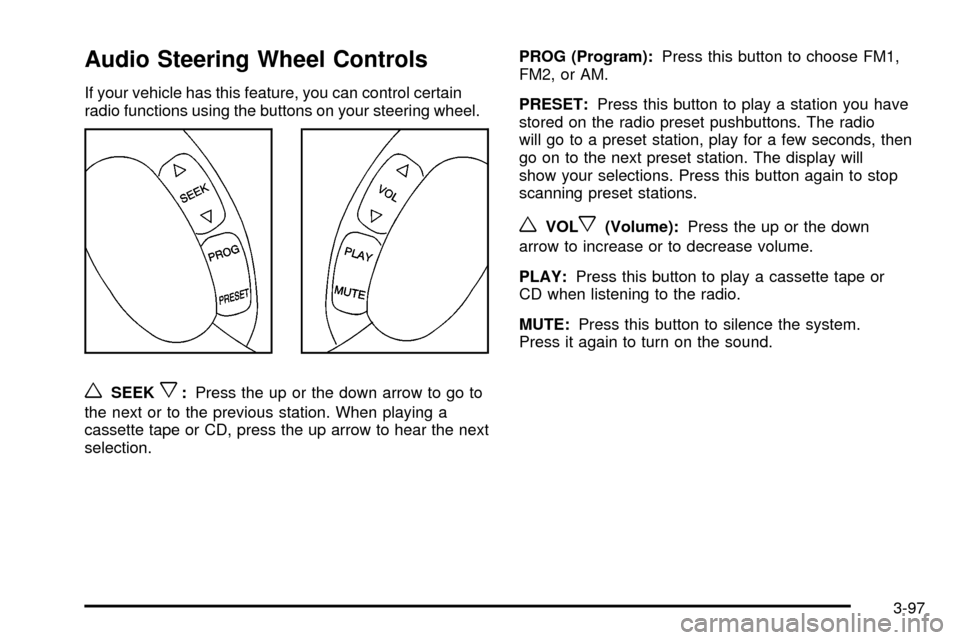
Audio Steering Wheel Controls
If your vehicle has this feature, you can control certain
radio functions using the buttons on your steering wheel.
wSEEKx:Press the up or the down arrow to go to
the next or to the previous station. When playing a
cassette tape or CD, press the up arrow to hear the next
selection.PROG (Program):Press this button to choose FM1,
FM2, or AM.
PRESET:Press this button to play a station you have
stored on the radio preset pushbuttons. The radio
will go to a preset station, play for a few seconds, then
go on to the next preset station. The display will
show your selections. Press this button again to stop
scanning preset stations.
wVOLx(Volume):Press the up or the down
arrow to increase or to decrease volume.
PLAY:Press this button to play a cassette tape or
CD when listening to the radio.
MUTE:Press this button to silence the system.
Press it again to turn on the sound.
3-97
Page 256 of 462

Care of Your CD and DVD Player
The use of CD lens cleaner discs is not advised, due to
the risk of contaminating the lens of the CD optics
with lubricants internal to the CD mechanism.
Cleaning Your DVD Player
When cleaning the outside DVD cabinet face and
buttons, use only a clean cloth dampened with
clean water.
Cleaning the Video Screen
When cleaning the video screen, use only a clean cloth
dampened with clean water. Use care when directly
touching or cleaning the screen, as damage may result.
Fixed Mast Antenna
The ®xed mast antenna can withstand most car washes
without being damaged. If the mast should ever
become slightly bent, you can straighten it out by hand.
If the mast is badly bent, you should replace it.
Check occasionally to be sure the mast is still tightened
to the fender. If tightening is required, tighten by
hand, then with a wrench one quarter turn.
3-100
Page 450 of 462

Engine Speci®cations.....................................5-109
Entering Programming Mode............................2-61
Entertainment System......................................3-85
Cleaning the Video Screen..........................3-100
Cleaning Your DVD Player..........................3-100
DVD Distortion............................................3-98
Entry Lighting.................................................3-19
Erasing HomeLink
žButtons..............................2-50
Event Data Records (EDR)..............................7-10
Exit Lighting...................................................3-20
Exiting Programming Mode...............................2-69
Express-Down Window....................................2-24
Extender, Safety Belt.......................................1-45
Exterior Lamps...............................................3-16
FFilter
Engine Air Cleaner......................................5-18
Finding a Program Type (PTY) Station.......3-67, 3-77
Finding a Station....................................3-65, 3-75
Finish Care....................................................5-96
Finish Damage...............................................5-98
Fixed Mast Antenna.......................................3-100
Flash-to-Pass................................................... 3-9
Flat Tire........................................................5-76Flat Tire, Changing.........................................5-76
Flip and Fold Rear Seats.................................. 1-8
Fluid
Automatic Transaxle.....................................5-19
Power Steering...........................................5-36
Windshield Washer......................................5-37
FM ...............................................................3-98
Fog Lamps....................................................3-18
Folding or Reclining the Seatbacks.............1-9, 1-14
Folding the Seatback.......................................1-19
Following Distance..........................................4-44
Front Reading Lamps......................................3-21
Front Seat Storage Net....................................2-54
Fuel............................................................... 5-4
Additives...................................................... 5-6
California Fuel.............................................. 5-5
Filling a Portable Fuel Container..................... 5-9
Filling Your Tank........................................... 5-7
Fuels in Foreign Countries.............................. 5-6
Gage.........................................................3-52
Gasoline Octane........................................... 5-4
Gasoline Speci®cations.................................. 5-5
Low Warning Message.................................3-59
Fuses
Fuses and Circuit Breakers.........................5-101
Windshield Wiper.......................................5-101
6