lock OPEL AMPERA E 2017.5 Manual user
[x] Cancel search | Manufacturer: OPEL, Model Year: 2017.5, Model line: AMPERA E, Model: OPEL AMPERA E 2017.5Pages: 265, PDF Size: 6.24 MB
Page 173 of 265

Driving and operating171not brake outside of its operating
speed range and only responds to
detected vehicles.
Forward looking brake assist
In addition to the brake preparation
system and emergency automatic
braking, the forward looking brake
assist function makes the brake assist more sensitive. Therefore,
depressing the brake pedal less
strongly results in immediate hard
braking. This function helps the driver brake quicker and harder before an
imminent collision.
The system operates up to a speed of 80 km/h.
9 Warning
Active emergency braking is not
designed to apply hard
autonomous braking or to
automatically avoid a collision. It is designed to reduce the vehicle
speed before a collision. It may not
react to animals. After a sudden
lane change, the system needs a
certain time to detect the next
preceding vehicle.
The complete attention of the
driver is always required while
driving. The driver must always be
ready to take action and apply the brakes and steer to avoid
collisions.
Intelligent brake assist
Intelligent brake assist may activate
when the brake pedal is applied
quickly by providing a boost to
braking based on the speed of
approach and distance to a vehicle
ahead.
Minor brake pedal pulsations or pedal movement during this time are normal and the brake pedal should continue
to be applied as required. Intelligent
brake assist will automatically
disengage only when the brake pedal is released.
9 Warning
Intelligent brake assist may
increase vehicle braking in
situations when it may not be
necessary. You could block the
flow of traffic. If this occurs, take
your foot off the brake pedal and
then apply the brakes as needed.
Front pedestrian protection
Front pedestrian protection 3 172.
Deactivation Active emergency braking can be
deactivated in the personalisation
menu in the Info display 3 92.
If deactivated, a message is
displayed in the Driver Information
Centre.
The system is reactivated the next time the vehicle is switched on.
System limitations In some cases, the active emergencybraking system may provide
automatic braking in situations that
seem to be unnecessary, for instance
Page 174 of 265

172Driving and operatingin parking garages, due to traffic signsin a curve or due to vehicles in
another lane. This is normal
operation, the vehicle does not need
a service. Firmly apply the accelerator
pedal if the situation and
surroundings permit to override the
automatic braking.
In the following cases, active
emergency braking performance is
limited:
● When driving on winding or hilly roads.
● When not all vehicles are detected, especially vehicles witha trailer, tractors, muddy
vehicles, etc.
● When detecting a vehicle when weather limits visibility, such as in
fog, rain, or snow.
● During nighttime driving.
● When weather limits visibility, such as fog, rain, or snow.
● When the sensor in the windscreen is blocked by snow,
ice, slush, mud, dirt, windscreen
damage or affected by foreign
items, e.g. stickers.To avoid malfunction keep the areas
of the camera sensor in the
windscreen always clear of dirt, dust,
ice and snow.
Complete attention is always required while driving, and you should beready to take action and apply the
brakes and/or steer the vehicle to
avoid crashes.
Fault
In case the system requires a service, a message is displayed in the Driver
Information Centre.
If the system does not work as it
should do, vehicle messages are
displayed in the Driver Information
Centre.
Vehicle messages 3 90.
Front pedestrian protection
The front pedestrian protection
system may help avoid or reduce the
harm caused by front-end crashes
with nearby pedestrians when driving in a forward gear.The system uses the front camera inthe windscreen to detect a pedestrian
directly ahead in your path.
The front pedestrian protection
system can detect and alert about
pedestrians when in a forward gear at
speeds between 8 km/h and
80 km/h.
Additionally, the front pedestrian protection system can provide a
boost to braking or automatically
brake the vehicle.
During daytime driving, the system
detects pedestrians up to a distance
of approximately 40 metres. During
nighttime driving, system
performance might be limited.
The front pedestrian protection can
be set to Off, Alert or Alert and
Brake in the vehicle personalisation
3 92.
Page 176 of 265

174Driving and operatingAutomatic braking can be disabled
through vehicle personalisation 3 92.
General information9 Warning
The driver must always be ready
to take action and apply the brakes and steer to avoid collisions.
9 Warning
Front pedestrian braking may alert
or automatically brake the vehicle
suddenly in situations where it is
unexpected and undesired. It
could falsely alert or brake for
objects similar in shape or size to
pedestrians, including shadows.
This is normal operation and the
vehicle does not need a service.
To override Automatic braking,
firmly depress the accelerator
pedal, if it is safe to do so.
System limitations
In the following cases, front
pedestrian protection may not detect
a pedestrian ahead or sensor
performance is limited:
● When vehicle speed is out of range from 8 km/h to 80 km/h .
● When the distance to an pedestrian ahead is more than
40 metres.
● When weather limits visibility, such as fog, rain, or snow.
● During nighttime driving.
● When the sensor in the windscreen is blocked by snow,
ice, slush, mud, dirt, windscreen
damage or affected by foreign
items, e.g. stickers.Parking assist
Rear parking assist9 Warning
It is the driver who bears full
responsibility for the parking
manoeuvre.
Always check the surrounding
area while reversing and using the rear parking assist system.
The rear parking assist makes
parking easier by measuring the
distance between the vehicle and
rear obstacles. It informs and warns
the driver by giving acoustic signals
and display indication.
Page 197 of 265

Driving and operating195
3. Open the tailgate. Lift the rearfloor storage cover and remove
the charge cord.
4. Plug the charge cord into the electrical outlet. Electrical
requirements 3 208.
Verify the charge cord status.
Charge cord 3 205.
Select the appropriate charge
level. See "Charge limit selection" in Programmable charging
3 197.5. Plug in the vehicle plug of the
charge cord into the charge port
on the vehicle. Verify that the
charging status indicator
illuminates on top of the
instrument panel and an audible
beep occurs. Charging status
3 204.
6. Once charging, the vehicle plug will be locked to the charge port
and cannot be disconnected while
charging is active.
Stop charging 1. To stop charging, when inside the
vehicle, use the Stop button on
the Charging screen. See
"Temporary charge mode
override and cancel” in Programmable charging 3 197.
Additionally, the stop charge button on the radio remote control may also be used. Press and hold
5 on the radio remote control.
This will also unlock the vehicle
plug.
2. Unplug the vehicle plug of the charge cord from the vehicle.
3. Close the charge port door by pressing firmly in the centre until it
engages.
4. Unplug the charge cord from the electrical outlet.
5. Place the charge cord into the storage compartment.
Page 198 of 265
196Driving and operatingDC (direct current) charging
Check the charging station DC
vehicle plug for compatibility with the
DC charge port on this vehicle. When
recharging at a DC fast charge
station, the power cable connected to the vehicle must be less than
10 metres in length.
Follow the steps listed on the
charging station to perform a DC
vehicle charge.
If for any reason DC charging does not begin or is interrupted, check the
DC charge station display for
messages. Unplug to restart the DC
charge process.
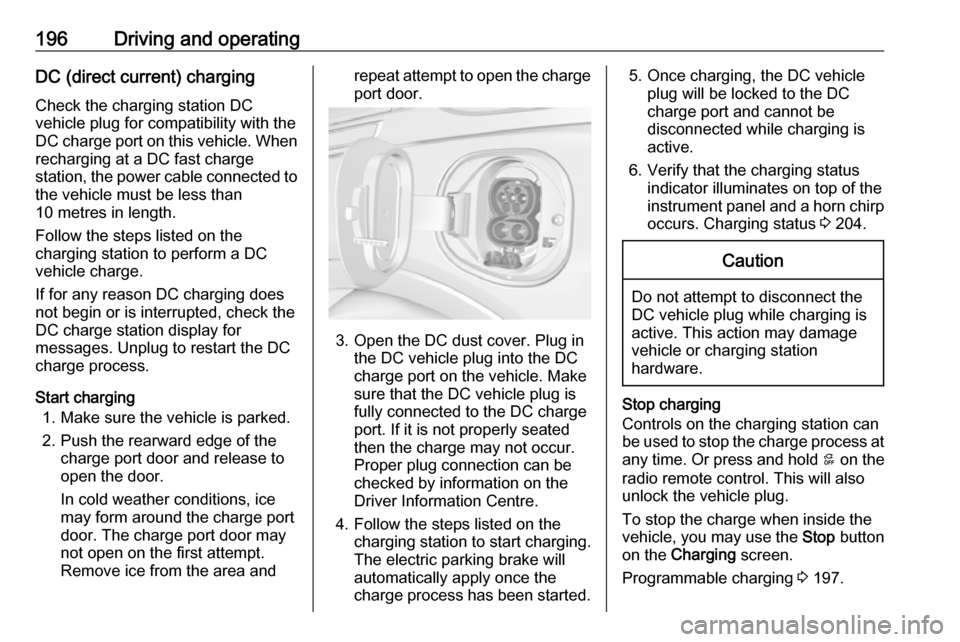
Start charging 1. Make sure the vehicle is parked.
2. Push the rearward edge of the charge port door and release to
open the door.
In cold weather conditions, ice
may form around the charge port
door. The charge port door may
not open on the first attempt.
Remove ice from the area andrepeat attempt to open the charge port door.
3. Open the DC dust cover. Plug in the DC vehicle plug into the DC
charge port on the vehicle. Make
sure that the DC vehicle plug is
fully connected to the DC charge
port. If it is not properly seated
then the charge may not occur.
Proper plug connection can be
checked by information on the
Driver Information Centre.
4. Follow the steps listed on the charging station to start charging.
The electric parking brake will
automatically apply once the
charge process has been started.
5. Once charging, the DC vehicle plug will be locked to the DC
charge port and cannot be
disconnected while charging is
active.
6. Verify that the charging status indicator illuminates on top of the
instrument panel and a horn chirp occurs. Charging status 3 204.Caution
Do not attempt to disconnect the
DC vehicle plug while charging is
active. This action may damage vehicle or charging station
hardware.
Stop charging
Controls on the charging station can
be used to stop the charge process at any time. Or press and hold 5 on the
radio remote control. This will also unlock the vehicle plug.
To stop the charge when inside the
vehicle, you may use the Stop button
on the Charging screen.
Programmable charging 3 197.
Page 199 of 265

Driving and operating197There is also an available mobile app
with several charging functions.
Smartphone remote function 3 26.Automatic power supply cut-off
When the vehicle no longer needs to
use power from the charging station,
the charging process will be stopped. Use the radio remote control to unlock
the DC vehicle plug.
Energy can still be consumed from
the charging station when the
vehicle’s displays and indicators
show that the high voltage battery is
fully charged. This is to ensure the
high voltage battery is in optimal
temperature operating range to
maximise vehicle range.
Programmable charging 3 197.
End charging
1. Wait until the charging process has been fully stopped, the
vehicle plug is unlocked and the
charging status indicator is solid
green or off.
2. Unplug the DC vehicle plug from the DC charge port on the vehicle
and close the dust cover.
3. Close the charge port door by pressing firmly in the centre to
latch properly.
4. Manually disengage the electric parking brake before driving the
vehicle.
5. To start another DC charge, remove the DC vehicle plug and
reconnect.
Programmable charging
Programmable charge modes To view the current charge mode
status in the Infotainment display,
touch Energy and then Charging.
The charge start and charge
complete time estimations are also displayed on the screen. These
estimations are most accurate when
the vehicle is plugged in and in
moderate temperature conditions.
Also, to get an accurate time
estimate, the vehicle uses an internal clock for programmable charging, notthe clock in the instrument panel.Charge mode selection
Touch Energy and then Charging and
select the desired charging mode.Immediate
The vehicle starts charging as soon
as it is connected to an electrical outlet.
Select the Charge limit , see below.
Departure
The vehicle estimates the charging start time considering the
programmed departure time for the
current day of the week. Charging
begins at the start time and is
Page 200 of 265
198Driving and operatingcomplete by the departure time only if
sufficient time is allowed after the
charge cord is plugged in.
Select the Priority charging to On or
Off (Priority charging will immediately
charge the vehicle to a predefined
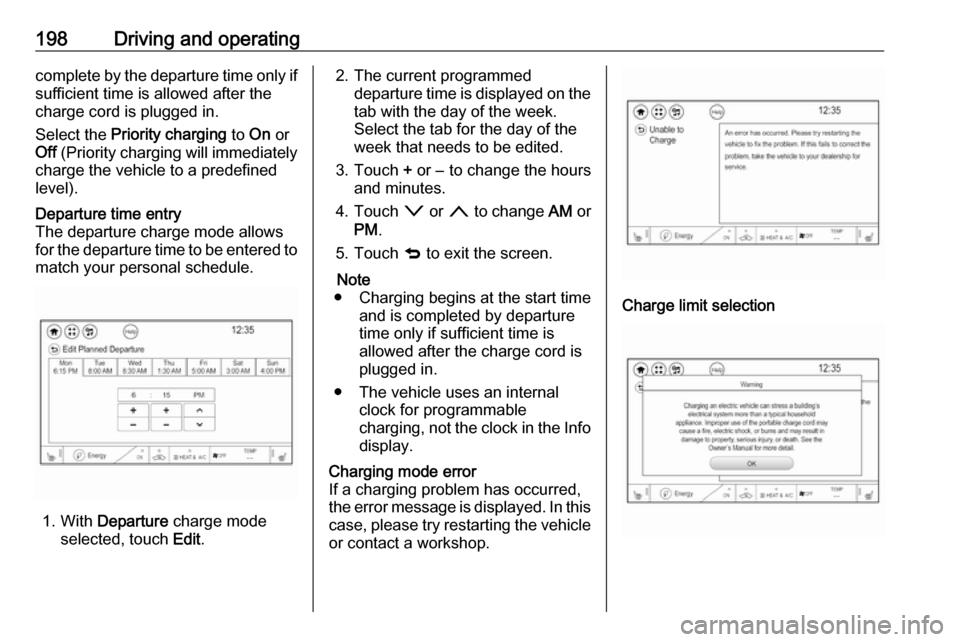
level).Departure time entry
The departure charge mode allows
for the departure time to be entered to match your personal schedule.
1. With Departure charge mode
selected, touch Edit.
2. The current programmed
departure time is displayed on the
tab with the day of the week.
Select the tab for the day of the
week that needs to be edited.
3. Touch + or − to change the hours
and minutes.
4. Touch o or n to change AM or
PM .
5. Touch q to exit the screen.
Note
● Charging begins at the start time and is completed by departure
time only if sufficient time is
allowed after the charge cord is
plugged in.
● The vehicle uses an internal clock for programmable
charging, not the clock in the Info display.Charging mode error
If a charging problem has occurred,
the error message is displayed. In this
case, please try restarting the vehicle or contact a workshop.
Charge limit selection
Page 214 of 265

212Vehicle care● Do not apply the parking brake.
● Open the bonnet, close all doors and lock the vehicle.Up to four weeks
Plug in the charge cord.Four weeks to 12 months ● Discharge the high voltage battery until two or three bars
remain on the battery range
indicator (battery symbol) on the
instrument cluster.
● Do not plug in the charge cord
● Always store the vehicle in a place with temperatures between−10 °C and 30 °C.
● Vehicle storage at extreme temperatures may cause
damage to the high voltage
battery.
● Remove the black negative (−) cable from the 12-volt vehicle
battery and attach a trickle
charger to the vehicle battery
terminals or keep the 12-volt vehicle battery cables connected
and trickle charge from thepositive (+) and negative (−)
terminals in the engine
compartment.Caution
The vehicle is equipped with an
AGM 12-volt battery, which can be damaged by using the incorrect
type of trickle charger.
An AGM compatible charger must be used, with the appropriate
setting selected.
Follow the trickle charger
manufacturer instructions.
After the vehicle battery cable is
reconnected, it is possible that the
vehicle may not operate. If this
happens, the high voltage battery
may need to be charged.
Putting back into operation
When the vehicle is to be put back into
operation:
● Connect the clamp to the negative terminal of the vehicle
battery. Activate the electronics
of the power windows.
● Check tyre pressure.
● Fill up the washer fluid reservoir.
● Check the coolant level.
● Fit the number plate if necessary.
Page 222 of 265
220Vehicle careBulb replacement
Switch off the vehicle and switch off
the relevant switch or close the doors.
Only hold a new bulb at the base. Do not touch the bulb glass with bare
hands.
Use only the same bulb type for
replacement.
Replace headlight bulbs from within
the engine compartment.
Bulb check After a bulb replacement switch on
the vehicle, operate and check the
lights.
Halogen bulbs9 Warning
Halogen bulbs have pressurised
gas inside and can burst if you
drop or scratch the bulb. You or others could be injured. Be sure to read and follow the instructions onthe bulb package.
Xenon headlights9 Danger
Xenon headlights work under
extremely high electrical voltage.
Do not touch. Have bulbs replaced by a workshop.
Bulbs for front turn signal and
corner lighting can be changed.
Sidelight/Daytime running lights are
designed as Light Emitting Diodes
(LEDs) and cannot be replaced.
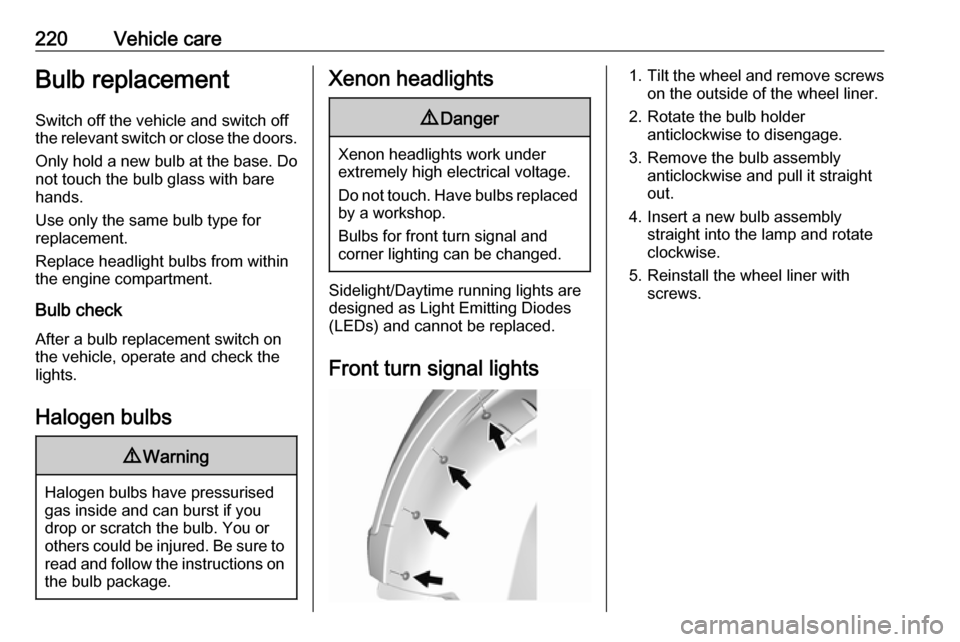
Front turn signal lights
1. Tilt the wheel and remove screws
on the outside of the wheel liner.
2. Rotate the bulb holder anticlockwise to disengage.
3. Remove the bulb assembly anticlockwise and pull it straight
out.
4. Insert a new bulb assembly straight into the lamp and rotate
clockwise.
5. Reinstall the wheel liner with screws.
Page 223 of 265
Vehicle care221Tail lights
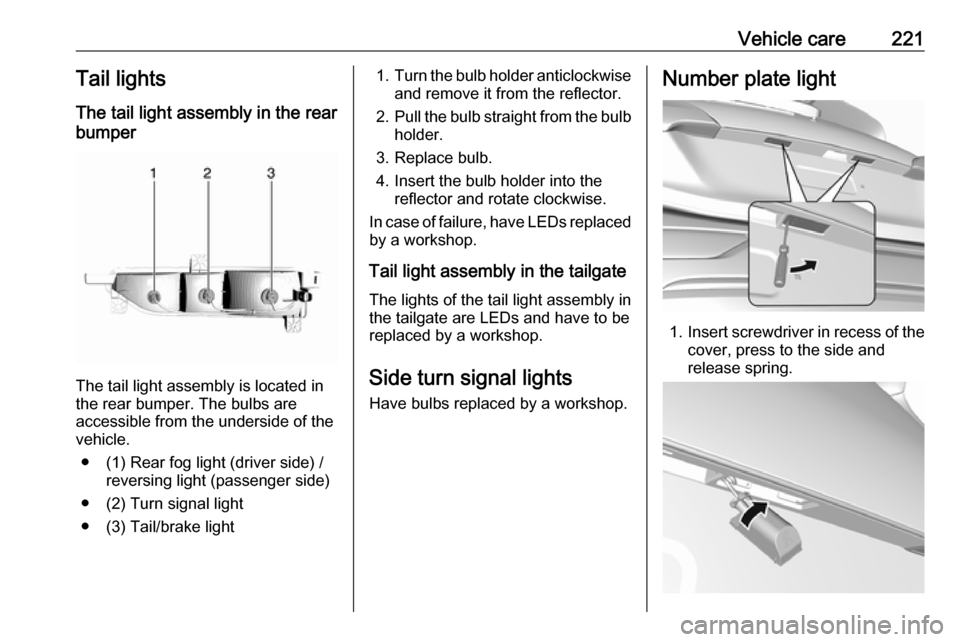
The tail light assembly in the rear
bumper
The tail light assembly is located in
the rear bumper. The bulbs are
accessible from the underside of the
vehicle.
● (1) Rear fog light (driver side) / reversing light (passenger side)
● (2) Turn signal light
● (3) Tail/brake light
1. Turn the bulb holder anticlockwise
and remove it from the reflector.
2. Pull the bulb straight from the bulb
holder.
3. Replace bulb.
4. Insert the bulb holder into the reflector and rotate clockwise.
In case of failure, have LEDs replaced by a workshop.
Tail light assembly in the tailgate The lights of the tail light assembly in
the tailgate are LEDs and have to be
replaced by a workshop.
Side turn signal lights
Have bulbs replaced by a workshop.Number plate light
1. Insert screwdriver in recess of the
cover, press to the side and
release spring.