Power OPEL AMPERA E 2018.5 User Guide
[x] Cancel search | Manufacturer: OPEL, Model Year: 2018.5, Model line: AMPERA E, Model: OPEL AMPERA E 2018.5Pages: 273, PDF Size: 6.6 MB
Page 36 of 273

34Keys, doors and windowsPower windows9Warning
Take care when operating the
power windows. Risk of injury,
particularly to children.
If there are children on the rear seats, switch on the child safety
system for the power windows.
Keep a close watch on the
windows when closing them.
Ensure that nothing becomes
trapped in them as they move.
Switch on the vehicle to operate
power windows.
Retained power off 3 151.
Operate the switch for the respective
window by pushing to open or pulling to close.
All windows: Pushing or pulling the
switch gently to the first detent moves
the window down or up as long as the switch is operated.
The driver's window opens or closes
automatically with safety function
enabled when the switch # is
pushed or pulled firmly to the second detent. To stop movement, operate
the switch once more in the same
direction. The co-driver's window
opens automatically when respective
switch is being pushed firmly to the
second detent.
Safety function
If the driver's window glass
encounters resistance above the
middle of the window during
automatic closing, it is immediately
stopped and opened again.
Override safety function In the event of closing difficulties due
to frost or the like, switch on the
vehicle, then pull the switch to the first
detent and hold. The window moves
up without safety function enabled.
To stop movement, release the
switch.
Page 37 of 273
Keys, doors and windows35Child safety system for rear
windows
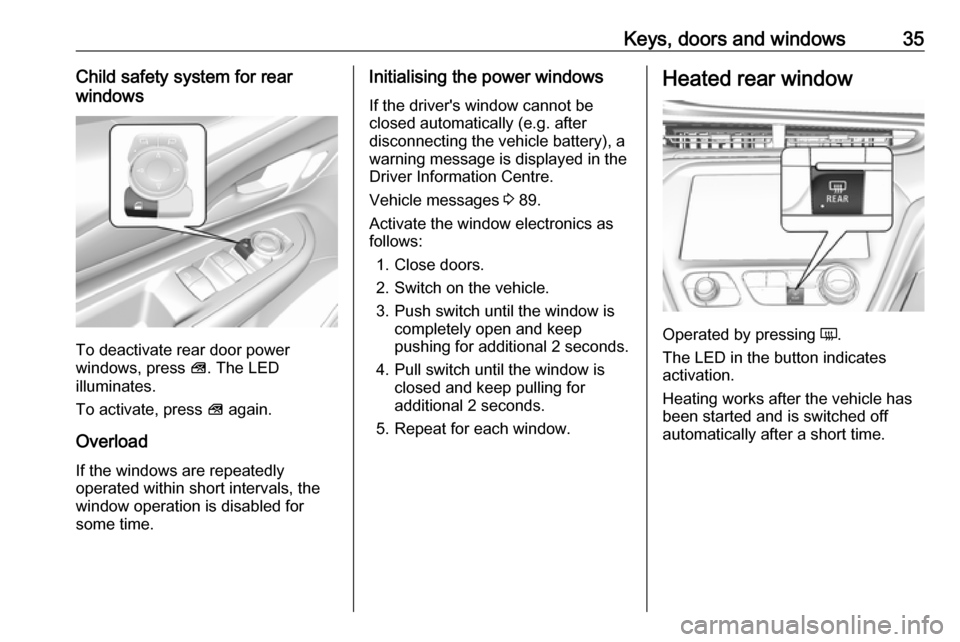
To deactivate rear door power
windows, press V. The LED
illuminates.
To activate, press V again.
Overload
If the windows are repeatedly
operated within short intervals, the
window operation is disabled for
some time.
Initialising the power windows
If the driver's window cannot be
closed automatically (e.g. after
disconnecting the vehicle battery), a
warning message is displayed in the
Driver Information Centre.
Vehicle messages 3 89.
Activate the window electronics as
follows:
1. Close doors.
2. Switch on the vehicle.
3. Push switch until the window is completely open and keep
pushing for additional 2 seconds.
4. Pull switch until the window is closed and keep pulling for
additional 2 seconds.
5. Repeat for each window.Heated rear window
Operated by pressing Ü.
The LED in the button indicates
activation.
Heating works after the vehicle has
been started and is switched off
automatically after a short time.
Page 43 of 273
Seats, restraints41Heating
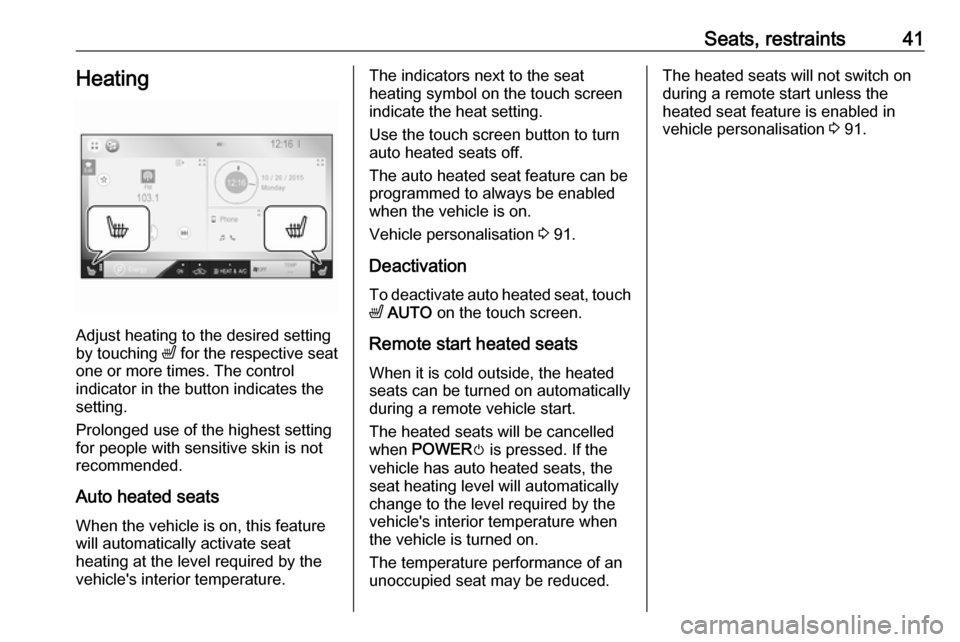
Adjust heating to the desired setting
by touching ß for the respective seat
one or more times. The control
indicator in the button indicates the
setting.
Prolonged use of the highest setting
for people with sensitive skin is not
recommended.
Auto heated seats
When the vehicle is on, this feature
will automatically activate seat
heating at the level required by the
vehicle's interior temperature.
The indicators next to the seat
heating symbol on the touch screen
indicate the heat setting.
Use the touch screen button to turn
auto heated seats off.
The auto heated seat feature can be programmed to always be enabled
when the vehicle is on.
Vehicle personalisation 3 91.
Deactivation To deactivate auto heated seat, touchß AUTO on the touch screen.
Remote start heated seats When it is cold outside, the heatedseats can be turned on automaticallyduring a remote vehicle start.
The heated seats will be cancelled
when POWER m is pressed. If the
vehicle has auto heated seats, the
seat heating level will automatically
change to the level required by the
vehicle's interior temperature when
the vehicle is turned on.
The temperature performance of an
unoccupied seat may be reduced.The heated seats will not switch on
during a remote start unless the
heated seat feature is enabled in
vehicle personalisation 3 91.
Page 66 of 273

64Instruments and controlsInstruments and
controlsControls ....................................... 65
Steering wheel adjustment ........65
Steering wheel controls .............65
Heated steering wheel ...............65
Horn ........................................... 66
Pedestrian safety alert ...............66
Windscreen wiper and washer ..66
Rear window wiper and washer ...................................... 68
Outside temperature ..................68
Clock ......................................... 69
Power outlets ............................. 69
Inductive charging .....................70
Warning lights, gauges and indi‐ cators ........................................... 72
Instrument cluster ......................72
Speedometer ............................. 74
Odometer .................................. 74
Battery gauge ............................ 74
Driving efficiency gauge ............74
Power indicator gauge ...............76
Regenerative braking ................76
Total vehicle range ....................77
Service display .......................... 77Control indicators ......................77
Turn lights .................................. 77
Seat belt reminder .....................77
Airbag and belt tensioners .........78
Airbag deactivation ....................78
Charging system .......................78
Service vehicle soon .................79
Brake system ............................. 79
Electric parking brake ................79
Electric parking brake fault ........79
Antilock brake system (ABS) .....79
Sport mode ................................ 80
Lane keep assist .......................80
Electronic Stability Control off ...80
Electronic Stability Control and Traction Control system ...........80
Traction Control system off .......80
Tyre pressure monitoring system ...................................... 80
Immobiliser ................................ 81
Vehicle ready ............................. 81
Exterior light .............................. 81
High beam ................................. 81
High beam assist .......................81
Rear fog light ............................. 81
Cruise control ............................ 81
Vehicle detected ahead .............81
Pedestrian detection ..................81
Speed limiter ............................. 81Traffic sign assistant ..................82
Door open .................................. 82
Displays ....................................... 82
Driver Information Centre ..........82
Info Display ................................ 85
Vehicle messages ........................89
Warning chimes .........................90
Battery voltage .......................... 90
Vehicle personalisation ................91
Telematics service .......................94
OnStar ....................................... 94
Page 71 of 273
Instruments and controls699Warning
The road surface may already be
icy even though the display
indicates a few degrees above
0 °C.
Clock
Date and time are shown in the
Info Display.
Info Display 3 85.
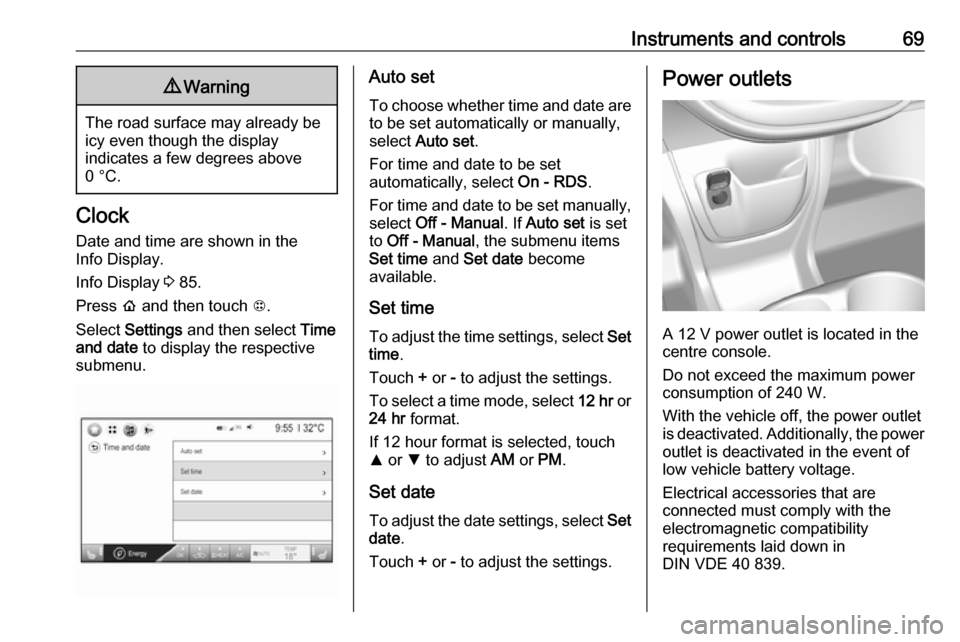
Press p and then touch 1.
Select Settings and then select Time
and date to display the respective
submenu.
Auto set
To choose whether time and date are to be set automatically or manually,
select Auto set .
For time and date to be set
automatically, select On - RDS.
For time and date to be set manually, select Off - Manual . If Auto set is set
to Off - Manual , the submenu items
Set time and Set date become
available.
Set time To adjust the time settings, select Set
time .
Touch + or - to adjust the settings.
To select a time mode, select 12 hr or
24 hr format.
If 12 hour format is selected, touch
R or S to adjust AM or PM .
Set date To adjust the date settings, select Set
date .
Touch + or - to adjust the settings.Power outlets
A 12 V power outlet is located in the
centre console.
Do not exceed the maximum power
consumption of 240 W.
With the vehicle off, the power outlet
is deactivated. Additionally, the power
outlet is deactivated in the event of
low vehicle battery voltage.
Electrical accessories that are
connected must comply with the
electromagnetic compatibility
requirements laid down in
DIN VDE 40 839.
Page 72 of 273
70Instruments and controlsDo not connect any current-delivering
accessories, e.g. electrical charging
devices or batteries.
Do not damage the outlets by using
unsuitable plugs.
USB charging ports
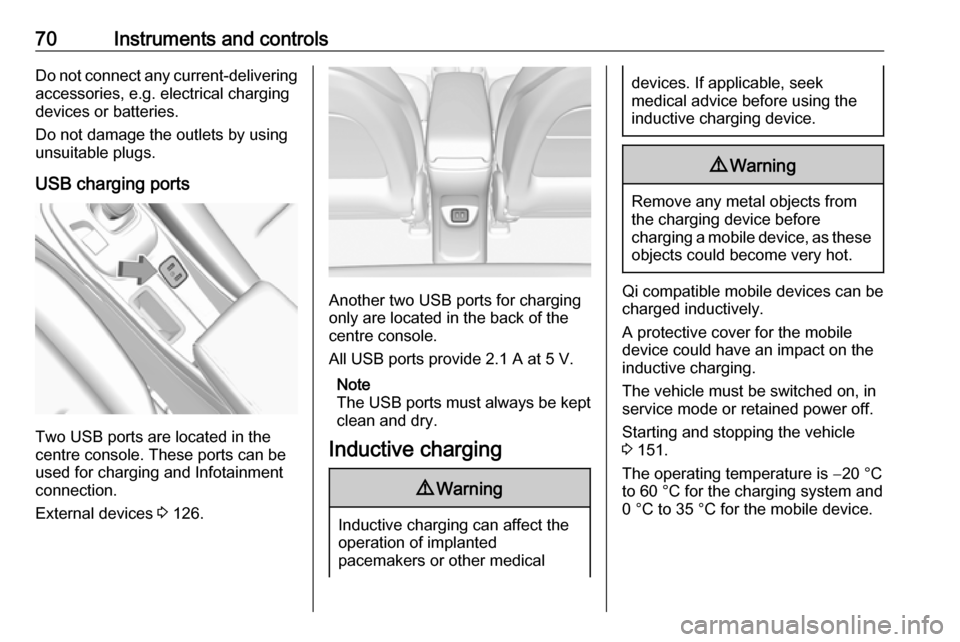
Two USB ports are located in the
centre console. These ports can be
used for charging and Infotainment
connection.
External devices 3 126.
Another two USB ports for charging
only are located in the back of the
centre console.
All USB ports provide 2.1 A at 5 V.
Note
The USB ports must always be kept clean and dry.
Inductive charging
9 Warning
Inductive charging can affect the
operation of implanted
pacemakers or other medical
devices. If applicable, seek
medical advice before using the
inductive charging device.9 Warning
Remove any metal objects from
the charging device before
charging a mobile device, as these objects could become very hot.
Qi compatible mobile devices can be
charged inductively.
A protective cover for the mobile
device could have an impact on the
inductive charging.
The vehicle must be switched on, in
service mode or retained power off.
Starting and stopping the vehicle
3 151.
The operating temperature is −20 °C
to 60 °C for the charging system and
0 °C to 35 °C for the mobile device.
Page 75 of 273

Instruments and controls73OverviewOTurn lights 3 77XSeat belt reminder 3 77vAirbag and belt tensioners
3 78VAirbag deactivation 3 78pCharging system 3 786Service vehicle soon
3 79RBrake system 3 79mElectric parking brake
3 79jElectric parking brake fault
3 79uAntilock brake system
(ABS) 3 793Sport mode 3 80aLane keep assist 3 80aElectronic Stability Control
off 3 80bElectronic Stability Control
and Traction Control
system 3 80kTraction Control system off
3 80wTyre pressure monitoring
system 3 80dImmobiliser 3 814Vehicle ready 3 818Exterior light 3 81CHigh beam 3 81fHigh beam assist 3 81øRear fog light 3 81mCruise control 3 81AVehicle detected ahead
3 817Pedestrian detection
3 81LSpeed limiter 3 81LTraffic sign assistant
3 82hDoor open 3 82
Reconfigurable instrument cluster
The cluster layout can be changed.
Use the steering wheel control to
move between the different display
zones and scroll through the different displays.
There are three display
configurations to choose from:
● Basic configuration displays the
speedometer with a simplified
high voltage battery gauge and
efficiency light.
● Standard configuration displays
the speedometer with a high
voltage battery gauge and
efficiency gauge.
● Enhanced configuration displays
the speedometer with high
voltage battery gauge, efficiency
ring, and power gauge.
Driver Information Centre 3 82.
Page 78 of 273

76Instruments and controlsPower indicator gauge
The power indicator gauge displays
the instantaneous charge and
discharge power flowing either into or out of the high voltage battery.
Maximum discharge power is
available when the high voltage
battery is fully charged. During normal
operation, a slight reduction in
discharge power may occur as the
high voltage battery state of charge
decreases.
Regenerative braking
There is an indication when
regenerative braking is active. If
regenerative braking is active, the regenerative active icon with arrowsis shown as green.
Regenerative power limited
indication
Regenerative power icon is shown as grey when regenerative power is
limited. Additionally, a horizontal bar
is displayed on the gauge. This
usually occurs when the high voltage
battery is near full charge or cold.
Regenerative braking 3 161.
Page 87 of 273
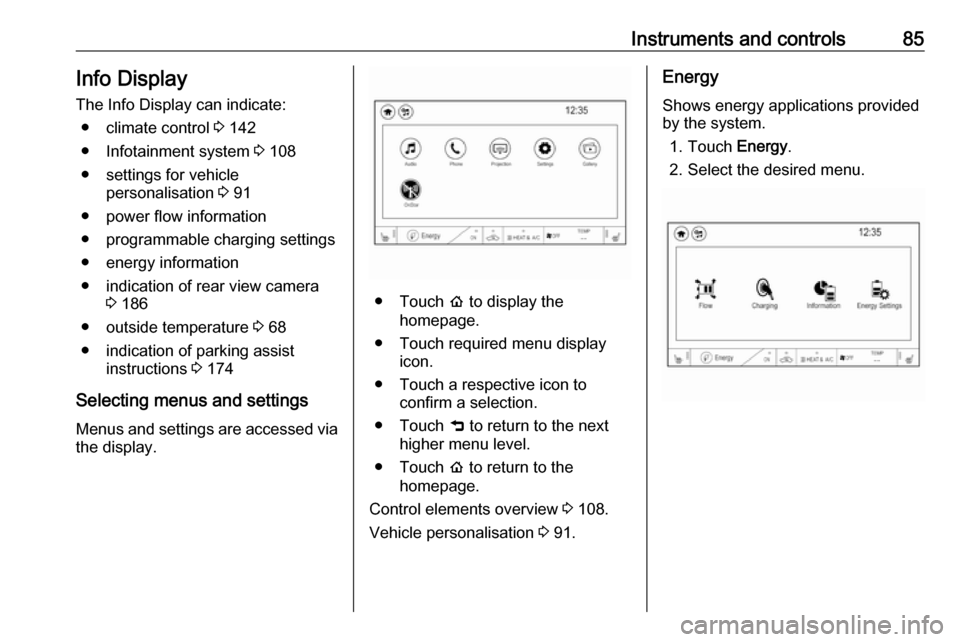
Instruments and controls85Info DisplayThe Info Display can indicate: ● climate control 3 142
● Infotainment system 3 108
● settings for vehicle personalisation 3 91
● power flow information
● programmable charging settings
● energy information
● indication of rear view camera 3 186
● outside temperature 3 68
● indication of parking assist instructions 3 174
Selecting menus and settings
Menus and settings are accessed via the display.
● Touch p to display the
homepage.
● Touch required menu display icon.
● Touch a respective icon to confirm a selection.
● Touch 9 to return to the next
higher menu level.
● Touch p to return to the
homepage.
Control elements overview 3 108.
Vehicle personalisation 3 91.
Energy
Shows energy applications provided
by the system.
1. Touch Energy.
2. Select the desired menu.
Page 88 of 273

86Instruments and controlsCommunication error
If a communication problem has
occurred with the energy system, the
error message is displayed. In this
case, please try restarting the vehicle
or contact a workshop.
Flow
This menu displays energy flow
between the electric drive unit and the high voltage battery.
1. Touch Energy.
2. Touch Flow.
The components will be highlighted
when they are active.
Power off
No power is flowing to the wheels.
The high voltage battery scale colour
is greyed out.Power
The arrow indicates from high voltage battery to wheel.Regenerate
Power from the wheels returns to the
high voltage battery during
regenerative braking or coasting.