Power OPEL AMPERA E 2018.5 Owner's Guide
[x] Cancel search | Manufacturer: OPEL, Model Year: 2018.5, Model line: AMPERA E, Model: OPEL AMPERA E 2018.5Pages: 273, PDF Size: 6.6 MB
Page 89 of 273
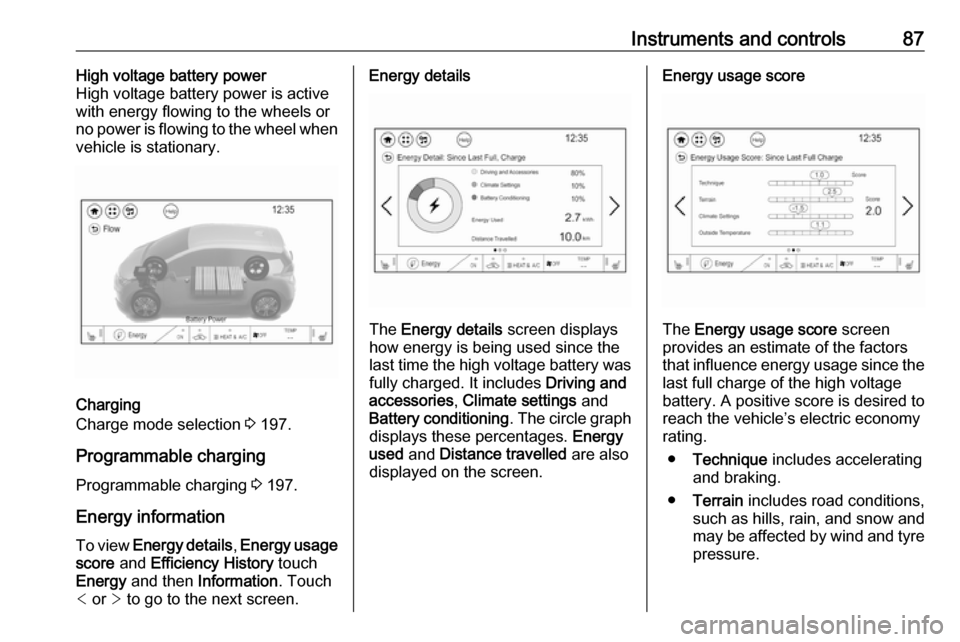
Instruments and controls87High voltage battery power
High voltage battery power is active
with energy flowing to the wheels or
no power is flowing to the wheel when
vehicle is stationary.
Charging
Charge mode selection 3 197.
Programmable charging
Programmable charging 3 197.
Energy information To view Energy details , Energy usage
score and Efficiency History touch
Energy and then Information . Touch
< or > to go to the next screen.
Energy details
The Energy details screen displays
how energy is being used since the
last time the high voltage battery was
fully charged. It includes Driving and
accessories , Climate settings and
Battery conditioning . The circle graph
displays these percentages. Energy
used and Distance travelled are also
displayed on the screen.
Energy usage score
The Energy usage score screen
provides an estimate of the factors
that influence energy usage since the last full charge of the high voltage
battery. A positive score is desired to
reach the vehicle’s electric economy
rating.
● Technique includes accelerating
and braking.
● Terrain includes road conditions,
such as hills, rain, and snow and
may be affected by wind and tyre
pressure.
Page 91 of 273

Instruments and controls89●Hill Top Reserve : Select Off, On ,
On – home only , or On – away
only .
Regenerative braking 3 161.
● Energy summary pop-up : Set the
energy summary pop-up feature
to On or Off.
● Charge status feedback : Set the
charge status feedback feature to Horn chirps or Off.
● Charge power loss alert : This
feature allows an alert to sound
when the vehicle is charging and
loses power at the electrical
outlet. Set the charge power loss alert feature to On or Off.
● Radio power down : This allows
high voltage battery power to be conserved. Set the value for the
reminder to be displayed. To set
high voltage battery charge level
for Radio power down , touch
Energy , then Energy settings ,
then Radio power down . Select
Off , 2% , 4% , 6% , 8% , 10% .Low power mode
This allows high voltage battery power to be conserved.1. Press and hold m of the
Infotainment system.
2. Touch Yes on the Info Display.
The screen will turn off.
3. Press m again to turn the display
on.Vehicle messages
Messages are indicated in the Driver
Information Centre, in some cases
together with a warning and signal
chime.
Press 9 on the steering wheel to
confirm a message.
Vehicle and service messages
The vehicle messages are displayed
as text. Follow the instructions given
in the messages.
Page 92 of 273

90Instruments and controlsSome important messages may
appear additionally in the Info
Display. Some messages only pop-
up for a few seconds.
Warning chimes If several warnings appear at the
same time, only one warning chime will sound.
When starting the propulsion
system or whilst driving
The warning chime regarding not
fastened seat belts has priority over
any other warning chime.
● If seat belt is not fastened.
● If a door or the tailgate is not fully
closed when starting off.
● If a certain speed is exceeded with parking brake applied.
● If approaching a vehicle ahead too rapidly.
● If a programmed speed or speed
limit is exceeded.
● If a warning message appears in the Driver Information Centre.● If the electronic key is not in thepassenger compartment.
● If the parking assist detects an object.
● If an unintended lane change occurs.
● If safety function of the power tailgate detects obstacles in the
moving area.
When the vehicle is parked and /
or the driver's door is opened
● With exterior lights on.
Battery voltage
When the voltage of the 12 V vehicle
battery is running low, a warning
message will appear in the Driver
Information Centre.
1. Switch off any electrical consumers which are not requiredfor a safe drive, e.g. seat heating,
heated rear window or other main
consumers.
2. Charge the 12 V vehicle battery by
driving continuously for a while or
by using a charging device.The warning message will disappear
after the vehicle has been started
twice without a voltage drop.
If the 12 V vehicle battery cannot be
recharged, have the cause of the fault remedied by a workshop.
Page 94 of 273

92Instruments and controlsAuto wipe in reverse gear:
Activates or deactivates
automatic switching on of the
rear window wiper when reverse
gear is engaged.
● Collision / detection systems
Pedestrian safety signal :
Activates or deactivates
pedestrian safety alert. Even if
pedestrian safety signal is
deactivated, it is automatically
activated while this menu is not
accessible such as OnStar
calling, camera projection, Apple
CarPlay and Android Auto, non-
auto dismiss pop-up, etc.
Forward Collision System : This
allows the feature’s notification to
be customised. This feature will
turn on or off the Forward
Collision Alert and Active
Emergency Braking. The Off
setting disables all Forward
Collision Alert and Active
Emergency Braking functions.
With the Alert and Brake setting,
both Forward Collision Alert and
Active Emergency Braking are
available. The Alert settingdisables Active Emergency
Braking. Select Off, Alert , or Alert
and Brake .
Front pedestrian detection : This
allows the feature’s notification to be customised. This feature may
help avoid or reduce the harm
caused by front-end crashes with
nearby pedestrians. Select Off,
Alert , or Alert and Brake .
Rear Cross Traffic Alert :
Activates or deactivates rear
cross traffic alert.
Lane Change Alert : Activates or
deactivates lane change alert.
● Lighting
Vehicle locator lights : Activates
or deactivates the entry lighting.
Exit lighting : Activates or
deactivates and changes the duration of exit lighting.
● Power door locks
Auto door lock : Activates or
deactivates the automatic door
locking function after switching on the vehicle.Unlocked door anti lockout :
Activates or deactivates the door
locking function while a door is
open.
Delayed door lock : Activates or
deactivates the delayed door locking function. This feature
delays the actual locking of the
doors until all doors are closed. It just can be toggled when Auto
door lock is deactivated.
● Remote lock / unlock / start
Remote unlock light feedback :
Activates or deactivates the
hazard warning flasher feedback
whilst unlocking.
Remote lock feedback : Changes
what kind of feedback is given
when locking the vehicle.
Remote door unlock : Changes
the configuration to unlock only
the driver's door or the whole
vehicle whilst unlocking.
Relock remotely unlocked doors :
Activates or deactivates the
automatic relock function after
unlocking without opening the vehicle.
Page 107 of 273

Lighting105Lighting features
Entry lighting Low beam and the interior lights turn
on briefly by pressing ( on the
electronic key. The lights turn off
immediately when POWERm is
pressed or automatically after a brief period.
Exit lighting The low beam and the reversing light
come on by doing the following:
1. Switch off the vehicle.
2. Open the driver's door.
3. Pull the stalk briefly and release.
Some interior lights come on when
the vehicle is switched off. The
exterior and the interior lights remain
on after the door is closed for a brief
period and then turn off.
Activation, deactivation and duration
of this function can be changed in the
Info Display.
Vehicle personalisation 3 91.Battery discharge protection
Vehicle battery state of charge
function
The vehicle battery saver feature is
designed to protect the 12 V vehicle
battery. If any interior light is left on and the vehicle is switched off, thevehicle battery discharge protection
system automatically turns the lights
off after approx. 10 minutes.
If the exterior lights are left on, they
turn off when the vehicle is switched
off. If the sidelights are switched on
when the vehicle is switched off, the
sidelights remain on until they are
manually switched off.
Page 111 of 273

Infotainment system1091Display / touch screen ........113
2 m (knob)
Turn: adjust volume ............110
3 m (button)
Short press: mute system ...110
or deactivate mute
function if mute function is
active ................................... 110
or exit low power mode if
low power mode is active ....110
Long press: turn on low
power mode ........................ 110
4 p
Press: display the
Infotainment home screen ..113
5 t / v
Short press: skip to
previous or next station
when radio active ................121
or skip to previous or next
track when external
devices active .....................128Long press: seek up or
down when radio active ......121
or fast forward or fast
rewind when external
devices active .....................128Steering wheel controls
1w
Short press: open OnStar
menu if no phone
connected ........................... 110
or open the phone menu .....137
or take phone call if phone connected ........................... 137
Long press: activate
speech recognition ..............133
Page 112 of 273

110Infotainment system2Five-way controller
Press buttons: operate
menus on the Driver
Information Centre ................82
3 n
Press: end / decline call ......137
or deactivate speech recognition .......................... 133
or activate / deactivate
mute function ...................... 110
Press FAV n or FAV o to display
the favourites list and choose one of
the favourites stored.
Press the buttons behind the steering wheel on the right side to adjust the
volume.
Usage
Control elements
The Infotainment system can be
operated in different ways.
Inputs are made optionally via:
● the central control unit in the control panel 3 108
● the touch screen 3 113
● audio controls on the steering wheel 3 108
● the speech recognition 3 133
Switching the Infotainment
system on or off
The Infotainment system is switched
on automatically when the vehicle is turned on. After switching on, the last selected Infotainment source
becomes active.
Automatic switch-off
If the Infotainment system has been
switched on by pressing X while the
vehicle is switched off, it will switch off again automatically 10 minutes after
the last user input.
Low power mode
To save high voltage battery power, a
low power mode is available.
If desired, you may turn the display off while the sound remains active.
Page 113 of 273

Infotainment system111Press and hold X. A low power
message is displayed. Confirm the
message to turn off the display.
To cancel low power mode, press X.
If the high voltage battery level of the vehicle drops below the level set in
the vehicle settings menu, the
Infotainment system suggests to turn
off display and sound.
Note
For a detailed description of how to
set the high voltage battery level
3 85.
A low power message is displayed.
Confirm the message to turn off
display and sound.
To cancel low power mode, press X.
Setting the volume
Turn X. The current setting is shown
on the display.
When the Infotainment system is
switched on, the last selected volume is set, provided that it is lower than themaximum start-up volume. For a
detailed description 3 116.Speed compensated volume
When the speed compensated
volume is activated 3 116, the
volume is adapted automatically to
make up for the road and wind noise
as you drive.
Mute
Press X to mute the Infotainment
system.
To cancel the mute function: press
X again. The last selected volume is
set again.
Full screen clock display From any screen, touch the time
indication field to display a clock in full
screen mode.
Touch u to return to the previous
screen.
Modes of operationPress p and then select 1 in the top
left corner of the screen to display the application overview screen.
Page 142 of 273

140Infotainment systemPress p and then select 1 in the top
left corner of the screen to display the application overview screen.
Select Settings and then Bluetooth
Phone . Activate or deactivate
Privacy .
Functions during a call
During an ongoing phone call the
phone main menu is displayed.
Deactivating the hands-free mode
temporarily
To continue the conversation on the
mobile phone, activate m.
To return to the hands-free mode,
deactivate m.
Deactivating the microphone
temporarily
To mute the microphone, activate n.
To reactivate the microphone,
deactivate n.
Setting a call on hold
During an active phone call, the t
screen button changes to Hold.
Select Hold to set the call on hold.Ending a phone call
Select @ to end the call.
Voice mail box You may operate your voice mail boxvia the Infotainment system.
Voice mail number
To check the voice mail number of the
phone currently connected, press p
and then select 1 in the top left corner
of the screen.
Select Settings and then Bluetooth
Phone .
If available, the voice mail number is
displayed under My Number.
Calling the voice mail box
Press p and then select 1 in the top
left corner of the screen to display the application overview screen.
Select Phone to display the phone
main screen.
Select t on the keypad to call the
mailbox.
Alternatively, enter the voice mail
number via the phone keypad.Mobile phones and CB radio
equipment
Installation instructions and
operating guidelines
The vehicle specific installation
instructions and the operating
guidelines of the mobile phone and
hands-free manufacturer must be
observed when installing and
operating a mobile telephone. Failure to do so could invalidate the vehicleoperating permit (EU directive 95/54/
EC).
Recommendations for fault-free
operation:
● Professionally installed exterior antenna to obtain the maximum
range possible
● Maximum transmission power 10 W
● Installation of the phone in a suitable spot, consider relevant
Note in the Owner's Manual
3 45
Page 143 of 273
Infotainment system141Seek advice on predetermined
installation points for the external
antenna or equipment holder and
ways of using devices with a
transmission power exceeding 10 W.
Use of a hands-free attachment
without external antenna with mobile
telephone standards GSM
900/1800/1900 and UMTS is only
permitted if the maximum
transmission power of the mobile
telephone is 2 W for GSM 900 or
1 W for the other types.
For reasons of safety, do not use the
phone while driving. Even use of a hands-free set can be a distraction
while driving.9 Warning
Operation of radio equipment and
mobile telephones which fail to
meet above mentioned mobile
telephone standards is only
permitted using an antenna
located outside of the vehicle.
Caution
Mobile telephones and radio
equipment may lead to
malfunctions in the vehicle
electronics when operated inside
the vehicle with no exterior
antenna, unless the above
mentioned regulations are
observed.