hold OPEL AMPERA E 2018.5 Owner's Guide
[x] Cancel search | Manufacturer: OPEL, Model Year: 2018.5, Model line: AMPERA E, Model: OPEL AMPERA E 2018.5Pages: 273, PDF Size: 6.6 MB
Page 140 of 273

138Infotainment systemInitiating a phone call
Entering a phone number
Press p and then select 1 in the top
left corner of the screen to display the application overview screen.
Select Phone.
Enter a telephone number using the keypad in the phone main menu.
To delete one or more entered
characters, touch or touch and hold
{ .
Touch ? on the screen to start
dialling.
Phone book
When pairing a mobile phone with the
Infotainment system via Bluetooth,
the phone book of the mobile phone
is downloaded automatically 3 134.
Press p and then select 1 in the top
left corner of the screen to display the application overview screen.
Select Phone.
Activate the ^ tab in the phone main
menu.
To start a phone call, select the
desired contact in the list.
Note
To display a contact with all
information available, select More
next to the desired contact.
Contacts sorting
The phone book can be sorted by last
name or first name.
Press p and then select 1 in the top
left corner of the screen to display the application overview screen.
Select Settings to display the
respective menu.
Select Bluetooth Phone and then Sort
contacts . Activate the desired option.Call history
All incoming, outgoing, or missed
calls are registered.
Press p and then select 1 in the top
left corner of the screen to display the
application overview screen.
Select Phone. Select the Y tab in the
phone main menu.
Outgoing calls are marked with ],
incoming calls are marked with [ and
missed calls are marked with \.
Select the desired list entry to initiate
a phone call.
Page 141 of 273

Infotainment system139Favourites
Contact favourites can be stored in
the phone favourites list.Storing favourites
Press p and then select 1 in the top
left corner of the screen to display the application overview screen.
Select Phone. Select the ^ tab in the
phone main menu.
Select t next to the contact you want
to store as favourite. The icon
changes to s and the contact
appears in the favourites list.
Select s again to delete the contact
from the favourites list. The icon
changes to t.
Note
The favourites list is not
synchronised with the phone
favourites. The favourites have to be added to the favourites list on the
Infotainment system.Retrieving favourites
Press p and then select 1 in the top
left corner of the screen to display the application overview screen.Select Phone. Select the < tab in the
phone main menu.
Select the desired favourite to initiate a phone call.
Redialling a number
The last dialled phone number can be
redialled.
Press p and then select 1 in the top
left corner of the screen to display the application overview screen.
Select Phone and then ? on the
screen.
Using speed dial numbers
Speed dial numbers that are stored
on the mobile phone can also be
dialled using the keypad of the phone
main menu.
Press p and then select 1 in the top
left corner of the screen to display the application overview screen.
Select Phone.
Touch and hold the respective digit on the keypad to initiate the call. For two-
digit speed dial numbers, select the
first digit and then touch and hold the second digit.Incoming phone call
Taking a call
If an audio mode, e.g. the radio or
USB mode, is active at the moment a call comes in the audio source is
muted and stays muted until the call
ends.
To answer the call, select v in the
message on top of the screen or
press w on the steering wheel.
The Z tab is activated displaying
information on the call.
Rejecting a call
To reject the call, select @ in the
message on top of the screen or
press n on the steering wheel.
Privacy settings
When a call comes in, a message is displayed on the Info Display
indicating the name and number of
the person calling (if available). If
Privacy is activated, information on
the caller is only shown in the cluster
display.
Page 142 of 273

140Infotainment systemPress p and then select 1 in the top
left corner of the screen to display the application overview screen.
Select Settings and then Bluetooth
Phone . Activate or deactivate
Privacy .
Functions during a call
During an ongoing phone call the
phone main menu is displayed.
Deactivating the hands-free mode
temporarily
To continue the conversation on the
mobile phone, activate m.
To return to the hands-free mode,
deactivate m.
Deactivating the microphone
temporarily
To mute the microphone, activate n.
To reactivate the microphone,
deactivate n.
Setting a call on hold
During an active phone call, the t
screen button changes to Hold.
Select Hold to set the call on hold.Ending a phone call
Select @ to end the call.
Voice mail box You may operate your voice mail boxvia the Infotainment system.
Voice mail number
To check the voice mail number of the
phone currently connected, press p
and then select 1 in the top left corner
of the screen.
Select Settings and then Bluetooth
Phone .
If available, the voice mail number is
displayed under My Number.
Calling the voice mail box
Press p and then select 1 in the top
left corner of the screen to display the application overview screen.
Select Phone to display the phone
main screen.
Select t on the keypad to call the
mailbox.
Alternatively, enter the voice mail
number via the phone keypad.Mobile phones and CB radio
equipment
Installation instructions and
operating guidelines
The vehicle specific installation
instructions and the operating
guidelines of the mobile phone and
hands-free manufacturer must be
observed when installing and
operating a mobile telephone. Failure to do so could invalidate the vehicleoperating permit (EU directive 95/54/
EC).
Recommendations for fault-free
operation:
● Professionally installed exterior antenna to obtain the maximum
range possible
● Maximum transmission power 10 W
● Installation of the phone in a suitable spot, consider relevant
Note in the Owner's Manual
3 45
Page 143 of 273
Infotainment system141Seek advice on predetermined
installation points for the external
antenna or equipment holder and
ways of using devices with a
transmission power exceeding 10 W.
Use of a hands-free attachment
without external antenna with mobile
telephone standards GSM
900/1800/1900 and UMTS is only
permitted if the maximum
transmission power of the mobile
telephone is 2 W for GSM 900 or
1 W for the other types.
For reasons of safety, do not use the
phone while driving. Even use of a hands-free set can be a distraction
while driving.9 Warning
Operation of radio equipment and
mobile telephones which fail to
meet above mentioned mobile
telephone standards is only
permitted using an antenna
located outside of the vehicle.
Caution
Mobile telephones and radio
equipment may lead to
malfunctions in the vehicle
electronics when operated inside
the vehicle with no exterior
antenna, unless the above
mentioned regulations are
observed.
Page 152 of 273

150Driving and operatingIf the vehicle will not start, place the
electronic key in the transmitter
pocket inside the centre console.
Starting and stopping the vehicle
3 151.Switching on the vehicle
With the vehicle off and the brake
pedal applied, pressing POWERm
once will switch on the vehicle. When 4 illuminates in the instrument
cluster, the vehicle is ready to be
driven. This could take up to
15 seconds at extremely cold
temperatures.Switching off the vehicle
With the vehicle in P, press
POWER m briefly in service mode or
when engine is running and vehicle is
stationary. Some functions remain
active until driver's door is opened.
If the vehicle is not in P when
switching off the vehicle, P will be
automatically engaged before the
vehicle is switched off.A chime will sound if the driver's door is opened while the vehicle is
switched on. Always press
POWER m to switch off the vehicle
before exiting the vehicle.Emergency shut off during driving
If the vehicle needs to be switched off during driving in case of emergency,
press POWER m for more than
2 seconds or press twice briefly within
5 seconds.
Starting and stopping the vehicle
3 151.
Service mode
This power mode is available for
service and diagnostics and to verify
the proper operation of the service
vehicle soon control indicator as may
be required for emission inspection
purposes.
With the vehicle switched off and the
brake pedal not applied, pressing and holding POWER m for more than
5 seconds will place the vehicle in service mode. The instruments and
audio systems will operate as they do when the vehicle is switched on, but
the vehicle will not be able to be
driven. The propulsion system will not start in service mode. Press
POWER m again to switch off the
vehicle.Caution
Service mode will discharge the
12 V vehicle battery. Do not use
service mode for an extended
period, or the vehicle may not
start.
Operation in case of failure
If the vehicle does not start due to a
low electronic key battery, a message
will be displayed in the Driver
Information Centre.
To still drive the vehicle, proceed as
follows:
1. Open the centre console and remove the small tray from the
centre console. Place the
electronic key in the pocket with
the buttons facing the bottom of
the vehicle.
Page 154 of 273
152Driving and operatingThe instrument cluster also displays
an active battery gauge when the
vehicle is ready to be driven.
A chime will sound if the driver's door is opened while the vehicle is
switched on. Always press
POWER m to switch off the vehicle
before exiting the vehicle.
If the vehicle will not start due to a low electronic key battery, the vehicle can
still be driven.
Operation in case of failure 3 149.
RestartingCaution
If the vehicle must be restarted
while it is still moving, move the
selector lever into N and press
POWER m twice without
depressing the brake pedal. The
propulsion system will not restart
in any other way.
Emergency shut off during driving
1. Brake using a firm and steady pressure. Do not pump the brakes
repeatedly. This may reduce
power assist, requiring increased brake pedal force.
2. Shift the selector lever into N. This
can be done while the vehicle is
moving. After shifting into N, firmly
apply the brakes and steer the
vehicle to a safe location.
3. Come to a complete stop, shift into P, and switch off the vehicle
by pressing POWERm.
4. Apply the parking brake. If the vehicle cannot be pulled
over and must be shut off while
driving, press and hold
POWER m for more than
2 seconds, or press twice briefly
within 5 seconds.9 Danger
Switching off the vehicle while
moving may disable the airbags.
While driving, only shut the
propulsion system off in an
emergency.
Starting the vehicle at low
temperatures
It is recommended to plug in the vehicle when exterior temperatures
are below 0 °C to maximise high
voltage battery life.
Should the exterior temperature be
lower than -32 °C, the vehicle must be
plugged in when the vehicle is
switched on.
Parking Note
Do not allow the vehicle to remain in
extreme temperatures for long
periods without being driven or
being plugged in.
Page 158 of 273

156Driving and operatingAt low vehicle speeds, R can be used
to rock the vehicle back and forth to
get out of snow, ice, or sand without
damaging the electric drive unit.
N : In this position, the propulsion
system does not transfer torque to the
wheels. To restart the propulsion
system when the vehicle is already
moving, use D only.
The vehicle is not designed to stay in N for extended periods of time. It will
automatically shift into P.
To shift into and out of N:
● To shift into N, move the selector
lever forward until N is illuminated
in red.
● If the vehicle is in P, press the
release button while pressing the selector lever forward until N is
illuminated in red.
To shift out of N, bring the vehicle
to a complete stop and shift into the desired gear.D : This position is for normal driving.
If more power is needed for passing,
and the vehicle speed is:
● less than 56 km/h, push the accelerator pedal about halfway
down.
● about 56 km/h or more, push the accelerator pedal all the way
down.Caution
If the vehicle seems to accelerate
slowly or not respond when you try to go faster, do not continue your
journey. The electric drive unit
could be damaged. Consult a
workshop as soon as possible.
Note
In slippery conditions, operate the
vehicle in D for enhanced riding and
handling performance.
To shift into and out of D:
1. Bring the vehicle to a complete stop.
2. To shift into D, move the selector
lever back. If the vehicle is in P,
press the release button while
pressing the selector lever back.
D is illuminated in red.
To shift out of D, shift to the
desired gear.
When stopping on a steep hill, use the brakes to hold the vehicle in place.
When shifting into P on a hill, use the
brakes to hold the vehicle. Then shift
into P.
L : This position reduces vehicle
speed without using the brakes. Use
L on very steep hills, in deep snow, in
mud or in stop-and-go traffic.Caution
Spinning the tyres or holding the
vehicle in one place on a hill using only the accelerator pedal may
damage the electric drive unit. If you are stuck, do not spin the
tyres. When stopping on a hill, use
the brakes to hold the vehicle in
place.
Page 159 of 273

Driving and operating157One-pedal drivingCaution
When the vehicle is operated in L
and the driver unfastens his seat
belt, the electric parking brake is
automatically applied and one
pedal driving is not possible.
With one-pedal driving, the
accelerator pedal can be used to
control the deceleration of the vehicle
down to a complete stop.
Quick releasing of the accelerator
pedal will result in aggressive
deceleration. Slow releasing of the
accelerator pedal will allow the
deceleration of the vehicle to be
adjusted as desired.
To use one-pedal driving, shift into L.
L is only selectable when the vehicle
is in D. Press the accelerator pedal to
achieve the desired speed. The
deceleration provided by one-pedal
driving provides full regenerative
braking and helps increase energy efficiency.
While driving on slopes, one-pedal
driving may not be able to bring the
vehicle to a complete stop or hold the
vehicle at a stop.
If the vehicle cannot stop on a slope
while using one-pedal driving, the
electric parking brake may be applied to hold the vehicle stationary.
To drive again, depress the
accelerator pedal, and the electric
parking brake will automatically
disengage.
One-pedal driving may become
disabled and the vehicle may
continue to creep forward, or if
stopped, may apply the electric
parking brake or shift to P.
This can be caused by the following: ● The driver's door is open.
● The driver's seat belt is unbuckled.
● The vehicle has remained stationary for 5 minutes.
● There is a problem with the propulsion system.Additional deceleration can be
achieved by using the regenerative braking paddle.
Regenerative braking 3 161.
Car wash mode This vehicle includes a car washmode that allows the vehicle to
remain in N (neutral) for use in
automatic car washes.
Car wash mode (vehicle off) - driver in vehicle
To place the vehicle in N with the
vehicle off and occupied:
1. Apply the brake pedal.
2. Shift to N.
3. Turn off the vehicle and release the brake pedal.
4. The indicator should continue to show N. If it does not, repeat steps
1-3.
The vehicle is now ready for the
car wash.
Page 162 of 273

160Driving and operatingThe control indicator m will flash and
then stay on once the electric parking brake is fully applied. Before leaving
the vehicle, check the control
indicator m to ensure the parking
brake is applied.
If the control indicator m flashes
continuously, then the electric parking
brake is only partially applied or there
is a problem with the electric parking
brake. A message is displayed in the
Driver Information Centre. Release
the electric parking brake and try to
apply it again. If the control indicator
m does not illuminate or keeps
flashing, seek the assistance of a
workshop.
Do not drive the vehicle if the control
indicator m is flashing 3 79.
If the electric parking brake is applied while the vehicle is moving, a chimewill sound and a message will be
displayed in the Driver Information
Centre. The vehicle will decelerate as
long as the switch is pulled.
Releasing the switch m during the
deceleration process will release the
parking brake. If the switch m ispulled until the vehicle stops moving,
the electric parking brake will remain
applied.
When the electric parking brake fault
indicator j illuminates, the electric
parking brake has detected a system
problem and is operating with
reduced functionality. To apply the
electric parking brake when j
illuminates, pull the switch m and
hold it until the control indicator m
remains on. If the control indicator j
illuminates, seek the assistance of a
workshop.
The vehicle may automatically apply
the electric parking brake in some
situations when the vehicle is not
moving. This is normal, and is done to periodically check the correct
operation of the electric parking brake
system.
If the electric parking brake fails to
apply, the rear wheels should be
blocked to prevent vehicle
movement.Releasing
1. Switch on the vehicle.
2. Keep brake pedal depressed.
3. Push switch m.
If attempting to release the electric parking brake without the brake pedal
being applied, a chime will sound and
a message will be displayed in the Driver Information Centre. The
electric parking brake is released
when m is off.
If control indicator j is illuminated, the
electric parking brake has detected a
system problem, and is operating with reduced functionality. To release the
electric parking brake when j is on,
push down the switch m and hold it
down until the control indicator j
goes off. If the control indicator
remains illuminated, seek the
assistance of a workshop.
Note
Driving with the parking brake on
can overheat the brake system and
cause premature wear or damage to brake system parts. Make sure that
Page 163 of 273
Driving and operating161the parking brake is fully released
and the control indicator m is off
before driving.
Automatic release
The electric parking brake is
automatically released when the
vehicle is running, placed into gear
and an attempt is made to drive away.
Avoid rapid acceleration when the
electric parking brake is applied, to
reduce wear of parking brake lining.
Electric parking brake control
indicator m 3 79.
Electric parking brake fault control
indicator j3 79.
Driver Information Centre 3 82.
Regenerative braking
Some braking energy from the
moving vehicle is turned back into
electrical energy. This energy is then
stored back into the high voltage
battery system, increasing energy
efficiency.
Regenerative power may be limited
when the high voltage battery is near
full charge or cold.Regeneration on demand
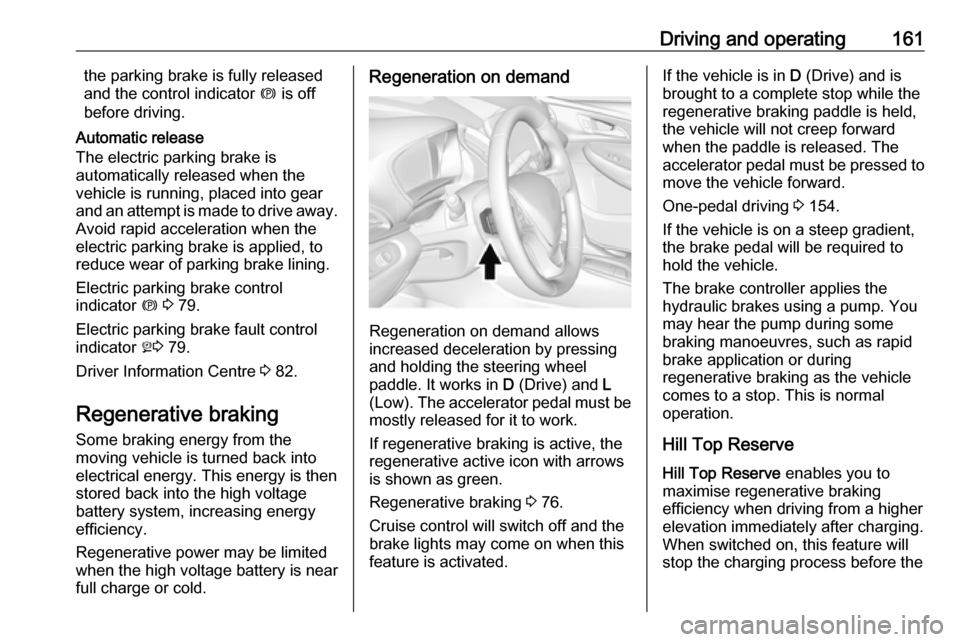
Regeneration on demand allows
increased deceleration by pressing
and holding the steering wheel
paddle. It works in D (Drive) and L
(Low). The accelerator pedal must be mostly released for it to work.
If regenerative braking is active, the regenerative active icon with arrowsis shown as green.
Regenerative braking 3 76.
Cruise control will switch off and the
brake lights may come on when this
feature is activated.
If the vehicle is in D (Drive) and is
brought to a complete stop while the regenerative braking paddle is held,
the vehicle will not creep forward
when the paddle is released. The
accelerator pedal must be pressed to
move the vehicle forward.
One-pedal driving 3 154.
If the vehicle is on a steep gradient,
the brake pedal will be required to
hold the vehicle.
The brake controller applies the
hydraulic brakes using a pump. You
may hear the pump during some
braking manoeuvres, such as rapid
brake application or during
regenerative braking as the vehicle
comes to a stop. This is normal
operation.
Hill Top ReserveHill Top Reserve enables you to
maximise regenerative braking
efficiency when driving from a higher
elevation immediately after charging.
When switched on, this feature will
stop the charging process before the