hold OPEL AMPERA E 2018.5 User Guide
[x] Cancel search | Manufacturer: OPEL, Model Year: 2018.5, Model line: AMPERA E, Model: OPEL AMPERA E 2018.5Pages: 273, PDF Size: 6.6 MB
Page 91 of 273

Instruments and controls89●Hill Top Reserve : Select Off, On ,
On – home only , or On – away
only .
Regenerative braking 3 161.
● Energy summary pop-up : Set the
energy summary pop-up feature
to On or Off.
● Charge status feedback : Set the
charge status feedback feature to Horn chirps or Off.
● Charge power loss alert : This
feature allows an alert to sound
when the vehicle is charging and
loses power at the electrical
outlet. Set the charge power loss alert feature to On or Off.
● Radio power down : This allows
high voltage battery power to be conserved. Set the value for the
reminder to be displayed. To set
high voltage battery charge level
for Radio power down , touch
Energy , then Energy settings ,
then Radio power down . Select
Off , 2% , 4% , 6% , 8% , 10% .Low power mode
This allows high voltage battery power to be conserved.1. Press and hold m of the
Infotainment system.
2. Touch Yes on the Info Display.
The screen will turn off.
3. Press m again to turn the display
on.Vehicle messages
Messages are indicated in the Driver
Information Centre, in some cases
together with a warning and signal
chime.
Press 9 on the steering wheel to
confirm a message.
Vehicle and service messages
The vehicle messages are displayed
as text. Follow the instructions given
in the messages.
Page 96 of 273

94Instruments and controlsTelematics service
OnStar OnStar is a personal connectivity and
service assistant with integrated
Wi-Fi hotspot. The OnStar service is
available 24 hours a day, seven days
a week.
Note
OnStar is not available for all
markets. For further information,
contact your workshop.
Note
In order to be available and
operational, OnStar needs a valid
OnStar subscription, functioning
vehicle electrics, mobile service and GPS satellite link.
To activate the OnStar services and
set up an account, press Z and speak
with an advisor.Depending on the equipment of the vehicle, the following services are available:
● Emergency services and support
in the case of a vehicle
breakdown
● Wi-Fi hotspot
● Smartphone application
● Remote control, e.g. location of the vehicle, activation of horn and
lights, control of central locking
system
● Stolen vehicle assistance
● Vehicle diagnostics
● Destination download
Note
The OnStar module of the vehicle is
deactivated after ten days without
switching on the vehicle. Functions
requiring a data connection will be
available again after switching on
the vehicle.OnStar buttons
Privacy button
Press and hold j until a message is
heard to activate or deactivate the
transmission of the vehicle location.
Press j to answer a call or to end a
call to an advisor.
Press j to access the Wi-Fi settings.
Service button
Press Z to establish a connection to
an advisor.
Page 99 of 273

Instruments and controls97Note
The workshop notification function
can be disabled in your account.
The report contains the status of key
operating systems of the vehicle like
propulsion system, airbags, ABS, and
other major systems. It also provides
information on possible maintenance
items and tyre pressure (only with tyre
pressure monitoring system).
To look at the information in greater
detail, select the link within the email and log in to your account.
Destination download
A desired destination can be directly
downloaded to the navigation system.
Press Z to call an advisor and
describe the destination or point of
interest.
The advisor can look up any address
or point of interest and directly send
the destination to the built-in
navigation system.OnStar settings
OnStar PIN
To have full access to all OnStar
services, a four-digit PIN is required.
The PIN has to be personalised when first talking to an advisor.
To change the PIN, press Z to call an
advisor.
Account data
An OnStar subscriber has an account
where all the data is stored. To
request a change of the account
information, press Z and talk to an
advisor or log in to your account.
If the OnStar service is used on
another vehicle, press Z and request
that the account be transferred to the new vehicle.
Note
In any case, if the vehicle is disposed
of, sold or otherwise transferred,
immediately inform OnStar about
the changes and terminate the
OnStar service on this vehicle.Vehicle location
The vehicle location is transmitted to OnStar when service is requested or triggered. A message on the Info
Display informs about this
transmission.
To activate or deactivate the
transmission of the vehicle location,
press and hold j until an audio
message is heard.
The deactivation is indicated by the
status light flashing red and green for a short period of time and each time
the vehicle is started.
Note
If the transmission of the vehicle
location is deactivated, some
services are no longer available.
Note
The vehicle location always remains
accessible to OnStar in the case of
an emergency.
Find the privacy policy in your
account.
Page 105 of 273
Lighting103Activate temporary flashing by
holding the stalk just before the
resistance point. Turn lights will flash
until stalk is being released.
To activate three flashes, tap the stalk
briefly without passing the resistance
point.
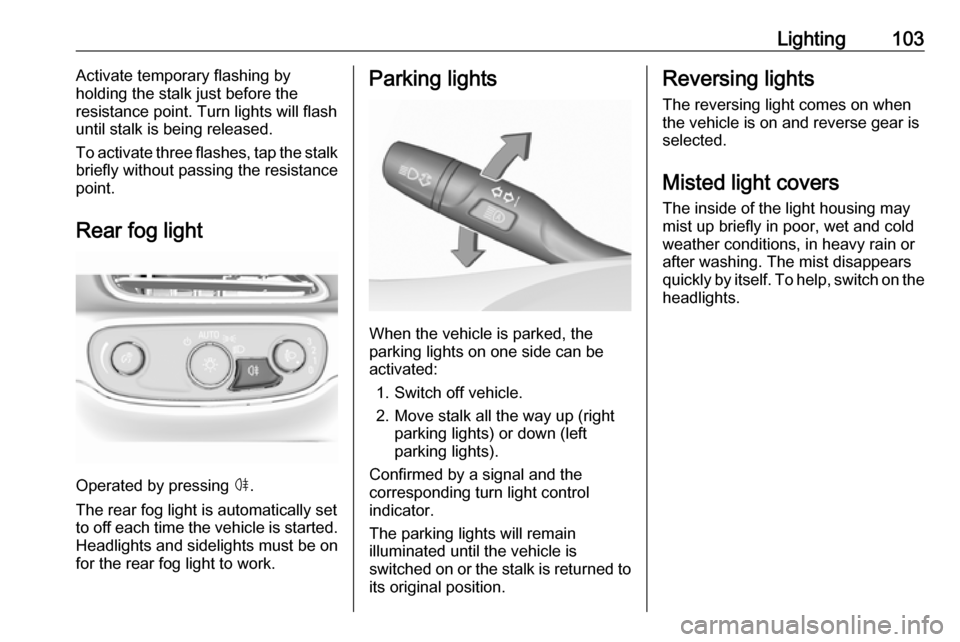
Rear fog light
Operated by pressing ø.
The rear fog light is automatically set
to off each time the vehicle is started.
Headlights and sidelights must be on
for the rear fog light to work.
Parking lights
When the vehicle is parked, the
parking lights on one side can be
activated:
1. Switch off vehicle.
2. Move stalk all the way up (right parking lights) or down (left
parking lights).
Confirmed by a signal and the
corresponding turn light control
indicator.
The parking lights will remain
illuminated until the vehicle is
switched on or the stalk is returned to
its original position.
Reversing lights
The reversing light comes on when
the vehicle is on and reverse gear is
selected.
Misted light covers
The inside of the light housing may
mist up briefly in poor, wet and cold
weather conditions, in heavy rain or after washing. The mist disappears
quickly by itself. To help, switch on the headlights.
Page 113 of 273

Infotainment system111Press and hold X. A low power
message is displayed. Confirm the
message to turn off the display.
To cancel low power mode, press X.
If the high voltage battery level of the vehicle drops below the level set in
the vehicle settings menu, the
Infotainment system suggests to turn
off display and sound.
Note
For a detailed description of how to
set the high voltage battery level
3 85.
A low power message is displayed.
Confirm the message to turn off
display and sound.
To cancel low power mode, press X.
Setting the volume
Turn X. The current setting is shown
on the display.
When the Infotainment system is
switched on, the last selected volume is set, provided that it is lower than themaximum start-up volume. For a
detailed description 3 116.Speed compensated volume
When the speed compensated
volume is activated 3 116, the
volume is adapted automatically to
make up for the road and wind noise
as you drive.
Mute
Press X to mute the Infotainment
system.
To cancel the mute function: press
X again. The last selected volume is
set again.
Full screen clock display From any screen, touch the time
indication field to display a clock in full
screen mode.
Touch u to return to the previous
screen.
Modes of operationPress p and then select 1 in the top
left corner of the screen to display the application overview screen.
Page 123 of 273

Infotainment system121Station searchAutomatic station search
Briefly press or touch t or v on the
control panel or on the screen to play the previous or next station available.
Manual station search
Press and hold t or v on the
control panel. Release when the
required frequency has almost been
reached.
A search is made for the next station that can be received and it is played
automatically.
Note
FM waveband: when the RDS
function is activated, only RDS
stations 3 123 are searched for, and
when the radio traffic service (TP) is activated, only traffic service
stations 3 123 are searched for.
Station tuning
Touch x on the screen. The tuning
display is shown.
Enter the desired frequency.
Use { to delete digits entered.
Select x to delete the whole input. If
necessary, touch d or c to
subsequently adjust the input.
Note
A " ." between the digits is
automatically added by the system
at the right location.
Stations lists
Stations
Select Menu to open the
corresponding waveband-specific
submenu.Select the Browse audio tab and then
select the respective station list, e.g.
FM stations . All receivable stations of
the relevant waveband and in the
current reception area are displayed.
Alternatively, select the waveband
symbol tab, e.g. ~ to directly
display the stations.
Select the desired station.
Categories
Numerous radio stations broadcast a
PTY code, which specifies the type of programme transmitted (e.g. news).
Some stations also change the PTY
code depending on the content which
is currently transmitted.
Page 124 of 273

122Infotainment systemThe Infotainment system stores these
stations, sorted by programme type in
the corresponding category list.
Note
The categories list item is only
available for the FM and the DAB
wavebands.
To search for a programme type
determined by the stations, select
Menu and then select the Browse
audio tab. Select FM categories or
DAB categories .
A list of programme types currently
available is displayed.
Select the desired programme type. A
list of stations is displayed
transmitting a programme of the
selected type.
Select the desired station.
Update station lists
If the stations stored in the waveband-
specific station list are no longer
received, the station lists must be
updated.Select Menu and then select the
Browse audio tab. Depending on the
waveband, select Update FM
stations , Update DAB stations or
Update AM stations .
Note
If a waveband-specific station list is
updated, the corresponding
category list is also updated.
A station search is started and a
corresponding message is displayed. Once the search is finished, the
respective station list is displayed.
Favourites
Favourites of all audio sources can be stored manually in the favourites list.The favourites list contains up to
15 favourites.
Storing a station
Activate the desired waveband and
station.
Activate the < tab to display the
favourites list. Touch and hold the
desired list item for a few seconds.
The currently active frequency or
station is stored to the list item.
Alternatively, select t on the screen
or in a list. The favourite is saved and
the screen button changes to s.
To delete a station, fling the
respective list item to the right. The
favourite is wiped from the favourites
list.
Page 131 of 273

Infotainment system129Returning to the beginning of the
current track
Touch t after a few seconds of the
track playing.
Fast forwarding and rewinding
Touch and hold t or v. Release to
return to normal playback mode.
Playing tracks randomly
Touch n to play the tracks in random
order. The screen button changes to
o .
Touch o again to deactivate the
shuffle function and go back to the
normal playback mode.
Playing tracks repeatedly
Touch } and then select one of the
options in the drop-down menu.
Repeat all : All available files are
played repeatedly.
Repeat song : The song currently
playing is played repeatedly.
Repeat off : The repeat function is
deactivated.Browse audio function
Select Menu to display the respective
audio menu and then select the
Browse audio tab.
Different categories, in which the
songs are sorted, are displayed, e.g.
Playlists , Artists or Albums .
Select the desired category and
subcategory (if available). The
selected files are added to the
playlist.
Select the track to start playback.
To return from the audio menu to the audio main screen, select Now
playing .
Songs list
The songs list contains songs stored
on the active media source.
Depending on prior selections, songs of an album or playlist are displayed.If no selection has been made, all
songs are displayed in alphabetical
order.
Activate the = tab to display the
songs list. Select the desired song.
Favourites
Favourites of all audio sources can be stored manually in the favourites list.
The favourites list contains up to
15 favourites.
Storing a song
Activate the desired media source
and song.
Activate the < tab to display the
favourites list. Touch and hold the
desired list item for a few seconds.
The currently playing song is stored
to the list item.
Alternatively, select t on the screen
or in a list. The favourite is saved and
the screen button changes to s.
Page 134 of 273
132Infotainment systemInterrupting and resuming playback
Touch = to interrupt playback. The
screen button changes to l.
Touch l to resume playback.
Playing the next or previous track
Touch v to play the next movie file.
Touch t within the first seconds of
the movie playing to return to the
previous movie file.
Returning to the beginning of the
current movie
Touch t after a few seconds of the
movie playing.
Fast forwarding and rewinding
Touch and hold t or v. Release to
return to normal playback mode.
Movie menu
Select Menu to display the movie
menu.
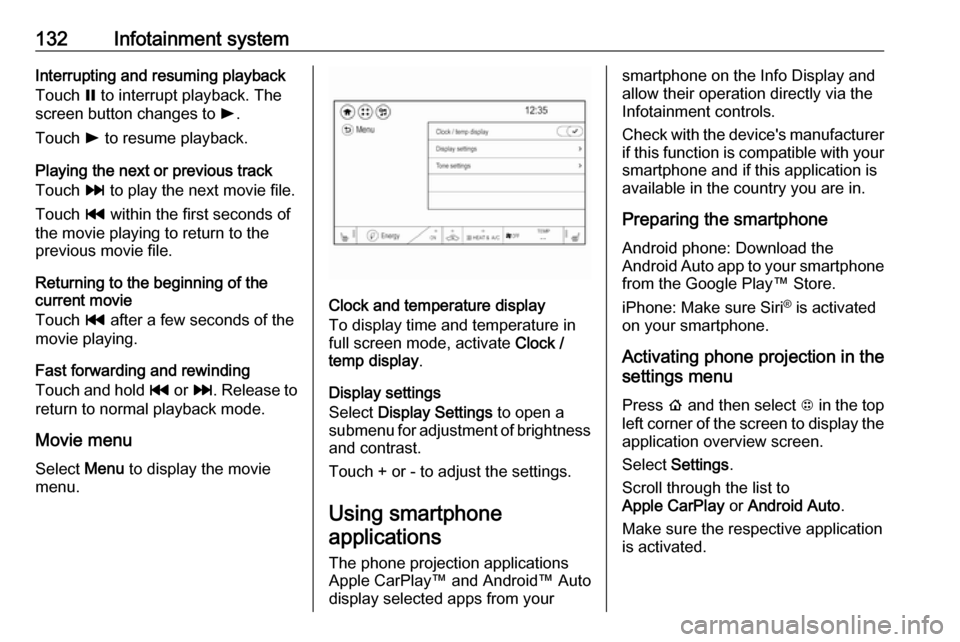
Clock and temperature display
To display time and temperature in
full screen mode, activate Clock /
temp display .
Display settings
Select Display Settings to open a
submenu for adjustment of brightness and contrast.
Touch + or - to adjust the settings.
Using smartphone
applications
The phone projection applications
Apple CarPlay™ and Android™ Auto
display selected apps from your
smartphone on the Info Display and
allow their operation directly via the
Infotainment controls.
Check with the device's manufacturer
if this function is compatible with your
smartphone and if this application is
available in the country you are in.
Preparing the smartphone
Android phone: Download the
Android Auto app to your smartphone from the Google Play™ Store.
iPhone: Make sure Siri ®
is activated
on your smartphone.
Activating phone projection in the
settings menu
Press p and then select 1 in the top
left corner of the screen to display the application overview screen.
Select Settings .
Scroll through the list to
Apple CarPlay or Android Auto .
Make sure the respective application
is activated.
Page 135 of 273

Infotainment system133Connecting the mobile phoneConnect the smartphone to the USB
port 3 126.
When first connecting a device, a
privacy consent message may be
displayed. Confirm the message to
continue the connection procedure.
Starting phone projection Press p and then select 1 in the top
left corner of the screen to display the
application overview screen.
To start the phone projection function, select Projection .
Note
If the application is recognised by
the Infotainment system, the
application icon may change to
Apple CarPlay or Android Auto .
Alternatively, press and hold p.
The phone projection screen
displayed depends on your
smartphone and software version.
Returning to the home screen
Press p.Speech recognition
General information
The voice pass-thru application of the Infotainment system allows access to
the speech recognition commands on your smartphone. See your
smartphone manufacturer's
operating instructions to find out
whether your smartphone supports this feature.
In order to use the voice pass-thru
application, the smartphone must be
connected to the Infotainment system
via USB cable 3 126 or via Bluetooth
3 134.
Usage
Activating speech recognition Press and hold w on the steering
wheel to start a speech recognition
session. A voice command message
is displayed on the screen.As soon as a beep is heard, you can
say a command. For information on
the commands supported, see the
operating instructions for your
smartphone.
Adjusting the volume of voice
prompts
Turn m on the control panel or press
the volume buttons behind the
steering wheel to increase or
decrease the volume of voice
prompts.
Deactivating speech recognition
Press n on the steering wheel. The
voice command message disappears
and the speech recognition session is ended.